Standing desks promised a health revolution. The pitch was simple: stop sitting so much, add years to your life. In 2026, the science is more nuanced — and in some ways more useful — than that marketing ever suggested. Research published in Applied Ergonomics found that workers who alternated between sitting and standing every 30 minutes saw measurable improvements in lower back pain, concentration, and work-related stress. The critical qualifier: alternating. Standing still for eight hours is not better than sitting for eight hours. Movement and position variety are what matter.
If you’re evaluating a standing desk purchase — or trying to make the one you already own actually work — here’s what research supports, what it doesn’t, and how to use it well.
Already decided? Jump to our best electric standing desks or full 2026 standing desk roundup. Budget-focused? See best standing desks under $500.
Essential Gear at a Glance
| Product | Price | Type | Best For | Rating |
|---|---|---|---|---|
| FlexiSpot E6 | $339.99 as of Oct 11, 2026 | Sit-stand desk | Daily alternating use | 8.6/10 |
| Ergodriven Topo | $109.00 as of Oct 11, 2026 | Terrain anti-fatigue mat | Active standing comfort | 9.3/10 |
| ComfiLife Mat | $49.99 as of Oct 11, 2026 | Flat anti-fatigue mat | Budget cushioning | 8.8/10 |
What the Research Actually Shows
Back Pain: The Strongest Evidence
The most consistent finding in standing desk research is back pain reduction. The CDC’s Take-a-Stand Project tracked office workers who reduced sitting time by an average of 66 minutes per day. Result: a 54% reduction in upper back and neck pain.
That’s a compelling number — and it comes from simply sitting less, not from any particular desk configuration. The mechanism is straightforward: sustained sitting compresses intervertebral discs and shortens hip flexors. Any significant break from that loading helps, and standing is one of the simplest ways to introduce it.
Blood Sugar and Metabolic Health
Multiple studies across 2024 and 2025 found that alternating between sitting and standing every 30 minutes reduced post-meal blood glucose spikes by approximately 11% compared to continuous sitting. One 24-week study on office workers found associated improvements in insulin resistance.
When you stand, the large muscles in your legs remain lightly engaged. That low-level muscle activation helps cells absorb glucose more efficiently than when you’re fully sedentary — without any dedicated exercise required.
Mood, Energy, and Focus
A university student population review found modest but consistent benefits: reduced anxiety, improved mood, and higher reported energy levels in those who incorporated regular standing intervals. These effects weren’t dramatic, but they appeared consistently across different study populations.
A Texas A&M call center study found a 23–53% productivity improvement over six months for workers using sit-stand desks — though this was a structured workplace intervention, not simply access to the equipment. How you use the desk matters as much as having one.
The Risks Nobody Mentions in the Marketing
This is the part that brands selling standing desks tend to leave out.
The University of Sydney Finding
In October 2024, University of Sydney researchers published a large cohort study in the International Journal of Epidemiology following more than 83,000 adults. The findings challenged the popular narrative directly:
- Standing did not reduce cardiovascular disease risk compared to sitting
- Extended standing — beyond two hours per day of continuous, static standing — was associated with an 11% higher risk of circulatory disease per additional 30 minutes, including varicose veins and deep vein thrombosis
The lead researcher’s conclusion: “Standing for too long will not offset an otherwise sedentary lifestyle, and could be risky for some people in terms of circulatory health.”
This doesn’t mean standing desks are useless. It means treating them as a passive health fix you set and forget doesn’t work — and can create new problems.
Fatigue Builds Faster Than You’d Expect
Research consistently shows that standing for more than 40 consecutive minutes begins to increase lower back discomfort and leg fatigue. The same reasoning that makes prolonged sitting harmful applies to prolonged static standing — it’s the static part that creates musculoskeletal load, not the posture itself.
The Desk Alone Won’t Change Your Habits
A British Journal of Sports Medicine study found that simply providing sit-stand desks did not significantly reduce sitting time without behavioral support. Many people buy the desk, use it enthusiastically for a week or two, then gradually stop. The health benefits require actually using it — consistently, long-term.
The 20-8-2 Rule: The Evidence-Backed Sweet Spot
The most practical framework aligned with current research is the 20-8-2 rule: for every 30-minute block of the workday, spend approximately:
- 20 minutes seated
- 8 minutes standing
- 2 minutes moving — walking, stretching, getting water
This ratio captures the blood sugar and back pain benefits of alternating postures while staying well below the 40-minute threshold where fatigue and circulatory risks emerge. Over an eight-hour workday, it results in roughly 2–2.5 hours of standing time — right in the evidence-supported range.
The practical challenge is friction. People who intend to switch frequently don’t, because adjusting desk height manually is disruptive. A desk with memory presets eliminates that friction entirely — one button press and the desk moves to your saved height. That’s the main reason the memory keypad is worth prioritizing on any desk purchase.
The Calorie Math: Setting Realistic Expectations
Standing burns roughly 0.15 more calories per minute than sitting. Over a six-hour standing session (excessive by the research), that’s about 54 extra calories.
In a realistic 20-8-2 routine across an eight-hour workday, total standing time is 2–2.5 hours, translating to roughly 18–23 extra calories burned.
Standing desks are not a weight management strategy. They’re a tool for breaking up continuous sedentary time — and on that measure, and that measure specifically, the research is consistently positive.
How to Get the Most Out of Your Standing Desk
Anti-Fatigue Mat: Not Optional

Standing on a hard floor accelerates fatigue significantly compared to cushioned support. This is the most common reason people stop using their standing desk within a month — it’s genuinely uncomfortable without the right mat.
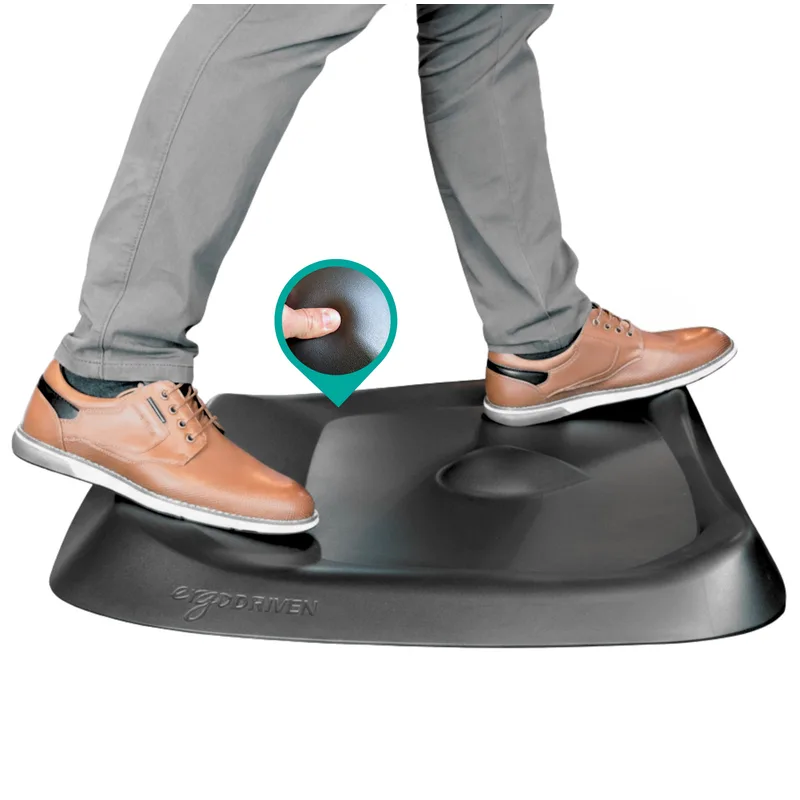
Terrain mats like the Ergodriven Topo go further by encouraging micro-movements: the contoured surface keeps your feet and ankles subtly shifting instead of locking in one position. This addresses both fatigue and the circulatory concern from static loading.
If $79 is more than you want to spend right now, the ComfiLife mat at $49 provides meaningful cushioning over bare floor. It won’t encourage movement, but it’s a real step up in standing comfort.
See all ranked options in our complete anti-fatigue mat guide and best standing desk mats roundup.
Match Monitor Height to Your Standing Position
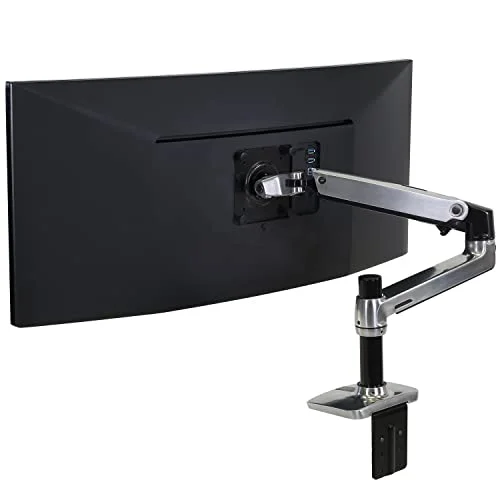
Most people configure their monitor for seated use, then stand to face a screen they have to look slightly down at. For correct standing ergonomics, the monitor should be at eye level — typically 3–6 inches higher than your seated position. A height-adjustable monitor arm that moves independently of the desk surface is the cleanest fix. See our best monitor arms for standing desks guide.
Build Up Gradually
Don’t go from sitting eight hours a day to standing for four in week one. Start with two 8-minute standing periods on day one. Add 10 minutes of total daily standing each week. Most people reach a comfortable 20-8-2 rhythm by week four or five. Rushing adaptation is the main reason new standing desk users develop lower back pain and give up.
For a complete ergonomic setup walkthrough covering desk height, monitor angle, keyboard placement, and chair height, see our complete standing desk setup guide.
Add Movement Options
A balance board adds core engagement to standing time — constant micro-balance adjustments that keep circulation moving. Our balance boards for standing desks guide covers the best options at every price point.
1. FlexiSpot E6 Electric Standing Desk — Editor’s Pick
FlexiSpot E6 Electric Standing Desk
Pros
- ✓ Memory keypad with 4 height presets makes switching effortless
- ✓ Dual-motor, 3-stage frame with the desktop included
- ✓ 23.6" to 48.8" listed height range
Cons
- ✗ 220 lb listed capacity — add up a heavy multi-monitor setup before buying
- ✗ One desktop size and finish on this listing
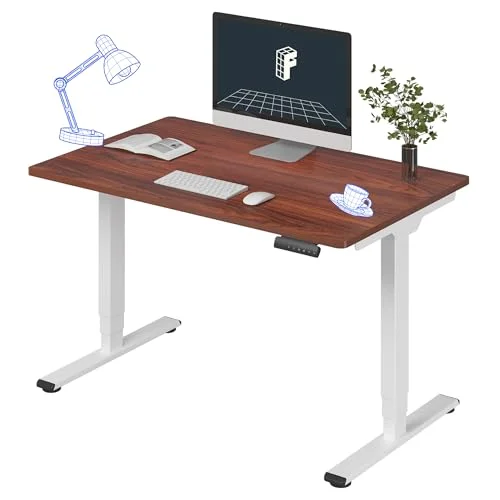
The FlexiSpot E6 is the standing desk I’d recommend to anyone committed to making the sit-stand habit actually stick. The four-preset memory keypad eliminates the primary friction point: having to manually adjust height every time you want to switch. You press one button and the desk moves to your saved standing height.
It is a dual-motor, 3-stage frame with the 48” x 30” desktop included, listed at 220 lbs of capacity and a 23.6” to 48.8” height range — enough for a monitor, a docking station and accessories; add up a heavier dual-monitor setup before buying.
It’s a real investment, but the research-backed 20-8-2 routine only works if switching is frictionless, and the presets make it frictionless.
Compare more options in our best electric standing desks for home roundup.
2. Ergodriven Topo Comfort Mat — Best Anti-Fatigue Mat
Ergodriven Topo Comfort Mat
Pros
- ✓ Terrain design encourages micro-movements that reduce static fatigue
- ✓ Waterproof polyurethane surface wipes clean in seconds
- ✓ 7-year warranty — backs up the durability claims
- ✓ NYT Wirecutter top pick across multiple consecutive reviews
Cons
- ✗ Priciest mat in this comparison at $79
- ✗ Terrain contours take a few sessions to feel natural underfoot
- ✗ One size only — no compact version for tight spaces
The Ergodriven Topo is the mat most committed standing desk users end up with. The terrain design is the differentiator: instead of a flat cushioned surface, the contoured ridges and slopes keep your feet naturally shifting throughout every standing session. This movement reduces the static load that builds fatigue and, over long sessions, the circulatory pressure the University of Sydney study flagged.
The 7-year warranty is unusual in this category and reflects genuine material quality — 100% polyurethane foam that holds its density where cheaper foam compresses within months. The waterproof surface survives spills and cleans in seconds.
It takes a few sessions to feel natural if you’re used to flat mats. After the adjustment period, most users don’t want to go back.
3. ComfiLife Anti-Fatigue Floor Mat — Best Value
ComfiLife Anti-Fatigue Floor Mat
Pros
- ✓ Excellent cushioning for the price — clearly better than bare floor
- ✓ 13 color options to match any home or office setup
- ✓ Stain-resistant surface wipes clean easily
- ✓ Three sizes available including a long 70-inch runner
Cons
- ✗ Standard 20x32 is narrow — wider stances need the runner size
- ✗ Flat surface doesn't encourage movement like terrain mats
- ✗ Memory foam compresses over time with daily heavy use
At $49, the ComfiLife delivers the core benefit — cushioning — without terrain features. Memory foam at 0.75 inches thick noticeably reduces fatigue compared to hard floor. The lifetime replacement guarantee is unusually strong for this price tier.
It’s a solid starting point if you’re new to standing desks and not ready to commit more to a mat. If you’re standing 90+ minutes per day long-term, the Topo’s terrain benefits become meaningful and worth the upgrade.
FAQ
Do standing desks actually improve your health?
Yes, conditionally. The strongest evidence supports back pain reduction and improved blood sugar regulation when you alternate between sitting and standing regularly. Evidence for cardiovascular benefits from standing itself is weak — movement and frequent position changes matter far more than the total hours spent standing.
How long should you stand at a standing desk each day?
The research supports 1.5–3 hours of total standing distributed in short intervals throughout the day, not all at once. The 20-8-2 rule (20 minutes sitting, 8 standing, 2 moving per 30-minute block) is the most evidence-aligned practical framework. Continuous standing beyond 40 minutes increases fatigue and lower back discomfort.
Will a standing desk help me lose weight?
Not meaningfully. Standing burns approximately 0.15 more calories per minute than sitting — roughly 18–23 extra calories in a realistic workday of use. Standing desks are not a weight loss tool.
Are standing desks worth the investment?
For most people sitting eight or more hours per day, yes. The back pain and blood sugar benefits are well-supported, and the habit of breaking up sedentary time has compounding returns over years. Budget options can deliver the same behavioral benefits as premium models — see our standing desks under $500 roundup for well-priced alternatives.
Can standing too much at a standing desk cause health problems?
Yes. The University of Sydney’s 2024 cohort study found that static standing beyond two hours per day was associated with elevated circulatory disease risk, including varicose veins and deep vein thrombosis. Standing more than 40 continuous minutes also increases lower back discomfort. The mitigations are frequent alternating and an anti-fatigue mat.
Do I need an anti-fatigue mat?
Strongly recommended. Standing on a hard floor significantly accelerates fatigue and is one of the primary reasons people give up on standing desks within weeks. A mat extends comfortable standing time and reduces joint strain — the Ergodriven Topo for terrain-based comfort, the ComfiLife for budget cushioning.
The Bottom Line
Standing desks work — just not in the passive, set-it-and-forget-it way the marketing suggests. The benefits are real for back pain and blood sugar regulation, but they require actually alternating between positions, not converting to a standing-only workday. The University of Sydney research is a useful counterweight: prolonged static standing carries its own risks.
The 20-8-2 rule is the most evidence-aligned approach: 20 minutes sitting, 8 standing, 2 moving, repeated throughout the day. Consistency is the challenge. That’s why the desk and mat choices matter — they either make the daily habit frictionless or create enough friction that you stop.
Best desk: FlexiSpot E6 — memory presets remove the friction barrier to consistent switching. Best mat: Ergodriven Topo for terrain-based comfort, ComfiLife for budget cushioning.
For a complete ergonomic workspace setup from scratch, start with our complete standing desk setup guide.