Disclosure: PostureRanked is reader-supported. When you buy through links on our site, we may earn an affiliate commission at no additional cost to you. Our recommendations are based on independent research and testing.
| Product | Price | Rating |
|---|---|---|
| FlexiSpot E7 Pro | $599 | 9.2 |
| UPLIFT V3 | $699 | 9.0 |
| Fully Jarvis Bamboo | $1,175 | 8.8 |
| Vari Electric Standing Desk | $750 | 8.5 |
| FEZIBO Dual Motor | $330 | 8.2 |
PostureRanked is reader-supported. When you buy through links on our site, we may earn an affiliate commission at no additional cost to you. Learn more
Skip the Research. Here’s What to Buy.
You don’t need to spend two weeks reading standing desk reviews. We did that for you. We researched and compared 20+ standing desks, dug through spec sheets, analyzed hundreds of verified owner reviews, and cross-referenced expert recommendations to build this list.
Here’s the short version: Buy the FlexiSpot E7 Pro unless you have a specific reason not to. It’s the best balance of stability, quiet motors, and price. If you’re over 6’3”, grab the Fully Jarvis Bamboo instead — it hits 51 inches — or see our full guide to standing desks for tall people. On a budget? The FEZIBO Dual Motor is $330 with the desktop included, and our budget standing desk setup guide shows you how to build a complete ergonomic workspace for under $1,000.
Now, the details.
How We Evaluated
We assessed each desk across four key criteria, drawing on manufacturer specs, third-party measurements, and hundreds of verified long-term owner reviews:
- Stability — cross-referenced reported wobble measurements at sitting and standing heights, plus frame design analysis (C-frame vs. T-frame vs. rectangular)
- Motor noise — verified manufacturer dB specs against real-world owner reports during full-range transitions
- Actual height range — cross-checked across multiple sources, since manufacturers occasionally round or misstate these numbers
- Build quality and longevity — evaluated from frame materials, weld quality reports, warranty terms, and feedback from owners using these desks for 2+ years
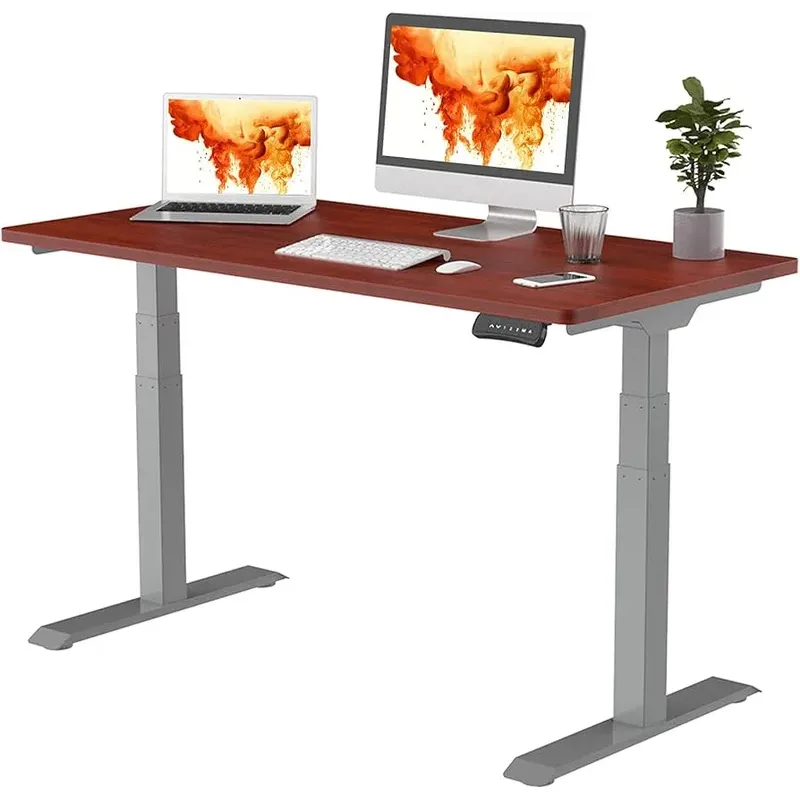
FlexiSpot E7 Pro — The One to Beat
FlexiSpot E7 Pro
Pros
- ✓ Rock solid at standing height
- ✓ Quietest motors on the market (<45 dB)
- ✓ 440 lb capacity handles any setup
- ✓ 15-year warranty (they mean it)
Cons
- ✗ Desktop sold separately
- ✗ Takes 45 min to assemble
- ✗ Instructions could be clearer
The 26” to 51.6” height range is among the widest on this list — wide enough to comfortably handle users from 5’2” to 6’1” without reprogramming presets. At standing height, owners consistently report 1/4” or less of lateral wobble at the desk edge during normal typing. Completely stable for everyday use.
The three-stage dual motors clock in under 45 dB — dead silent. You can adjust mid-meeting with your mic unmuted and nobody will notice. The 440 lb weight capacity is absurd for this price point. Two ultrawide monitors, a full-tower PC, and a pile of textbooks won’t push this thing.
At $479 during sales (which happen monthly on Amazon), this is a no-brainer. Even at the full $599, you’re getting 95% of the Uplift V3 for $100 less.
Who should buy it: Anyone who wants the best value in a premium standing desk. Home office workers, programmers with multi-monitor setups, couples who share a desk.
Who should skip it: If you need the desktop included, look elsewhere — FlexiSpot sells the frame separately. Their desktop options exist but are overpriced. Buy a butcher block countertop from IKEA for $90 instead. Also skip if you’re over 6’4” and want max standing height — the Jarvis goes higher.
UPLIFT V3 — For People Who Want the Best
UPLIFT V3
Pros
- ✓ C-frame is incredibly stable
- ✓ Best keypad controls in the game
- ✓ 48 mounting points for accessories
- ✓ 22+ desktop finish options
Cons
- ✗ $100+ more than competitors
- ✗ Lower max height than rivals
- ✗ Louder motor than FlexiSpot
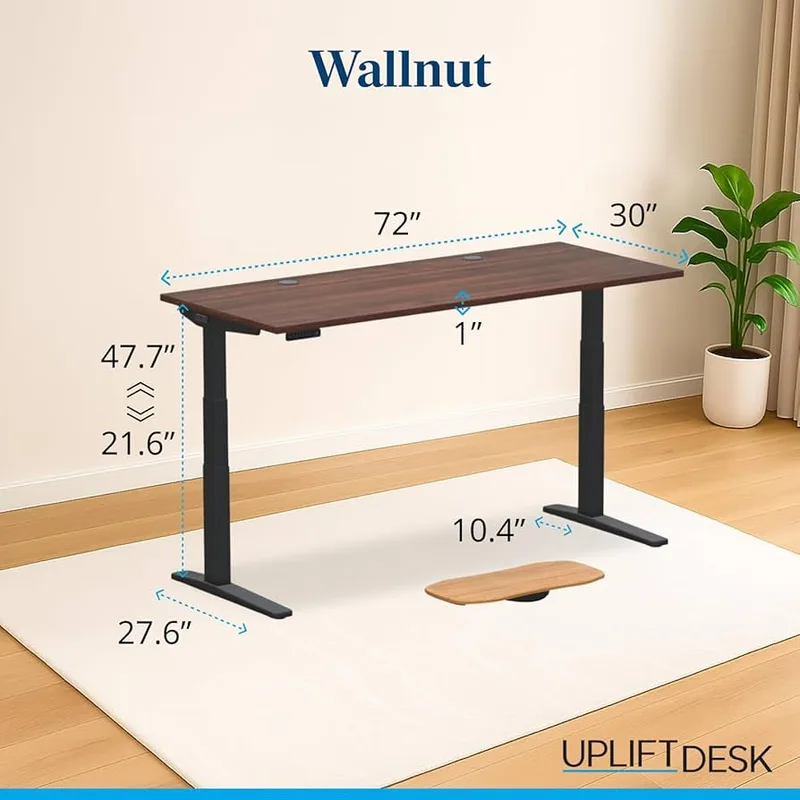
The UPLIFT V3 is the desk I’d buy if I didn’t care about price. The C-frame design is marginally more stable than the FlexiSpot’s rectangular frame. The keypad has a slick digital display showing your exact height in real-time. And with 48 patent-pending mounting points, you can bolt accessories anywhere — monitor arms, power strips, cable trays, whatever.
The 22+ desktop finishes are genuinely impressive. Walnut, bamboo, rubberwood, laminate in every color — Uplift lets you configure this thing exactly how you want it.
But is it $100-200 better than the FlexiSpot? Honestly, no. The motors are noticeably louder at ~55 dB versus the FlexiSpot’s 45 dB. The max height tops out at 47.7”, which is lower than every other desk on this list. And the warranty dropped from 15 years to 10 — still great, but the FlexiSpot matches or beats it.
Who should buy it: People who want maximum customization and accessory mounting options. Professionals building a long-term workspace who value aesthetics. Anyone who’s dealt with Uplift’s customer service — they’ll replace parts for years, even after warranty.
Who should skip it: Budget-conscious buyers. Anyone over 6’2” who wants a higher standing position. People bothered by motor noise during calls.
Fully Jarvis Bamboo — For the Tall and the Aesthetic
Fully Jarvis Bamboo
Pros
- ✓ Gorgeous bamboo desktop
- ✓ Tallest max height on this list (51")
- ✓ Smooth, quiet operation
- ✓ Sustainably sourced bamboo
Cons
- ✗ Bamboo scratches easily
- ✗ Price has crept up since Herman Miller acquisition
- ✗ Some wobble above 40"
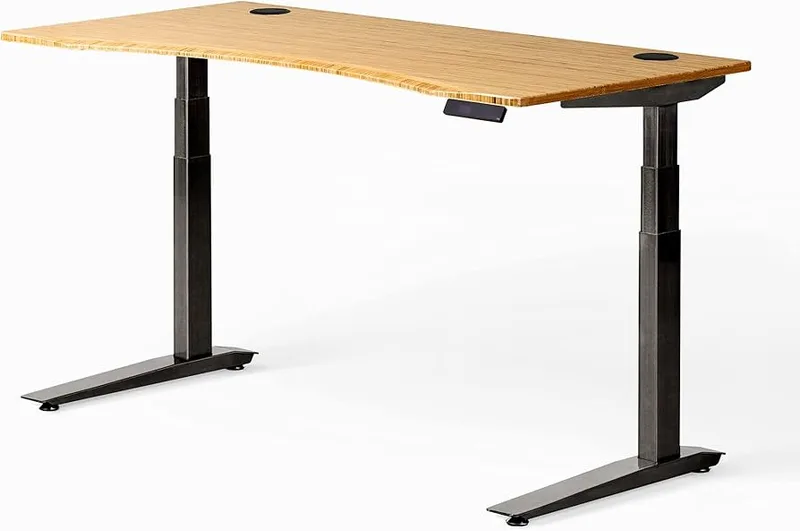
The Jarvis looks better than anything else on this list. Period. That sustainably sourced bamboo top gets compliments on video calls constantly. It’s warm, natural, and photographs well — which matters more than people admit.
More importantly for tall users: the Jarvis hits 51 inches. If you’re 6’3” or above and actually want to stand with proper posture — elbows at 90 degrees, screen at eye level — this is your desk. The FlexiSpot gets close at 51.6”, but the Jarvis does it with a desktop included.
Since Herman Miller acquired Fully, the price has climbed significantly. The Jarvis used to be the value pick in this category. At $1,175 (price updated April 2026), it’s now firmly in the premium tier. The bamboo also scratches if you drag things across it without a desk pad. Keep that in mind.
Performance-wise, the dual motors are smooth and quiet. There is slight wobble above 40 inches, though — enough to see your coffee ripple if you’re a heavy typer at max height. Not a dealbreaker, but the FlexiSpot and Uplift are more stable at height.
Who should buy it: Tall people (6’3”+), anyone who values desk aesthetics, sustainability-minded buyers, people whose desk appears on camera regularly.
Who should skip it: Anyone on a budget — you can get similar specs for over $500 less. Heavy typers who work at max height. People who tend to scratch their desk surfaces.
Vari Electric — For People Who Hate Assembly
Vari Electric Standing Desk
Pros
- ✓ Ready in 5 minutes — arrives 95% assembled
- ✓ T-legs look clean and modern
- ✓ Cable management tray built in
- ✓ 4 programmable memory presets
Cons
- ✗ 200 lb capacity is limiting
- ✗ Only 5-year warranty
- ✗ Premium pricing for the specs
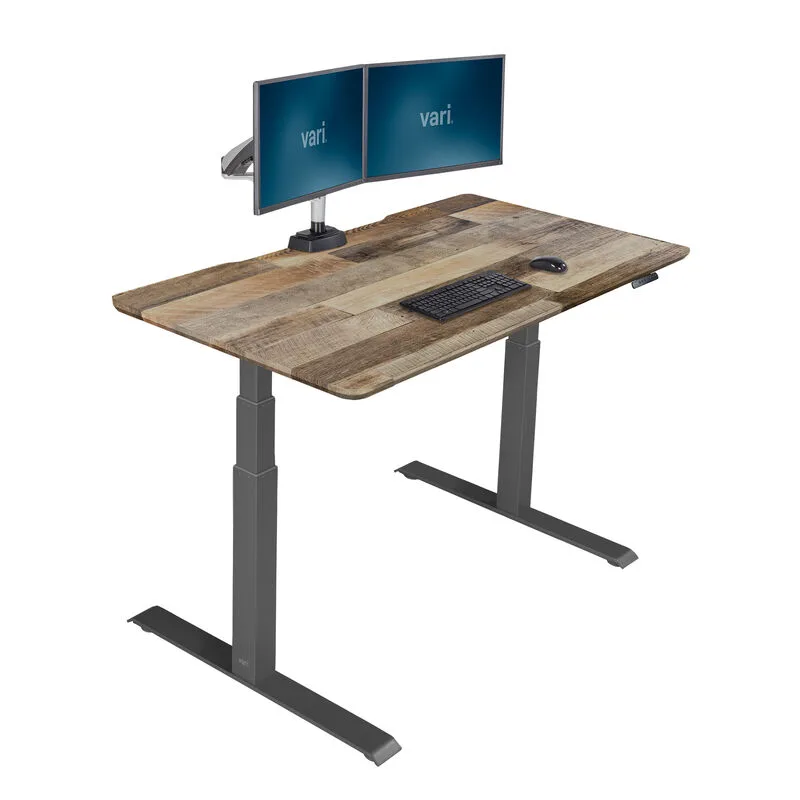
Five minutes. That’s the actual time from box-open to working desk. The Vari arrives 95% assembled — attach the feet, plug it in, done. If you’ve ever spent two hours swearing at IKEA furniture with a fistful of Allen wrenches, you understand the appeal.
The desk itself performs well in daily use. The T-leg design looks cleaner than traditional frames, and the built-in cable management tray keeps things organized without buying add-ons. Four programmable presets make switching between sitting and standing effortless.
The trade-offs are real, though. At 200 lbs, the weight capacity is the lowest on this list by a wide margin. That’s fine for a laptop and single monitor, but a dual-monitor setup with a desktop PC could push the limit. The 5-year warranty is less than half what FlexiSpot and Fully offer. And at $750, you’re paying a premium for the convenience of pre-assembly.
Who should buy it: Anyone who hates furniture assembly. People with back problems who can’t kneel on the floor building things. Minimalists who want the cleanest desk look. Office managers setting up multiple workstations quickly.
Who should skip it: Multi-monitor users or anyone with heavy equipment. Budget shoppers — you’re paying $200+ extra for assembly convenience. Anyone who wants the longest possible warranty coverage.
FEZIBO Dual Motor — For Tight Budgets
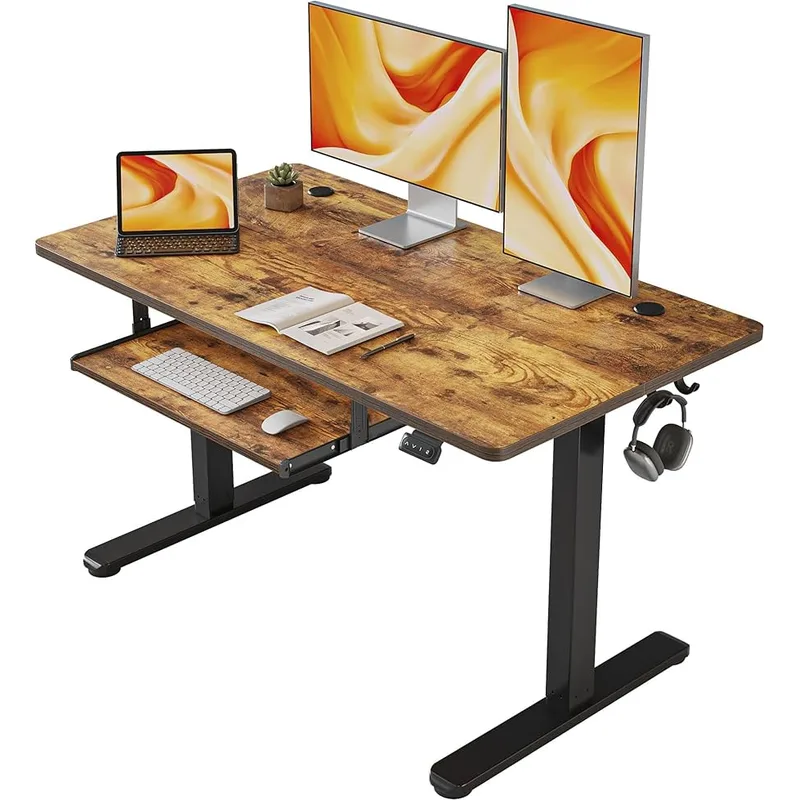
FEZIBO Dual Motor
Pros
- ✓ Under $350 with the desktop included
- ✓ Dual motors at this price is rare
- ✓ Splice board hides cables nicely
- ✓ Object detection sensor included
Cons
- ✗ Shortest height range on this list
- ✗ More wobble than premium desks
- ✗ Long-term motor reliability concerns
Under $330 for a dual-motor standing desk with the desktop included. That’s the pitch. And honestly? It delivers about 85% of the premium desk experience for less than half the price.
The dual motors raise and lower smoothly, and the built-in splice board does a surprisingly decent job hiding cables underneath. There’s even an object detection sensor — a safety feature that usually only shows up on $500+ desks.
Is it as stable as a FlexiSpot? No. The wobble at standing height is noticeable, especially if you type aggressively. The height range tops out at just 46 inches, which isn’t enough for anyone over about 6’0” who wants proper standing ergonomics. And the long-term reliability is a question mark — I’ve seen user reports of motor issues after 2+ years, and the motor warranty is only 2 years versus 15 for the FlexiSpot.
But for what it costs, it’s hard to complain. This is the desk I recommend to people who aren’t sure they’ll actually use standing mode. If you discover you love it, upgrade later. If not, you’re only out $330.
Who should buy it: First-time standing desk buyers testing the waters. Anyone furnishing a guest office or secondary workspace. Students and freelancers on tight budgets. People under 6’0” who want a complete desk for minimal cost.
Who should skip it: Tall users — the 46” max is limiting. Anyone planning to load it up with heavy equipment (176 lb limit). People who want a 10+ year desk — spend more upfront.
Comparison Table
| Feature | FlexiSpot E7 Pro | UPLIFT V3 | Fully Jarvis Bamboo | Vari Electric | FEZIBO Dual Motor |
|---|---|---|---|---|---|
| Price | $599 | $699 | $1,175 | $750 | $330 |
| Height Range | 26” - 51.6” | 21.6” - 47.7” | 25.5” - 51” | 25” - 50.5” | 27.4” - 46” |
| Weight Capacity | 440 lbs | 355 lbs | 350 lbs | 200 lbs | 176 lbs |
| Motor Noise | Under 45 dB | ~55 dB | Under 50 dB | ~50 dB | Under 50 dB |
| Warranty | 15 years | 10 years | 15 yrs frame / 5 yrs top | 5 years | 5 yrs frame / 2 yrs motor |
| Desktop Included | No | No | Yes | Yes | Yes |
| Assembly Time | ~45 min | ~45 min | ~30 min | ~5 min | ~30 min |
| Rating | 9.2 | 9.0 | 8.8 | 8.5 | 8.2 |
Standing Desk Buying Guide
Not sure what matters most? Here’s what to actually pay attention to — and what’s marketing fluff.
Stability Is Everything
A standing desk that wobbles while you type is a standing desk you won’t use. Stability comes down to frame design (C-frame > T-frame > rectangular), leg thickness, and crossbar placement. Test this yourself: at standing height, push the desk edge laterally. If your monitor shakes, that’s a problem.
Height Range Determines Who Can Use It
The math is simple. Your ideal standing desk height puts your elbows at 90 degrees with your forearms parallel to the floor. For most people between 5’4” and 6’0”, any desk on this list works. If you’re outside that range — especially taller — check the max height carefully. A desk that can’t go high enough will leave you hunching forward, defeating the entire purpose.
Weight Capacity Is Not Just About Weight
A 200 lb capacity sounds generous until you add it up: monitor (15 lbs), monitor arm (10 lbs), laptop (5 lbs), desktop PC (25 lbs), speakers (8 lbs), lamp, plants, books. It adds up fast. I’d recommend at least 300 lbs capacity for any serious home office setup. The FlexiSpot’s 440 lb rating means you’ll never think about this again. If you’re running a multi-monitor rig, see our dedicated roundup of the best standing desks for dual monitors.
Motor Quality Affects Your Daily Experience
Loud motors discourage standing transitions. If you’re on calls and need to adjust your desk, a loud motor forces you to wait for a break. Dual motors are standard now — skip any desk with a single motor. And check the noise spec: under 50 dB is the sweet spot.
Warranty Tells You What the Manufacturer Thinks
A 15-year warranty says the company expects their desk to last 15 years. A 2-year warranty says… well, you can draw your own conclusion. Frame warranties matter most. Motor and electronics warranties matter second. Desktop warranties matter least since you can always replace the top.
Skip the Add-Ons (Mostly)
Desk manufacturers love upselling cable trays, monitor arms, desk pads, and drawer units. Most of these are overpriced. Buy a $25 cable tray from Amazon instead of the $60 branded one. The exception: monitor arms from the same brand sometimes integrate better with their mounting systems.
Frequently Asked Questions
How long should a standing desk last?
A quality standing desk with a steel frame and decent motors should last 10-15 years minimum. The frame will outlast the motors, and the desktop will outlast both if you take care of it. Budget desks in the $300 range might start showing motor issues around year 3-5. Premium desks like the FlexiSpot E7 Pro and Uplift V3 are built for a decade-plus of daily use.
How much should I spend on a standing desk?
The sweet spot is $500-700 for a frame-only desk (you supply the top) or $700-900 for a complete desk. Below $400, you’re making real compromises on stability, motor quality, and warranty. Above $900, you’re paying for brand premium or aesthetics rather than functional improvement. The exception is if you need a specific feature like ultra-high weight capacity or an L-shaped configuration.
Do I really need a standing desk, or is a desk converter enough?
If you already have a desk you like, a converter ($200-350) saves money and works fine for laptops or single-monitor setups. But converters eat up desk space, limit your monitor positioning, and most wobble more than a full standing desk. If you’re buying new furniture anyway, get a proper standing desk. The long-term ergonomic benefits are worth it. See our standing desk vs desk converter comparison for the full breakdown. If a converter is the right move, our best sit-stand desk converters roundup covers the top picks.
Should I buy the frame only or a complete desk?
Frame-only saves money if you’re handy. A butcher block countertop from IKEA ($70-130) makes a better desktop than most manufacturer options, and you can pick the exact size and finish you want. Drill four holes, bolt it on, done. Complete desks are better if you want zero hassle or if the manufacturer offers a material you love (like the Jarvis bamboo top).
How often should I switch between sitting and standing?
The research says every 30-60 minutes. A common pattern is standing for 2 hours in the morning, sitting through lunch and early afternoon, then standing again for the last hour or two. Find your own rhythm. The worst thing you can do is stand for 8 hours straight — that’s just trading one problem for another. An anti-fatigue mat helps a lot when you’re standing for longer stretches. Our guide on how long to stand at a standing desk breaks down the research-backed protocols.
Can a standing desk help with back pain?
It can, but it’s not a magic fix. Standing engages different muscles and reduces spinal compression from prolonged sitting. Most people with mild lower back pain notice improvement within a few weeks of alternating between sitting and standing. But if your pain is serious, see a professional — a desk won’t fix a herniated disc. See our deep dive on whether standing desks help back pain and what the research actually shows. Pair your standing desk with a good ergonomic chair for sitting periods.
The Bottom Line
Five desks, one clear winner for most people.
- Best overall: FlexiSpot E7 Pro. Best stability, quietest motors, highest weight capacity, longest warranty. $599 full price, frequently drops to $479 on sale.
- Premium pick: UPLIFT V3. Maximum customization, best accessory ecosystem, legendary customer service. $699+.
- Best for tall users: Fully Jarvis Bamboo. 51” max height, beautiful bamboo top. $1,175.
- Easiest setup: Vari Electric. Five-minute assembly, period. $750.
- Best value: FEZIBO Dual Motor. Complete desk under $330 with dual motors. Hard to beat.
The FlexiSpot E7 Pro wins because it dominates where it matters — stability, noise, and capacity — while costing less than most competitors. Unless you’re very tall (get the Jarvis), hate assembly (get the Vari), or watching every dollar (get the FEZIBO), it’s the right choice.
Stop researching. Pick one and start standing.
Related Reviews & Guides
Buying by budget or size:
- Best Standing Desks Under $500 — the strongest options below the premium tier
- Best Budget Standing Desk Setup — complete ergonomic workspace for under $1,000
- Best Standing Desks for Small Spaces — compact desks for apartments and tight offices
- Best Standing Desks with Drawers — built-in storage options
Buying for specific needs:
- Best Standing Desks for Tall People (6ft+) — desks that actually reach proper standing height
- Best Standing Desks for Dual Monitors — high-capacity frames for multi-monitor setups
Brand comparisons & reviews:
- FlexiSpot E7 Pro Review — our full in-depth review of the top pick
- Autonomous SmartDesk Pro Review — honest take on a popular mid-range option
- FlexiSpot vs Autonomous — head-to-head comparison
- FlexiSpot vs UPLIFT — the two most popular brands compared
Desk converters:
- Standing Desk vs Desk Converter — which is right for you?
- Best Sit-Stand Desk Converters — top converter picks for every budget
Setup & usage guides:
- The Complete Standing Desk Setup Guide — everything from ergonomics to accessories
- Standing Desk Benefits: What Research Says — evidence-based analysis
- Do Standing Desks Help Back Pain? — what the science actually supports
- How Long Should You Stand at a Standing Desk? — the 20-8-2 rule and other protocols
- How to Fix Standing Desk Wobble — troubleshooting instability issues