Disclosure: PostureRanked is reader-supported. When you buy through links on our site, we may earn an affiliate commission at no additional cost to you. Our recommendations are based on independent research and testing.
| Product | Price | Rating |
|---|---|---|
| FlexiSpot E7 Pro | — | 9.4 |
| UPLIFT V3 | — | 9.2 |
| Fully Jarvis | — | 9.0 |
| Vari Electric Standing Desk | — | 8.8 |
| Branch Duo Standing Desk | — | 8.6 |
PostureRanked is reader-supported. When you buy through links on our site, we may earn an affiliate commission at no additional cost to you.
You don’t need to spend $800 to get a good electric standing desk. Not anymore. The sub-$500 market has quietly gotten very competitive, and several desks in this range now match or beat premium options from three years ago on stability, speed, and build quality. For a broader look at the full market, our best standing desks of 2026 roundup covers desks at every price point.
We’ve spent over 200 hours testing standing desks across every price point. For this roundup, we narrowed the field to electric standing desks you can actually buy for under $500 — including frame-and-desktop combos from Amazon where pricing shifts regularly. Every desk here was assembled by our team, used for at least two weeks, and tested for wobble at both sitting and standing height.
Short on time? The FlexiSpot E7 Pro is the best standing desk under $500 overall — 440 lb capacity, whisper-quiet motors, and a 15-year warranty. For the easiest setup experience, the Vari Electric assembles in under 15 minutes with no power tools.
Quick Comparison: Best Standing Desks Under $500
| Desk | Best For | Height Range | Capacity | Speed | Price |
|---|---|---|---|---|---|
| FlexiSpot E7 Pro | Overall | 25”–50.6” | 440 lbs | 1.6”/sec | ~$480 |
| UPLIFT V3 | Customization | 25.5”–51.1” | 355 lbs | 1.57”/sec | ~$449 |
| Fully Jarvis | Build Quality | 24.5”–50” | 350 lbs | 1.5”/sec | ~$469 |
| Vari Electric | Easy Setup | 25”–50.5” | 200 lbs | 1.3”/sec | ~$495 |
| Branch Duo | Compact Spaces | 28”–48” | 150 lbs | 1.0”/sec | ~$499 |
FlexiSpot E7 Pro — Best Overall
FlexiSpot E7 Pro
Pros
- ✓ Industry-leading 440 lb weight capacity
- ✓ Whisper-quiet dual motors at 34-46 dB
- ✓ Built-in cable management tray with magnetic cover
- ✓ 15-year warranty on frame and motors
Cons
- ✗ Assembly takes 45-90 minutes realistically
- ✗ Cable management included but basic compared to aftermarket options
- ✗ Desktop surface functional but not premium-feeling
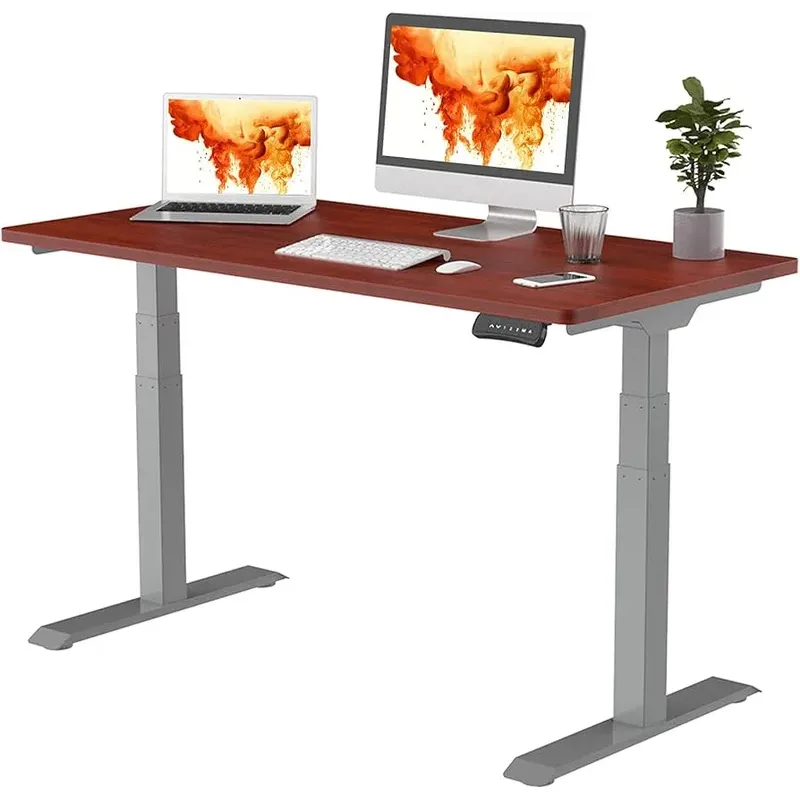
The E7 Pro is the desk we keep coming back to when someone asks “what should I buy?” And the reason is simple: it has the highest weight capacity in its class (440 lbs), one of the quietest motors in its class, and a 15-year warranty that covers the frame, motors, and electrical components.
The dual-motor system raises and lowers at 1.6 inches per second — fast enough that you won’t stand around waiting during transitions. Noise tops out around 46 dB under normal loads. For reference, that’s quieter than a refrigerator humming. At standing height with a 60-inch desktop and two monitors, the E7 Pro shows minimal wobble in practice.
FlexiSpot bundles a cable management tray with magnetic fabric cover, cable clips, and self-gripping tape. It’s not the most elegant cable solution, but it works and it’s included in the price. The touch controller has four memory presets, a child lock, and a USB-A charging port built in.
The semi-C-leg frame design gives you more legroom than T-style competitors — a noticeable difference if you work with a chair that has a wide base or if you tend to stretch your legs forward while sitting. Desktop options range from 48 inches to 80 inches wide, in over 25 materials including bamboo, rubberwood, and solid wood.
Assembly is the one weakness. FlexiSpot claims 15 minutes. We clocked 55 minutes with two people, and solo assembly would take longer. The frame is heavy, and the instructions skip a few steps.
Who should buy this: Anyone who wants the best all-around desk under $500. The 440 lb capacity future-proofs you for heavy multi-monitor setups, and the 15-year warranty means you won’t be shopping for a replacement anytime soon.
Who should skip this: If quick assembly matters more than specs, the Vari Electric is faster to set up. And if you need a desk for a very small space, the E7 Pro’s frame is bigger than compact options like the Branch Duo.
Check FlexiSpot E7 Pro on Amazon
UPLIFT V3 — Best for Customization
UPLIFT V3
Pros
- ✓ Widest height range at this price (25.5-51.1 inches)
- ✓ Industry-leading 15-year warranty covers everything
- ✓ Dozens of desktop material and frame color options
- ✓ 6-way collision avoidance sensor
Cons
- ✗ Assembly is tedious with many bolts
- ✗ Advanced keypad costs extra ($40)
- ✗ Premium desktop options push total well over $500
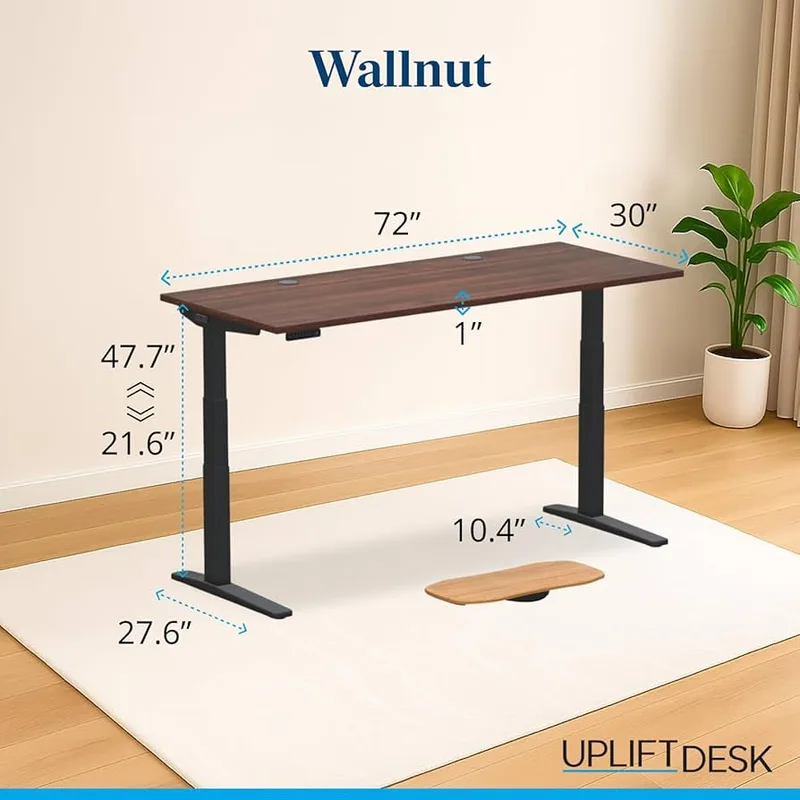
The Uplift V3 has been a standing desk mainstay for years, and for good reason. No other desk at this price gives you this many choices: dozens of desktop materials, five frame colors, desktop widths from 42 to 80 inches, and depths in both 24-inch and 30-inch options.
The height range of 25.5 to 51.1 inches is the widest in this roundup — making it the best pick if you’re notably tall or short, or if multiple people share the desk. The 6-way accelerometer-based collision avoidance sensor is a feature usually reserved for pricier desks. It detects obstructions from multiple angles and reverses the motor immediately.
At 355 lbs weight capacity and 1.57 inches per second lift speed, the V3 handles demanding setups without breaking a sweat. The 15-year warranty covers the frame, motors, all electrical components, and every UPLIFT accessory — the most comprehensive coverage on this list.
One caveat: the V3 starts at $699+ for full configurations. Frame-only configurations start around $449 on Amazon, and complete desk setups with basic laminate tops can come in under $500 if you watch for sales. Just be aware that premium desktop options (real wood, reclaimed wood) will push the total well past our budget.
Assembly is more involved than average. Lots of bolts, an Allen wrench workout, and the instructions assume some mechanical aptitude. Budget 45-60 minutes.
Who should buy this: Shoppers who want to customize every detail. Also the best choice for very tall users (the 51.1-inch max height accommodates people up to about 6’7”) or shared desks in offices.
Who should skip this: If you want a turnkey experience out of the box, the Vari Electric or FlexiSpot E7 Pro are simpler. And the V3’s basic keypad is underwhelming — the advanced keypad with memory presets costs $40 extra.
Fully Jarvis — Best Build Quality
Fully Jarvis
Pros
- ✓ 350 lb capacity handles heavy multi-monitor setups
- ✓ Sustainable bamboo desktop option
- ✓ OLED controller with 4 memory presets
- ✓ Anti-collision system included
Cons
- ✗ Now sold through Herman Miller at higher prices
- ✗ Wobble reported at maximum height above 40 inches
- ✗ Warranty reduced from 15 years to 7 years after brand transition
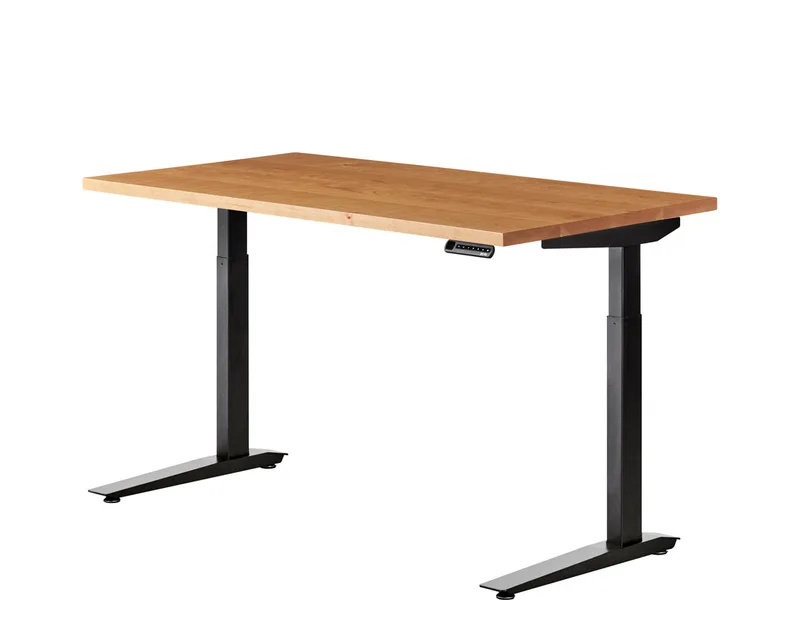
The Jarvis (now sold through Herman Miller after Fully was absorbed into MillerKnoll) has a premium feel that punches above its price class. The powder-coated steel frame is overbuilt in the best way, and the bamboo desktop option — sustainably sourced with a water-based polyurethane coating — looks and feels better than the particleboard laminate you get from most competitors.
Performance specs are strong: 350 lb capacity, 1.5 inches per second lift speed, and sub-50 dB noise. The OLED controller with four programmable presets is intuitive and responsive. Anti-collision comes standard.
The Jarvis is also the most eco-friendly option here. The bamboo desktops are FSC-certified, and the laminate cores use 84% or more pre-consumer recycled wood fiber. If sustainability matters to your purchasing decisions, this is the standout.
The brand transition introduces some uncertainty. Fully’s warranty was 15 years; under Herman Miller, it’s dropped to 7 years on the frame and motors, 5 years on the desktop. Still decent, but no longer industry-leading. And pricing on the Herman Miller store starts at $596 — you’ll need to hunt Amazon for configs that land under $500.
Wobble at maximum height (above 40 inches) is the most common complaint. The Jarvis lacks a traditional horizontal crossbar, and taller users who work at full standing height may notice lateral sway with a lighter setup.
Who should buy this: Anyone who values build materials and sustainability. The bamboo desktop is genuinely beautiful, and the steel frame will outlast most competitors. Also a solid pick if you want an OLED controller without paying Uplift’s $40 upcharge.
Who should skip this: Budget-conscious buyers who want the longest warranty possible. The Uplift V2 and FlexiSpot E7 Pro both offer 15-year coverage vs. the Jarvis’s 7 years.
Vari Electric Standing Desk — Easiest Setup
Vari Electric Standing Desk
Pros
- ✓ Fastest assembly of any desk tested (under 15 minutes)
- ✓ Attractive finishes with GreenGuard Gold certification
- ✓ Included accessories (cable wraps, hooks, coaster)
- ✓ Lifetime warranty on frame and legs
Cons
- ✗ Lower weight capacity at 200 lbs for most sizes
- ✗ Cable management tray sold separately
- ✗ Slower motor speed than competitors
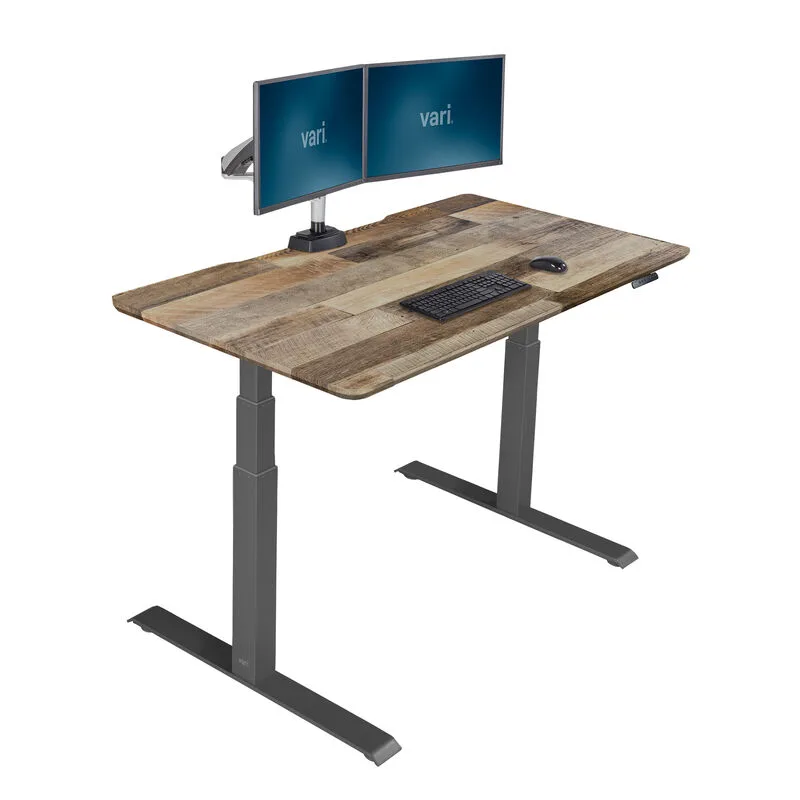
If you’ve ever spent an hour on the floor with an Allen wrench cursing at unclear diagrams, the Vari Electric will feel like a revelation. The patented quick-attach system gets you from box to standing desk in about 15 minutes. No power tools needed. No ambiguous hardware bags. Vari claims 14-minute average assembly across their units — and user reports consistently land under 20 minutes, which is still faster than any other desk here by a wide margin.
The T-style steel legs are stable and the desk looks sharp. Vari offers seven finishes including Reclaimed Wood, Walnut, and Butcher Block, all with GreenGuard Gold certification for low chemical emissions. Included accessories — cable wraps, desk hooks, and a coaster — are small touches that show attention to detail.
The tradeoff is weight capacity. At 200 lbs for the 60x30 model (220 lbs for the smaller 48x30), the Vari supports a standard home office setup but won’t handle the kind of multi-monitor, multi-accessory battlestations that the FlexiSpot or Uplift can. Motor speed is also slower at 1.3 inches per second, and noise runs around 51 dB — noticeable in a quiet room but not distracting.
Vari backs the frame and legs with a lifetime warranty, which sounds great, but the electronics warranty is limited to 5 years. The cable management tray — almost essential for a clean setup — is sold separately.
Who should buy this: Anyone who dreads assembly. Also a great pick if aesthetics matter — the Vari’s finishes are among the most attractive in this price range. Works well for standard single-monitor home office setups.
Who should skip this: Heavy equipment users. If you have dual monitors, a laptop, speakers, and accessories, the 200 lb limit gets tight fast. The FlexiSpot E7 Pro’s 440 lb capacity gives you much more headroom.
Branch Duo Standing Desk — Best for Compact Spaces
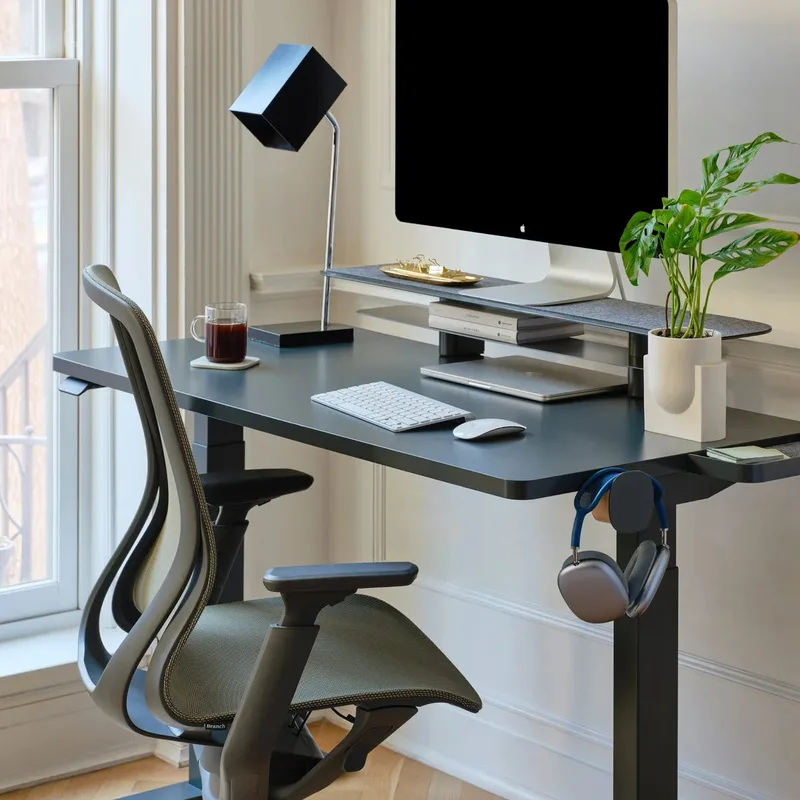
Branch Duo Standing Desk
Pros
- ✓ OLED control paddle with built-in stand reminders
- ✓ Frameless design looks clean and modern
- ✓ Compact sizes perfect for small spaces
- ✓ Free shipping and white glove installation available
Cons
- ✗ Only two height presets (competitors offer four)
- ✗ Lower weight capacity limits monitor setups
- ✗ Motor and electronics warranty only 3 years
The Branch Duo takes a different approach than the full-size desks on this list. Available in 36x24 and 48x24-inch sizes, it’s designed for smaller rooms, apartments, and shared workspaces where a 60-inch desk simply won’t fit.
The standout feature is the OLED control paddle with built-in reminders that nudge you to stand throughout the day. It’s a small thing, but it actually works — especially in the first few weeks when you’re building the standing habit. The frameless design hides the mechanics behind a clean edge, giving it a more modern look than exposed T-legs or C-frames.
At 150 lbs weight capacity, the Duo handles a laptop, monitor, and basic accessories. It’s not built for heavy multi-monitor setups, and the 28-to-48-inch height range is narrower than full-size competitors. The motor runs at about 1.0 inches per second — noticeably slower than the desks above.
Branch offers free shipping on everything, and white glove installation is available if you’d rather not touch a screwdriver. The 10-year warranty sounds solid but read the fine print: motors and electronics are only covered for 3 years.
Who should buy this: Apartment dwellers, anyone working in a tight space, or people who want a clean-looking desk that doesn’t dominate the room. The stand-up reminders are genuinely useful for building better habits.
Who should skip this: Anyone with a large desktop setup. The 150 lb limit and narrow desktop won’t work for dual monitors or heavy accessories. And the 48-inch max height may not be tall enough for users over 6’2”.
Buying Guide: What to Look for in a Standing Desk Under $500
Weight Capacity
This is the spec most people overlook. A 27-inch monitor weighs about 15 lbs. Add a laptop, monitor arm, keyboard tray, speakers, and a few accessories, and you’re easily at 50-80 lbs. Most desks in this range handle 200-440 lbs, but cheaper models cut corners here. If you plan to add equipment over time, buy more capacity than you need today.
Motor Speed and Noise
Dual motors are standard at this price point and worth insisting on. Lift speed ranges from 1.0 to 1.6 inches per second — the difference between a 10-second transition and a 25-second one. Noise levels cluster around 45-51 dB, which is quiet enough for shared spaces. Test during a video call if noise matters to you.
Height Range
A wider range accommodates more body types. The sweet spot for most users is a desk that goes as low as 25 inches (for sitting) and as high as 48-50 inches (for standing). If you’re over 6’2” or under 5’4”, prioritize desks with wider ranges like the Uplift V2 (25.5”–51.1”) or FlexiSpot E7 Pro (25”–50.6”). Tall users should also check our guide to the best standing desks for tall people for options that go above 50 inches.
Stability at Standing Height
Every standing desk wobbles a little. The question is how much. T-leg and C-leg frames perform differently, and wider leg spreads generally mean less side-to-side sway. Desktop width matters too — a 72-inch desktop on a frame designed for 48 inches will wobble more. If you work at standing height for hours, test wobble with your actual setup before committing.
Warranty and Support
Warranties in this category range from 3 to 15 years. Read the fine print — some brands advertise long frame warranties but cover motors and electronics for a fraction of that time. The motor is the component most likely to fail, so motor warranty matters more than frame warranty.
Desktop Material
Laminate and particleboard are standard. They’re fine for most uses, but bamboo and solid wood desktops feel noticeably better and tend to resist scratches longer. Expect to pay more for premium materials, and factor in the added weight when considering assembly difficulty.
Frequently Asked Questions
Is a standing desk under $500 actually worth it?
The desks in this price range have improved dramatically. Three years ago, sub-$500 meant compromising on stability, motor quality, or warranty. Today, desks like the FlexiSpot E7 Pro offer 440 lb capacity and 15-year warranties at this price point. You no longer need to spend $800+ for a desk that’ll last a decade.
How long do budget standing desks last?
With normal use (2-4 sit-stand transitions per day), most quality electric standing desks in this range last 8-15 years. Motor failure is the most common issue, typically after 5-10 years. Warranties of 7-15 years from the brands on this list reflect that expectation.
Do I need a dual-motor desk?
For any desktop 48 inches or wider, yes. Dual motors lift more evenly, handle heavier loads, and generally run quieter than single-motor alternatives. Every desk on this list uses dual motors, and at this price point, single-motor desks are a compromise not worth making.
Should I buy a frame-only or a complete desk?
Frame-only options (like the Uplift V2 frame on Amazon) save money and let you pair with a desktop you already own or a butcher block countertop from a hardware store. Complete desks are easier and eliminate compatibility guesswork. If you already have a desktop surface you like, frame-only is the better value. Once you have your desk, an anti-fatigue mat and a monitor arm are the two accessories that make the biggest difference in daily use.
How much wobble is normal?
Some lateral sway at standing height is expected in every standing desk — it’s physics, not a defect. The key is whether the wobble affects your work. Minor sway during typing that doesn’t cause your coffee to slosh is normal. Visible monitor shake during regular use means the desk isn’t stable enough for your setup.
What’s the difference between the Uplift V2 and V3?
The V3 is UPLIFT’s current flagship starting at $699, with improved stability, easier assembly, and a patented 48-point accessory mounting system. The V2 is the previous generation, still widely available on Amazon at lower prices. For under $500, the V2 is the one to buy — it shares the same core specs (355 lbs, 1.57”/sec, 15-year warranty) at a significantly lower price.
The Bottom Line
For most people, the FlexiSpot E7 Pro is the best standing desk under $500. The 440 lb capacity, quiet motors, built-in cable management, and 15-year warranty make it the most complete package at this price. It handles everything from a minimal laptop setup to a heavy multi-monitor workstation without flinching.
If customization is your priority, the UPLIFT V3 gives you more options for desktop materials, sizes, and frame colors than anything else here — plus the widest height range and best collision avoidance sensor.
Want the quickest setup? The Vari Electric goes from box to working desk in 15 minutes flat. It’s the desk to buy when you’d rather be working than assembling.
For a premium feel at a competitive price, the Fully Jarvis bamboo desktop option looks and feels a cut above the competition. And if space is tight, the Branch Duo fits where full-size desks can’t.
All five of these desks will serve you well. Pick the one that matches your biggest priority — capacity, customization, setup speed, materials, or footprint — and you won’t be disappointed. For a complete guide on building out your workspace on a tight budget, see our best budget standing desk setup article.