Disclosure: PostureRanked is reader-supported. When you buy through links on our site, we may earn an affiliate commission at no additional cost to you. Our recommendations are based on independent research and testing.
| Product | Price | Rating |
|---|---|---|
| BraceAbility Gaming Wrist Brace | $29.99 | 8.6 |
| Logitech MX Master 3S Wireless Mouse | $80 | 9.0 |
| Gimars Gel Memory Foam Keyboard and Mouse Wrist Rest Set | $14.97 | 8.1 |
| IMAK RSI SmartGlove with Compression Therapy | $29.99 | 8.0 |
Disclosure: PostureRanked is reader-supported. When you buy through links on our site, we may earn an affiliate commission at no extra cost to you. Learn more
Gaming-related repetitive strain injuries are becoming more common in 2026 as the average age of dedicated gamers rises into the 30s and 40s and daily session lengths keep climbing. Esports healthcare researchers now track gaming-specific RSI, carpal tunnel, and De Quervain’s tenosynovitis as occupational-level health concerns. The good news: prevention is straightforward when you know what to fix.
This guide covers the injuries that sideline gamers, the habits and setups that prevent them, and the gear worth buying before you need a doctor’s visit.
In a hurry? The BraceAbility Gaming Wrist Brace is the fastest intervention if you’re already feeling symptoms. Start there.
What’s Actually Injuring Gamers’ Hands and Wrists
Repetitive Strain Injury (RSI)
RSI is the umbrella term for what happens when you repeat the same micro-movements thousands of times without adequate rest. For PC gamers, that’s clicking, moving a mouse, and holding a grip posture for hours. For console players, it’s sustained thumbstick and button pressure.
Early RSI feels like a dull ache that goes away overnight. Ignore it for months and it becomes pain that doesn’t go away.
Carpal Tunnel Syndrome
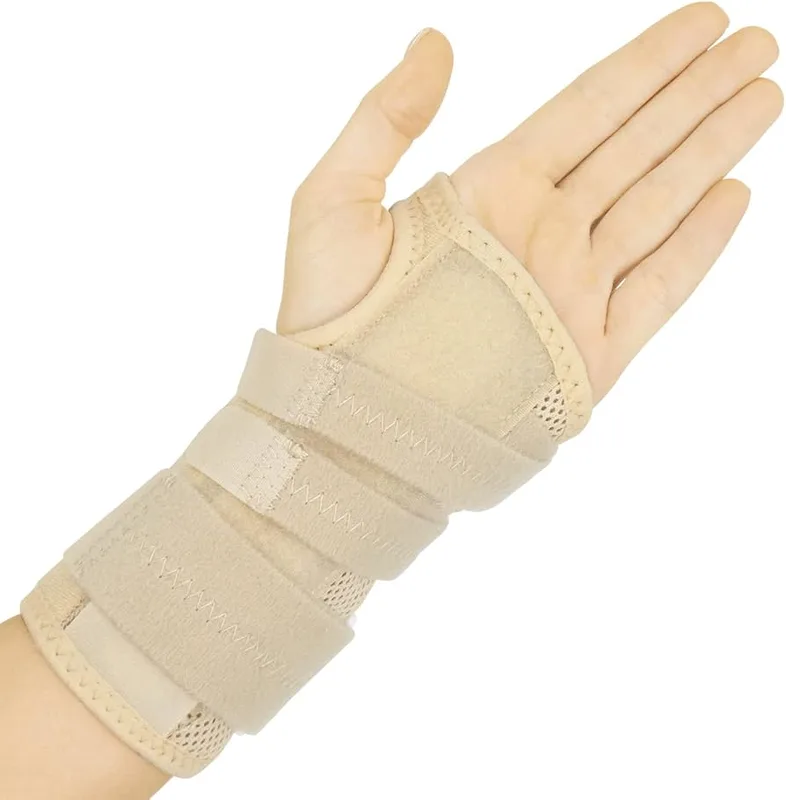
Carpal tunnel happens when the median nerve gets compressed inside the wrist canal — usually from a combination of repetitive motion and poor wrist angle. Symptoms: tingling and numbness in the thumb, index, and middle finger. Often worse at night. Many gamers dismiss it as hand falling asleep until it becomes constant.
The most common cause specific to gaming: resting your wrist on a hard desk surface while using a mouse with your wrist bent upward (dorsiflexion). Holding that position for two hours straight does real damage.
De Quervain’s Tenosynovitis (Gamer’s Thumb)
Gamer’s Thumb is inflammation of the tendons that run along the thumb side of the wrist. It comes from repetitive thumb motion — thumbsticks, swiping on mobile, or holding a controller for long sessions. You’ll feel it as pain at the base of your thumb when you grip or pinch.
Trigger Finger
Trigger finger causes one or more fingers to catch, pop, or lock when you bend them. The ring finger and middle finger are most common in gamers. It comes from repetitive flexion — exactly what you’re doing every time you click a mouse button or press a controller trigger repeatedly.
The 5 Habits That Prevent Most Gaming Injuries
1. Keep Your Wrist Neutral, Not Bent
This is the single highest-impact change you can make. A neutral wrist is straight — not bent up, down, or sideways. When your wrist is bent while you mouse or type, you’re compressing the carpal tunnel every single second of play.
Fix: Raise your chair or lower your desk so your forearm is parallel to the floor. Your wrist should float level over the mouse, not cocked upward. Add a wrist rest if your desk is too high.
2. Take Breaks Every 45–60 Minutes
Even five minutes of rest every hour makes a measurable difference in tendon fatigue. Set an alarm. Stand up, shake out your hands, and do a few wrist circles. It sounds too simple to matter — it isn’t.
3. Warm Up Before Long Sessions
Cold tendons are more susceptible to injury. Before you sit down for a three-hour raid or ranked session, spend 2–3 minutes doing wrist circles, finger spreads, and gentle tendon glides. Think of it the same way an athlete warms up before a game.
Try this quick sequence:
- Wrist circles: 10 rotations each direction
- Finger spreads: open and close fully, 10 reps
- Prayer stretch: press palms together and lower slowly until you feel a stretch in the forearms, hold 15 seconds
- Reverse prayer: backs of hands together, lift until you feel the stretch, hold 15 seconds
4. Grip Your Mouse and Controller Lightly
Most gamers death-grip their peripherals without realizing it, especially in tense moments. Sustained tension in your forearm flexors is a major driver of tendonitis. Practice using the minimum grip pressure needed — your cursor doesn’t care how hard you’re squeezing.
5. Don’t Ignore Early Warning Signs
If you feel tingling, numbness, or aching that doesn’t go away after a night of sleep, something is starting. Early-stage RSI responds well to rest, anti-inflammatories, and ergonomic corrections. Ignored for months, it becomes a six-week recovery with a wrist brace required for daily tasks.
The Right Gear Makes a Real Difference
Equipment choices have a direct impact on injury risk. A mouse that forces your wrist into pronation, a keyboard placed too high, or a desk with no wrist support can amplify the damage from every hour of play.
BraceAbility Gaming Wrist Brace
BraceAbility Gaming Wrist Brace
Pros
- ✓ Specifically designed for PC and console gaming use
- ✓ Removable aluminum stay lets you adjust support level
- ✓ Keeps wrist in neutral position to relieve carpal tunnel pressure
- ✓ Low-profile construction doesn't block mouse movement
Cons
- ✗ Only available in right or left, not reversible
- ✗ Takes a break-in period before feeling natural
- ✗ Not ideal for severe carpal tunnel — see a doctor for advanced cases
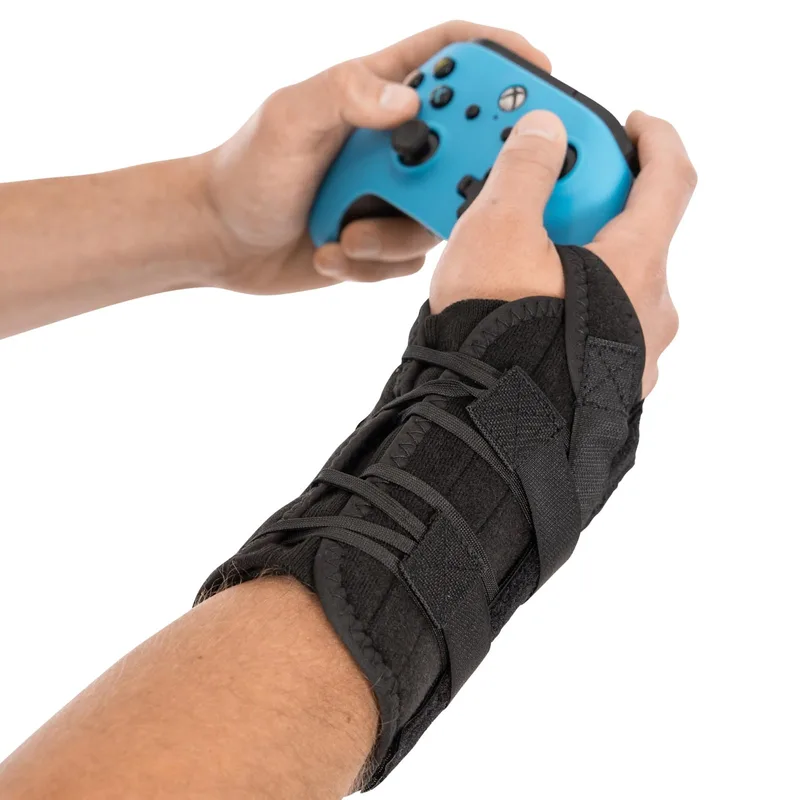
The BraceAbility Gaming Wrist Brace is the only wrist brace designed specifically for gamers — not repurposed from a medical supply catalog. It uses a lace-up cock-up splint with a removable aluminum stay that holds your wrist in neutral position while still allowing enough movement for mouse use.
It fits wrist circumferences from 5 to 9 inches and is available separately for right and left hands. The medical-grade Velcro doesn’t slip during fast movement. Reviewers with early-stage RSI and carpal tunnel consistently report that wearing it during sessions reduces next-day soreness significantly.
This is not a cure for serious carpal tunnel — if you have severe symptoms, see a hand specialist. But for prevention and mild symptom management, it’s the most practical gaming-specific option available.
Best for: Gamers experiencing early RSI symptoms, long daily PC gaming sessions, or those who need positional support during play.
Logitech MX Master 3S Wireless Mouse
Logitech MX Master 3S Wireless Mouse
Pros
- ✓ Sculpted right-hand shape with thumb rest reduces forearm rotation
- ✓ Whisper-quiet clicks — good for shared spaces and long sessions
- ✓ USB-C charging with 3-hour use from 1-minute quick charge
- ✓ Tracks on any surface including glass desktops
Cons
- ✗ Right-hand only — not suitable for left-handed users
- ✗ Heavier than ultralight gaming mice at 141g
- ✗ MagSpeed scrolling has a learning curve if you're used to clicky wheels
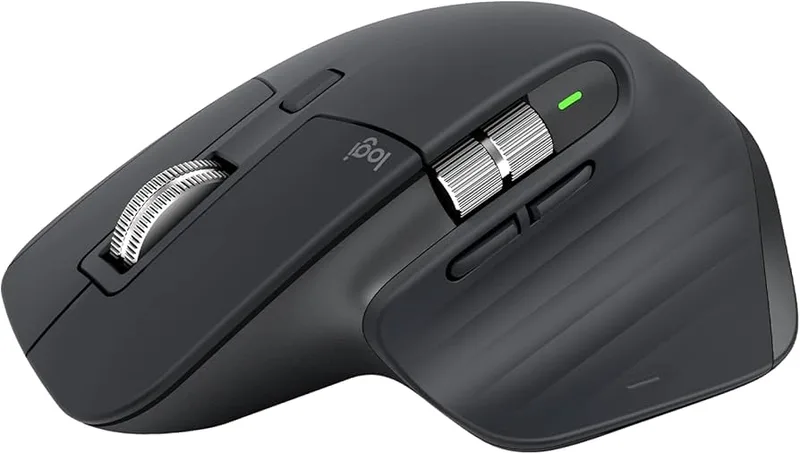
The shape of your mouse determines the angle of your wrist for every second of use. The Logitech MX Master 3S has an ergonomically sculpted right-hand form with a deep thumb rest that keeps your forearm in a more natural, slightly supinated position — meaning less pressure on the median nerve.
It’s not a gaming mouse in the traditional sense (no ultralow latency polling, no configurable RGB). But for gamers who also spend hours at a desk outside of gaming, or who play slower-paced titles and strategy games, the ergonomic benefit significantly outweighs the performance difference.
The 8K DPI sensor tracks on any surface including glass. Quiet click switches reduce the mechanical shock of rapid clicking. Battery life runs up to 70 days. At $80, it’s a meaningful investment — regularly available at this price on Amazon.
For pure competitive gaming mice, see our Best Ergonomic Gaming Mice roundup.
Best for: PC gamers, productivity-first setups, strategy and RPG players who log long daily hours.
Gimars Gel Memory Foam Keyboard and Mouse Wrist Rest Set
Gimars Gel Memory Foam Keyboard and Mouse Wrist Rest Set
Pros
- ✓ Gel memory foam molds to your wrist for custom support
- ✓ Superfine fabric is soft and easy to clean
- ✓ Non-slip base stays in place during fast mouse movements
- ✓ Combo set covers both keyboard and mouse at one price
Cons
- ✗ Foam compresses over time with daily heavy use
- ✗ Not suitable for very large keyboards (fullsize + numpad)
- ✗ Light-colored fabric shows grime with extended use
A wrist rest does one thing: keeps your wrist from resting on a hard desk edge. That edge creates a pressure point directly over the carpal tunnel, and sustained pressure there accelerates nerve irritation.
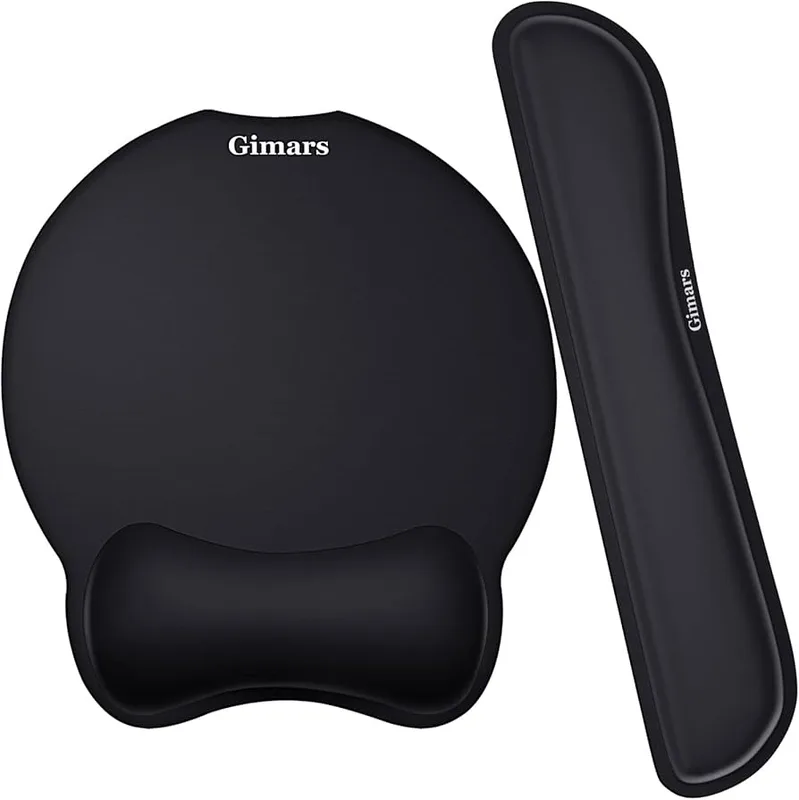
The Gimars set comes with both a keyboard rest and a mouse pad rest — gel-infused memory foam that molds to your wrist contour without bottoming out. The superfine fabric is softer than standard neoprene and easier to clean. The non-slip rubber base stays put during fast mouse movements.
At under $15 for both pieces, this is the lowest-cost intervention with immediate daily impact. If you’re gaming on a hard desk without any wrist support, this should be the first thing you buy.
For dedicated mechanical keyboard users, see our Best Wrist Rests for Mechanical Keyboards roundup and our Best Wrist Rests for Gaming guide.
Best for: Budget-conscious gamers, anyone resting wrists on a hard desk surface, full-size keyboard setups.
IMAK RSI SmartGlove with Compression Therapy
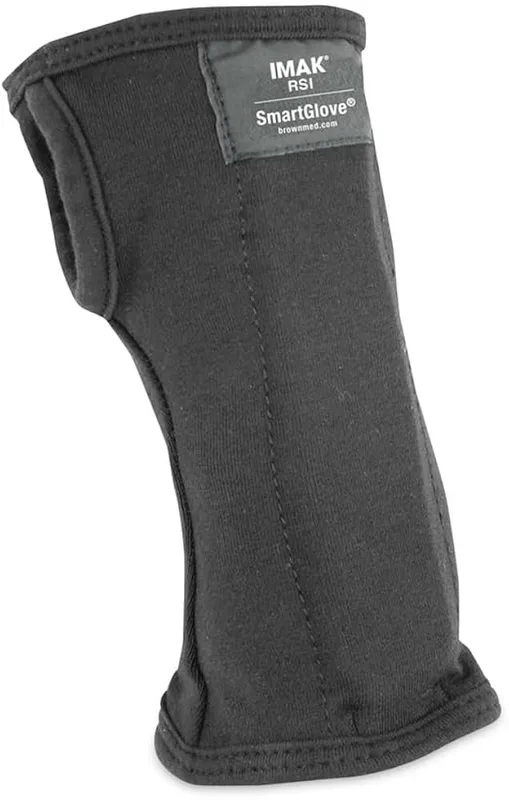
IMAK RSI SmartGlove with Compression Therapy
Pros
- ✓ Designed by an orthopedic surgeon for actual clinical effectiveness
- ✓ ErgoBeads pad cushions and supports circulation under the wrist
- ✓ Open-finger design keeps you fully functional during gameplay
- ✓ Washable breathable cotton stays comfortable for long wear
Cons
- ✗ Mild support level — not a substitute for a rigid splint
- ✗ Sizing runs small — size up if between sizes
- ✗ Open back design offers less warmth in cold environments
The IMAK RSI SmartGlove was designed by an orthopedic surgeon specifically for people with RSI, carpal tunnel, and tendonitis. It provides mild wrist compression that improves circulation and reduces inflammation without restricting finger movement.
The standout feature is the ergoBeads pad built into the underside of the wrist — a small cushion that sits between your wrist and any surface to relieve pressure on the carpal tunnel. The open-finger design keeps you fully functional during gameplay. It’s washable, breathable cotton that most users find comfortable enough to wear for full sessions.
The IMAK glove isn’t a splint — it won’t hold your wrist in place. But as a daily-wear compression tool during gaming or at a desk, it genuinely reduces fatigue and discomfort for people in early-stage recovery or those with chronically tender wrists.
It has earned the Arthritis Foundation’s Ease of Use commendation for its design — which says something about clinical credibility at this price point.
Best for: Gamers with mild chronic wrist pain, early RSI, arthritis, or who want light compression during play without restricting movement.
Product Comparison
| Product | Price | Primary Use | Support Level | Rating |
|---|---|---|---|---|
| BraceAbility Gaming Wrist Brace | $29.99 | Active injury prevention | Firm (aluminum splint) | 8.6 |
| Logitech MX Master 3S | $80 | Ergonomic mouse upgrade | N/A | 9.0 |
| Gimars Gel Wrist Rest Set | $14.97 | Desk pressure relief | Soft/passive | 8.1 |
| IMAK RSI SmartGlove | $29.99 | Compression therapy | Light/flexible | 8.0 |
How to Set Up Your Gaming Station to Minimize Injury Risk
Mouse and keyboard height
Your keyboard and mouse should be at elbow height. When seated, your upper arm should hang vertically from your shoulder and your forearm should be roughly parallel to the floor. If your desk is too high, your shoulders shrug up and your wrists bend — both of which accelerate injury.
A keyboard tray is a cheap fix for desks that are too tall. See our Best Keyboard Trays for Standing Desks guide.
Monitor position
A monitor too low forces you to hunch. Too high and your neck cranes back. Center height of the screen should be roughly at eye level or just below. See our Gaming Monitor Ergonomics Guide for the full breakdown.
Chair and posture
Your chair sets the foundation for everything else. If you’re slumped or perched on the edge of a seat with no lumbar support, your whole spine alignment is off — and your arms compensate by tensing. See Best Gaming Chairs for Back Pain and our main Gaming Posture Guide for setup recommendations.
Want to go further? Our Ergonomic Gaming Setup Complete Guide covers every element of a pain-free gaming station.
When to See a Doctor
Most gaming hand and wrist injuries can be self-managed in the early stages — rest, ice, anti-inflammatories, bracing, and ergonomic corrections. But see a doctor if:
- Numbness or tingling doesn’t resolve after 2+ weeks of rest
- Pain is constant rather than just after long sessions
- You’re losing grip strength
- Fingers are locking or catching (trigger finger)
- A specific spot is tender to touch (possible tendon tear)
A hand specialist (not just a GP) can order nerve conduction studies that confirm carpal tunnel severity and recommend the right treatment — whether that’s physical therapy, corticosteroid injections, or surgical decompression for severe cases.
FAQ
How do I know if I have carpal tunnel syndrome from gaming?
Classic symptoms are tingling, numbness, or a pins-and-needles sensation in your thumb, index, and middle fingers — often worst at night or after long sessions. Pain that runs up the forearm is also common. If symptoms last more than a week or come back consistently, see a hand specialist for a proper diagnosis.
Can I still game if I have wrist pain?
Mild soreness that fades overnight is manageable with ergonomic corrections, rest breaks, and wrist support gear. If you’re in active pain during gaming, stop and rest. Pushing through active pain causes progressive tissue damage and can turn a 2-week recovery into a 2-month one.
Does a wrist rest actually help prevent carpal tunnel?
A wrist rest helps by removing hard desk-edge pressure from the carpal tunnel while your hands are at rest position (not while actively mousing). Some research suggests they reduce static muscle load. They’re most effective when combined with proper mouse height and neutral wrist posture.
What’s the difference between a wrist brace and a compression glove?
A wrist brace (usually with a metal or plastic splint) immobilizes the wrist in neutral position — best for acute symptoms, recovery, or night wear. A compression glove applies mild pressure to reduce swelling and improve circulation without restricting movement — better for all-day wear during light activity or mild chronic symptoms.
Are ergonomic mice actually better for gamers with wrist pain?
Yes — ergonomic mice that raise the hand into a more vertical position reduce forearm pronation, which directly reduces pressure on the median nerve. The effect is most noticeable over long sessions. For competitive players who can’t switch to a vertical mouse, a larger ergonomic shape (like the Logitech MX Master 3S) still helps compared to a small flat ambidextrous mouse.
Should I wear a wrist brace while gaming?
A wrist brace during gaming is appropriate if you’re actively managing symptoms — it keeps your wrist in neutral position and prevents the involuntary flexion that irritates tendons. For prevention in healthy wrists, focus on posture and rest breaks rather than wearing a brace as insurance.
Final Recommendations
If your wrists are already hurting: Get the BraceAbility Gaming Wrist Brace and take a few days off. Apply ice for 15 minutes post-session. Do the warm-up routine before every session.
If you want to prevent injury before it starts: Start with the Gimars Wrist Rest Set to eliminate desk-edge pressure — it’s cheap, effective, and should be on every gaming desk. Pair with proper chair height and 5-minute breaks each hour.
For a full ergonomic overhaul: Read our Ergonomic Gaming Setup Complete Guide and upgrade your chair, mouse, and desk height systematically. Also see the Best Gaming Chairs for Back Pain and the Gaming Posture Guide to get the full picture.
Your hands are how you play. They’re also how you work, type, and do everything else in your life. Protecting them costs less than most people think — and costs far less than the alternative.
For more gear to protect your streaming setup, see our Best Ergonomic Streaming Setup guide and the main gaming chairs roundup.