Disclosure: PostureRanked is reader-supported. When you buy through links on our site, we may earn an affiliate commission at no additional cost to you. Our recommendations are based on independent research and testing.
| Product | Price | Rating |
|---|---|---|
| Secretlab Titan Evo Gaming Chair | $449 | 9.2 |
| Ergotron LX Desk Monitor Arm | $179.99 | 9.0 |
| Logitech MX Brio 700 Webcam | $199.99 | 9.0 |
| Elgato Key Light | $179.99 | 8.8 |
| Rode PSA1+ Boom Arm | $119.00 | 8.7 |
| Logitech C920x HD Pro Webcam | $59.99 | 8.2 |
Disclosure: PostureRanked is reader-supported. When you buy through links on our site, we may earn an affiliate commission at no extra cost to you. Learn more
At CES 2026, nearly every major hardware brand had an ergonomic workspace product on display. That shift is not a coincidence. Streaming sessions routinely run six to eight hours, and the physical toll of that time — neck strain from a mis-positioned monitor, wrist fatigue from bad armrest angles, back pain from a chair that only felt comfortable for the first hour — has become a real conversation. “Streamer neck” is now a documented occupational issue, caused by chronic sideways glancing at monitors that were never positioned correctly.
This guide covers every piece of the ergonomic streaming equation: the chair, the monitor arm, the webcam, the lighting, and the microphone — each in the position that keeps you comfortable and looking professional on camera.
Quick Pick: If you are starting from scratch, get the Secretlab Titan Evo for the chair, the Ergotron LX for your monitor, and the Elgato Key Light for lighting. Those three changes do more for a streaming setup than any peripheral upgrade.
Secretlab Titan Evo Gaming Chair
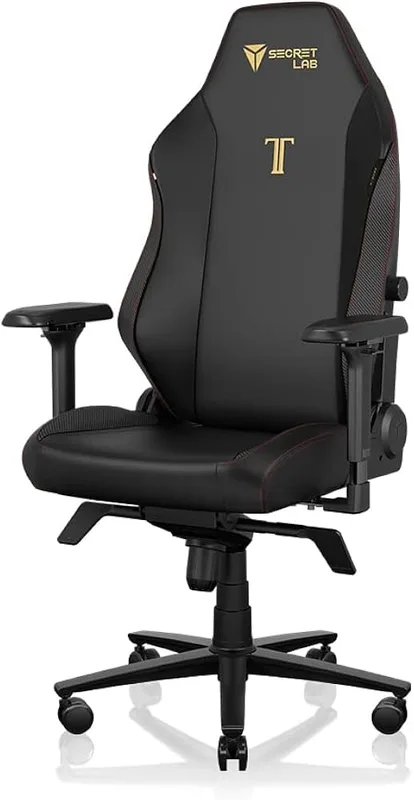
Secretlab Titan Evo Gaming Chair
Pros
- ✓ 4-way magnetic lumbar support adapts as you shift position
- ✓ 4D armrests keep elbows and wrists at the right angle
- ✓ 165° full recline for breaks between streams
- ✓ 395 lb capacity covers a wide range of body types
Cons
- ✗ Leatherette runs warm compared to mesh chairs
- ✗ Foam needs a 2-3 week break-in period to soften
- ✗ No breathable mesh option at this price point
The Titan Evo is the streaming community’s de facto chair pick for good reason. The 4-way magnetic lumbar support is actually adjustable — you can push it up or down, in or out, until it hits the curve of your lower back instead of poking into the middle of it. Most budget chairs ship with a pillow that sits wherever it wants.
The 4D armrests deserve attention too. During a six-hour stream, where your arms end up matters. The Titan Evo’s armrests adjust in four axes — height, width, forward/back, and angle — so you can match them exactly to your desk height. That alignment eliminates the elbow and wrist strain that creeps in when your arms hang in an unnatural position.
Best For: Streamers who want a single chair that handles long gaming sessions and on-camera presence without looking out of place.
Check out the full Secretlab Titan Evo vs Herman Miller comparison if you are deciding between gaming and office chair styles.
Ergotron LX Desk Monitor Arm
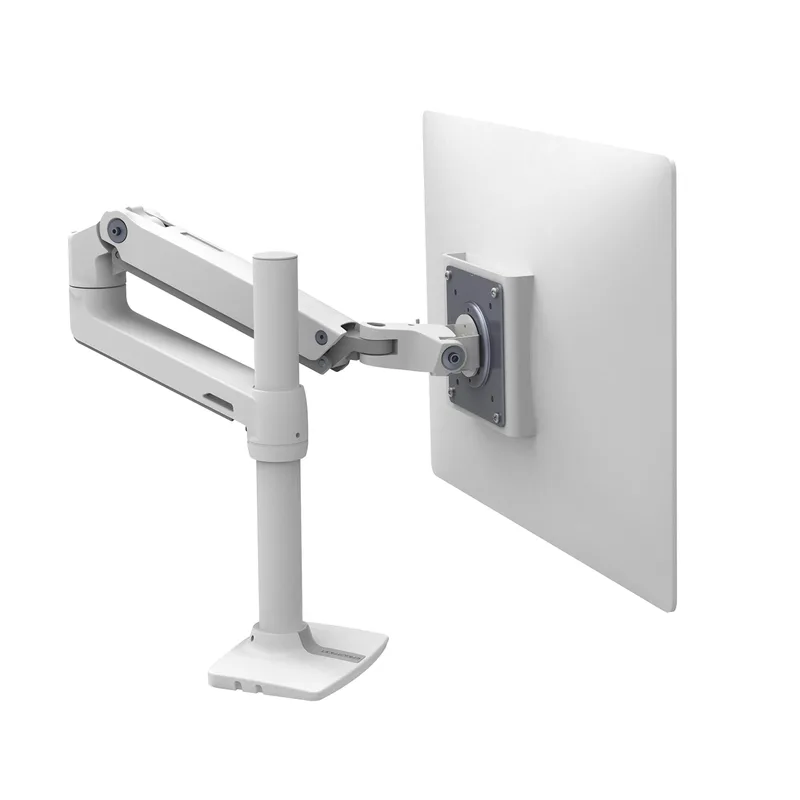
Ergotron LX Desk Monitor Arm
Pros
- ✓ One-hand adjustment with smooth, effortless movement
- ✓ Clears the entire desk surface for camera and lighting gear
- ✓ Positions monitor at exact eye level to prevent neck flexion
- ✓ Integrated cable channels hide display cables cleanly
Cons
- ✗ 25 lb weight limit rules out heavy ultrawide monitors
- ✗ Initial spring tension setup requires a hex wrench
- ✗ Polished aluminum version scratches if over-tightened
The biggest ergonomic mistake in most streaming setups is a monitor sitting flat on the desk — too low by several inches and angled wrong for both posture and camera alignment.
The Ergotron LX is the first thing to buy after a chair. Mount your monitor at true eye level: top of the screen at roughly eyebrow height when seated. This one adjustment eliminates the forward chin-tuck that causes neck tension in the upper trapezius and cervical spine. It also pulls the monitor off the desk surface, freeing up space for your webcam, key light, and microphone arm.
The LX is smooth enough to adjust with one finger. Tension is set once during installation and holds position indefinitely. The integrated cable channels route display cables cleanly along the arm so nothing dangles in camera shot.
The LX handles monitors up to 34 inches and 25 lbs, which covers most gaming monitors. If you are running a heavier ultrawide over 25 lbs, look at the Ergotron HX instead.
Best For: Any streaming setup with a display sitting on the desk surface.
Logitech MX Brio 700 Webcam
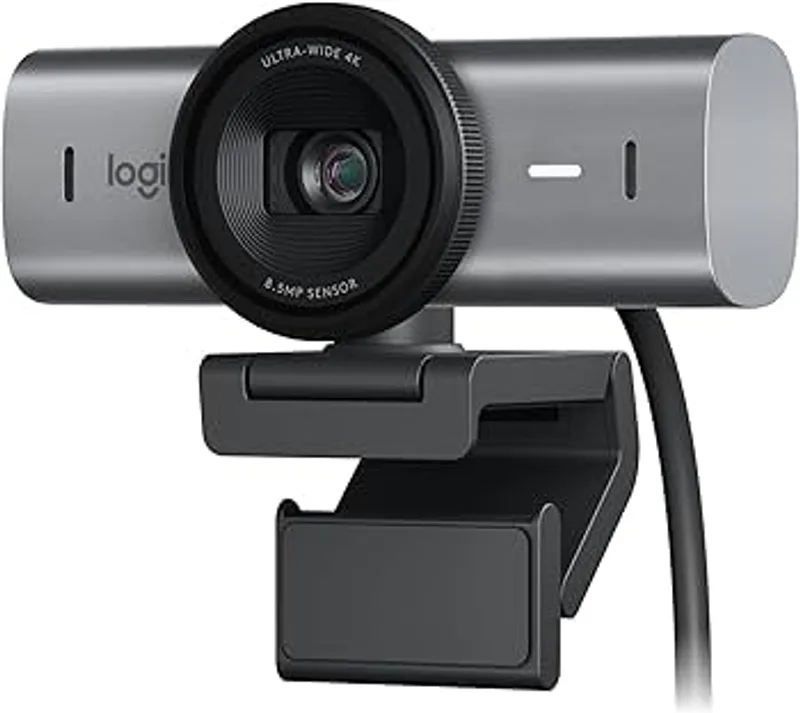
Logitech MX Brio 700 Webcam
Pros
- ✓ Adjustable FOV from 65° to 90° to match any desk layout
- ✓ AI autofocus stays sharp even when you lean back or move
- ✓ Show Mode flips view to display keyboard or desk contents
- ✓ Dual noise-canceling mics serve as capable audio backup
Cons
- ✗ 4K maxes out at 30fps, not 60fps
- ✗ Overkill if you are already using a dedicated capture card with mirrorless
- ✗ Costs significantly more than the C920x with diminishing returns at 1080p stream quality
The MX Brio 700 is Logitech’s best dedicated streaming webcam. It shoots 4K at 30fps or 1080p at 60fps, and the AI-powered autofocus tracks your face accurately even when you lean back in the chair or lean forward to look at chat.
The adjustable field of view — 65° to 90° — is more useful than it sounds. A narrow 65° keeps background clutter out of frame; 90° shows more of your desk setup if you want to display peripherals or a second monitor. You dial in whichever works for your scene.
Show Mode flips the camera view downward, useful for displaying a keyboard layout, art, or anything on your desk surface without repositioning a camera on a tripod.
For most 1080p Twitch or YouTube streams, the C920x below does the job at a third of the price. But if you stream in 4K, do YouTube content production, or want clean AI-driven focus tracking, the MX Brio justifies its price.
Best For: Streamers who want 4K capability or plan to use the same webcam for both streaming and professional video calls.
Elgato Key Light
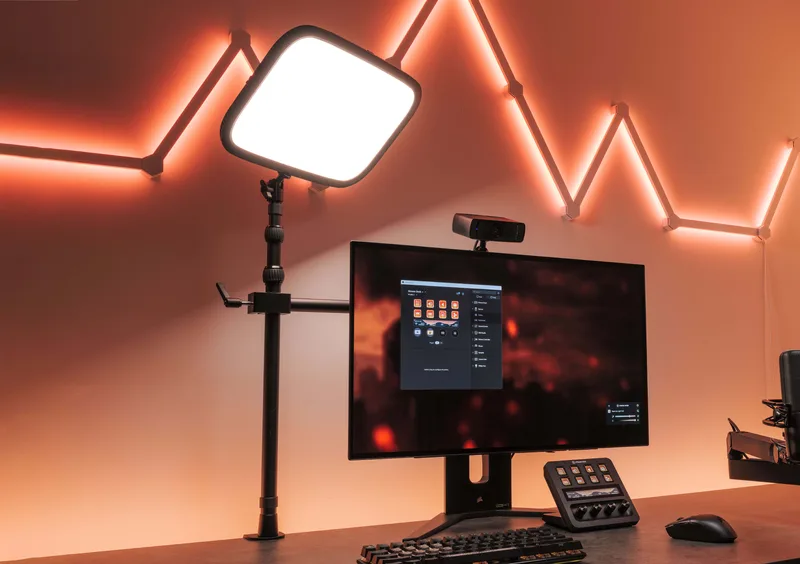
Elgato Key Light
Pros
- ✓ App control from PC, Mac, iOS, Android, or Stream Deck
- ✓ 160 OSRAM LEDs produce flat, even light with no hotspots
- ✓ 2900K-7000K range matches warm or cool scenes
- ✓ Compact panel sits on the desk without a tripod
Cons
- ✗ Requires AC power, no battery option
- ✗ Brightness controlled by app only, no physical knob
- ✗ Desk clamp can slip on thin desktops under 1.5 inches
Bad lighting kills stream quality faster than a low-end webcam. A bright, adjustable LED panel like the Key Light fixes the most common streaming lighting problem — flat, directionless light from above that washes out faces and creates unflattering shadows.
Place the Key Light at eye level or slightly above, angled toward your face from the front-left or front-right, about 45° off-axis. This creates dimensional light that defines facial features on camera. A second Key Light on the opposite side fills shadows for a cleaner, more professional look.
The 2900K–7000K color temperature range lets you match warm incandescent room lighting or cool daylight without an orange face. Control is entirely through the Elgato app, or better, a Stream Deck button if you have one.
160 OSRAM LEDs at 2800 lumens produces even, hotspot-free light that holds up well even when the webcam is set to a wide aperture. At $179.99, it is one of the better production value investments per dollar in a streaming setup.
Best For: Streamers who want professional lighting control without a complicated three-light rig.
Rode PSA1+ Boom Arm
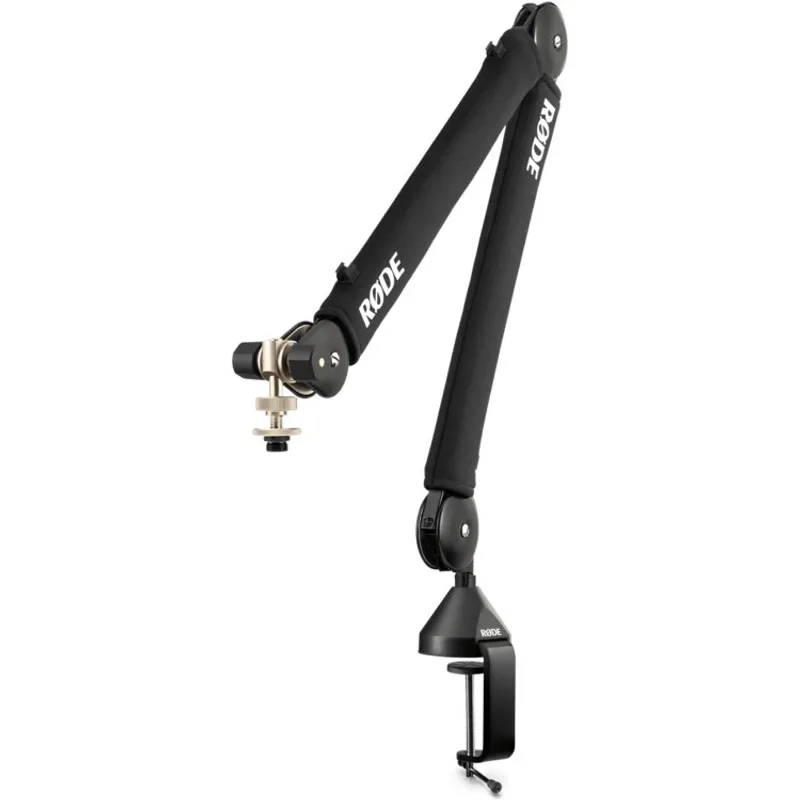
Rode PSA1+ Boom Arm
Pros
- ✓ Spring-damped movement is completely silent mid-stream
- ✓ 32-inch reach positions mic close without entering camera frame
- ✓ Internal cable routing hides XLR cables from camera view
- ✓ 360° rotation handles any desk orientation
Cons
- ✗ Heavy arm needs a thick desk edge for a secure clamp
- ✗ Spring tension is factory-set and cannot be tuned
- ✗ Overkill for lightweight USB desktop mics
A microphone on a boom arm positioned 6–8 inches from your mouth at chin or cheek height does two things: it captures better audio than a desktop mic three feet away, and it keeps the microphone body out of the camera frame.
The PSA1+ reaches 32 inches horizontally and 33 inches vertically, enough to swing the mic from behind the monitor to your mouth in any desk configuration. The spring-damping system makes arm movement completely silent — no metal-on-metal thunk audible mid-stream when you reposition. Internal cable routing hides the XLR cable along the arm body.
The clamp attaches to desk edges up to 3.1 inches thick. On thinner IKEA-style desktop edges, use the included grommet mount instead for a secure fit.
Best For: Streamers running a condenser or dynamic USB microphone who want clean camera angles without the mic in the shot.
Logitech C920x HD Pro Webcam
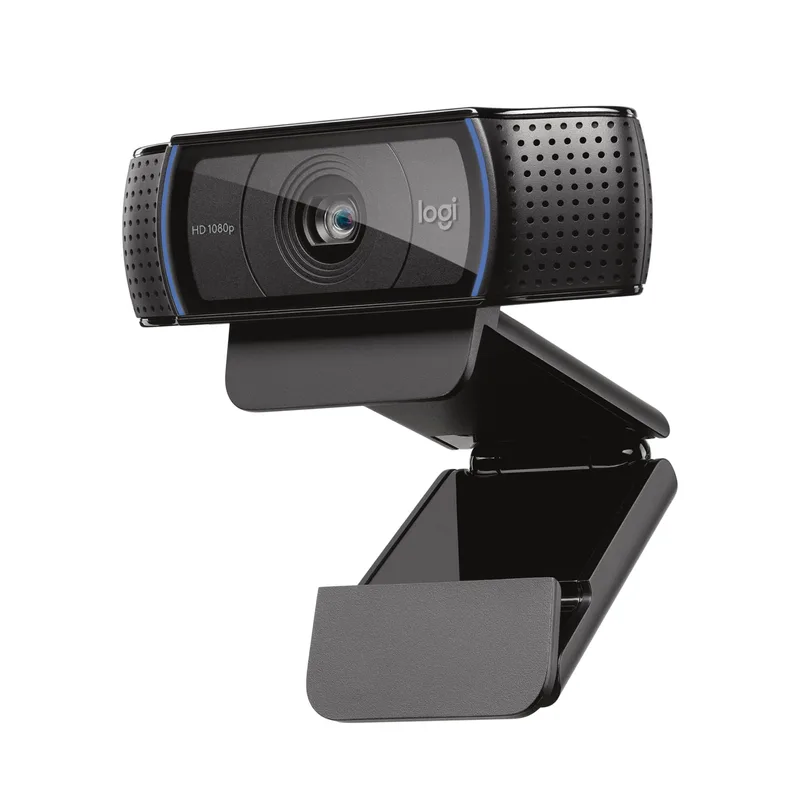
Logitech C920x HD Pro Webcam
Pros
- ✓ 1080p is sufficient quality for Twitch and YouTube live streams
- ✓ Under $60 makes it the most accessible streaming webcam
- ✓ Clip-on mount works directly on a monitor without an arm
- ✓ Plug-and-play — works immediately with OBS and Streamlabs
Cons
- ✗ 30fps cap with no 60fps option
- ✗ Noticeably weaker low-light performance than the MX Brio
- ✗ No Show Mode or FOV adjustment
Not every streaming setup needs a $200 webcam. If you are just getting started, the C920x delivers 1080p at 30fps, real autofocus, and dual stereo mics in a plug-and-play USB package. It clips directly onto the monitor top — no arm required — and works immediately with OBS, Streamlabs, and every major platform.
The C920x has been the standard entry streaming webcam for years because it is reliably good without complexity. Low-light performance falls behind the MX Brio, but with a Key Light in the setup, that gap largely disappears. Upgrade when you need 4K, 60fps, or wider FOV adjustment.
Best For: Newer streamers who want a capable webcam without overinvesting before the channel grows.
Setup Comparison
| Product | Price | Key Role | Rating |
|---|---|---|---|
| Secretlab Titan Evo | $449 | Chair and posture foundation | 9.2 |
| Ergotron LX Monitor Arm | $179.99 | Monitor height and positioning | 9.0 |
| Logitech MX Brio 700 | $199.99 | 4K webcam with AI autofocus | 9.0 |
| Elgato Key Light | $179.99 | Professional studio lighting | 8.8 |
| Rode PSA1+ Boom Arm | $119.00 | Silent mic positioning arm | 8.7 |
| Logitech C920x | $69.99 | Budget 1080p webcam | 8.2 |
How to Build Your Streaming Setup by Budget
Starter Setup (~$250)
Logitech C920x ($69.99) + Elgato Key Light ($179.99). These two changes — good lighting and a 1080p camera — improve stream quality more than anything else at this budget. Pair with whatever chair you already own and a monitor positioned at eye level.
Intermediate Setup (~$600)
Add the Ergotron LX ($179.99) to the starter setup. Mount your monitor at true eye level, free up desk space for gear, and eliminate the neck strain that comes from looking down for hours. Total spend stays under $600 and you have the three most impactful pieces in place.
Full Setup (~$1,000)
Add the Secretlab Titan Evo ($449) and Rode PSA1+ ($119) to the intermediate setup for a complete ergonomic streaming station. At this point, your physical setup matches what full-time streamers use. The chair handles the posture work, the arm positions the mic cleanly, and lighting plus camera do the production work.
For more information on gaming posture beyond just equipment, see the Gaming Posture Guide. For chair comparisons at different price points, see Best Gaming Chairs Under $200 and Best Gaming Chairs Under $500.
What to Look For in a Streaming Setup
Chair adjustability over aesthetics. A chair that looks good in thumbnails but causes back pain after two hours is a bad trade. Prioritize lumbar adjustability, armrest range, and seat depth — then look at color.
Monitor height is non-negotiable. If you take one action from this guide, it is getting your monitor to eye level with a proper arm. Looking down at a screen for six hours loads the cervical spine with 40–60 lbs of additional force. That is a well-established mechanical reason for neck and upper back pain.
Key light before webcam upgrade. Lighting affects camera quality more than the camera itself. A $70 webcam with good lighting outperforms a $200 webcam in dim overhead light. Prioritize the Key Light before the MX Brio upgrade.
Mic placement changes audio quality dramatically. Six inches from mouth, slightly off-axis, is dramatically better than three feet on a desktop stand. The PSA1+ arm makes this easy without cluttering camera view.
FAQ
How high should my monitor be for streaming?
Position the top edge of the monitor at or slightly below eye level when seated in your normal streaming posture. Looking up strains the neck; looking slightly down is the natural resting position of the eyes. For most people, this puts the monitor significantly higher than flat-desk placement allows — which is why a monitor arm is the highest-value ergonomic upgrade.
What is the best camera angle for streaming?
The webcam should be at or just above eye level, directly in front of your face — not to the side. “Streamer neck” is a real occupational syndrome caused by chronic lateral neck rotation from looking sideways at a second monitor. If chat or game is on one display, center the camera on that display or use picture-in-picture so the camera stays in your natural line of sight.
Do I really need a boom arm for my microphone?
Yes, if you are using a condenser or dynamic mic. A boom arm positioned 6–8 inches from your mouth captures voice at a significantly higher signal-to-noise ratio than a desktop mic a few feet away. It also keeps the mic body below camera frame, which looks more professional. The Rode PSA1+ is the best investment in audio quality that most streamers are not making.
Is the Secretlab Titan Evo worth it for streaming specifically?
Yes, because it solves the two biggest ergonomic problems streamers face: lumbar support that holds position without constant readjustment, and armrests that actually align with desk height. The 4-way lumbar and 4D arms are functional features, not marketing. See the full Secretlab vs Herman Miller comparison if you are weighing this against premium office chairs.
How should I position my Key Light?
Place it 45° off-axis from your face (front-left or front-right), at eye level or slightly above. The light should point toward your face at roughly a 45° downward angle. This creates three-dimensional face lighting that looks natural on camera. If budget allows, a second Key Light on the opposite side fills in shadows and creates a much cleaner look.
Can I build an ergonomic streaming setup without spending $1,000?
Yes. Start with the Elgato Key Light ($179.99) and Logitech C920x ($69.99). That $250 investment transforms stream quality. Add the Ergotron LX monitor arm next for ergonomics. The chair can wait if your current seat is reasonably comfortable — but if your back hurts after streaming, that is the priority to address.
Conclusion
A complete ergonomic streaming setup has five functional layers: the chair (Secretlab Titan Evo), the monitor position (Ergotron LX), the camera (Logitech MX Brio or C920x depending on budget), the lighting (Elgato Key Light), and the microphone placement (Rode PSA1+). Each one addresses a specific physical or production quality problem.
If you are choosing just one upgrade today: get your monitor to eye level with an Ergotron LX and add an Elgato Key Light. Those two changes cost about $360 combined and deliver the most noticeable improvement in both ergonomics and stream production quality.
For a deeper dive on gaming desk options, see Best Gaming Desks in 2026. For the complete gaming chair rundown, the Best Gaming Chairs roundup covers every major option at every price point.