Disclosure: PostureRanked is reader-supported. When you buy through links on our site, we may earn an affiliate commission at no additional cost to you. Our recommendations are based on independent research and testing.
| Product | Price | Rating |
|---|---|---|
| Glorious Gaming Wrist Rest | — | 9.2 |
| Keychron Wooden Palm Rest | — | 9.0 |
| Deltahub Carpio 2.0 | — | 8.6 |
| HyperX Wrist Rest | — | 9.0 |
| Keychron Silicone Wrist Rest | — | 8.6 |
| Glorious Wooden Wrist Rest | — | 8.8 |
| Razer Ergonomic Wrist Rest | — | 8.8 |
PostureRanked is reader-supported. When you buy through links on our site, we may earn an affiliate commission at no additional cost to you.
Your mechanical keyboard sounds great and types even better. But after three hours, your wrists start aching. That’s the tradeoff nobody mentions — mechanical switches sit taller than membrane ones, which forces your wrists into an upward bend that compounds into real pain over time.
A good wrist rest fixes this by filling the height gap between your palms and the desk surface. The right one depends on your keyboard size, your material preference, and whether you run hot during long sessions. Here’s a quick pick: if you just want the best all-around option, grab the Glorious Gaming Wrist Rest in your keyboard’s size and move on. For everyone else, here’s the full breakdown.
Quick Comparison: Best Keyboard Wrist Rests
| Wrist Rest | Best For | Material | Sizes Available | Price Range |
|---|---|---|---|---|
| Glorious Gaming Wrist Rest | Best Overall | Memory Foam + Cloth | Full, TKL, Compact | $20-$30 |
| Keychron Wooden Wrist Rest | Premium Aesthetic | Solid Wood | K, Q, V Series specific | $25-$40 |
| Deltahub Carpio 2.0 | Active Support | ABS + Silicone + PTFE | Size S, Size L | $40-$50 |
| HyperX Wrist Rest | Gaming Sessions | Cooling Gel + Memory Foam | Full, TKL, Compact | $17-$22 |
| Keychron Silicone Wrist Rest | Budget Pick | Silicone | K, Q, V Series specific | $10-$15 |
| Glorious Wooden Wrist Rest | Natural Material | White Ash Wood | Full, TKL | $30-$40 |
| Razer Ergonomic Wrist Rest | Leatherette Feel | Leatherette + Memory Foam | Full, TKL, Mini | $15-$20 |
Why Mechanical Keyboards Need Wrist Rests
Mechanical keyboards sit higher than membrane boards. The switches themselves are taller, the cases are thicker, and high-profile keycaps add even more height. All of that forces your wrists into extension — bending upward — which strains the tendons running through your carpal tunnel.
A correctly sized wrist rest brings your palms level with the bottom row of keys. Your wrists stay neutral, your forearms stay parallel to the desk, and your fingers reach keys without stretching. That’s the difference between comfortable 8-hour sessions and waking up with tingling hands.
One important detail: rest your palms on the support during typing pauses, not your wrists. Pressing your wrists down while actively typing creates the same pressure you’re trying to avoid.
Best Wrist Rests for Mechanical Keyboards
1. Glorious Gaming Wrist Rest — Best Overall
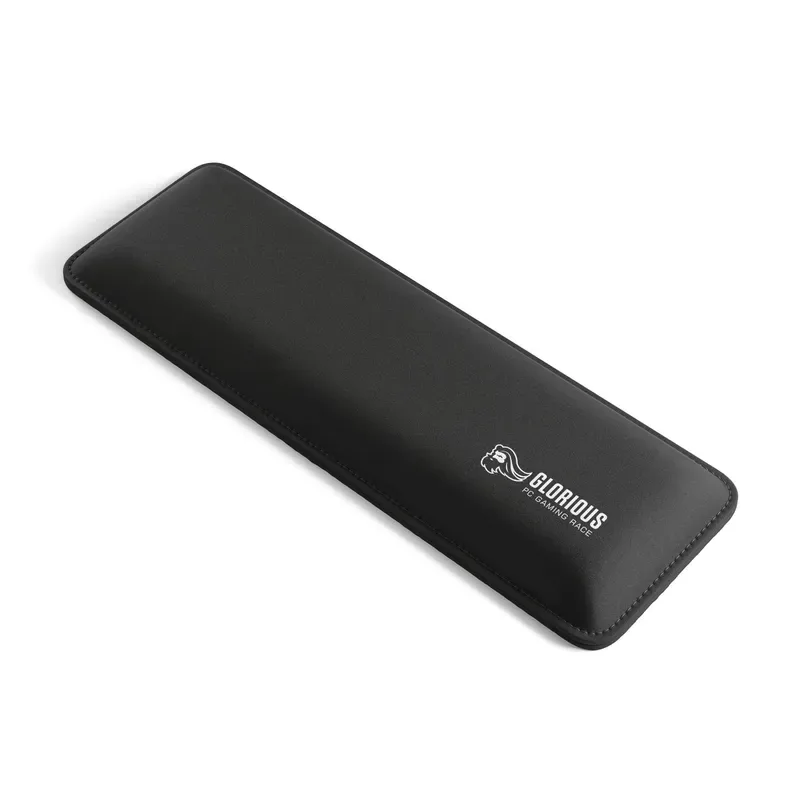
The Glorious wrist rest nails the fundamentals. A 25mm-thick memory foam core wrapped in smooth cloth hits the sweet spot between firm and soft. It’s tall enough for standard Cherry MX-height keyboards without being so tall that your wrists bend downward.
The dual-lock stitched edges are the hidden MVP here. Cheaper wrist rests start fraying at the seams within months — the Glorious still looks clean after a year of daily use. The non-skid rubber base stays planted on the desk, which matters more than you’d think during intense typing sessions.
Available in full-size (17.5 x 4”), TKL (14 x 4”), and compact (12 x 4”) — so it fits whatever layout you’re running.
Get this if: You want a no-fuss wrist rest that works with any keyboard and lasts.
Skip this if: You use a low-profile mechanical keyboard. At 25mm, it’ll be too tall.
Price: $20-$30 depending on size
Check Glorious Gaming Wrist Rest (Full Size) on Amazon
Check Glorious Gaming Wrist Rest (TKL) on Amazon
2. Keychron Wooden Wrist Rest — Best Premium Aesthetic
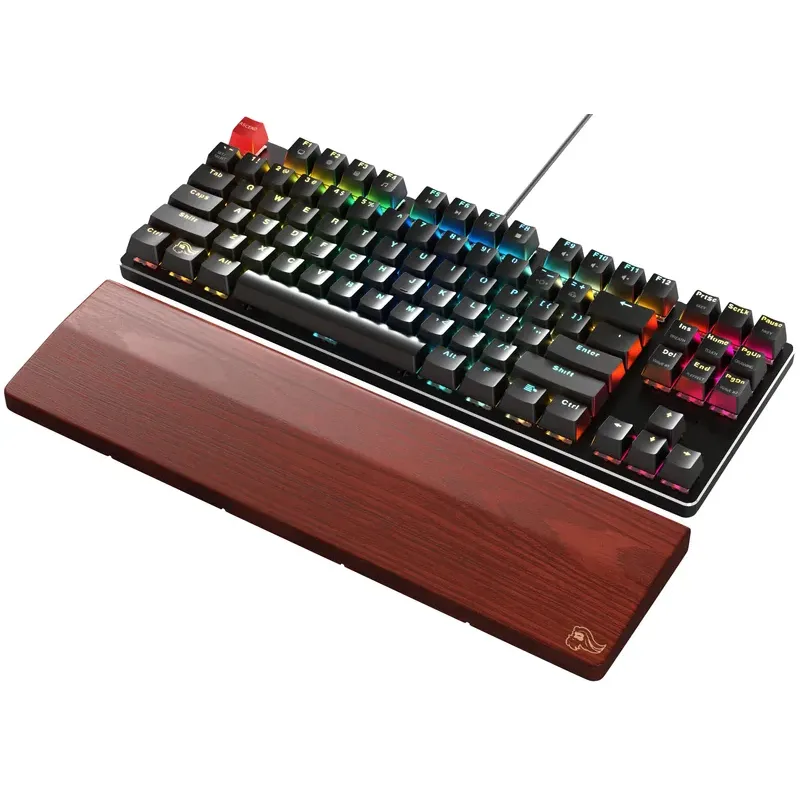
If you own a Keychron keyboard, this is the wrist rest to get. Keychron machines each wooden rest to the exact dimensions of specific models — Q1, K2, K8, Q6, and so on. The fit is seamless. No overhang, no gap, just a clean extension of the keyboard.
The solid wood construction provides firm, unyielding support. If you’ve only used foam rests, the hard surface feels surprising at first. Give it a few days. The firmness distributes pressure more evenly than foam, and the sealed finish shrugs off sweat and oil.
Aesthetically, a wooden wrist rest paired with a Keychron aluminum board looks chef’s kiss. It’s the kind of desk accessory that makes people ask about your setup.
Get this if: You own a Keychron keyboard and value aesthetics alongside ergonomics.
Skip this if: You use a non-Keychron board (sizing won’t match) or you prefer soft cushioning.
Price: $25-$40 depending on keyboard model
Check Keychron Wooden Wrist Rest on Amazon
3. Deltahub Carpio 2.0 — Best for Active Support
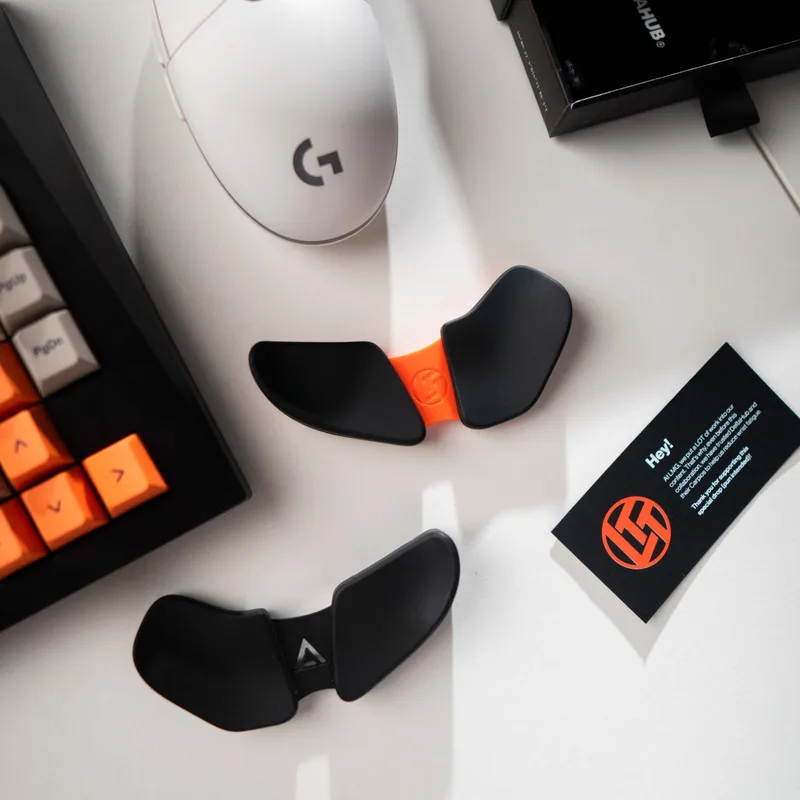
The Carpio is a completely different concept. Instead of a static bar that sits in front of your keyboard, it’s a pair of small sliding supports — one per hand — that move with you. PTFE feet on the bottom glide across your desk surface while the silicone top cradles your palm.
The idea is that static wrist positioning causes more strain than movement does. By encouraging micro-movements throughout your typing session, the Carpio reduces the repetitive strain that comes from holding your wrists in one position for hours. It sounds gimmicky until you realize your wrists feel noticeably better after a week of use.
The downside is a real learning curve. Your hands need to unlearn the habit of anchoring to one spot. And at $40-50 for two small pieces, the price-to-material ratio is hard to stomach — but the ergonomic design is genuinely innovative.
Get this if: You have wrist pain from static positioning and you’re open to a different approach.
Skip this if: You game competitively (the sliding motion slows reflexes) or can’t justify $45 for wrist supports.
Price: $40-$50
Check Deltahub Carpio 2.0 on Amazon
4. HyperX Wrist Rest — Best for Gaming
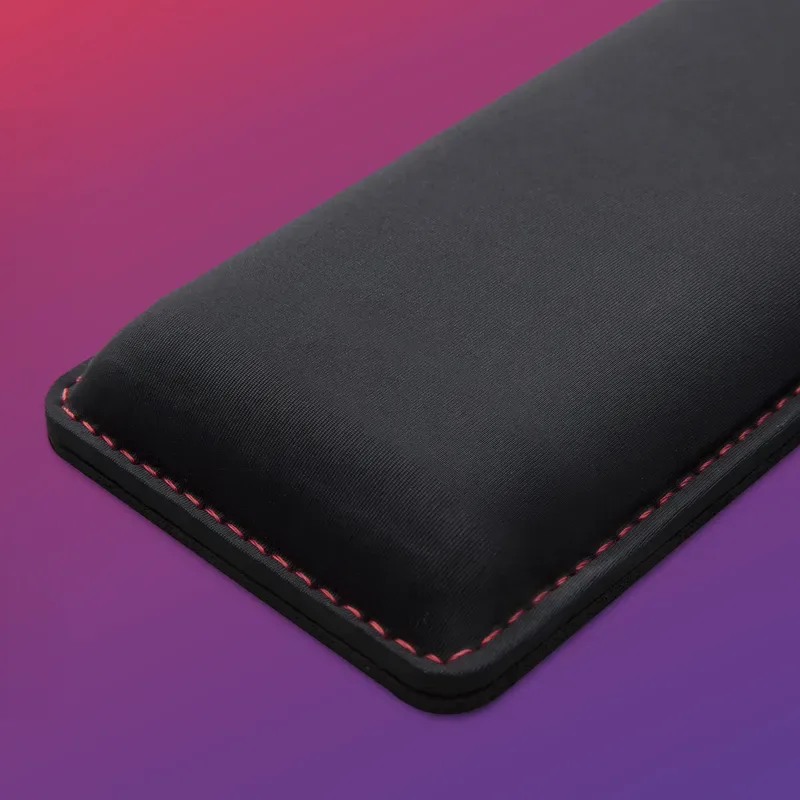
HyperX layers cooling gel over memory foam, and the difference is noticeable during long gaming sessions. Where a standard foam rest gets warm and clammy after an hour, the HyperX stays cool to the touch. If your palms run hot, this is the one.
The memory foam base conforms to your wrist shape over time while the gel layer on top keeps temperature regulated. Build quality is solid — stitched edges, anti-slip rubber base, 22mm thickness that works with most full-size mechanical keyboards.
HyperX now offers TKL and compact sizes alongside the original full-size, so you’re covered regardless of layout. At $17-22 for the full-size version, it’s one of the best values in the cooling wrist rest category.
Get this if: You game for long sessions and your palms overheat easily.
Skip this if: You don’t run hot — the cooling gel adds bulk that’s unnecessary if temperature isn’t an issue.
Price: $17-$22
Check HyperX Wrist Rest on Amazon
5. Keychron Silicone Wrist Rest — Best Budget Pick
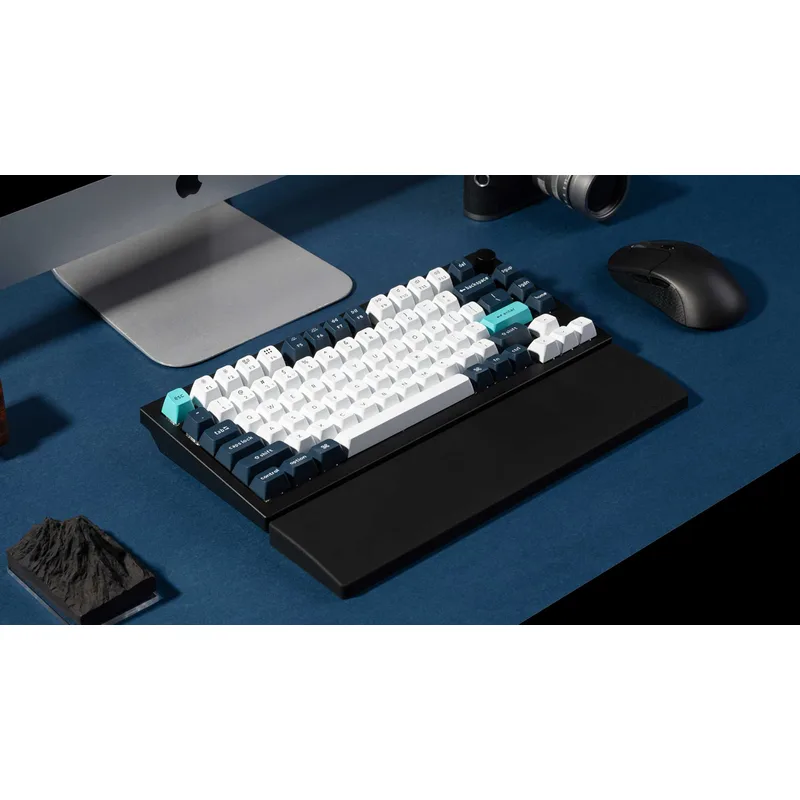
At $10-15, the Keychron Silicone is the cheapest quality wrist rest you can buy. The soft silicone surface is pliable and gentle — almost squishy compared to foam options. And because silicone is non-porous, it never absorbs oils or sweat. A quick wipe with a damp cloth and it’s brand new.
Like the wooden version, these are sized specifically for Keychron keyboards. The K10 version runs 17.6 inches, the K2/K6 version comes in at 12.48 inches, and the K8 sits in between at 14.6 inches. Exact sizing means no awkward alignment gaps.
The tradeoff is firmness. If you prefer solid support, the silicone feels mushy. It’s also a dust magnet — silicone surfaces attract particles like a screen protector. But for the price and the ease of cleaning, it’s the best budget option by a wide margin.
Get this if: You want a cheap, easy-to-clean wrist rest and you own a Keychron keyboard.
Skip this if: You want firm support or use a non-Keychron keyboard.
Price: $10-$15
Check Keychron Silicone Wrist Rest on Amazon
6. Glorious Wooden Wrist Rest — Premium Natural
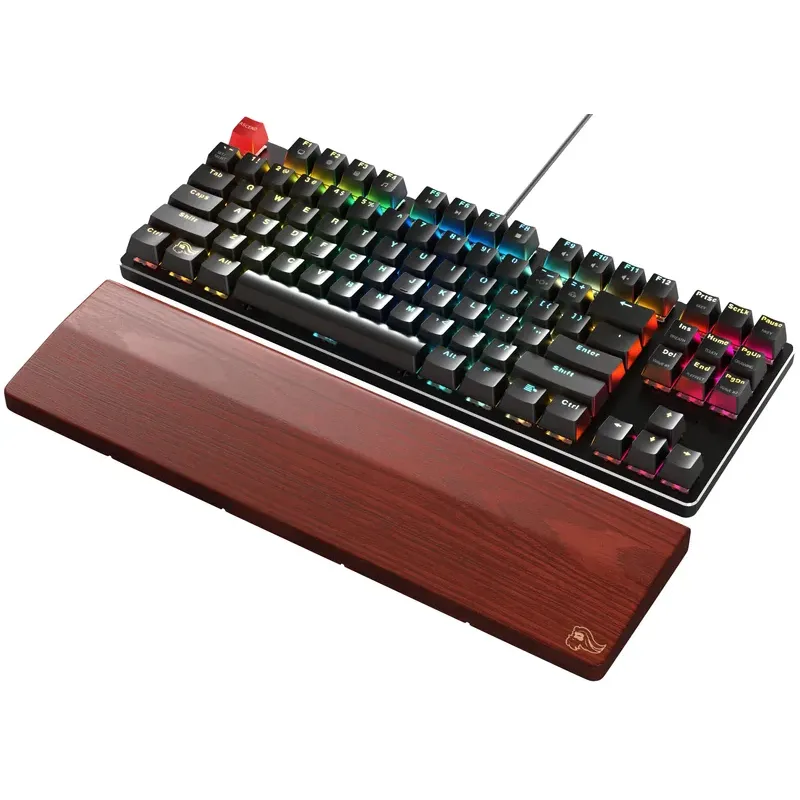
Glorious takes a different approach to wood than Keychron — their White Ash rest comes in standard full-size and TKL dimensions rather than keyboard-specific sizing. That means it works with any brand, not just one.
The sealed White Ash surface is smooth, sweat-resistant, and develops a subtle patina over time that adds character. It’s the kind of desk accessory that ages well rather than wearing out.
Support-wise, it’s identical to the Keychron wooden rest: firm, consistent, and completely immune to compression. The rubber feet keep it planted. At $30-40, it’s the premium wood option for non-Keychron keyboard users.
Get this if: You want a wooden wrist rest that fits any full-size or TKL keyboard.
Skip this if: You prefer soft cushioning or need a compact size.
Price: $30-$40
Check Glorious Wooden Wrist Rest on Amazon
7. Razer Ergonomic Wrist Rest — Best Leatherette
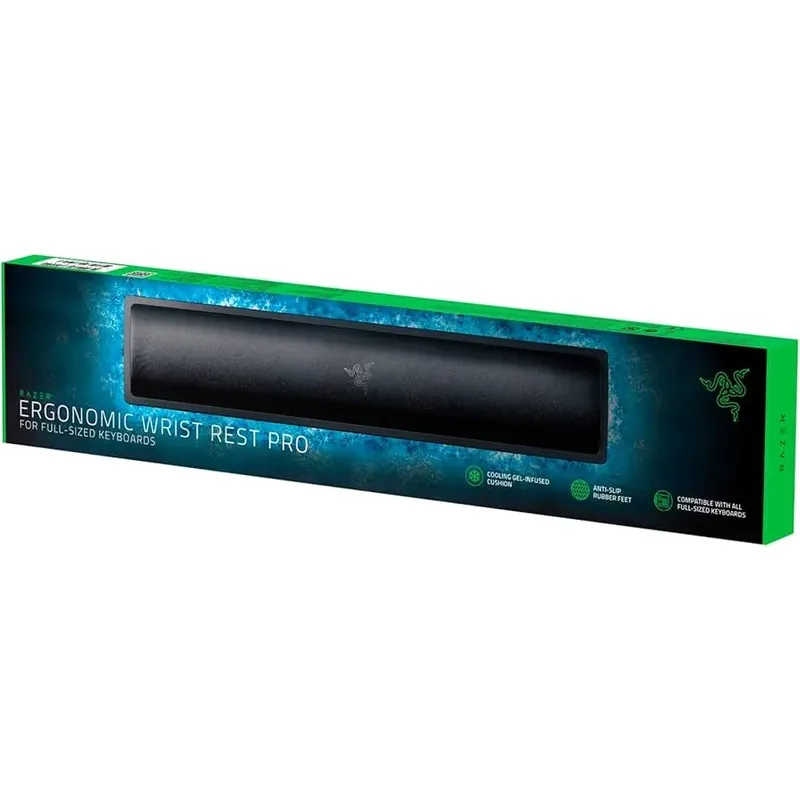
Razer’s wrist rest wraps memory foam in plush leatherette with a contoured ergonomic profile. The shape isn’t flat — it curves slightly to match the natural arch of your palms, which makes the first contact feel more natural than a rectangular bar of foam.
The leatherette surface wipes clean easily and looks sharp next to any black keyboard setup. Memory foam underneath provides soft cushioning without the bouncy feel of gel. And unlike most competitors, Razer offers three sizes: full, TKL, and mini (for 60-65% layouts).
The leatherette is the weak point long-term. After a year or two of heavy use, it can start to peel and crack — especially in warm, humid environments. If you’re gentle with it, expect 2-3 solid years. If you game intensely every day, maybe 18 months before it shows wear.
Get this if: You want a premium-feeling wrist rest with a contoured shape and multiple size options.
Skip this if: You need something that lasts 3+ years — the leatherette won’t.
Price: $15-$20
Check Razer Ergonomic Wrist Rest (Full Size) on Amazon
Check Razer Ergonomic Wrist Rest (TKL) on Amazon
Buying Guide: What to Look For
Match Your Keyboard Size
This is the most important decision. A wrist rest that’s longer or shorter than your keyboard looks awkward and doesn’t support your palms evenly.
| Keyboard Layout | Approximate Length |
|---|---|
| Full Size (104 keys) | 17-18 inches |
| TKL/80% (87 keys) | 14-15 inches |
| 75% (84 keys) | 12-14 inches |
| 65%/60% | 11-12 inches |
Match Your Keyboard Height
The wrist rest should bring your palms level with the bottom row of keycaps. Too tall and your wrists angle down. Too short and they angle up. Both cause strain.
- Standard mechanical keyboards (Cherry MX, Gateron): 20-25mm wrist rest
- Mid-profile keyboards: 15-20mm wrist rest
- Low-profile keyboards: 10-15mm wrist rest — or none at all
Choose Your Material
| Material | Feel | Durability | Maintenance | Best For |
|---|---|---|---|---|
| Memory Foam + Cloth | Soft, cushioned | Good (2-3 years) | Absorbs oils over time | All-around comfort |
| Wood | Firm, solid | Excellent (5+ years) | Wipe clean | Long-term durability |
| Silicone | Soft, pliable | Very good (3-4 years) | Wipe clean | Budget + easy care |
| Leatherette | Premium, medium | Fair (1-2 years) | Can peel | Premium aesthetics |
| Cooling Gel | Cool, cushioned | Good (2-3 years) | Easy to clean | Hot-handed gamers |
Proper Wrist Rest Positioning
Four rules to actually benefit from your wrist rest:
- Place it flush against the front edge of your keyboard
- Rest your palms on the support — not your wrists
- Float your wrists above the rest while actively typing
- Only rest palms on the support during pauses between typing
The most common mistake is pressing your wrists down while typing. This creates pressure directly on the carpal tunnel — the exact thing you’re trying to avoid.
Frequently Asked Questions
Do wrist rests actually prevent carpal tunnel?
When used correctly, they help. A wrist rest maintains neutral wrist position during pauses, which reduces the cumulative strain on carpal tunnel tendons. But they’re not a magic fix — you still need proper typing posture and regular breaks. And resting your wrists while typing is counterproductive.
Should I get the same brand as my keyboard?
Only if you use Keychron. Keychron’s wrist rests are machined to specific keyboard dimensions, so the fit is perfect. For everything else, just match the length and height — brand doesn’t matter.
Memory foam vs. wood — which is better?
Neither is objectively better. Memory foam is softer and more comfortable immediately. Wood is firmer, more durable, and easier to clean. Try foam first since it’s cheaper. If you find yourself wanting more support, switch to wood.
How thick should my wrist rest be?
Match your keyboard’s front edge height. Most standard mechanical keyboards (Cherry MX or Gateron switches) pair well with 20-25mm wrist rests. Low-profile mechanical keyboards need 10-15mm. If your wrist rest is too thick, your wrists bend downward. Too thin and they bend upward.
Can I use a wrist rest with a keyboard tray?
Yes, if there’s enough depth. Keyboard trays are often shallow, so measure before buying. You need at least 3-4 inches of depth in front of the keyboard. A compact wrist rest (2-3 inches deep) fits better than a full-depth one.
How do I clean a cloth wrist rest?
Spot clean with a damp microfiber cloth and mild soap. Don’t submerge it — the foam inside won’t dry properly. For oil buildup on cloth surfaces, a light scrub with isopropyl alcohol works. Wood and silicone wrist rests just need a wipe-down.
The Bottom Line
For most people, the Glorious Gaming Wrist Rest is the answer. It’s the right height for standard mechanical keyboards, the cloth surface is comfortable from day one, and the stitched construction actually lasts. At $20-30, it’s hard to argue with.
If you own a Keychron keyboard and care about aesthetics, the Keychron Wooden Palm Rest gives you a perfect-fit wooden rest that looks stunning alongside aluminum boards.
On a tight budget? The Keychron Silicone Wrist Rest at $10-15 is the best value in the category — just know it’s soft and sized specifically for Keychron layouts.
For gamers battling sweaty palms, the HyperX Wrist Rest with its cooling gel layer is the clear pick, though the full-size-only limitation is frustrating.
And if you’re dealing with actual wrist pain from repetitive strain, the Deltahub Carpio 2.0 is worth the investment — its sliding design genuinely reduces the static positioning that causes most keyboard-related discomfort. A wrist rest works best as part of a complete ergonomic input setup — pair it with an ergonomic keyboard and an ergonomic mouse or trackball for the full picture. For everything else you need to complete a healthy workspace, see our best desk accessories for remote work guide and the ergonomic workstation setup guide.