Most chairs stop at your shoulder blades. You lean back to read a long email or think through a problem, and your head has nowhere to go. A headrest changes that, and the best ergonomic office chairs with headrests make reclined work comfortable instead of a neck-craning compromise. Manufacturers are leaning into it this year: HBADA launched a 2026 Edition of its E3 Air with a dual-axis headrest, and Boulies introduced an upgraded 2026 Master Rex with a 165-degree recline.
Our quick pick is the Steelcase Gesture with the headrest option, the most adjustable chair on this list. If that price is out of reach, the SIHOO M18 and Ticova are the two cheap chairs I’d shortlist. All six were researched from spec sheets, listing details and owner feedback, and every one is in stock or listed for sale on Amazon today.
What a headrest actually does
A headrest only helps when you recline. Sit bolt upright at a keyboard and it should sit behind your head without touching it. Lean back 20 to 30 degrees and it takes the weight of your skull off your neck muscles. That makes it useful for calls, reading, and long thinking sessions, less so for hunched typing. If your neck and shoulders ache from desk work, our guide to office chairs for neck pain goes deeper, and the neck pain guide for desk workers covers the habits around it.
Steelcase Gesture with Headrest
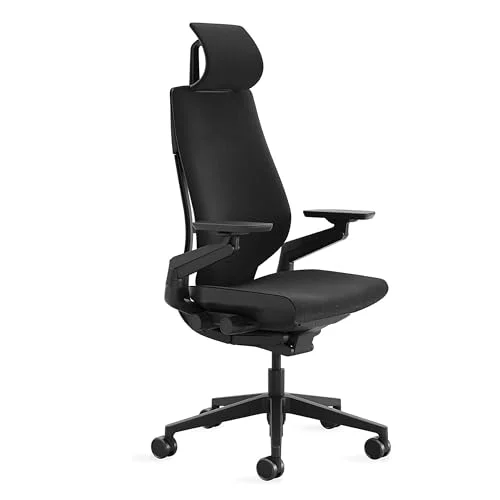
Steelcase Gesture Office Chair with Headrest
Pros
- ✓ The most adjustable headrest in this roundup, with height, angle and depth all independent
- ✓ Arms follow you through laptop, tablet and keyboard postures instead of fixing one position
- ✓ LiveBack flexes as you recline, so the headrest stays in contact with your head
- ✓ 400-lb capacity and a 12-year warranty back up the price
Cons
- ✗ Priced well above every other chair here except the Humanscale
- ✗ Heavy, which makes moving it between rooms a chore
- ✗ Less lumbar height tuning than some rivals
Steelcase builds the Gesture around how people really sit now: leaning toward a phone, tablet or laptop, not just a desktop monitor. The arms rotate through 360 degrees and the LiveBack backrest flexes with your spine. With the headrest option, height, angle and depth all adjust separately, so you can place it where your head lands when you recline. Owners tend to describe it as the chair they stop thinking about.
The honest problem is price. At $1,721.19 on Amazon today, it is a furniture purchase, not an accessory. Read our Steelcase Gesture review for the full breakdown, or see Gesture versus Humanscale Freedom if you are deciding between the top two.
Best for: people who split time across a laptop, phone and monitor and want the best headrest available.
Humanscale Freedom with Headrest
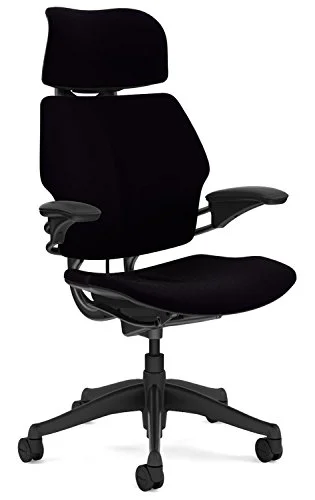
Humanscale Freedom Task Chair with Headrest
Pros
- ✓ The articulating headrest moves with your head as you lean back, with nothing to fiddle with
- ✓ Weight-sensitive recline needs no tension knob
- ✓ A 15-year warranty is the longest on this list
- ✓ Minimal, quiet design that suits a shared or client-facing room
Cons
- ✗ The Amazon listing shows a lead time rather than ready stock
- ✗ Lumbar adjustment is more limited than on the Gesture
- ✗ 300-lb capacity is the lowest of the premium options
The Freedom’s headrest articulates on its own. Lean back and it follows your head, and there is no knob to tune. Recline is weight-sensitive too, so the whole chair adjusts without you touching a lever. If you hate fiddling with settings, this is the one. The 15-year warranty is the longest here.
Two cautions. The Amazon listing shows a lead time instead of ready stock, so check before you count on a date. And lumbar adjustment is more limited than the Gesture’s. Our Humanscale Freedom review has the full picture.
Best for: frequent recliners who want a set-and-forget chair.
Secretlab Titan Evo
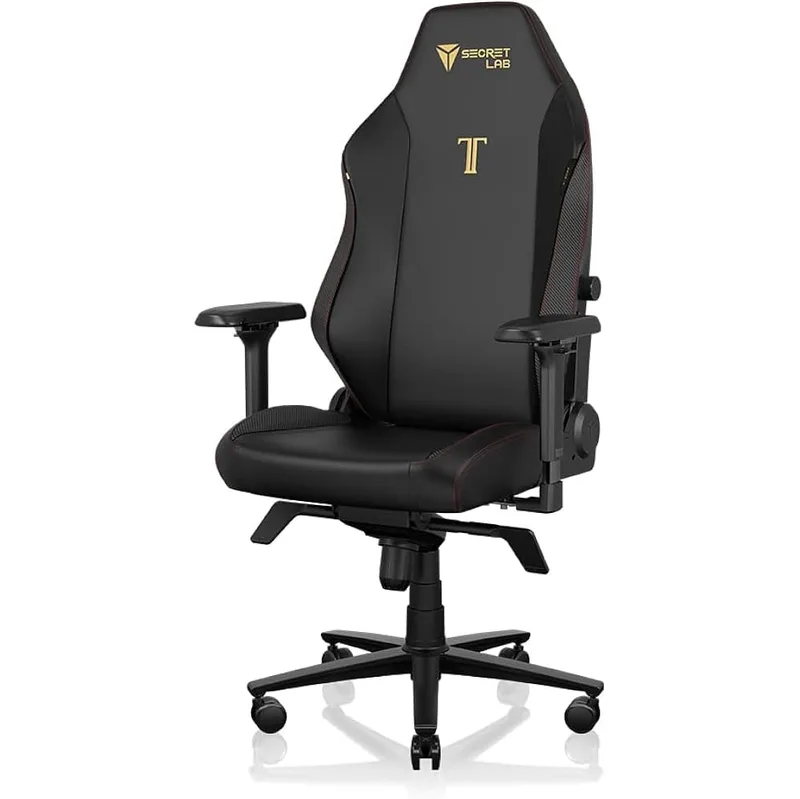
Secretlab Titan Evo Gaming Chair
Pros
- ✓ Magnetic headrest pillow clips on and slides up and down, with no straps to slip
- ✓ Four-way lumbar is built in, so there is no extra cushion to buy
- ✓ Reclines to 165 degrees for breaks
- ✓ Comes in three sizes, so smaller and larger frames get a closer fit
Cons
- ✗ The headrest is a pillow, not a rigid mechanical headrest like the Steelcase or Humanscale
- ✗ Firm foam needs a break-in period
- ✗ Gaming styling does not suit every office
The Titan Evo is a gaming-style chair, but its ergonomics are better than most. The four-way lumbar is built in, the recline runs from 85 to 165 degrees, and the headrest is a magnetic memory-foam pillow that slides up and down. It is a pillow, not a mechanical headrest, so it will not articulate like the Humanscale. For $669.00 it is the best middle path. See the Titan Evo review and our best gaming chairs for ergonomic comfort.
Best for: people who want a headrest and a plush recline without paying premium-office prices.
SIHOO M18
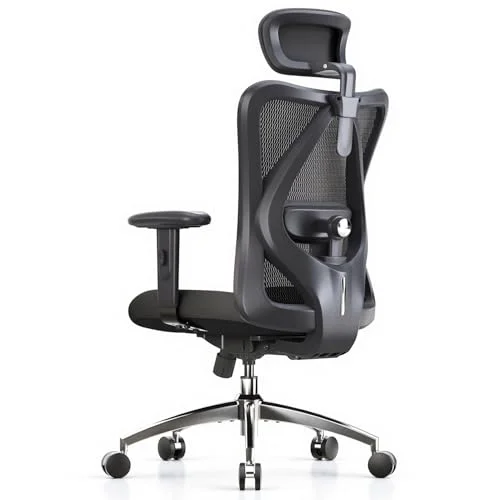
SIHOO M18 Ergonomic Office Chair with Headrest
Pros
- ✓ Adjustable headrest and dual lumbar for under $200
- ✓ 330-lb capacity is generous at this price
- ✓ Wide, padded seat suits long sessions
- ✓ Mesh back breathes better than the faux-leather chairs at this price
Cons
- ✗ Armrests only adjust two ways
- ✗ Build feels a step below pricier mesh chairs
- ✗ Headrest angle is less adjustable than on the Ticova
At $146.99, the M18 has a height-adjustable headrest, dual lumbar support and a 330-lb capacity. The armrests only adjust two ways and the build is not premium, but you get the features that matter for the money. It also appears in our best ergonomic chairs under $200.
Best for: a first real ergonomic chair on a tight budget.
Ticova Ergonomic Office Chair
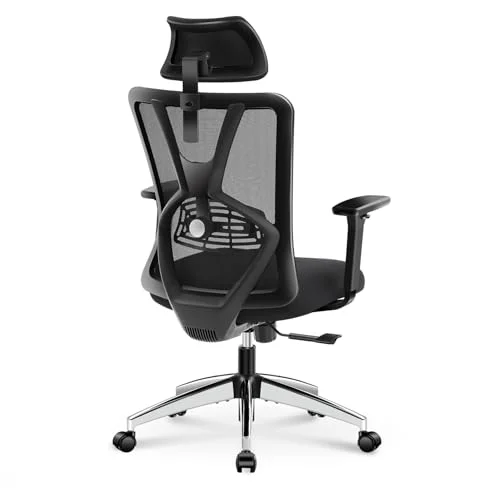
Ticova Ergonomic Office Chair with Adjustable Headrest
Pros
- ✓ Headrest adjusts for both height and angle
- ✓ 3D armrests give more adjustment than most chairs near $200
- ✓ 130-degree recline with the headrest following along
- ✓ Thick seat cushion with a waterfall edge
Cons
- ✗ Lumbar height does not adjust
- ✗ Owners report the headrest mount can loosen over time
- ✗ Mesh feels cheaper than the SIHOO or Branch
The Ticova’s headrest adjusts for height and angle, which most chairs at this price skip. Add 3D armrests, 130-degree recline and a thick waterfall-edge seat and it earns its $199.98. The weak points are fixed-height lumbar and a headrest mount some owners say loosens with time. Tighten it every few months.
Best for: people who recline a lot and want the headrest to follow them.
HOLLUDLE Mesh Chair
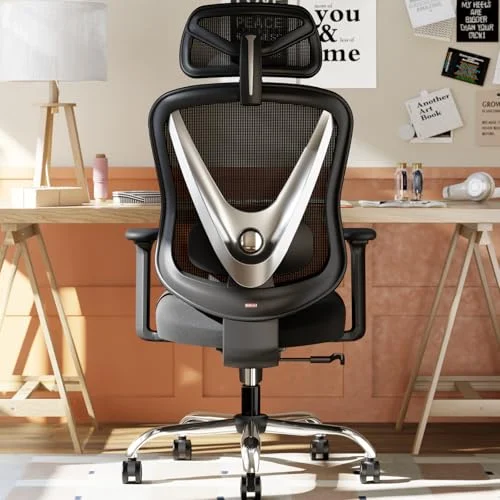
HOLLUDLE Ergonomic Mesh Office Chair with 2D Headrest
Pros
- ✓ Lowest price here, with a 2D adjustable headrest
- ✓ 3D lumbar and 3D armrests are rare under $150
- ✓ 5-year warranty, the longest among the budget chairs
- ✓ Foldable arms and back make it easy to tuck away
Cons
- ✗ Newer brand with fewer long-term owner reports
- ✗ V-shaped back runs narrow for broad shoulders
- ✗ Assembly instructions are less polished
The HOLLUDLE costs $149.99 and packs a 2D headrest, 3D lumbar and foldable 3D arms. It is a newer brand, so long-term durability is less proven, but the 5-year warranty offsets some of that risk. The narrow V-shaped back is a poor fit for broad shoulders. Compare it with other budget chairs in our best office chairs under $150.
Best for: the lowest price with a real adjustable headrest.
How to choose a chair with a headrest
Check the headrest type. Rigid, adjustable headrests (Steelcase, Humanscale, Ticova) hold your head in position. Pillow headrests (Secretlab) are softer but less precise. Strap-on cushions are an option if your chair has none; see our headrest pillow roundup.
Look for height and angle adjustment. A headrest that only moves up and down often lands in the wrong place when you recline. Angle matters as much.
Recline matters. A headrest is wasted on a chair that only tilts a few degrees. Look for 120 degrees or more.
Don’t skip the basics. Lumbar support, seat depth and arm adjustment still do most of the work. See how to adjust an office chair properly and how to choose an ergonomic chair.
Mind your floor. A chair mat protects hard floors and helps casters roll.
What to expect at each budget
Under $200. The SIHOO M18, Ticova and HOLLUDLE all include a headrest in the base price, and all three are mesh or mesh-and-foam builds with plastic or nylon frames. Expect adjustable lumbar and arms, a headrest that moves in one or two directions, and warranties of three to five years. What you give up is refinement: smoother recline mechanisms, tighter tolerances, and long-term durability data. Plan on tightening hardware occasionally.
Around $650 to $700. This is where the Secretlab Titan Evo sits. You get thicker foam, built-in lumbar and a wider recline range, but the headrest remains a pillow. If you want a rigid headrest that holds your head at a set angle, you are choosing between the budget mesh chairs and the premium tier.
Over $1,700. The Steelcase Gesture and Humanscale Freedom are built for the long haul, with 12 and 15-year warranties, and their headrests are engineered parts of the chair rather than add-ons. If you sit at a desk eight hours a day, the cost per day over a decade is modest. If you sit three hours a day, the budget chairs are the more sensible purchase.
Who should skip the headrest
Some people are better served by a chair without one. If you sit very upright, work in a forward-leaning posture, or share a desk with someone who is much taller or shorter, a fixed headrest can sit in the wrong place and push your head forward. In that case a chair with strong lumbar and seat adjustment is the better spend, and our ergonomic chairs for lower back pain roundup is a better starting point. Taller users should also look at chairs for tall people, since headrest height range is a common limit.
Setting the headrest up
Recline to the angle you actually use, then raise the headrest until it meets the back of your skull, not your neck. Angle it so it supports without pushing your chin down. Check it again when you change posture, and revisit the rest of your chair settings with our chair adjustment guide.
FAQ
Do I need a headrest on my office chair?
Not always. If you mostly sit upright and type, a headrest does little. If you recline during calls, reading or thinking, it takes strain off your neck.
Is a headrest good for neck pain?
It can reduce effort in your neck muscles while you recline. It is not a treatment. If pain persists, see a healthcare professional.
Can I add a headrest to a chair that doesn’t have one?
Sometimes. Premium brands sell headrest add-ons, and many chairs accept clip-on pillows. Fit varies by model, so check compatibility first.
Should I use the headrest while typing?
Usually no. Keep it just behind your head when upright and use it when you lean back.
Is the Secretlab Titan Evo a good office chair?
Yes, for most people. Its lumbar and recline are strong. The headrest is a pillow rather than a rigid headrest, which some prefer and some do not.
Final recommendation
The Steelcase Gesture is the best chair with a headrest here. The Humanscale Freedom suits people who want everything automatic. The Secretlab Titan Evo is the mid-priced pick. On a budget, the SIHOO M18 is the best all-rounder, the Ticova is the pick for reclining, and the HOLLUDLE is the cheapest way in.
Sources: HBADA E3 Air 2026 Edition, Boulies Master Rex 2026 coverage on Techaeris.