Wrist discomfort at the keyboard usually traces back to one habit: a flat mouse that twists your forearm and keeps your wrist planted while your whole arm drags it around. Vertical mice and trackballs both try to fix that, but from opposite directions. In 2026 the choice is easier to make than it used to be, partly because the category keeps growing. Kensington announced its Pro Fit Ergo TB675 vertical trackball this year, a hybrid of both ideas, and vertical mice from brands other than Logitech are now easy to find.
Quick answer: if you want the least change to how you work, get a vertical mouse. If your discomfort is in the wrist or forearm from constant arm movement, or your desk is cramped, try a trackball. The Logitech Lift is the vertical mouse we’d start with, and the Ergo M575S is the cheap way into trackballs. This is a research-based comparison from specs and owner reports, not a medical recommendation. If pain persists, see a clinician.
How the Two Designs Differ
A vertical mouse tilts your hand into a handshake position, around 57° on the Logitech models below. Your forearm stops rotating palm-down, which is the twist a flat mouse imposes. You still move the mouse across the desk with your arm, so shoulder and elbow work stays about the same.
A trackball stays put. Your thumb (or fingers, on some models) rolls a ball and the cursor follows. Your arm barely moves and the wrist can stay in a neutral spot, but the thumb now does fine motor work it was never doing before. That is why trackballs have a learning period and why some people trade wrist relief for thumb fatigue.
Vertical Mice: Same Motion, Better Angle
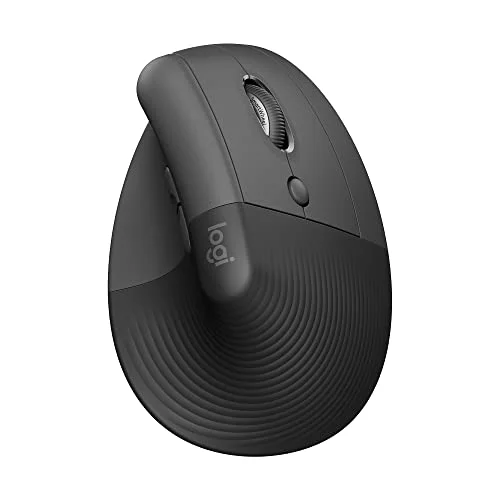
Logitech Lift Vertical Ergonomic Wireless Mouse
Pros
- ✓ Handshake grip removes most of the forearm twist a flat mouse forces
- ✓ Compact shape suits small and medium hands
- ✓ Quiet clicks and multi-device Bluetooth pairing
- ✓ No learning curve beyond a few days of adjusting to the angle
Cons
- ✗ Too small for large hands
- ✗ You still move your whole arm to move the cursor
- ✗ Right-handed version only in this listing
The Logitech Lift is the vertical mouse that fits the most people. Its low-profile body suits small and medium hands that the bigger vertical designs overwhelm, the clicks are quiet, and a single AA battery means no charging cable. Expect a week or two before the 57° angle feels normal. It is not for large hands, and you still sweep your arm across the desk to move the cursor. For the full field of vertical options, including a left-handed model, see our best vertical mice roundup.
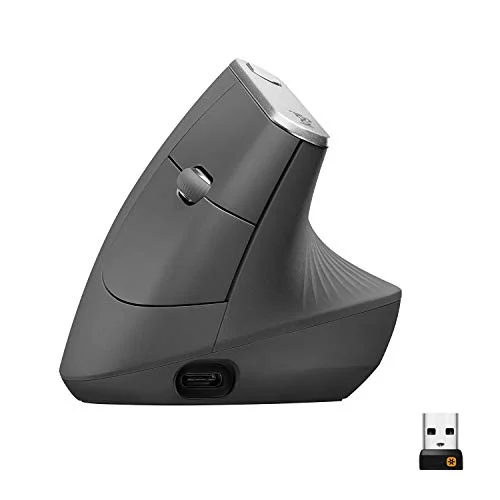
Logitech MX Vertical Wireless Mouse
Pros
- ✓ Larger body gives the whole palm a place to rest
- ✓ Rechargeable battery with a fast top-up
- ✓ Adjustable DPI button for quick speed changes
- ✓ Solid thumb rest
Cons
- ✗ Small hands will stretch for the buttons
- ✗ Heavier than the Lift
- ✗ Older design that has not been refreshed
The Logitech MX Vertical uses the same 57° angle in a larger body. If the Lift feels like holding a toy, this is the fix: the whole palm rests on the shell and the thumb rest is generous. It is heavier, rechargeable over USB-C, and hasn’t changed much in years. Small hands will find the buttons a reach.
Trackballs: Stationary Hand, Busier Thumb
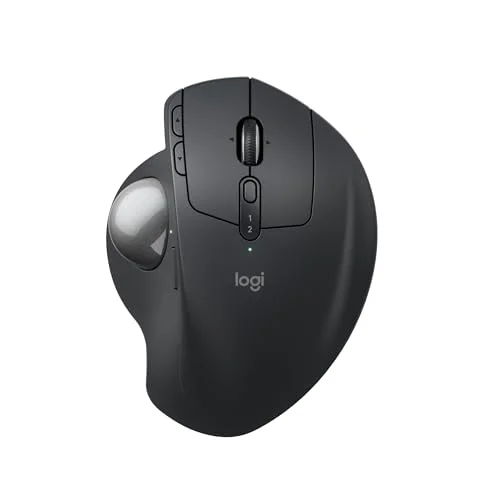
Logitech MX Ergo S Advanced Wireless Trackball
Pros
- ✓ The hand stays still while the thumb moves the cursor
- ✓ Adjustable tilt hinge lets you set the wrist angle
- ✓ Needs almost no desk space
- ✓ Pairs with two devices and switches with one button
Cons
- ✗ Real learning curve of one to two weeks
- ✗ Right-handed only
- ✗ Priciest option here
The Logitech MX Ergo S is the trackball I’d buy if the budget allows. The adjustable hinge tilts the body up to 20°, so you can tune the wrist angle instead of living with a fixed one. It pairs with two devices, charges over USB-C, and takes almost no desk room. Plan for one to two weeks of clumsy pointing, and note it is right-handed only. Our best ergonomic trackballs roundup covers alternatives, including ambidextrous models.
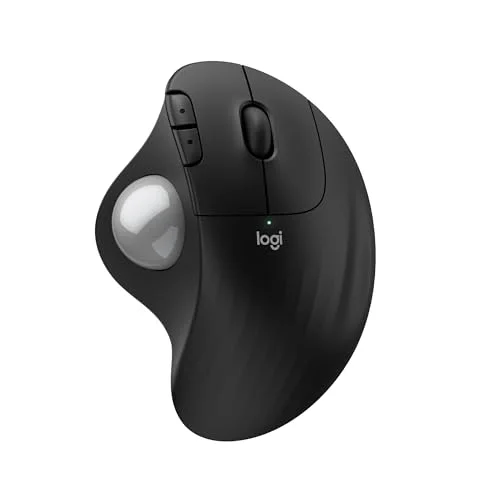
Logitech Ergo M575S Wireless Trackball
Pros
- ✓ Cheapest way to find out whether a trackball suits you
- ✓ Long battery life from a single AA
- ✓ Compact and comfortable for small to medium hands
- ✓ Same thumb-driven approach as the pricier MX Ergo S
Cons
- ✗ No tilt adjustment
- ✗ Connects to one device at a time, unlike the MX Ergo S
- ✗ Right-handed only
The Ergo M575S is the same thumb-ball idea without the tilt hinge and with a simpler feature set, at well under half the MX Ergo S price. It’s the one to buy if you’re curious but unsure. If you hate it, you’ve lost very little. If you love it, the MX Ergo S is the upgrade.
Vertical Mouse vs Trackball: Which Fits You
Logitech MX Vertical Wireless Mouse
Pros
- ✓ Larger body gives the whole palm a place to rest
- ✓ Rechargeable battery with a fast top-up
- ✓ Adjustable DPI button for quick speed changes
- ✓ Solid thumb rest
Cons
- ✗ Small hands will stretch for the buttons
- ✗ Heavier than the Lift
- ✗ Older design that has not been refreshed
| Vertical mouse | Trackball | |
|---|---|---|
| Main change | Hand angle | Hand stays still |
| Arm movement | Same as a flat mouse | Almost none |
| Learning curve | A few days | One to two weeks |
| Desk space | Same as a normal mouse | Minimal |
| Possible trade-off | Shoulder still works | Thumb can tire |
| Entry price | Lift | Ergo M575S |
Choose a vertical mouse if your complaint is forearm twist or wrist pressure and you want to keep your pointing habits. It’s the easier switch, and it works for gaming and precise design work.
Choose a trackball if you have limited desk space, shoulder or elbow strain from reaching, or you’re already comfortable with thumb work. Many people also end up using one of each, switching through the day.
Who Tends to Prefer Which
Owner feedback on both designs follows a pattern. People who spend the day in spreadsheets, documents and email, with lots of small precise clicks, tend to settle into a trackball because the cursor movement is tiny and the hand never leaves the ball. People who switch between design tools, editing, browsing and the occasional game tend to stay happier with a vertical mouse, since the sweeping arm motion they already use still works.
Desk layout matters too. A trackball sits in one spot, so it works on a cluttered desk, a lap tray or a narrow keyboard shelf where a mouse would run out of room. A vertical mouse needs the same clear space as any mouse. If you share a desk between sitting and standing, a sit-stand setup with a small surface is a natural place for a trackball.
Getting Through the First Two Weeks
Whichever you choose, the first days feel worse than the mouse you had. Plan for it rather than judging too soon.
- Switch fully. Alternating between the old mouse and the new one resets the adjustment every time.
- Lower the sensitivity first. Both categories feel twitchy at default speed; slow the pointer, then raise it as your accuracy improves.
- Keep your wrist neutral. The new mouse can’t help if your keyboard sits too high or your forearm hangs off the desk edge. Adjust the chair and desk first. Our guide to why your back hurts at your desk covers setup basics.
- Take micro-breaks. Stop and shake out your hand a few times an hour, especially in the early days when you grip too hard.
- Stop if it hurts. Mild awkwardness is normal. Sharp, tingling or worsening pain is a signal to stop and talk to a professional.
What to Look For Before You Buy
- Hand size. Small hands fit the Lift and M575S. Large hands need the MX Vertical or MX Ergo S.
- Handedness. All four picks here are right-handed. A left-handed Lift exists, covered in the vertical mice roundup.
- Adjustability. Only the MX Ergo S lets you change the angle.
- Battery type. AA models (Lift, M575S) run a long time; rechargeable ones (MX Vertical, MX Ergo S) need a cable occasionally.
- The rest of the setup. A mouse won’t fix a desk set too high. Read our guide to preventing wrist pain from typing for keyboard and posture changes.
FAQ
Is a vertical mouse or trackball better for carpal tunnel?
Neither is a proven treatment, and results vary. Both are designed to reduce wrist strain, vertical mice by removing forearm twist and trackballs by removing hand movement. Someone with a diagnosis should ask their clinician.
Do trackballs cause thumb pain?
They can. Thumb trackballs shift work to the thumb, and some users report fatigue early on. Take breaks, keep your grip loose, and consider a vertical mouse if the thumb complains.
How long does it take to get used to a vertical mouse?
Most owner reports describe a few days to two weeks. Trackballs take longer, often one to two weeks before pointing feels natural.
Can I use a vertical mouse or trackball for gaming?
Vertical mice handle casual and some competitive play. Trackballs are usually a poor fit for fast aiming. If you game, read our gaming hand and wrist injury prevention guide.
Can I switch between the two?
Yes, and some people alternate to vary which muscles do the work. Just give each a fair trial before judging it.
Conclusion
For most people the Logitech Lift is the easiest upgrade from a flat mouse, with the MX Vertical for larger hands. If you want your hand to stop moving, the Logitech MX Ergo S is the best trackball here and the Ergo M575S is the low-risk trial. Pick one, give it two weeks, and keep the old mouse in a drawer in case it isn’t for you.