Disclosure: PostureRanked is reader-supported. When you buy through links on our site, we may earn an affiliate commission at no additional cost to you. Our recommendations are based on independent research and testing.
| Product | Price | Rating |
|---|---|---|
| Logitech MX ERGO S Wireless Trackball | $99.99 | 9.2 |
| Logitech ERGO M575S Wireless Trackball | $39.99 | 8.7 |
| Kensington SlimBlade Pro Wireless Trackball | $119.99 | 8.8 |
| Kensington Expert Wireless Trackball | $89.99 | 8.4 |
| Elecom HUGE Wireless Trackball | $67.26 | 8.2 |
| Perixx PERIMICE-520 Trackball | $39.99 | 7.8 |
Disclosure: PostureRanked is reader-supported. When you buy through links on our site, we may earn an affiliate commission at no extra cost to you. Learn more
If your wrist aches after a long day at the desk, a trackball mouse might be the single upgrade that changes everything. Unlike a regular mouse, a trackball sits still — you move the cursor by rolling a ball with your thumb or fingers, which means your wrist and forearm barely move at all. For people dealing with carpal tunnel syndrome, RSI, or chronic wrist pain, trackballs aren’t just comfortable — they’re often the only thing that lets them work without pain.
The market has gotten genuinely good. Logitech, Kensington, and Elecom have all released updated models in the past year, and there are solid options at every price point from $40 to $140.
Short on time? The Logitech MX ERGO S is our top pick — premium ergonomics, quiet clicks, and a 20° tilt that puts your hand in a near-neutral position. Budget-conscious? The Logitech ERGO M575S at $40 punches way above its weight.
1. Logitech MX ERGO S — Editor’s Pick
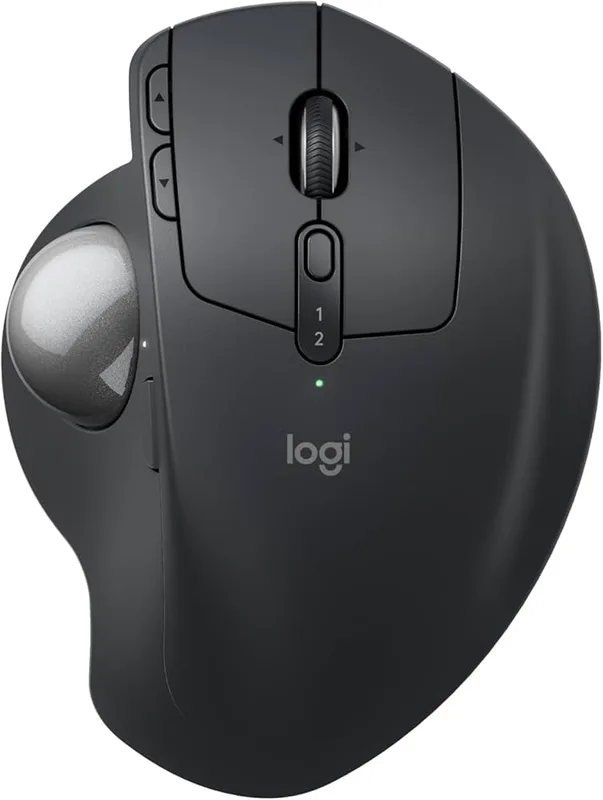
Logitech MX ERGO S Wireless Trackball
Pros
- ✓ Best-in-class ergonomics with 20° tilt
- ✓ 80% quieter clicks than predecessor
- ✓ Connect two devices, switch seamlessly
- ✓ 120-day battery with 1-min quick charge
Cons
- ✗ No left-handed version
- ✗ Only 6 buttons vs 8 on previous MX ERGO
$99.99 | Buy on Amazon
The MX ERGO S is Logitech’s latest flagship trackball, and it earns that title. The defining feature is the adjustable hinge: you can set the body at 0° or 20° of tilt, which rotates your forearm into a more neutral, handshake-like position. Logitech claims 27% less muscle strain compared to a standard mouse. Having used one for months, I believe it.
Logitech also overhauled the clicks for the S version — they’re 80% quieter than the original MX ERGO. In an open office or late-night session, that matters. USB-C charging replaces the older micro-USB port, and 120 days of battery life means you’ll charge it maybe four times a year. One-minute quick charge gives you a full day if you’re caught short.
The thumb trackball is precise and well-positioned. Six programmable buttons are configured through Logi Options+, and you can connect two computers via Bluetooth or the encrypted Logi Bolt dongle — switching between them with a single button. If you use a laptop and a desktop, that’s genuinely useful.
The only real downside: it’s right-hand only, and there’s no left-handed version on the horizon.
Best for: Power users, people with RSI, anyone who wants the best trackball money can buy.
2. Logitech ERGO M575S — Best Value
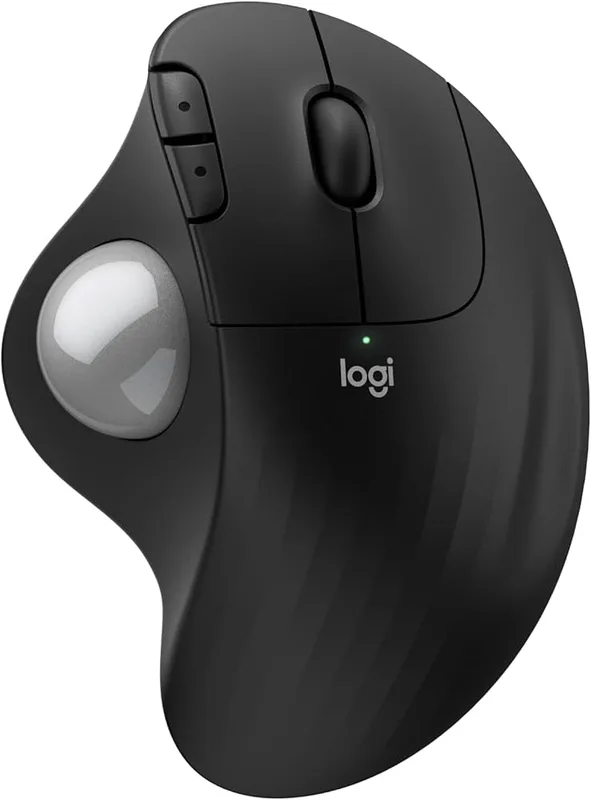
Logitech ERGO M575S Wireless Trackball
Pros
- ✓ Exceptional value at $40
- ✓ 18-month battery — no charging needed
- ✓ Smooth thumb control learning curve
- ✓ Compact, right-hand-friendly shape
Cons
- ✗ Single device connection only
- ✗ No tilt adjustment
$39.99 | Buy on Amazon
The M575S costs less than a third of the MX ERGO S and gives you 80% of the experience. That’s remarkable.
It’s a thumb-operated trackball — the ball sits in the upper-left corner where your thumb rests — with a gentle ergonomic curve that keeps your wrist in a natural position. The ball size (34mm) is smaller than the premium models, but tracking is smooth and precise enough for everyday work.
What makes the M575S extraordinary at its price: an 18-month AA battery. No charging, no cables, no anxiety about dying mid-meeting. Bluetooth or Logi Bolt wireless for a clean desk. And it’s quiet enough that you won’t bother anyone around you.
The S update over the original M575 adds encrypted wireless for business users and slightly smoother tracking. If you’re shopping for a first trackball or want a budget option that genuinely works, start here.
Best for: First-time trackball users, people on a budget, anyone who hates charging peripherals.
3. Kensington SlimBlade Pro — Best for Ambidextrous Users
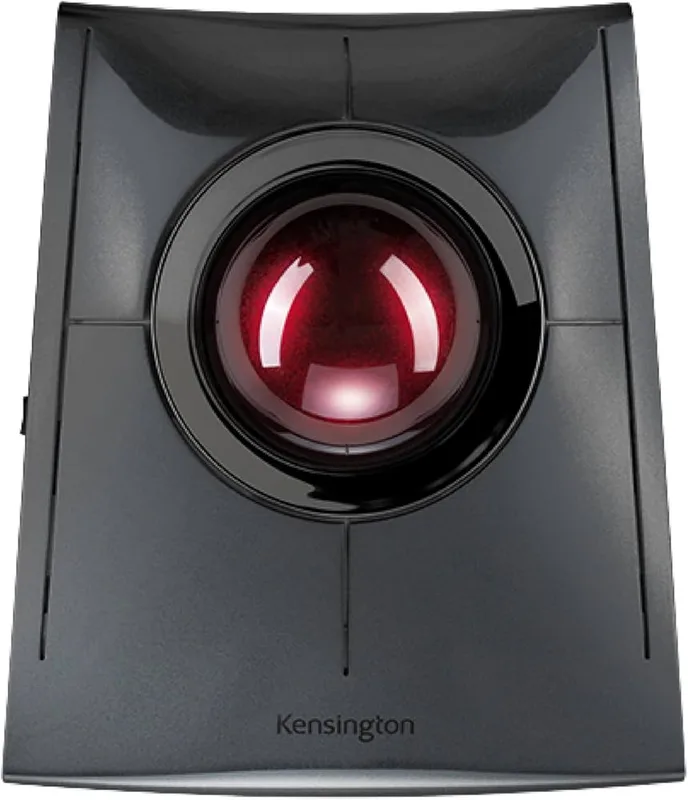
Kensington SlimBlade Pro Wireless Trackball
Pros
- ✓ Unique ball-twist scroll eliminates scroll wheel fatigue
- ✓ Works for both left and right hands
- ✓ Triple connectivity including wired
- ✓ Rechargeable with USB-C
Cons
- ✗ Ball-twist scrolling has a steep learning curve
- ✗ Pricey compared to similarly equipped rivals
$119.99 | Buy on Amazon
The SlimBlade Pro’s party trick is ball-twist scrolling. Instead of a scroll wheel, you twist the large 55mm ball left and right to scroll up and down. It takes about a week to feel natural. After that, it’s better — more precise, less fatigue, no small scroll wheel to wear out.
The ambidextrous flat design works equally well for left- and right-handed users, which makes it the only serious option if you mouse with your left hand. Build quality is excellent — Kensington uses premium materials and the ball feels silky-smooth.
Connectivity is triple: Bluetooth, 2.4GHz wireless, and wired USB-C. Battery lasts four months on a charge. Eight programmable buttons are configured through KensingtonWorks software, which is functional if not beautiful.
At $120 it’s priced similarly to the MX ERGO S, and for right-handed users I’d lean toward Logitech. But if you’re left-handed or love the ball-twist scroll concept, the SlimBlade Pro stands alone.
Best for: Left-handed users, people who want an alternative to scroll wheels, multi-device setups.
4. Kensington Expert Wireless Trackball — The Reliable Classic
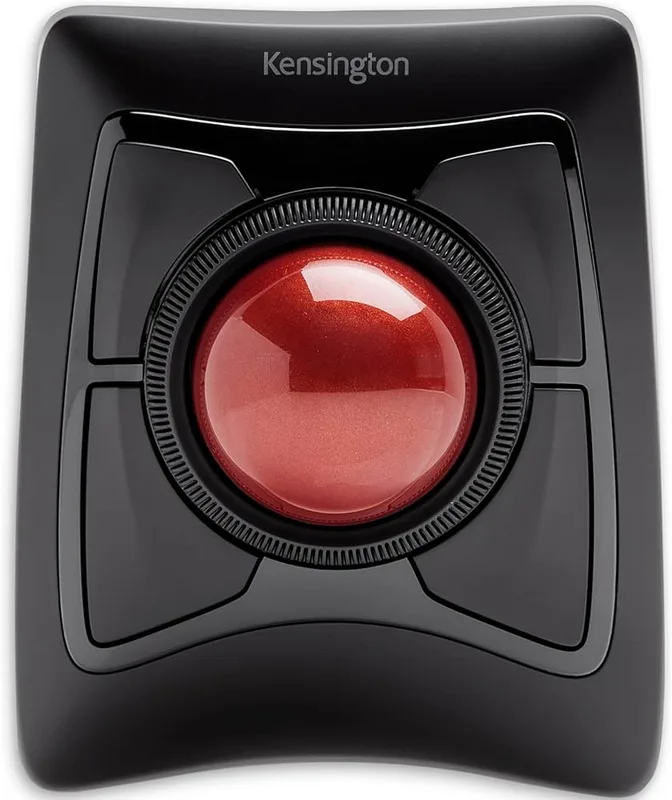
Kensington Expert Wireless Trackball
Pros
- ✓ Classic ergonomic design, loved by power users
- ✓ Large 55mm ball for precise control
- ✓ Detachable wrist rest is genuinely useful
- ✓ 3-year warranty
Cons
- ✗ Button clicks are noticeably loud
- ✗ Only 4 buttons — limited customization
- ✗ Large form factor — not for small hands
$89.99 | Buy on Amazon
The Expert Wireless has been the gold standard ambidextrous trackball for years, and for good reason. The 55mm ball is large — big enough that precise cursor placement feels effortless after the initial adjustment period. DiamondEye optical tracking reads the ball accurately regardless of rolling speed, and the patented Scroll Ring lets you scroll by rotating the ring that surrounds the ball. Intuitive once learned, and kind to fingers.
The included detachable wrist rest is genuinely ergonomic — not a token rubber pad but a real angled support that keeps your wrist in a neutral position. Bluetooth or 2.4GHz USB dongle. Three-year warranty.
Downsides: only 4 customizable buttons (fewer than rivals at this price), and the clicks are loud — notably loud. If you’re in a quiet shared space, this is a real issue. The Expert Mouse TB800 EQ (ASIN: B0G2L19JPY) is Kensington’s newer model with quieter clicks, if that’s a dealbreaker.
Best for: Long-term power users, ambidextrous setups, people who want a proven workhorse.
5. Elecom HUGE Wireless — Best Finger-Operated Trackball
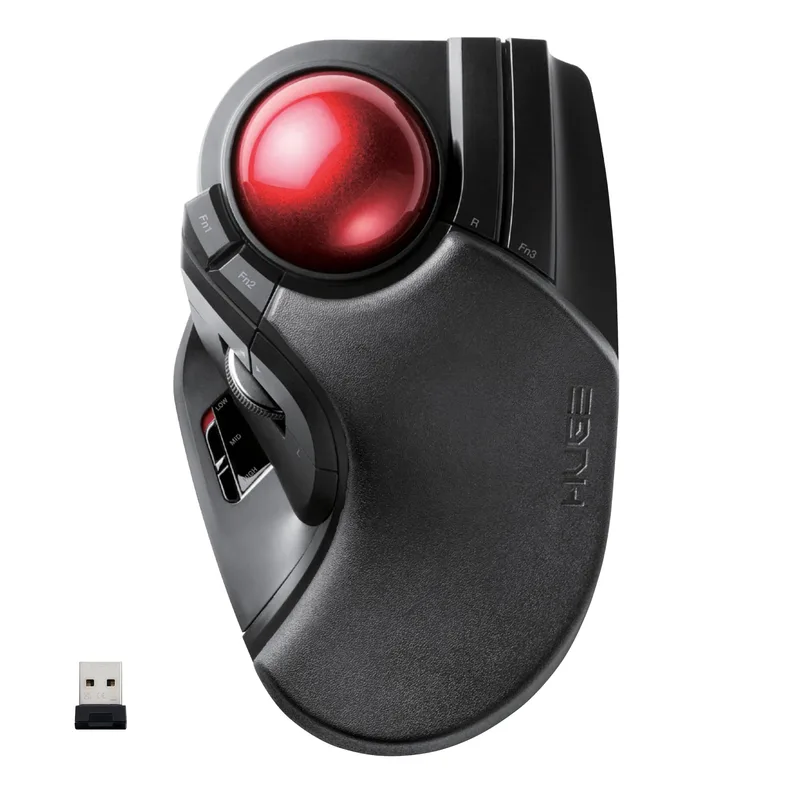
Elecom HUGE Wireless Trackball
Pros
- ✓ Finger-operated control is faster for CAD/design work
- ✓ Ruby ball bearings = buttery-smooth tracking
- ✓ Excellent palm rest for all-day use
- ✓ Good design award winner
Cons
- ✗ 2.4GHz only — no Bluetooth
- ✗ Older model — no USB-C or rechargeable battery
- ✗ Right-hand only
$67.26 | Buy on Amazon
Most trackballs are thumb-operated. The Elecom HUGE is finger-operated: you roll the 52mm ball with your index and middle fingers while your ring and pinky fingers rest on the body. It’s a different skill than thumb trackballs, but finger-operated control offers more precision — particularly for design, CAD, and any work requiring fine cursor placement.
The ball rolls on three artificial ruby bearings, which is the same technology used in professional trackballs. It’s noticeably smoother than plastic-bearing alternatives. The ergonomic palm rest keeps your hand in a relaxed position, and eight programmable buttons give you plenty of shortcut real estate.
At $67, it’s mid-range in price but genuinely premium in build quality. The main limitation: 2.4GHz only (no Bluetooth), no USB-C or rechargeable battery, and it’s right-hand only. Elecom also offers the newer HUGE Plus (ASIN: B0FYC9YC3M) at $139.99 with tri-mode connectivity and rechargeable battery; the original HUGE remains available at $67.26 and is the better value pick.
Best for: Graphic designers, CAD users, anyone who wants finger-operated precision.
6. Perixx PERIMICE-520 — Best Budget Trackball
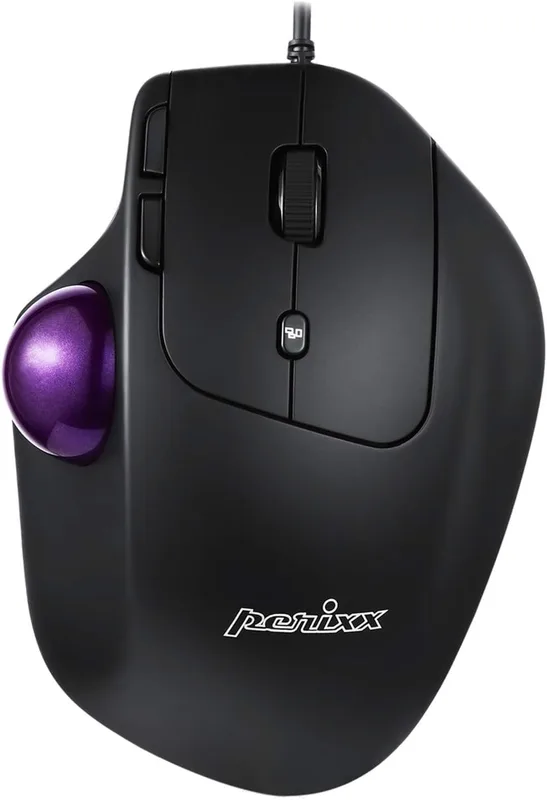
Perixx PERIMICE-520 Trackball
Pros
- ✓ Adjustable angle is unique at this price
- ✓ 8 programmable buttons for a budget pick
- ✓ No batteries or charging required (wired)
- ✓ Solid Omron switches
Cons
- ✗ Wired only — no wireless option
- ✗ Software UI feels dated
- ✗ Smaller community of reviews vs Logitech/Kensington
$39.99 | Buy on Amazon
The PERIMICE-520 stands out in the budget category for one reason: adjustable angle. Two included risers let you set the body at 0°, 10°, or 20° of tilt — a feature you normally only find on premium models. Combined with 8 programmable buttons and solid Omron click switches, this is a lot of trackball for $40.
It’s wired, which is actually a feature if you want zero latency and no battery concerns. Thumb-operated ball. Ergonomic right-hand sculpt. The software for programming buttons is functional but shows its age.
Where Perixx lags: the community and ecosystem around it is much smaller than Logitech or Kensington, reviews are fewer, and Perixx’s software doesn’t match Logi Options+ for polish. But the hardware itself is solid for the price.
Best for: Budget buyers who still want an adjustable angle, wired ergonomic setups.
Trackball Comparison Table
| Model | Price | Ball Size | Control | Connectivity | Battery |
|---|---|---|---|---|---|
| Logitech MX ERGO S | $99.99 | 34mm | Thumb | BT + Logi Bolt | 120 days, USB-C |
| Logitech M575S | $39.99 | 34mm | Thumb | BT + Logi Bolt | 18 months (AA) |
| Kensington SlimBlade Pro | $119.99 | 55mm | Fingers | BT + 2.4GHz + Wired | 4 months, USB-C |
| Kensington Expert Wireless | $89.99 | 55mm | Fingers | BT + 2.4GHz | USB dongle battery |
| Elecom HUGE Wireless | $67.26 | 52mm | Index finger | 2.4GHz | AA batteries |
| Perixx PERIMICE-520 | $39.99 | ~34mm | Thumb | Wired USB | N/A (wired) |
Trackball Buying Guide
Thumb vs. Finger Control
This is the biggest choice. Thumb-operated trackballs (Logitech M575S, MX ERGO S, Perixx) position the ball at the thumb, leaving your fingers free for clicking. They’re more common and have a faster learning curve.
Finger-operated trackballs (Elecom HUGE, Kensington Expert, SlimBlade) use your index and middle fingers to roll the ball. They tend to offer more precision and are preferred by designers and engineers who need fine cursor control.
Ball Size Matters
Larger balls (50mm+) offer more precision because small hand movements translate to smaller cursor movements. The Kensington Expert and SlimBlade Pro use 55mm balls. The Logitech options use 34mm balls. If you do detailed work requiring precise cursor placement, bigger is better.
Ambidextrous vs. Right-Hand Only
Most trackballs are designed for right-hand use. If you’re left-handed, your choices narrow significantly: the Kensington Expert Wireless and SlimBlade Pro are both genuinely ambidextrous, not just symmetrically-shaped. Most Logitech and Elecom models are right-hand only.
Wireless vs. Wired
All wireless trackballs use either Bluetooth, a 2.4GHz USB dongle, or both. Bluetooth is better for clean setups and travel; a 2.4GHz dongle typically offers more reliable, lower-latency connection. Wired (like the Perixx) is lag-free by definition and great for older machines.
Budget Expectations
- Under $50: Logitech M575S or Perixx PERIMICE-520. Both are genuinely good options.
- $50–$80: Elecom HUGE — the jump in build quality and ball-bearing smoothness is worth the extra spend.
- $80–$100: Kensington Expert Wireless — a proven, durable workhorse.
- $100–$140: Logitech MX ERGO S or Kensington SlimBlade Pro — premium ergonomics, premium features.
FAQ
Are trackball mice actually better for carpal tunnel?
Yes, for most people. The fundamental difference is that your wrist and forearm stay still — you move a ball instead of moving the entire mouse. This dramatically reduces the repetitive lateral wrist motion that contributes to carpal tunnel and RSI. Many physical therapists specifically recommend trackballs for patients with wrist issues.
Is there a learning curve switching to a trackball?
Expect one to two weeks to feel natural, and two to four weeks to feel faster than you were with a regular mouse. Most people find they stop wanting to go back. The hardest part is precision scrolling and fast diagonal movements — these improve with practice.
Which trackball is best for left-handed users?
The Kensington SlimBlade Pro and Kensington Expert Wireless are your best bets — both are designed from the ground up as ambidextrous devices, not adapted right-hand shapes. Most other trackballs are right-hand-only.
Can I use a trackball for gaming?
Some people do, but trackballs are generally not competitive for fast-twitch gaming (FPS, RTS). They shine for productivity, design, and browsing. If you want a hybrid situation — gaming with a regular mouse, desk work with a trackball — that’s a popular setup.
How do I clean a trackball?
Remove the ball (most pop out with gentle pressure from below), wipe it with a microfiber cloth, and clean the bearing contact points with a cotton swab. Do this every two to four weeks for smooth tracking. Ruby and stainless steel bearings (Elecom HUGE, Kensington Expert) accumulate less gunk than plastic bearings.
Does the Logitech MX ERGO S work with an iPad?
Yes — it connects via Bluetooth and works with iPadOS. The tilt adjustment and programmable buttons function as standard mouse buttons on iPadOS. Logi Options+ for full customization requires a Mac or Windows computer, but basic usage works with any Bluetooth device.
Conclusion
The Logitech MX ERGO S is the trackball we’d recommend to most people — the 20° tilt, quiet clicks, 120-day battery, and dual-device switching add up to a device that’s hard to beat at any price. At $100, it pays for itself in wrist health within a month.
If $100 feels like too much for a first trackball, the Logitech M575S at $40 is the right starting point. It’s not a compromise — it’s genuinely excellent, just without the tilt hinge and the premium finishes.
Left-handed? Go Kensington SlimBlade Pro. Need finger-operated precision for design work? Elecom HUGE. Want to try a trackball risk-free? Perixx PERIMICE-520 at $40 is a solid wired entry point.
Whatever you pick, the switch from a regular mouse to a trackball is one of the most impactful ergonomic changes you can make at your desk. Pair it with an ergonomic keyboard and a wrist rest for a complete wrist-friendly input setup. If you’re not ready to commit to a trackball, our ergonomic mouse for large hands guide covers conventional alternatives. For the full home office picture, see our best desk accessories for remote work guide.