Disclosure: PostureRanked is reader-supported. When you buy through links on our site, we may earn an affiliate commission at no additional cost to you. Our recommendations are based on independent research and testing.
| Product | Price | Rating |
|---|---|---|
| Logitech Ergo K860 Wireless Ergonomic Keyboard | $129 | 9.2 |
| Logitech MX Vertical Wireless Mouse | $75 | 9.0 |
| Kensington Duo Gel Keyboard Wrist Rest | $22 | 8.5 |
| HUANUO Adjustable Under-Desk Keyboard Tray | $48 | 8.3 |
Disclosure: PostureRanked is reader-supported. When you buy through links on our site, we may earn an affiliate commission at no extra cost to you. Learn more
If your wrists ache by 2 PM every day, you’re not alone. In 2026, wrist and hand pain from typing is one of the most searched ergonomic complaints among desk workers — and the hybrid work era has only made it worse. Workers who spent years customizing their home setups are now being forced back to legacy office workstations with flat keyboards and zero tilt adjustment, and the complaints are flooding in.
The good news: most typing-related wrist pain is preventable. The bad news: a wrist rest alone won’t fix it. You need to understand why your wrists hurt before you can address it.
This guide covers the core ergonomic principles — keyboard angle, wrist positioning, mouse grip, keyboard height — and the specific gear that actually helps. Skip to the product recommendations if you’re already up to speed on the basics.
Quick pick: The Logitech Ergo K860 fixes the single biggest cause of wrist pain (keyboard angle) and includes a built-in wrist rest. It’s the keyboard I’d put on every desk.
Why Wrists Hurt From Typing: The Root Cause
Most wrist pain from typing comes down to sustained non-neutral postures. The three culprits:
- Wrist extension — your wrists bent upward while typing (the raised-heel keyboard position everyone learned growing up)
- Ulnar deviation — wrists bent outward toward the pinky side to reach a flat, straight keyboard
- Forearm pronation — forearms rotated flat to use a standard horizontal mouse
Any one of these, repeated for hours daily, increases pressure on the carpal tunnel and tendons in your wrist. Combine all three, and you have a recipe for repetitive strain injury (RSI), carpal tunnel syndrome, or tendinitis.
Research published in the Journal of Electromyography and Kinesiology confirms that even small changes in wrist flexion angle significantly alter carpal tunnel pressure. The fix isn’t rest — it’s correcting the angle.
The 5 Fundamentals of Wrist-Friendly Typing
1. Keyboard Angle: Negative Tilt Is Everything
The single most important adjustment most people never make. Standard keyboards sit flat or with the back elevated (positive tilt). This forces your wrists into extension — exactly what you don’t want.
What to do: Use negative tilt — rear of the keyboard lower than the front. This keeps wrists flat or slightly flexed downward, which is the neutral position.
Options for achieving negative tilt:
- Buy a keyboard with built-in negative tilt adjustment (most ergonomic keyboards like the K860 have this)
- Use an under-desk keyboard tray with tilt adjustment
- Lower your keyboard by lowering your chair or raising your desk
Don’t fold out those kickstand feet on the back of your keyboard. That positive tilt is the opposite of what your wrists need.
2. Keyboard Height: Elbows at 90°
Your keyboard should sit at roughly elbow height so your forearms are parallel to the floor (or angled slightly downward toward the keyboard). If your keyboard is too high, your shoulders shrug and your wrists extend. Too low, and you flex your elbows uncomfortably.
The standard desk height of 29–30 inches is too tall for most seated workers. This is why keyboard trays exist — they drop the typing surface 3–6 inches below the desk, putting the keyboard exactly where your arms need it.
For standing desk users: adjust desk height until your elbows are at 90° with your arms hanging naturally. Then lower it another inch for the negative tilt benefit.
3. Wrist Position: Float, Don’t Rest
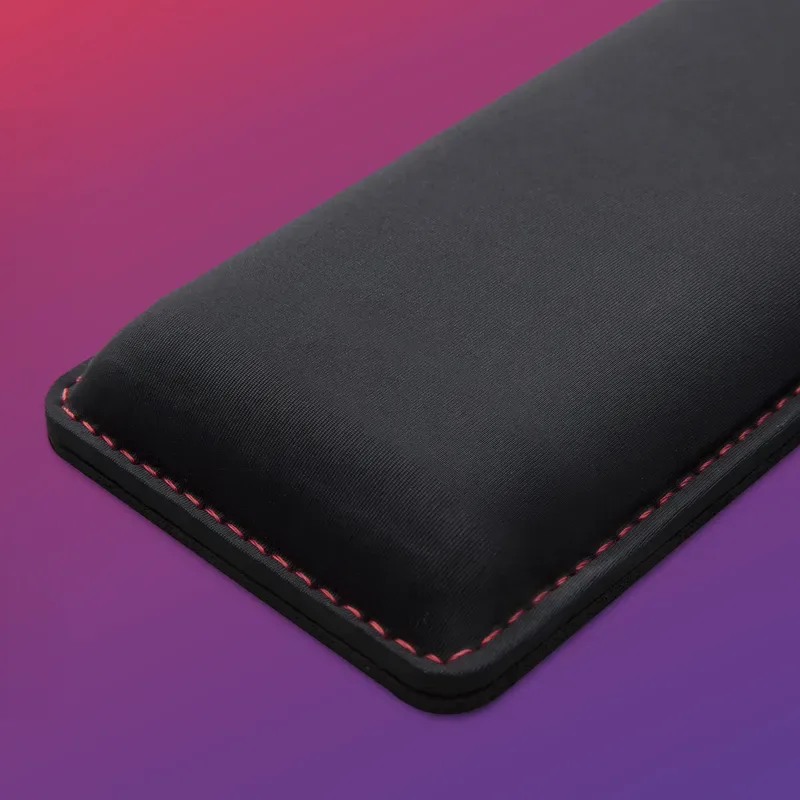
This is where wrist rests are widely misused. A wrist rest is not for your wrists while you’re typing — it’s for your palms to rest on between keystrokes.
While actively typing:
- Keep wrists floating slightly above the surface
- Don’t let wrists contact the desk or wrist rest
- Move your whole arm to reach keys, not just your fingers
Use the wrist rest as a resting place during pauses. If you’re constantly leaning on it while typing, you’re compressing the carpal tunnel from the outside — adding to the problem, not solving it.
4. Split Keyboard Layout: Eliminate Ulnar Deviation
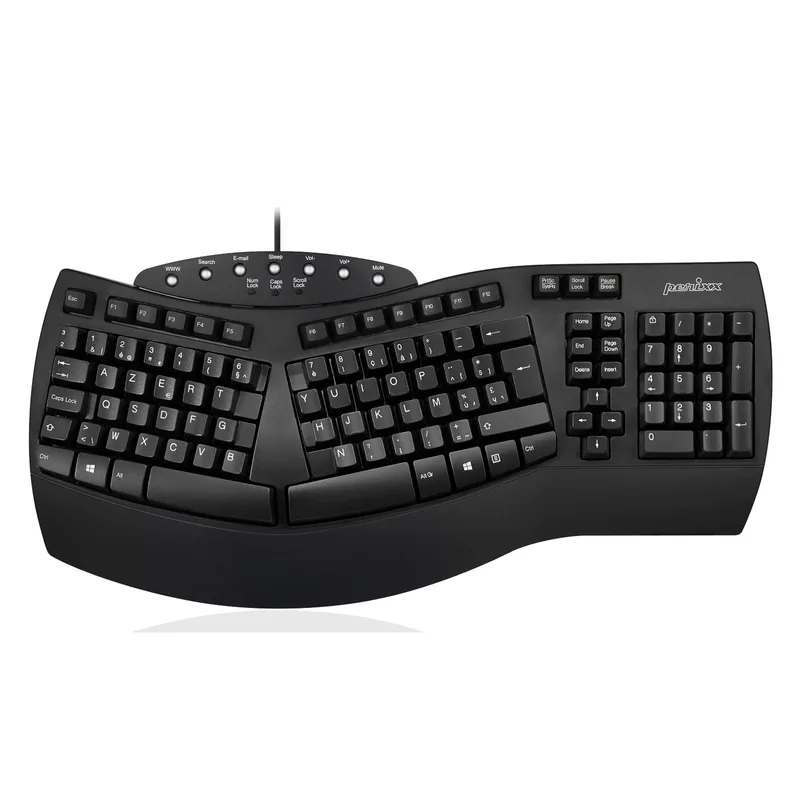
Standard keyboards force you to angle your wrists outward to type in a straight line. A split ergonomic keyboard lets you angle each half to match your natural shoulder width, eliminating that ulnar deviation entirely.
You don’t need a dramatic split keyboard. Even a slight tent (angling the keys upward toward the center) makes a significant difference. For most desk workers, the Logitech Ergo K860 strikes the right balance — ergonomic without looking alien on your desk. For programmers who want to go deeper, see our ergonomic keyboards for programmers guide.
5. Mouse Grip: The Overlooked Half
Your mouse causes as much wrist strain as your keyboard — sometimes more. Using a standard horizontal mouse keeps your forearm in pronation (palm down), which compresses the tissues along your forearm and wrist all day.
A vertical mouse places your hand in a handshake position (thumb up), which is the neutral forearm position. It takes a few days to adapt, but most people notice reduced forearm fatigue within a week.
For heavy mousing work, consider a trackball — your arm barely moves, eliminating repetitive positioning strain entirely.
3 Daily Wrist Exercises to Do at Your Desk

These take under five minutes and should be done every 2–3 hours:
1. Wrist Circles (30 seconds each direction) Make a fist and slowly rotate your wrists in full circles — 10 clockwise, 10 counterclockwise. This improves circulation and keeps the tendons mobile.
2. Prayer Stretch (30 seconds) Press palms together in front of your chest (prayer position), then slowly lower your hands toward your waist until you feel a stretch in your forearms. Hold 15 seconds, repeat twice.
3. Tendon Glides (10 reps) Start with fingers straight. Curl fingertips to form a hook fist, then bend into a full fist, then make a flat fist (fingers bent at knuckle, straight at joints). Hold each position briefly. This keeps tendon sheaths lubricated.
4. Finger Splay (5 reps) Spread fingers as wide as possible, hold for 3 seconds, release. Counteracts the constant curling position of typing.
Set a timer — if you wait until your wrists hurt to stretch, you’ve waited too long.
Recommended Products
These are the four pieces of gear that address the four main causes of typing wrist pain.
Best Ergonomic Keyboard: Logitech Ergo K860
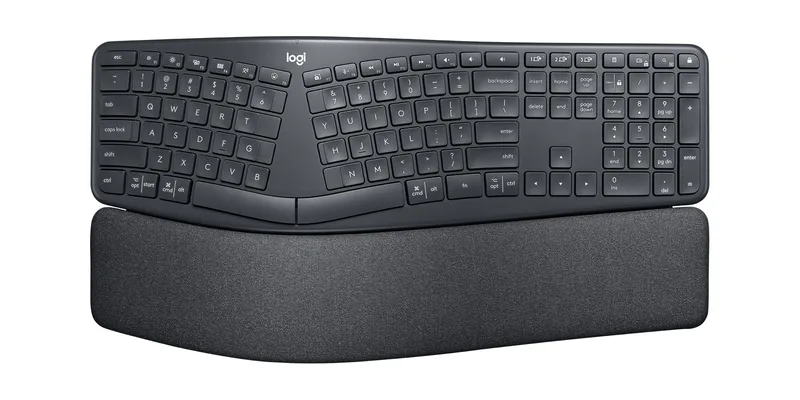
The K860 is the keyboard I’d buy first for anyone dealing with wrist pain. The curved, split layout reduces ulnar deviation without requiring you to learn a radically different keyboard. The built-in negative tilt eliminates wrist extension. The cushioned wrist rest is correctly designed — elevated enough to support your palms during pauses without forcing contact during typing.
Logitech claims 25% less wrist bending compared to a standard flat keyboard. Based on owner reports across forums and verified purchase reviews, that figure seems believable — users consistently note reduced afternoon fatigue within 2–3 weeks of adapting.
Best for: Anyone working 6+ hours at a keyboard who wants a significant ergonomic upgrade with minimal learning curve.
Best Ergonomic Mouse: Logitech MX Vertical
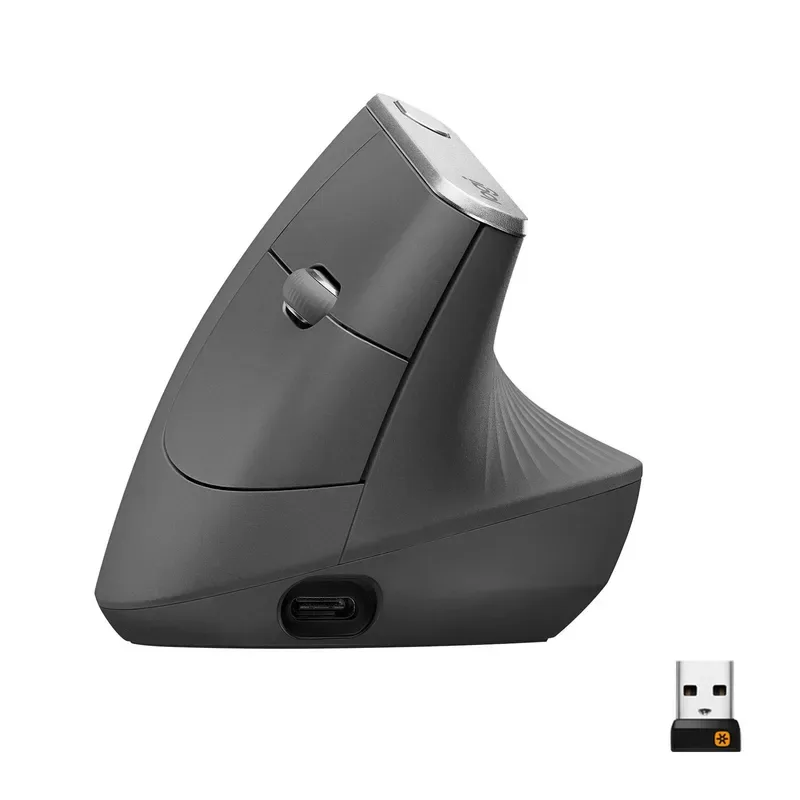
The MX Vertical’s 57° handshake angle is the most natural resting position for your forearm. Using it eliminates the pronation strain that accumulates over a full day of horizontal mouse use.
The sensor is accurate enough for detail work, the rechargeable battery lasts months, and the build quality is exactly what you’d expect from Logitech’s MX line. The right-hand-only limitation is the main drawback — left-handed users will need to look at the Lift Left or a different brand.
Best for: Right-handed users with forearm or wrist fatigue from standard mouse use.
Best Wrist Rest: Kensington Duo Gel
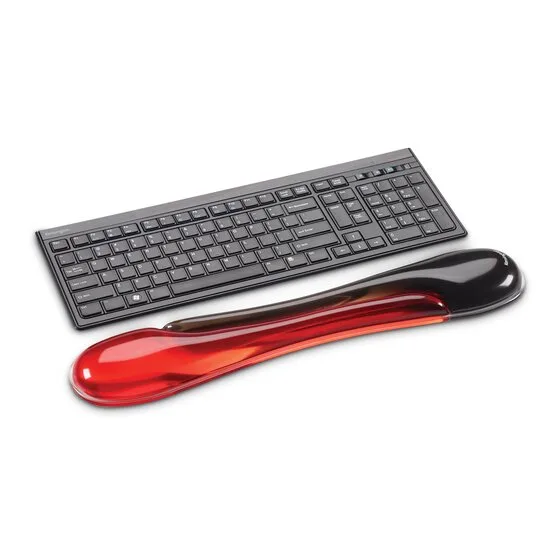
Wrist rests are frequently bought and frequently misused. The Kensington Duo Gel gets the form right: the ventilation channel down the center reduces direct pressure on the carpal tunnel, the cooling gel stays cooler than foam during extended sessions, and the non-skid base keeps it from migrating across the desk.
At $22, it’s the easiest upgrade on this list. For mechanical keyboard users, see our dedicated wrist rests for mechanical keyboards guide — keyboard height matters more with high-profile switches.
Best for: Anyone on any keyboard who needs palm support between typing bursts.
Best Keyboard Tray: HUANUO Adjustable
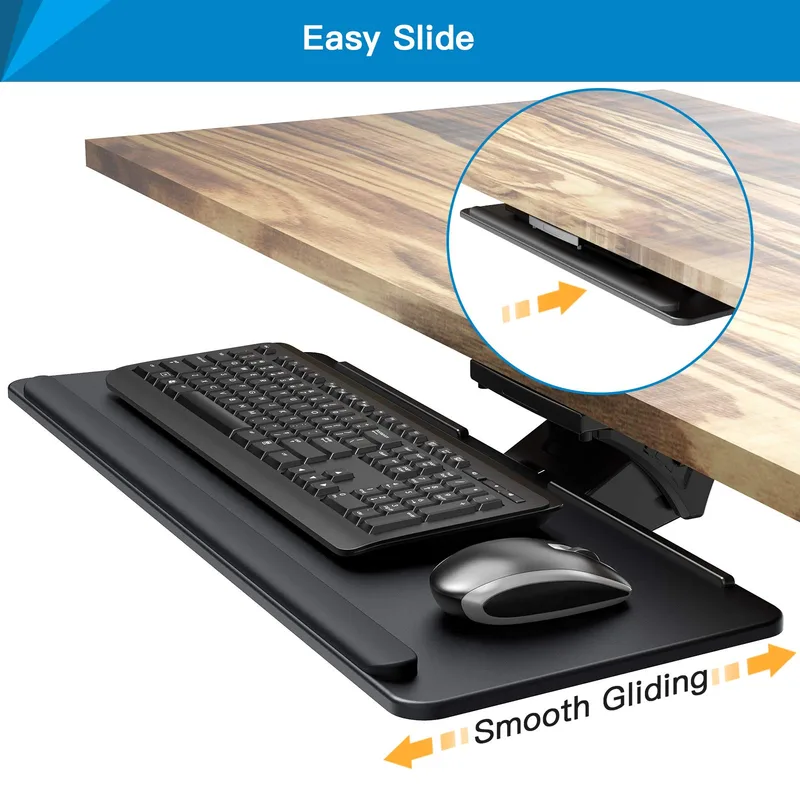
If your desk is at a fixed height that’s too tall for proper elbow positioning, a keyboard tray is more effective than any ergonomic keyboard. The HUANUO drops your typing surface below the desk edge and lets you dial in negative tilt. The 360° swivel means you can center the keyboard to your body, not your desk — useful if your monitor isn’t centered with your chair.
The installation requires screwing into your desk, which rules it out for rented spaces. But if you have your own desk and your typing position is chronically too high, this is the most impactful single fix. See our full keyboard tray guide for more options.
Best for: People with fixed-height desks whose keyboard sits too high.
Quick Comparison
| Product | Price | Primary Fix | Best For |
|---|---|---|---|
| Logitech Ergo K860 | $129 | Wrist extension + ulnar deviation | Most desk workers |
| Logitech MX Vertical | $75 | Forearm pronation | Heavy mouse users |
| Kensington Duo Gel Wrist Rest | $22 | Palm support | Any keyboard setup |
| HUANUO Keyboard Tray | $48 | Keyboard height + negative tilt | Fixed-height desks |
Buying Guide: What Actually Matters
For keyboard selection:
- Look for built-in negative tilt (not just feet that add positive tilt)
- Curved split layout > straight split > standard keyboard
- Low-profile keys reduce finger travel distance, which matters at high volumes
- Avoid mechanical keyboards with heavy actuation force if you have existing pain — linear or lighter tactile switches are gentler
For wrist rests:
- Gel > foam for long sessions (stays cooler, compresses less)
- Medium firmness is better than soft — too soft provides no meaningful support
- Match the length to your keyboard width
- Never use a wrist rest that puts your wrist at or above your typing surface height
For mice:
- Vertical mice work best for users with forearm/wrist pronation pain
- Trackballs work best for users with shoulder/arm repetitive positioning pain
- Match size to hand — a mouse that’s too small creates a claw grip that tenses your hand
- See our guide to ergonomic mice for large hands if fit is a concern
Budget expectations:
- Wrist rest alone: $15–$35
- Keyboard tray: $40–$130
- Ergonomic keyboard: $80–$200
- Vertical mouse: $50–$130
- Full setup (all four): $200–$500, replacing years of physical therapy visits
Frequently Asked Questions
Does a wrist rest actually help with carpal tunnel?
Used correctly, yes — but only during rest periods, not while actively typing. The wrist rest supports your palms between keystrokes, reducing cumulative fatigue. If you lean on it while typing, it compresses the carpal tunnel from outside and can worsen symptoms. Wrist rests are a tool for pauses, not for use during active typing.
What keyboard angle prevents wrist pain?
Negative tilt — where the back of the keyboard is lower than the front — is the clinically recommended position. This keeps your wrists flat or slightly flexed downward, which reduces pressure on the carpal tunnel. Aim for a 5–15° negative tilt. The standard elevated-heel position (positive tilt) increases wrist extension and should be avoided.
Is a split keyboard worth it for wrist pain?
For most people with wrist or forearm pain from typing, yes. Split keyboards eliminate ulnar deviation (wrists bending outward) and allow each hand to be positioned independently. The Logitech Ergo K860 is the least disruptive starting point — it doesn’t look as extreme as a full open-split keyboard but provides most of the ergonomic benefit.
How long does it take to adapt to an ergonomic keyboard?
Most people fully adapt within 2–3 weeks. The first week feels slow as your muscle memory recalibrates. Typing speed usually returns to normal by week 2–3. Start with shorter sessions (30 minutes, then gradually longer) during the first week if adaptation feels difficult.
Can the wrong mouse cause wrist pain?
Absolutely. Standard horizontal mice keep your forearm in pronation all day — palm facing the desk. This position compresses the tissues along the inside of your wrist and forearm. A vertical or angled mouse keeps your forearm in a neutral handshake position, significantly reducing that compression. Mouse pain is often more persistent than keyboard pain because it’s less discussed.
When should I see a doctor?
If you have numbness, tingling, or pain that wakes you at night, see a doctor before making equipment changes. These can be signs of diagnosed carpal tunnel syndrome or other conditions that require medical evaluation. Ergonomic changes help prevent injury and reduce mild discomfort — they don’t treat an existing injury that needs clinical care.
Conclusion
Wrist pain from typing is almost always a setup problem, not a structural one. Fix the keyboard angle first — that single change eliminates the most common cause of RSI before it develops. Then address height, mouse grip, and wrist rest technique.
The Logitech Ergo K860 handles keyboard angle and ulnar deviation in one purchase. Add the MX Vertical for your mouse hand, and you’ve solved the two biggest contributors to desk-related wrist pain for under $220.
If your desk is too high, the HUANUO keyboard tray makes more difference than any keyboard swap. And at $22, the Kensington wrist rest is the easiest first step for any setup.
Do the wrist exercises. Take the breaks. Set a timer if you have to. The best ergonomic setup in the world still needs movement to work.