Most ergonomic mice are sized for average to large hands. That leaves a huge portion of users—people with hands under 7 inches from wrist to fingertip—struggling with mice that are simply too big. Reaching for buttons becomes an overextension, grip styles shift awkwardly, and the result is exactly the kind of strain ergonomic gear is supposed to prevent.
In 2026, the market has improved. Perixx just released the PERIMICE-719R in March—a rechargeable vertical mouse purpose-built for smaller hands at only $20. Brands like Evoluent and Logitech have offered small-hand options for years, but 2026 is the first time budget buyers have a genuinely ergonomic option at this price.
If you want the short answer: the Logitech MX Anywhere 3S is the best all-around pick. For wrist pain specifically, the Evoluent VerticalMouse D Small Wireless is unmatched. And if budget is the priority, the Perixx PERIMICE-719R at $20 is a legitimate ergonomic option, not just a cheap mouse with marketing copy.
How to Measure Your Hand for Mouse Sizing
Measure from the base of your wrist (where your hand meets your forearm) to the tip of your middle finger with your hand flat. Under 7 inches is small. Seven to eight is medium. Over eight is large—see our best ergonomic mice for large hands guide if that’s you.
For grip style: palm grip users generally need a longer mouse body. Claw and fingertip grip users can use shorter, more compact designs. Most picks on this list work for all three grip styles in the small-hand range.
1. Logitech MX Anywhere 3S — Editor’s Pick
Logitech MX Anywhere 3S
Pros
- ✓ Compact footprint fits small hands without awkward overreach
- ✓ MagSpeed electromagnetic scroll wheel is remarkably smooth
- ✓ Tracks on virtually any surface, including glass
- ✓ Up to 70 days of battery from a single USB-C charge
Cons
- ✗ No vertical angle—standard horizontal orientation only
- ✗ Scroll wheel click can feel stiff for some users
- ✗ At $79, it's on the expensive side for a compact mouse
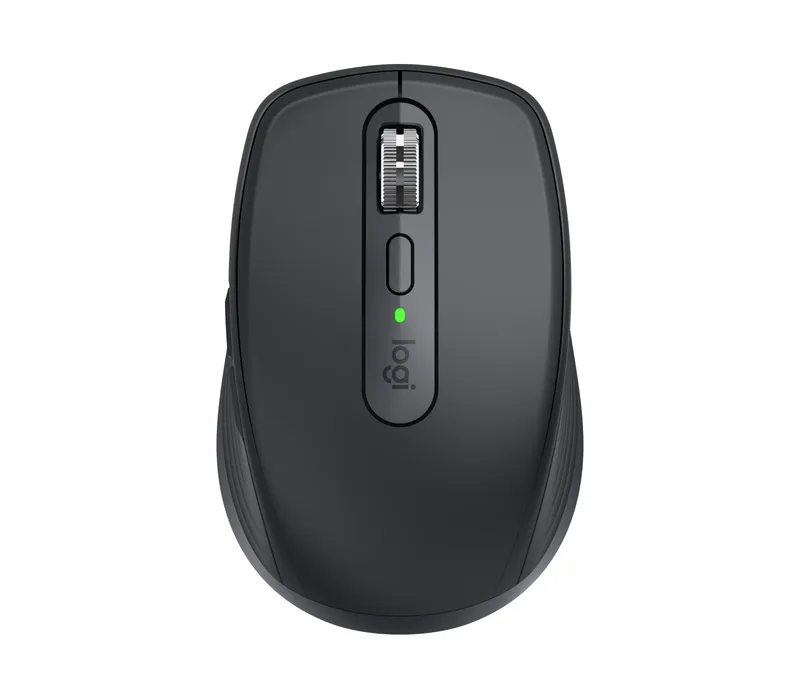
The MX Anywhere 3S is the mouse I’d recommend to most small-handed users before anything else. At 100.5mm long and 65.5mm wide, it’s genuinely compact without feeling toyish—and Logitech has built in every quality-of-life feature that matters.
The MagSpeed scroll wheel is the standout feature: electromagnetic rather than mechanical, it delivers near-silent, butter-smooth scrolling that switches between precise-click and free-spin modes automatically. The 8,000 DPI Darkfield sensor tracks on any surface, including glass—handy if your desk has a glass insert. Battery life is exceptional: 70 days on a full USB-C charge.
Six programmable buttons via Logi Options+ give you meaningful customization: back/forward navigation, mission control shortcuts, or app-specific macros. Pair up to three devices and switch between them via a button on the bottom.
The trade-off: it’s a horizontal mouse. If your wrist pain stems from pronation (forearm rotated palm-down), the MX Anywhere 3S won’t fix that. It’s excellent for small-hand comfort, not wrist angle correction. If pronation is your issue, look at the Evoluent or Logitech Lift below.
At $79, it’s the same price as the larger MX Master 3S—but it’s a better fit for small hands, and the sensor is just as capable.
2. Evoluent VerticalMouse D Small Wireless — Best for Wrist Pain
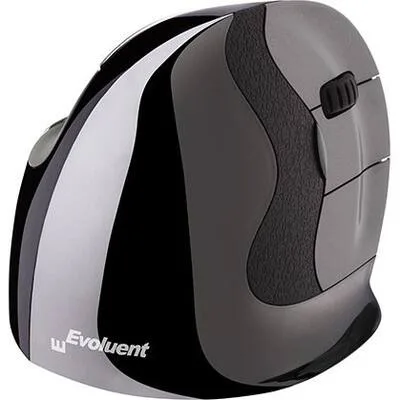
Evoluent VerticalMouse D Small Wireless
Pros
- ✓ The only vertical mouse engineered specifically for small hands
- ✓ Grooved buttons guide fingers into optimal position naturally
- ✓ Six programmable buttons for productivity shortcuts
- ✓ Eliminates forearm rotation entirely—zero pronation required
Cons
- ✗ Most expensive pick at $110
- ✗ Expect a 1–2 week adjustment period before it feels natural
- ✗ 2.4GHz only—no Bluetooth connectivity option
Evoluent invented the vertical mouse in the early 2000s, and the VerticalMouse D Small Wireless remains the gold standard for small-handed users with wrist or forearm issues. No other vertical mouse is explicitly sized for smaller hands; Evoluent offers S, M, and large specifically to match hand size.
The design holds your hand in a true handshake position—forearm neutral, zero pronation, palm perpendicular to the desk. Users recovering from carpal tunnel, repetitive strain, or forearm tendinitis consistently cite the Evoluent as the mouse that made the difference. Owner reports describe significant pain reduction within the first few weeks of switching.
The grooved buttons are Evoluent’s other signature touch: they physically guide your fingers into correct placement, so even when you’re tired and your form slips, the buttons nudge you back. Six programmable buttons let you customize speed settings and assign shortcuts via Evoluent’s driver software.
The downsides are real. At $110, it’s the most expensive pick here. Expect 1–2 weeks of adjustment before the vertical grip feels natural—many users find the first few days awkward. And the 2.4GHz-only wireless (no Bluetooth) means it requires the USB receiver.
If you’re serious about ergonomics and dealing with wrist pain, nothing on this list solves the problem more directly.
3. Logitech Lift Vertical Ergonomic Mouse — Best for Office Use
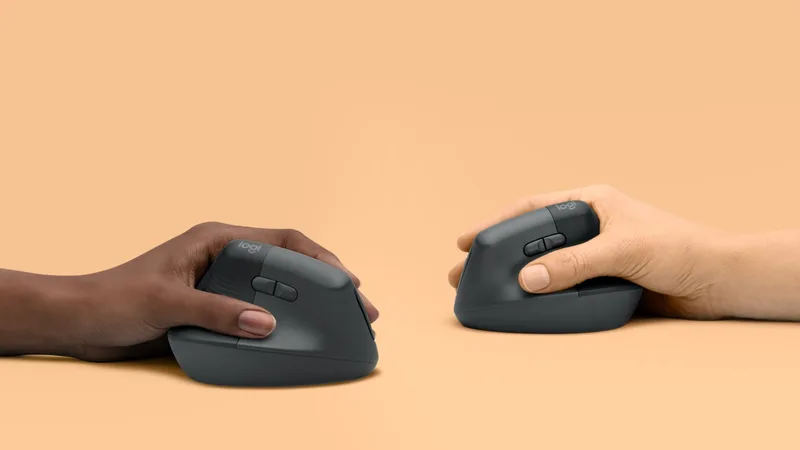
Logitech Lift Vertical Ergonomic Mouse
Pros
- ✓ 57° vertical angle relieves wrist pronation without full learning curve
- ✓ Dual wireless: Bluetooth and Logi Bolt USB receiver
- ✓ Available in left-handed version—rare for vertical mice
- ✓ Two-year battery life on a single AA; no charging routine needed
Cons
- ✗ DPI tops out at 4,000—not ideal for precision design or photo work
- ✗ No true 'small' size option; fits small-to-medium rather than small
- ✗ Scroll wheel feel is less refined than the MX Anywhere line
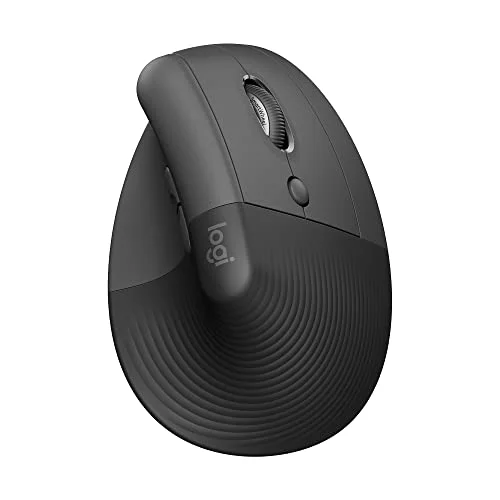
The Logitech Lift is the more accessible entry point into vertical ergonomics. It’s sized for small-to-medium hands (under 7.5 inches), positioned at a 57° vertical angle—not quite 90° like the Evoluent, but enough to meaningfully reduce wrist pronation.
The dual wireless setup (Bluetooth + Logi Bolt USB receiver) gives you options that the Evoluent doesn’t. A single AA battery lasts up to 24 months—there’s no charging cable to remember. Six quiet-click buttons are customizable via Logi Options+, and the soft rubber grip materials feel premium.
Two things stand out about the Lift in 2026: first, it’s available in a left-handed version, which is genuinely rare for vertical mice. Second, it comes in four colors (Graphite, Off-White, Sand, Rose), which sounds trivial but matters if you care about your desk aesthetic.
The weakness is sizing precision: Logitech doesn’t make a “small” and “medium” variant like Evoluent—the Lift is sized for small-to-medium, which means hands at the smaller end of the range may find it slightly oversized. The 4,000 DPI cap is fine for office work but limiting for photo editing or precision design. At $67, it’s the sweet spot between the budget picks and the premium Evoluent.
4. Razer Viper Mini — Best for Gaming
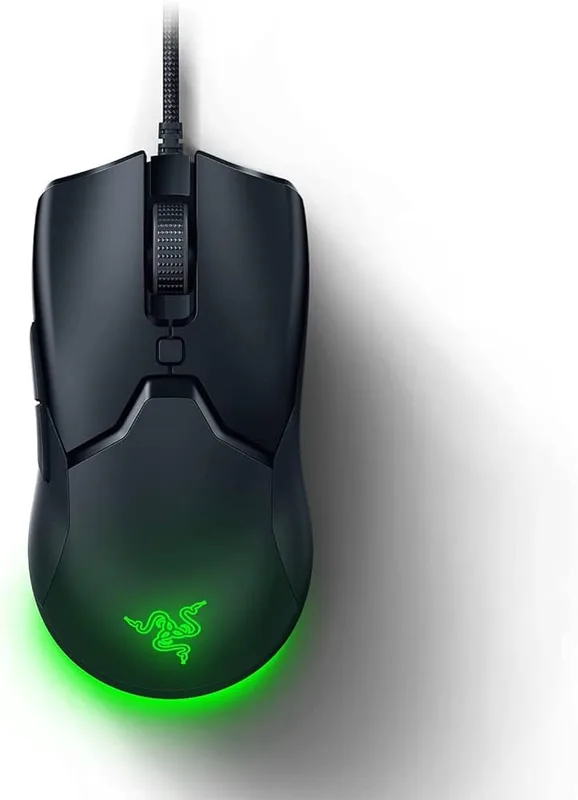
Razer Viper Mini
Pros
- ✓ 61g is among the lightest mice available—virtually no wrist fatigue
- ✓ 118mm length fits palm and claw grip styles for small hands
- ✓ Razer optical switches register at 0.2ms—no debounce lag
- ✓ Speedflex cable is so flexible it barely feels wired
Cons
- ✗ Wired only—no wireless version at this price
- ✗ Gaming aesthetics won't suit every office environment
- ✗ No ergonomic vertical angle; horizontal design only
If you game, the Viper Mini is the obvious small-hands pick. At 61g and just 118.3mm long, it’s designed to disappear in your hand—light enough that wrist fatigue during long sessions is dramatically reduced, short enough that fingers don’t overextend.
The Razer Optical Switches deliver 0.2ms actuation time with no mechanical debounce—competitive gaming input that matters in fast-paced titles. The 8,500 DPI sensor handles anything from casual browsing to 1440p+ gaming. The Speedflex cable is so thin and flexible it barely registers as a cable; drag is minimal.
For daily office use, the Viper Mini works fine—it’s quiet enough, the DPI steps are adjustable, and the Chroma RGB can be turned off entirely if you want professional aesthetics. But it’s not ergonomically designed for wrist relief. If your goal is gaming performance in a compact body, it’s excellent. If your goal is addressing repetitive strain, look at the vertical options.
Owner feedback consistently highlights the Viper Mini as the go-to recommendation in small-hands gaming forums. At $40, it’s a straightforward value proposition.
5. Perixx PERIMICE-719R — Best Value
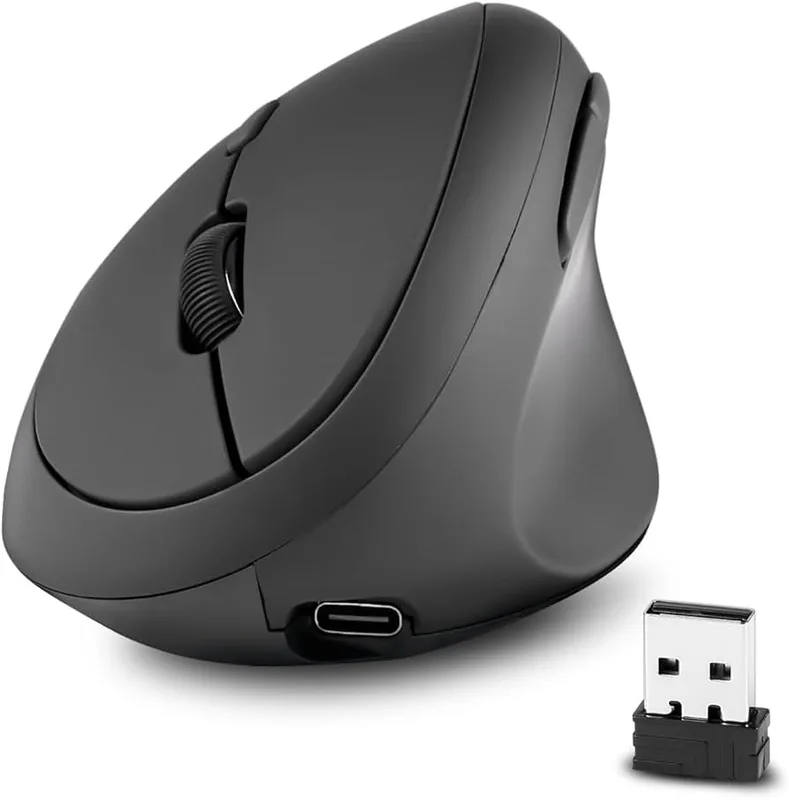
Perixx PERIMICE-719R
Pros
- ✓ Rechargeable via USB-C and wireless pad at just $20
- ✓ Vertical ergonomic design purpose-built for small hands
- ✓ Silent click buttons ideal for shared offices and libraries
- ✓ Launched in March 2026 with updated wireless charging support
Cons
- ✗ Only 5 buttons vs 6 on premium picks
- ✗ 2,400 DPI cap limits creative and precision use cases
- ✗ Build quality reflects the budget price point
Perixx launched the PERIMICE-719R in March 2026 specifically targeting smaller hands—and at $20 with USB-C and wireless charging, it’s the most accessible ergonomic vertical mouse available.
The vertical design mirrors the Evoluent’s handshake position, with quiet clicks and a compact body sized for hands under 7.1 inches. What makes the 719R notable compared to the older PERIMICE-719 is the charging upgrade: dual charging via USB-C cable or wireless pad, depending on which version you choose. The 719R ships without the wireless pad; the 719RX includes it for a few dollars more.
Build quality reflects the price—the plastic shell feels hollow compared to Logitech or Evoluent, and the 2,400 DPI cap is limiting for anything beyond standard office tasks. Five buttons instead of six means one fewer shortcut. The sensor is basic but functional for spreadsheet work, browsing, and general productivity.
For someone curious about vertical mice who isn’t ready to spend $67–$110, the PERIMICE-719R is the right entry point. If you try it and find vertical doesn’t work for you, you’re out $20. If you find it helps, you can upgrade to the Evoluent with full confidence.
6. Anker 2.4G Wireless Vertical Ergonomic Mouse — Most Affordable
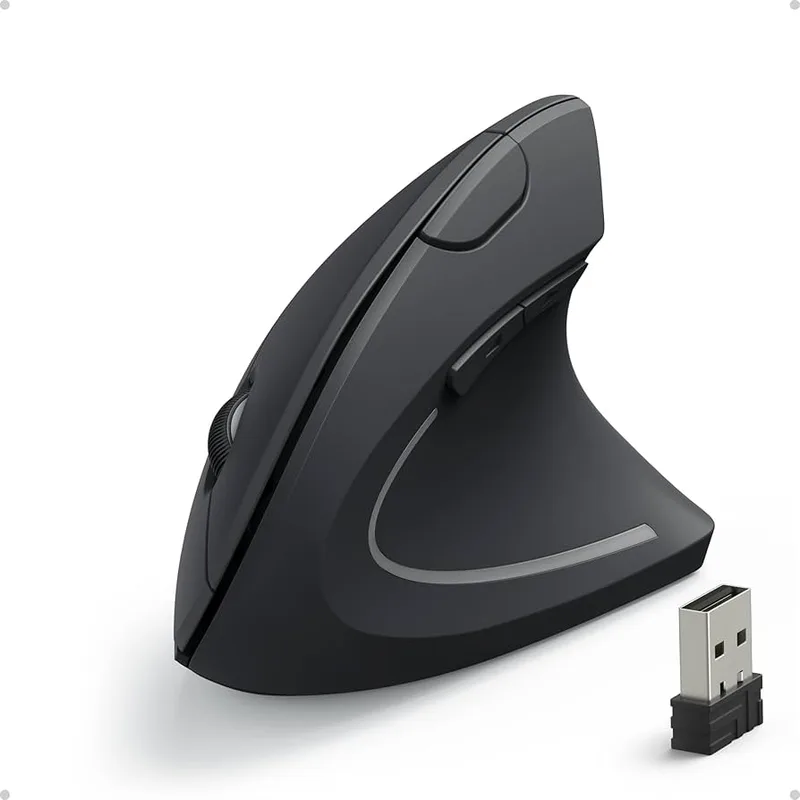
Anker 2.4G Wireless Vertical Ergonomic Mouse
Pros
- ✓ One of the most-reviewed vertical mice on Amazon with solid track record
- ✓ Compact form factor works well for smaller hands
- ✓ Three DPI settings cover everyday computing tasks
- ✓ Under $25 makes it easy to try ergonomic mice risk-free
Cons
- ✗ AA batteries only—no USB-C or rechargeable option
- ✗ No Bluetooth; requires nano USB receiver
- ✗ Sensor and build quality don't compete with Logitech or Razer
The Anker 2.4G Wireless Vertical has been one of the most-reviewed ergonomic mice on Amazon for years, and at under $30 it remains a reliable entry point for small-handed users who want vertical ergonomics without the premium price.
The compact 120mm body sits lower than most vertical mice, which translates well to smaller hands. Three DPI settings (800/1200/1600) cover most office needs. The 2.4GHz receiver is reliable up to 30 feet. Thousands of owner reports point to genuine relief from wrist and forearm fatigue.
The drawbacks: AA batteries only (no USB-C charging), no Bluetooth, and build quality that’s clearly a step below Logitech. The sensor won’t satisfy precision users. And with the Perixx 719R at $20, the Anker’s value proposition is less clear than it once was—the 719R has USB-C charging and is purpose-sized for small hands.
That said, if you want a vertical mouse with a proven track record and 30+ days of battery life on a single AA (no charging routine), the Anker is still a legitimate option.
Comparison Table
| Mouse | Price | DPI | Type | Connectivity | Battery | Best For |
|---|---|---|---|---|---|---|
| Logitech MX Anywhere 3S | $53.09-$69.99 as of Oct 18, 2026 | 200–8,000 | Compact horizontal | Bluetooth + Logi Bolt | 70 days USB-C | Productivity |
| Evoluent D Small Wireless | Unavailable | 800–2,400 | Vertical | 2.4GHz USB | 2 years (AA) | Wrist pain |
| Logitech Lift Vertical | $45.49-$64.99 as of Oct 18, 2026 | 400–4,000 | Vertical 57° | Bluetooth + Logi Bolt | 24 months AA | Office use |
| Razer Viper Mini | Unavailable | 200–8,500 | Compact horizontal | Wired | — | Gaming |
| Perixx PERIMICE-719R | Unavailable | 1,000–2,400 | Vertical | 2.4GHz + USB-C charge | Rechargeable | Budget ergonomics |
| Anker 2.4G Wireless | $19.98 as of Oct 18, 2026 | 800–1,600 | Vertical | 2.4GHz USB | AA batteries | Budget entry |
Buying Guide: What to Look for in a Mouse for Small Hands
1. Physical dimensions first
The single most important spec is length, not DPI or button count. A mouse that’s too long forces you to open your fingers wide just to reach the buttons—that position creates exactly the strain you’re trying to avoid. For hands under 7 inches, target mice under 115mm in length. For claw or fingertip grip styles, you can go as short as 110mm.
2. Vertical vs. horizontal
Horizontal mice (like the MX Anywhere 3S and Razer Viper Mini) keep your wrist parallel to the desk, which is fine for many users. Vertical mice (Evoluent, Logitech Lift, Perixx) rotate your hand 57–90° so your forearm is neutral—like a handshake. If you currently have wrist, forearm, or shoulder pain, a vertical mouse addresses it more directly. If you’re preventing future issues, a compact horizontal is a gentler starting point. Our ergonomic workstation setup guide covers the broader picture of how your mouse fits into your full desk setup.
3. Grip style compatibility
- Palm grip: Your whole palm rests on the mouse. Needs a slightly longer body. The Logitech Lift is best here.
- Claw grip: Fingertips and palm heel contact the mouse; fingers arched. The Razer Viper Mini is designed for this.
- Fingertip grip: Only fingertips touch. Works well with lightweight compact mice like the MX Anywhere 3S.
4. Wireless vs. wired
For desk use, wireless is almost always preferable—no cable drag, and 2.4GHz mice are functionally lagless for non-competitive gaming. The only exception: gaming at competitive level, where the Razer Viper Mini’s wired connection is marginally more consistent. For trackball users looking for a completely different ergonomic approach, check our best ergonomic trackballs for 2026.
5. Price expectations
- Under $25: Budget vertical mice. Expect limited DPI, AA batteries, and basic sensors. Fine for office tasks.
- $40–$70: Midrange. Good sensors, wireless, and real brand support. The Logitech Lift and Razer Viper Mini live here.
- $79–$110: Premium. Best sensors, MagSpeed scrolling, purpose-built ergonomic sizing. MX Anywhere 3S and Evoluent.
FAQ
What hand size is considered “small” for mice?
Under 7 inches from wrist to middle fingertip is the standard small-hand threshold. Under 6.5 inches is extra-small—at that size, even “small” mice from Evoluent and Perixx may need pairing with a smaller grip style (claw or fingertip rather than palm).
Is a vertical mouse actually better for small hands?
Vertical mice address wrist pronation, which is a separate issue from hand size. Small-handed users benefit from both: a small body so you don’t overreach, and a vertical angle if you have wrist or forearm pain. If you don’t currently have pain, a compact horizontal mouse like the MX Anywhere 3S may be easier to adapt to.
Can I use these mice for gaming?
The Razer Viper Mini is the gaming pick here. The MX Anywhere 3S works reasonably well for casual gaming. The vertical mice (Evoluent, Logitech Lift, Perixx) are not suited for gaming—the grip angle limits rapid directional movement. For a full gaming-focused roundup, see our best ergonomic gaming mice guide.
Is the Logitech Lift good for very small hands or just medium-small?
The Lift is best for hands in the 6.5–7.5 inch range—what Logitech calls “small to medium.” If your hands are under 6.5 inches, the Evoluent D Small or Perixx PERIMICE-719R will fit more precisely. The Lift does not make a dedicated “small” variant the way Evoluent does.
How long does it take to adjust to a vertical mouse?
Most users report an adjustment period of 1–2 weeks. The first few days can feel unnatural and slower. After about a week, the motion becomes intuitive. Evoluent recommends giving it 2–3 weeks before judging whether the change was beneficial. The 57° angle of the Logitech Lift is gentler than the full 90° of the Evoluent, so it tends to have a shorter learning curve.
Are there left-handed options for small hands?
Yes. The Logitech Lift is available in a left-handed version—one of the very few vertical mice to offer this. The Razer Viper Mini and the Anker are symmetric enough to use in either hand. The Evoluent D Small and the Perixx PERIMICE-719R are right-hand-only designs.
Conclusion
For most small-handed users, the Logitech MX Anywhere 3S ($79) is the first mouse I’d recommend: compact, wireless, excellent sensor, and battery life that doesn’t require weekly charging.
If wrist or forearm pain is already a problem, the Evoluent VerticalMouse D Small Wireless ($110) is the most targeted solution. The Logitech Lift ($67) is a gentler introduction to vertical ergonomics with a less steep learning curve.
Gamers should look at the Razer Viper Mini ($40)—it’s designed for small-handed claw and fingertip grip styles and handles competitive titles without compromise.
For anyone unsure if ergonomic mice are worth it, start with the Perixx PERIMICE-719R ($20). It’s the most accessible vertical mouse available in 2026, launched specifically for small hands, and the risk is minimal at that price.