The under-desk cable tray is one of those upgrades that takes 10 minutes and improves your day for years. No more stepping on charging cables. No more tangled mess in your eyeline. No more having to trace which plug goes to what every time you need to rearrange.
In early 2026, a new wave of no-drill clamp designs hit the market — led by updated F-clamp models from DELAMU, covered by 9to5toys in March and April 2026 — making this category more renter-friendly than ever. The trend is clear: fewer holes in desks, more flexibility for people moving setups or working in leased spaces.
This guide covers the best under-desk cable trays specifically — the basket and mesh designs that mount under your desk to hide a power strip and bulk cable runs. If you want J-channels, cable raceways, or desk-edge velcro wraps, those are a different category.
Quick picks: For a permanent screw-mount install, get the VIVO 17” tray. For a standing desk or renter setup, the VIVO 36” clamp-on mesh covers more ground without drilling.
1. VIVO 17” Under-Desk Cable Management Tray — Editor’s Pick
VIVO 17" Under-Desk Cable Management Tray
Pros
- ✓ Proven steel construction holds a full power strip without flex or sag
- ✓ Partially closed sides keep cords contained while front opening makes wiring easy
- ✓ Screws mount flush under any desk — stays put permanently
- ✓ Works with power strips up to 15 inches
Cons
- ✗ Requires drilling — not ideal for renters or IKEA tabletops
- ✗ 17 inches may not cover larger surge protectors
- ✗ No color options beyond black and white
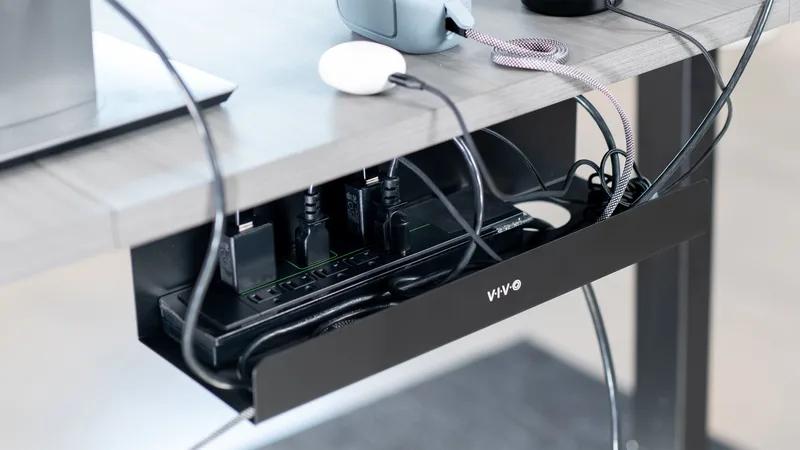
The VIVO 17” tray (model DESK-AC06-1C) is the recommendation that shows up in practically every desk setup community because it works, costs under $20, and doesn’t require any brainpower to install. Screw it under your desk, drop in a power strip, and route your cables through the front opening. Done.
The partially closed design is what makes this better than simple J-hooks or cable baskets. Your power strip and adapters stay concealed from all angles, but the full-length front slot makes plugging and unplugging easy without removing anything. The steel construction supports 11 lbs comfortably — more than enough for a standard surge protector plus a few cable runs.
At 17 inches, it fits most mid-size power strips. If you have a 6-outlet surge protector in the 13–15 inch range, this is the right fit. The included hardware has 11-inch mounting hole spacing, so measure your desk ahead of time to confirm there’s clearance.
Best for: Anyone with a permanent desk setup who doesn’t mind drilling two holes. This is the tray you’ll use for 5+ years without thinking about it.
2. VIVO 36” Clamp-On Mesh Cable Management — Best for Standing Desks
VIVO 36" Clamp-On Mesh Cable Management
Pros
- ✓ 36-inch span covers an entire standing desk width in one shot
- ✓ No drilling — clamps attach with hand-tightening only
- ✓ Mesh netting keeps weight low and allows airflow around the power strip
- ✓ Adjustable depth from 5.5" to 7" below desk surface
Cons
- ✗ Mesh holds cables loosely — not as contained as a solid tray
- ✗ C-clamps can shift slightly on very smooth laminate surfaces
- ✗ 11 lb capacity is adequate but not impressive for multi-hub setups
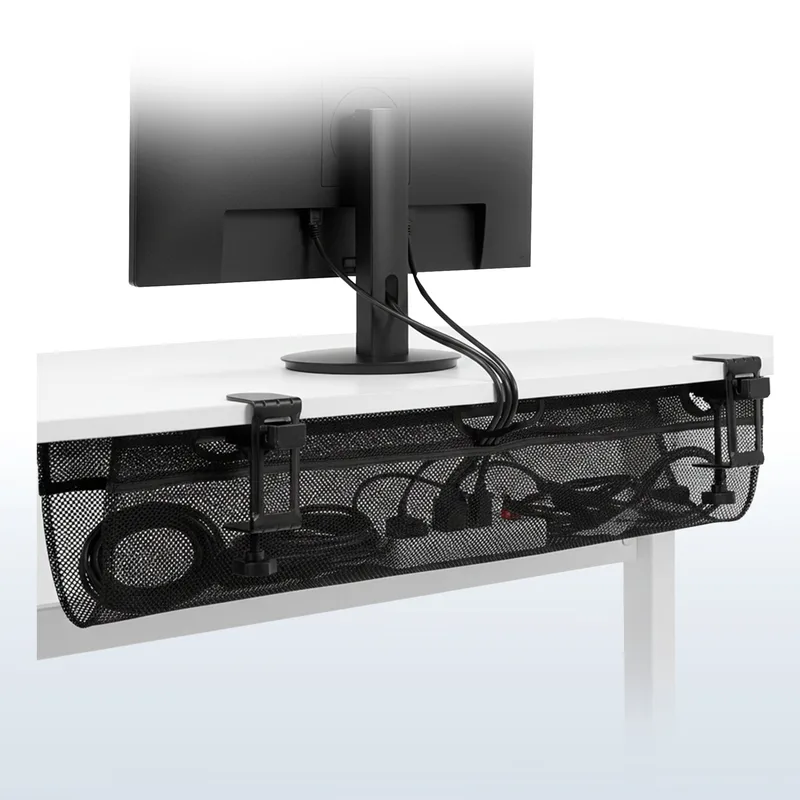
Standing desks present a cable challenge that standard trays don’t solve: cables need to flex as the desk moves up and down. The VIVO DESK-AC36MH handles this with a 36-inch mesh net that spans the full underside of most standing desks and holds cables loosely enough that they shift with height adjustments without binding.
The C-clamps attach with hand-tightening — no tools, no drilling. Clearance requirement is 8.5 inches below the desktop, which most standing desks easily clear. The netting adjusts from 5.5 to 7 inches deep depending on how you position the loops on the clamps, so you can tune it for your specific cable volume.
The mesh material is flame-resistant and genuinely allows airflow around your power strip — relevant if you’re running a big USB hub or charging brick that generates heat. The 36-inch span covers a full cable run from one side of the desk to the other with room to spare.
At $30, it costs $10 more than the screw-mount VIVO, but you’re paying for the no-drill flexibility and 2x the coverage. For a standing desk, that’s the right trade.
Best for: Standing desk owners, renters, and anyone who wants to avoid drilling into their desk.
3. DELAMU 25” Upgraded Adjustable Clamp Tray — Best Value

DELAMU 25" Upgraded Adjustable Clamp Tray
Pros
- ✓ Adjustable F-clamp fits a wider range of desk edge profiles than standard C-clamps
- ✓ 25-inch width fits a power strip plus USB hub side by side
- ✓ 2026 updated design with dual open-end cable exits for cleaner routing
- ✓ At $18, it undercuts most competitors by $5–$12
Cons
- ✗ Newer product with fewer long-term owner reviews than VIVO
- ✗ Black only — no white or silver option
- ✗ F-clamp adjustment range not as wide as VIVO's mesh net
DELAMU released its updated 25-inch F-clamp tray in early 2026 and it quickly gained traction — 9to5toys covered a sale in April 2026 that dropped it to $10. At regular price of around $18, it’s already the best price-per-inch in this category.
The key improvement in the 2026 model is the adjustable F-clamp design. Standard C-clamps have a fixed opening that works for common desk thicknesses, but F-clamps adjust across a wider range of edge profiles including thicker bamboo or solid wood tops. The dual open-end cable exits on each side also allow for neater routing than a single opening.
At 25 inches, it covers more ground than the Cinati without requiring the commitment of a 36-inch net. The metal mesh construction is solid enough to hold a power strip and USB hub without sagging.
The main limitation is that it’s a newer product with fewer long-term user reviews than VIVO. Owner feedback so far is positive, but it hasn’t been validated over years the way the VIVO has.
Best for: Budget-conscious buyers who want a no-drill clamp option with more width than a small tray.
4. Litwaro 25” No-Drill Cable Management Tray — Best Heavy-Duty
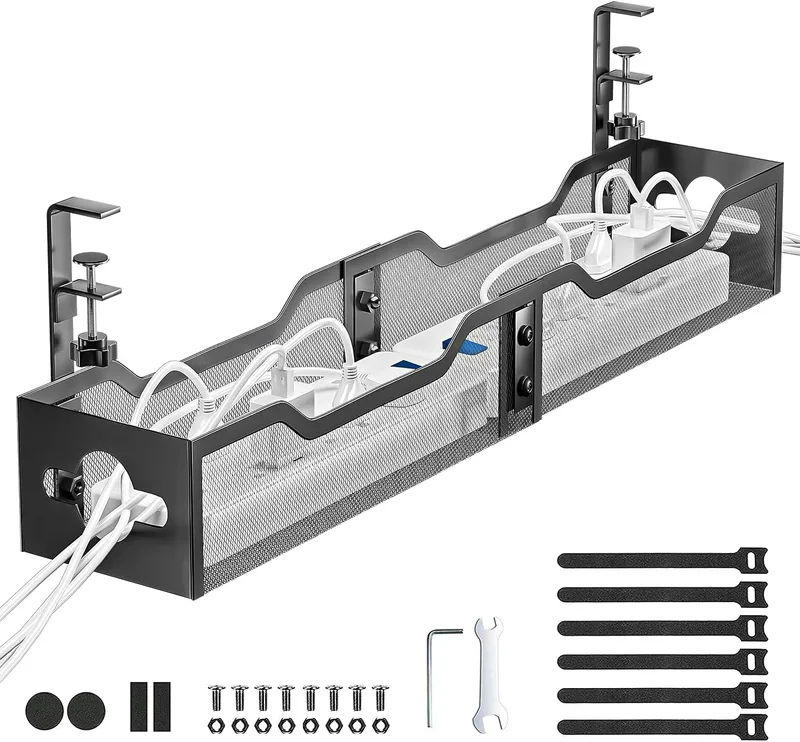
Litwaro 25" No-Drill Cable Management Tray
Pros
- ✓ 30 lb weight capacity — handles a full surge protector, USB hub, and laptop charger brick
- ✓ Carbon steel build is noticeably more rigid than lighter-gauge competitors
- ✓ Rubber pads on clamps protect glass and lacquered desk surfaces
- ✓ No-drill clamp installs in under 5 minutes
Cons
- ✗ Heavier than mesh alternatives — adds more mass under the desk
- ✗ Black only color option
- ✗ Clamp width range not specified — measure your desk edge before ordering
If you’re running a power strip, a USB-C hub, a laptop charger brick, and a monitor cable bundle under your desk, you need something that won’t flex or sag. The Litwaro 25” tray is built from carbon steel with a 30 lb weight capacity — nearly 3x the capacity of most competitors in this price range.
The no-drill clamp uses rubber-padded contact points to grip the desk edge without scratching glass, lacquer, or wood finishes. Owner reports consistently note that the tray feels noticeably more solid than lighter-gauge alternatives — no deflection even with a heavy surge protector and multiple brick-style adapters.
At $26, it costs a few dollars more than the DELAMU or Cinati, but the weight capacity difference is real. If you’ve had trays sag or shift under a heavy load before, this is the one to buy.
Best for: Power users with heavy surge protectors, multiple USB hubs, or large laptop charger bricks.
5. Cinati Under-Desk Cable Tray with Clamp — Best Budget
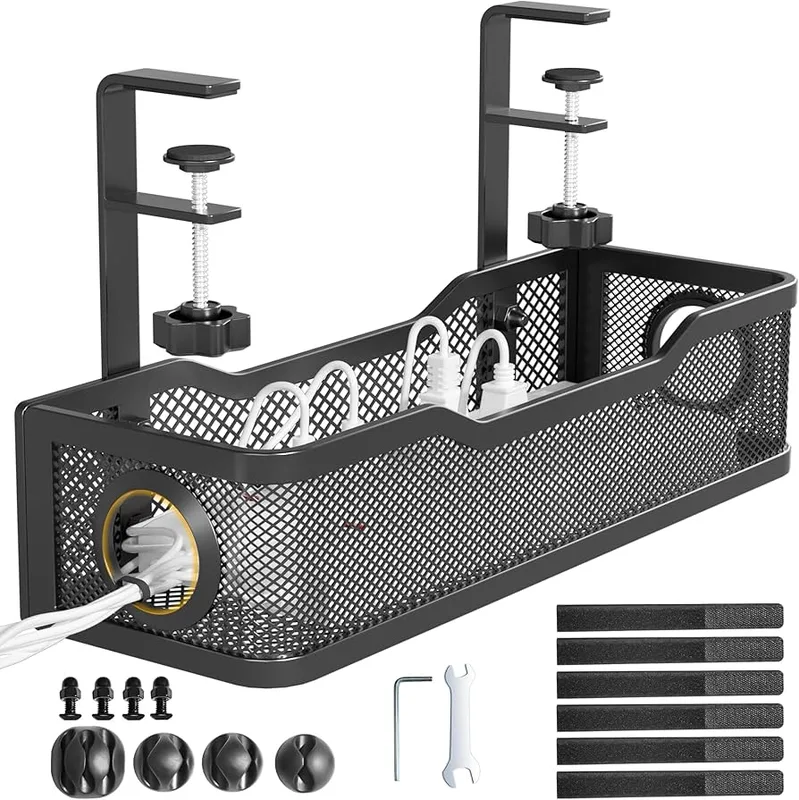
Cinati Under-Desk Cable Tray with Clamp
Pros
- ✓ Powder-coated steel resists rust better than bare metal alternatives
- ✓ Includes cable clips and ties in the box — not sold separately
- ✓ Fits desks from 0.4" to 2.4" thick — works on thin IKEA and thick solid-wood tops
- ✓ Under $20 with accessories included makes this the most complete budget kit
Cons
- ✗ 13.8-inch width won't fit longer surge protectors
- ✗ 10 lb weight limit means one power strip only — no stacking
- ✗ Compact size can feel tight with thick cables or power bricks
The Cinati comes in at the smallest form factor in this roundup — 13.8 inches — which is actually the right size for a lot of setups. If you only need to hide a 12-outlet power strip or a single charging brick, buying a 25–36-inch tray is paying for space you won’t use.
What makes the Cinati stand out at this price is that it includes cable clips and cable ties in the box — most trays don’t. That’s roughly $5–8 of accessories bundled in, which changes the value equation when you’d otherwise add them to your cart separately.
The powder-coated steel resists rust better than bare metal alternatives. The clamp fits desk edges from 0.4 to 2.4 inches thick, which covers IKEA tabletops (thin) and solid hardwood (thick). Anti-scratch pads are pre-installed on the clamp feet.
10 lb weight capacity is adequate for a single power strip but won’t accommodate stacking heavy adapters. Stay aware of what you’re loading into it.
Best for: Smaller setups, compact desks, and anyone who wants a complete kit under $20.
Comparison Table
| Tray | Price | Width | Mounting | Capacity | Best For |
|---|---|---|---|---|---|
| VIVO DESK-AC06-1C | $20 | 17” | Screw | 11 lbs | Permanent installs |
| VIVO DESK-AC36MH | $30 | 36” | Clamp | 11 lbs | Standing desks |
| DELAMU 25” Clamp | Unavailable | 25” | F-Clamp | — | Best value |
| Litwaro 25” | $29.99-$32.99 as of Oct 18, 2026 | 25” | Clamp | 30 lbs | Heavy loads |
| Cinati 13.8” | $18 | 13.8” | Clamp | 10 lbs | Budget/compact |
Buying Guide: What to Look for in an Under-Desk Cable Tray
Screw-mount vs. clamp-on
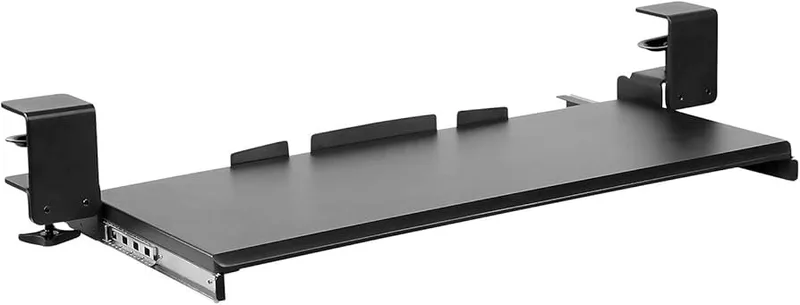
Screw-mount trays (like the VIVO DESK-AC06-1C) are more permanent and more secure. Two screws into the underside of the desk and the tray won’t move. The downside is obvious: you can’t take it with you if you change desks, and some desktops (tempered glass, thin laminate) don’t accept screws well.
Clamp-on trays attach to the desk edge with adjustable clamps — no holes required. They’re better for renters, for standing desks (where cables flex during height changes), and for anyone with a tabletop that shouldn’t be drilled. The trade-off is that clamps can shift on very smooth surfaces, and the attachment isn’t as permanent.
Width: match it to your power strip
Measure your power strip before buying. Most 6-outlet strips are 12–14 inches long. Most 8-outlet and surge-protected strips run 15–17 inches. If you have a 12-outlet strip, you’ll need something in the 20-inch range.
Adding USB hubs, cable bricks, or cable velcro alongside the power strip? Add 4–6 inches to your estimate.
Weight capacity: don’t overlook it
A standard 6-outlet power strip weighs around 1–2 lbs. Add two heavy laptop charger bricks (the kind with long cables attached to a transformer block) and a USB-C hub, and you’re easily at 4–6 lbs of hardware. Look for a rating of at least 10 lbs. If you’re running a multi-device charging station, go for 15+ lbs — the Litwaro’s 30 lb rating is overkill for most setups but peace of mind for power users.
Desk compatibility
Clamp trays specify a thickness range (usually 0.4” to 2.4” or 0.6” to 2.8”). Common desk thicknesses:
- IKEA BEKANT/LAGKAPTEN: ~0.7” to 1.0”
- IKEA KARLBY butcherblock: ~1.5”
- FlexiSpot / Uplift / Fully tabletops: ~1.0”
- Solid hardwood custom tops: 1.5”–2.5”
Measure your desk edge before ordering a clamp tray. If your desk is thicker than 2” and outside the stated range, you’ll need a wider-opening clamp or a screw-mount option.
Open vs. enclosed design
Fully enclosed trays (covered on all sides) hide cables completely but can trap heat and make plugging and unplugging annoying. Open-front or mesh trays provide better airflow and easier access — the trade-off is that cables and adapters are slightly more visible from below. For under-desk placement, mesh or open-front designs are generally preferable.
FAQ
Do under-desk cable trays work with standing desks?
Yes, but choose a clamp-on design rather than a screw-mount. When a standing desk moves up and down, screw-mounted trays stay fixed to the frame, but the cables running from the tray to wall outlets need slack to flex. Clamp-on mesh trays like the VIVO DESK-AC36MH work particularly well because the netting holds cables loosely enough to accommodate movement without binding.
Can I install a cable tray under a glass desk?
Use a clamp-on model with rubber-padded contact points — drilling into glass is not advisable. The Cinati and Litwaro both include rubber or soft padding on the clamp contact surfaces. Confirm the clamp opening fits your glass desk edge (usually 0.4”–0.6” for glass tops). Avoid screw-mount models entirely for glass.
What size cable tray do I need?
Measure your power strip and add 2–4 inches of buffer. For a single 6-outlet strip, 13”–15” is sufficient. For a 6-outlet strip plus a USB hub, aim for 20–25 inches. For full-desk cable organization including monitor cable bundles, the 36-inch VIVO mesh tray is the most practical option.
Will a cable tray hold my surge protector and laptop charger?
Most cable trays handle a surge protector plus a few items fine. If you’re loading in a power strip, a laptop GaN charger, a USB-C hub, and cable runs, check that the capacity rating is at least 15 lbs. The Litwaro 25” at 30 lbs is the best option for heavy multi-device loads. Lighter-duty trays at 10–11 lbs can sag or shift under excessive weight.
Is drilling really necessary for the screw-mount VIVO tray?
Two small pilot holes in the underside of the desk — that’s all. It takes about 10 minutes with a basic drill. The underside of most desks is never visible, so two clean pilot holes are a non-issue. If the desk is rented furniture or a tabletop you want to keep pristine, use a clamp-on option instead.
Do cable trays work with cable management holes in the desk?
Yes — in fact, cable trays work better with desks that have grommet holes. Route cables down through the grommet, into the tray underneath, then out to the wall. This creates a clean straight-down cable path that’s completely hidden from the front. The VIVO 17” tray’s partially enclosed design works especially well here.
Conclusion
Most under-desk setups come down to one decision: drill or don’t drill.
If you own your desk and your space, the VIVO 17” tray is the permanent fixture you’ll stop thinking about after the first week. It’s solid, cheap, and works exactly as described.
If you’re renting, working on a standing desk, or just want flexibility, the VIVO 36” clamp-on mesh handles the widest range of setups without requiring any holes.
For budget buyers who want no-drill: the DELAMU 25” at $18 is the best price-per-inch in the category, with a 2026 F-clamp update that handles more desk edge types than older designs.
For more ideas on cleaning up your workspace, see our full standing desk setup guide and best desk accessories roundup.