Disclosure: PostureRanked is reader-supported. When you buy through links on our site, we may earn an affiliate commission at no additional cost to you. Our recommendations are based on independent research and testing.
| Product | Price | Rating |
|---|---|---|
| Logitech MX Master 4 | — | 9.4 |
| Razer DeathAdder V4 Pro | — | 9.2 |
| Logitech G502 X Plus | — | 9.0 |
| Razer Basilisk V3 X HyperSpeed | — | 8.6 |
| Logitech MX Vertical | — | 8.8 |
| Logitech Signature M650 L | — | 8.8 |
| Razer DeathAdder V3 HyperSpeed | — | 9.0 |
PostureRanked is reader-supported. When you buy through links on our site, we may earn an affiliate commission at no additional cost to you.
Standard mice are built for average-sized hands. If your hand measures 19cm or longer from wrist to fingertip, you already know the problem: cramped fingers, a hovering palm, wrist strain that creeps in after an hour. After evaluating dozens of mice across size categories, the conclusion is clear: size mismatch is the single biggest cause of mouse-related discomfort for larger-handed users.
The fix is straightforward — get a mouse that actually fits. Here are the seven best options in 2026 for spreadsheet warriors, competitive gamers, and everyone who’s tired of their hand aching by 3 PM.
Short on time? The Logitech MX Master 4 is the best all-around pick for productivity. For gaming, go with the Razer DeathAdder V4 Pro. On a budget, the Logitech Signature M650 L is a steal under $40.
Quick Comparison: Best Mice for Large Hands
| Mouse | Best For | Weight | Wireless | Price Range |
|---|---|---|---|---|
| Logitech MX Master 4 | Productivity | 141g | Bluetooth / USB / Wired | $100–$120 |
| Razer DeathAdder V4 Pro | Competitive Gaming | 56g | HyperSpeed / BT / Wired | $150–$180 |
| Logitech G502 X Plus | Work + Gaming Hybrid | 106g | Lightspeed / BT | $150–$160 |
| Razer Basilisk V3 X HyperSpeed | Budget Gaming | 110g | HyperSpeed / BT | $55–$70 |
| Logitech MX Vertical | Wrist Pain Relief | 135g | Bluetooth / USB / Wired | $90–$110 |
| Logitech Signature M650 L | Budget Productivity | 111g | Bluetooth / USB | $35–$45 |
| Razer DeathAdder V3 HyperSpeed | Ultralight Gaming | 55g | HyperSpeed | $90–$100 |
1. Logitech MX Master 4 — Best Overall for Productivity
Logitech MX Master 4
Pros
- ✓ Sculpted palm rest fits large hands perfectly
- ✓ MagSpeed scroll wheel is best-in-class
- ✓ Multi-device pairing (up to 3)
- ✓ USB-C fast charging
Cons
- ✗ Right-handed only
- ✗ Premium price ($100+)
- ✗ Not suited for gaming
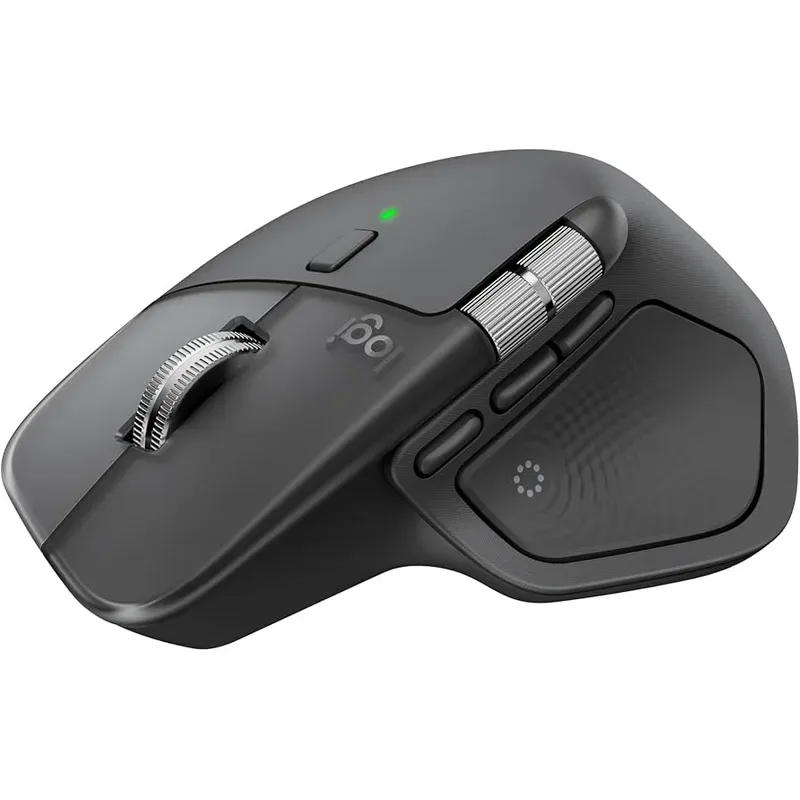
The MX Master line has been the default productivity mouse for years, and the fourth generation is the most refined version yet. At 124.9mm long and 84.3mm wide, it fills out a large palm without feeling bloated.
The sculpted right-side profile with the integrated thumb rest is what separates it from everything else in this price range. Your thumb locks into position naturally, and the arching back supports even XXL palms. After eight hours at a desk, there’s no fatigue — that’s the test that matters.
The MagSpeed scroll wheel deserves its own mention. It switches between ratcheted and free-spinning modes automatically. Scrolling through a 500-row spreadsheet takes about two seconds. The electromagnetic mechanism is nearly silent, too.
Who should buy this: Office workers, developers, designers — anyone who spends 6+ hours daily at a desk and needs precision without strain. Multi-device pairing means you can switch between laptop and desktop with one button press.
Who should skip this: Gamers. The sensor maxes out at 8,000 DPI, which is fine for productivity but won’t keep up in competitive shooters. The 141g weight also makes fast flick shots impractical.
Price Range: $100–$120
Check Logitech MX Master 4 on Amazon
2. Razer DeathAdder V4 Pro — Best for Gaming
Razer DeathAdder V4 Pro
Pros
- ✓ Extended body built for big hands
- ✓ Insanely light at 56g
- ✓ Top-tier 45K sensor for competitive play
- ✓ 150-hour battery life
Cons
- ✗ Expensive ($150+)
- ✗ Gaming-focused design
- ✗ Right-handed only
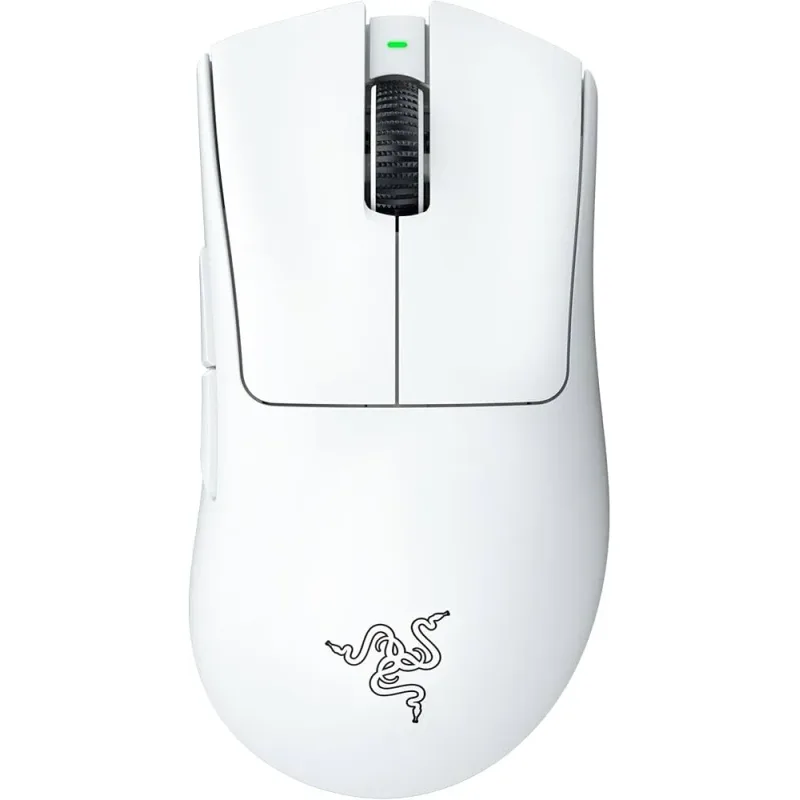
The DeathAdder shape has been a large-hand staple since 2006. Twenty years later, the V4 Pro is the best iteration of that classic ergonomic profile. At 128mm long with a deep palm rest, it’s one of the few gaming mice that genuinely fits hands over 20cm.
What’s remarkable is the weight: 56 grams. Most large mice trade size for heft — the V4 Pro doesn’t. It feels almost impossibly light for its dimensions. The Focus Pro 45K Gen-2 sensor is overkill for most players, but the point is that tracking is flawless at any DPI. No acceleration, no jitter, no spin-outs.
The Gen-4 optical switches actuate in 0.2ms with zero debounce delay. If you’re playing at a competitive level, that responsiveness matters. Battery life at 150 hours means you’re charging once every few weeks.
Who should buy this: Competitive gamers, FPS players, anyone who wants flagship performance in a large-hand-friendly shape. Also works fine for daily productivity — just overqualified for Excel.
Who should skip this: Budget shoppers. At $150–$180, this is the most expensive mouse on the list. If you don’t need sub-millisecond response times, you’re paying for features you won’t use.
Price Range: $150–$180
Check Razer DeathAdder V4 Pro on Amazon
3. Logitech G502 X Plus — Best Hybrid for Work and Gaming
Logitech G502 X Plus
Pros
- ✓ 131mm length accommodates biggest hands
- ✓ 13 programmable buttons for productivity or gaming
- ✓ Works great for both work and play
- ✓ Lightspeed wireless has zero perceptible lag
Cons
- ✗ Heavier than dedicated gaming mice (106g)
- ✗ Button-heavy layout can overwhelm new users
- ✗ G Hub software is clunky
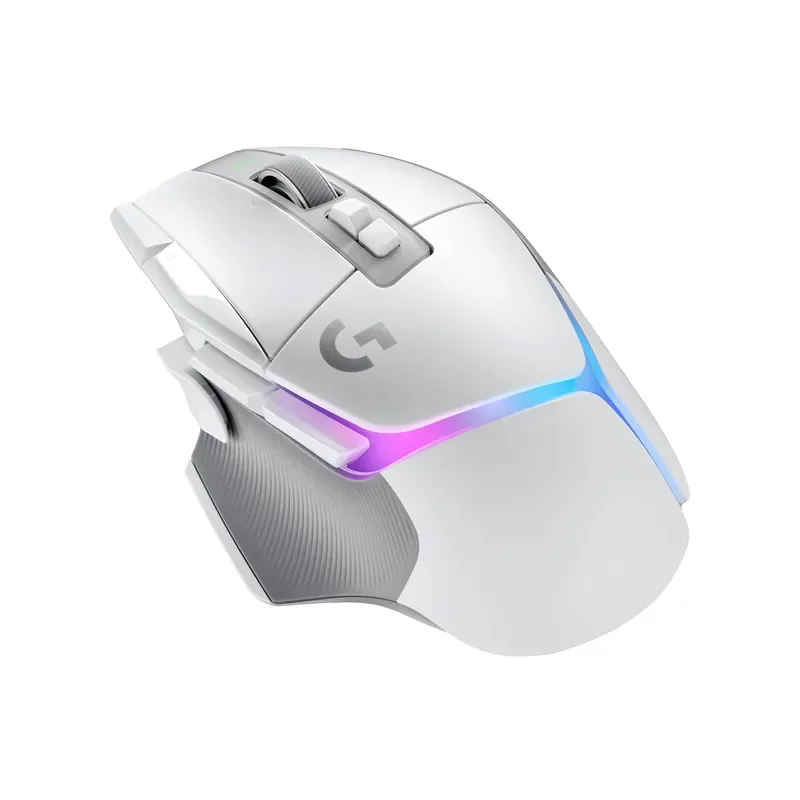
The G502 X Plus is the Swiss Army knife of mice. It’s the largest mouse on this list at 131mm, so even the biggest hands will find full palm contact. But size alone doesn’t make it special — the 13 programmable buttons do.
With Logitech’s G Hub software, you can map those buttons differently per application. Ctrl+Z on button 4 in Photoshop, grenade throw in the same button during games. The LIGHTFORCE hybrid switches use optical and mechanical tech together — optical speed with a mechanical click feel. It’s the best of both.
At 106g, it sits in that comfortable middle ground. Not ultralight, not heavy. The Lightspeed wireless connection runs at 1ms polling — indistinguishable from wired in blind tests. Battery lasts about 130 hours with RGB off, closer to 50 with it on.
Who should buy this: Users who do both productivity work and gaming and don’t want two separate mice. The button layout is genuinely useful for both use cases once you set up profiles.
Who should skip this: People who want simplicity. 13 buttons and G Hub’s learning curve can be frustrating. If you just need a comfortable mouse for email and browsing, the MX Master 4 or M650 L is a better fit.
Price Range: $150–$160
Check Logitech G502 X Plus on Amazon
4. Razer Basilisk V3 X HyperSpeed — Best Budget Gaming Mouse
Razer Basilisk V3 X HyperSpeed
Pros
- ✓ 535-hour battery life is absurd (in a good way)
- ✓ Solid gaming performance under $70
- ✓ Sculpted thumb rest and palm support
- ✓ Dual wireless modes
Cons
- ✗ 110g feels heavy next to premium options
- ✗ 18K sensor is a step below flagship
- ✗ RGB eats battery if you leave it on
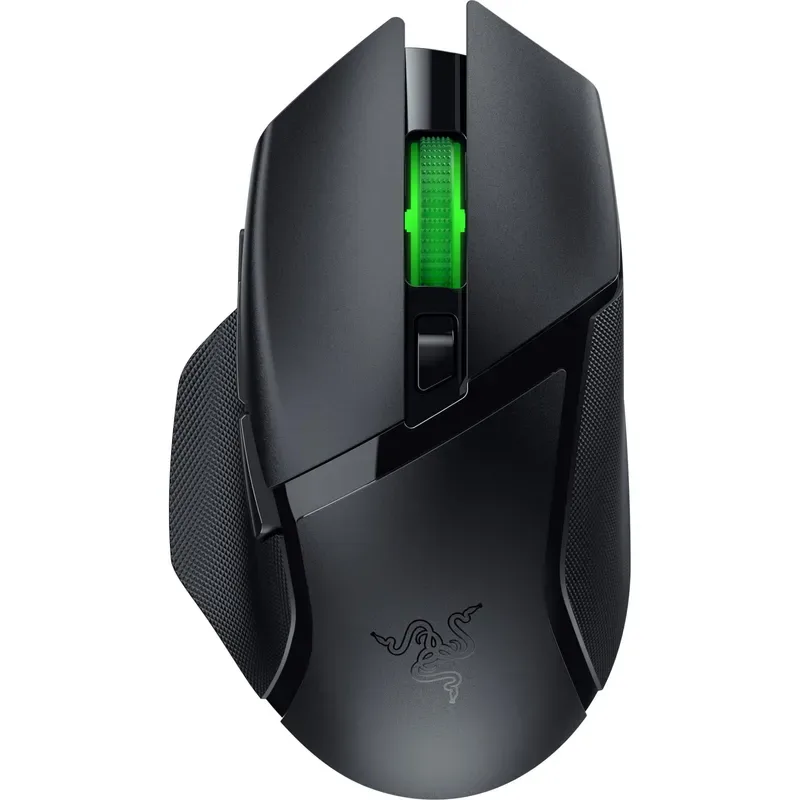
The Basilisk V3 X brings Razer’s ergonomic shape to a much friendlier price point. At 130mm long with sculpted thumb support and a satisfying palm curve, it fits large hands nearly as well as its pricier siblings.
The standout spec is battery life: 535 hours on HyperSpeed wireless, or even longer on Bluetooth. That’s not a typo. You’ll charge this mouse a few times a year. The 18K optical sensor isn’t flagship-tier, but for the vast majority of players — even ranked competitive ones — the difference between 18K and 30K sensors is imperceptible.
Build quality is solid plastic with textured side grips. It doesn’t feel cheap, but it also doesn’t feel like a $150 mouse. That’s fair at this price. The scroll wheel has a tactile step that’s satisfying without being loud.
Who should buy this: Gamers who want large-hand comfort without spending $150+. Also a great first “real” gaming mouse for someone upgrading from a $15 office mouse.
Who should skip this: Users sensitive to weight. At 110g, it’s nearly double the DeathAdder V4 Pro. Fast-twitch FPS players will notice.
Price Range: $55–$70
Check Razer Basilisk V3 X HyperSpeed on Amazon
5. Logitech MX Vertical — Best for Wrist Pain
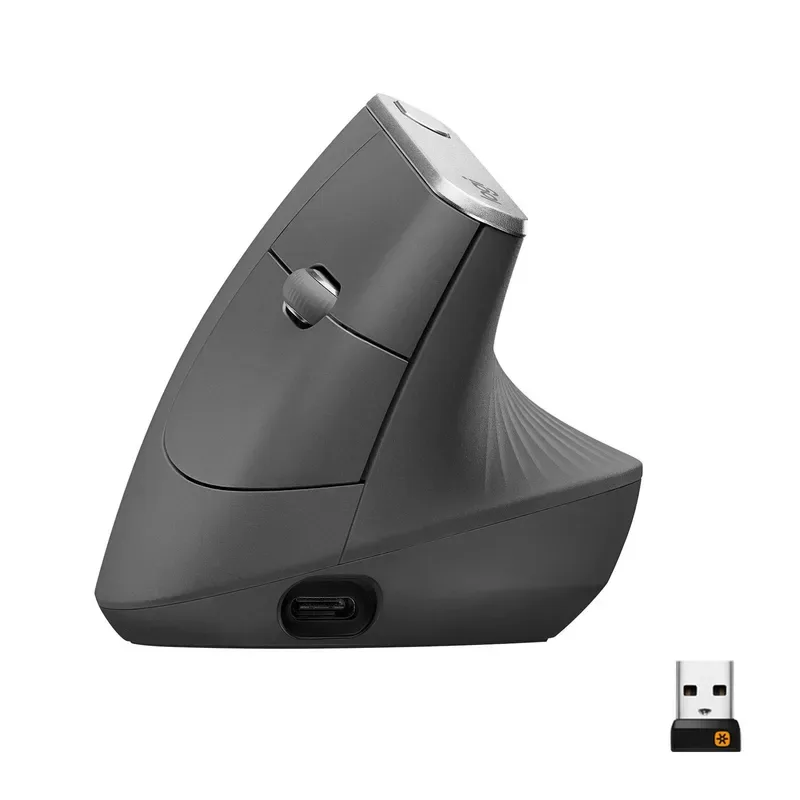
Logitech MX Vertical
Pros
- ✓ 57-degree angle eliminates forearm rotation
- ✓ Immediately reduces wrist strain
- ✓ Generous grip surface for large hands
- ✓ Multi-device connectivity
Cons
- ✗ Steep learning curve for first week
- ✗ Low DPI ceiling (4,000)
- ✗ Completely unusable for gaming
If your wrist already hurts, stop reading reviews and buy this mouse. The MX Vertical holds your hand at a 57-degree angle — a natural handshake position that eliminates the forearm pronation responsible for most mouse-related wrist pain.
The grip surface is generous enough for large hands, though the shape takes getting used to. The first three days feel strange. By day five, going back to a flat mouse feels wrong. Logitech claims a 10% reduction in muscle strain, but the real benefit is that chronic ache going away.
At 4,000 DPI max, it’s underpowered compared to gaming mice. But that’s not the point. This is a health tool that happens to be a good productivity mouse. The cursor speed switch on top lets you toggle between precise and fast DPI settings without software.
Who should buy this: Anyone experiencing wrist pain, RSI symptoms, or carpal tunnel warning signs. Also a strong pick for users who’ve had wrist surgery and need a mouse that minimizes strain during recovery.
Who should skip this: Gamers (the vertical angle makes fast horizontal movements nearly impossible) and anyone who shares a desk with a left-handed user (right-hand only).
Price Range: $90–$110
Check Logitech MX Vertical on Amazon
6. Logitech Signature M650 L — Best Budget Pick
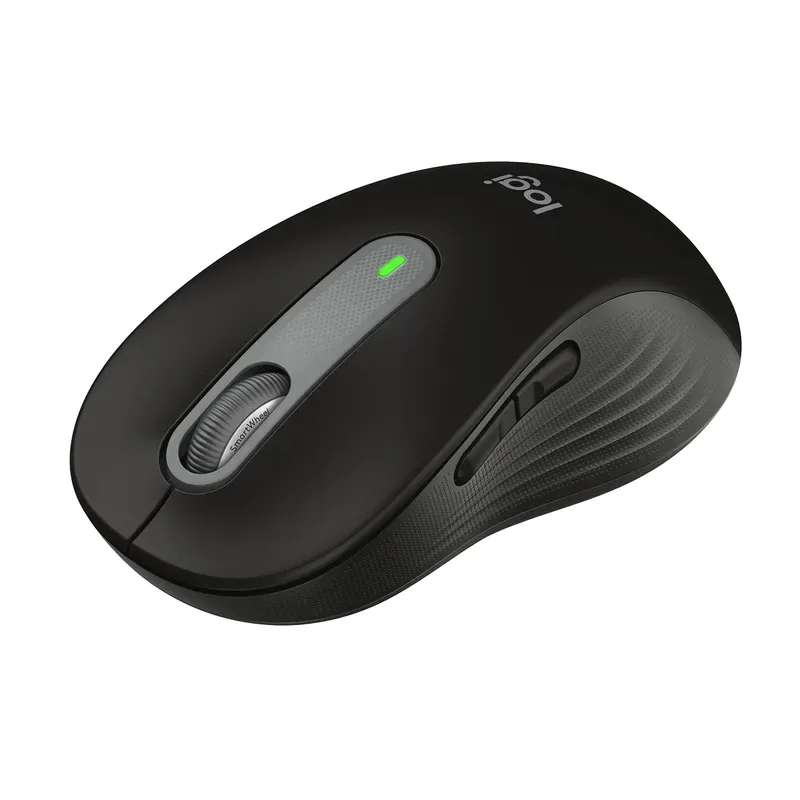
Logitech Signature M650 L
Pros
- ✓ L size specifically built for 19cm+ hands
- ✓ Under $40 — best price-to-comfort ratio
- ✓ Near-silent clicks
- ✓ 24-month battery life on a single AA
Cons
- ✗ Basic feature set, no programmable buttons
- ✗ Not for gaming
- ✗ Plasticky build at this price
The “L” in M650 L stands for Large, and Logitech designed this size specifically for hands measuring 19cm and above. At under $40, it’s the cheapest way to get a properly sized mouse without compromising on core ergonomics.
The SilentTouch switches make clicks nearly inaudible — a genuine perk for shared offices or late-night work. The SmartWheel automatically shifts between line-by-line and free-spin scrolling depending on how fast you flick it. It’s simpler than Logitech’s MagSpeed tech, but it works well enough.
Battery life is absurd: 24 months on a single AA battery. No charging cables, no docks, no thinking about it. The build is plastic and lightweight at 111g, which makes it feel less premium than the MX Master — but honestly, for basic productivity, it does 90% of the same job.
Who should buy this: Budget-conscious users, students, or anyone setting up a home office without spending $100 on a mouse. If you just need comfortable daily use, this is the answer.
Who should skip this: Power users who need programmable buttons, gamers, or anyone who wants premium build quality. The plastic chassis and basic feature set reflect the price.
Price Range: $35–$45
Check Logitech Signature M650 L on Amazon
7. Razer DeathAdder V3 HyperSpeed — Best Lightweight Option
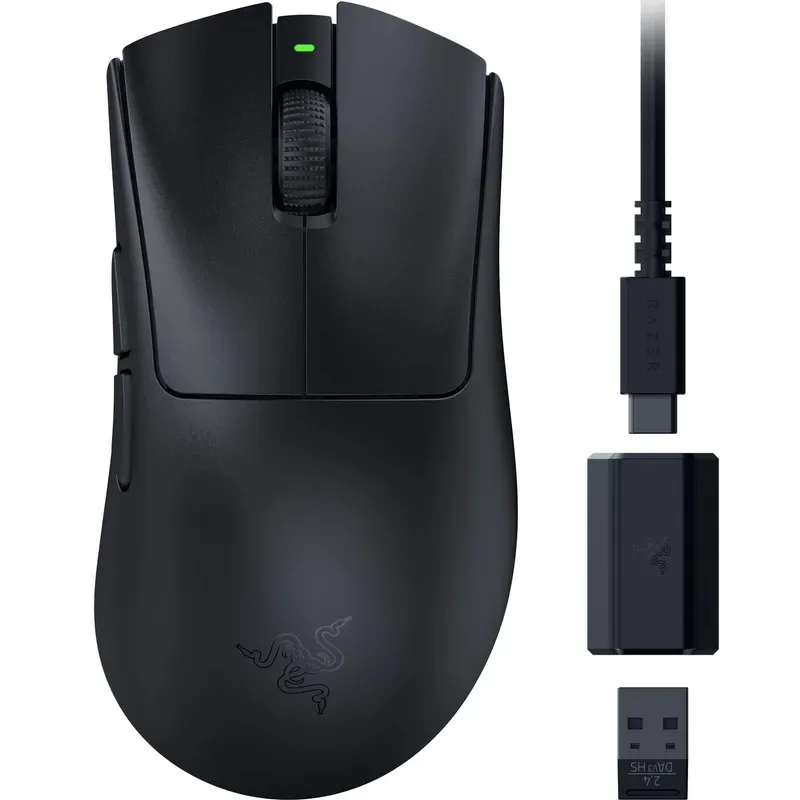
Razer DeathAdder V3 HyperSpeed
Pros
- ✓ 55g with a full-size body — rare combination
- ✓ Top-tier 26K sensor
- ✓ 100-hour battery life
- ✓ Upgradeable to 8000Hz polling
Cons
- ✗ No Bluetooth — 2.4GHz dongle only
- ✗ Ultralight feel takes adjustment
- ✗ $90+ is steep for a non-flagship
At 55 grams, the DeathAdder V3 HyperSpeed is the lightest full-size mouse on this list — and one of the lightest large mice on the market, period. The 128mm body maintains the classic DeathAdder shape that’s been refined over two decades, but the internal engineering strips out every unnecessary gram.
The Focus X 26K sensor handles any surface and any DPI setting without issues. It’s upgradeable to 8000Hz wireless polling via a separate dongle, which future-proofs it for competitive play as high-polling-rate monitors become standard.
The one notable omission: no Bluetooth. This is a 2.4GHz dongle-only mouse, which means you’re using a USB port on every device. For a gaming-focused mouse, that’s an acceptable trade for lower latency. For productivity users who want multi-device pairing, it’s a dealbreaker.
Who should buy this: Gamers who want ultralight weight without sacrificing hand size. The 55g body with 128mm length is genuinely unusual — most mice this light are small.
Who should skip this: Multi-device users (no Bluetooth) and anyone who finds ultralight mice too slippery. At 55g, this mouse moves fast with minimal effort, which some people find hard to control precisely.
Price Range: $90–$100
Check Razer DeathAdder V3 HyperSpeed on Amazon
Buying Guide: What to Look for in a Large-Hand Mouse
Size — Measure First, Buy Second
The most important factor. Measure your hand from the base of your palm to the tip of your middle finger:
- Under 17cm: Standard mice work fine
- 17–19cm: Medium-large mice, look for 115mm+ body length
- 19cm+: You need a large mouse, 120mm+ body length minimum
Width matters too. Measure across your palm below the knuckles. Anything over 9cm qualifies as large and benefits from mice 70mm+ wide.
Weight — Heavier Isn’t Always Better
Common wisdom says large-handed users need heavy mice. That’s outdated. The DeathAdder V4 Pro at 56g and the V3 HyperSpeed at 55g prove that large mice can be ultralight.
That said, weight preference is genuinely personal:
- Under 70g: Ultralight. Fast, twitchy, best for competitive gaming
- 70–120g: Mid-weight. Balanced for most users and use cases
- Over 120g: Heavy. More controlled, but can cause fatigue over long sessions
Grip Style Compatibility
Your grip style determines which mouse shapes work:
- Palm grip: Your entire hand rests on the mouse. Requires the largest mice — look for 125mm+ body length and an arched top profile. Most large-handed users default to palm grip.
- Claw grip: Palm rests on the back, fingers arch over buttons. Works with medium-large mice. Look for a pronounced hump in the rear half.
- Fingertip grip: Only your fingertips touch the mouse. Size matters less here, but a wider body prevents the mouse from rotating during use.
Wireless Technology
All seven mice on this list are wireless, but the tech varies:
- 2.4GHz (Lightspeed, HyperSpeed): Sub-1ms latency. Required for competitive gaming. Uses a USB dongle.
- Bluetooth: Universal device support, slightly higher latency (5–10ms). Fine for productivity.
- Dual-mode: Offers both. Best for users who game on a desktop and also want to use the mouse with a laptop.
Sensor — Don’t Overbuy
Most people don’t need a 30K DPI sensor. Here’s what actually matters by use case:
- Office work: 1,000–2,000 DPI is comfortable for most
- Design/CAD: 2,000–4,000 DPI for precision
- Gaming: 800–1,600 DPI (most pros use this range regardless of sensor capability)
- High-res displays (4K+): 2,000–3,000 DPI compensates for extra pixels
Frequently Asked Questions
Is palm grip the best option for large hands?
For most people, yes. Palm grip lets your entire hand rest naturally on the mouse, which is exactly what large mice are designed for. Your fingers, palm, and thumb all make contact, distributing pressure evenly. Claw grip can work with medium-large mice, and fingertip grip reduces the importance of size entirely — but if you’re buying a large mouse, you’re almost certainly a palm gripper.
Do ergonomic mice actually help with carpal tunnel?
They can help prevent symptoms and reduce existing discomfort, but they’re not a medical treatment. A properly sized mouse keeps your hand in a neutral position and reduces the repetitive strain that contributes to carpal tunnel syndrome. Vertical mice like the MX Vertical go further by eliminating forearm pronation. If you’re experiencing numbness or tingling, see a doctor — but switching to a better-fitting mouse is a solid first step.
Can I game with a productivity mouse like the MX Master 4?
You can play casual games without issues. The MX Master 4’s 8,000 DPI sensor handles most titles fine. But for competitive FPS or fast-paced games, the higher weight (141g), slower polling rate, and less aggressive sensor tracking will put you at a measurable disadvantage. If you play competitively, get a dedicated gaming mouse.
How important is mouse weight for large hands?
More important than most people realize, but in the opposite direction you’d expect. Larger hands generate more force per movement, so a heavy mouse (130g+) compounds fatigue faster. Many large-handed users find that switching to a lighter mouse (sub-80g) dramatically reduces end-of-day hand tiredness. The DeathAdder V3 HyperSpeed at 55g is proof that large mice don’t have to be heavy.
What if I’m left-handed with large hands?
Unfortunately, your options are limited. Every mouse on this list is right-handed or ambidextrous-leaning-right. For left-handed large mice, look at the Razer Viper V3 HyperSpeed (ambidextrous, 54g) or the Logitech G Pro X Superlight 2 (ambidextrous, 60g). Neither is specifically “large,” but both are long enough at 126mm and 125mm respectively.
The Bottom Line
For productivity, the Logitech MX Master 4 is the clear winner. Four generations of refinement have produced a mouse that fits large hands like it was custom-molded. The MagSpeed scroll wheel, thumb rest, and multi-device pairing make it worth the $100+ price tag for anyone who works at a desk daily.
For gaming, the Razer DeathAdder V4 Pro combines the best large-hand shape in gaming with a 56g weight that shouldn’t be physically possible at this size. It’s expensive, but if you compete, it’s the right tool.
On a budget, the Logitech Signature M650 L at under $40 proves you don’t need to spend $100 to get a properly sized mouse. Make sure you order the L variant — the standard M650 is significantly smaller.
And if your wrist already hurts, skip the deliberation and get the Logitech MX Vertical. The first week feels weird. Every week after that, you’ll wonder why you waited. If wrist pain is severe, consider pairing a vertical mouse with an ergonomic trackball for variety — alternating between the two prevents the repetitive strain that comes from any single position. An ergonomic keyboard completes the input device overhaul. For the full accessories picture, see our best desk accessories for remote work guide.