Gaming in a dark room with a bright monitor is one of the fastest ways to trash your eyes. The contrast between a blazing screen and a pitch-black background forces your eyes to constantly readjust — and after a few hours, that adds up to headaches, blurred vision, and the kind of fatigue that follows you into the next day.
Monitor light bars solve this. They clamp to the top of your display and cast light downward onto your desk, reducing eye-straining contrast without adding glare to the screen itself. In 2026, the category has matured significantly: BenQ’s ScreenBar Halo 2 (released in late 2025 and picking up strong reviews in early 2026) brings wireless control and tri-zone ambient backlighting to the premium tier, while budget brands like Quntis now offer genuine RA95 eye-care specs with gaming RGB modes for around $60.
Quick picks: Best overall: BenQ ScreenBar Halo 2. Best value: Quntis RGB Pro Plus.
For a broader look at how to set up your monitor ergonomically, see our gaming monitor ergonomics guide.
1. BenQ ScreenBar Halo 2 — Best Overall for Gaming
BenQ ScreenBar Halo 2
Pros
- ✓ Rear tri-zone backlight dramatically softens eye strain in dark gaming rooms
- ✓ Wireless desk controller is far easier to use than touch controls on the bar
- ✓ 1000 lux front output is bright enough for any desk environment
- ✓ Curved monitor support covers most gaming monitors
Cons
- ✗ At $179, it's a significant investment for desk lighting
- ✗ Rear backlight does not sync with games (no Razer Chroma or equivalent)
- ✗ Wireless controller requires its own USB-A port
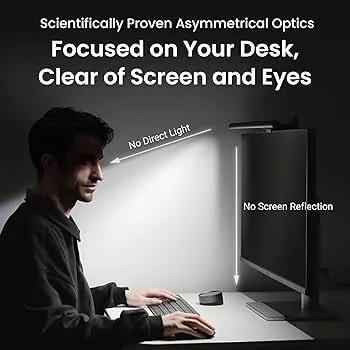
The Halo 2 is BenQ’s current flagship, and it earns that title. What separates it from every other monitor light bar is the rear ambient backlight — a tri-zone LED strip on the back of the unit that casts soft light toward the wall behind your monitor.
This matters specifically for gaming. When you’re deep into a dark game world and the only light source in the room is a 27-inch or 32-inch panel, your eyes are dealing with extreme contrast. The rear lighting softens that edge. You set it to a warm 2700K amber for late-night sessions, or a neutral 4000K if you’re playing during daylight and just want consistency. The difference in eye comfort over a 3-4 hour session is noticeable based on owner reports.
The front light hits 1000 lux — more than enough for any ergonomic gaming setup. CRI 95+ means the color on your desk looks accurate, which matters for tasks between gaming sessions but won’t change your gameplay.
The wireless controller is the other standout feature. A physical dial on your desk handles brightness, color temperature, and switching between front-only, rear-only, or both. No reaching up to the bar, no fumbling with an app. The motion sensor auto-dims after you leave and restores brightness when you return — a small but genuinely useful daily-driver feature.
Curved monitor support covers 1000R to 1800R, which catches the major gaming monitor curves including aggressive 1000R Samsung Odyssey-style panels.
The $179 price is real money for desk lighting. But if your gaming setup lives in a dark room and eye strain has been an issue, the Halo 2 is the upgrade that addresses it properly.
2. BenQ ScreenBar Plus — Best for Streamers and Content Creators
BenQ ScreenBar Plus
Pros
- ✓ Desktop dial gives precise, intuitive control without reaching up
- ✓ Auto-dimming adjusts to room lighting conditions reliably
- ✓ CRI 95+ color accuracy is excellent for streaming and content work
- ✓ Clean, minimal design fits any desk aesthetic
Cons
- ✗ No rear ambient lighting
- ✗ Desktop dial controller is wired, adding a cable to manage
- ✗ Older design — newer Pro models offer more features at similar pricing
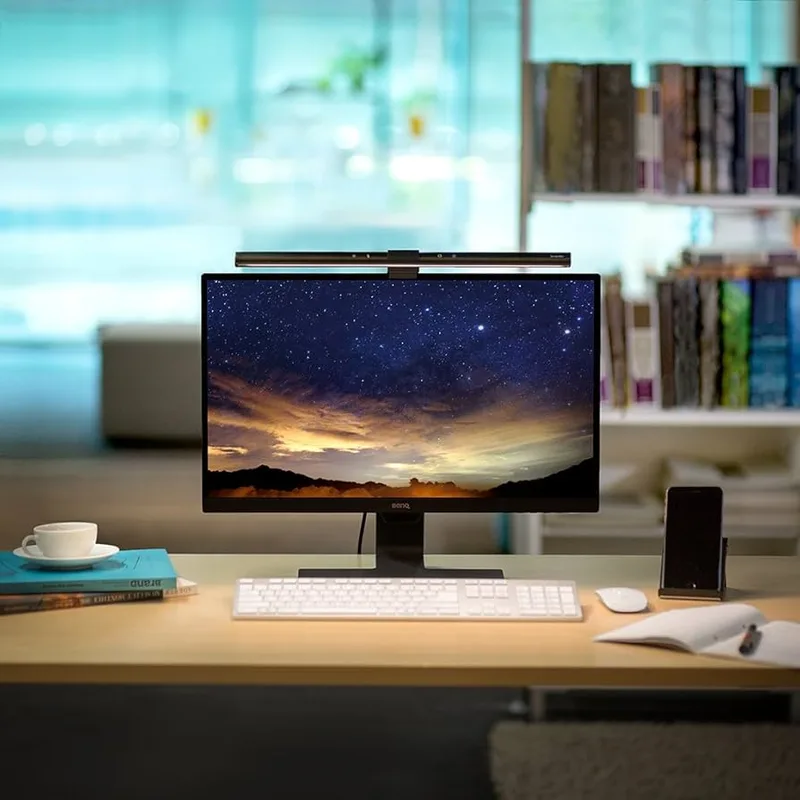
The ScreenBar Plus isn’t new, but it holds its position because the desktop dial is genuinely the right control solution for streamers and creators who need quick, precise lighting adjustments throughout a session.
When you’re mid-stream and the room light changes, you don’t want to reach up and tap at the bar. The dial lets you roll brightness up or down in a second from your normal seated position. Color temperature sweeps from 2700K (warm) to 6500K (cool) continuously, not in preset jumps.
Auto-dimming is built into the bar’s ambient sensor. It reads room light and adjusts output so your desk stays at a consistent brightness — useful when gaming with variable room lighting or in spaces with windows.
The core optics are the same BenQ asymmetric design used across the lineup: light directed at the desk, not at the monitor face. Based on extensive owner feedback, the no-glare claim is genuine across a wide range of monitor sizes and positions.
At $109, the Plus sits in an interesting middle ground. You get BenQ’s build quality and dial control without paying for the Halo 2’s ambient backlight. For streamers using their setup as a professional workspace too, that desk dial matters more than rear glow. For pure gaming setups in dark rooms, spend the extra $70 on the Halo 2.
For streamers wanting to complete their ergonomic setup, our best ergonomic streaming setup guide covers the full picture.
3. Quntis RGB Pro Plus — Best for Gamers Who Want RGB Ambiance
Quntis RGB Pro Plus Monitor Light Bar with Remote
Pros
- ✓ 15 RGB backlight modes add gaming atmosphere at an unbeatable price
- ✓ RA95 front lighting matches BenQ's premium eye-care spec
- ✓ Remote control is practical and works reliably
- ✓ Clip mechanism is secure without scratching monitor bezels
Cons
- ✗ RGB effects are preset modes only — no game sync or app control
- ✗ No auto-dimming
- ✗ Build quality is clearly a step below BenQ
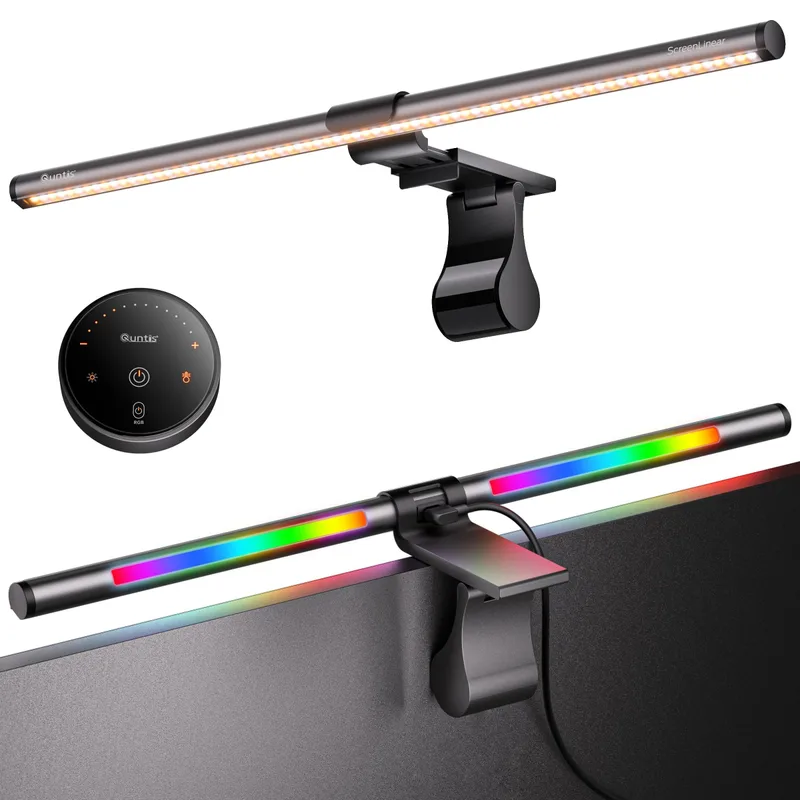
At $62, the Quntis RGB Pro Plus makes a case that you don’t need to spend $179 to get solid desk lighting with gaming flair. The front light uses RA95 color rendering — the same spec BenQ charges a premium for — and the rear backlight offers 15 customizable RGB modes.
The RGB backlight won’t replace a Govee or Philips Hue bias lighting setup if you want true game-synced ambiance. These are preset modes: color cycles, static colors, breathing effects. You cycle through them with the remote. For a gaming setup that had zero ambient lighting before, it’s a meaningful improvement.
The 20-inch front bar covers standard 24-27 inch monitors well. Owner reports consistently note the clip mechanism as solid — firm grip without scratching bezels. 100-step brightness adjustment gives precise control. Four color temperature presets cover warm, neutral, cool, and daylight ranges.
Where the Quntis shows its price point: no auto-dimming, plastic construction that feels cheaper than BenQ’s aluminum, and remote controls that work but feel basic. The RGB is preset, not programmable, and there’s no app or PC software.
For gamers on a budget who want both eye-care lighting and gaming ambiance in one unit, this is the pick. It doesn’t embarrass itself against pricier options on the specs that matter for daily use.
4. Xiaomi Mi Computer Monitor Light Bar — Best Value for Wireless Control
Xiaomi Mi Computer Monitor Light Bar
Pros
- ✓ Wireless remote included at this price is a genuine advantage
- ✓ RA95 color rendering matches premium options
- ✓ Magnetic rotation lets you fine-tune the angle after installation
- ✓ Flicker-free design reduces eye fatigue during long sessions
Cons
- ✗ 270 lumens is on the lower end — not ideal for brightly-lit rooms
- ✗ No auto-dimming or ambient sensor
- ✗ Warranty and brand support less established than BenQ
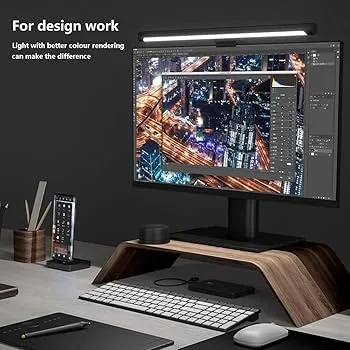
The Xiaomi Mi earns its spot by including a wireless remote at a price where most competitors either skip wireless entirely or charge more for the feature. The 2.4GHz remote puck gives you standalone brightness and color temperature control without adding a cable to your desk.
RA95 color rendering matches the premium options. Color temperature spans 2700K–6500K continuously. The magnetic rotation mechanism lets you tilt the bar to adjust exactly where the light falls on your desk — a small detail that makes a practical difference once you’ve dialed in your preferred position.
Flicker-free operation is worth mentioning. At the high refresh rates gaming monitors run, unmatched lighting frequency can contribute to subtle eye fatigue over a long session. The Xiaomi Mi eliminates this.
The 270-lumen output is lower than BenQ’s 500+ lux options. In a dim gaming room, that’s fine. In an office with overhead fluorescents or natural light, it can feel underwhelming. Know your environment before buying.
At $68, this is the pick for a gamer who wants wireless control and genuine eye-care specs without paying BenQ pricing. Pair it with blue-light filtering if you want additional eye protection — our best blue light glasses for gamers covers that angle.
5. BenQ ScreenBar — Most Reliable Entry-Level Pick
BenQ ScreenBar
Pros
- ✓ CRI 95+ and auto-dimming at the lowest price in the BenQ lineup
- ✓ Seven years of real-world validation — every complaint has been mapped
- ✓ Asymmetric optics eliminate screen glare completely
- ✓ Simple setup — clamp on, plug in, done
Cons
- ✗ Touch controls on the bar require reaching up — no remote option
- ✗ No rear ambient lighting
- ✗ No motion sensor
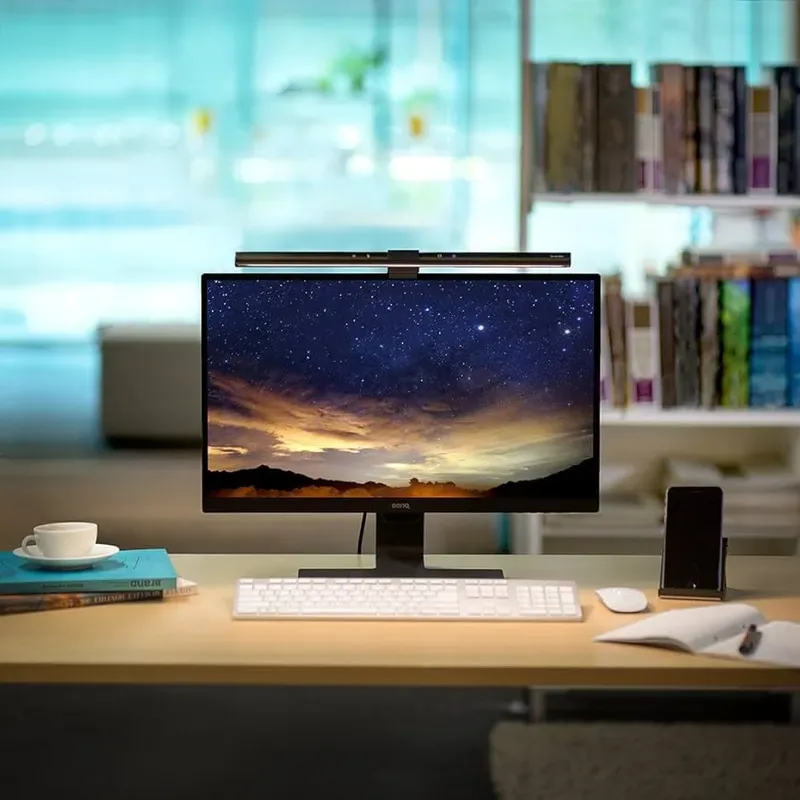
The original ScreenBar has been on the market since 2017 and has more real-world hours behind it than any other monitor light bar. At $49, it delivers BenQ’s asymmetric optics, CRI 95+, auto-dimming, and build quality without any of the add-ons that drive up the cost of newer models.
Controls are touch-based on the bar itself, which means reaching up to adjust brightness or color temperature. That’s the primary sacrifice at this price point. There’s no wireless option, no motion sensor, and no ambient backlight.
What you do get: a product that has been refined through years of production, backed by a brand with real support infrastructure, and validated by thousands of owners across every type of gaming setup imaginable. If something were fundamentally wrong with this design, it would have surfaced by now. It hasn’t.
For a secondary monitor station, a minimal budget, or a setup where you want quality without any feature complexity, the original ScreenBar is still a defensible choice.
Comparison Table
| Product | Price | CRI | Control | Rear Backlight | Curved Support |
|---|---|---|---|---|---|
| BenQ ScreenBar Halo 2 | $199.00 as of Oct 18, 2026 | 95+ | Wireless dial | Yes (tri-zone) | 1000R–1800R |
| BenQ ScreenBar Plus | Unavailable | 95+ | Wired desk dial | No | Standard |
| Quntis RGB Pro Plus | $61.99 as of Oct 18, 2026 | RA95 | Remote | Yes (15 RGB modes) | Yes |
| Xiaomi Mi | Unavailable | RA95 | Wireless remote | No | Standard |
| BenQ ScreenBar | $109.00 as of Oct 18, 2026 | 95+ | Touch on bar | No | Standard |
Buying Guide: What Actually Matters in a Gaming Monitor Light Bar
Glare-Free Optics Come First
The fundamental job of a monitor light bar is to illuminate your desk without bouncing light off the screen face. All five products above do this through asymmetric optical design. If you’re looking at a product not on this list, check for this feature specifically — cheap bars without proper optics will create exactly the glare you’re trying to eliminate.
CRI 95+ for Accurate Colors
Color Rendering Index (CRI) measures how accurately a light source reproduces colors compared to natural daylight. A CRI of 95+ means the colors on your desk — your keyboard, any documents, peripherals — look accurate. Anything below 90 produces a washed-out appearance most people find unpleasant in a gaming setup. All five products above hit RA95 or CRI 95+.
Front Light vs. Ambient Backlight
Front light is the primary function: illuminating your desk. Ambient backlight is the secondary function: adding soft light behind your monitor to reduce contrast in dark rooms. If you game primarily in a dark room, ambient backlight is worth paying for — it’s the single biggest comfort upgrade for long gaming sessions. If you game in a lit room or use your setup for work too, front light quality matters more than backlight.
Auto-Dimming vs. Manual Control
Auto-dimming monitors the ambient room light and adjusts output accordingly. It’s useful if your room light changes (windows, overhead lights turning on/off). For pure gaming setups in controlled environments, it’s less critical. Manual control via a remote or dial is more important for most gamers.
Monitor Compatibility
Standard light bars clip to monitors 15mm–60mm thick (most monitors fall in this range). Curved monitor support varies: the Halo 2 handles 1000R–1800R. If you have an aggressive 1000R curve, verify compatibility before buying.
For your broader gaming setup, see our best gaming chairs and best monitor arms for gaming guides.
FAQ
Do monitor light bars actually reduce eye strain?
Based on owner reports and ergonomic research, yes — when used correctly. The mechanism is straightforward: they reduce the contrast between a bright monitor and a dark surrounding environment. Uniform illumination means your eyes aren’t constantly adjusting between extremes. They also eliminate the need for a desk lamp that might reflect off your screen. Whether a $49 entry-level bar or a $179 premium model, the core eye-care benefit is consistent.
Can I use a monitor light bar with a curved monitor?
Most standard bars work on gently curved monitors (1800R and beyond). For more aggressive curves — 1000R gaming monitors like the Samsung Odyssey series — you need a bar specifically rated for that curvature. The BenQ ScreenBar Halo 2 explicitly supports 1000R–1800R. Check the spec sheet on any bar before buying if you have a tightly curved display.
Does a monitor light bar work for multiple monitors?
One bar per monitor. Light bars are designed to clip to a single monitor and illuminate the desk area in front of it. For dual-monitor setups, most people put one bar on the primary monitor only and rely on general room lighting for the secondary. If you want full coverage, you’ll need two bars.
What’s the difference between a monitor light bar and a desk lamp?
A desk lamp sits on your desk and casts light outward in multiple directions, often creating reflections on your monitor. A monitor light bar mounts on the monitor itself and uses asymmetric optics to direct light downward onto your desk only — it physically cannot create screen glare because of how the light is aimed. For anyone gaming in a dim environment, this is a significant quality-of-life difference.
Do gaming monitor light bars sync with games?
None of the standard monitor light bars on this list sync with games (no Razer Chroma, Corsair iCUE, or similar integration). They provide static or preset ambient effects. If you want true game-reactive bias lighting that changes color based on what’s on screen, look at dedicated bias lighting systems like Govee DreamView or Philips Hue Play — those are a different product category.
Is the BenQ ScreenBar Halo 2 worth the upgrade over the original ScreenBar?
For dark-room gamers: yes, clearly. The rear ambient backlight is genuinely useful, the wireless controller eliminates a daily friction point, and the motion sensor adds quality-of-life functionality. For gamers in lit rooms or setups where you’re not spending 3+ hours in darkness, the original ScreenBar at $49 does the core job at a third of the price.
Conclusion
Monitor light bars are one of the more underrated upgrades in a gaming setup — but only if you buy the right one for your environment.
Best overall: BenQ ScreenBar Halo 2 — $179. If you game in a dark room and eye strain has been an issue, this is the product that addresses it properly. The rear ambient backlight is the feature that earns the price premium.
Best for streaming/dual-use: BenQ ScreenBar Plus — $109. The desktop dial is the right tool for streamers and creators who need frequent lighting adjustments.
Best value for gaming: Quntis RGB Pro Plus — $62. RGB backlight and RA95 eye care at a budget price. Best pick for most gamers.
Best wireless value: Xiaomi Mi — $68. Wireless remote at a price that’s hard to beat.
Most reliable budget: BenQ ScreenBar — $49. No frills, no surprises. Proven over seven years.
Your eyes are doing heavy lifting every session. A $49–$179 desk lighting upgrade that reduces strain and improves comfort is one of the better investments you can make in your gaming setup.