Searching for a standing desk in 2026 keeps leading to the same name, and the reason is the UPLIFT V3. UPLIFT announced its 4-leg frame at the V3 standard in July 2026, and the V3 L-shaped desk followed on July 8. This review covers the 2-leg desk, the one most people mean when they ask about the best standing desk for a home office.
Quick pick: if you were about to buy a V2, buy the V3 instead. It is the desk I’d put at the top of a $600–$700 shortlist. The one exception is anyone over roughly 6’3” who wants the V2’s taller ceiling, covered below.
UPLIFT V3 2-Leg Standing Desk
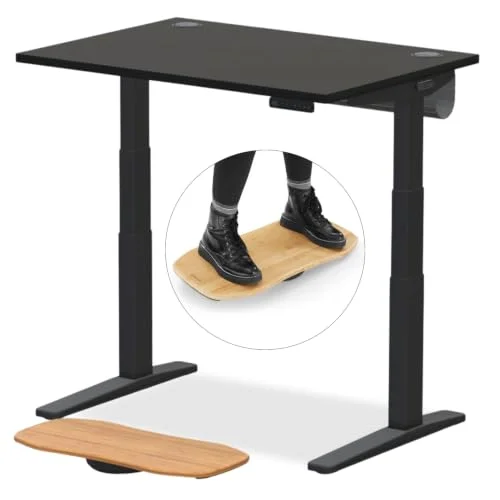
UPLIFT V3 2-Leg Standing Desk
Pros
- ✓ 22.6" minimum height works for shorter users better than the V2's 25.3" minimum
- ✓ 355 lb capacity handles a dual-monitor arm setup, a PC and accessories
- ✓ 15-year warranty covers frame, motors and electronics
- ✓ Available through Amazon, so Prime shipping and Amazon's return process apply
Cons
- ✗ The $648 listing is the entry 42" x 30" laminate top; bigger or premium tops cost more
- ✗ 48.7" maximum height is lower than the V2's 50.9", which matters for very tall users
- ✗ Assembly is still a real project, not a 10-minute job
Best for: most home offices, shorter-to-average-height users, and anyone who wants a long warranty without paying Herman Miller money.
The V3 is a dual-motor, 2-leg desk with a 355 lb capacity. It lifts at about 2 inches per second and UPLIFT rates the noise under 45 dB. The warranty is 15 years across frame, motors and electronics. That coverage is the main reason I’d pick UPLIFT over cheaper brands. A desk you use eight hours a day for a decade is worth a long guarantee.
The entry configuration is a 42” x 30” laminate top at $648 on Amazon. That is mid-range money, not budget. Walnut or bamboo tops, wider sizes and the memory keypad upgrade all raise the total. If you want a cheaper dual-motor option, our best budget standing desk setup guide is the better starting point.
What Changed From the V2
I compared UPLIFT’s published specs and our existing V2 coverage. Here is what shifted.
Height range moved down. Our UPLIFT V2 review lists the V2 at 25.3” to 50.9”. The V3 runs 22.6” to 48.7”. Both ends dropped by roughly 2–2.5 inches. For anyone under about 5’5”, the lower minimum means a seated position without a footrest. For very tall users, the V2’s higher ceiling was the better fit. This is the single most important difference to check against your own elbow height.
Stability is the headline. UPLIFT describes the V3 frame as BIFMA-certified for stability without requiring a lower crossbar, so there is nothing to bump your knees on. The V3 4-leg frame adds stability plates that tie the lifting columns to the upper structure. Owner reports describe the 2-leg V3 as more planted at full height than the V2, though a 355 lb-rated desk with a heavy monitor arm will still show some motion at the top of its range. Every standing desk does.
What stayed the same. Dual motors, 355 lb capacity, the 15-year warranty, anti-collision sensing and the accessory ecosystem carry over. UPLIFT’s own materials say V2 and V3 share these. If you already own a V2 and it works, none of this justifies replacing it.
Where the V2 is now. Our UPLIFT V2 standing desk review still covers the previous generation, and the V2 listings we link are currently marked unavailable on Amazon. That is another reason to look at the V3 first.
Setup and Daily Use
Expect to set aside an hour or more for assembly, since the frame, crossbar-free legs and top all go together with an Allen wrench and some patience. Once it is built, program your sitting and standing heights into the keypad presets and alternate through the day. Most ergonomists suggest changing position regularly rather than standing for hours at a stretch.
Who Should Skip It
Three groups should think twice.
- Very tall users. At 48.7” maximum, standing elbow height tops out sooner than on the V2. Measure your standing elbow height first.
- Heavy multi-monitor or workstation builds. 355 lbs is plenty for most setups. The 4-leg V3 frame is rated for 535 lbs including the desktop if you need that headroom.
- Budget buyers. The V3 is not cheap. A dual-motor FlexiSpot can cost far less. See our FlexiSpot E7 Pro vs UPLIFT V2 comparison for what you give up.
Alternatives Worth Considering
The main premium alternative is the Jarvis Bamboo desk, formerly sold by Fully, which now sells through Herman Miller. It starts at $1,295, so it costs roughly twice the V3. Our UPLIFT V3 vs Jarvis Bamboo comparison goes through the price, warranty and buying-experience differences. Unless you specifically want a bamboo top, the V3 wins on value.
For another premium-desk matchup, see our Secretlab Magnus Pro vs UPLIFT V2 comparison.
Buying Guide: Configuring a V3
- Desktop size. 48” x 30” is the sweet spot for one monitor plus a laptop. Go wider for dual monitors.
- Material. Laminate is the cheapest and lasts. Solid wood and bamboo look better and cost more.
- Keypad. The basic keypad is fine. The advanced keypad adds more presets and USB charging.
- Cable management. Plan for a tray from day one. It is far easier than retrofitting later.
- Floor and mat. Pair it with an anti-fatigue mat if you stand for long stretches.
Frequently Asked Questions
Is the UPLIFT V3 better than the V2?
For most people, yes. The V3 has a lower minimum height and a stability-focused frame redesign. The V2 does reach higher at 50.9”, so very tall users should compare numbers.
How much does the UPLIFT V3 cost?
The entry 42” x 30” laminate configuration is $648 on Amazon as of November 2026. Other sizes, materials and keypads change the price.
What is the warranty on the UPLIFT V3?
UPLIFT lists 15 years covering the frame, motors and electronics.
Can the V3 hold two monitors and a PC?
Yes. The 2-leg desk is rated for 355 lbs, which covers a dual-monitor arm setup, a tower and accessories with room to spare.
Should I upgrade from a V2 to a V3?
Probably not if your V2 is working. The shared motors, capacity and warranty mean the gains are incremental. Upgrade only if height range or wobble is a real problem for you.
Conclusion
The V3 is the UPLIFT to buy in 2026. A lower minimum height, a more stable frame and the same 15-year warranty make it an easy recommendation for most home offices. Check your standing elbow height against the 48.7” ceiling before you order, and you are unlikely to regret it.