If you want a mouse that stops asking your wrist and forearm to move all day, the Logitech MX Ergo S is the trackball most people end up with. It is the one I’d buy first. It is not the cheapest trackball, and it is not for everyone, but it fixes the specific problem trackballs exist to fix: the sweeping arm motion a regular mouse demands.
This review is based on Logitech’s spec sheet, published reviewer coverage, and owner feedback. We have not physically used the unit. A quick check of 2026 coverage turned up no recall, redesign, or new MX Ergo successor. The MX Ergo S, launched with Logi Bolt support and quieter clicks, remains Logitech’s top trackball.
Why a trackball at all?
A mouse moves across the desk, so your hand, wrist and forearm move with it. A trackball stays put. Your thumb rolls the ball, and your arm can rest in one position. Some people find that more comfortable over a long day. Others hate it. If you’re deciding between styles, our vertical mouse vs trackball comparison lays out the trade-offs, and our best vertical mice roundup covers the other route.
This is a comfort product, not a treatment. If you have ongoing pain, numbness or tingling in your hand, see a clinician. Our wrist pain from typing guide covers desk habits that help alongside any gear change.
Logitech MX Ergo S: what you get
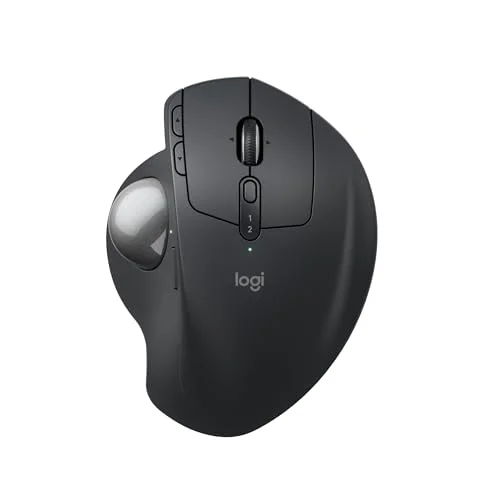
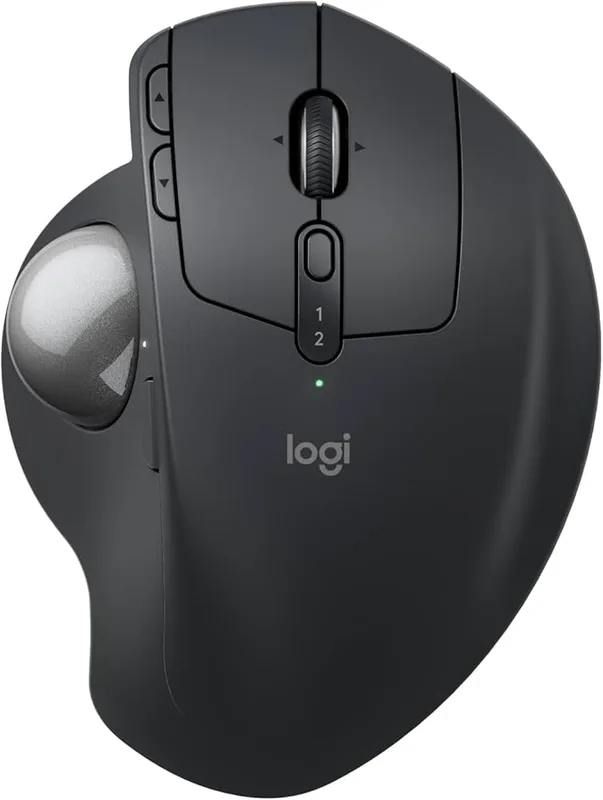
Logitech MX Ergo S Wireless Trackball
Pros
- ✓ Adjustable 20° tilt lets you set the forearm angle instead of accepting a fixed one
- ✓ Stationary body: your thumb moves the ball, so the wrist and forearm stay put
- ✓ Quiet clicks make it easy to live with in shared offices
- ✓ Pairs with two computers and switches between them with one button
Cons
- ✗ Right-handed only; left-handed users need a different trackball
- ✗ Costs more than twice the Logitech M575S, which shares the same basic idea
- ✗ Thumb-ball control takes a week or two to feel natural, and precision work like detailed photo editing stays slower than a mouse
The 20° tilt is the real feature
A hinge under the body lets you tilt the trackball up to 20°. That angle rotates your forearm toward a more neutral, handshake-like position instead of palm-flat. Logitech says the tilted design reduces forearm muscle strain by 27% compared with a standard flat mouse. That is the company’s own claim, so treat it as marketing, not independent research. Still, an adjustable angle is something cheaper trackballs lack, and it is the main reason to pay extra.
The North American MX Ergo S Plus bundles an extra 10° wedge for a steeper setup. If you suspect you’ll want more tilt than the base 20°, check which version you’re ordering.
Quiet clicks and a sensible button layout
Owners often mention the click noise, which is much softer than on older MX Ergo models. That matters if you share a room or take calls. There are six programmable buttons through Logi Options+, and a dedicated DPI button lets you slow the cursor for precise work. Six is fewer than the older MX Ergo’s eight, which some long-time users complain about.
Connectivity and battery
Bluetooth and a Logi Bolt USB receiver are both supported, and you can pair two computers and flip between them with a button. That works well for a work laptop plus a personal machine. Charging is over USB-C. Logitech says a one-minute charge gives about a day of use, and a full charge lasts months, so battery anxiety is minimal.
The adjustment period
This is the honest caveat. Thumb control feels odd for the first week or two, and owners commonly report that pixel-precise work such as detailed photo retouching or fast competitive gaming stays slower than a mouse. For spreadsheets, documents, email and browsing, most people adapt fine. Give it two weeks before judging it.
Desk setup matters too
A trackball only helps if the rest of the setup cooperates. Keep it at elbow height, close enough that your upper arm hangs naturally, and tilt it so your forearm isn’t twisted flat. Because the body doesn’t move, it also suits cramped desks and standing desks where sweeping a mouse across the surface is awkward. Many people park it beside the keyboard, not out at arm’s length, which shortens the reach considerably.
The cheaper alternative: Logitech ERGO M575S
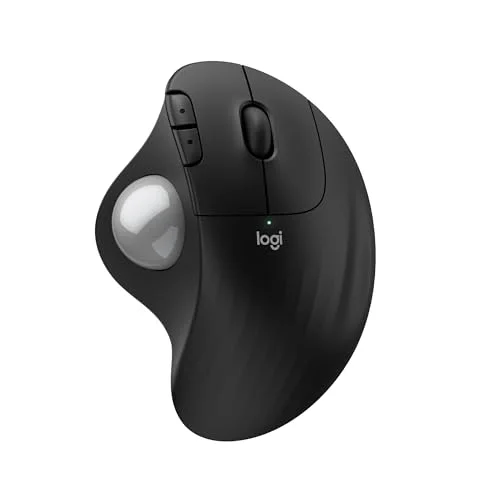
Logitech ERGO M575S Wireless Trackball
Pros
- ✓ Same thumb-ball layout as the MX Ergo S at under half the cost
- ✓ AA battery means no charging routine
- ✓ Light and compact, easy to pack
Cons
- ✗ No tilt adjustment, so forearm angle is fixed
- ✗ Connects to one device at a time
- ✗ Right-handed only
The Logitech ERGO M575S uses the same thumb-ball idea at well under half the price. You give up the tilt hinge, the dual-device switching and USB-C charging, but you gain an AA battery that Logitech says lasts up to 18 months. If you only want to find out whether trackballs suit you, start here. If you already know you like them, the MX Ergo S’s adjustable angle justifies the extra money. For a wider look, including ambidextrous models, see our best ergonomic trackballs roundup.
Who should buy the MX Ergo S
- Long-hours desk workers who want a stationary arm and an adjustable angle.
- People who switch between two computers and want one device for both.
- Shared-office users who need quiet clicks.
Who should skip it
- Left-handed users. There is no mirrored version.
- Precision creative work and fast gaming. A conventional mouse is quicker.
- Anyone on a tight budget. The M575S does most of the job for far less.
Get a decent ergonomic mouse pad or wrist support only if you find your hand needs more rest. The trackball itself needs no pad.
FAQ
Is the Logitech MX Ergo S good for wrist comfort?
It’s designed to reduce arm and wrist movement, and the 20° tilt is meant to put the forearm in a more neutral position. Many owners report it feels better over long days, but comfort is personal and it is not a medical treatment.
What’s the difference between the MX Ergo S and the MX Ergo S Plus?
The Plus version, sold in North America, adds a detachable 10° wedge for extra tilt. The trackball itself is the same.
Is the MX Ergo S worth it over the M575S?
If you want adjustable tilt, two-computer switching and a rechargeable battery, yes. If you just want a trackball to try, the M575S is the smarter first purchase.
How long does it take to get used to a trackball?
Owners typically describe a week or two of adjustment. Precision tasks may stay slower than a mouse.
Does the MX Ergo S work with Mac and Windows?
Yes. It connects over Bluetooth or the Logi Bolt receiver, and Logi Options+ handles button customization on both.
Verdict
The MX Ergo S is the trackball to buy if you’ve decided the format suits you: adjustable tilt, quiet clicks, two-device pairing, and USB-C charging. Choose the M575S if cost matters or you’re unsure about trackballs. Skip both if you’re left-handed or do precision work all day.