If your lower back aches after a long session, you’re not alone. Back pain is the single most common complaint among PC gamers who sit 4+ hours daily — and with PC gaming sessions getting longer as competitive play and live streaming continue to grow through 2026, the problem isn’t going away on its own.
The good news: most gaming back pain is preventable and fixable. It comes from a handful of specific causes, each with a clear solution. This guide covers the root causes, the free fixes you can do today, and the equipment upgrades that make the biggest difference.
Quick pick: For most gamers, the Secretlab Titan Evo at $669 is the right starting point — built-in 4-way lumbar adjustability, proper sizing options, and cold-cure foam that holds up long-term. If you want the ergonomic gold standard and the price isn’t a dealbreaker, the Herman Miller x Logitech G Embody at $1,688 is the chair your back actually wants.
Why Gaming Causes Back Pain
Gaming is hard on your back for the same reasons desk work is — but with longer uninterrupted sessions and worse posture habits.
Static loading. When you hold any position for hours, muscles fatigue and spinal discs compress. Even a perfectly correct posture becomes painful without movement breaks.
Forward head posture. A monitor set too low pulls your head forward. For every inch your head sits in front of your shoulders, it adds roughly 10 lbs of effective load on your neck and upper back. This compounds over a 4-hour session.
No lumbar support. Standard gaming chairs often include a removable lumbar pillow that either sits in the wrong position or gets thrown aside within the first week. Without lumbar support, the lower back loses its natural curve, flattening the spine and overloading the posterior muscles.
Seat depth mismatch. Sitting in a chair that’s too deep forces you to either slouch against the backrest or perch on the edge. Neither is sustainable.
Zero movement. Office workers tend to get up more — coffee runs, meetings, bathroom breaks. Gamers often don’t move for hours. Prolonged static loading without movement is the fastest path to chronic pain.
5 Free Fixes to Try Today
Before spending anything, make these adjustments. Owner reports consistently show these changes alone reduce pain significantly for many gamers.
1. Sit all the way back. Your lower back should contact the backrest. If there’s a gap, the chair isn’t providing lumbar support regardless of what’s advertised.
2. Set chair height so feet are flat. Thighs should be roughly parallel to the floor. Feet dangling or knees above hips both increase lumbar load. If your chair won’t go low enough for your desk height, a footrest fixes this without a new chair.
3. Get your monitor to eye level. The top third of your screen should be at or just below your natural eye level when sitting up straight. If your monitor is on a stand that’s too low, stack it on books temporarily to confirm the improvement before buying a monitor arm.
4. Take a movement break every 45–60 minutes. Stand up, walk for 2 minutes, and do a basic hip flexor stretch (lunge position, 30 seconds each side). Setting a timer is the only reliable way to actually do this during immersive sessions.
5. Roll your shoulders back and down. Most gamers unconsciously round forward. Periodically check: shoulders back, chest slightly open, chin neutral. It sounds simple because it is — but it’s easy to forget for hours at a time.
For a deeper look at posture mechanics specific to gaming positions, the gaming posture guide covers monitor distance, keyboard placement, and chair positioning with exact measurements.
Equipment That Actually Helps
Once posture habits are in place, equipment upgrades lock in those improvements. These four items address the most common physical causes of gaming back pain.
Secretlab Titan Evo Gaming Chair
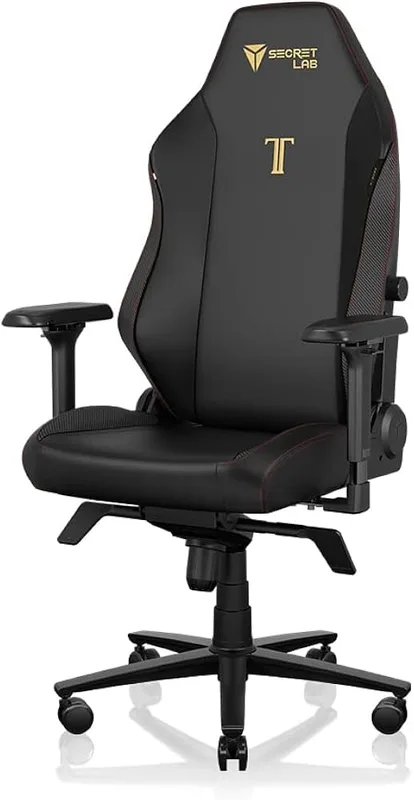
Secretlab Titan Evo Gaming Chair
Pros
- ✓ 4-way lumbar adjusts height, depth, and angle — genuinely useful for lower back pain relief
- ✓ Cold-cure foam holds its shape over years rather than compressing flat within months
- ✓ Magnetic memory foam neck pillow repositions easily during long sessions
- ✓ Available in S, Regular, and XL sizes so most builds get a proper fit
Cons
- ✗ Leatherette runs noticeably warm after 2+ hour sessions without air conditioning
- ✗ Break-in period of a few weeks before the cold-cure foam softens to full comfort
- ✗ Lumbar support can feel too aggressive until you dial in the correct height adjustment
At $669, the Titan Evo is the chair most gamers should buy first. The built-in 4-way lumbar system — adjustable in height, depth, lateral angle, and forward push — is the key differentiator from cheaper gaming chairs where lumbar support is a removable pillow that never sits quite right.
The cold-cure foam is worth noting. Standard polyurethane foam compresses and flattens within a year of daily use. Cold-cure foam maintains its shape significantly longer, which means the support you get on day one is still there after two years of daily 4-hour sessions. Owner reports confirm this holds in practice.
The sizing options matter if you’re shorter or taller than average. The S fits builds up to 5’7” and 180 lbs; Regular covers 5’7”–6’2” up to 220 lbs; XL fits up to 395 lbs at extended heights. Getting the right size is as important as the chair itself — an oversized chair puts the lumbar pillow at the wrong height for shorter users.
The leatherette gets warm, which is a real complaint. The SoftWeave Plus fabric version runs cooler and is worth the slight price premium in warmer climates.
Best for: Gamers who want proper lumbar adjustability without spending four figures.
Herman Miller x Logitech G Embody Gaming Chair
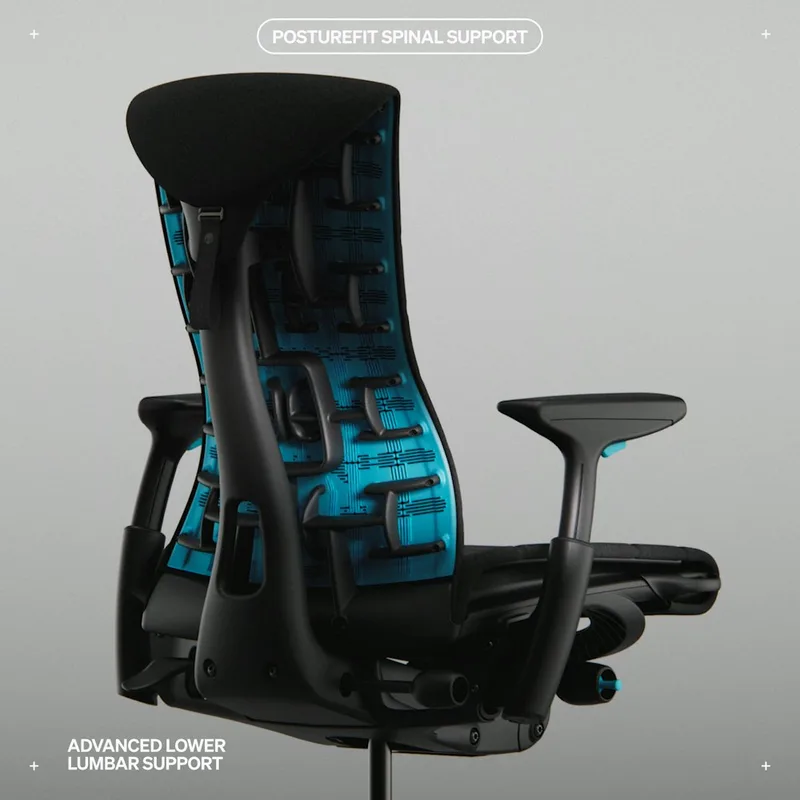
Herman Miller x Logitech G Embody Gaming Chair
Pros
- ✓ BackFit adjustment dial matches the backrest to your exact spinal curve — not a generic pillow
- ✓ PostureFit SL supports both lumbar and sacral spine, addressing the root cause of most gaming back pain
- ✓ Copper-infused cooling foam added specifically for the gaming version runs cooler during extended sessions
- ✓ 12-year warranty is the longest in the gaming chair category by a significant margin
Cons
- ✗ Price of $1,688 is difficult to justify against $669 alternatives for most gamers
- ✗ Looks like a corporate office chair — doesn't match every gaming setup aesthetic
- ✗ No removable headrest cushion — taller users may want more neck support
The Embody is not a gaming chair with extra padding. It’s an ergonomic office chair — one of the best ever made — with a gaming-specific upgrade: a layer of copper-infused cooling foam added specifically for extended gaming sessions.
The BackFit adjustment is what makes it unique. A dial on the back of the chair lets you physically match the backrest curvature to your own spinal curve. No other gaming chair offers this. The PostureFit SL system supports both the lumbar curve and the sacral region below it, addressing the full lower back rather than just the mid-lumbar point most chairs target.
The 144-pivot pixelated support matrix means the back flexes with your movement rather than holding you rigid. For gamers who shift positions constantly — leaning forward during intense moments, reclining during cutscenes — this active response is genuinely different from a fixed foam backrest.
At $1,688, it’s expensive. The value proposition is straightforward: it’s the chair most likely to eliminate back pain entirely, it has a 12-year warranty that most gaming chairs can’t approach, and it holds its resale value. If you’re spending 6+ hours a day gaming and back pain is affecting your daily life, the math changes compared to someone who games casually.
Best for: Serious gamers and streamers who game 6+ hours daily and need the best lumbar support available.
Everlasting Comfort Lumbar Support Pillow
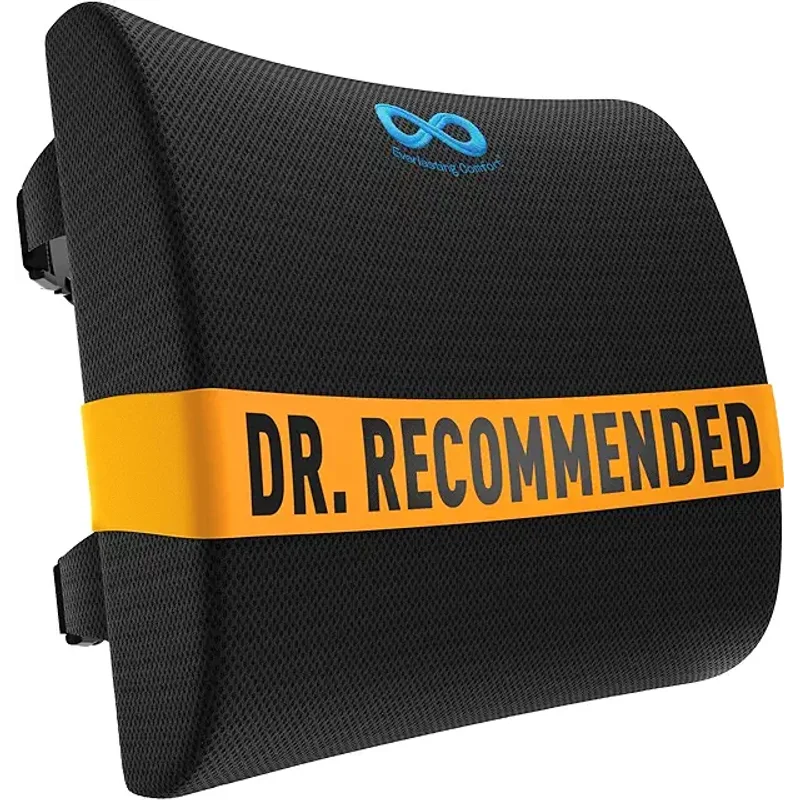
Everlasting Comfort Lumbar Support Pillow
Pros
- ✓ Immediate lumbar relief for any chair — no need to buy a new seat
- ✓ Memory foam conforms to your lumbar curve within minutes of sitting
- ✓ Removable washable cover keeps it fresh through daily use
- ✓ Under $40 makes it the lowest-risk ergonomic upgrade available
Cons
- ✗ Memory foam compresses and loses firmness over 12–18 months of daily use
- ✗ Strap can shift backward during long or active gaming sessions
- ✗ Adds bulk that reduces usable seat depth on compact chairs
If you’re not ready to replace your chair, or if you’re waiting for a sale, the Everlasting Comfort lumbar pillow is the best $36 ergonomic upgrade available. It installs in 30 seconds via elastic strap and provides immediate lumbar support to any chair.
The memory foam conforms to your lower back’s natural curve rather than just pushing against it uniformly. The cover is removable and machine washable, which matters after months of daily gaming.
The limitation is lifespan. Memory foam compresses over time — plan on replacing it after 12–18 months of daily use. It’s also a supplement, not a substitute: a chair that doesn’t fit you correctly won’t be fully fixed by adding a lumbar pillow. But as a low-cost bridge or as a supplement to a chair that already fits well, it’s effective.
Best for: Gamers on a tight budget, or as a supplemental add-on to any chair lacking adequate lumbar support.
HUANUO Single Monitor Arm

HUANUO Single Monitor Arm
Pros
- ✓ Gas spring holds your monitor at true eye level without drift — eliminates forward head posture
- ✓ Full motion arm lets you fine-tune the angle for your exact seating position
- ✓ C-clamp installs in under 10 minutes with no desk drilling required
- ✓ Frees up desk space by eliminating the bulky stock monitor stand
Cons
- ✗ 19.8 lb capacity won't support some heavy 32″+ ultrawide monitors
- ✗ C-clamp base can mark soft desk surfaces without a protective pad underneath
- ✗ Not compatible with desks thicker than 3.5 inches
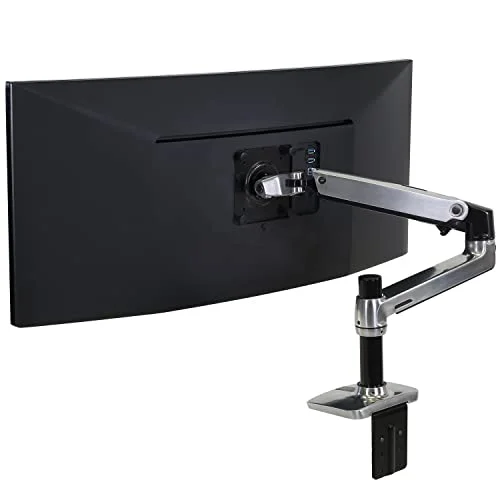
Neck and upper back pain in gaming is often not a chair problem — it’s a monitor height problem. If your monitor is on its stock stand, it’s probably too low. Looking down at a screen for hours creates the forward head posture that loads the upper back and contributes directly to neck pain that feels like shoulder tension or headaches.
The HUANUO gas spring arm holds your monitor at true eye level without drift. Gas spring means the arm stays where you put it and adjusts with one hand. The full motion joint lets you tilt, swivel, and rotate the screen to match your exact seated position. At $33, it’s the cheapest way to fix monitor height, which is one of the most common and overlooked causes of upper-back gaming pain.
The 19.8 lb capacity covers most gaming monitors up to 27 inches. For heavy 32-inch+ panels or ultrawide monitors, step up to the Ergotron LX which handles up to 25 lbs and has a longer arm reach.
For multi-monitor setups, see the best gaming monitor arms for multi-monitor setups roundup.
Best for: Gamers with neck or upper-back pain and monitors sitting too low on their stock stand.
Comparison Table
| Product | Price | Primary Benefit | Best For |
|---|---|---|---|
| Secretlab Titan Evo | $669.00 as of Oct 18, 2026 | 4-way built-in lumbar | Most gamers |
| Herman Miller Embody | $1,688 | Full spinal alignment system | Heavy daily use |
| Everlasting Comfort Lumbar Pillow | Unavailable | Instant support for any chair | Budget / add-on |
| HUANUO Single Monitor Arm | Unavailable | Eye-level monitor positioning | Neck/upper back pain |
How to Choose the Right Fix
If your chair has no lumbar support at all: Start with the Everlasting Comfort pillow. It’s reversible, cheap, and immediate. If lumbar support alone solves the problem, you’ve avoided a much larger purchase. If it doesn’t fully solve it, you’ll know the chair itself is the issue and a replacement is warranted.
If your chair fits your body but you still have lower back pain: Check your sitting position first (use the 5 free fixes above). If position adjustments don’t help, the chair’s lumbar support is inadequate — the Titan Evo is the upgrade to make.
If your pain is in the neck, shoulders, or upper back: Monitor height is the first suspect. Try the HUANUO arm before anything else.
If back pain is severe or chronic and you game 6+ hours daily: The Herman Miller Embody is the correct tool for this specific problem. Cheaper chairs are compromises. The Embody is the chair most likely to address the root cause completely.
For a full breakdown of gaming chair options at every price point, the best gaming chairs for back pain roundup covers six chairs in detail. For the complete ergonomic gaming setup — monitor, desk, chair, peripherals — the ergonomic gaming setup guide covers everything together.
FAQ
How long does it take for gaming back pain to go away?
Mild gaming back pain from poor posture typically improves within 1–2 weeks of correcting your setup and taking regular movement breaks. Chronic pain from years of poor ergonomics can take longer. If pain persists after setup corrections, consult a physical therapist — some issues require targeted strengthening, not just equipment changes.
Is a gaming chair actually better than an office chair for back pain?
Not necessarily. Many gaming chairs prioritize aesthetics (bucket seats, racing styling) over ergonomics. A mid-range office chair with proper lumbar support often outperforms a similarly-priced gaming chair. The Secretlab Titan Evo and Herman Miller Embody are exceptions — they’re gaming chairs with genuine ergonomic engineering behind them.
What’s the best sitting position for gaming?
Sit all the way back so your lower back contacts the lumbar support. Feet flat on the floor or a footrest. Thighs roughly parallel to the floor. Monitor top at or slightly below eye level. Arms at roughly 90 degrees at the elbow when hands are on keyboard. Shoulders relaxed, not hunched toward ears.
Can a lumbar pillow fix gaming back pain on its own?
It can help significantly, especially if your existing chair has no lumbar support. But a pillow addresses symptoms, not cause. If your chair doesn’t fit your body correctly (too deep, too tall, armrests at wrong height), a lumbar pillow won’t fully compensate. Think of it as a supplement to a decent chair, not a substitute for a poorly fitting one.
Should I use a standing desk to avoid gaming back pain?
Standing while gaming is rarely comfortable for extended sessions, but alternating between sitting and standing every 30–60 minutes reduces the static loading that causes most back pain. If you already own a standing desk, adding a standing interval to your gaming routine is a free way to reduce cumulative spinal load. See the best standing gaming desks roundup for desks designed for this use case.
How do I know if my monitor is at the right height?
Sit in your normal gaming position with eyes closed. Open your eyes and note where your gaze naturally falls. That’s where the top third of your monitor should be. If it’s currently lower — which it almost certainly is on a stock stand — a monitor arm is the fix.
Conclusion
Gaming back pain has a clear root cause hierarchy: posture habits first, chair fit second, monitor height third. Address them in that order.
For most gamers, the Secretlab Titan Evo solves the chair problem at a price that’s hard to argue with — $669 for 4-way lumbar adjustability, proper sizing, and foam that actually holds up. Add the HUANUO monitor arm at $33 for eye-level positioning, and you’ve addressed the two biggest physical causes of gaming back pain for under $710 total.
If budget is the constraint right now, the Everlasting Comfort lumbar pillow at $36 is the right starting point — immediate relief, no chair replacement required.
If back pain is genuinely affecting your daily life and you game heavily, the Herman Miller Embody is worth the investment. It’s the chair that addresses the full spinal support picture rather than just one point of it.
For the full gaming ergonomics picture, including keyboard, mouse, and monitor setup: the 6 best gaming chairs for ergonomic comfort and the gaming posture guide are the next reads.