Disclosure: PostureRanked is reader-supported. When you buy through links on our site, we may earn an affiliate commission at no additional cost to you. Our recommendations are based on independent research.
Disclosure: PostureRanked is reader-supported. When you buy through links on our site, we may earn an affiliate commission at no extra cost to you. Learn more
Two standing desks dominate the $400–$700 conversation every year, and 2026 is no exception. The FlexiSpot E7 Pro and the UPLIFT V2 are the most-compared sit-stand desks for a reason — both are dual-motor, both carry 15-year frame warranties, and both cover the height range that works for most people. The difference is in the details: stability, customization, price, and what you’re getting for the premium.
FlexiSpot just refreshed the E7 Pro for 2026 with a new self-locking dual motor certified by TÜV Rheinland and a 25% faster lift speed. That narrows the performance gap with the UPLIFT V2 more than ever. But UPLIFT still holds advantages in stability and configuration depth that matter depending on how you work.
Short answer: The UPLIFT V2 is the better desk for long-term stability and customization. The E7 Pro is the smarter buy if you want rock-solid performance at $150 less. Neither is wrong — but they solve different problems.
Here’s the full breakdown.
UPLIFT V2 Standing Desk
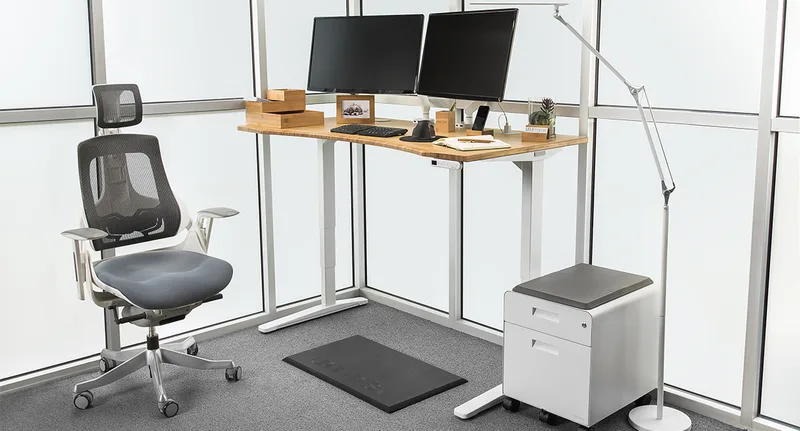
UPLIFT V2 Standing Desk
Pros
- ✓ Superior stability at all heights — less wobble than the E7 Pro under load at max extension
- ✓ 200+ configuration options including solid wood, bamboo, and laminate desktop materials
- ✓ 15-year frame warranty plus a 5-year desktop warranty — industry-leading coverage
- ✓ 6-axis anti-collision sensor stops movement instantly if an obstacle is detected
Cons
- ✗ Starts at $599 — roughly $150 more than the E7 Pro at street price
- ✗ Advanced keypad with USB charging port is a $29 add-on, not included in base price
- ✗ Slight wobble under heavy edge pressure at maximum 50.9" height
The UPLIFT V2 has been the stability benchmark in this category for years, and it earns that reputation. Owner reports consistently describe minimal wobble at standing height even with a dual-monitor setup — a win over the E7 Pro at max extension. The desk rises from 25.3” to 50.9”, covers most users from 5’0” to 6’8”, and the adjustment is quiet enough to use in a shared office space.
The real draw is customization. UPLIFT offers over 200 configuration options — sizes from 42” to 80”, desktop materials including bamboo, solid walnut, acacia butcher block, and standard laminate, plus a C-frame or standard-leg option. If you want a specific look or need a non-standard size, UPLIFT delivers in a way that FlexiSpot simply doesn’t.
The 6-axis anti-collision system is legitimately useful — it stops movement immediately if a monitor arm, cable, or stray item gets in the way during adjustment. And while the base keypad is basic, the advanced memory keypad (an extra $29) adds USB charging and app integration.
Where it falls short: the starting price is $599, the advanced features cost extra, and some owners have noted the keypad mount adhesive loses grip over time. At max height with edge-heavy loads, there’s a small but detectable wobble — nothing structural, but noticeable if you’re particular about feel.
For a deeper look, see our full UPLIFT V2 review.
FlexiSpot E7 Pro Standing Desk
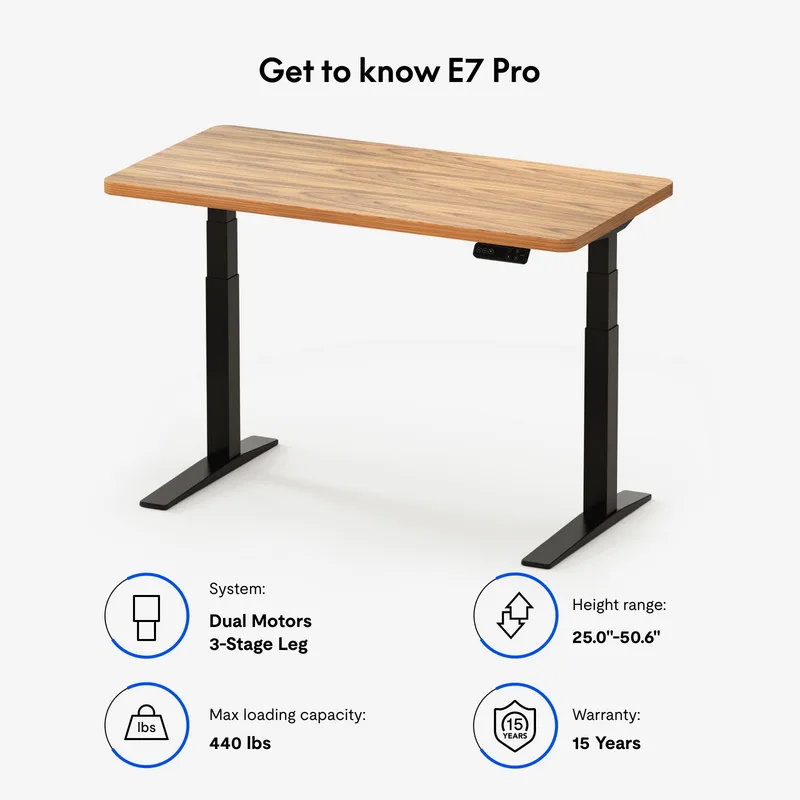
FlexiSpot E7 Pro Standing Desk
Pros
- ✓ 440 lb weight capacity — highest in its price tier, handles dual monitors plus a PC tower with headroom to spare
- ✓ Semi-C-leg frame pushes legs toward the rear for more usable legroom and front desktop space
- ✓ Built-in USB charging port included at base price — no add-on required
- ✓ 2026 Edition features TÜV Rheinland-certified self-locking dual motor with 25% faster lift speed
Cons
- ✗ More perceptible wobble at maximum height compared to the UPLIFT V2
- ✗ Fewer desktop material and size options — limited to FlexiSpot's own lineup
- ✗ Basic cable management tray; UPLIFT includes a more substantial wire management system
The E7 Pro 2026 Edition is FlexiSpot’s most significant upgrade to this line. The new Enhanced Self-Locking Dual Motor uses an internal braking mechanism — FlexiSpot calls it a “parking brake” — that locks the columns at the set height instead of relying solely on motor tension. TÜV Rheinland, an independent German safety certification body, has certified this system. The result is better hold at standing height and less drift under dynamic loads.
At 440 lbs rated capacity, the E7 Pro handles more weight than the UPLIFT V2’s 355 lbs. That matters if you run a loaded workstation: multiple 27”+ monitors, a PC tower, speakers, and peripherals can approach 50-60 lbs without much effort. The E7 Pro gives you substantial headroom.
The semi-C-leg design is understated but practical. Standard standing desk legs sit under the front corners of the desktop. FlexiSpot’s legs shift toward the back, which opens up more knee clearance and makes the front of the desk feel wider. If you sit close, it’s a real ergonomic improvement.
At $449 street price — and often $399 during sales — it undercuts the UPLIFT V2 by a meaningful margin. The included USB charging port and 15-year warranty mean you’re not giving up much at the core feature level.
The honest downside: wobble. At 50.6” maximum height, the E7 Pro shakes more than the UPLIFT V2 under the same load. It’s still within normal standing desk tolerances, but if you’re particular about desk feel or run heavy equipment at full extension, you’ll notice it. Fewer desktop options is also a limitation if you want something beyond FlexiSpot’s standard laminate finishes.
For a detailed breakdown, see our FlexiSpot E7 Pro review.
Head-to-Head Comparison
Stability
UPLIFT V2 wins. Multiple owner reviews and comparison analyses consistently rank the V2 ahead of the E7 Pro in lateral stability at standing height. The difference isn’t dramatic — neither desk falls apart — but if you tap the desk during a standing session, the V2 recovers faster and feels more planted.
The 2026 E7 Pro update improves column locking, which helps with vertical stability under load. But horizontal wobble (side-to-side motion at max height) is still slightly better on the UPLIFT.
Winner: UPLIFT V2
Height Range
Nearly identical. E7 Pro goes 25” to 50.6”; UPLIFT V2 goes 25.3” to 50.9”. The 0.3” difference at the bottom and top is irrelevant for almost every user. Both use three-stage column legs that cover the full range from seated (for short users on low chairs) to standing (for users up to about 6’7”).
Winner: Tie
Motor Performance
Both desks move at roughly 1.5–1.6 inches per second. The 2026 E7 Pro is rated 25% faster than its predecessor, which puts it at near-parity with the UPLIFT V2. Noise levels are comparable — both stay under 46 dB during adjustment, which is about as loud as a quiet conversation.
The E7 Pro’s self-locking motor mechanism may give it a slight edge in how the desk holds its position under dynamic load. The UPLIFT V2’s dual motors are well-reviewed and reliable.
Winner: Tie
Customization
UPLIFT isn’t in the same league here. Over 200 configurations, 20+ desktop materials, multiple frame colors, two leg styles (C-frame or standard), and a range of add-ons from built-in power strips to privacy panels. If you want a desk that matches your office aesthetic exactly, UPLIFT is the answer.
The E7 Pro offers a handful of desktop colors and sizes. Functional, not flexible.
Winner: UPLIFT V2
Warranty
Both carry 15-year frame warranties — genuinely exceptional coverage for a standing desk. The meaningful difference: UPLIFT backs the desktop with a 5-year warranty. FlexiSpot typically doesn’t cover the desktop separately, which matters if you’re paying extra for a premium tabletop.
Winner: UPLIFT V2 (desktop warranty)
Price
At street prices in mid-2026, the E7 Pro runs about $449 and UPLIFT V2 starts at $599 — a $150 gap for the base models. That gap widens if you add UPLIFT’s advanced keypad, a non-standard desktop material, or a larger size.
Winner: FlexiSpot E7 Pro
Comparison Table
| Feature | UPLIFT V2 | FlexiSpot E7 Pro |
|---|---|---|
| Price | From $599 | From $449 |
| Height Range | 25.3” – 50.9” | 25” – 50.6” |
| Weight Capacity | 355 lbs | 440 lbs |
| Motor | Dual motor | Dual self-locking |
| Noise Level | Under 45 dB | 34–46 dB |
| Frame Warranty | 15 years | 15 years |
| Desktop Warranty | 5 years | Not listed |
| USB Port Included | Add-on ($29) | Yes (built-in) |
| Desktop Options | 200+ configs | Limited |
| Anti-Collision | 6-axis sensor | Yes |
| Our Rating | 9.1 | 8.8 |
Who Should Buy Each Desk
Choose the UPLIFT V2 if:
- Stability is your top priority — you want a desk that feels planted at standing height
- You want to customize desktop material, size, or frame color to match your space
- You’re planning to keep this desk for 10+ years and want the best-in-class warranty coverage
- You value UPLIFT’s customer service reputation over a lower price point
Choose the FlexiSpot E7 Pro if:
- You want strong dual-motor performance at roughly $150 less than the UPLIFT
- You run a heavy workstation — the 440 lb capacity gives you more headroom than the V2’s 355 lbs
- You prefer a built-in USB charging port without paying extra
- The 2026 motor upgrade and TÜV Rheinland certification give you confidence in the build quality
If budget is not the deciding factor and you’re choosing the desk you’ll use for the next decade, the UPLIFT V2 wins. If you want excellent performance without the premium pricing, the E7 Pro 2026 Edition is the better value play.
For more context on how both stack up against the full market, see our best standing desks roundup for 2026 and our standing desk buying guide.
Frequently Asked Questions
Is the FlexiSpot E7 Pro more stable than the UPLIFT V2?
No. The UPLIFT V2 is generally considered more stable at standing height, particularly under lateral load. The 2026 E7 Pro Edition improved vertical column locking with its self-locking dual motor, but the V2 still holds a stability advantage at maximum extension.
Does UPLIFT V2 have a weight capacity advantage over the E7 Pro?
No — it’s the opposite. The FlexiSpot E7 Pro has a higher rated weight capacity at 440 lbs vs the UPLIFT V2’s 355 lbs. If you’re running a heavily loaded workstation, the E7 Pro handles more.
Can I buy the UPLIFT V2 on Amazon?
UPLIFT sells primarily through their own website at upliftdesk.com, where you can configure the full range of desktop materials, sizes, and accessories. Some frame-only or specific configurations appear on Amazon, but the full product selection is only available direct.
Is the FlexiSpot E7 Pro 2026 Edition a new model or the same desk?
FlexiSpot updated the E7 Pro for 2026 with a new Enhanced Self-Locking Dual Motor system certified by TÜV Rheinland and a 25% faster lift speed compared to the previous generation. It’s a meaningful mechanical upgrade, not just a cosmetic refresh.
Which standing desk has the better warranty?
Both carry 15-year frame warranties — among the best in the industry. The UPLIFT V2 adds a 5-year desktop warranty, which is an advantage if you’re investing in a premium wood or bamboo surface. FlexiSpot’s frame warranty is equivalent, but desktop coverage is less clearly defined.
What accessories should I get with a standing desk?
A quality anti-fatigue mat is the first addition worth making. Standing on hard floors for extended periods negates some of the health benefit. See our guide to the best anti-fatigue mats for standing desks for recommendations at every budget.
Conclusion
Both the FlexiSpot E7 Pro and UPLIFT V2 are genuinely good standing desks — and the 2026 E7 Pro update makes the value case even stronger than before.
The UPLIFT V2 is the pick for buyers who want the best stability, the widest customization options, and a premium brand experience. At $599+, it’s worth it if you’re equipping a long-term home office and care about the desk feeling solid at standing height.
The FlexiSpot E7 Pro is the pick for buyers who want dual-motor reliability, a higher weight capacity, and a built-in USB port — at roughly $150 less. The 2026 motor upgrade and TÜV certification close the performance gap more than previous generations.
Neither is a bad choice. If you’re splitting the decision, ask yourself this: will you notice the stability difference? If you’re not running heavy edge loads or working at max height daily, the E7 Pro’s $150 savings is hard to justify giving up.