Disclosure: PostureRanked is reader-supported. When you buy through links on our site, we may earn an affiliate commission at no additional cost to you. Our recommendations are based on independent research and testing.
Disclosure: PostureRanked is reader-supported. When you buy through links on our site, we may earn an affiliate commission at no extra cost to you. Learn more
Steelcase’s spring sale is running through March 31, 2026 — one of the few times the Leap V2 gets discounted. Most people see the $1,399 price tag and move on. That’s a mistake if you sit at a desk for 7+ hours a day.
The Leap V2 has been at or near the top of every credible ergonomic chair comparison for nearly two decades, and it still holds that position in 2026. The reason isn’t brand reputation. It’s two mechanical features — LiveBack technology and the Natural Glide System — that behave differently from anything else at this price.
Quick pick: For long keyboard sessions at a traditional desk, the Steelcase Leap V2 is the chair to get. If you regularly switch between a laptop, tablet, and multiple devices, the Steelcase Gesture is the better fit.
Steelcase Leap V2
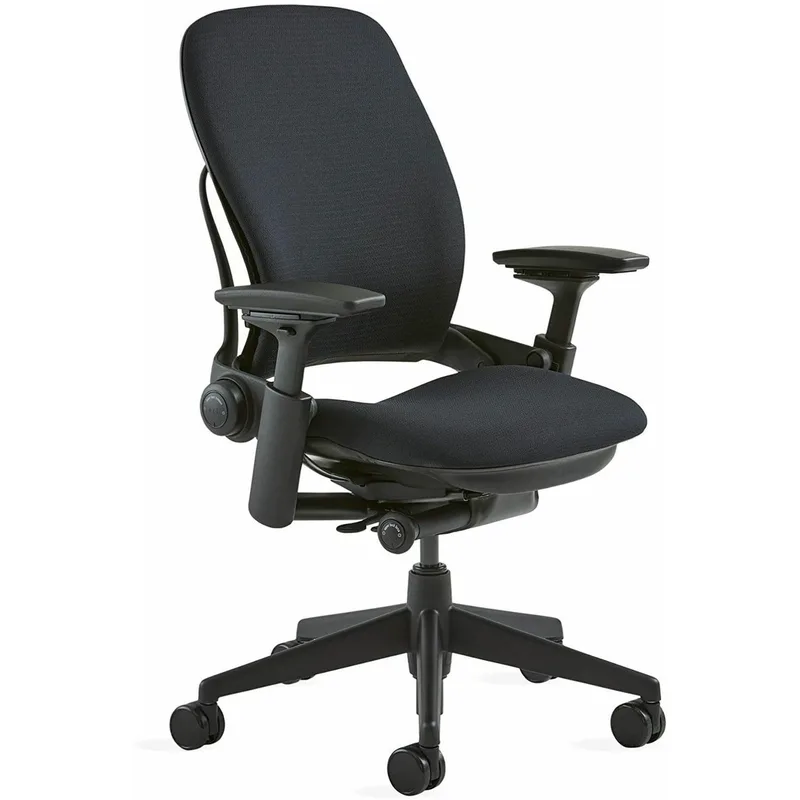
Steelcase Leap V2
Pros
- ✓ LiveBack technology flexes upper and lower back independently — keeps your whole spine supported through every posture shift
- ✓ Natural Glide System slides the seat forward as you recline, keeping you close to your work surface
- ✓ Seven distinct adjustment points including lumbar height AND firmness — more control than any competitor
- ✓ Lumbar firmness dial lets you fine-tune lower back pressure independently of position
Cons
- ✗ No headrest in standard configuration — it's an add-on or you go with the Gesture instead
- ✗ Takes a week or more to fully dial in; first impression often undersells what the chair can do
- ✗ Price is hard to justify for under 5 hours of sitting per day
What Makes It Work: LiveBack and Natural Glide
Two features separate the Leap from everything else in its class.
LiveBack technology means the backrest doesn’t just tilt as a single piece. The upper and lower sections flex independently to mirror your spine’s movement. When you lean back, your upper spine moves rearward while your lower spine maintains its natural forward curve. In a fixed-back chair — including expensive fixed-back chairs — you either get lumbar support when sitting upright or when reclining, but not both. The Leap handles both at once.
The Natural Glide System solves a mechanical problem most chairs ignore. In a standard chair, reclining pushes you away from your desk. You either stop reclining or you hunch forward to reach your keyboard, which loads your neck and shoulders. The Leap’s seat slides forward simultaneously as you recline, keeping your eyes, arms, and torso at a consistent distance from your work surface. After sitting in the Leap for a few days, going back to a fixed-seat chair feels noticeably worse.
The Adjustments
The Leap offers seven major adjustment points:
- Seat height: 15.5–20.5 inches (covers most body heights)
- Seat depth: 3-inch range — critical if you’re shorter or taller than average
- Tilt tension: how much resistance you feel when you lean back
- Tilt limiter: five-position lock that caps your recline range
- Lumbar height: 5-inch vertical range to align with your specific lower back
- Lumbar firmness: independent dial controls how much pressure you feel
- 4D arms: adjust height, width, depth, and pivot angle
The firmness dial is the piece that surprises most people. You can set the chair to light resistance for all-day background support, or firm resistance if you’re dealing with lower back pain and need active engagement. Most chairs give you one lumbar setting or none.
Don’t evaluate this chair in a single 20-minute sit. The adjustments interact with each other, and finding the right combination takes time. Most users report it clicking around day 3 to 7 of regular use.
Build and Sustainability
Steelcase backs the Leap with a 12-year warranty, and the chair regularly reaches 15–20 years in office environments. The steel frame and quality upholstery hold up well over time. Steelcase also recently reduced the chair’s carbon footprint by 39% and brought recycled content to 25% of materials — the chair carries CarbonNeutral certification and is remanufacturable through Steelcase’s Circular program. If a chair eventually wearing out matters to your purchasing decision, this one can be rebuilt for another 15–20 years.
Who the Leap Is Right For
- Home office workers at a desk 7–10 hours a day
- Anyone with chronic lower back issues who needs precise lumbar control
- Buyers who have cycled through budget ergonomic chairs and want to stop replacing them
- People who type at a fixed desk and rarely switch between devices
Who Should Look Elsewhere
- Multi-device users who work with tablets, phones, and laptops frequently (→ Gesture)
- Anyone who needs headrest support and doesn’t want a separate add-on
- Sitting fewer than 5 hours daily — the ROI on $1,399 doesn’t work at low usage
- Budget is a concern — see the best luxury office chairs guide for lower-cost options that still perform well
Steelcase Gesture
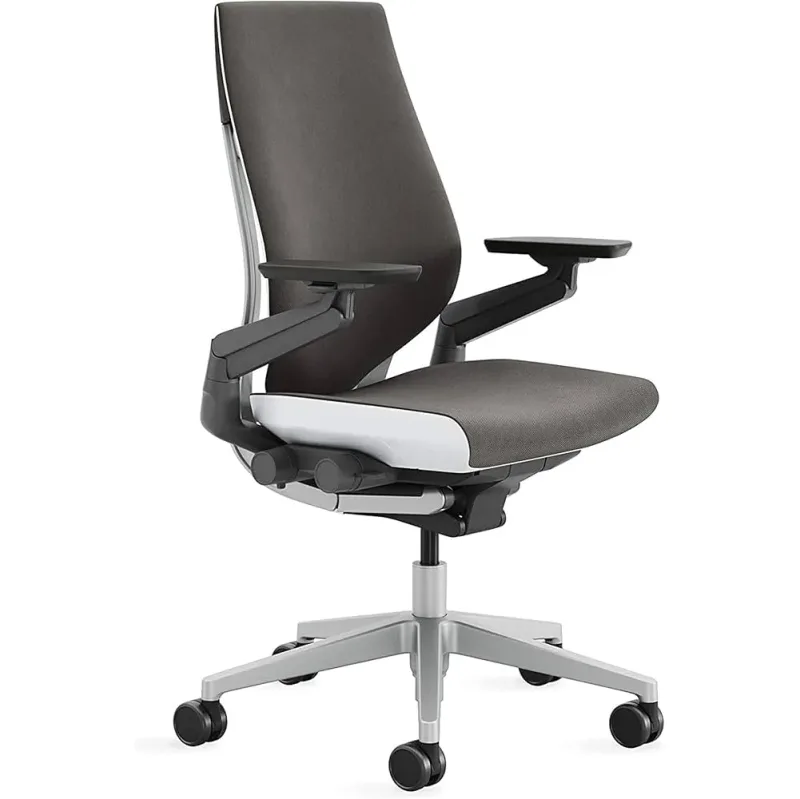
Steelcase Gesture
Pros
- ✓ 360-degree arms follow your arms anywhere — built for tablets, phones, and multi-device setups
- ✓ Handles a much wider range of sitting postures including curled-forward, sideways, and fully reclined
- ✓ Optional headrest adds neck support that the standard Leap lacks
- ✓ Softer, more forgiving feel — some users strongly prefer this over the Leap's firmer back
Cons
- ✗ Lumbar is adjustable but not adaptive — no LiveBack-style independent movement
- ✗ Costs more than the base Leap at equivalent configuration
- ✗ Fewer lumbar fine-tuning options compared to the Leap
The Gesture came out of Steelcase research into how people actually sit with modern technology. People don’t only sit upright at a keyboard. They curl forward over a laptop, lean back scrolling a phone, and turn sideways toward a second screen. The Gesture was designed around all of those positions.
The defining feature is the 360-degree arms. They rotate in any direction to follow your arms — typing, reaching forward, or turning to another screen. If you use a tablet or switch between multiple devices regularly, this matters in a way that the Leap’s 4D arms don’t replicate.
The Gesture also handles more postures overall. It’s more comfortable when sitting cross-legged, sideways, or fully reclined for long stretches. The Leap is more specifically optimized for upright and slightly reclined keyboard work.
The tradeoff: the Gesture’s lumbar is adjustable but not adaptive. There’s no LiveBack-style independent upper/lower movement. For pure lower-back support during extended typing sessions, the Leap has the edge. At $1,499, the Gesture costs more than the base Leap at equivalent configuration.
Side-by-Side Comparison
| Feature | Steelcase Leap V2 | Steelcase Gesture |
|---|---|---|
| Price | $1,399 | $1,499 |
| Weight capacity | 400 lbs | 400 lbs |
| Back technology | LiveBack (adaptive) | Fixed-flex |
| Lumbar control | Height + firmness dial | Height adjust only |
| Arm type | 4D (H/W/D/pivot) | 360-degree rotation |
| Seat glide | Yes (Natural Glide System) | No |
| Headrest | Add-on only | Optional included config |
| Best for | Keyboard-focused work | Multi-device, varied postures |
| Warranty | 12 years | 12 years |
Buying Guide
New vs. Remanufactured Both the Leap and Gesture can be purchased remanufactured from certified dealers for significantly less. Remanufactured from a reputable source (not just used off a marketplace) typically includes refreshed foam, cleaned upholstery, and a warranty. Worth considering if the full price is a barrier.
The Leap vs. the Aeron The Herman Miller Aeron is the Leap’s main competition. The Aeron runs mesh throughout (better for warm offices), while the Leap gives more precise lumbar control. For a full breakdown, see the Herman Miller Aeron vs. Steelcase Leap comparison. If you’re trying to decide between the two top chairs in this category, that article covers it in detail. You can also read our Herman Miller Aeron review for a standalone look at the Aeron.
Is $1,399 justified? If you sit 8+ hours daily, the economics usually work out. A premium chair used for 15 years typically costs less per year than cycling through budget chairs every 3–4 years — and the ergonomic difference is significant. For a full analysis of what premium chairs actually buy you, see our guide on whether expensive office chairs are worth it.
Where to buy The Leap is on Amazon and directly from Steelcase. As of late March 2026, the Steelcase spring sale offers a discount with the SPRING code through March 31. Check both prices before purchasing — Amazon pricing fluctuates.
FAQ
Does the Steelcase Leap V2 have a headrest?
No. The standard Leap V2 does not include a headrest. Steelcase sells an aftermarket headrest attachment separately, and some Amazon listings include it as a bundled variant. If built-in headrest support is important, the Gesture includes it as an option without an aftermarket purchase.
How long does the Steelcase Leap V2 last?
The Leap V2 is rated for 15–20 years with regular use. The steel frame and quality upholstery hold up in office environments, and Steelcase’s 12-year warranty covers defects in materials and workmanship.
Is the Steelcase Leap good for tall people?
Yes. The standard Leap accommodates users up to around 6’4” comfortably. The seat height range, 3-inch depth adjustment, and tall back handle most body types. Very tall users (6’4” and above) should confirm seat depth and arm height work for their frame before purchasing.
What’s the difference between Leap V1 and V2?
The V2 added lower back firmness control, improved upper back support, and better arm adjustability. The V1 is still a good chair, but the firmness dial on the V2 is a meaningful upgrade. If you find a V2 for meaningfully more than a V1, the gap is worth it for the lumbar control alone.
Can I return the Steelcase Leap if it doesn’t work for me?
Steelcase recently reduced its direct-store return window to 14 days. Amazon return policies vary by seller. Given the adjustment period this chair requires, try to confirm return terms before purchasing if you’re uncertain.
How does the Leap compare to budget ergonomic chairs?
Budget chairs typically offer basic seat height adjustment and a fixed lumbar bump. The Leap’s LiveBack, Natural Glide, and lumbar firmness dial are features that simply don’t exist at those price points. The question isn’t whether the Leap is better — it is — it’s whether your usage level justifies the cost difference.
Conclusion
The Steelcase Leap V2 is the chair I’d recommend before almost everything else at its price point if you work at a keyboard for long hours. The LiveBack technology and Natural Glide System aren’t marketing terms — they describe real mechanical behavior that changes how the chair supports your spine across posture changes throughout a long day.
The Gesture is the right call if you use multiple devices and want arms that follow you everywhere, or if having a headrest in the box matters. For everything else, the Leap is the standard to compare against.
For more premium options across all price tiers, see the best luxury office chairs roundup.