Disclosure: PostureRanked is reader-supported. When you buy through links on our site, we may earn an affiliate commission at no additional cost to you. Our recommendations are based on independent research.
| Product | Price | Rating |
|---|---|---|
| Herman Miller Aeron Chair (Size B) | $1,599 | 9.3 |
| Steelcase Leap V2 | $1,199 | 9.1 |
| Herman Miller Embody Chair | $1,945 | 9.0 |
| Steelcase Gesture | $1,430 | 8.8 |
| Humanscale Freedom Chair with Headrest | $1,686 | 8.7 |
| Herman Miller Cosm Chair (Mid Back) | $1,595 | 8.5 |
| HAG Capisco 8106 | $995 | 8.4 |
Disclosure: PostureRanked is reader-supported. When you buy through links on our site, we may earn an affiliate commission at no extra cost to you. Learn more
Spending $1,000+ on an office chair sounds absurd — until you’ve sat in one. The gap between a $300 chair and a Herman Miller or Steelcase isn’t marketing. It’s the difference between a chair that fights your body and one that disappears under you. For buyers not ready for this investment, our best ergonomic chairs under $500 roundup covers the best options at a more accessible price.
These are chairs engineered by ergonomics researchers, built to last 15–20 years, and backed by 12-to-15-year warranties that cover 24/7 commercial use. The price is real. So is the value.
If you’re on the fence about whether the price is justified: for anyone sitting 6+ hours a day, the math works. Twelve-year warranties, refurbishable parts, and resale value that holds at 40–60% of retail make these chairs a long-term investment, not a splurge.
Quick picks:
- Best overall: Herman Miller Aeron — the gold standard
- Best value: Steelcase Leap V2 — most adjustable at the best price
- For standing desk users: HAG Capisco — built for sit-stand workflows
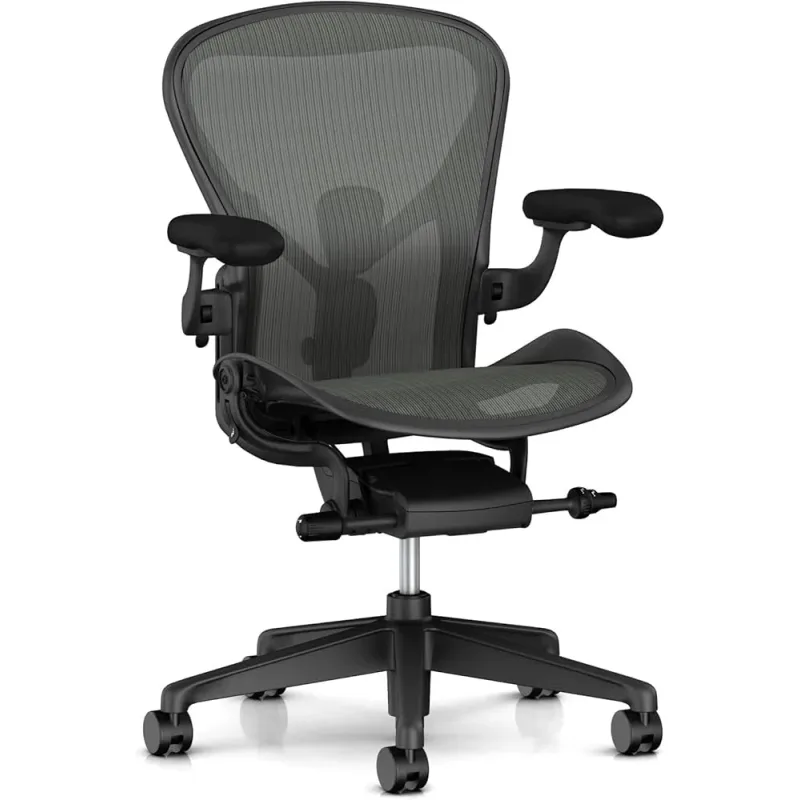
Herman Miller Aeron Chair (Size B) — Editor’s Pick
Herman Miller Aeron Chair (Size B)
Pros
- ✓ Breathable 8Z Pellicle mesh eliminates heat buildup all day
- ✓ PostureFit SL provides sacral + lumbar dual support
- ✓ 12-year warranty covers 24/7 commercial use
- ✓ Decades of refinement — proven ergonomic design
Cons
- ✗ PostureFit SL height is fixed — may not suit all anatomies
- ✗ Firm seat with no cushion option
- ✗ Fully loaded configuration pushes $1,700+
The Aeron is the chair that made ergonomics a mainstream conversation. Introduced in 1994 and refined ever since, it remains the benchmark against which every premium office chair is measured.
The defining feature is the 8Z Pellicle suspension mesh — different tension zones across the seat and back that distribute weight evenly and let air flow freely. If you’ve ever ended a long session with a sweaty back, the Aeron fixes that permanently.
The PostureFit SL lumbar system provides dual-point support at both the sacrum and lumbar spine, unlike most chairs that support only the lower back. This encourages a natural forward pelvic tilt — the position your spine actually wants to be in. Some people find it aggressive at first. Give it two weeks.
At 350 lb capacity and with fully-loaded 4D arm configuration options, the Aeron fits a wide range of bodies. Size matters though — the B (medium) is the sweet spot for most users (5’0”–6’6”), but Aeron also comes in A (petite) and C (large) sizes.
Best for: Long-hours knowledge workers, anyone with lower back pain, people who run hot.
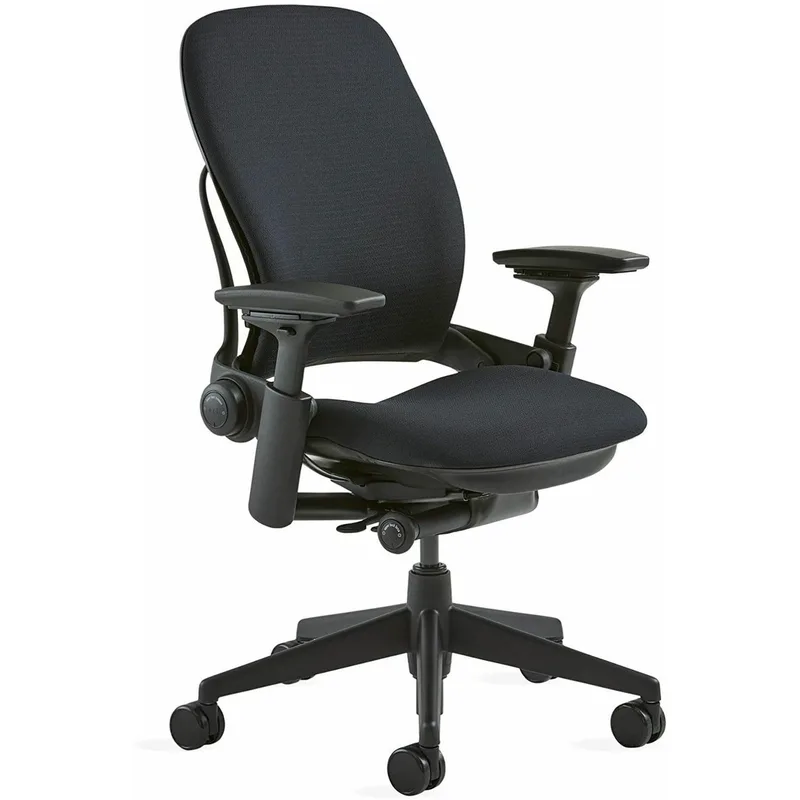
Steelcase Leap V2 — Best Value
Steelcase Leap V2
Pros
- ✓ LiveBack technology flexes with your spine — best back tracking available
- ✓ Optional height-adjustable lumbar with independent firmness control
- ✓ Highest weight capacity (400 lbs) in this class
- ✓ 14+ adjustment points — most customizable chair here
Cons
- ✗ Fabric-only seat and back runs warm in hot environments
- ✗ Headrest add-on pushes head forward — skip it
- ✗ Recline not as smooth as Herman Miller
The Leap V2 is the chair ergonomics consultants actually recommend most. Not the Aeron. The Leap.
Why? LiveBack technology. The backrest is divided into upper and lower sections that flex independently, tracking the changing curve of your spine as you shift from leaning forward to leaning back. It doesn’t just support your back — it moves with it.
Add the optional height-adjustable lumbar (worth every penny) with independent firmness control, and the Leap becomes the most dialed-in chair in this roundup. You can position lumbar support exactly where your back needs it, then set how firm it pushes.
At $1,199 with 14+ adjustment points and a 400 lb capacity, the Leap V2 is the best performance-per-dollar in the premium tier. The 12-year multi-shift warranty matches Herman Miller. The chair will outlast most furniture you own.
One skip: the headrest add-on. It pushes your head forward and ruins the ergonomics. Buy without it.
Best for: Anyone wanting maximum adjustability, taller users, people with specific lumbar support needs.
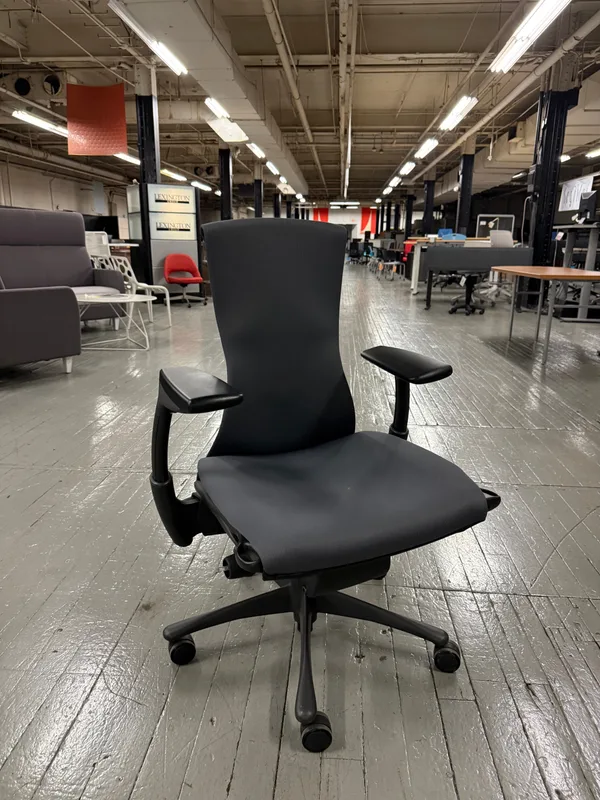
Herman Miller Embody Chair — Best for Long Sessions
Herman Miller Embody Chair
Pros
- ✓ Pixelated seat and back respond dynamically to micro-movements
- ✓ BackFit2 spinal angle adjustment adapts as you shift
- ✓ Exceptional all-day comfort for knowledge workers
- ✓ 12-year warranty on every component
Cons
- ✗ Most expensive Herman Miller at nearly $2,000
- ✗ Less breathable than mesh chairs — fabric runs warm
- ✗ Lower weight limit (300 lbs) than Leap or Gesture
The Embody was designed with input from 30 physicians and PhDs with one goal: build a chair that actively supports the human body during extended computer use. The result is one of the most unusual — and effective — office chairs ever made.
The Pixelated Support system — interlocking polymer pixels across the seat and back — responds to micro-movements constantly. Every shift in posture, every slight lean, triggers a cascade of tiny adjustments. It doesn’t hold you in one position. It supports every position you move through.
The BackFit2 adjustment lets you fine-tune the back panel angle to match your specific spinal curve. Get it right and the chair feels almost custom-made for your body.
At nearly $2,000, the Embody is the most expensive chair here. It’s also the most purpose-built for all-day computing. Designers, developers, and writers who spend 8–10 hours in front of a screen often consider it worth the premium.
Note the 300 lb weight limit — lower than the Leap or Gesture. And it runs warmer than mesh-only chairs, which matters in summer.
Best for: Long-session computing, designers and developers, users who want adaptive support rather than manual controls.
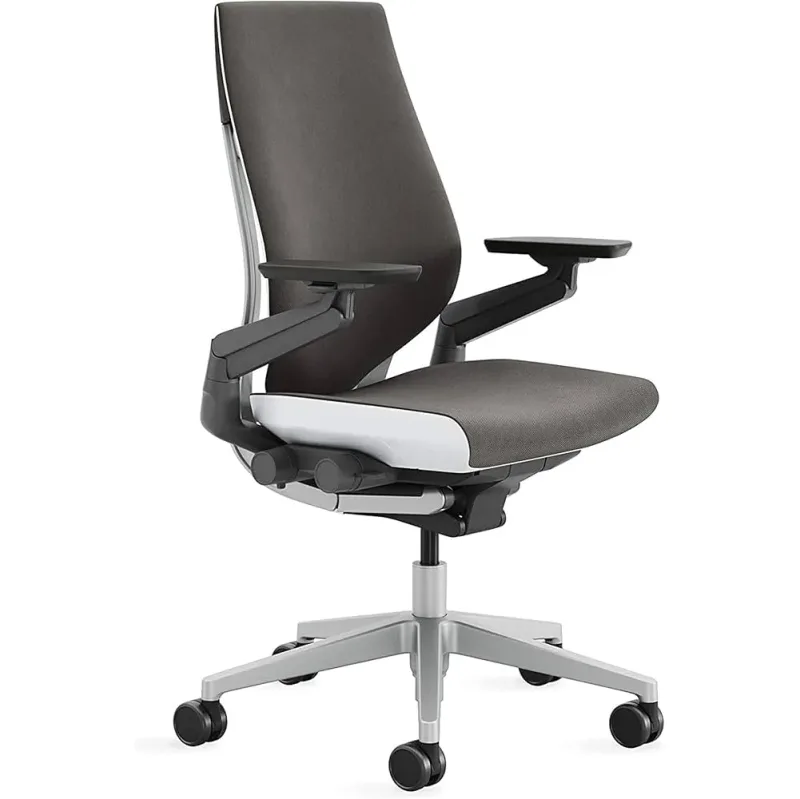
Steelcase Gesture — Best for Tech Workers
Steelcase Gesture
Pros
- ✓ 360-degree arm movement — only chair designed for tablet/phone/keyboard switching
- ✓ 3D LiveBack mirrors your spine curve during recline
- ✓ Lifetime frame warranty
- ✓ Ships fully assembled — zero setup required
Cons
- ✗ Stock lumbar pad is too aggressive for many users
- ✗ No mesh option — padded seat and back gets warm
- ✗ Headrest add-on is not worth the extra cost
The Gesture was designed in 2013 around a simple observation: people don’t just type at desks anymore. They use laptops, tablets, phones, second screens — constantly switching between devices and postures. Existing chairs weren’t built for this.
The result is the most arm-versatile chair ever made. The Gesture’s arms rotate 360 degrees: forward, back, out to the sides, inward. You can rest your arms on them while cradling a tablet, while using a side monitor, while leaning back on your phone. No other major ergonomic chair comes close.
The 3D LiveBack backrest flexes similarly to the Leap, following spine movement through deep reclines. Combined with the lifetime frame warranty, the Gesture is a serious long-term investment.
One consistent complaint: the stock lumbar pad pokes too aggressively into the lower back for many users. You can add an adjustable lumbar module, but it shouldn’t be necessary at this price point. Worth knowing before you buy.
Best for: Multi-device workers, people who frequently switch between tablet/phone/desktop, anyone with a dynamic workstyle.
Humanscale Freedom Chair with Headrest — Best for Reclining
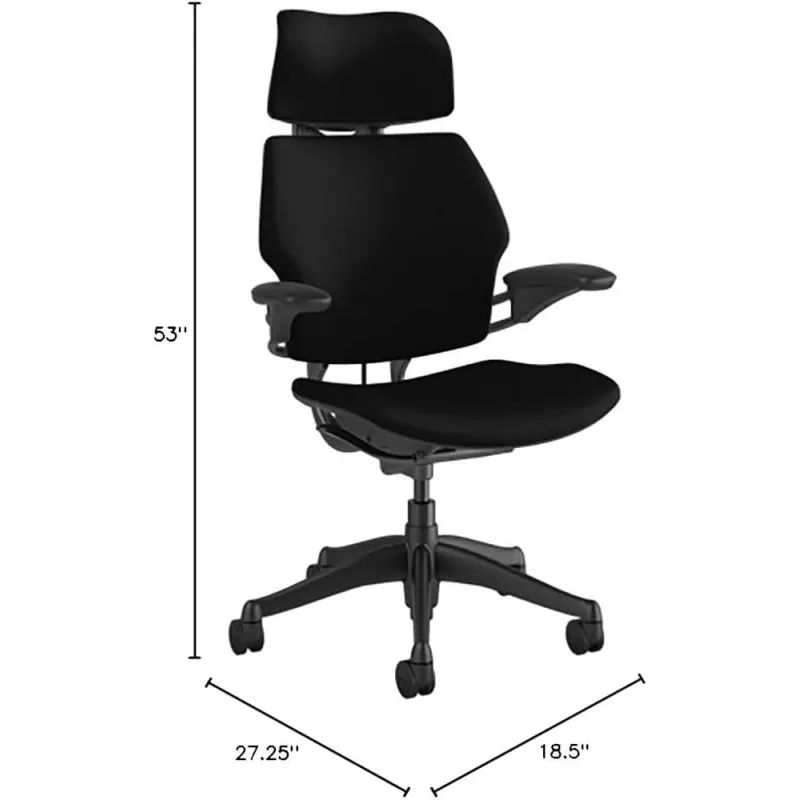
Humanscale Freedom Chair with Headrest
Pros
- ✓ Weight-sensitive auto-recline calibrates to your body — no friction dial needed
- ✓ Articulating headrest actually tracks head and neck movement
- ✓ Arms recline with the seat — continuous arm support throughout
- ✓ 15-year warranty covers everything — best in the industry
Cons
- ✗ Very limited manual adjustability — no seat depth, no lumbar height control
- ✗ Cannot lock upright — shifts unexpectedly when stretching
- ✗ Headrest bends neck forward slightly at maximum recline
The Freedom takes the opposite philosophy from the Leap and Gesture: instead of giving you 14 dials to adjust, it gives you almost none. The chair figures it out.
The counterbalance mechanism calibrates recline resistance to your body weight automatically. Lean back and the chair moves with exactly the right amount of resistance — not too stiff, not too loose — without you ever touching a tension knob. It sounds simple. It feels effortless.
The articulating headrest — usually an afterthought on other chairs — actually moves with your head and neck as you recline, keeping your neck in a natural position throughout. And the arms recline with the seat, maintaining support no matter how far back you lean.
That 15-year warranty is the best in the industry. It covers 24/7 use, all components, all materials.
The trade-off is adjustability. No seat depth adjustment. No lumbar height control. No way to lock the chair fully upright if you need it. If you’re a fiddler who likes to dial everything in, the Freedom will frustrate you. If you want to sit down and have the chair handle everything, it’s exceptional.
Best for: People who hate adjusting chairs, frequent recliners, anyone prioritizing the headrest experience.
Herman Miller Cosm Chair (Mid Back) — Best for Minimalists
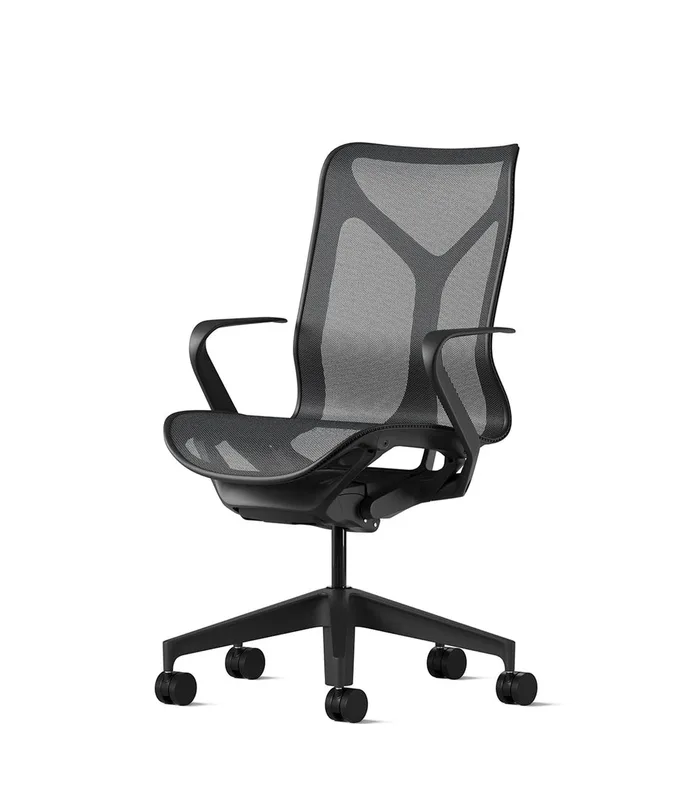
Herman Miller Cosm Chair (Mid Back)
Pros
- ✓ Stunning design — the most visually striking chair in this roundup
- ✓ Auto-harmonic tilt adapts to your weight with zero manual controls
- ✓ One-piece AireWeave mesh is exceptionally breathable
- ✓ Fits 5th to 95th percentile body types without tuning
Cons
- ✗ Almost no manual adjustability — no lumbar, no tilt lock
- ✗ Constant spring resistance cannot be disabled
- ✗ One-piece mesh cannot be replaced if damaged
The Cosm is Herman Miller’s most design-forward chair. It looks like furniture. It sits like a dream for the right user. It has almost no controls.
The auto-harmonic tilt mechanism adjusts recline resistance based on your weight and movement — similar in concept to the Humanscale Freedom, but without the Freedom’s arm-reclining mechanism. There’s no tilt tension knob. No lumbar dial. Seat height and arm height (optional). That’s it.
The one-piece AireWeave suspension mesh is gorgeous and breathable — arguably more comfortable than the Aeron’s Pellicle for shorter sessions. The chair handles a wide range of body types (5th to 95th percentile) without any adjustment needed.
At $1,595, the Cosm is priced between the Leap and Embody. For users who value aesthetics and simplicity over adjustability, it earns its price. For anyone who needs specific lumbar positioning or a locked-upright option, look elsewhere.
Best for: Minimalists, home offices where aesthetics matter, people who sit primarily in a neutral upright position.
HAG Capisco 8106 — Best for Standing Desk Users
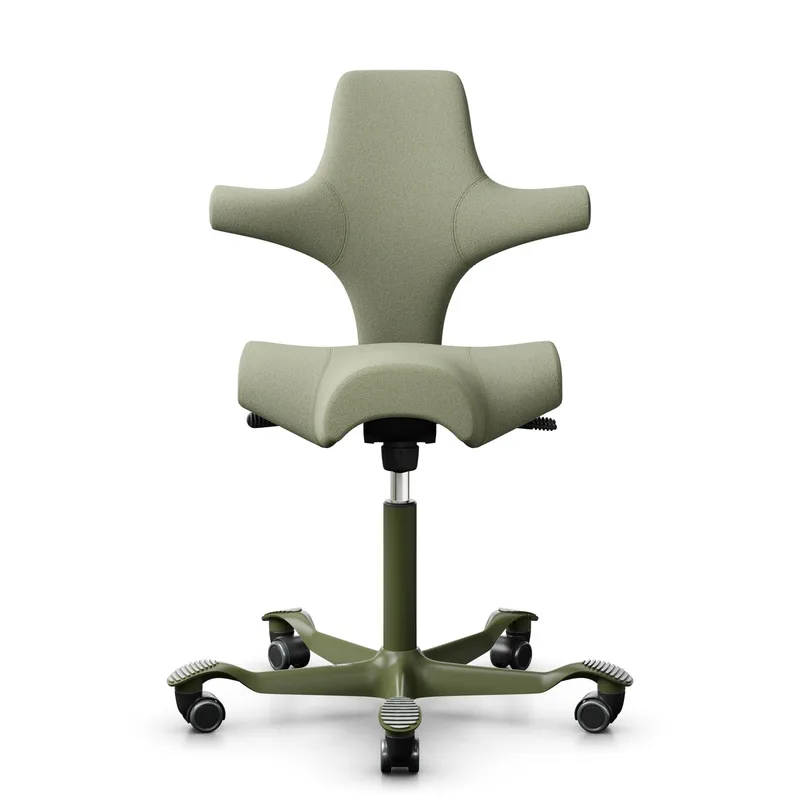
HAG Capisco 8106
Pros
- ✓ Saddle seat opens hip angle and reduces lower back compression
- ✓ Tallest cylinder reaches counter and standing desk height
- ✓ Active seating design encourages constant micro-movement
- ✓ Can be sat on backward for additional posture variety
Cons
- ✗ Saddle seat requires a 2 to 4 week adjustment period
- ✗ Lower weight capacity (300 lbs) vs. others in this roundup
- ✗ Not ideal for traditional upright or reclined sitting styles
The Capisco is the outlier in this roundup. Designed by Norwegian ergonomist Peter Opsvik, it doesn’t look like any other office chair because it doesn’t work like any other office chair.
The saddle-style seat tilts the pelvis slightly forward, which opens the hip angle and reduces compression in the lumbar spine. The same principle behind why kneeling chairs work — without the knee discomfort. It takes 2–4 weeks to adapt, and some users never fully come around. Those who do rarely go back to conventional seating.
The real selling point is the height range. With the tall 265mm cylinder, the Capisco reaches 31.9 inches — true counter height, perfect for pairing with a standing desk. At standing height you can perch on the seat half-standing, keeping blood flowing without fully sitting or standing. This is exactly what sit-stand ergonomics is supposed to look like.
At $995, it’s the most affordable chair in this roundup. It’s also the most different. If you have a sit-stand desk and you’re already converting standing time, the Capisco makes that transition seamless.
Best for: Standing desk users, people with lower back or hip pain, anyone wanting to try active/saddle seating.
Luxury Office Chair Comparison Table
| Chair | Price | Rating | Weight Cap. | Warranty | Best For |
|---|---|---|---|---|---|
| Herman Miller Aeron | $1,599 | 9.3 | 350 lbs | 12 years | Best overall |
| Steelcase Leap V2 | $1,199 | 9.1 | 400 lbs | 12 years | Best value + adjustability |
| Herman Miller Embody | $1,945 | 9.0 | 300 lbs | 12 years | All-day computing |
| Steelcase Gesture | $1,430 | 8.8 | 400 lbs | Lifetime frame | Multi-device work |
| Humanscale Freedom | $1,686 | 8.7 | 400 lbs | 15 years | Reclining + headrest |
| Herman Miller Cosm | $1,595 | 8.5 | 350 lbs | 12 years | Minimalists |
| HAG Capisco | $995 | 8.4 | 300 lbs | 10 years | Standing desk pairing |
What to Look for in a Luxury Office Chair
Lumbar Support System
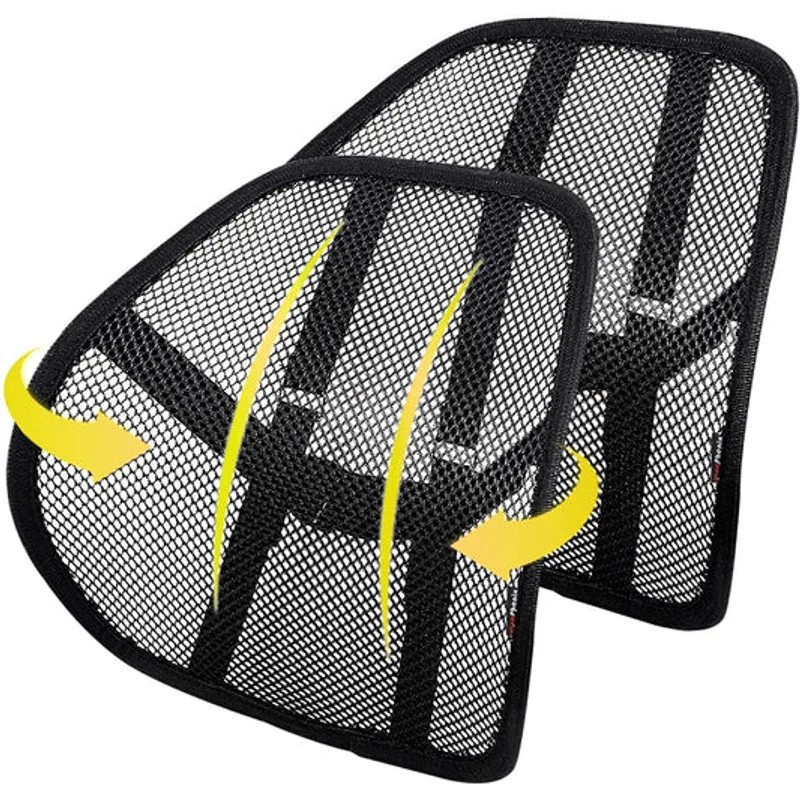
Not all lumbar systems are equal. The Aeron’s PostureFit SL is dual-point (sacrum + lumbar). The Leap’s is height-adjustable with firmness control. The Gesture’s is a poky add-on. The Cosm and Freedom handle it passively. Know which approach matches your back.
The best lumbar support for you is the one positioned correctly for your specific anatomy. Height-adjustable lumbar (Leap V2) gives you the most control.
Mesh vs. Fabric
Mesh seats and backs run cooler — significantly. If your office gets warm, or if you naturally run hot, mesh is worth prioritizing. Aeron, Cosm, and Capisco are mesh. Leap V2, Embody, and Gesture are fabric/foam and will be warmer.
Warranty Coverage
Twelve years is the luxury standard (Herman Miller, Steelcase). Humanscale tops this with 15 years. The HAG Capisco offers 10 years on defects, lifetime on structural components. Check whether the warranty covers multi-shift (24/7) use — all chairs in this roundup do.
Adjustability vs. Auto-Adjustment
Some chairs (Leap, Gesture, Aeron) give you maximum manual control. Others (Cosm, Freedom) handle adjustment automatically. Neither approach is better — it depends on your preference: dial everything in manually, or sit down and let the chair handle it.
Sizing
The Aeron is the most size-conscious chair here — it comes in three sizes. Make sure you’re ordering the right one. Size B (medium) fits most people between 5’0” and 6’6”. The others in this roundup are one-size-fits-most, but check seat width if you’re on the broader side.
Budget vs. Luxury: When Does the Price Make Sense?
A $300 chair and a $1,200 Leap V2 don’t feel 4× different for 30 minutes of sitting. They feel completely different after 8 hours.
The luxury tier offers:
- 12–15 year warranties vs. 1–5 year coverage on budget chairs
- Proprietary mechanisms (LiveBack, PostureFit SL, auto-harmonic tilt) that budget chairs can’t replicate
- Refurbishable parts — these chairs can be rebuilt 10 years later
- Resale value — used Aerons and Leaps hold 40–60% of retail value
If you’re sitting less than 4 hours a day, a well-chosen chair from our best ergonomic chairs under $500 guide will serve you well. If you’re putting in full workdays, the math shifts quickly in favor of investing properly.
FAQ
Which luxury office chair is best for back pain?
The Steelcase Leap V2 edges out the competition for back pain because of its height-adjustable lumbar support with firmness control — you can target exactly where your back needs support. The Herman Miller Aeron is a close second, particularly for lower back pain, thanks to the dual-point PostureFit SL system. For a comprehensive look at matching chairs to specific pain types, see our complete guide to ergonomic chairs for lower back pain.
Is Herman Miller better than Steelcase?
They’re designed differently. Herman Miller chairs (Aeron, Embody, Cosm) tend to enforce good posture with specific support structures. Steelcase chairs (Leap, Gesture) tend to follow your movement and adapt to how you actually sit. Neither is objectively better — the right choice depends on your body, your workstyle, and how much you move throughout the day.
Can I buy these chairs refurbished?
Yes, and it’s a smart move. Steelcase and Herman Miller chairs are fully refurbishable — dealers like BTOD, Crandall Office, and Office Architects sell professionally restored units at 40–60% of retail. The mechanisms last 15–20+ years. A 10-year-old Leap V2 is still a better chair than most new options under $500.
How long do luxury office chairs last?
Properly maintained, 15–20 years. Steelcase offers a lifetime warranty on the Gesture’s frame. Herman Miller’s 12-year warranty covers 24/7 commercial use — meaning it’s designed to hold up in offices where multiple people use the same chair every shift. Home use is far lighter duty than this.
Is the HAG Capisco worth it for a standing desk?
If you have a sit-stand desk and you’re actually using it, yes. The Capisco’s saddle seat and extra-tall cylinder range make it the best companion for standing desk workflows. It fills the awkward middle ground between fully sitting and fully standing, letting you perch at counter height comfortably. No other chair in this roundup does this as well.
Do I need a headrest on my office chair?
For most people, no. A proper headrest requires perfect positioning — too far back and it pushes your head forward, worsening posture. The Humanscale Freedom’s articulating headrest is the only one in this roundup that genuinely works because it moves with you. All other headrest add-ons (Gesture, Leap) are generally more trouble than they’re worth.
Final Verdict
The Aeron is the safest pick — proven over decades, widely available, and the right choice for most people sitting at a desk all day. Read our full Herman Miller Aeron review for the detailed breakdown.
The Leap V2 is the better pick if you have specific back issues and want maximum control. The adjustable lumbar system alone is worth the price difference over budget alternatives. See our Herman Miller Aeron vs Steelcase Leap comparison to decide between the two flagships.
The Embody is for the long-session power user — the person who clocks 9-hour days and wants a chair purpose-built for extended computing. Our Herman Miller Embody vs Steelcase Leap V2 comparison walks through that decision in detail.
The Gesture if you’re constantly switching between devices or have an unusual work setup.
The Freedom if you recline frequently and want a chair that handles everything for you.
The Cosm if you care as much about your office aesthetic as your ergonomics.
The Capisco if you already have a standing desk and you want to make the most of it.
Any of these chairs will outlast two or three rounds of cheaper alternatives. That’s the real value proposition — not a luxury purchase, but a permanent one.
For the desk to go with your new chair, see our best standing desks in 2026 roundup — a great chair deserves a great desk.