Disclosure: PostureRanked is reader-supported. When you buy through links on our site, we may earn an affiliate commission at no additional cost to you. Our recommendations are based on independent research and testing.
| Product | Price | Rating |
|---|---|---|
| Logitech G Pro X Superlight 2 DEX | $149 | 9.2 |
| Razer DeathAdder V3 HyperSpeed | $65 | 8.8 |
| Logitech MX Master 4 | $119 | 8.8 |
| Logitech MX Vertical | $79 | 8.4 |
| Razer DeathAdder V3 Pro | $99 | 9.0 |
Disclosure: PostureRanked is reader-supported. When you buy through links on our site, we may earn an affiliate commission at no extra cost to you. Learn more
Your wrist doesn’t know it’s 3am. Your gaming performance does.
Ergonomic gaming mice don’t get enough attention. Most buyers still pick the lightest, flashiest option without considering grip angle, hand fatigue, or long-term joint health. By 2026, that’s changing — manufacturers are building mice that are simultaneously competitive-grade and genuinely shaped for human hands. The good news: you no longer have to choose between precision and comfort.
Grinding ranked matches for four hours, streaming weeknight sessions, or using the same desk setup for work and gaming — there’s an ergonomic option here for how you actually use a mouse. The Logitech G Pro X Superlight 2 DEX is the pick if you want a competitive-grade ergonomic mouse without compromises.
1. Logitech G Pro X Superlight 2 DEX — Editor’s Pick
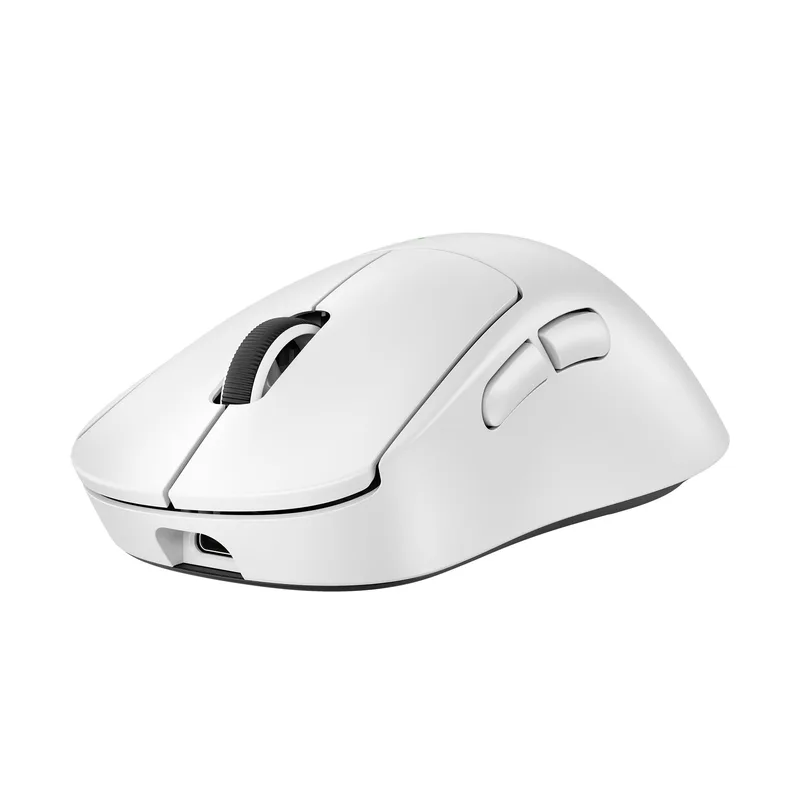
Logitech G Pro X Superlight 2 DEX
Pros
- ✓ Ergonomic asymmetric shape designed specifically for right-hand comfort during long sessions
- ✓ HERO 2 sensor with 8kHz polling is as accurate as any mouse at any price
- ✓ LIGHTFORCE switches eliminate pre-travel and feel snappy without wrist fatigue
- ✓ 60g keeps your arm and wrist from fighting the mouse all day
Cons
- ✗ Right-hand only — lefties need to look elsewhere
- ✗ $149.95 is a serious investment for a peripheral
- ✗ No RGB if that matters to your setup
The standard Superlight 2 was already excellent. Logitech then asked a simple question: what if the shape were actually ergonomic? The DEX is the answer. It takes the same HERO 2 sensor and LIGHTFORCE switches and wraps them in an asymmetric, right-handed shell with side contouring that guides your thumb naturally.
At 60g, it’s featherlight without feeling hollow. The HERO 2 sensor tops out at 44,000 DPI and supports up to 8kHz polling via the LIGHTSPEED dongle — that’s response time that makes wired mice feel slow. LIGHTFORCE hybrid switches combine optical and mechanical design to eliminate pre-travel almost entirely, which translates to fewer misfires during extended sessions.
Battery life is 95 hours. Charge it Sunday night, forget about it for most of the month.
Best for: Competitive gamers who want pro-grade hardware in an ergonomic shell. FPS, battle royale, any game where milliseconds and precision matter.
2. Razer DeathAdder V3 HyperSpeed — Best Value
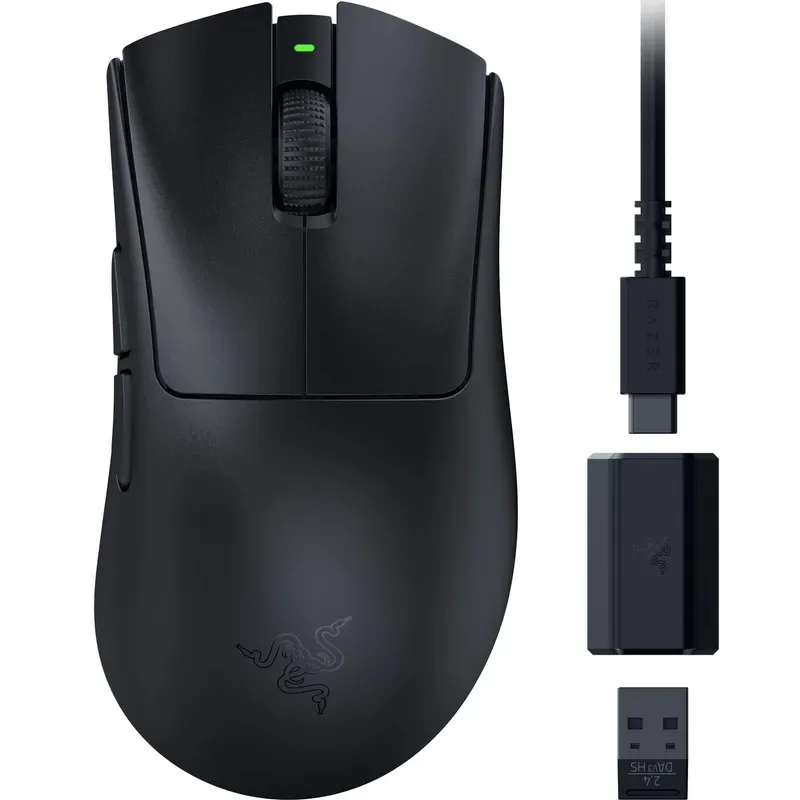
Razer DeathAdder V3 HyperSpeed
Pros
- ✓ 55g is genuinely lightweight — you stop noticing the mouse and start noticing your game
- ✓ 100-hour battery life is exceptional, even among wireless mice
- ✓ Razer's classic ergonomic right-hand shape has been refined over many generations
- ✓ HyperSpeed wireless has zero perceptible latency in daily use
Cons
- ✗ 26K DPI Focus X sensor is excellent but not at the absolute peak tier of the Focus Pro 30K
- ✗ Right-hand only ergonomic shape
- ✗ No side-scroll or extra thumb buttons beyond two basic thumb keys
The DeathAdder has been Razer’s ergonomic workhorse for over a decade. The V3 HyperSpeed is its most refined iteration — and as of early 2026, it’s available well below its original $99.99 MSRP, making it genuinely hard to beat at the price.
The shape needs no introduction to anyone who’s used Razer’s ergonomic lineup. The right-hand curves position your fingers naturally and the palm rest reduces grip pressure during marathon sessions. What changed in this generation: the Focus X 26K sensor and HyperSpeed wireless. The sensor is accurate and consistent at any DPI setting. The wireless has no perceptible latency — it matches or beats wired mice in real-world use.
55g. 100-hour battery. These are the numbers that matter most.
The DeathAdder V3 HyperSpeed doesn’t have the HERO 2’s tracking ceiling or the DEX’s ergonomic contouring. But at this price and weight, it’s the obvious choice for gamers who want ergonomic performance without spending $150.
Best for: Budget-conscious buyers who want a genuinely lightweight, wireless ergonomic mouse. FPS, MOBA, competitive games.
3. Logitech MX Master 4 — Best for Hybrid Work and Gaming
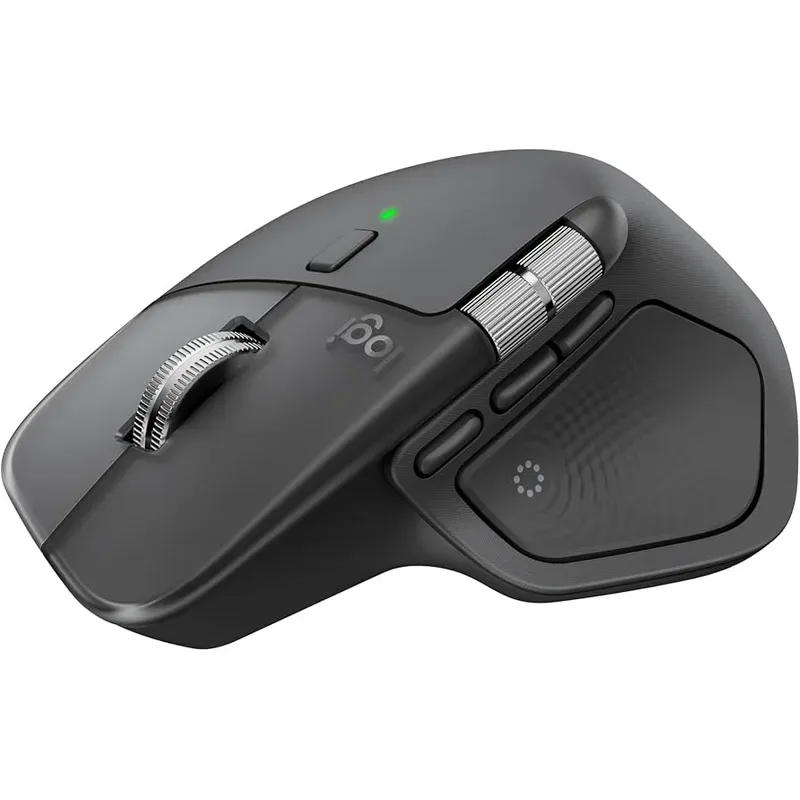
Logitech MX Master 4
Pros
- ✓ The new MagSpeed scroll with haptic feedback makes navigating long documents feel genuinely satisfying
- ✓ Ergonomic thumb rest and sculpted profile reduce ulnar deviation during extended sessions
- ✓ Multi-device switching lets you use one mouse for both your gaming rig and work laptop
- ✓ 70-day battery with USB-C charging — practically never think about it
Cons
- ✗ 141g is heavy by gaming standards — not ideal for twitch shooters
- ✗ 8,000 DPI is enough for most but below dedicated gaming sensors
- ✗ Overkill (and overpriced) if you only want a gaming mouse
The MX Master 4 is not a traditional gaming mouse. It’s heavier (141g), slower to aim, and not built for 400 DPI flick shots. But if your desk serves double duty — working all day, then gaming at night — it’s the most intelligent piece of hardware you can buy.
The big addition in the Master 4 is the haptic feedback panel, which gives you tactile resistance when you activate the MagSpeed electromagnetic scroll. It’s a minor detail that makes the mouse feel alive in a way that’s hard to explain until you use it. The ergonomic thumb rest is substantial and well-positioned, reducing ulnar deviation even during extended pointing.
For gaming, it’s genuinely good for MMOs, strategy titles, and any game that rewards precise controlled movement over twitch reflexes. The multi-device switching (Bluetooth + Logi Bolt, up to 3 devices) means you can flip between gaming rig and work laptop without reaching for a second mouse.
Currently available at around $107 on Amazon — roughly 11% off the $119.99 MSRP.
Best for: Gamers who also work at their desk. MMO, strategy, simulation. Anyone who hates switching mice.
4. Logitech MX Vertical — Best Vertical Ergonomic Mouse
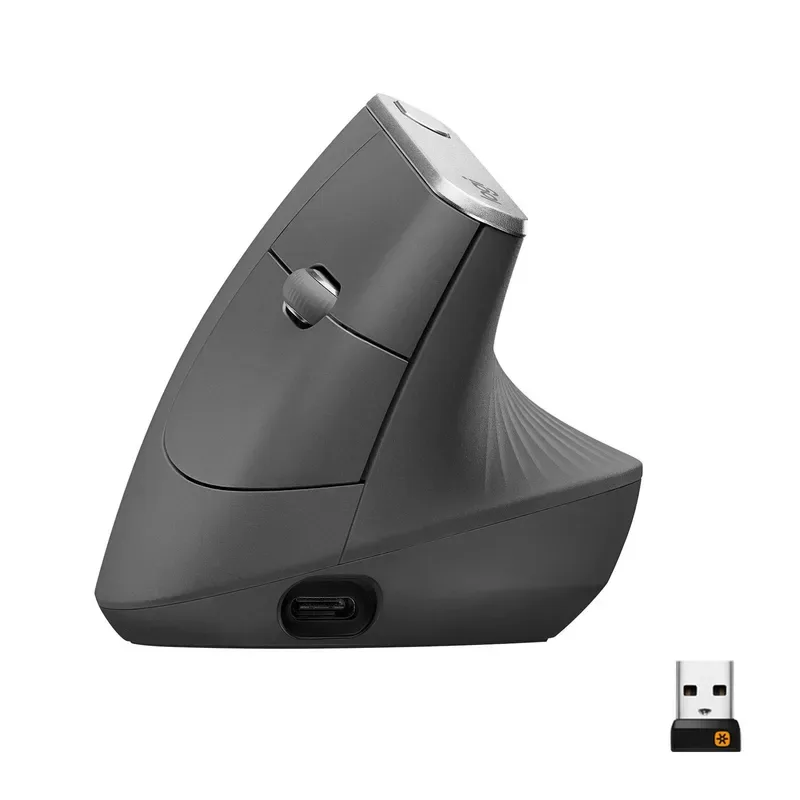
Logitech MX Vertical
Pros
- ✓ 57-degree grip angle measurably reduces forearm muscle strain compared to flat mice
- ✓ Endorsed by physiotherapists for wrist and forearm RSI recovery
- ✓ Multi-device (2 connections) works seamlessly for mixed gaming/office setups
- ✓ Up to 4 months battery life on a charge
Cons
- ✗ 4,000 DPI cap is too low for competitive or high-DPI gaming
- ✗ The learning curve is real — expect a few days of awkward mousing
- ✗ No programmable side buttons for gaming macros
The MX Vertical is the recommendation you get from a physiotherapist when your wrist starts hurting. Its 57-degree grip angle eliminates most of the forearm pronation that causes RSI in flat-mouse users — your arm stays in a natural “handshake” position rather than rotating inward.
It dropped to $69.99 on Amazon in February 2026 (from its regular $79.99 price), and it’s regularly available in that range.
The downsides are real: 4,000 DPI is a hard ceiling, and competitive gaming at that DPI simply isn’t viable for most players. The learning curve is also genuine — expect two to three days of reduced precision as you adjust to the angle. After that, most users report they can’t go back to flat mice.
For gaming, it works best in slower-paced titles: strategy games, point-and-click RPGs, simulation, or any game where pinpoint precision at high speeds isn’t critical. If you’re dealing with wrist pain from gaming and need to keep playing, this is the option that lets you do that.
Best for: Gamers recovering from wrist or forearm strain. Strategy, simulation, RPG genres. Mixed work/gaming setups.
5. Razer DeathAdder V3 Pro — Best Premium Wireless
Razer DeathAdder V3 Pro
Pros
- ✓ Focus Pro 30K sensor tracks flawlessly — including on glass surfaces
- ✓ 63g hits the ergonomic sweet spot: light enough to reduce fatigue, solid enough to feel substantial
- ✓ Gen-3 optical switches actuate in 0.2ms with zero debounce delay
- ✓ 90-hour battery life means weekly charging at worst
Cons
- ✗ Right-hand only — no ambidextrous version
- ✗ No on-the-fly DPI button (requires Razer Synapse software)
- ✗ Heavier and pricier than the HyperSpeed variant without a massive performance gap
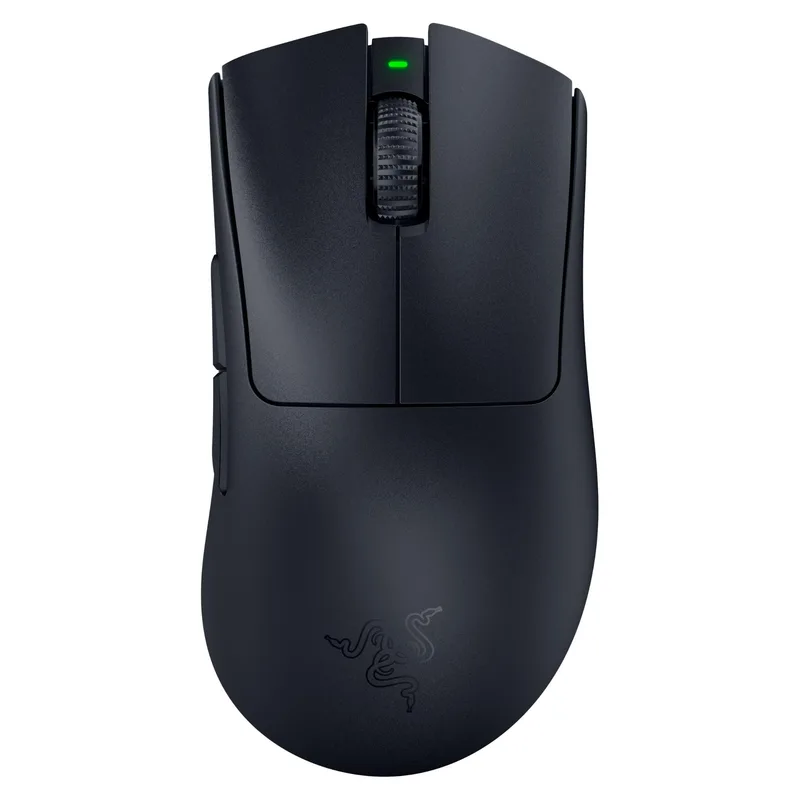
The V3 Pro sits above the HyperSpeed in Razer’s lineup, adding the Focus Pro 30K sensor (up from the 26K Focus X), Gen-3 optical switches, and longer battery life (90 hours). The shape is identical to the HyperSpeed’s ergonomic right-hand design — same palm contours, same thumb positioning, same refined profile.
The Focus Pro 30K is one of the best gaming sensors available in 2026. It tracks on virtually any surface including glass, handles rapid direction changes without prediction errors, and maintains accuracy at both low and very high DPIs. The optical switches actuate in 0.2ms with a 90 million click lifecycle.
At around $99 (regularly available below its $149.99 MSRP), the V3 Pro offers the DeathAdder ergonomic pedigree with genuinely top-tier internals. The main reason to choose the HyperSpeed over it: you’re saving ~$35 and the sensor difference is imperceptible to most gamers. The main reason to choose the DEX over it: the DEX has a more purposefully ergonomic shape and better software control. The V3 Pro sits cleanly in the middle — premium performance, classic ergonomic shape.
Best for: Experienced right-hand claw/palm grip gamers who want top-tier wireless without the DEX’s shape. FPS, competitive gaming.
Comparison Table
| Mouse | Price | Weight | Sensor | Best For |
|---|---|---|---|---|
| G Pro X Superlight 2 DEX | $149 | 60g | HERO 2, 44K DPI | Competitive ergonomic |
| DeathAdder V3 HyperSpeed | $65 | 55g | Focus X, 26K DPI | Budget lightweight |
| MX Master 4 | $119 | 141g | 8K DPI | Hybrid work/gaming |
| MX Vertical | $79 | 135g | 4K DPI | Vertical/RSI recovery |
| DeathAdder V3 Pro | $99 | 63g | Focus Pro, 30K DPI | Premium wireless |
Buying Guide: What Actually Matters in an Ergonomic Gaming Mouse
Shape and Grip Style First
Before sensor specs, battery life, or polling rate — the shape has to fit your hand. Ergonomic mice come in three main profiles:
- Right-handed contoured (DeathAdder, Superlight 2 DEX): Sculpted for right-hand palm or claw grip. Side contouring supports the thumb and pinky finger naturally.
- Vertical (MX Vertical): 57-degree angle eliminates forearm rotation entirely. Best for RSI prevention or recovery.
- Hybrid ergonomic (MX Master 4): Ergonomic side profile without the extreme angle of a vertical mouse. Better for mixed use.
Weight and Fatigue
For competitive gaming, lighter is generally better — less mass means less resistance during fast movements. Under 70g is the current benchmark for “lightweight.” Under 60g is ultralight.
For slower gaming or mixed work use, weight matters less. The MX Master 4’s 141g is fine for hours of strategic clicking; it would become a liability in a fast-paced FPS.
Wireless vs. Wired
Wireless gaming mice have crossed a quality threshold in 2026 where there is no meaningful latency penalty. Modern options like LIGHTSPEED (Logitech) and HyperSpeed (Razer) match or beat wired mice in response time. Unless you specifically prefer the simplicity of a cable, wireless is now the default recommendation.
Polling Rate: How Much Do You Need?
- 125-500 Hz: Fine for casual gaming and work
- 1000 Hz: Standard for competitive gaming — perceptible improvement over 500Hz
- 8000 Hz: Measurable advantage in highest-skill competitive play — the DEX supports this
For most gamers, 1000Hz is sufficient. The 8kHz option is genuinely useful if you’re playing at the highest competitive levels.
Sensors: Stop Chasing DPI Numbers
DPI marketing numbers are largely irrelevant above 3,200 DPI for most gamers. What matters is sensor accuracy, consistency at the DPI you actually use, and surface compatibility. The Focus Pro 30K and HERO 2 are both excellent sensors. The Focus X 26K is only marginally behind them for real-world use.
FAQ
Are ergonomic gaming mice actually better for your wrists?
Yes, but only if the shape fits your grip. A right-handed ergonomic mouse like the DeathAdder reduces ulnar deviation and encourages a more natural thumb position. A vertical mouse like the MX Vertical eliminates forearm pronation almost entirely. Both reduce long-term strain compared to a symmetrical ambidextrous shape. The key is matching the mouse to your grip style and hand size.
Can I use a vertical mouse for gaming?
Technically yes, practically it depends on the genre. The MX Vertical’s 4,000 DPI cap makes competitive FPS gaming difficult. For strategy, simulation, MMO, and point-and-click games, it works well. Many users report a 2-3 day adjustment period before their accuracy returns to baseline after switching.
Is wireless lag still a problem in gaming mice?
No. As of 2026, the best wireless gaming mice from Logitech (LIGHTSPEED) and Razer (HyperSpeed) have response times that match or beat wired alternatives in controlled tests. Wireless is now the recommended default for most gaming setups.
What weight is considered “lightweight” for a gaming mouse?
Under 70g is widely considered lightweight. Under 60g is ultralight. The DeathAdder V3 HyperSpeed at 55g and the Superlight 2 DEX at 60g both qualify as ultralight. The Razer DeathAdder V3 Pro at 63g is lightweight. These weights reduce arm and wrist fatigue during extended sessions.
Do I need a gaming-specific sensor in an ergonomic mouse?
If you play fast-paced competitive games (FPS, battle royale, MOBA), yes — a gaming sensor with accurate tracking, low lift-off distance, and consistent response matters. If you play slower-paced games or use the mouse for mixed work and gaming, a standard optical sensor like the MX Master 4’s 8K is more than adequate.
Is the Logitech MX Vertical worth it for gaming?
For competitive gaming, no. For casual gaming combined with long work days, yes — especially if you already have wrist discomfort. The 57-degree angle is genuinely therapeutic for forearm strain, and the mouse handles slower-paced games well. At $69-79, it’s reasonably priced for what it offers.
Final Recommendations
The Logitech G Pro X Superlight 2 DEX is the best ergonomic gaming mouse money can buy in 2026 — purpose-built ergonomic shape, best-in-class sensor, and competitive-grade switches in a 60g package.
If budget is the priority: the Razer DeathAdder V3 HyperSpeed at $65 is the obvious choice — 55g, 100-hour battery, zero excuses.
For wrist pain or RSI: the Logitech MX Vertical is the physiotherapist recommendation for a reason. The 57-degree angle works.
And if your desk does double duty for work and gaming: the Logitech MX Master 4 is one of the best peripherals available, period — haptic scroll, multi-device switching, and ergonomic design in one package.
Want to build out the rest of your ergonomic gaming setup? Check out our guides to the best ergonomic gaming keyboards and the 6 best gaming chairs for ergonomic comfort. For a complete ergonomic streaming setup, see our best ergonomic streaming setup guide.