Wrist pain from gaming doesn’t just happen to older players. After hours of hovering over a mechanical keyboard or death-gripping a mouse through tense competitive matches, even younger wrists start complaining. In 2026, with more people gaming longer — whether competing, streaming, or just unwinding — protecting your wrists has become as standard as a good chair or monitor arm.
The right wrist rest does two things: it takes the edge off that hard desk digging into your wrist tendons, and it keeps your wrists in a more neutral position so you’re not fighting against your own posture every round. The wrong one is a sweaty, slippery slab that makes things worse.
Quick pick: If you want one option and nothing else, grab the HyperX Wrist Rest Full Size at $22.99. Cooling gel, doesn’t slide, priced right.
For streaming setups or smaller budgets, keep reading — there’s a combo set and a budget gaming option worth knowing about.
1. HyperX Wrist Rest Full Size — Editor’s Pick
HyperX Wrist Rest Full Size
Pros
- ✓ Cooling gel actively pulls heat away from your wrists during long sessions
- ✓ Stays put on any desk surface — zero sliding mid-game
- ✓ Priced well under most premium competitors
- ✓ Available in multiple sizes (TKL and compact also sold separately)
Cons
- ✗ Rubber surface runs slightly warm compared to cloth alternatives
- ✗ Limited to one color (black)
- ✗ Shorter than some full-size keyboards on the edges
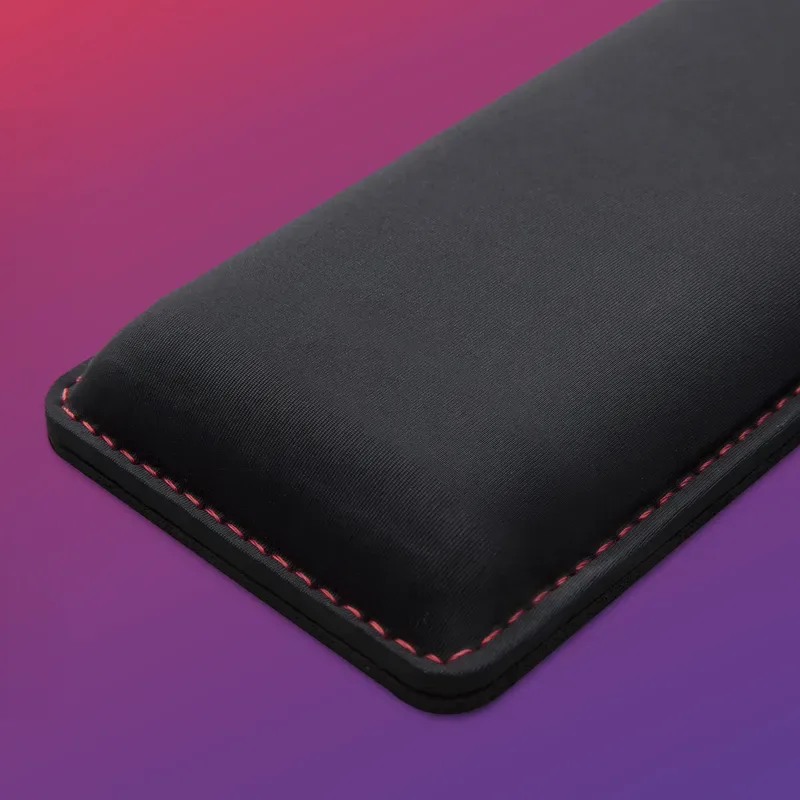
The HyperX is the most commonly recommended gaming wrist rest for good reason: it handles everything well without excelling at just one thing. The cooling gel inside the memory foam actively pulls heat away from your wrists — which matters more than you’d expect after 90 minutes of competitive play. Most wrist rests just trap heat; this one doesn’t.
It’s 18 inches wide, which aligns with most full-size keyboards. The underside is natural rubber — it doesn’t move on smooth or fabric desk surfaces. The stitched edges have held up to years of daily use based on owner reports.
The surface material is smooth and slightly grippy — not the same cloth texture as a gaming mouse pad, but not sticky either. A few users note it runs slightly warmer than the Glorious cloth option, which makes sense since the rubber cover is less breathable. If your hands run hot, consider the Razer option below.
Best for: Most gamers who want a reliable, well-priced wrist rest without overthinking it.
2. Razer Ergonomic Wrist Rest Pro — Best for Heat Dissipation
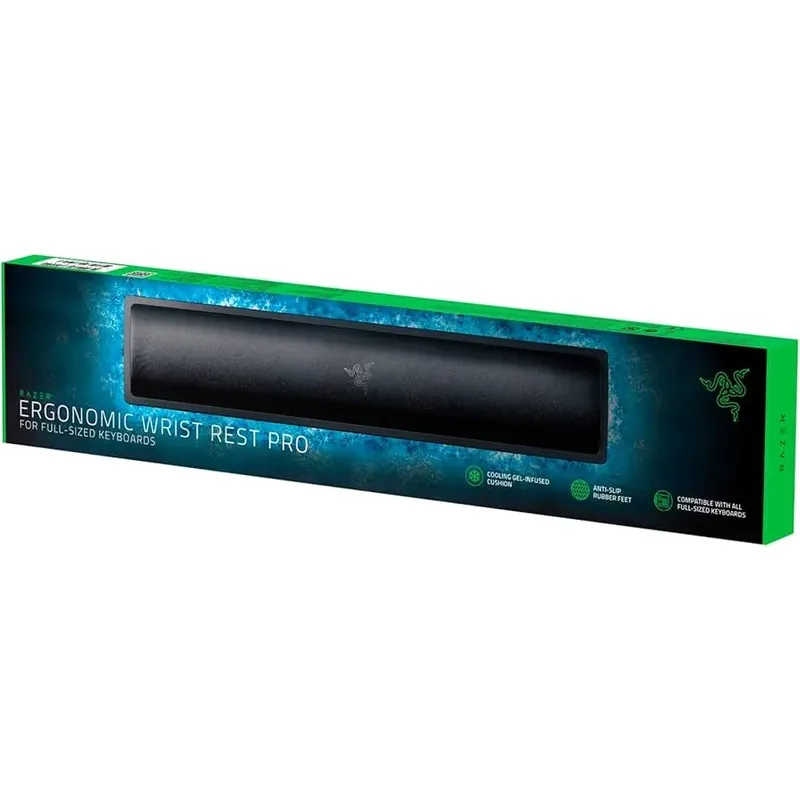
Razer Ergonomic Wrist Rest Pro
Pros
- ✓ Heat-transfer fabric keeps hands noticeably cooler during marathon sessions
- ✓ Angled incline encourages a more neutral wrist position than flat pads
- ✓ Razer build quality is rock solid — no sagging or deformation over time
- ✓ Low profile sits flush with most gaming keyboards
Cons
- ✗ Most expensive keyboard-only wrist rest on this list
- ✗ Memory foam is firmer than HyperX — takes a few days to break in
- ✗ No matching mouse wrist rest sold separately in this series
The Razer Pro takes the cooling concept a step further. Instead of gel embedded in foam, Razer wraps the cushion in a heat-transfer fabric — the same type used in some athletic gear — designed to wick warmth away from the skin rather than just containing it. Based on owner feedback and spec analysis, it performs noticeably better than standard memory foam in warm gaming rooms.
The angled incline is the other standout feature. Most flat wrist rests push your wrists into a slight extension; the Razer’s incline counters that, keeping your hands in a position closer to what proper gaming posture recommends. If you’re dealing with early signs of wrist fatigue or carpal tunnel sensitivity, this geometry makes a real difference.
The downside is cost — at $36.00, you’re paying a $13 premium over the HyperX for the better cooling and posture geometry. That’s reasonable if you game four or more hours daily. For casual players, the HyperX is still the smarter buy.
Best for: Serious gamers who run hot or already notice wrist fatigue.
3. Glorious GWR-100 Padded Wrist Rest — Best Value
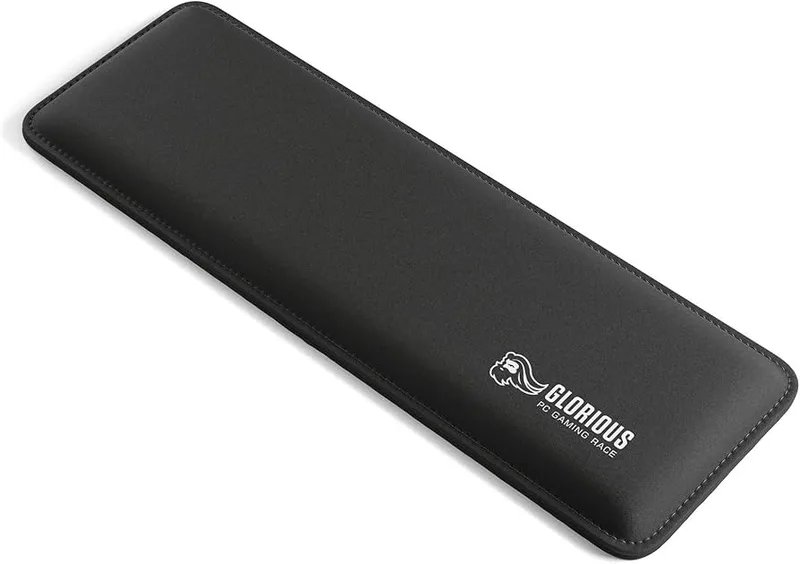
Glorious GWR-100 Padded Wrist Rest
Pros
- ✓ Best price for a gaming-branded wrist rest that holds up to daily use
- ✓ Cloth surface glides under a gaming mouse if you rest the pad near the edge
- ✓ Stitched edges don't fray — outlasts many budget foam alternatives
- ✓ Medium firmness suits both mechanical and membrane keyboards
Cons
- ✗ Foam runs firmer than gel options — less cushion for ultra-long sessions
- ✗ Surface retains some heat without the gel cooling tech
- ✗ Only available in black
The Glorious GWR-100 is the wrist rest for gamers who want a real gaming brand behind the product without paying premium pricing. At $13.99, it’s the most affordable option from a company that makes keyboards, mice, and desk pads for competitive players.
The 25mm foam is denser than it looks — it won’t bottom out when you lean on it during a tense match. The cloth surface is the main advantage here: if your mouse extends near the keyboard and you occasionally rest your hand palm-down at the edge, this surface is much more forgiving than rubber or vegan leather. Some users pair it with a matching Glorious gaming mouse pad for a seamless surface transition.
YourBestDigs noted the foam can feel firm and heat-retaining — both fair criticisms. But for $13.99, you’re getting anti-fray stitching, anti-slip rubber, and a recognizable gaming brand. The budget picks from no-name sellers at this price point typically have none of those qualities.
Best for: Budget-conscious gamers who still want a purpose-built gaming wrist rest.
4. Kensington ErgoSoft for Mechanical & Gaming Keyboards
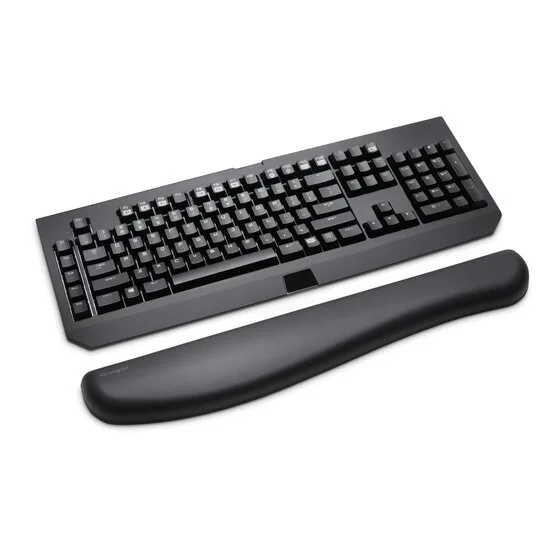
Kensington ErgoSoft Wrist Rest for Mechanical & Gaming Keyboards
Pros
- ✓ Taller profile accommodates mechanical keyboard keycaps without wrist strain
- ✓ Gel cushioning distributes pressure more evenly than flat foam pads
- ✓ Ergonomist-certified design aligns with neutral wrist posture guidelines
- ✓ Premium vegan leather finish feels noticeably upscale compared to cloth pads
Cons
- ✗ Vegan leather surface gets sticky in warm rooms — less breathable than cloth
- ✗ Taller height doesn't suit low-profile keyboards
- ✗ More of an office product than a hardcore gaming aesthetic
The Kensington ErgoSoft is the pick for mechanical keyboard gamers who are starting to notice real discomfort — not just post-session fatigue, but persistent wrist or forearm tension. This is an ergonomist-certified product designed specifically to accommodate the taller keycap height of mechanical switches, which require a higher palm height to achieve a neutral wrist position.
The gel cushioning distributes pressure across a wider surface area than foam, which reduces the “pressure point” feeling you get from resting a wrist bone directly on a firmer pad. The vegan leather exterior is a trade-off — it looks premium and wipes clean easily, but it’s less breathable than cloth or rubber options.
At $28.99, it sits in an awkward middle ground between the HyperX ($22.99) and the Razer Pro ($36.00). The reason to choose it over both is if you’re specifically on a high-travel mechanical keyboard and have ergonomic concerns — this is the most medically thoughtful design on the list. For everyone else, the HyperX or Razer makes more sense.
Best for: Mechanical keyboard gamers dealing with wrist discomfort or early carpal tunnel symptoms.
5. iCasso 4-in-1 Gaming Desk Mat Wrist Rest Set — Best Combo
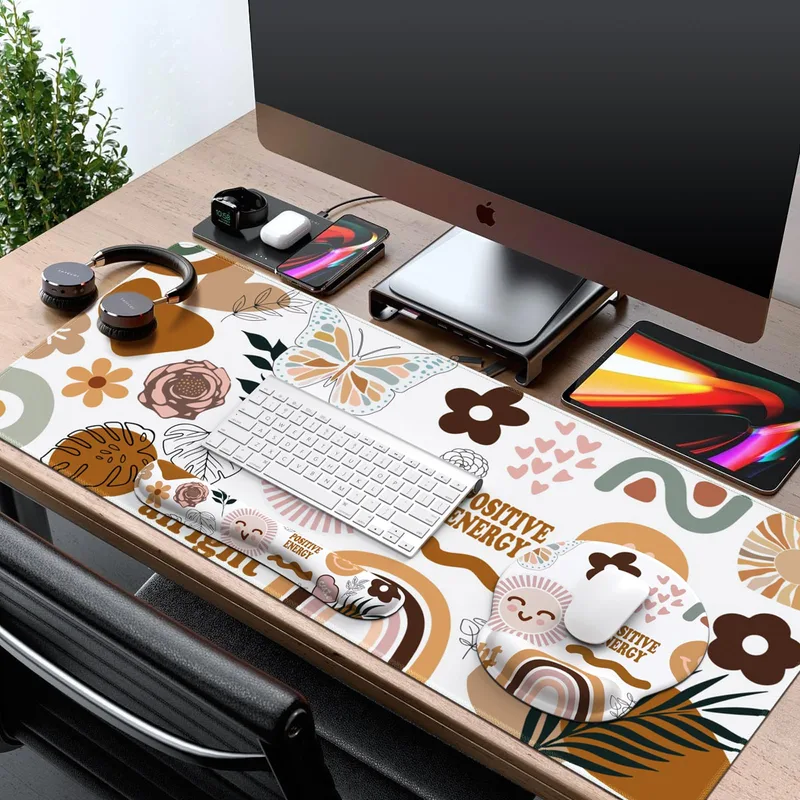
iCasso 4-in-1 Gaming Desk Mat Wrist Rest Set
Pros
- ✓ Four accessories for the price of one — best dollar-per-piece value on this list
- ✓ Water-resistant surface shrugs off drink spills during late-night sessions
- ✓ Non-slip rubber base covers the whole desk surface, eliminating all movement
- ✓ Great for streamers wanting a uniform, camera-friendly desk setup
Cons
- ✗ Memory foam is softer than gel — compresses over time with heavy use
- ✗ Larger than some desks need — the XXL size can feel overwhelming on a small setup
- ✗ Individual components aren't sold separately for replacements
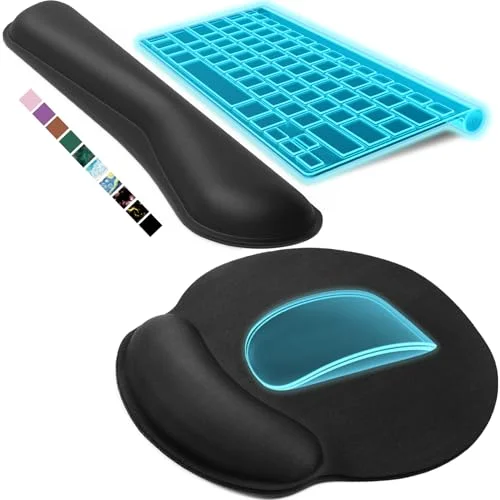
If you’re building or upgrading a whole gaming setup at once, the iCasso set solves four problems in one purchase: a large desk mat, a keyboard wrist rest, a mouse wrist rest, and a drink coaster. For streamers or anyone who wants a uniform, camera-ready desktop look, this is the obvious choice.
The desk mat extends to 35.4 × 15.7 inches — enough to cover most mid-size gaming desks. The keyboard pad (17.32 × 3.15 inches) and mouse pad sit on top, all matching the same design. The water-resistant surface is the standout practical feature: spills wipe off immediately, which is something no standalone foam wrist rest offers.
The trade-off is cushioning quality. The memory foam is softer than the gel or hybrid options above, and based on owner reports, it compresses gradually with heavy daily use. For the price, it’s an excellent starting setup — just don’t expect it to hold up to a five-year daily abuse cycle the way the HyperX or Razer will.
Best for: Streamers, new setup builders, or anyone who wants matching wrist support for keyboard and mouse in one buy.
Comparison Table
| Product | Price | Type | Cooling | Best For | Rating |
|---|---|---|---|---|---|
| HyperX Wrist Rest Full Size | $18.84-$22.99 as of Oct 18, 2026 | Keyboard | Gel | Most gamers | 9.2 |
| Razer Ergonomic Wrist Rest Pro | Unavailable | Keyboard | Gel + Heat fabric | Hot-handed, ergonomic focus | 8.8 |
| Kensington ErgoSoft Gaming | Unavailable | Keyboard | Gel | Mechanical keyboard users | 8.7 |
| Glorious GWR-100 | Unavailable | Keyboard | None | Budget pick | 8.5 |
| iCasso 4-in-1 Set | $25.99 as of Oct 18, 2026 | Keyboard + Mouse + Desk Mat | None | Full-setup combos | 8.3 |
Buying Guide: What to Look For in a Gaming Wrist Rest
Material and Cooling
This is the biggest differentiator. Three main options:
- Gel memory foam (HyperX, Kensington): Gel pulls heat away from skin passively. Better than regular foam for long sessions. Most popular in gaming wrist rests.
- Gel + heat-transfer fabric (Razer Pro): Actively wicks warmth away. Best cooling performance.
- Foam + cloth (Glorious, iCasso): No cooling tech. Fine for shorter sessions or cooler environments.
Height and Keyboard Type
Mechanical keyboards need more wrist rest height than membrane keyboards — the taller keycaps mean your palm sits higher. A wrist rest that’s too short forces your wrists into downward extension, which is exactly what causes tendon problems. The Kensington ErgoSoft is specifically designed for this. The HyperX and Razer sit at a height that works for most gaming keyboards.
Surface Material
- Rubber: Durable, grips the desk, slightly warm to the touch. Good general-purpose choice.
- Cloth: Breathable, mouse-friendly if used near a mouse pad. Best for warm hands.
- Vegan leather: Premium feel, wipes clean, less breathable. More office than gaming.
Size Matching
Your wrist rest should be close to the length of your keyboard:
- Full-size keyboard (100%): 17–18 inch wrist rest
- TKL (87%): 14 inch wrist rest
- 65–75%: 12–13 inch wrist rest
All products on this list come in multiple sizes, so measure your keyboard footprint before buying.
Standalone vs. Combo Sets
A standalone keyboard wrist rest (HyperX, Razer, Glorious) is higher quality per piece. A combo set (iCasso) sacrifices individual material quality for coverage and value. If you’re upgrading from nothing and need to cover both keyboard and mouse, start with the combo. Once you know what bothers you, replace individual pieces with premium alternatives.
How Wrist Rests Fit Into Your Full Gaming Ergonomics Setup
A wrist rest addresses one piece of a broader posture problem. If your chair height is wrong, your monitor is too low, or your keyboard is angled incorrectly, a wrist rest won’t fix the underlying issue — it’ll just mask it temporarily.
The correct ergonomic sequence: get your chair and gaming posture right first, then adjust your desk height, then add wrist support. Gamers building a more complete ergonomic setup will also want to look at monitor arms for gaming and ergonomic gaming chairs — especially if you’re logging four or more hours per session.
For streamers specifically, the iCasso combo gives you a visually cohesive setup that looks clean on camera. If you want to go deeper on streaming ergonomics, the best ergonomic streaming setup guide covers monitor positioning, desk layout, and peripheral placement in detail.
FAQ
Do wrist rests actually help with gaming?
Yes — but only if your overall setup is already reasonably set up. A wrist rest prevents the hard desk edge from cutting off circulation and compressing tendons in your wrist. Owner reports consistently show reduced post-session aching in wrists and forearms for players who switch from no support to gel or foam rests. The benefit is most noticeable during sessions over two hours.
Should I rest my wrists on the pad while typing or only during pauses?
During active gaming, you should be resting your palms lightly on the pad with your wrists in a neutral (flat) position — not curled up or bent down. The wrist rest prevents you from floating your entire arm weight off the desk during pauses between actions. Some ergonomic coaches advise lifting your wrists during fast keystrokes and only resting during game loading or breaks, which reduces the total pressure time.
What’s the difference between a wrist rest and a palm rest?
A wrist rest supports the base of your palm and your wrist, sitting in front of the keyboard. A palm rest usually refers to the integrated pad on a laptop or keyboard deck. For gaming peripherals, the terms are used interchangeably — any pad that keeps your wrist elevated off the desk counts.
Are memory foam or gel wrist rests better for gaming?
Gel wins for cooling and even pressure distribution. Memory foam conforms to your wrist shape but retains heat and may compress over time. For long gaming sessions in warm rooms, gel (or the gel-heat-fabric hybrid in the Razer Pro) is the better choice. For short sessions or a cooler environment, memory foam works fine and is usually cheaper.
Can a wrist rest make carpal tunnel syndrome worse?
If you already have carpal tunnel syndrome, a wrist rest can help or hurt depending on usage. Resting on a firm pad with your wrists extended (angled upward) can compress the carpal tunnel further. A proper wrist rest keeps your wrists flat — neutral position. If you’re experiencing numbness, tingling, or persistent pain, consult a doctor before relying on wrist rests alone. The Kensington ErgoSoft’s ergonomist-certified design is the most appropriate choice if you already have wrist issues.
How do I clean a gaming wrist rest?
Most cloth and foam wrist rests can be spot-cleaned with a damp cloth and mild soap. Let them air dry completely before use — moisture trapped in the foam promotes bacteria and mold. The iCasso water-resistant surface wipes down the fastest. Vegan leather (Kensington) also cleans easily. Avoid machine washing — it breaks down the foam core.
Final Recommendations
Best overall: HyperX Wrist Rest Full Size — $22.99. The cooling gel and anti-slip rubber bottom make it the right choice for most gaming setups without spending more than you need to.
Best for serious heat issues: Razer Ergonomic Wrist Rest Pro — $36.00. The angled incline and heat-transfer fabric are worth the premium if you game four or more hours daily and notice wrist heat buildup.
Best budget pick: Glorious GWR-100 — $13.99. The most affordable option from a real gaming brand.
Best combo: iCasso 4-in-1 Set — $26.99. Keyboard rest, mouse rest, desk mat, and coaster in one matched set. Hard to beat for a new setup.
For mechanical keyboard users specifically, the Kensington ErgoSoft at $28.99 is worth considering — the taller profile and ergonomist-certified design address the unique wrist positioning demands of high-travel switches.
If you haven’t already dialed in your gaming posture fundamentals, that’s where to start — a wrist rest works best as the finishing touch on an already solid ergonomic setup.