Disclosure: PostureRanked is reader-supported. When you buy through links on our site, we may earn an affiliate commission at no additional cost to you. Our recommendations are based on independent research and testing.
| Product | Price | Rating |
|---|---|---|
| Kinesis Freestyle Edge RGB Plus | $179 | 9.3 |
| Logitech ERGO K860 | $129 | 8.8 |
| Keychron Q11 | $159 | 8.6 |
| Dygma Defy | $449 | 9.0 |
| Microsoft Sculpt Ergonomic Keyboard for Business | $60 | 7.8 |
| Perixx PERIBOARD-512B | $40 | 7.5 |
Disclosure: PostureRanked is reader-supported. When you buy through links on our site, we may earn an affiliate commission at no extra cost to you. Learn more
With return-to-office momentum in 2026 pushing more people back to fixed workstations — after years of home-office setups optimized for comfort — the demand for genuinely ergonomic peripherals has surged. Gaming keyboards have been a surprisingly neglected category in ergonomics. Most gaming keyboards are flat, compact slabs designed for aesthetics and speed, not for the shoulder-width typing position your joints prefer after hour six of a raid or ranked session.
The best ergonomic gaming keyboards solve a real problem: repetitive strain injuries (RSI) and carpal tunnel syndrome are climbing among gamers and desk workers alike. A split, tented, or curved keyboard changes the angle of your wrists and forearms, reducing ulnar deviation and pronation. If you type or game more than 4-5 hours a day, the right keyboard can meaningfully reduce hand fatigue and long-term joint stress.
Quick pick: The Kinesis Freestyle Edge RGB Plus is the top choice for gamers who want a true mechanical split with tenting support. For an accessible ergonomic upgrade without going full-split, the Logitech ERGO K860 is the most practical entry point.
1. Kinesis Freestyle Edge RGB Plus — Editor’s Pick
Kinesis Freestyle Edge RGB Plus
Pros
- ✓ True gaming-grade split design — each half positions independently
- ✓ Hot-swappable switches so you can dial in your preferred feel
- ✓ Lift kit included in the box (no extra purchase needed for tenting)
- ✓ Per-key RGB with macro layer support
Cons
- ✗ Wired only — no wireless option
- ✗ Learning curve for repositioning both halves optimally
- ✗ Pricier than entry-level ergonomic options
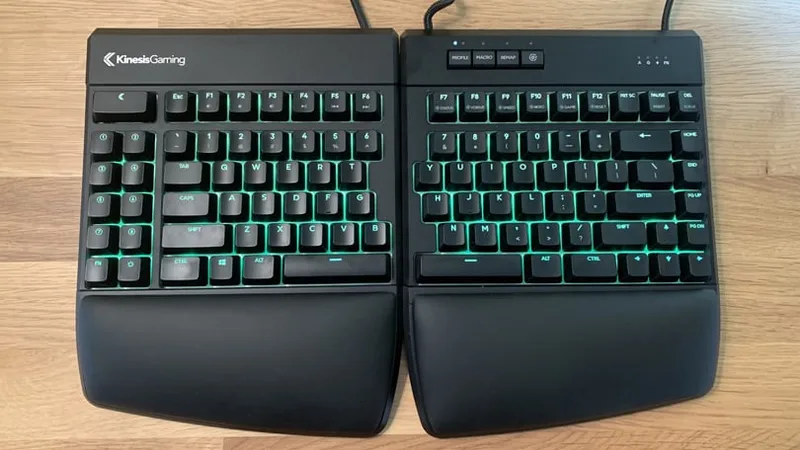
The Freestyle Edge RGB Plus is purpose-built for gamers who take wrist health seriously. Each half of the keyboard positions completely independently, so you can set shoulder-width spacing and align the keys exactly with your natural hand angle. The lift kit ships in the box — no separate accessory purchase — and raises each half up to 15 degrees for proper wrist tenting.
The hot-swappable switch sockets are a meaningful upgrade over the previous generation. You can pull switches without soldering, making it easy to swap from linear reds for gaming to tactile browns for typing sessions. Per-key RGB, detachable palm rests, and a fully programmable SmartSet app round out the package.
For gamers who already have good keyboard habits, this is the clearest upgrade path from a traditional gaming keyboard to an ergonomic one without abandoning gaming-grade features.
Best for: Gamers who spend 5+ hours daily at the keyboard and want full mechanical + tenting support without switching to a productivity-only layout.
2. Logitech ERGO K860 — Best Value
Logitech ERGO K860
Pros
- ✓ Built-in cushioned wrist rest is genuinely useful, not an afterthought
- ✓ Bluetooth + USB dongle dual connectivity
- ✓ Negative tilt stands reduce forearm pronation noticeably
- ✓ Works across Windows, Mac, and Chrome OS without driver headaches
Cons
- ✗ Membrane switches aren't for gamers who prefer mechanical feedback
- ✗ Not separable — the two halves are fixed in one body
- ✗ Moderate actuation force may fatigue typists who prefer lighter keys
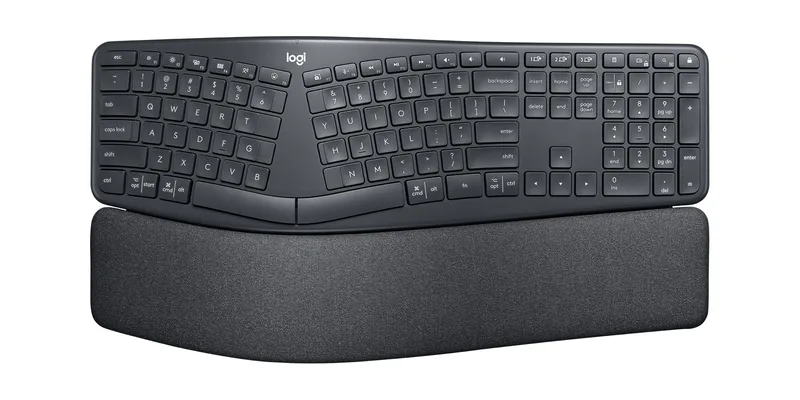
The K860 is the most popular ergonomic keyboard on Amazon for good reason. It’s a unified-body split — the two halves are built into one curved chassis — which means you get meaningful wrist angle improvement without the setup complexity of a true separable split.
The built-in wrist rest is the best on any keyboard at this price. It’s actually padded, not the thin hard plastic found on budget options. Negative tilt legs drop the back of the keyboard lower than the front, encouraging a forearm-neutral position that most flat keyboards make impossible. Bluetooth and USB connectivity means it works with your PC, Mac, and iPad simultaneously.
It’s not a gaming keyboard in the traditional sense — membrane switches won’t satisfy gamers who want crisp tactile or clicky feedback. But for strategy games, MMOs, and anyone who spends more time typing than reaction-gaming, the K860 is hard to beat at $129.
Best for: Office workers who also game casually — MMOs, strategy, simulators — and want an all-day ergonomic keyboard that doubles as a gaming board.
3. Keychron Q11 — Best for Mechanical Enthusiasts
Keychron Q11
Pros
- ✓ Solid aluminum chassis with premium feel at sub-$200 price
- ✓ QMK/VIA support for complete key remapping and macro layers
- ✓ Hot-swappable 5-pin socket accepts almost any MX-compatible switch
- ✓ Dual rotary knobs are great for volume and scroll control during gaming
Cons
- ✗ No tenting support — sits flat on desk
- ✗ Heavier than most keyboards due to aluminum frame
- ✗ No wireless mode
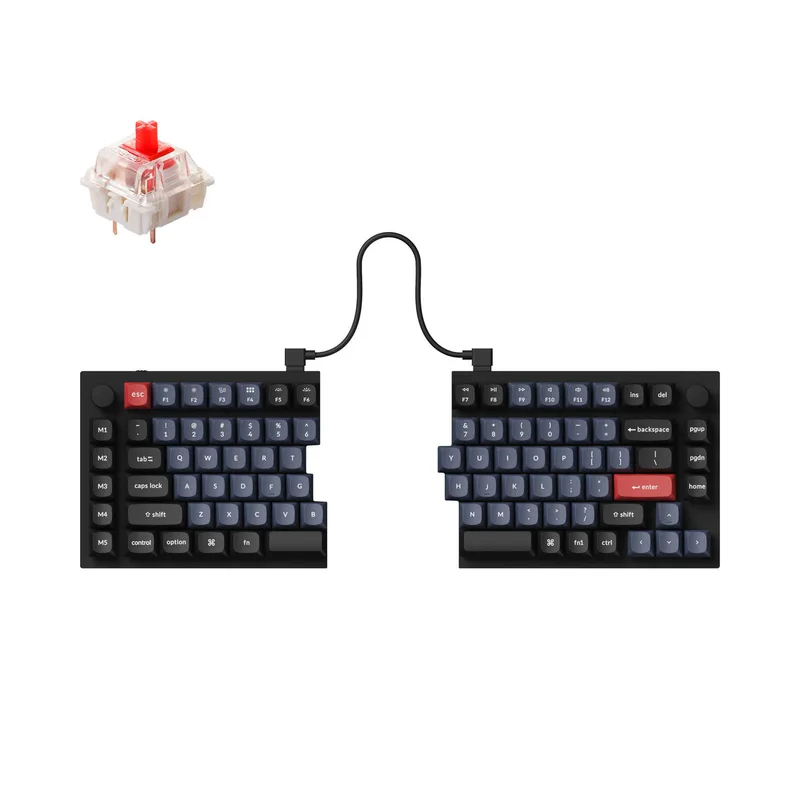
The Q11 is Keychron’s first split keyboard, and it lands squarely in the “premium mechanical but not premium-priced” category. The CNC machined aluminum case gives it a weight and rigidity that feels closer to a $300 enthusiast board than a $160 one. QMK/VIA compatibility means you can remap every key, build macros, and configure layers without writing firmware.
The dual rotary knobs are a practical gaming addition — assign one to volume, one to scroll, and you have tactile media control without reaching for the mouse. The split cable lets you position each half exactly where your hands fall naturally when your arms rest at shoulder width.
The main limitation is tenting. The Q11 sits flat — no built-in legs or tenting accessories — so you’re relying on aftermarket risers if you want wrist elevation. Still, the split spacing alone dramatically reduces ulnar deviation compared to a full-width gaming keyboard.
Best for: Mechanical keyboard enthusiasts who want QMK programmability and a premium build at an accessible price point.
4. Dygma Defy — Best Premium
Dygma Defy
Pros
- ✓ Columnar stagger layout dramatically reduces lateral finger movement
- ✓ Wireless with RF 2.4GHz — low latency for competitive gaming
- ✓ Thumb clusters let you reassign Ctrl, Shift, Space to thumbs (wrist saver)
- ✓ Bazecor software makes remapping accessible even for non-programmers
Cons
- ✗ Steep learning curve — expect 2-4 weeks to reach typing speed
- ✗ Only available direct from dygma.com, not on Amazon
- ✗ Significant price premium over traditional split keyboards
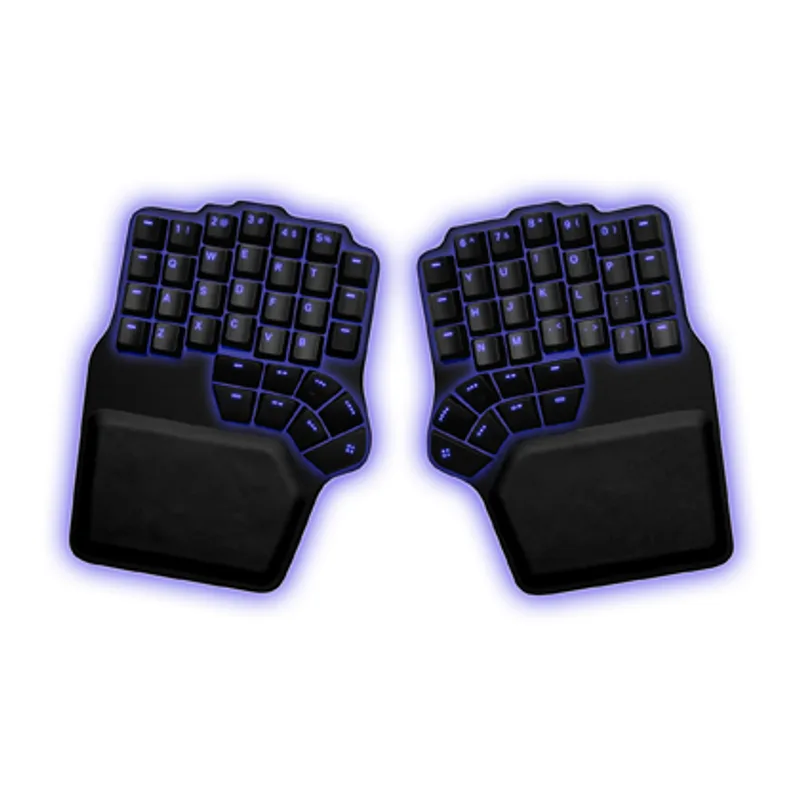
The Defy is the keyboard for gamers who are willing to commit. Columnar stagger — where each column of keys is vertically aligned rather than staggered — eliminates the lateral finger movement that a traditional staggered layout forces on your pinkies and ring fingers. The difference becomes noticeable around week two.
The thumb clusters are the real ergonomic innovation. Six keys per thumb let you reassign Ctrl, Alt, Shift, and Backspace to your thumbs instead of your overworked pinky fingers. Pinky overload is one of the leading causes of RSI in heavy keyboard users — offloading modifier keys to the strongest digit on each hand makes a meaningful difference.
Wireless at 2.4GHz RF means competitive gaming latency with no cable drag. Battery life is rated at 15 hours, which covers a full gaming day. At $449, the Defy is priced for people who’ve experienced RSI symptoms and are treating ergonomics as a medical investment rather than a nice-to-have.
Best for: Serious competitive gamers or developers dealing with wrist fatigue who want the most ergonomically advanced design available.
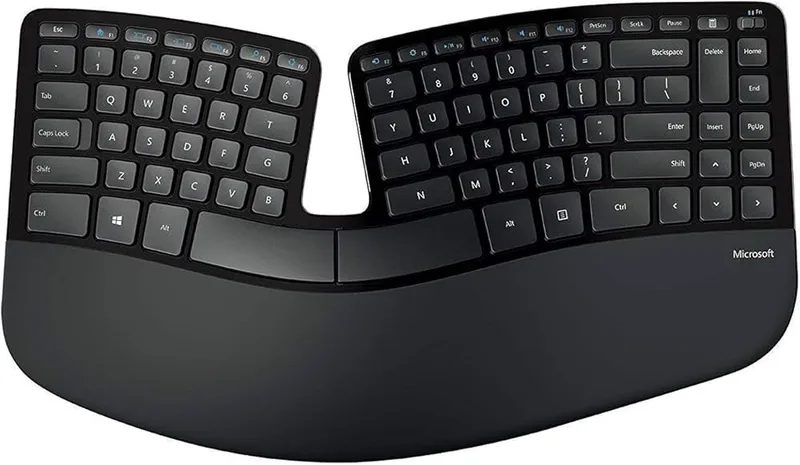
5. Microsoft Sculpt Ergonomic Keyboard for Business — Best for Casual Gamers
Microsoft Sculpt Ergonomic Keyboard for Business
Pros
- ✓ Dome arch lifts wrists into a natural forearm-neutral position
- ✓ Separate numpad lets you position it wherever makes sense
- ✓ Very quiet membrane switches — great for shared living situations
- ✓ Excellent value for a shaped ergonomic keyboard
Cons
- ✗ Windows-only — limited Mac compatibility
- ✗ Membrane feel is unsuitable for gaming that requires precise key actuation
- ✗ Dongle must stay plugged in — no Bluetooth
The Sculpt has an unusual shape: a dome arch in the center raises the middle of the keyboard, naturally separating the left and right hand zones and prompting you to keep wrists in a neutral position. It’s not a true split, but the dome effect provides real ergonomic benefit compared to flat keyboards.
The separate wireless numpad is a thoughtful feature that desktop users and spreadsheet workers will appreciate — position it on whichever side makes more sense for your workflow. The cushioned wrist rest is built in, and the quiet membrane keys are genuinely inoffensive in shared spaces.
Realistic about its gaming limitations: the Sculpt is a casual-gaming keyboard. It suits Minecraft, city builders, and turn-based RPGs. It’s not the right tool for CS2 or Valorant, where key feel and actuation precision matter.
Best for: Casual gamers who want an ergonomic upgrade from a flat keyboard without spending $150+, and who play games that don’t require precise key actuation.
6. Perixx PERIBOARD-512B — Best Budget
Perixx PERIBOARD-512B
Pros
- ✓ Under $40 — lowest barrier to entry for ergonomic split typing
- ✓ Full-size layout means zero adjustment to key positions
- ✓ Integrated wrist rest included without extra cost
- ✓ Reliable USB wired connection with no pairing issues
Cons
- ✗ No tenting — completely flat layout
- ✗ Membrane keys feel mushy compared to mechanical alternatives
- ✗ Large footprint at nearly 20 inches wide
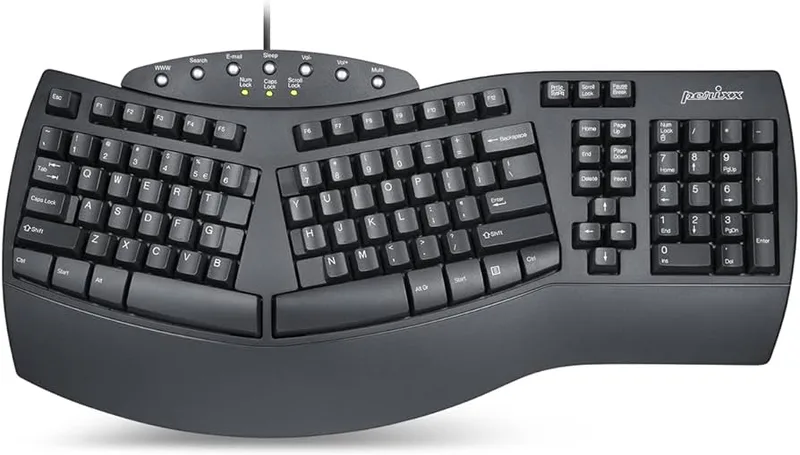
Under $40 gets you a genuine full-size split keyboard with an integrated wrist rest. The PERIBOARD-512B keeps the left and right halves in a familiar QWERTY layout — no key position changes to learn — while providing the shoulder-width spacing that reduces ulnar deviation.
It’s membrane-only and completely flat, so it won’t satisfy gamers who want mechanical feedback or tenting. But as a first ergonomic keyboard for someone coming off a standard flat slab, it’s a genuine upgrade at a price that removes all financial hesitation.
Best for: Budget-conscious buyers who want to try split keyboard ergonomics before investing in a $150+ mechanical option.
Comparison Table
| Keyboard | Price | Type | Split | Tenting | Wireless | Best For |
|---|---|---|---|---|---|---|
| Kinesis Freestyle Edge RGB Plus | $179 | Mechanical | True split | ✅ 15° | ❌ Wired | Gaming + ergonomics |
| Logitech ERGO K860 | $129 | Membrane | Curved unified | ❌ | ✅ BT + USB | All-day typing |
| Keychron Q11 | $159 | Mechanical | True split | ❌ | ❌ Wired | Mechanical fans |
| Dygma Defy | $449 | Mechanical | True split | ✅ Adjustable | ✅ 2.4GHz RF | RSI prevention |
| Microsoft Sculpt | $60 | Membrane | Dome arch | ❌ | ✅ USB dongle | Casual gaming |
| Perixx PERIBOARD-512B | $40 | Membrane | Fixed split | ❌ | ❌ Wired | Budget entry |
Buying Guide: What to Look for in an Ergonomic Gaming Keyboard
Split vs Curved vs Standard
True split keyboards (Freestyle Edge, Keychron Q11, Dygma Defy) let you position each half independently at exactly shoulder width. This eliminates shoulder inward rotation and reduces forearm pronation — the biggest sources of long-term strain.
Curved unified keyboards (Logitech K860, Microsoft Sculpt) keep both halves in one piece but angle them toward the center. You get meaningful ergonomic improvement without the setup complexity of a true split. Good starting point.
Standard gaming keyboards are flat rectangles designed for aesthetics. No ergonomic benefit. If you’re reading this article, you’ve probably already outgrown them.
Tenting
Tenting raises the inner edge of the keyboard so your wrists rotate to a “handshake” position — thumbs up — rather than lying flat palm-down. Even 5-10 degrees of tent dramatically reduces forearm pronation over hours of use.
Look for: built-in tent legs (Dygma Defy) or included tent kits (Kinesis Freestyle Edge RGB Plus). Avoid keyboards where tenting is an expensive add-on sold separately.
Switch Type
Membrane: Quieter, cheaper, mushy feel. Fine for casual and strategy gaming. Not suitable for competitive play where you rely on tactile feedback to register keystrokes.
Mechanical linear: Fast actuation, smooth keystroke, no tactile bump. Most popular for competitive gaming (CS2, Valorant, Apex).
Mechanical tactile: A bump mid-travel tells your finger the key registered. Preferred for typing-heavy games, MMOs, and hybrid work-gaming setups.
Mechanical clicky: Audible click plus tactile bump. Excellent feedback, but loud — annoying to anyone in the same room.
Hot-swap sockets (found on the Kinesis and Keychron Q11) let you change switches without soldering — ideal if you want to experiment.
Programmability
For gaming, programmability is genuinely useful: macro layers for game-specific keybinds, toggle between gaming and typing profiles, and key remapping to accommodate ergonomic layouts. Look for:
- QMK/VIA: Open-source, maximally flexible. Keychron Q11.
- Proprietary app: Usually simpler interface. Kinesis SmartSet, Dygma Bazecor.
- None: Logitech K860, Microsoft Sculpt. What you see is what you get.
Budget Expectations
- Under $50: Perixx PERIBOARD-512B. Gets you into a split layout, that’s it.
- $100-$150: Logitech ERGO K860. Best all-around value with wireless and wrist rest.
- $150-$200: Kinesis Freestyle Edge RGB Plus, Keychron Q11. Mechanical quality, gaming-grade features.
- $400+: Dygma Defy. For people treating RSI prevention as a long-term investment.
FAQ
Is an ergonomic keyboard worth it for gaming?
Yes, particularly if you game 4+ hours daily. Traditional gaming keyboards place your wrists in a pronated, ulnar-deviated position that loads the same tendons repeatedly. A split or tented keyboard reduces this load. Gamers who’ve switched to ergonomic keyboards frequently report reduced hand fatigue during long sessions — a real performance advantage, not just a health one.
Do I need mechanical switches for gaming on an ergonomic keyboard?
Not necessarily. Membrane switches are fine for strategy games, RPGs, simulators, and MMOs where you’re not relying on sub-30ms reaction inputs. For competitive FPS and battle royale gaming — where key feel and actuation precision matter — mechanical switches are a meaningful upgrade.
How long does it take to adapt to a split keyboard?
Most people reach 80-90% of their previous typing speed within 2-3 weeks of daily use. Full adaptation, where the split layout feels natural, typically takes 4-6 weeks. The Keychron Q11 and Kinesis Freestyle Edge have the gentlest learning curves because they use standard staggered QWERTY layouts. Columnar keyboards like the Dygma Defy take longer — expect 4+ weeks.
What is tenting on a keyboard?
Tenting raises the inner edge of each keyboard half, rotating your forearms from a flat palm-down position toward a thumb-up “handshake” position. This reduces forearm pronation — a key factor in repetitive strain injuries. Even 10 degrees of tent makes a noticeable difference during long sessions.
Can I use an ergonomic keyboard for competitive gaming?
Yes. The Kinesis Freestyle Edge RGB Plus and the Dygma Defy are built specifically for competitive gaming. Both support hot-swappable mechanical switches, per-key RGB, and full programmability. The Dygma Defy adds wireless 2.4GHz RF connectivity at gaming-grade latency. Ergonomic form factor does not mean slower gaming — it just changes where your hands sit.
What’s the best ergonomic keyboard if I’ve never used one before?
Start with the Logitech ERGO K860. It provides genuine ergonomic improvement — curved split layout, built-in wrist rest, negative tilt — without requiring any adaptation to a new layout. If you want mechanical switches and are willing to spend more, the Kinesis Freestyle Edge RGB Plus is the gaming-specific step up.
Conclusion
If you’re gaming for hours daily and not thinking about your wrists, you’re building toward a problem. The good news is ergonomic keyboards have matured dramatically — you don’t have to choose between proper ergonomics and a keyboard that’s actually good for gaming.
- Best overall: Kinesis Freestyle Edge RGB Plus — true gaming split with tenting and hot-swap switches
- Best value: Logitech ERGO K860 — wireless, cushioned, and genuinely comfortable
- Best mechanical split: Keychron Q11 — QMK flexibility in an aluminum chassis
- Best premium: Dygma Defy — columnar stagger and thumb clusters for serious RSI prevention
- Best budget: Perixx PERIBOARD-512B — no-frills entry into split layouts
Start with the K860 if you’re not sure. Upgrade to the Freestyle Edge if you want mechanical gaming performance. Go Defy if your wrists are already talking to you.