Your shoulders ache by 2 p.m. Your elbows hover in mid-air for hours. You’re not imagining it — desk work without forearm support is physically exhausting in ways that sneak up on you. Unsupported forearms during computer work significantly increase upper trapezius and deltoid muscle activation, the exact muscles that cause that tight, burning sensation across your shoulders by day’s end.
The fix is simpler than a new chair. A clamp-on desk armrest — a device that bolts to your desk edge and holds your forearm at the right height — can eliminate that muscle load entirely.
If you want one pick: the VIVO MOUNT-ARM01 at $39.99 is the best all-around choice for most desk workers. If you have RSI or chronic shoulder problems, the ErgoRest 330-016-BK at $129.95 is what occupational therapists actually recommend.
Quick Comparison
| Product | Price | Height Adj. | Desk Thickness | Rotation | Warranty |
|---|---|---|---|---|---|
| VIVO MOUNT-ARM01 | $39.99 | 1.4–3.9 in | Up to 2.2 in | 360° | None |
| Mount-It! MI-7145 | Unavailable | 0–4 in | 0.3–2.63 in | 360° | None |
| StarTech 1AHC | $34.84 | -0.2–2.7 in | Up to 2 in | 360° | 2 years |
| ErgoRest 330-016-BK | Unavailable | Articulating | Up to 1.8 in | Articulating | Limited |
| BONTEC Tray | $25.49-$29.99 as of Oct 18, 2026 | Fixed | Up to 4.4 in | None | None |
What to Look For Before Buying
- Clamp-on depth: Desks vary from 0.3 inches (glass) to 4+ inches (thick hardwood). Check compatibility first.
- Height adjustment: Minimum 2 inches of range to suit different chair heights. More is better.
- Rotation: 360-degree base rotation lets you swing the arm away when not in use.
- Pad size: Longer pads (15+ inches) support the full forearm. Smaller pads just cushion the elbow.
- Articulating vs. fixed: Articulating arms follow your movement. Fixed arms stay put. Both work — the right one depends on your situation.
1. VIVO Universal Clamp-on Adjustable Armrest — Editor’s Pick
VIVO Universal Clamp-on Adjustable Armrest
Pros
- ✓ Best-selling clamp-on arm rest with a proven, reliable design
- ✓ Smooth 360-degree rotation lets you swing it out of the way instantly
- ✓ Simple clamp setup attaches to most desks in under five minutes
- ✓ Affordable price for reliable daily use
Cons
- ✗ Height range tops out at 3.9 inches — may not reach sitting position for very tall setups
- ✗ Steel pad base is firm; some users add an extra foam layer
- ✗ Maximum desk thickness of 2.2 inches excludes thick hardwood tops
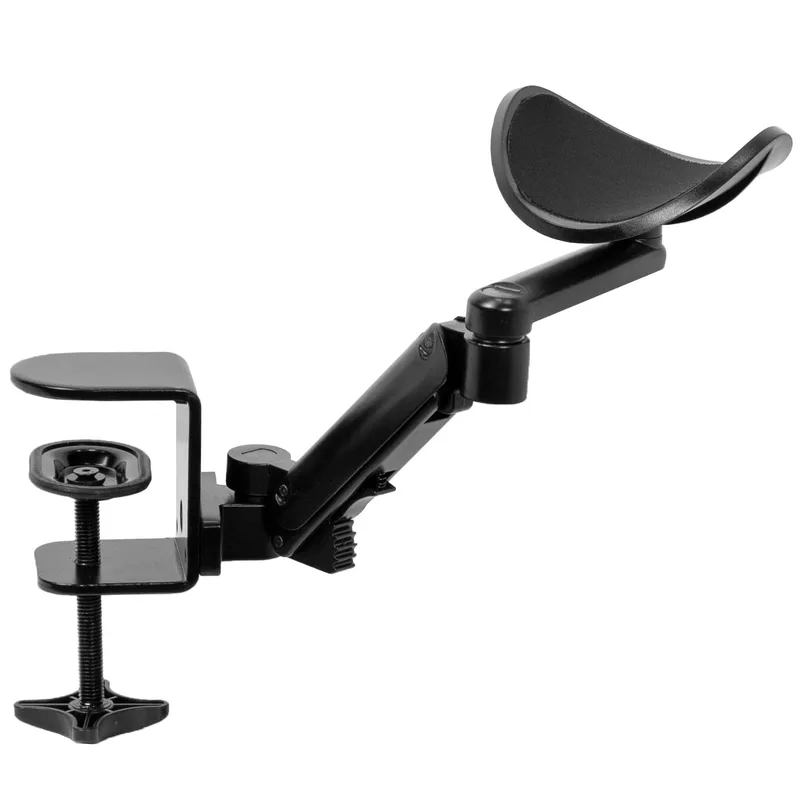
The VIVO MOUNT-ARM01 is the most popular desk armrest on the market, and it earns that position honestly. At $39.99, it gives you 360-degree base rotation, 90-degree swivel, and a height range from 1.4 to 3.9 inches above desk surface — enough range to match most standard office setups.
The C-clamp base handles desks up to 2.2 inches thick. Thin glass desks won’t work, but the vast majority of standing desks and standard office desks are fine. Steel construction means it doesn’t flex or creak under forearm pressure. Setup takes about five minutes without tools.
Where it shines: the rotation. Swing it 360 degrees completely out of the way when you push back from the desk, then swing it back without re-adjusting. That detail matters when you do it 50 times a day.
The cushion pad isn’t memory foam. If you have sensitive elbows, adding a small foam pad on top is a common modification that costs nothing.
Best for: Desk workers who want the proven all-around pick at an honest price. Thin glass or very thick hardwood desks should look at the Mount-It! or BONTEC instead.
2. Mount-It! Adjustable Arm Rest MI-7145 — Best Value
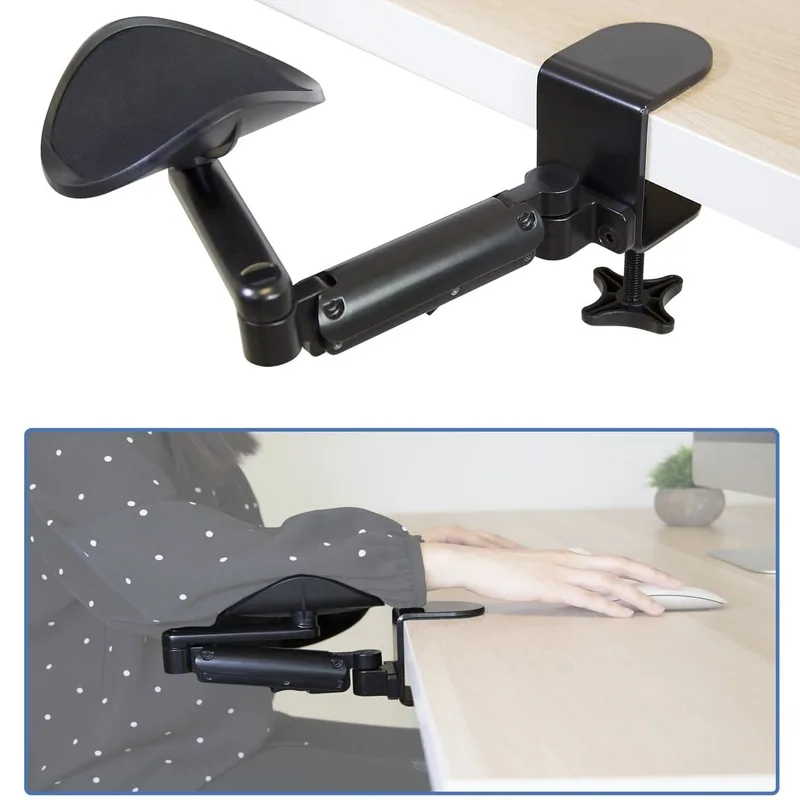
Mount-It! Adjustable Arm Rest (MI-7145)
Pros
- ✓ 4-inch height adjustment range — widest among budget clamp-on options
- ✓ Heavy-gauge steel frame holds up well over years of daily use
- ✓ Fits desks as thin as 0.3 inches, including glass and thin MDF
- ✓ Full 360-degree rotation makes repositioning effortless
Cons
- ✗ Cushion padding is thinner than premium options
- ✗ No integrated wrist rest pad
- ✗ Cushion surface can feel slippery during rapid typing
The Mount-It! MI-7145 costs the same as the VIVO at $39.99, but wins on one specific spec: the 4-inch height adjustment range versus 2.5 inches on the VIVO. If you use an adjustable chair or share your desk with someone of a different height, that extra range matters.
The clamp accepts desk edges from 0.3 to 2.63 inches — wider compatibility on the thin end than the VIVO. Glass-top desks and thin IKEA surfaces that choke other clamps work with the MI-7145.
Steel construction holds up. User reports mention 2–3 years of daily use without the clamp loosening or the swivel degrading. Heavy-gauge steel makes a real difference here.
The pad is where it loses points. It’s functional but thinner and less padded than what you’d want for 8+ hour sessions. An aftermarket cushion cover helps a lot.
Best for: Tall setups, adjustable-height desks, shared workstations, or thin glass-top desks. Skip it if pad comfort is your top priority.
3. StarTech 1AHC-DESK-ARM-REST — Best Warranty
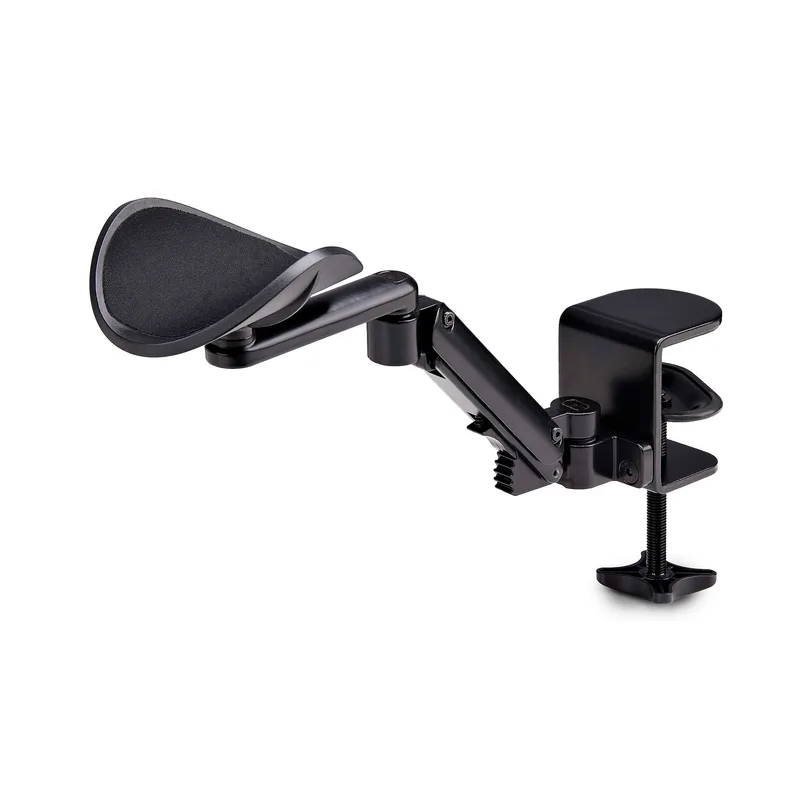
StarTech Adjustable Arm Rest (1AHC-DESK-ARM-REST)
Pros
- ✓ 2-year warranty — longest in this price range by a wide margin
- ✓ Ships fully assembled; tool-free clamp takes under 3 minutes to attach
- ✓ Aluminum and steel construction adds durability over all-plastic competitors
- ✓ 6-level height adjustment lets you dial in fit with more precision than 5-level options
Cons
- ✗ Not sold on Amazon — order direct from StarTech or authorized resellers
- ✗ Height adjustment range is narrower than the Mount-It! at the same price
- ✗ Foam padding is standard density, not memory foam
StarTech is known for commercial IT accessories, and the 1AHC-DESK-ARM-REST reflects that DNA. The 2-year warranty is the longest in this price range — most clamp-on armrests come with none. At $34.84 direct from StarTech, it’s cheaper than the two picks above.
The build uses aluminum and steel rather than all-steel, giving a slightly cleaner profile. Six height adjustment levels cover -0.2 to +2.7 inches above desk surface — a narrower range than the Mount-It! but with more precise steps. Supports desks up to 2 inches thick.
The biggest drawback: it’s not on Amazon. You’re buying direct from StarTech.com or through authorized resellers like CDW and B&H. Returns are slightly more involved. If you’re buying for a corporate environment or want actual warranty support, that tradeoff makes sense.
Best for: Corporate offices, IT-managed workstations, anyone who wants real warranty coverage. Pass if you need thick-desk compatibility or a wider height range.
4. ErgoRest Articulating Arm Support 330-016-BK — Best Premium
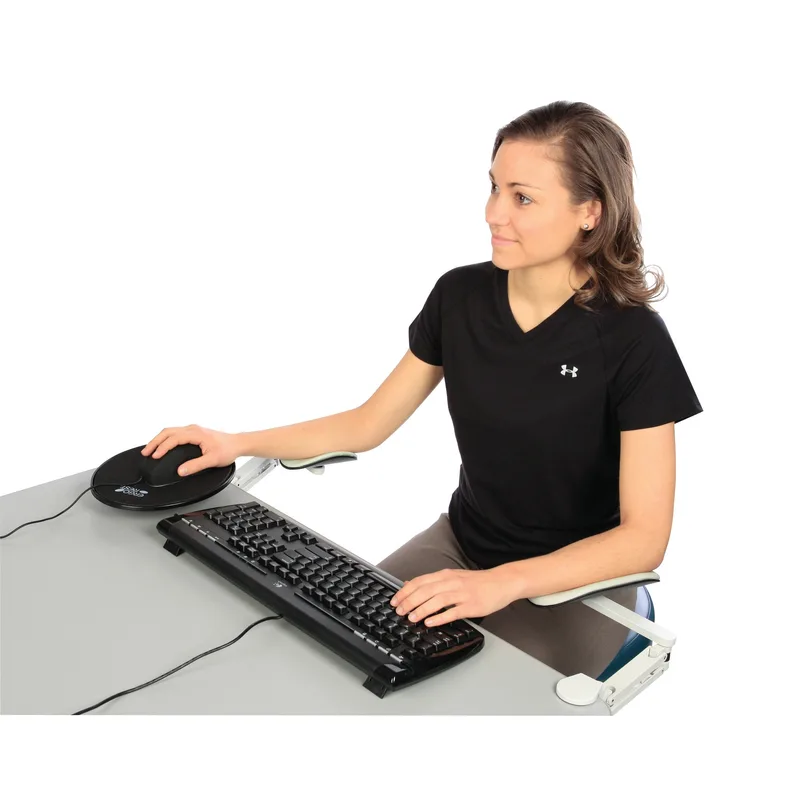
ErgoRest Articulating Arm Support (330-016-BK)
Pros
- ✓ Fully articulating arm follows your natural forearm movement continuously
- ✓ Cast aluminum frame built for decades of use — no plastic components
- ✓ Genuine leather pad is substantially more comfortable for long sessions
- ✓ Standard equipment in occupational therapy and RSI recovery setups
Cons
- ✗ Premium price — costs roughly 3x more than comparable clamp-on options
- ✗ Desk thickness limit of 1.8 inches means it won't fit thick butcher block tops
- ✗ Requires an adjustment period to set tension and find your natural positioning
This is a different category of product. The ErgoRest 330-016-BK is a fully articulating forearm support — the arm pivots and rotates freely, following your forearm as you type, reach, and move. A fixed clamp-on arm sits still; the ErgoRest moves with you.
The dual-arm structure is cast aluminum. The pad is genuine leather over high-density foam, 15.6 inches long — enough to support from elbow to wrist. Setup requires more care than a simple C-clamp: you’re setting the articulation tension so it floats with your arm weight, not so loose it drops or so tight it resists movement. Takes 10–15 minutes to dial in. Once set, it disappears from your awareness.
At $129.95, it’s not for everyone. If you have RSI, carpal tunnel, or chronic shoulder problems from desk work, the ErgoRest is what occupational therapists actually recommend — not because it’s expensive, but because articulating support is biomechanically superior to fixed support. Your arm isn’t static; your arm rest shouldn’t be either.
The desk thickness limit of 1.8 inches is worth checking. Thick butcher block standing desks won’t work.
Best for: RSI recovery, carpal tunnel prevention, long-session typists, occupational therapy setups. Too expensive and involved for casual use — get the VIVO instead.
5. BONTEC Foldable Desk Extender Tray — Best Budget
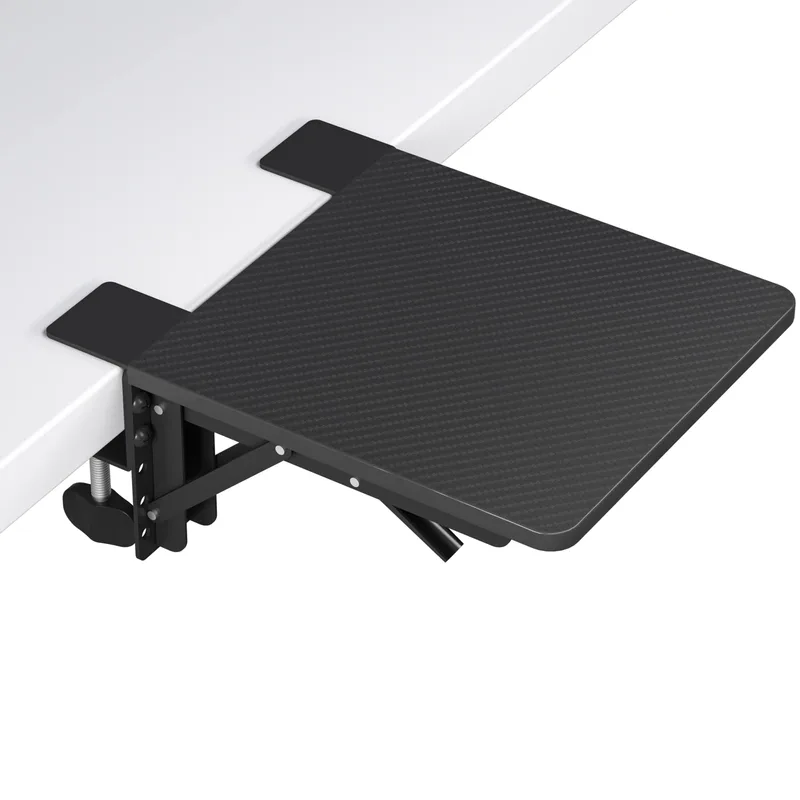
BONTEC Ergonomic Foldable Desk Extender Tray
Pros
- ✓ Widest desk compatibility in this list — fits desks up to 4.4 inches thick
- ✓ Tray-style design supports both forearms simultaneously for writers and readers
- ✓ 33-lb weight capacity is double most articulating arms
- ✓ Most affordable option for basic elbow and forearm support
Cons
- ✗ No height adjustment — position is fixed once clamped to the desk
- ✗ Tray does not move with your arm like an articulating option does
- ✗ Less ergonomically precise than height-adjustable rotating alternatives
The BONTEC takes a fundamentally different approach. Instead of a small articulating arm with a single pad, it’s a 9.5 × 9.1-inch flat tray that clamps to the desk and folds flat when not in use. You rest both forearms on it like a wider desk surface.
At $29.99, it’s the cheapest effective option here. The standout spec is desk compatibility — fits desks up to 4.4 inches thick, which covers every desk in this roundup’s range and then some. Thick hardwood or bamboo standing desks that choke other clamps work with this one.
The 33-lb weight capacity is notably higher than articulating arms, which helps nothing in practice but confirms the clamp is solid. The tradeoff: no height adjustment, no articulation, no reposition while sitting. For writers who rest both forearms on the desk while reading or thinking, ideal. For fast typists who need precise ergonomic positioning, the VIVO or Mount-It! is the better call.
Best for: Budget-conscious workers, thick desks, and writers or readers who want both forearms supported simultaneously. Not the right pick for typists who need precise arm placement.
Buying Guide: What Actually Matters
Desk thickness first, everything else second
Every clamp-on armrest has a maximum desk thickness rating. Check yours before ordering. A standard office desk is usually 1–1.5 inches thick. Bamboo standing desks run 1.5–2 inches. Solid hardwood butcher block can be 2.5–4 inches. The BONTEC tray and Mount-It! cover the widest range.
Fixed vs. articulating
A fixed arm holds your forearm in one position. An articulating arm like the ErgoRest follows your arm as it moves. For most desk workers, a fixed arm is sufficient — you hold your arms relatively still while typing. If you have existing shoulder or elbow problems, or you switch frequently between typing and mousing, an articulating arm is worth the higher cost.
Pad length matters
A 4-inch pad covers your elbow. A 15-inch pad covers elbow to wrist. If you type with your forearm resting on the pad, you need 12+ inches of pad length. Most arms in this list offer pads in the 15-inch range — that’s the minimum you want.
Height range and rotation
Set the armrest so your forearms are roughly parallel to the floor, shoulders relaxed, elbows at about 90 degrees. You shouldn’t be shrugging or dropping your shoulders to reach it. The Mount-It! has the most adjustment range at this price point; the VIVO is close. Both cover the vast majority of standard desk setups.
Budget expectations
- Under $35: BONTEC tray ($29.99), StarTech direct ($34.84) — functional, limited features
- $35–$50: VIVO, Mount-It! (both $39.99) — best value range, where most people should shop
- $130+: ErgoRest articulating ($129.95) — meaningful upgrade for RSI and chronic pain
How to Use a Desk Armrest Correctly
Position the pad so it contacts your forearm about two-thirds of the way from elbow toward wrist — not just the elbow, and not the wrist. Your hand should float above your keyboard, not rest on the armrest while typing.
Set the height so your forearm is parallel to the floor or angles very slightly downward toward the keyboard. If the armrest pushes your shoulder up, lower it. If you’re dropping your shoulder to reach it, raise it.
An armrest works best when you consciously shift weight onto it between bursts of typing. Resting your arm continuously while typing can restrict blood flow. Rest between keystrokes, not during them.
Pair a desk armrest with a good ergonomic chair and anti-fatigue mat for a complete ergonomic setup. For the full picture of what else to add to your desk, see our complete desk accessories guide.
FAQ
Do desk armrests actually reduce shoulder pain?
Yes, when set up correctly. Unsupported forearms significantly increase upper trapezius and anterior deltoid muscle activity during seated computer work — that’s the burn you feel in your shoulders and neck by afternoon. Forearm support reduces that muscle load directly.
Can I use a desk armrest with any chair?
Yes. Desk armrests attach to the desk, not the chair. They work independently of chair armrests and are often better than chair armrests because they’re positioned relative to your keyboard rather than your seat.
My desk has rounded edges — will a clamp-on armrest work?
Most standard C-clamps work on mildly rounded desk edges. Very rounded profiles like the radius on some IKEA desks can cause clamps to slip under load. The BONTEC tray’s clamp mechanism handles more varied edge profiles than the simple C-clamps on the VIVO and Mount-It!.
Should I get one armrest or two?
Most people find one armrest sufficient — typically on the mouse side. Typists who hold both arms up during long sessions may benefit from two. VIVO sells a two-pack (MOUNT-ARM02P) if you want bilateral support.
What’s the difference between a desk armrest and a chair armrest?
Chair armrests move with the chair — they can’t be independently positioned relative to your keyboard height. Desk armrests stay fixed relative to the desk surface, which is almost always the right reference point for forearm support during computer work. If you use a standing desk, desk armrests also adjust with the desk when you change height.
Is the ErgoRest worth the premium?
For most people: no. The VIVO at $39.99 solves 80% of the problem at 30% of the cost. The ErgoRest is worth it if you have diagnosed RSI, are recovering from elbow or shoulder injury, or work 10+ hours daily and have already tried fixed options that didn’t fully resolve your symptoms.
Conclusion
For most desk workers, the VIVO MOUNT-ARM01 at $39.99 is the right pick — easy to install, easy to reposition, and well-made enough to last for years. If you need a wider height range or thinner desk compatibility, the Mount-It! MI-7145 at the same price is the smart upgrade.
If you’re dealing with actual pain — shoulder impingement, elbow tendinitis, carpal tunnel — the ErgoRest 330-016-BK at $129.95 is the product occupational therapists recommend. It costs more but it’s built for exactly this use case.
The BONTEC tray is worth considering if you have a thick desk that other clamps can’t handle, or if you want basic both-forearm support on a tight budget.
Whatever you choose, the goal is the same: get your forearms supported so your shoulder muscles stop working overtime. Most people who try a desk armrest wonder why they waited this long.