Disclosure: PostureRanked is reader-supported. When you buy through links on our site, we may earn an affiliate commission at no additional cost to you. Our recommendations are based on independent research and testing.
| Product | Price | Rating |
|---|---|---|
| UPLIFT V2 Standing Desk | $599 | 9.0 |
| UPLIFT V2 Commercial Standing Desk | $799 | 9.2 |
| FlexiSpot E7 Pro Standing Desk | $499 | 8.7 |
Disclosure: PostureRanked is reader-supported. When you buy through links on our site, we may earn an affiliate commission at no extra cost to you. Learn more
The UPLIFT V2 has been on “best standing desk” lists for years. That kind of sustained recognition either means the desk is genuinely excellent — or that affiliate sites are recycling the same picks.
After comparing its spec sheet against thousands of verified owner reports, pitting it against competitors at the same price point, and digging into what’s actually changed for 2026, here’s the honest answer: the UPLIFT V2 is still very good. But whether it’s worth it depends entirely on what you need, and there are a couple of things the marketing copy won’t tell you.
The short version: if you want serious customization, a best-in-class warranty, and a desk that can handle a maxed-out multi-monitor workstation, the UPLIFT V2 is one of the top choices at its price. If you primarily want a simple, stable desk at a lower price and don’t care about desktop material options, the FlexiSpot E7 Pro gets you 90% of the way there for $100–$200 less.
UPLIFT V2 Standing Desk
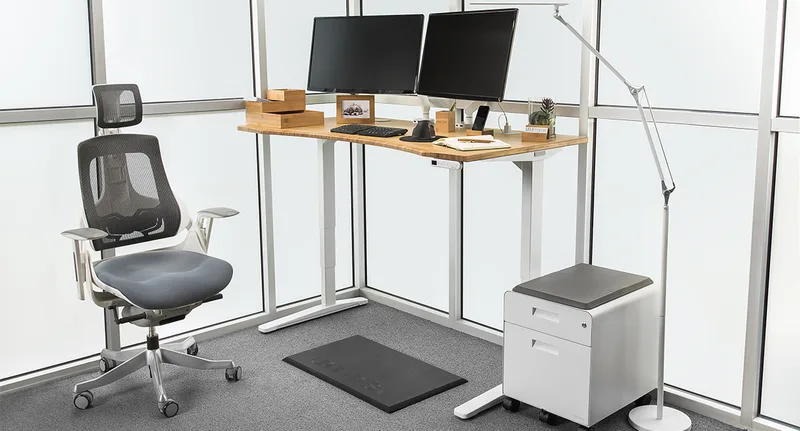
UPLIFT V2 Standing Desk
Pros
- ✓ 355 lb weight capacity is best-in-class for a 2-leg residential standing desk
- ✓ 15-year warranty on frame and motors covers virtually any failure for the life of the desk
- ✓ Over 20 desktop materials — bamboo, walnut, rubberwood, reclaimed fir, multiple laminates — make this genuinely customizable
- ✓ Anti-collision system with 6-axis accelerometer stops the desk safely if something is in the way
Cons
- ✗ At $599+ base, it costs meaningfully more than FlexiSpot and similar desks with comparable specs
- ✗ Sold direct only — no Amazon, no showrooms, so you cannot evaluate it before buying
- ✗ Standard 2-leg model exhibits some front-to-back wobble at full standing height, especially with wide desktops loaded with monitors
The V2 has been UPLIFT’s flagship two-leg model since 2017, and they’ve refined it considerably over that time without replacing it — until recently, when the V3 launched. The V2 is still sold alongside the V3 in 2026, and UPLIFT has positioned it as the value tier of their lineup.
What Has Not Changed
The frame is the same dual-motor, 3-stage design that made the V2 famous. Two motors — one per leg — drive the desk from a minimum of 25.3 inches to a maximum of 50.9 inches. That range covers users from about 5’0” to 6’4” comfortably, with a few inches of breathing room on each end.
The 355-pound weight capacity is what separates the V2 from budget competitors. Real-world workstations — dual 27-inch monitors, a monitor arm, a heavy laptop dock, speakers, and a desktop PC on a side shelf — can easily reach 60–80 lbs. You’d need to work hard to approach 355 lbs, which means the motors are running comfortably within their rated range during normal use. Based on owner reports, this headroom translates directly into longer motor life and less strain on the frame over time.
The 15-Year Warranty
This is the biggest reason to buy an UPLIFT over a budget desk, and it’s worth dwelling on. Most standing desks in the $300–$500 range come with a 2–5 year warranty. UPLIFT covers the frame and motors for 15 years. Desktop surfaces get 5 years.
According to owner accounts, UPLIFT actually honors this warranty without significant hassle. Control boxes, leg actuators, and keypads have all been replaced under warranty for owners with desks 5–10 years old. For a product you will use every single workday, that kind of coverage changes the long-term math significantly.
Customization Options
This is where the V2 genuinely sets itself apart from competitors. The desk can be configured with:
- Desktop sizes from 42” x 30” up to 80” x 30”
- L-shaped configurations for corner setups
- Over 20 surface materials including standard laminates, bamboo, natural walnut, rubberwood, reclaimed fir, and live-edge solid wood options
- Frame colors in black, white, gray, and industrial (raw steel look)
- Keypad options from a basic up/down paddle to an Advanced Keypad with 4 memory presets, LED height display, and sit/stand reminders
The Advanced Keypad costs about $29 extra and is worth it. Without memory presets, switching heights involves pressing and holding a button while the desk slowly travels to your preferred height. With presets, you press once and the desk goes exactly where you set it.
The Wobble Reality
Every two-leg standing desk wobbles at full height. Physics makes this unavoidable. The V2 is better than most budget desks, but multiple independent owner reports confirm that the standard V2 frame — particularly in wider desktop configurations (72” and above) — exhibits noticeable front-to-back movement when you type at standing height.
The amount of wobble depends on three variables: desktop width (wider = more flex), workstation height (taller = more lever arm), and what’s on the desk (heavier = more inertia). Based on aggregated owner feedback, a standard 60” V2 at 44” height with a single monitor shows minimal wobble. The same desk at 72” wide, 48” height, with dual monitor arms shows considerably more.
If wobble is a concern, UPLIFT’s solution is the V2 Commercial, which adds a crossbar between the legs. More on that below.
V2 vs. V3: Should You Buy the Newer Model?
UPLIFT launched the V3 in 2026. The V3 has reinforced legs, improved crossbar geometry, quieter motors, better integrated cable management, and a slightly wider height range. It also costs more.
For most buyers in 2026, the V3 is the better option if budget allows. But the V2 isn’t obsolete. If you’re looking at a base configuration with a standard laminate top and plan to use it in a typical single-monitor setup, the V2 delivers the same day-to-day experience at a lower price. The V3’s improvements are most meaningful for heavy workstations, tall users, and people who place the desk at maximum height frequently.
UPLIFT V2 Commercial Standing Desk
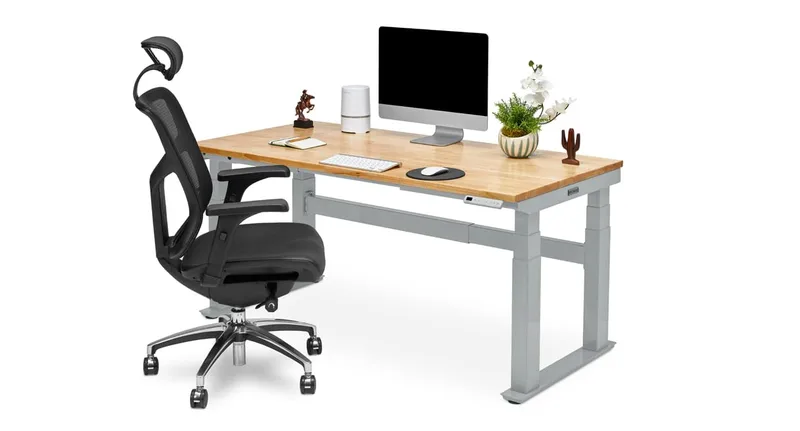
UPLIFT V2 Commercial Standing Desk
Pros
- ✓ Heavier steel legs and a crossbar between them dramatically reduce wobble compared to the standard V2
- ✓ Lower minimum height (22.8") accommodates shorter users better than the standard model
- ✓ Same 15-year warranty and 355 lb capacity as the standard V2
- ✓ Better choice for heavy multi-monitor workstations or users above 6 feet
Cons
- ✗ Roughly $200 more expensive than the standard V2 for the same desktop options
- ✗ The crossbar reduces legroom slightly — an issue if you frequently cross your legs while seated
- ✗ Still direct-purchase only — no ability to evaluate in person before buying
The V2 Commercial is the version you should buy if you’re worried about wobble and your budget allows it.
The difference from the standard V2 is structural: the Commercial model uses heavier-gauge steel leg columns and adds a crossbar connecting the two legs near the floor. Both modifications reduce the flex that causes wobble, and owner reports consistently confirm the Commercial is meaningfully more stable than the standard V2, particularly at heights above 44 inches.
The Commercial also has a slightly lower minimum height — 22.8” vs. 25.3” — which matters for shorter users (under 5’4”) who sit at a standard desk height and need the desk to go low enough.
The trade-off is price (roughly $200 more than the standard V2) and the crossbar, which takes up some legroom in the seated position. If you tend to cross your legs or sit far back from your desk, check that the crossbar won’t interfere with your posture.
For anyone building a heavy dual-monitor workstation, the Commercial is the better starting point. The extra stability cost is justified by the fact that you’ll use this desk for 10+ years.
FlexiSpot E7 Pro Standing Desk
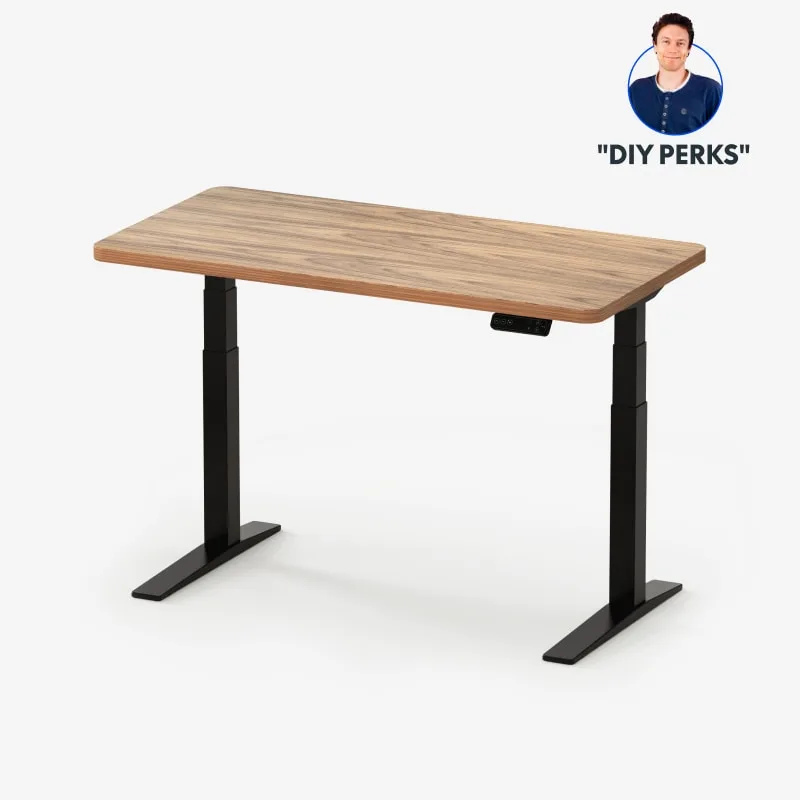
FlexiSpot E7 Pro Standing Desk
Pros
- ✓ Sold on Amazon with a full desktop included — easier to buy and return than UPLIFT's direct model
- ✓ Same 355 lb capacity and dual-motor design as the UPLIFT V2 at a lower price
- ✓ 3-stage legs provide a wide height range comparable to premium desks
- ✓ Solid slab desktop included at base price — no customization fees
Cons
- ✗ 5-year warranty is significantly shorter than UPLIFT's 15-year coverage
- ✗ Far fewer desktop material and size options than UPLIFT
- ✗ The included desktop is a basic laminate — no premium wood options without third-party purchase
The FlexiSpot E7 Pro exists in this review as the honest answer to a real question: do you actually need an UPLIFT?
At $499 on Amazon (ASIN B08B3X9CKH), the E7 Pro gets you:
- The same 355 lb weight capacity
- A comparable dual-motor, 3-stage lift system
- A height range of 22.8” to 48.4” — nearly identical to the V2
- 4 memory presets
- A complete desk with a solid laminate top included
The E7 Pro’s main disadvantage is the warranty — 5 years vs. UPLIFT’s 15. According to owner feedback, FlexiSpot’s support is responsive, but a 5-year warranty on a product you’ll use daily for 10+ years is a meaningful gap.
The E7 Pro also lacks customization options. You get a basic laminate desktop in a few size and color combinations. There is no walnut option, no bamboo, no live edge. If your workspace aesthetic matters to you, the FlexiSpot will feel generic.
For a basic functional desk that will work reliably for 5+ years and fit a tighter budget, the FlexiSpot E7 Pro is an excellent choice. For a premium long-term investment with better warranty and customization, the UPLIFT V2 earns its premium.
How They Compare
| Model | Price | Height Range | Weight Cap | Warranty | Available On |
|---|---|---|---|---|---|
| UPLIFT V2 | $599+ | 25.3”–50.9” | 355 lbs | 15 years | Direct only |
| UPLIFT V2 Commercial | $799+ | 22.8”–48.7” | 355 lbs | 15 years | Direct only |
| FlexiSpot E7 Pro | $499 | 22.8”–48.4” | 355 lbs | 5 years | Amazon |
Buying Guide: What to Look for in a Premium Standing Desk
Height Range
Your minimum sitting height should be at least 2 inches lower than your elbow height when seated. For someone 5’4”, that means looking for a minimum height of around 23–24 inches. At the maximum, add at least 4–6 inches above your standing elbow height for breathing room. Both UPLIFT models cover this well.
Weight Capacity — and Why Headroom Matters
Manufacturers rate maximum weight capacity, but running a desk motor at 80–90% of its rated load every day shortens motor life. A desk rated at 355 lbs that carries a 50-lb workstation is operating at about 14% capacity — effectively stress-free. The higher the rated capacity relative to your actual load, the longer the motors will last.
Frame Material and Construction
Steel frame gauge matters more than marketing language. The UPLIFT Commercial’s heavier steel and crossbar reduce wobble at standing height. If you’re taller (6’1”+), use the desk at maximum height regularly, or have a wide desktop (72”+), the additional frame rigidity of the Commercial is worth the cost.
Warranty as a Proxy for Build Quality
A brand willing to stand behind its product for 15 years is telling you something about how confident they are in the motors, electronics, and frame. UPLIFT’s 15-year warranty is the best in the class and is a legitimate reason to pay more.
Direct-Only vs. Amazon
UPLIFT sells exclusively through its website. That means no Amazon returns, no ability to see the desk in person before buying. For most buyers this is fine — UPLIFT’s customer support reputation is strong and shipping is fast. But if you need the security of an easy Amazon return, the FlexiSpot E7 Pro is worth considering.
For more context on what makes a standing desk worth buying, see our complete standing desk guide.
FAQ
Is the UPLIFT V2 or V3 better in 2026?
For most buyers, the V3 is the better desk in 2026 if budget allows. It has a wider height range, quieter motors, and better integrated cable management. The V2 remains a solid choice for buyers who want UPLIFT quality at a lower price point and don’t need the maximum height range or heavy workstation stability of the V3.
Does the UPLIFT V2 wobble?
Yes, to some degree — all two-leg standing desks do. The standard V2 exhibits more noticeable front-to-back movement at maximum height, especially with wide desktops and heavy monitor setups. The V2 Commercial (with its crossbar) is significantly more stable. If wobble concerns you and your budget allows it, buy the Commercial version or add the crossbar kit.
Can you buy the UPLIFT V2 on Amazon?
No. UPLIFT sells exclusively through its own website at upliftdesk.com. There are some UPLIFT frame-only listings on Amazon from third parties, but the full configured desk with your choice of desktop is direct-only. This is worth factoring in if you prefer Amazon’s return policy.
How long do UPLIFT V2 motors last?
Based on owner reports in online forums and UPLIFT’s support documentation, motors on properly maintained V2 units have lasted well beyond the 7–10 year range. UPLIFT’s 15-year warranty covers motor failure, so even if a motor does go, UPLIFT replaces it under warranty. The key factor is not overloading the desk regularly — keep your workstation well within the 355 lb capacity.
What is the best desktop material for the UPLIFT V2?
For most home office users, the standard laminate desktop offers the best balance of durability, price, and ease of care. Bamboo is a popular upgrade — durable, attractive, and eco-friendly at a modest price premium. Solid wood options (walnut, rubberwood) are beautiful but add significant cost and require more care. Choose based on your aesthetic priorities and budget, not perceived quality — the laminate is genuinely robust.
How does the UPLIFT V2 compare to the FlexiSpot E7?
Both desks share the same 355 lb capacity and dual-motor design. The UPLIFT V2’s main advantages are its 15-year warranty (vs. FlexiSpot’s 5 years), broader desktop customization options, and — according to owner comparisons — slightly better long-term build quality. The FlexiSpot E7 costs less, is available on Amazon, and includes a desktop at its base price. If warranty length matters to you, the UPLIFT is worth the premium. If budget is tight, the FlexiSpot delivers comparable performance.
Conclusion
The UPLIFT V2 is still one of the best standing desks you can buy in 2026. The 15-year warranty, 355 lb capacity, and extensive customization options justify the $599+ price for buyers who plan to keep their desk for a decade or more.
Two caveats worth repeating: first, if stability matters to you — especially with a wide desktop or heavy multi-monitor setup — step up to the V2 Commercial rather than the standard. Second, the UPLIFT V3 is the more current product, and if your budget stretches to it, the V3 is the better long-term buy.
If you want a premium, long-lasting, customizable standing desk and are prepared to buy direct, the UPLIFT V2 earns its reputation. If budget is a constraint, the FlexiSpot E7 Pro is the honest alternative.
For a full breakdown of how to pick the right standing desk for your height, budget, and workstation, read our complete standing desk buying guide.