A June 2026 OSHA framework for teleworking employees pushed remote-work ergonomics past “buy a good chair” and into behavior — how you actually move through a workday. That shift matters a lot more once a baby or an aging parent is part of the picture, because the workday stops being continuous. You’re not sitting for eight hours anymore. You’re sitting for eleven minutes, standing up, walking a bottle to the kitchen, sitting back down at a different height because someone else used your chair, and doing it again forty times before lunch.
Standard ergonomic advice assumes uninterrupted blocks of focused work at a desk you control. Caregiving remote work doesn’t look like that, and most ergonomics guides were never written with it in mind. This one is.
Quick pick if you only fix one thing: get a desk with memory-height presets. Interrupted-sitting posture — hunching over a laptop on the couch because standing back up and readjusting a manual-crank desk takes too long — is one of the most common patterns caregivers fall into, and it’s the easiest one to fix with the right equipment.
The Core Problem: Interrupted-Sitting Posture
Traditional desk ergonomics is built around holding one good position for a long time. Caregiving remote work is built around getting in and out of position constantly, which means the posture that matters most isn’t your “ideal” sitting posture — it’s your transition posture. The slouch you fall into when you sit down for six minutes between interruptions, because it’s not worth the effort to set everything up properly for such a short stretch.
That slouch, repeated dozens of times a day, adds up to more strain than a full eight hours of mediocre — but consistent — sitting posture. The fix isn’t willpower. It’s removing the friction between “I have six minutes” and “my setup is actually correct for those six minutes.”
Fix #1: Furniture That Adjusts in One Motion
A manual-crank standing desk or a chair with five separate knobs is fine for someone who sets it up once a day and leaves it. It’s a bad fit for someone adjusting their setup ten times before noon. Memory-height presets on a standing desk — one button, saved height, done — turn a 30-second readjustment into a two-second one.
The UPLIFT V3 is the desk we’d point most caregivers toward for this reason. Four memory presets cover sitting, standing, a lower height for when you’re holding a baby while typing one-handed, and whatever else your rotation needs. At $648 it’s not cheap, but the alternative — a static-height desk you fight with all day — costs more in strain over time than the desk does in dollars.
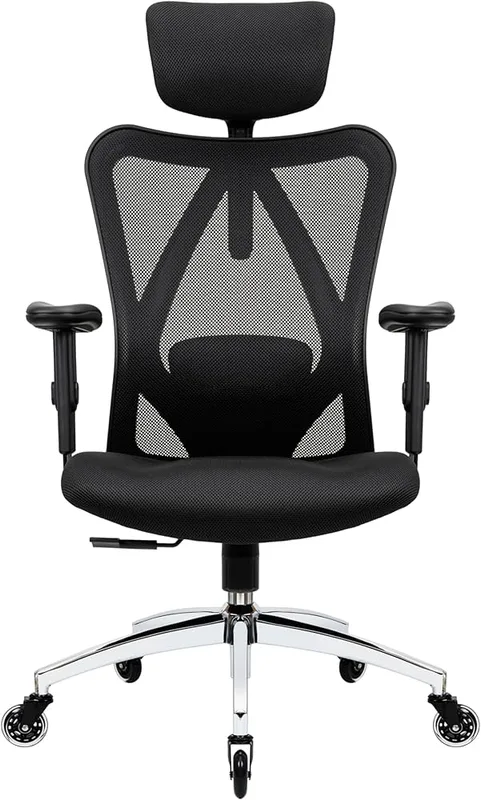
If a full desk upgrade isn’t in the budget right now, a chair with a locking recline does a smaller version of the same job. The Duramont Ergonomic Office Chair has adjustable lumbar support and a recline that locks at multiple angles, so you can drop into a more reclined position for a feeding session without losing back support or needing to fully leave the desk setup.
Fix #2: One-Handed Input Devices
If you’re regularly working with a baby, a toddler, or a mobility-limited parent on one arm, a standard mouse and keyboard assume two free hands you don’t have. A thumb-operated trackball solves this better than almost any other single piece of gear, because the cursor moves without your wrist, forearm, or shoulder needing to move with it.
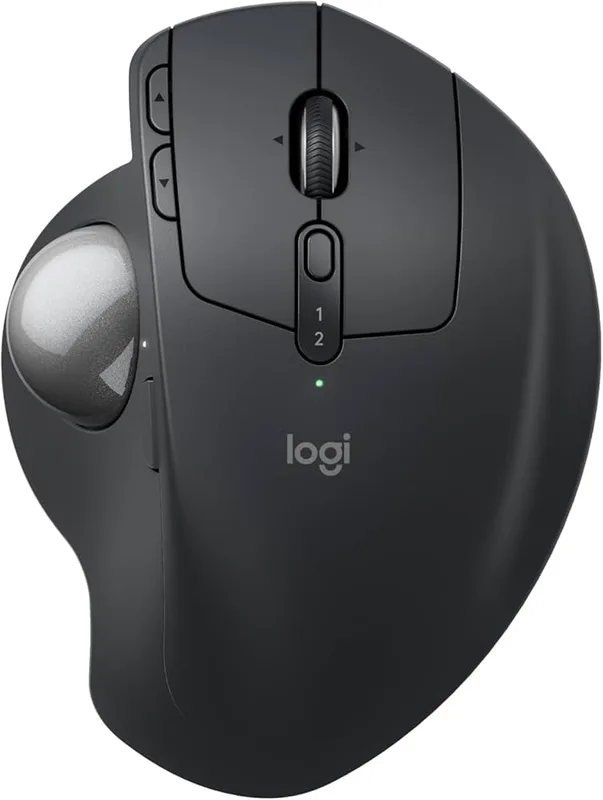
The Logitech MX Ergo S is built around exactly this: a stationary base, a thumb-driven ball, and a hinge that tilts to keep your wrist neutral. You can use it leaned back, angled sideways, or braced against your leg — positions a standard mouse doesn’t tolerate. It won’t replace a keyboard for typing, but it removes one of the two hands most setups assume you have free.
Fix #3: Standing Support for Rocking and Bouncing
A lot of caregiving happens standing up — soothing, bouncing, pacing while on a call. A flat anti-fatigue mat helps some, but a mat with a slight dome, like the Topo by Ergodriven, actually works with the small constant weight shifts of rocking a baby instead of fighting them. It’s firm enough for bottle prep and calls, and it wipes clean, which matters more than it sounds like it would.
Fix #4: A Habit Backstop for the Days the Setup Falls Apart
Some days the good chair and the memory-preset desk don’t matter, because you’re on the couch with a laptop and a sleeping baby, and moving isn’t an option. For those days, a wearable posture reminder is a reasonable backstop. The Upright GO 2 sits on your upper back and gives a gentle vibration when you slouch past a set point — it won’t fix a bad setup, but it catches the hunch that builds up over a long, off-schedule day.
Comparison: Match the Fix to Your Day
| Problem | Best Fix | Price |
|---|---|---|
| Manual desk too slow to readjust between interruptions | UPLIFT V3 memory-preset standing desk | $648.00 as of Oct 18, 2026 |
| Need to work with one hand often occupied | Logitech MX Ergo S trackball | $90.67-$99.99 as of Oct 18, 2026 |
| Lower back tired from broken-up sitting | Duramont ergonomic chair with lumbar support | $299.98 as of Oct 18, 2026 |
| Standing for long soothing/bouncing stretches | Topo by Ergodriven anti-fatigue mat | $109.00 |
| No control over your setup that day (couch, floor, car) | Upright GO 2 posture trainer | $89.95 as of Oct 18, 2026 |
What to Prioritize on a Limited Budget
If you can only buy one thing, buy for the transitions, not the ideal position. A perfect chair you use for 20 minutes at a stretch matters less than removing the friction that makes you skip setup entirely. In order of impact for most caregivers:
- Quick-adjust desk height — this fixes the largest number of bad-posture moments because it’s the step people skip most.
- A chair that reclines and locks — covers feeding and soothing positions without abandoning the desk.
- A one-handed input device — only essential if you’re regularly working one-handed; skip it if that’s rare for your situation.
- A wearable reminder — cheap insurance for the days nothing else applies.
For general desk accessory picks beyond this list — monitor arms, cable management, lighting — see our complete guide to desk accessories for remote work. If you’re deciding between a wearable posture device and just fixing your chair, our posture corrector vs. ergonomic chair comparison breaks down which one actually solves which problem. And if you’re not sure a standing desk is worth it yet, our standing desk self-assessment guide can help you figure out whether it’s the right first purchase.
FAQ
Is it safe to work at a standing desk while holding a baby?
Most manufacturers don’t design or rate standing desks for holding a child while adjusting height, and anti-collision sensors are meant to protect furniture and small hands from a moving desktop — not to make holding a baby during adjustment safe. Set the height first, then pick the baby up once the desk is stationary.
What’s the single best piece of gear for working with a newborn?
A desk with memory-height presets has the widest impact, because it removes the biggest source of friction: the ten-second window between “I need to sit down” and “my setup is actually correct.” Everything else on this list solves a narrower problem.
Do I really need a trackball, or is a regular wireless mouse fine?
A regular wireless mouse works fine if both your hands are usually free. A trackball earns its price specifically if you’re often typing or clicking with only one hand — it’s a niche upgrade, not a universal one.
How do I fix posture on days I’m stuck working from the couch?
You mostly can’t fix the setup itself in that situation, which is where a wearable posture reminder like the Upright GO 2 earns its keep — it’s not a substitute for good furniture, but it catches slouching when good furniture isn’t an option that day.
Is a $648 desk worth it for someone on parental leave with a tighter budget?
Not automatically. If your return-to-desk stretches are short and infrequent, a locking-recline chair and a trackball solve more of the actual problem for a fraction of the cost. The memory-preset desk earns its price for people back to near-full-time remote work while still managing frequent interruptions.
Conclusion
Caregiving remote work isn’t a smaller version of normal remote work — it’s a different problem, built around interruptions instead of focus blocks. The fixes that matter aren’t about finding the single “best” chair or desk; they’re about cutting the friction between an interruption ending and your setup being correct again. A memory-preset desk, a chair that reclines without abandoning support, and a trackball for one-handed stretches solve most of it. A wearable reminder covers the rest for the days nothing else applies.