The posture wearable market expanded dramatically in 2026 — over 47 new models launched this year alone, according to industry trackers, as demand for hybrid-work ergonomic tools accelerated. Brands like HBADA launched their new E3 Series in the US market, and AI-driven posture analytics are moving from enterprise wellness programs into consumer wearables. All of this means more choices, but also more noise.
The honest answer to whether these devices work: it depends entirely on how you use them. A posture sensor is a reminder tool, not a cure. Based on analysis of owner reports, clinical context, and manufacturer specs, we’ve ranked the five devices that consistently outperform the rest — and explained clearly where each one falls short.
If you want the short answer: the Upright GO 2 is the most capable option for most people. If budget matters, the Upright GO S at $59 gives you 90% of the experience for $20 less. And if you want zero app dependency, the Baron Active is the no-fuss pick.
For non-device approaches to posture, our posture corrector roundup covers straps and braces as an alternative or complement.
Upright GO 2 Premium Smart Posture Trainer
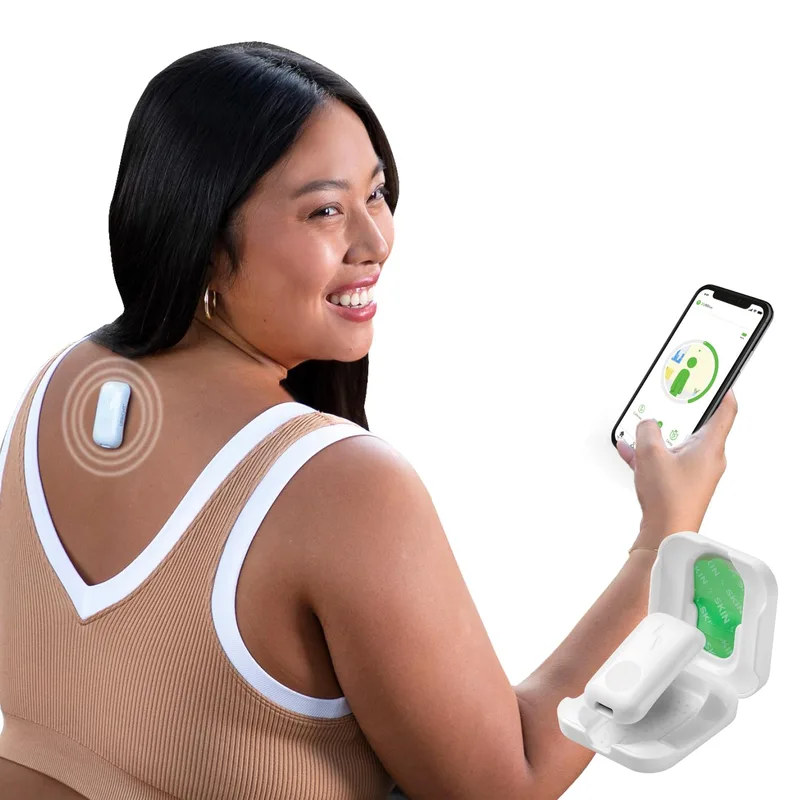
Upright GO 2 Premium Smart Posture Trainer
Pros
- ✓ Dual gyroscope sensors deliver the most accurate slouch detection in the category
- ✓ Structured 5-level training program that gradually builds new muscle habits
- ✓ Full 30-day posture history lets you spot your worst times of day
- ✓ Auto-calibrates to your natural baseline at the start of every session
Cons
- ✗ Adhesive tabs wear out in 2–3 days — replacement packs (30 tabs) run $10–15
- ✗ Premium features require the paid app tier
- ✗ More expensive than most alternatives in this category
The GO 2 earns the top spot because it combines the most accurate sensor hardware with a genuinely useful training structure. Its dual gyroscope setup tracks torso angle in two dimensions rather than a single plane — a meaningful difference for people who tend to slump sideways or twist rather than just hunch forward.
The 5-level training program starts with short awareness sessions (10–15 minutes) and gradually builds to full-day habit reinforcement. Unlike devices that just vibrate indefinitely, Upright’s app actually teaches a behavior change sequence. Owner reports consistently mention this structure as the reason they stuck with it past the first week when other devices collected dust.
The main friction point is the adhesive system. Each tab lasts 2–3 days of regular use, and the replacement packs (30 tabs, $10–15) are an ongoing cost. Some users switch to the magnetic clip accessory to avoid this, though that’s sold separately. If you sit in a relatively consistent chair and position, the tabs hold fine and the savings over the pro kit make the standard version the better buy.
Upright GO 2 Premium Smart Posture Trainer
Pros
- ✓ Dual gyroscope sensors deliver the most accurate slouch detection in the category
- ✓ Structured 5-level training program that gradually builds new muscle habits
- ✓ Full 30-day posture history lets you spot your worst times of day
- ✓ Auto-calibrates to your natural baseline at the start of every session
Cons
- ✗ Adhesive tabs wear out in 2–3 days — replacement packs (30 tabs) run $10–15
- ✗ Premium features require the paid app tier
- ✗ More expensive than most alternatives in this category
Best for: Daily desk workers who want a structured, progressive posture training program and detailed app analytics.
Upright GO S Smart Posture Trainer
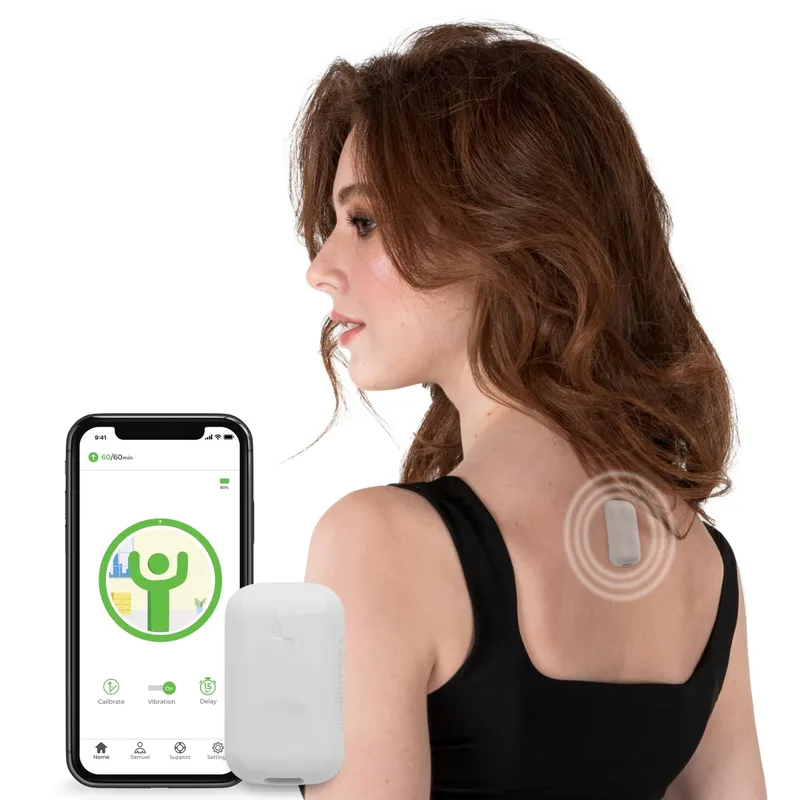
Upright GO S Smart Posture Trainer
Pros
- ✓ Same slim 1.89-inch form factor as the GO 2 — just as discreet
- ✓ Full Upright app ecosystem with session reports and slouch trends
- ✓ No straps or harness — sticks directly to skin between your shoulder blades
- ✓ $20 less than the GO 2 for people who want core tracking without the extras
Cons
- ✗ Single sensor is less spatially precise than the GO 2's dual setup
- ✗ 7-day app history versus 30 days on the GO 2
- ✗ Only 3 feedback plans — less flexibility in training intensity
The GO S is not a stripped-down disappointment — it’s a genuinely solid device that makes a rational tradeoff. You lose the second gyroscope sensor and the deep data history, but you keep everything that matters for a first-time posture sensor buyer: the same physical form factor, the same Upright app, and the same training workflow.
At $59, it’s the clearest value in this category. For the roughly $20 difference versus the GO 2, you’re buying the second sensor (more spatial precision) and 30-day vs 7-day history. If you’re new to posture training, the GO S is a smarter starting point. You can always upgrade later.
The included silicone adhesives are a nice touch — reusable, they last longer than disposable tabs and reduce the long-term ownership cost.
Upright GO S Smart Posture Trainer
Pros
- ✓ Same slim 1.89-inch form factor as the GO 2 — just as discreet
- ✓ Full Upright app ecosystem with session reports and slouch trends
- ✓ No straps or harness — sticks directly to skin between your shoulder blades
- ✓ $20 less than the GO 2 for people who want core tracking without the extras
Cons
- ✗ Single sensor is less spatially precise than the GO 2's dual setup
- ✗ 7-day app history versus 30 days on the GO 2
- ✗ Only 3 feedback plans — less flexibility in training intensity
Best for: People trying posture sensor tech for the first time, or anyone who doesn’t need professional-level analytics.
Strack Smart Posture Corrector and Trainer
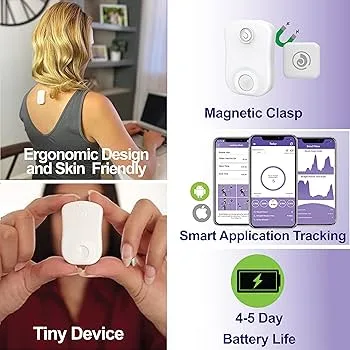
Strack Smart Posture Corrector and Trainer
Pros
- ✓ Adjustable sensitivity and vibration strength tunable through the app
- ✓ Can be calibrated once and used entirely without the app
- ✓ Both adhesive and magnetic clip options — clip avoids ongoing tab cost
- ✓ Tracks slouch count, straight posture time, and active minutes
Cons
- ✗ Same price as the Upright GO 2 but less structured training program
- ✗ Some users report continuous vibration during normal seated shifts
- ✗ App is less polished and less data-rich than the Upright ecosystem
The Strack competes directly with the Upright GO 2 on price but takes a different approach. Instead of a fixed training program, it gives you manual control over your experience: adjust vibration intensity, set your sensitivity threshold, and decide how aggressively the device reminds you. For people who found the Upright approach too regimented or too soft by default, this adjustability is genuinely useful.
The magnetic clip attachment option is a legitimate advantage. Once you accept that you’ll never get the adhesive cost back on pricier devices, being able to clip on and clip off without ever touching a tab is convenient. The tradeoff is that clip placement requires more daily attention than just sticking it on.
App quality is the weak point. Compared to Upright’s polished ecosystem, the Strack app is functional but less intuitive. If you’re someone who lives in your health data, the GO 2 is the better call at the same price.
Strack Smart Posture Corrector and Trainer
Pros
- ✓ Adjustable sensitivity and vibration strength tunable through the app
- ✓ Can be calibrated once and used entirely without the app
- ✓ Both adhesive and magnetic clip options — clip avoids ongoing tab cost
- ✓ Tracks slouch count, straight posture time, and active minutes
Cons
- ✗ Same price as the Upright GO 2 but less structured training program
- ✗ Some users report continuous vibration during normal seated shifts
- ✗ App is less polished and less data-rich than the Upright ecosystem
Best for: People who want manual control over sensitivity settings and don’t want to commit to a fixed training structure.
hipee P1 Smart Posture Trainer and Corrector
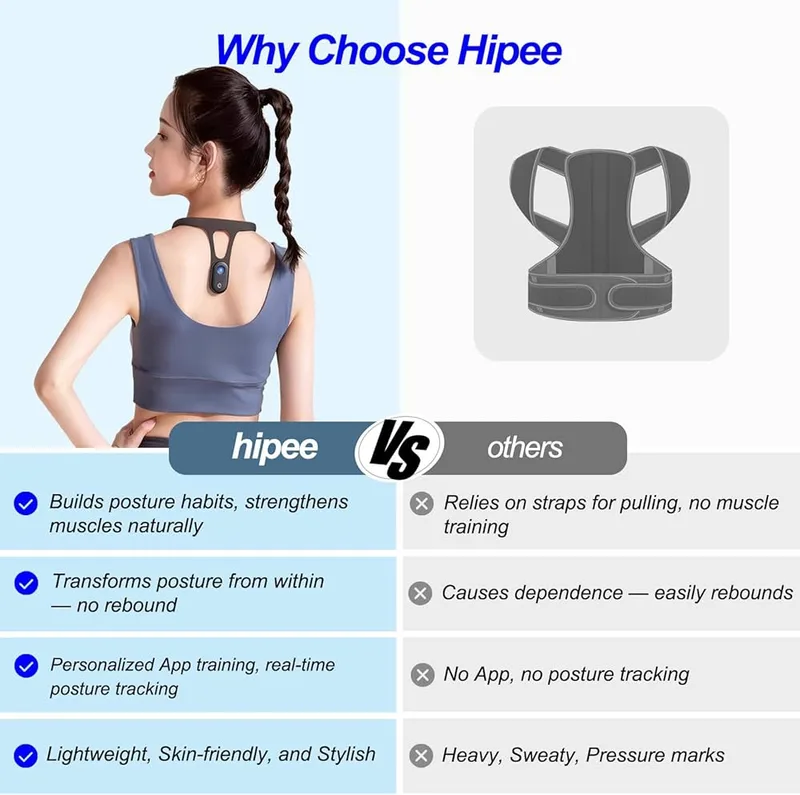
hipee P1 Smart Posture Trainer and Corrector
Pros
- ✓ 90-hour battery absolutely destroys everything else in this category
- ✓ Adjustable trigger angle and delay timer in the app for fine-tuned training
- ✓ Strapless, adhesive-free design — clips or wears without skin contact
- ✓ FCC, CMA, and SRRC certified for safety standards compliance
Cons
- ✗ No motion detection — vibrates during walking or other normal movement
- ✗ App experience is less refined than purpose-built posture software
- ✗ No structured training program or progress benchmarking
The hipee P1 is a Xiaomi ecosystem product (Youpin line), and it shows — the hardware specs are competitive but the software side is clearly secondary. The standout feature is the battery: 90 hours of working time means you can go weeks between charges if you’re using it a few hours daily. Every other device in this category asks you to charge every few days at best.
Setup is app-driven (Posture Up, iOS and Android), and you can dial in the trigger angle and delay time precisely. The 5–30° range means you can start permissive and get stricter as your awareness improves. The certification credentials (FCC, CMA, SRRC) confirm it’s a legitimate product, not a cheap no-name sensor.
The one frustration owners cite frequently: it doesn’t distinguish between slouching and walking. Move normally during the day, it’ll buzz. If you work a static desk job and rarely leave your chair, this isn’t an issue. If you’re up and about regularly, expect false positives.
hipee P1 Smart Posture Trainer and Corrector
Pros
- ✓ 90-hour battery absolutely destroys everything else in this category
- ✓ Adjustable trigger angle and delay timer in the app for fine-tuned training
- ✓ Strapless, adhesive-free design — clips or wears without skin contact
- ✓ FCC, CMA, and SRRC certified for safety standards compliance
Cons
- ✗ No motion detection — vibrates during walking or other normal movement
- ✗ App experience is less refined than purpose-built posture software
- ✗ No structured training program or progress benchmarking
Best for: People who hate charging wearables frequently, or who work static seated jobs and want long-session battery coverage.
Baron Active Smart Posture Reminder
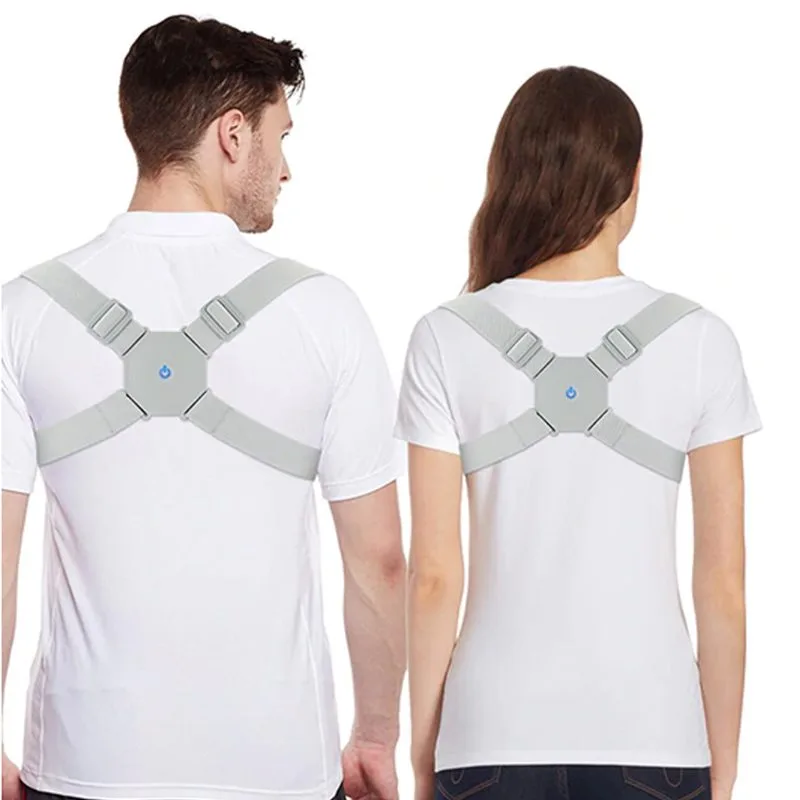
Baron Active Smart Posture Reminder
Pros
- ✓ Works without app setup — no Bluetooth pairing, no account required
- ✓ Fits discreetly under shirts, jackets, or hoodies throughout the day
- ✓ No ongoing adhesive or battery swap costs
- ✓ 30-day money-back guarantee from manufacturer
Cons
- ✗ No app, no data — you can't track progress over time
- ✗ Less adjustable than sensor-based devices with angle settings
- ✗ Sold direct only, not available on Amazon
The Baron Active takes the simplest possible approach: it vibrates when you slouch, and it doesn’t require an app, Bluetooth pairing, or any setup beyond putting it on. If the idea of pairing a device to your phone, calibrating angles, and reviewing daily charts sounds like work you won’t actually do, this is your device.
The vibration is straightforward — lean forward beyond the preset threshold and it buzzes. Return to upright and it stops. One-size strap design fits under clothing without being visible. Pricing moves around, up to $59.99 regularly, but Baron Active frequently discounts it to $49.99 — the price used here.
The major limitation is the lack of tracking. You have no data showing whether your posture is actually improving. For some people — especially those who’ve already spent months looking at posture charts without changing behavior — this simplicity is a feature. For data-driven users, it’s a dealbreaker.
Baron Active Smart Posture Reminder
Pros
- ✓ Works without app setup — no Bluetooth pairing, no account required
- ✓ Fits discreetly under shirts, jackets, or hoodies throughout the day
- ✓ No ongoing adhesive or battery swap costs
- ✓ 30-day money-back guarantee from manufacturer
Cons
- ✗ No app, no data — you can't track progress over time
- ✗ Less adjustable than sensor-based devices with angle settings
- ✗ Sold direct only, not available on Amazon
Best for: People who want zero-setup posture reminders without committing to an app-based system.
Comparison Table
| Device | Price | Sensor Type | Battery | App Tracking | Attachment |
|---|---|---|---|---|---|
| Upright GO 2 | $89.95 as of Oct 18, 2026 | Dual gyroscope | 12 days | Yes — 30-day history | Adhesive (skin) |
| Upright GO S | Unavailable | Single sensor | 6 days | Yes — 7-day history | Adhesive (skin) |
| Strack | Unavailable | Upper back sensor | Rechargeable | Yes — basic | Adhesive or clip |
| hipee P1 | Check price | IMU sensor | 90 hours | Yes — basic | Adhesive-free |
| Baron Active | $49.99 | Mechanical angle | Unknown | No | Strap (clothing) |
Complete the Setup
A posture sensor solves the awareness problem — it tells you when you’re slouching. It doesn’t solve the structural problem underneath: nothing physically supporting good posture, and nowhere ergonomic to sit once the vibration stops. These three products round out the toolkit.
Truweo Posture Corrector Back Brace
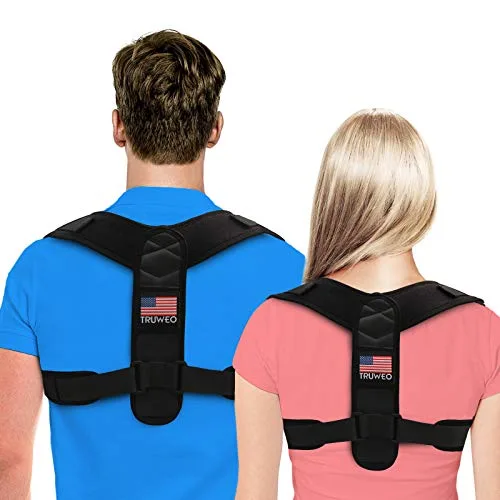
A sensor trains you to hold position yourself; a brace holds it for you while that training happens. Wearing the Truweo for short daily sessions (15–30 minutes) alongside a sensor gives your shoulders the muscle memory of “correct” faster than either tool alone — our posture corrector roundup covers this pairing in more depth. At under $27, it’s a cheap add-on next to any of the devices above.
Truweo Posture Corrector Back Brace
Pros
- ✓ Very slim — disappears completely under dress shirts
- ✓ Comfortable padded shoulder loops reduce friction
- ✓ Solid build quality at the price
- ✓ Effective at pulling shoulders back consistently
Cons
- ✗ Size range doesn't cover wider body types
- ✗ No lumbar support
- ✗ Velcro can snag on fine fabrics
Ergodriven Topo Anti-Fatigue Mat
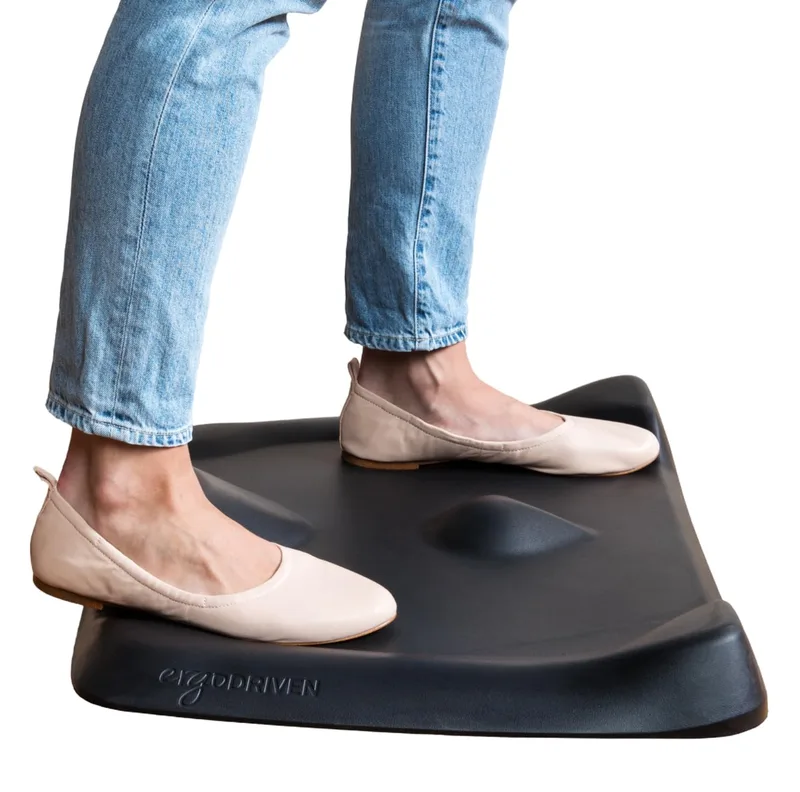
If your posture sensor keeps buzzing because you’re slumping into a static seated position for hours, part of the fix is getting up more. A textured anti-fatigue mat makes standing breaks at a standing desk more comfortable, encouraging the small weight shifts that keep you from locking into one slouched stance the way a chair does.
Ergodriven Topo Anti-Fatigue Mat
Pros
- ✓ Textured terrain encourages micro-movements while standing
- ✓ PVC-free and PFA-free — no off-gassing concerns
- ✓ Seven-year manufacturer warranty
- ✓ NYT Wirecutter's top pick for anti-fatigue mats
Cons
- ✗ More expensive than flat mats
- ✗ Textured terrain takes a few days to adapt to
- ✗ Not suitable for rolling office chairs
Branch Ergonomic Chair
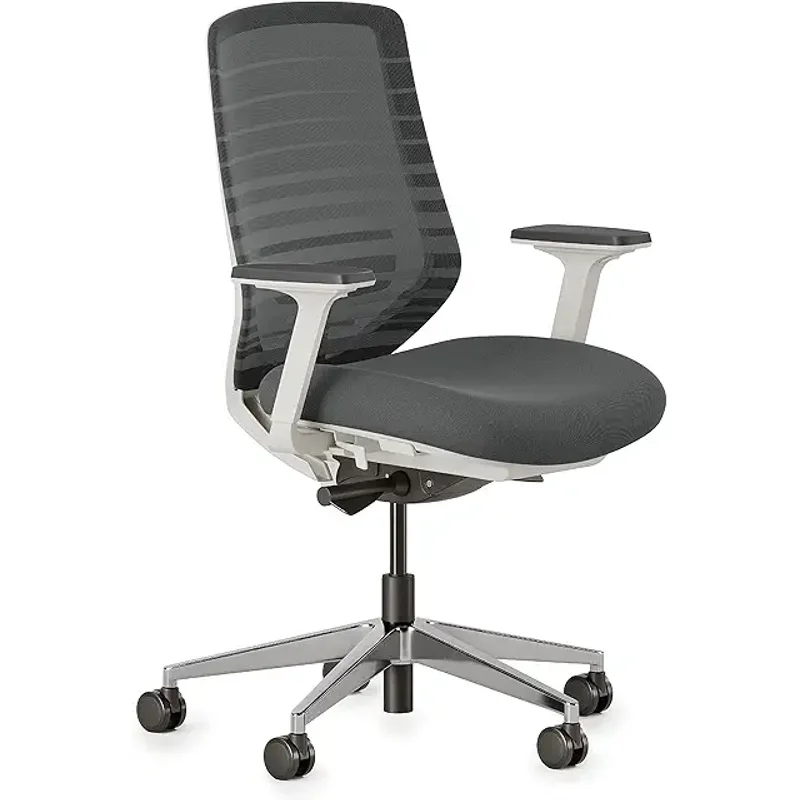
Some slouching isn’t a habit problem — it’s a chair problem. If your current chair has no adjustable lumbar support, a sensor will spend all day reminding you to fight a seat that’s actively working against you. The Branch’s adjustable lumbar height does structurally what the sensors above are trying to teach behaviorally, and the two work well together rather than as alternatives.
Branch Ergonomic Chair
Pros
- ✓ 8-point adjustability is unusually thorough for a chair under $300
- ✓ Adjustable lumbar height lets you dial in support instead of a fixed curve
- ✓ Breathable mesh back holds up on long sitting intervals
- ✓ 7-year warranty beats most chairs in this price range
Cons
- ✗ 275 lb weight capacity is lower than several premium alternatives
- ✗ No headrest on the base model
- ✗ Armrests feel less sturdy than the rest of the chair under heavy use
What to Look for in a Posture Sensor
Sensor accuracy matters more than feature count
A device that correctly identifies when you’re slouching is more valuable than one with a polished app and inaccurate detection. The Upright GO 2’s dual-sensor approach is meaningfully more accurate than single-sensor alternatives at the same price point.
Decide between skin-adhesive and clip-on before you buy
Skin-adhesive sensors (Upright GO line, Strack) are more stable and less likely to shift during use. But adhesive tabs wear out and cost money over time. Clip-on sensors (Strack’s magnet option, hipee P1) avoid that cost but require conscious daily placement. If you’ll forget to clip it on, the adhesive system builds better habits.
Training program vs. passive reminder
Some devices train you with progressive goals; others just remind you reactively. If you want to actually build new muscle memory and change default posture, look for a structured program (Upright GO 2). If you mainly want periodic reminders during work, a simpler device does the job cheaper.
App quality and long-term data
The value of a posture tracker isn’t just day-to-day buzzing — it’s seeing actual improvement over weeks. Upright’s app shows trends that help you identify whether your problem is mornings, afternoons, certain task types. Budget sensors often lack this retrospective view.
Ongoing costs
Budget the adhesive tab replacement cost into your decision. The GO 2 at $79 plus $10–15 every 6–8 weeks in tabs costs meaningfully more than the $59 GO S with reusable silicone adhesives. The Baron Active has no ongoing cost at all. Over 6 months, this can shift the apparent value rankings considerably.
FAQ
Do posture sensors actually work long-term?
Short-term, yes — the vibration reminder consistently interrupts slouching behavior in the moment. Long-term effectiveness depends heavily on whether you use the device consistently. Devices with training programs (like the Upright GO 2) show better retention in owner reports than passive buzzers. Without behavioral reinforcement, most users stop wearing them within 2–3 months.
Can I wear a posture sensor all day at work?
Most are designed for training sessions of 2–4 hours rather than full-day wear, particularly the skin-adhesive ones. The Upright app recommends starting with 15–30 minute sessions and building up gradually. All-day continuous use can cause skin irritation from adhesive tabs and can make the vibration alerts feel overwhelming rather than helpful.
Is a posture sensor better than a posture corrector brace?
They work differently. A physical posture corrector passively holds your alignment in place. A sensor trains you to hold it yourself. Most experts recommend using a corrector for short periods while a sensor builds long-term muscle habit — they’re complementary, not competing tools. Our posture corrector vs. ergonomic chair guide covers this tradeoff in more depth.
Where exactly do you wear these?
Upper-back sensor devices (Upright GO series, Strack, hipee) attach between your shoulder blades, about mid-back. They detect forward torso flexion. The RESET and neck-worn devices track head position specifically — better for forward head posture and “text neck” but less sensitive to lower back slouching.
Do I need to pay for an app subscription?
The core features on all devices in this list are free. Upright’s paid tier unlocks extended history, more training plans, and some analytics that go beyond the basics. The free tier is sufficient for most users getting started.
What’s the best posture sensor for desk workers specifically?
The Upright GO S at $59 is the strongest pick for desk-specific posture training. Seated posture is exactly what the adhesive upper-back sensor design is optimized for. If you travel frequently or want to avoid the adhesive cost, the hipee P1’s 90-hour battery handles extended business trips comfortably.
Conclusion
The posture sensor market in 2026 has matured into a clear tier structure. The Upright GO 2 remains the benchmark for accuracy and training quality at $79 — no other device in the under-$100 range matches its dual-sensor precision or program depth. The Upright GO S is the smarter buy for first-timers: same brand, same app, $20 less.
For people who want app control and clip-on flexibility, the Strack is a legitimate alternative at $79, though the less polished software is a real trade. The hipee P1 earns its spot for one specific user: someone who charges devices infrequently and needs a set-it-and-forget-it device for long work stretches. And the Baron Active is the honest choice for anyone who already knows they won’t use an app regularly.
The most important thing: none of these devices work if they sit on a shelf. The best posture sensor is the one you’ll actually wear. For most people, that means starting with the GO S, using it consistently for 8 weeks, and deciding from there whether the upgrade to the GO 2 is worth it.