Disclosure: PostureRanked is reader-supported. When you buy through links on our site, we may earn an affiliate commission at no extra cost to you. Learn more
Eight hours at a desk means eight hours under your lamp. Most people never think about this. They grab whatever was cheapest on Amazon, aim it vaguely at their desk, and then wonder why their eyes are burning by 3pm.
The problem isn’t screen time alone. It’s the contrast between a bright monitor and a dim, poorly-lit room. It’s LED flicker you can’t consciously see but your visual system detects after hours of accumulation. It’s harsh shadows on documents, glare bouncing off your monitor, and color-distorting light that makes your eyes work harder to distinguish between similar shades.
In 2026, the case for better desk lighting is stronger than ever. Research on circadian lighting — lamps that adjust their color temperature based on the time of day — has matured enough that products like the Dyson Solarcycle now implement it automatically using GPS-based daylight tracking. At the other end of the spectrum, $35 buys you flicker-free LEDs and adjustable color temperature that would have been impossible to find in this price range three years ago.
Quick pick: For most people doing serious desk work, the BenQ e-Reading Desk Lamp is the one to buy. CRI >95, dual smart modes for screens and documents, and auto-dimming in a package that’s genuinely engineered for long work sessions. If that’s over budget, the TROND Eye-Caring Lamp at $35 is a no-risk starting point.
The 5 Best Desk Lamps for Eye Strain in 2026
TROND Eye-Caring Desk Lamp
Pros
- ✓ Under $40 with features that outshine many $80+ lamps
- ✓ 5 color modes span warm white to cool daylight — useful range for all-day work
- ✓ Built-in USB charging port frees up one outlet on your power strip
- ✓ 30-minute auto-off timer prevents heat buildup and wasted power
Cons
- ✗ Plastic construction feels noticeably cheaper than PHIVE or BenQ
- ✗ CRI not specified by manufacturer — likely in the 80–85 range
- ✗ No auto-dimming or ambient sensor
1. BenQ e-Reading Desk Lamp — Best Overall
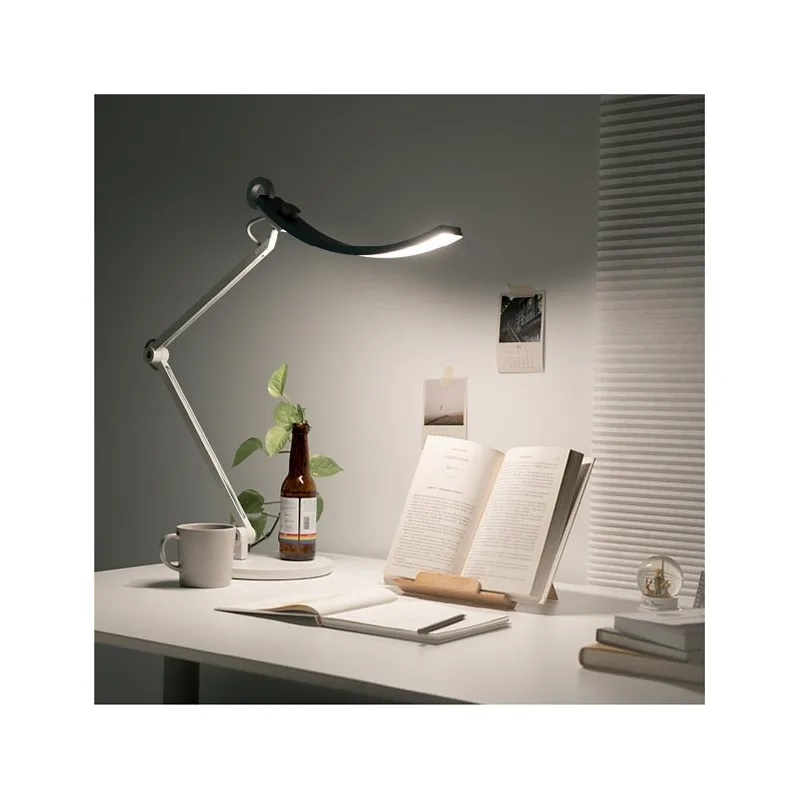
The BenQ e-Reading is the lamp other eye-care desk lamps are compared against. It’s not a general-purpose lamp with good specs bolted on — it’s designed from scratch for people spending hours on documents and screens.
The defining feature is dual smart modes. Screen Mode distributes light to be brighter at the edges and darker in the center, reducing the glare that bounces off your monitor. Paper Mode inverts this pattern to push more light toward your documents for maximum reading clarity. Most desk lamps make you choose one or the other. The BenQ handles both with a button press.
CRI >95 means colors appear as they would in natural daylight. When you’re reviewing code, working with spreadsheets, or doing any kind of color-sensitive work, high CRI reduces the visual effort your eyes expend on parsing information. The TÜV Rheinland certifications for both Flicker Free and Low Blue Light mean an independent testing body confirmed BenQ’s claims — not just marketing language.
The auto-dimming ambient sensor is genuinely useful in practice. As your room’s lighting changes through the day — morning sun, afternoon cloud cover, evening indoor lights — the lamp adjusts automatically. You configure it once.
The 35-inch wide illumination width covers a full-sized desk without the bright center and dim-edge pattern that plagues narrower lamps. At $249 it’s not a casual purchase, but it’s a one-time buy you won’t have to think about again.
Best for: Long workdays, screen-heavy roles, creative professionals, anyone who has tried adjusting monitor settings and taking more breaks but still gets eye strain by early afternoon.
2. BenQ Genie e-Reading Desk Lamp — Best for Small Desks
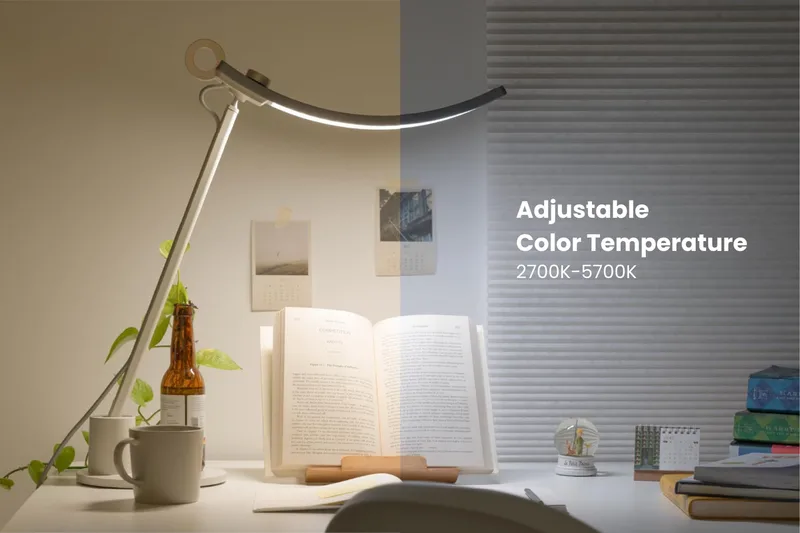
The Genie exists because the most common feedback on the standard BenQ e-Reading is: “I love everything about it except it takes up too much room.” BenQ listened.
The Genie delivers the same OVAL-Light technology with coverage up to 35.4” × 26.7” — impressively wide for a compact lamp. Screen Mode and Paper Mode are both present. Auto-dimming works the same way. The 13 color modes and 23 brightness levels give you more granular control than the original, which is a genuine improvement.
The base footprint is meaningfully smaller, making it the right call for apartment setups, standing desk converters with limited surface area, or any workspace where every inch counts. Owner reviews consistently note that it looks better in person than in product photos, and that the build quality holds up well over time.
At $189 it’s actually more than many buyers expect for the “smaller” version, but the feature parity with the flagship justifies it. If your desk space is the primary constraint, this is the pick.
Best for: Small workstations, secondary desks, budget-conscious buyers who want BenQ’s eye-care technology without the large footprint.
3. PHIVE ET-2 Architect Desk Lamp — Best for Architects & Designers
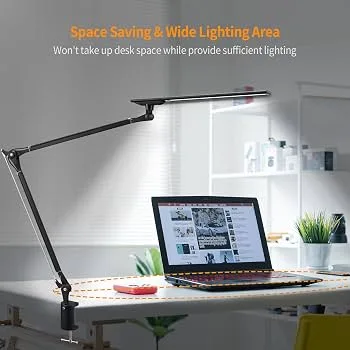
If you work across a large physical surface — drafting, illustration, detailed craftwork, or technical drawing — you need a lamp that can reach where you’re working. The PHIVE ET-2’s metal swing arm solves this. It extends and pivots to position light over wide surfaces where a standard gooseneck lamp can’t follow.
All-aluminum alloy construction is the other major differentiator at $99.99. Most lamps in this price range use plastic joints and arms that loosen after months of daily adjustment. The PHIVE holds its position reliably. The clamping mechanism opens to 2.36 inches and fits most desk edges without marring the surface.
The four color modes (3000K, 4000K, 5000K, 6000K) cover warm, neutral, and cool lighting scenarios. Stepless dimming means no jumping between preset brightness levels — you slide to exact. The touch-sensitive control panel with memory function restores your last settings automatically.
The LEDs are flicker-free and anti-glare, though CRI specs aren’t prominently documented — expect something in the 85-90 range rather than BenQ’s >95.
Best for: Architects, illustrators, engineers, model builders, anyone who needs a lamp that moves with them across a large work surface.
4. TROND Eye-Caring Desk Lamp — Best Value
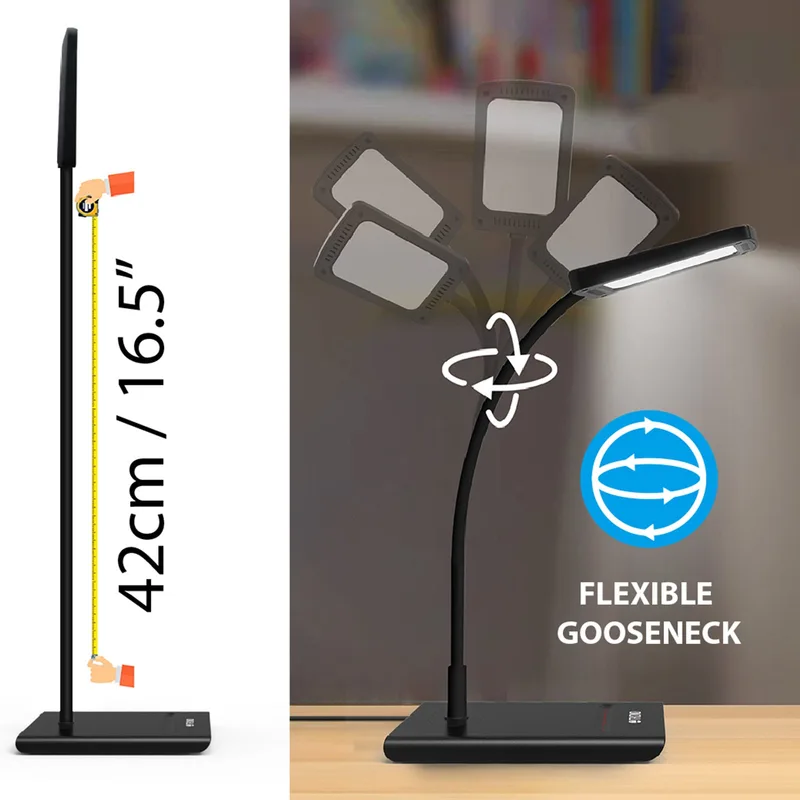
The TROND is the desk lamp that makes you question whether you need to spend $100+. At $35, it offers five color modes from 3000K warm white to 6200K cool daylight — a wider temperature range than many lamps that cost three times as much.
The flexible gooseneck positions light where you need it. The built-in USB charging port keeps your phone topped up without needing an extra outlet. The 30-minute auto-off timer is a small but thoughtful feature — useful if you step away and forget to kill the lamp. Flicker-free LEDs and anti-glare design are confirmed in the spec sheet.
The compromises are real: plastic construction, no auto-dimming, manufacturer doesn’t specify CRI (likely 80-85 based on its price class), and five brightness levels feels limited after using a BenQ. But at $35, the TROND is the rational starting point for anyone unsure whether lighting upgrades will actually help their eye strain. If you notice a difference, upgrade later. If it resolves the problem, you saved $200.
Owner reviews are consistently positive given the price, with the USB port and timer mentioned repeatedly as features that justify it as a daily driver.
Best for: Budget buyers, remote workers dipping their toe into ergonomic lighting, anyone who wants to see if better light helps before committing to a premium lamp.
5. Dyson Solarcycle Morph Desk Light — Best Luxury
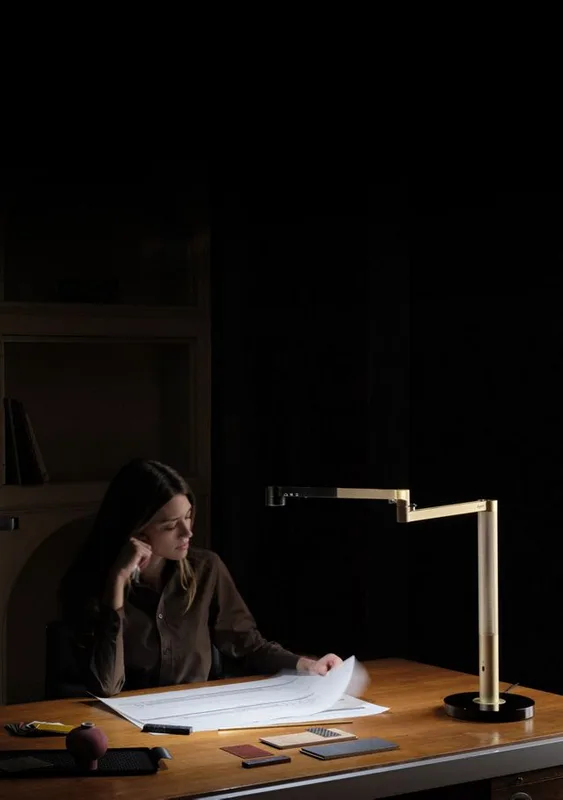
The Dyson Solarcycle Morph is overbuilt by every conventional measure. It costs $499.99. It weighs 3.5 kg. It requires a smartphone app to access many of its best features. It also might be the most thoughtfully engineered desk lamp available to consumers.
The centerpiece feature is GPS-based daylight tracking. Using your location, the Dyson Link app adjusts the lamp’s color temperature (2700K–6500K continuously tunable) and brightness to match local daylight conditions in real time. At 7am, you get bright, blue-white light to support alertness. By early evening it shifts toward warm amber tones that align with your circadian rhythm. The science behind this kind of tunable lighting is increasingly supported in 2026, and the Dyson is one of the few consumer products that implements it with real automation rather than requiring you to remember to change settings.
The 3 Point Revolve motion system positions the lamp head as task light, indirect wall wash, feature/accent light, or ambient fill. It can replace what would otherwise be two or three separate lamps in a setup. The 181,000-hour LED lifespan — Dyson’s claim is approximately 60 years of use — eliminates any concept of replacing a bulb.
At $499.99 it’s the hardest recommendation to make generally, but easy to make for specific buyers: people who work irregular hours, anyone doing color-critical design work, or those who want one excellent fixture that works for the next few decades.
Best for: High-income home office setups, color-critical design work, anyone with irregular schedules who benefits from circadian lighting automation.
Comparison Table
| Lamp | Price | CRI | Color Temps | Auto-Dimming | USB Port | Rating |
|---|---|---|---|---|---|---|
| BenQ e-Reading | $249 | >95 | 13 presets | Yes | No | 9.3 |
| BenQ Genie | $189 | >95 | 13 presets | Yes | No | 8.8 |
| PHIVE ET-2 | $99.99 | ~85–90 | 4 fixed | No | No | 8.4 |
| TROND Eye-Caring | $35 | ~80–85 | 5 presets | No | Yes | 8.7 |
| Dyson Solarcycle Morph | $499.99 | N/A | Continuous | Yes | No | 9.0 |
Desk Lamp Buying Guide for Eye Strain
CRI: The spec most people ignore
CRI (Color Rendering Index) measures how accurately a light source renders colors compared to natural daylight, on a scale from 0 to 100. For eye-strain purposes, CRI ≥90 is the practical threshold. CRI 95+ is where the difference becomes easily noticeable during long sessions.
At CRI 80, colors look slightly washed out — your visual system compensates by working harder to distinguish similar shades. At CRI 95, text is crisper, color gradients are clearer, and fatigue accumulates later in the day. Budget lamps commonly hit CRI 80–85. The BenQ e-Reading at CRI >95 is where you feel a meaningful difference.
Flicker-free technology
Standard LED lamps often flicker at 50–120 Hz — far too fast to see consciously, but your visual system detects it. Over the course of a workday, the constant micro-adjustments accumulate into fatigue, headaches, and difficulty maintaining focus. True flicker-free lamps use constant-current LED drivers that eliminate this cycling entirely. Look for “Flicker Free” in the spec sheet, or better, a TÜV Rheinland Flicker Free certification.
Color temperature range
For all-day use, you want coverage from at least 3000K (warm white — good for evenings and relaxed work) through 5000K–6500K (cool daylight — ideal for focus and detail work). A single fixed color temperature lamp is working against your circadian rhythm for half the day.
Screen Mode vs. standard illumination
Standard desk lamps shine light straight down onto your desk — and some of it bounces off your monitor as glare. BenQ’s Screen Mode adjusts the light distribution to reduce this reflection pattern. If you spend most of your time looking at a screen rather than paper, this feature makes a real difference and is worth understanding when comparing options.
Budget expectations
- Under $50: Flicker-free LEDs and adjustable color temperature are achievable. CRI will be moderate (80–85). Build quality will be plastic.
- $50–$150: Better CRI (85–90+), metal construction (PHIVE territory), USB ports, timers, and memory functions.
- $150–$300: Purpose-built eye-care engineering. BenQ lives here. Auto-dimming, dual smart modes, CRI >95 are standard.
- $300+: Luxury design, circadian tracking, app integration, premium build. Dyson territory.
FAQ
What CRI should a desk lamp have to reduce eye strain?
Aim for CRI ≥90 as a baseline. CRI 95+ makes a noticeable difference for extended reading and screen work. The improvement is most apparent when working with text-heavy documents, color-critical creative work, or sessions longer than 4–5 hours. Budget lamps commonly hit CRI 80–85, which is adequate but not optimal.
Do flicker-free desk lamps actually help with eye strain?
Yes — though the effect builds over time rather than being immediately dramatic. Flickering LEDs cycle at 50–120 Hz, which you can’t consciously detect, but your visual system responds to continuously. Over a full workday, the accumulated micro-adjustments contribute to fatigue, headaches, and difficulty sustaining focus. Switching to a flicker-free lamp won’t eliminate eye strain from other sources, but it removes one significant contributor.
What color temperature is best for a desk lamp?
It depends on your task and the time of day. For focus work and detail tasks, 5000K–6500K (cool daylight) keeps you alert and makes text and fine details sharper. For reading, creative work, and late-afternoon or evening sessions, 3000K–4000K (warm white) is more comfortable and less disruptive to sleep hormones. A lamp that lets you adjust between them is always preferable to a fixed color temperature.
Is a good desk lamp worth it when you can also adjust monitor brightness?
Both matter, and they solve different problems. Monitor brightness affects direct light from the screen. A good desk lamp reduces the contrast between your bright screen and the dim surroundings — and that contrast is one of the largest drivers of visual fatigue. The combination of a well-calibrated monitor and a quality desk lamp is more effective than either alone. If you’re choosing one intervention, desk lighting often has more impact per dollar at the lower end of the market.
Can a desk lamp actually replace an overhead light?
For task work at a single desk, yes — a good lamp like the BenQ e-Reading or Dyson Solarcycle provides enough lumens for focused work without ceiling lights. For ambient lighting in a full room, no. These are task lamps, not room lamps. The Dyson’s ambient mode gets closer than most, but it’s a supplement to overhead lighting rather than a replacement.
How is BenQ’s Screen Mode different from a standard desk lamp?
Standard desk lamps distribute light in a broad cone over the desk surface. Some of this light hits your monitor screen and creates a glare reflection that causes eye strain — particularly on glossy displays. BenQ’s Screen Mode shifts the light distribution to be brighter at the desk edges (where your keyboard, documents, and hands are) and dimmer toward the center, reducing the amount of light that reaches and reflects off the screen. It’s a meaningful engineering difference, not a marketing relabel.
Bottom Line
For most people spending long hours at a desk, the BenQ e-Reading Desk Lamp is the right buy. The combination of CRI >95, dual smart modes, and auto-dimming is purpose-built for eye-strain reduction in a way that general-purpose desk lamps aren’t. At $249 it’s the kind of purchase you make once and stop thinking about.
If that’s out of budget, start with the TROND Eye-Caring Lamp at $35. Flicker-free LEDs and adjustable color temperature at under $40 is a no-risk upgrade. Many people find it resolves the problem without needing to spend more.
Working at a large drafting or design surface? The PHIVE ET-2 at $99.99 is built for that job — all-metal swing arm, stepless dimming, clamp-on design that stays out of your way.
And if you want the best fixture you’ll ever buy for this category, the Dyson Solarcycle Morph is it — circadian-aware, beautifully designed, and built to last decades.
For more ways to optimize your workspace for comfort and productivity, see our guide to the best desk accessories for remote work.