Disclosure: PostureRanked is reader-supported. When you buy through links on our site, we may earn an affiliate commission at no extra cost to you. Learn more
Back pain is not a posture problem. It’s a chair problem — or more specifically, a chair-plus-hours problem. You can sit perfectly for the first two hours. But by hour five, if your chair’s lumbar isn’t actively supporting your spine, your muscles take over. They fatigue. Pain follows.
In 2026, the ergonomic chair market has matured significantly, with brands releasing chairs explicitly engineered around clinical lumbar research rather than just “adjustable foam bump” designs. The five picks below were selected specifically for their back pain track record — each has a measurably different approach to lumbar support, and the right one depends on where your pain lives and how long you sit.
Quick pick: If budget isn’t the issue, the Herman Miller Aeron is the standard. For long hours on a budget, the Branch Ergonomic Chair Pro is the honest answer.
Quick Comparison
| Chair | Price | Lumbar Type | Weight Cap | Warranty |
|---|---|---|---|---|
| Herman Miller Aeron | $1,195 | PostureFit SL (sacrum + lumbar) | 300 lbs | 12 years |
| Steelcase Leap V2 | $1,399 | LiveBack dynamic flex | 400 lbs | 12 years |
| Humanscale Freedom | $1,149 | Weight-sensing auto | 300 lbs | 15 years |
| Branch Ergonomic Pro | $499 | 2-way adjustable padded | 300 lbs | 5 years |
| SIHOO Doro C300 Pro | $279 | Dynamic self-adaptive | 330 lbs | 2 years |
Herman Miller Aeron Chair (Medium)
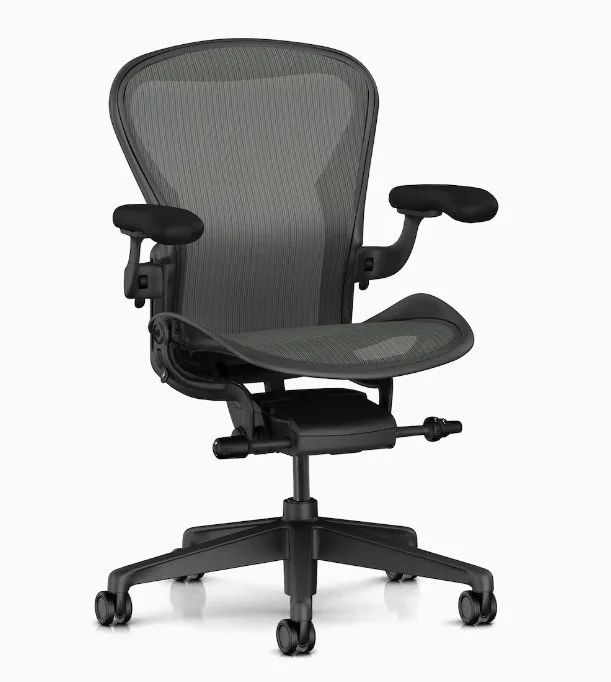
Herman Miller Aeron Chair (Medium)
Pros
- ✓ PostureFit SL independently supports both sacrum and lumbar — no other chair at this price does this as well
- ✓ 8Z Pellicle mesh has zoned tension so the lumbar area is firmer than the upper back
- ✓ Breathable mesh never retains heat — stays comfortable through 8-hour sessions
- ✓ Three sizes (A/B/C) ensure proper fit regardless of body type
Cons
- ✗ Premium price — hardest to justify if your back pain is mild or occasional
- ✗ Seat depth is fixed — no sliding adjustment for thigh length optimization
- ✗ Headrest requires the upgraded model or a third-party add-on
The Aeron has been the benchmark for ergonomic chairs since 1994. It earned that position with the PostureFit SL system — a dual-pad mechanism that independently supports both the sacrum (the triangular bone at the base of your spine) and the lumbar vertebrae above it. This distinction matters. Most chairs with “lumbar support” target the lumbar only. The Aeron hits both points, maintaining the natural S-curve of your spine without any active effort on your part.
The 8Z Pellicle mesh is zoned — the lumbar area is deliberately tenser than the upper back. Owner feedback consistently notes this feels less like sitting on a chair and more like the chair supports you from behind. No pressure points, no heat buildup.
Size matters here. The Aeron comes in three sizes: A (smaller frames, under 5’4”), B (5’4”–6’2”), and C (6’2” and taller). The Medium in this listing is the B size. Getting the wrong size is the most common Aeron mistake — check the sizing guide before ordering.
The main trade-off versus the Steelcase Leap is the fixed seat depth. There’s no seat slider on the Aeron, which matters if you have longer or shorter thighs than average. If sciatic nerve pressure from a misfit seat is your issue, read the Steelcase Leap V2 section instead.
Full Aeron deep-dive: Herman Miller Aeron Review
Best for: Anyone with chronic lumbar pain who sits 6-10 hours daily and wants the most complete lumbar system available.
Steelcase Leap V2
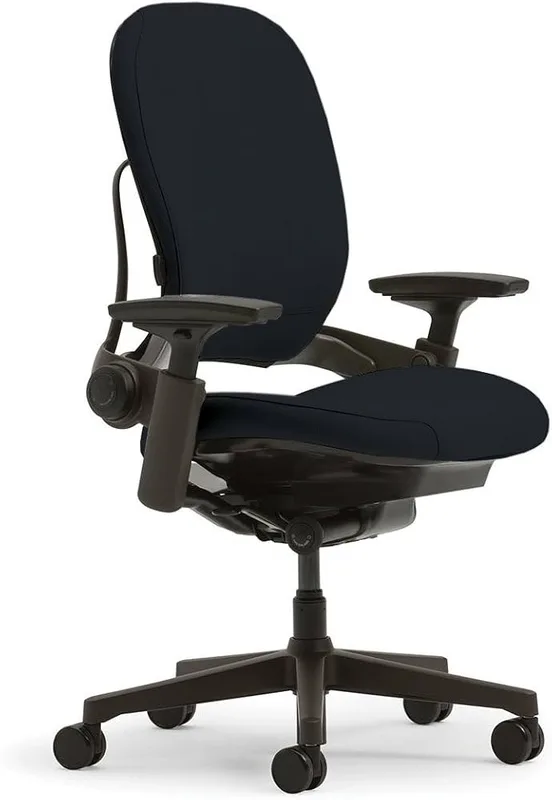
Steelcase Leap V2
Pros
- ✓ LiveBack technology flexes with your spine in real time — eliminates the static lumbar-pad pressure point
- ✓ Lower Back Firm Zone specifically targets the lumbar vertebrae where most chronic back pain originates
- ✓ 400 lb weight capacity — highest in this roundup
- ✓ Seat depth slider accommodates different thigh lengths, reducing sciatic nerve pressure
Cons
- ✗ No built-in headrest on the base model
- ✗ Fabric construction (not mesh) — runs warmer than the Aeron in summer
- ✗ Steeper adjustment learning curve — all the controls need to be properly set or support suffers
The Leap V2’s main claim is LiveBack technology — a flexible spine built into the chair back that literally moves as you shift posture. Where most chairs have a rigid or semi-rigid backrest, the Leap’s lower section flexes laterally and vertically, maintaining contact with your back through micro-movements rather than forcing you into one fixed position.
The secondary feature is the Lower Back Firm Zone — a deliberately stiffer lower band in the backrest that applies targeted pressure exactly where L4 and L5 vertebrae sit. This is not a generic lumbar bump. It’s designed around spinal anatomy, and owner reports consistently cite this as the specific feature that eliminated their lower back pain.
The 400 lb weight capacity is worth noting — highest in this roundup and particularly relevant for users who’ve found other “ergonomic” chairs don’t distribute weight well enough to reduce tailbone or hip pressure.
One honest note: the Leap V2 rewards patience. All the adjustment controls need proper configuration or the chair underperforms. Give it a week of tweaking. Once dialed in, it’s one of the best long-hour chairs money can buy.
For a head-to-head comparison against the Aeron: Herman Miller Aeron vs Steelcase Leap 2026
Best for: Long-hour sitters (8+ hours/day) with lower back pain who want a dynamic lumbar system and don’t mind the setup time.
Humanscale Freedom Chair with Headrest
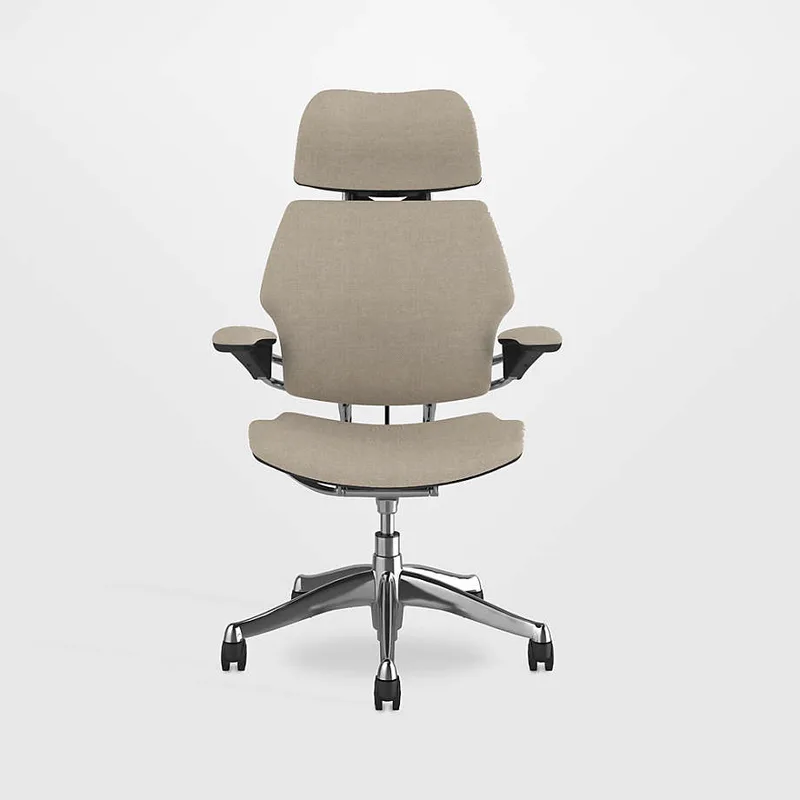
Humanscale Freedom Chair with Headrest
Pros
- ✓ Weight-sensing recline automatically calibrates tension to your body — zero manual adjustment required
- ✓ Pivoting headrest follows your head position as you recline, supporting the cervical spine
- ✓ 15-year warranty — longest in this roundup by three years
- ✓ Minimal adjustment design is ideal for people who never seem to dial in complex ergonomic chairs
Cons
- ✗ Limited lumbar height adjustment compared to the Steelcase Leap
- ✗ Arm adjustment is less granular than 4D or 5D competitors
- ✗ Expensive relative to what you're getting if you prefer heavily customizable settings
The Freedom takes a different philosophical approach than its competitors. Most ergonomic chairs ask you to dial in multiple settings manually. The Freedom’s answer: design the chair to adjust itself.
The recline mechanism uses a counterbalance system calibrated to your body weight. Lean back — the resistance automatically matches you. No tension dial, no fiddling. The mechanism adjusts continuously as you shift. For users who never actually touch their chair’s adjustment knobs (which is most people), this self-managing design means they always get correct recline resistance.
The pivoting headrest is the unique differentiator. As you recline, the headrest follows, maintaining contact with your head and supporting the cervical spine. This is relevant for back pain that extends into the neck and upper traps — a common pattern for people who hunch forward toward monitors.
The 15-year warranty is the longest in this roundup by three years, which offsets some of the premium cost over the lifetime of the chair.
The trade-off is less granular manual adjustment than the Leap or Aeron. If you want to set arm height to the millimeter or tweak lumbar depth precisely, the Freedom will frustrate you. If you want a chair that works without configuration, it’s a strong choice.
Full review: Humanscale Freedom Review
Best for: Upper back and cervical pain, or users who want effective ergonomics without a long adjustment learning curve.
Branch Ergonomic Chair Pro
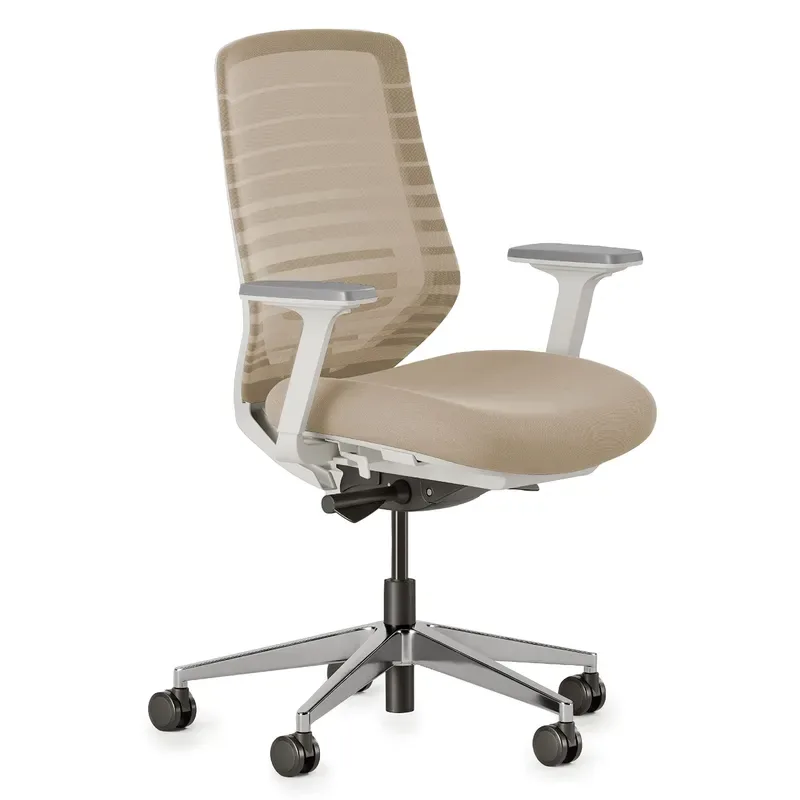
Branch Ergonomic Chair Pro
Pros
- ✓ 14 points of adjustment rivals chairs costing three times more
- ✓ 5D armrests let you position arms precisely for keyboard and mouse work, reducing shoulder strain
- ✓ Forward tilt option is rare at this price — engages core and reduces lower back compression during focused tasks
- ✓ Lumbar cushion adjusts in both height and depth for personalized spinal support
Cons
- ✗ 5-year warranty versus 12-15 years on premium picks
- ✗ Lumbar pad is removable foam, not a dynamic system — flattens over 12-18 months
- ✗ Build quality is solid but not at the multi-decade level of Steelcase or Herman Miller
At $499, the Branch Pro isn’t just a “good for the price” pick — it competes meaningfully with chairs costing hundreds more. The 14 adjustment points include features that premium chairs often gatekeep: forward tilt (tilts the seat pan forward to engage the lumbar curve), seat depth adjustment (critical for sciatic pressure relief), and 5D armrests that move in five directions to precisely position your forearms.
The lumbar system is a padded cushion adjustable in both height and depth. It’s not dynamic like LiveBack, and it will flatten over time — that’s the honest trade-off at this price. But in the first year or two of ownership, it supports the lumbar well for most users.
Owner reports highlight the forward tilt as the key differentiator. Tilting the seat pan forward 5-10 degrees encourages a neutral pelvic position, which in turn reduces the compression that causes lower back fatigue in standard upright sitting. This feature is unusual below $700.
For anyone not ready to spend $800+ on a chair but dealing with genuine chronic back pain, the Branch Pro is the honest recommendation. It won’t perform at the same level over a decade, but for the first few years it’s a serious ergonomic tool.
Best for: Budget-conscious buyers with chronic back pain who need adjustability beyond what entry-level chairs provide.
SIHOO Doro C300 Pro
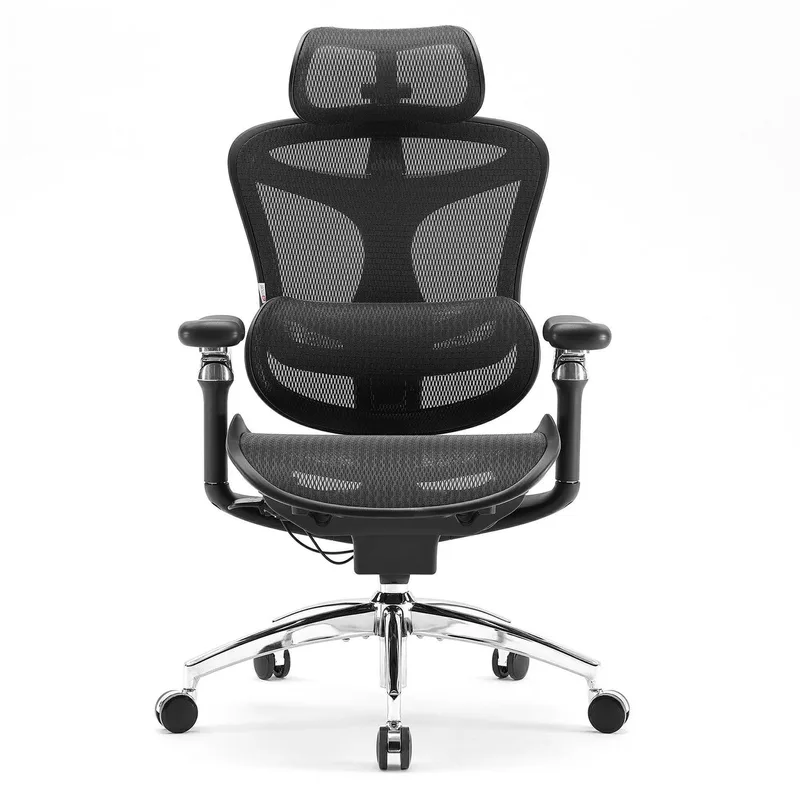
SIHOO Doro C300 Pro
Pros
- ✓ Dynamic self-adaptive lumbar moves with your posture shifts — not just a fixed foam pad
- ✓ 330 lb weight capacity at this price point beats most competitors
- ✓ 6D armrests offer better positioning than many chairs at double the price
- ✓ Seat depth adjustment lets you properly reduce thigh pressure for sciatic pain relief
Cons
- ✗ Shorter warranty than premium options — budget accordingly for replacement
- ✗ Arm adjustment mechanism feels plasticky compared to Steelcase or Herman Miller
- ✗ Seat cushion loses firmness after 12-18 months of heavy daily use
The SIHOO Doro C300 Pro’s standout feature for back pain is its dynamic lumbar system. Unlike a fixed foam pad, the lumbar mechanism floats — it moves as you shift posture, maintaining contact and adapting its angle as you lean forward, backward, or laterally. At $279, no other chair in this price range offers dynamic lumbar in a meaningful implementation.
The 6D armrests are a genuine surprise at this price. Most chairs in the sub-$300 range provide 3D arms (height, width, pivot) at best. The C300 Pro adds depth and forward/back positioning, which matters significantly for reducing shoulder strain and wrist fatigue during keyboard work.
The honest expectation-setting: this is a 3-5 year chair, not a 10-15 year chair. The seat cushion will compress, the arm adjustment mechanisms feel plastic under load, and the build quality reflects the price point. For someone dealing with back pain who needs a legitimate ergonomic solution under $300, it’s the best option available — but plan for eventual replacement.
Best for: Budget-limited buyers who need dynamic lumbar support and can’t justify spending $500+.
Complete Your Pain-Relief Setup
A good chair handles most of the problem. These three additions close the gap for common pain patterns:
Monitor position (neck + upper back pain): If your monitor sits on the desk surface, you’re likely tilting your head down 15-30 degrees all day — that’s equivalent to 27-60 lbs of force on your cervical spine. An Ergotron LX Monitor Arm brings the screen to eye level and saves the upper back in ways no chair adjustment can.
Seat cushion (tailbone + coccyx pain): Even the Aeron has a firm seat pan that bothers some users initially. A Cushion Lab Pressure Relief Seat Cushion has a tailbone cutout and extra-dense memory foam that distributes sit-bone pressure better than the chair’s stock surface. Particularly useful while waiting for a new chair to break in.
Supplemental lumbar (travel or temporary support): For back pain at a desk you can’t upgrade, or as a supplement to your chair while it’s en route, an Everlasting Comfort Lumbar Support Pillow provides targeted lumbar contact at a fraction of the chair upgrade cost.
Buying Guide: What to Look For
Lumbar System Type
The biggest functional difference between chairs isn’t brand or price — it’s how the lumbar support works:
- Static pad: Fixed position, fixed firmness. Most budget chairs. Effective initially, degrades and stays in one place as you shift.
- Adjustable pad: Move up/down, sometimes in/out. Better. Common from $200-600.
- Dynamic/floating: Moves with you. LiveBack (Steelcase), PostureFit SL (Herman Miller), adaptive lumbar (SIHOO). Best long-term option for chronic pain.
Where Is Your Pain?
Your pain location should guide your chair choice:
- Lower back (lumbar): Prioritize lumbar depth adjustment and dynamic support. Leap V2 or Aeron.
- Upper back / between shoulder blades: Prioritize upper backrest height and headrest. Humanscale Freedom.
- Sciatica / hip pain: Prioritize seat depth adjustment to relieve thigh pressure. Leap V2 or Branch Pro.
- General fatigue pain: Any chair with proper adjustability and an appropriate fit for your height will help. Start with the Branch Pro.
Fit Before Features
An expensive chair with wrong sizing causes more pain than a cheap chair that fits. Key measurements:
- Seat height: Feet should rest flat, thighs parallel to the floor
- Seat depth: 1-3 inches of clearance between the back of your knees and the seat front edge
- Back height: The lumbar support should align with your L4-L5 vertebrae, typically just above the belt line
Weight Capacity
If you’re near the weight limit of a chair, it affects performance — the components aren’t spec’d for sustained use at max capacity. Give yourself 15-20% headroom.
FAQ
How long does it take for a new chair to relieve back pain?
Most users notice a difference within 1-2 weeks, once the chair is properly adjusted and their muscles adapt to the new support. Chairs like the Steelcase Leap V2 take several days to dial in correctly — don’t judge them in the first hour.
Should I get a lumbar pillow instead of a new chair?
A lumbar cushion is a reasonable short-term fix or supplement, but it addresses symptoms, not cause. A good lumbar pillow in a bad chair still leaves you with incorrect seat depth, wrong arm height, and improper tilt — all of which contribute to back pain. It’s the equivalent of treating a leak with a bucket.
Do I need to spend over $1,000 to get real back pain relief?
No. The Branch Ergonomic Chair Pro at $499 has 14 adjustment points and forward tilt — both clinically meaningful features for back pain relief. The returns above $800 are real but diminishing. For most people, the $400-600 range is the sweet spot where ergonomic features are comprehensive without luxury pricing.
Is the Herman Miller Aeron worth it for back pain specifically?
Yes, if lower back and sacral pain is your primary issue. The PostureFit SL system is the most complete sacrum-to-lumbar support available in a production chair. The cost is high, but the Aeron regularly lasts 12-15 years, which puts the per-year cost in a reasonable range compared to cheaper chairs that need replacing every 3-5 years.
Does chair material (mesh vs fabric) affect back pain?
Not directly for lumbar support, but indirectly for comfort. Mesh allows airflow, reducing heat and sweat buildup that causes fidgeting and posture shifts. The Aeron’s mesh back is consistently cited as a reason users don’t move around as much — which means better sustained lumbar contact. Fabric chairs like the Leap V2 are slightly warmer but offer firmer back support.
Can ergonomic chairs fix back pain entirely?
For posture-related back pain caused by prolonged poor sitting, yes — significantly. For structural issues like disc herniation, stenosis, or sciatica from nerve compression, a chair can reduce daily pain load but isn’t a substitute for physical therapy or medical evaluation. If your back pain is severe or persists through multiple chair changes, consult a physiatrist or physical therapist.
Conclusion
For back pain relief specifically, chair selection is a targeted decision — not just a comfort upgrade.
- Chronic lumbar pain, long hours: Herman Miller Aeron or Steelcase Leap V2
- Upper back and neck pain: Humanscale Freedom with Headrest
- Best value under $500: Branch Ergonomic Chair Pro
- Best under $300: SIHOO Doro C300 Pro
If you’re specifically dealing with lower back pain and want a deeper breakdown by budget, see: Best Office Chairs for Lower Back Pain in 2026.
For help adjusting your chair once it arrives: How to Adjust Your Office Chair Properly in 2026.