Two monitors on one flimsy stand is a specific kind of annoying: nudge the left screen and the right one wobbles too. Dual-screen setups have gone from a developer niche to standard home office equipment in 2026, and the arm holding those screens up matters as much as the monitors themselves. A cheap single crossbar mount saves $30 upfront and then bounces every time you type.
This roundup covers dual monitor arms specifically — not single-monitor mounts, and not the ultrawide-focused heavy-duty arms built for one 40-inch curved display. If you’re running two separate 24 to 32-inch screens side by side, these five are the mounts worth buying.
If you just want the recommendation: the Ergotron LX Dual Side-by-Side Arm at $229.99 gives both monitors fully independent gas-spring arms and a 10-year warranty. It’s the one I’d buy if budget isn’t the deciding factor. If it is, the VIVO STAND-V002 at $49.99 punches well above its price.
Ergotron LX Dual Side-by-Side Arm — Editor’s Pick
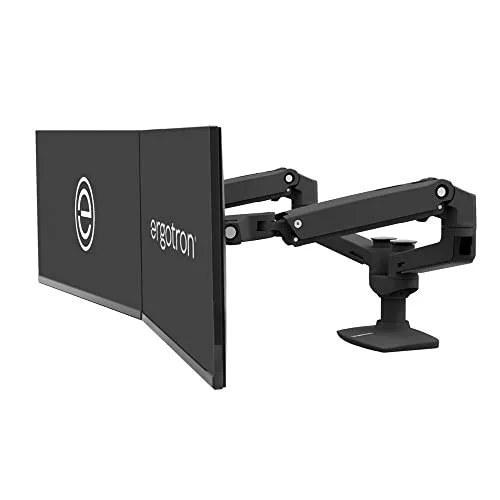
Ergotron LX Dual Side-by-Side Arm
Pros
- ✓ Both arms adjust completely independently — no fighting over a shared crossbar
- ✓ Gas spring holds position with zero drift after months of daily use
- ✓ 10-year warranty is the longest of any arm in this roundup
- ✓ One-handed height and tilt adjustment on both monitors
Cons
- ✗ 27-inch ceiling means it can't handle larger dual-ultrawide setups
- ✗ Costs noticeably more than the mid-range options here
- ✗ Clamp footprint eats into desks with drawers near the edge
Ergotron LX Dual Side-by-Side Arm
Pros
- ✓ Both arms adjust completely independently — no fighting over a shared crossbar
- ✓ Gas spring holds position with zero drift after months of daily use
- ✓ 10-year warranty is the longest of any arm in this roundup
- ✓ One-handed height and tilt adjustment on both monitors
Cons
- ✗ 27-inch ceiling means it can't handle larger dual-ultrawide setups
- ✗ Costs noticeably more than the mid-range options here
- ✗ Clamp footprint eats into desks with drawers near the edge
Ergotron’s single-arm LX has been a go-to recommendation for years, and the dual version is the same mechanism duplicated on a shared pole. Each arm moves completely independently — you can drop one monitor lower for a laptop-plus-external setup while keeping the other at standing-desk height, and neither arm affects the other’s position.
The gas spring is the standout feature here. Once you dial in the tension for your specific monitor weight (a short process with the included Allen key), the arms hold position with no creep, even months later. That’s the difference between a $230 arm and a $45 one — the cheaper mounts rely on friction and tighten-it-yourself knobs, which loosen gradually.
The catch is the 27-inch screen ceiling and the 7–20 lb per-arm capacity. If you’re running two 32-inch monitors, size up to the Fully Jarvis below instead.
Best for: Two 24–27 inch monitors where long-term reliability matters more than upfront price.
VIVO Dual Monitor Desk Mount (STAND-V002) — Best Value
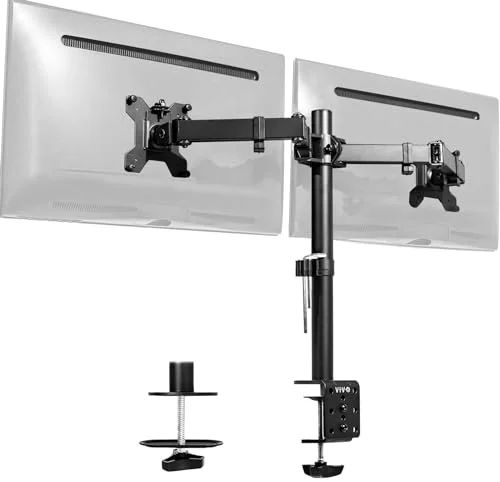
VIVO Dual Monitor Desk Mount (STAND-V002)
Pros
- ✓ 22 lb per-arm capacity is higher than most mounts twice its price
- ✓ Both C-clamp and grommet bases included in the box
- ✓ Steel construction feels sturdier than the price suggests
- ✓ Full tilt, swivel, and rotate on each arm independently
Cons
- ✗ No gas spring — height adjustment uses a manual pole clamp instead
- ✗ Cable management is minimal, just basic clip-on guides
- ✗ Assembly instructions are thin, budget for 30+ minutes
VIVO Dual Monitor Desk Mount (STAND-V002)
Pros
- ✓ 22 lb per-arm capacity is higher than most mounts twice its price
- ✓ Both C-clamp and grommet bases included in the box
- ✓ Steel construction feels sturdier than the price suggests
- ✓ Full tilt, swivel, and rotate on each arm independently
Cons
- ✗ No gas spring — height adjustment uses a manual pole clamp instead
- ✗ Cable management is minimal, just basic clip-on guides
- ✗ Assembly instructions are thin, budget for 30+ minutes
The VIVO undercuts every other arm here by at least $80 and still lists a 22 lb per-arm weight capacity — higher on paper than the pricier Ergotron. That capacity, combined with steel-and-aluminum construction rather than the mostly-plastic build of similarly priced mounts, is why this is the value pick rather than just the cheapest option.
What you give up for the price is the gas spring. Height adjustment happens by loosening a pole clamp, sliding the arm, and retightening — not a one-finger push. It’s a five-second task once you’re used to it, but it’s not the smooth motion you get from the Ergotron or Fully Jarvis. Cable management is also basic: a couple of plastic clips rather than an enclosed channel.
Both C-clamp and grommet bases ship in the box, which not every budget mount includes.
Best for: Home offices where two 24–27 inch monitors need a solid mount without spending $150-plus.
Fully Jarvis Dual Monitor Mounting Arm — Best Cable Management
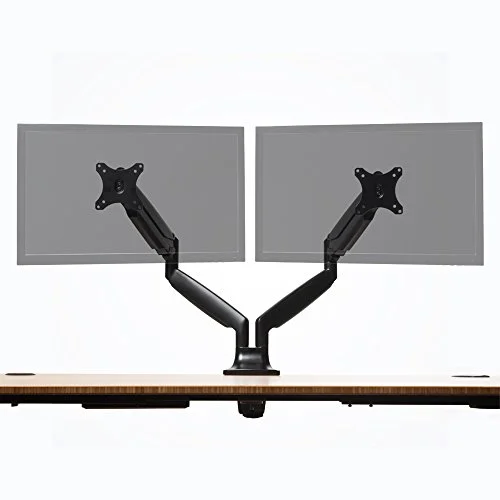
Fully Jarvis Dual Monitor Mounting Arm
Pros
- ✓ Built-in cable channels run the full length of both arms
- ✓ 15-year warranty is the longest backing of any arm here
- ✓ Arrives fully assembled — clamp on and go
- ✓ 32-inch ceiling fits larger monitors than most dual arms this size
Cons
- ✗ Often discounted below its $159 list price — check current pricing before buying at full price
- ✗ Heavier arm assembly makes initial clamping a two-person job on thin desks
- ✗ Color options are limited compared to Fully's single-arm lineup
Fully Jarvis Dual Monitor Mounting Arm
Pros
- ✓ Built-in cable channels run the full length of both arms
- ✓ 15-year warranty is the longest backing of any arm here
- ✓ Arrives fully assembled — clamp on and go
- ✓ 32-inch ceiling fits larger monitors than most dual arms this size
Cons
- ✗ Often discounted below its $159 list price — check current pricing before buying at full price
- ✗ Heavier arm assembly makes initial clamping a two-person job on thin desks
- ✗ Color options are limited compared to Fully's single-arm lineup
Fully built its reputation on the Jarvis standing desk, and the dual monitor arm shares the same attention to finish. The full-length cable channel running down both arms is the best in this roundup — cords disappear into the arm body instead of hanging loose, which matters more with two monitors than one since you’re routing twice the cabling.
At a 32-inch screen ceiling and 19.8 lbs per arm, it also handles larger displays than the Ergotron LX or VIVO. The 15-year warranty is the longest here, beating even Ergotron’s 10 years.
List price sits at $159, though Fully runs frequent sales that can bring it closer to $130 — worth checking current pricing before you buy at full price. The arm assembly itself is heavier than the VIVO or HUANUO, which makes the initial clamp-on step easier with two people, especially on a thinner desk.
Best for: Two 27–32 inch monitors where cable routing is a bigger annoyance than budget.
Mount-It! Dual Monitor Desk Mount with Gas Spring Arms — Best for Heavy Monitors
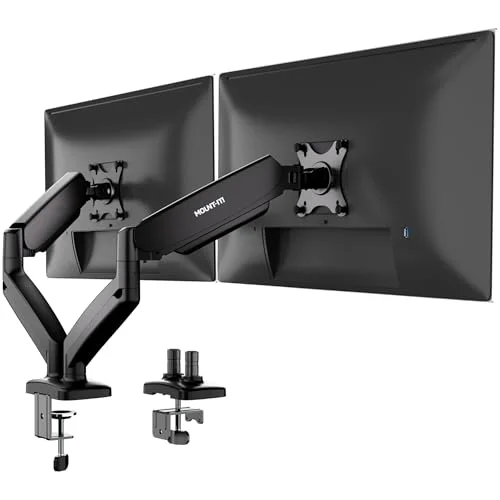
Mount-It! Dual Monitor Desk Mount with Gas Spring Arms
Pros
- ✓ Gas spring on both arms feels closer to Ergotron than the price suggests
- ✓ Independent arms mean one monitor doesn't sag when you adjust the other
- ✓ Wide 13–32 inch range covers small side monitors and large primaries alike
- ✓ Cable clips run along the arm to keep cords off the desk
Cons
- ✗ Owner reports mention the arms holding tension less consistently at the top of very heavy 27-inch-plus monitors
- ✗ Assembly video is more useful than the printed instructions
- ✗ Base plate is larger than the Ergotron or VIVO, needs more desk clearance
Mount-It! Dual Monitor Desk Mount with Gas Spring Arms
Pros
- ✓ Gas spring on both arms feels closer to Ergotron than the price suggests
- ✓ Independent arms mean one monitor doesn't sag when you adjust the other
- ✓ Wide 13–32 inch range covers small side monitors and large primaries alike
- ✓ Cable clips run along the arm to keep cords off the desk
Cons
- ✗ Owner reports mention the arms holding tension less consistently at the top of very heavy 27-inch-plus monitors
- ✗ Assembly video is more useful than the printed instructions
- ✗ Base plate is larger than the Ergotron or VIVO, needs more desk clearance
Mount-It’s gas spring dual arm splits the difference between the Ergotron and the budget mounts: real gas-spring adjustment on both arms, at roughly half the Ergotron’s price. The 13–32 inch range is the widest in this roundup, which is useful if you’re pairing a small secondary monitor with a larger primary display rather than matching sizes.
Owner reports are mostly positive on smooth adjustment, though a few mention the arms holding tension less reliably once a monitor creeps toward the top of the 27-inch-plus range — something to watch if your displays are on the heavier end of the 17.6 lb-per-arm spec. The base plate is also the largest footprint here, so measure your desk depth near the edge before ordering.
Best for: Mismatched monitor sizes — a small side display paired with a larger primary screen — where gas-spring adjustment matters but the Ergotron’s price doesn’t fit the budget.
HUANUO Dual Monitor Mount — Best Budget
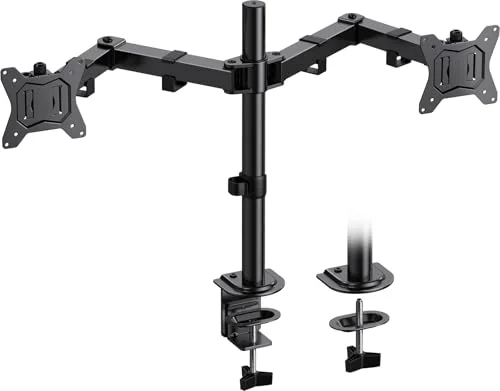
HUANUO Dual Monitor Mount
Pros
- ✓ Cheapest arm in this roundup that still supports 32-inch monitors
- ✓ Full range of motion, including 90-degree portrait rotation
- ✓ C-clamp and grommet base both included
- ✓ Owner reviews consistently mention easy setup in under 20 minutes
Cons
- ✗ No gas spring, so height changes require loosening a knob rather than a smooth push
- ✗ Plastic joint covers feel less premium than steel-and-aluminum competitors
- ✗ Weight capacity is toward the lower end for 27-inch-plus displays
HUANUO Dual Monitor Mount
Pros
- ✓ Cheapest arm in this roundup that still supports 32-inch monitors
- ✓ Full range of motion, including 90-degree portrait rotation
- ✓ C-clamp and grommet base both included
- ✓ Owner reviews consistently mention easy setup in under 20 minutes
Cons
- ✗ No gas spring, so height changes require loosening a knob rather than a smooth push
- ✗ Plastic joint covers feel less premium than steel-and-aluminum competitors
- ✗ Weight capacity is toward the lower end for 27-inch-plus displays
At $44.99, the HUANUO is the cheapest arm that still supports 32-inch monitors and full tilt, swivel, and 90-degree portrait rotation on both arms. For a starter dual-monitor setup — or a second desk that doesn’t need premium hardware — it covers the basics without cutting corners on range of motion.
The trade-offs are exactly what you’d expect at this price: no gas spring, so height changes mean loosening a knob rather than a smooth push, and the joint covers are plastic rather than the steel-and-aluminum build of the VIVO. The 17.6 lb per-arm capacity is also on the lower end for larger 27-inch-plus monitors, so check your display’s actual weight (not the boxed weight with the stand) before assuming it’ll fit.
Best for: A budget second setup or a first dual-monitor mount where you’re not sure yet if you’ll stick with two screens.
Buying Guide: What Actually Matters for Two Monitors
Weight capacity per arm, not combined. Every mount here lists capacity per arm, not total. Check your actual monitor weight (listed in the manufacturer spec sheet, not the shipping weight) against the per-arm number, and leave some headroom — an arm running at its exact limit tends to sag over months.
Independent arms beat a shared crossbar. Some budget dual mounts use one crossbar with two clamps instead of two fully independent poles. That means adjusting one monitor’s height shifts the crossbar and nudges the other. All five arms in this roundup use independent poles — worth confirming if you’re shopping outside this list.
VESA compatibility is nearly universal, but check anyway. Every monitor sold since roughly 2010 uses VESA 75x75mm or 100x100mm mounting holes, and all five arms here support both. Ultrawide and some all-in-one monitors are the exception — check your monitor’s spec sheet for “VESA compatibility” before ordering if you’re running anything unusual.
Clamp vs. grommet. A desk clamp attaches to the back edge and needs about 2–3 inches of clearance behind the desk. A grommet mount goes through a drilled hole and sits flatter, but only works if your desk has one (or you’re willing to drill). Every arm here includes both options.
Gas spring vs. manual adjustment. Gas spring arms (Ergotron, Fully Jarvis, Mount-It) let you reposition with one hand and hold position without retightening anything. Manual-clamp arms (VIVO, HUANUO) cost less but require loosening a knob to adjust height. Neither is “wrong” — it’s a trade-off between convenience and price.
For a broader look at monitor arms built for ultrawide and curved displays, see our premium monitor arms roundup. If you’re building a full two-screen desk setup rather than just the arm, our ergonomic dual monitor setup guide covers heights, distances, and angles, and our best standing desks for two monitors roundup covers the desk itself.
FAQ
What’s the best dual monitor arm for two 27-inch monitors?
The Ergotron LX Dual Side-by-Side Arm. Its 7–20 lb per-arm capacity comfortably covers most 27-inch monitors (which typically weigh 12–17 lbs without the stand), and the gas spring holds position reliably at that size without drifting over time.
Can I mix two different monitor sizes on a dual arm?
Yes, as long as both fall within the arm’s weight and size range. The Mount-It gas spring mount has the widest range in this roundup at 13–32 inches, making it a good fit for a small secondary monitor paired with a larger primary display. Just check that the heavier monitor stays under the per-arm weight limit.
Do I need a grommet hole, or is a desk clamp enough?
A desk clamp is enough for most desks and is what most buyers use. A grommet mount is only worth it if your desk already has a cable-management hole, or you’re comfortable drilling one — it sits slightly flatter and frees up the back desk edge. All five arms here include both mounting options in the box.
Will a dual monitor arm work with a standing desk?
Yes, all five arms clamp to the desk surface and move with it, so they work the same on a standing desk as a fixed-height one. Just confirm the arm’s vertical range covers your full sit-to-stand height difference — most dual arms, including all five here, cover a typical 20+ inch range.
How do I know if my monitor is too heavy for a budget arm?
Check the “weight without stand” spec on your monitor’s product page, not the total shipping weight. If that number is close to or above the arm’s per-arm capacity, size up. The VIVO and HUANUO in this roundup handle most 24–27 inch monitors fine, but a 32-inch display pushes toward the upper end of their ratings.
Conclusion
For most dual-monitor home offices: the Ergotron LX Dual Side-by-Side Arm at $229.99. Independent gas-spring arms on both sides and a 10-year warranty make it the one to buy once and not think about again.
If budget is the priority: the VIVO STAND-V002 at $49.99 delivers a steel build and 22 lb capacity for a fraction of the Ergotron’s price — you just give up the gas spring.
For larger 32-inch monitors or serious cable routing needs: the Fully Jarvis at $159, especially if Fully’s periodic sales bring it under $140.
For mismatched monitor sizes on a mid-range budget: the Mount-It gas spring mount at $129.99.
For a first dual-monitor setup or a secondary desk: the HUANUO at $44.99 covers the basics without a big spend.
Whichever arm you choose, pair it with the actual desk height and distance guidance in our dual monitor setup guide — the arm solves stability, but eye level and screen distance are separate adjustments worth getting right.