Your phone sits on your desk all day. Whether you are taking back-to-back video calls, following a document on a second screen, or just keeping Slack notifications visible without constantly reaching for the device, a phone stand is a small accessory that makes a real difference in how your workspace functions.
In 2026, MagSafe-compatible stands have become a major category — iPhone 17 users now expect to snap and go rather than wrestle with adjustable arms. Meanwhile, the budget bracket (under $15) has gotten genuinely good, with aluminum dual-hinge designs that used to cost twice as much. This roundup covers both camps.
Quick pick: If you just want a reliable stand that works for any phone, get the Lamicall Foldable Stand ($17). For iPhone users who want MagSafe snap-on convenience, the UGREEN Magnetic Stand ($14) is hard to beat at this price.
1. Lamicall Foldable Phone Stand for Desk — Editor’s Pick
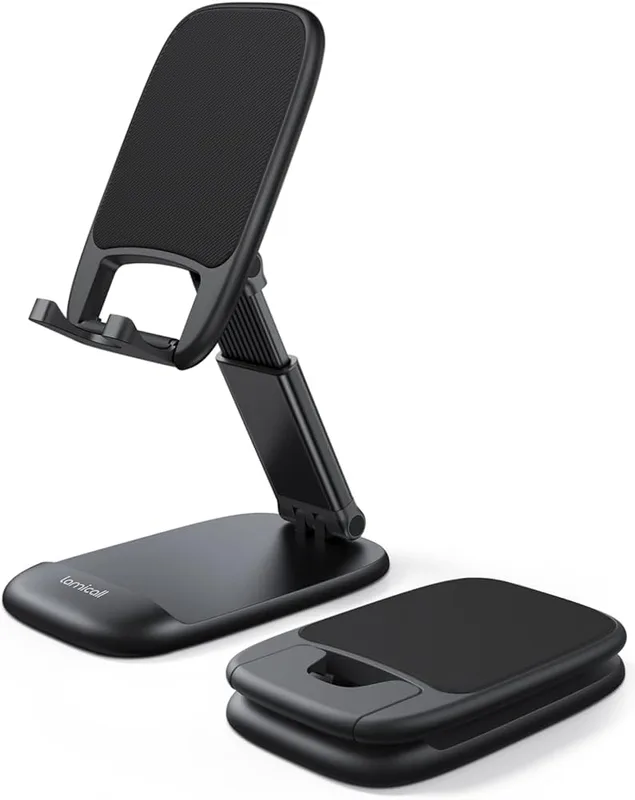
Lamicall Foldable Phone Stand for Desk
Pros
- ✓ Weighted metal base stays planted on the desk even when tapping the screen — far more stable than similarly priced plastic stands
- ✓ Height adjusts smoothly to raise the phone closer to eye level, which noticeably reduces neck strain during long video calls
- ✓ Folds completely flat in seconds, making it easy to toss in a bag for travel or clear off the desk when not needed
- ✓ Anti-slip silicone pads protect phone and desk surfaces without leaving marks — works well on glass desks too
Cons
- ✗ Height range tops out at 3.2 inches, which may not be enough to fully reach eye level for users who sit very low in their chairs
- ✗ Lacks rotation — once you set the angle it stays fixed, so quick landscape-to-portrait switching requires a manual readjust
- ✗ No MagSafe magnetic attachment, so iPhone users who want one-snap mounting should look at the UGREEN below
The Lamicall Foldable Stand has over 32,000 Amazon reviews at a 4.7-star rating. That is not an accident. It does the core job better than most — heavy enough to stay planted when you tap the screen, adjustable enough to get the angle right, and compact enough to fold and pocket when not needed.
The telescoping height adds up to 3.2 inches of lift, which cuts down on the neck-craning that comes with a flat-lying phone. A weighted metal base handles the stability. Anti-slip silicone protects both the phone and the desk surface.
Best for: Anyone who wants a reliable, no-fuss phone stand that works with any phone and any case.
2. UGREEN Magnetic Phone Stand for MagSafe — Best Value
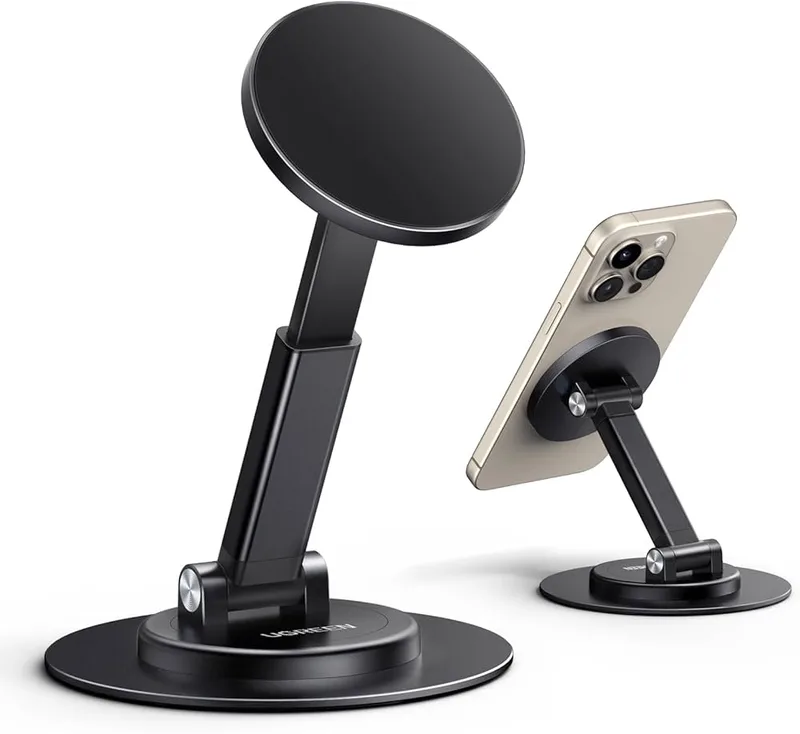
UGREEN Magnetic Phone Stand for MagSafe
Pros
- ✓ MagSafe magnetic attachment means iPhone 12 and newer users can snap the phone on and off one-handed without fiddling with a cradle
- ✓ 5.9-inch max height is the tallest in this roundup, making it much easier to position the phone at true eye level
- ✓ 360° rotating base with 180° angle adjustment gives real flexibility for both portrait calls and landscape video watching
- ✓ Aluminum construction feels genuinely premium for the price — no flex or wobble when typing on a mounted phone
Cons
- ✗ Does not support MagSafe wireless charging — it is a holder only, so you will still need a separate charger
- ✗ Android users need the included adhesive magnetic ring, which adds a step and leaves a small sticker on the back of the phone
- ✗ Metal ring add-on is slightly visible on thin phone cases
The UGREEN Magnetic Stand is the stand to get if you have an iPhone 12 or newer. The MagSafe attachment lets you snap the phone on and off one-handed — no cradle to open, no arm to adjust between uses. You just press the phone against the magnetic plate and it holds with 1,600g of force.
Height goes up to 5.9 inches, which is the tallest in this group. Combined with 360° base rotation and 180° angle adjustment, you can find a position that keeps the phone genuinely at eye level rather than making you look down. The aluminum build feels noticeably premium for a sub-$15 accessory.
One caveat: this is a holder, not a charger. No MagSafe charging comes through the stand, so you will still need to plug in separately.
Best for: iPhone 12 through 17 users who want the fastest phone-in, phone-out experience on their desk.
3. Nulaxy A4 Dual Folding Phone Stand — Best Budget
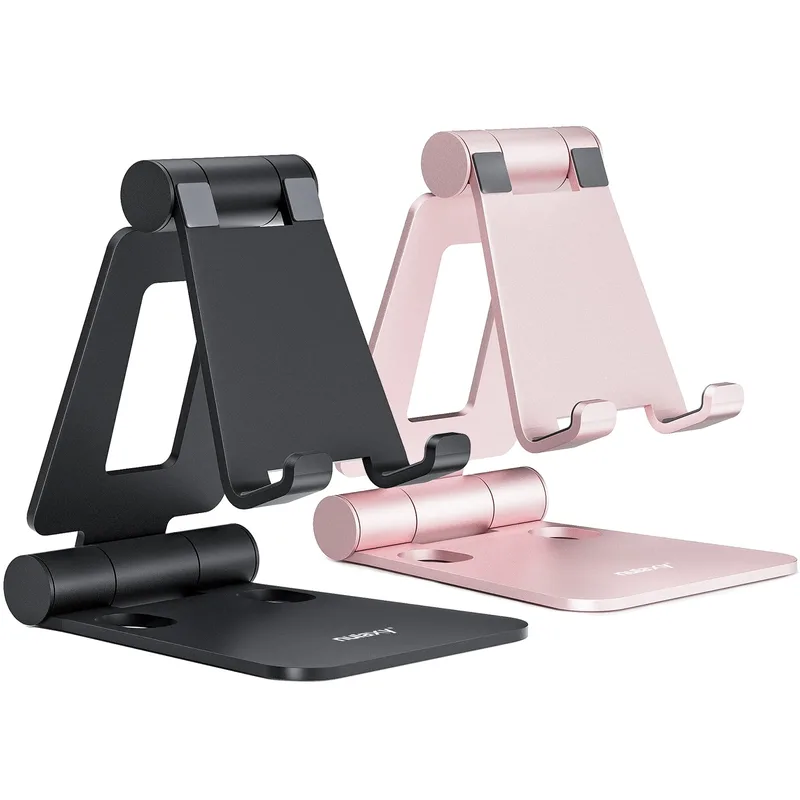
Nulaxy A4 Dual Folding Phone Stand
Pros
- ✓ Dual-hinge design lets you adjust height and viewing angle independently — you can dial in exactly the right position without one changing the other
- ✓ Nine color options mean you can match it to your desk setup, which is rare at this price
- ✓ Aluminum construction is noticeably more solid than plastic alternatives in the same budget range
- ✓ Works for tablets (up to 8 inches) as well as phones — useful for recipe viewing or reading during a standing desk session
Cons
- ✗ No magnetic attachment — requires setting the phone into the cradle each time, which feels slow compared to MagSafe options
- ✗ Cradle width is fixed, so very thick phone cases occasionally require a slight squeeze to fit
- ✗ Does not support portrait-only orientation without a workaround at certain angle settings
At $12, the Nulaxy A4 punches well above its weight. The dual-hinge design — one hinge for height, one for viewing angle — is the key feature here. Most budget stands have a single hinge, which means adjusting the angle also shifts the height. The A4 treats them as independent controls, which makes dialing in the right position genuinely easy.
It comes in nine colors, which matters more than it sounds for a desk accessory you will look at every day. The aluminum construction stays rigid without flex. It supports tablets up to 8 inches too, which is useful for standing desk reference reading.
Best for: Budget shoppers and anyone who prefers a traditional cradle-style stand over magnetic attachment.
4. iWALK Magnetic Cell Phone Stand for Desk — Best for Android Users
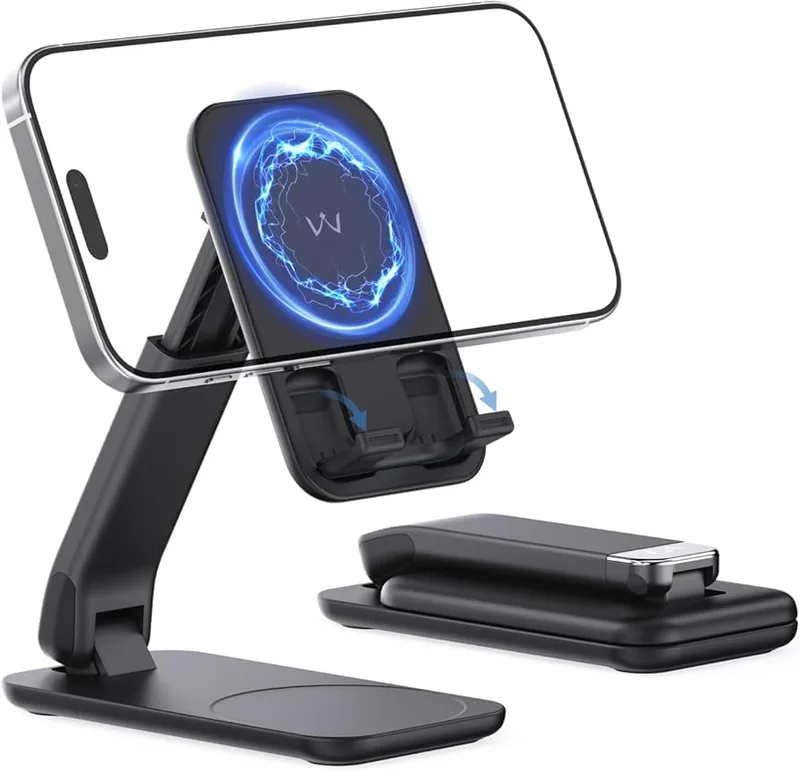
iWALK Magnetic Cell Phone Stand for Desk
Pros
- ✓ Wide compatibility covers both iPhone MagSafe users and Android phones with the included magnetic adapter — no separate ring required for most Samsung flagship models
- ✓ 6.1-inch max height is generous, keeping the phone comfortably near eye level on most desk setups
- ✓ Folds to the thickness of two phones, making it the slimmest packable stand in this roundup
- ✓ Integrated folding bracket means it holds non-magnetic phones securely even without the magnet grip
Cons
- ✗ 1.2 kg magnet force is slightly lower than UGREEN's 1.6 kg — heavier phones in thick cases can occasionally slip under vibration
- ✗ ABS and PC construction is less premium-feeling than the all-aluminum Nulaxy or UGREEN options
- ✗ Newer brand with fewer long-term durability data points than the more established Lamicall or Nulaxy
The iWALK Magnetic Stand covers the widest device range of any stand in this roundup. It supports iPhone MagSafe users natively and includes a magnetic adapter that works with most Samsung Galaxy flagship models without requiring an adhesive ring on the phone back.
Height adjustment runs from 4.7 to 6.1 inches — a generous range that covers most ergonomic needs. The tilt goes from flat at 0° to nearly vertical at 85°. Folded, it collapses to the thickness of two phones, making it easy to drop in a bag.
The 1.2 kg magnet force is slightly below the UGREEN’s 1.6 kg, which is worth noting for heavier phones in thick cases. In general use it holds reliably.
Best for: Android users who want magnetic attachment, or mixed iPhone/Android households.
5. MOFT O Snap Phone Stand & Grip — Best for Portability
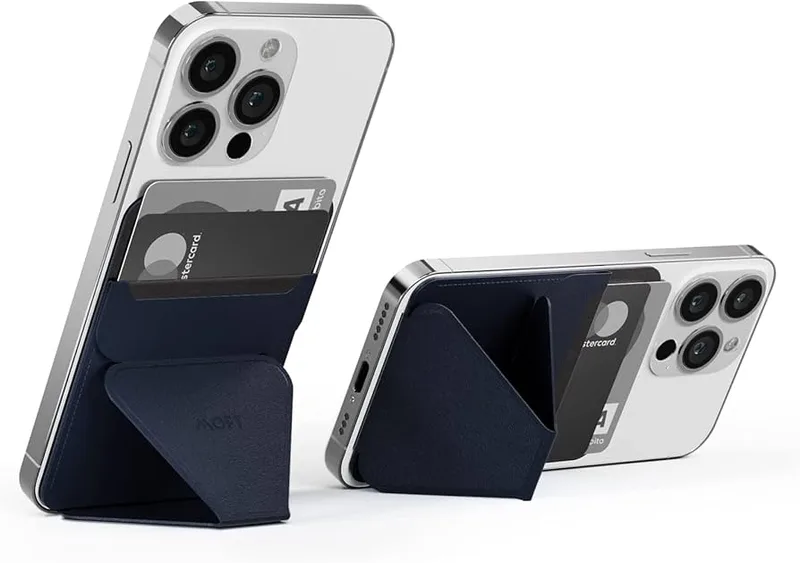
MOFT O Snap Phone Stand & Grip
Pros
- ✓ Ultra-lightweight orb design attaches to the phone back and doubles as a grip — eliminates the need for a bulky separate ring or case
- ✓ Three preset angles fold out for a stable tripod-style stand at 90° vertical, which is ideal for video calls and content viewing
- ✓ Snaps into MOFT's car mount and other ecosystem accessories, so one product covers desk, car, and travel use
- ✓ Practically weightless addition to a travel kit — you barely know it is there until you need it
Cons
- ✗ At $20, it is the priciest stand in this roundup for what is essentially a minimalist grip-and-stand hybrid
- ✗ Adhesive sticker attachment for non-MagSafe phones requires careful placement and cannot be repositioned easily
- ✗ Preset angles limit flexibility compared to fully adjustable stands — not ideal if you need a very specific tilt
The MOFT O Snap is a different animal. It is not primarily a desk stand — it is a phone grip and stand system that happens to work brilliantly on a desk. The orb-shaped attachment snaps onto MagSafe iPhones (or any phone via adhesive) and folds out into a tripod-style stand at three preset angles.
The result weighs under an ounce. You genuinely forget it is on the phone. It also slots into MOFT’s car mount system, which means your desk stand, car mount, and travel stand are all the same product.
The trade-off is that the preset angles are less flexible than a fully adjustable stand. If you need a specific tilt for your exact desk setup, the Lamicall or UGREEN will serve you better. But for people who are constantly moving between a desk, a car, and a hotel room, the O Snap is uniquely useful.
Best for: Frequent travelers and people who want one versatile phone accessory rather than separate stand and car mount.
6. Lamicall Gooseneck Flexible Phone Holder — Best Gooseneck
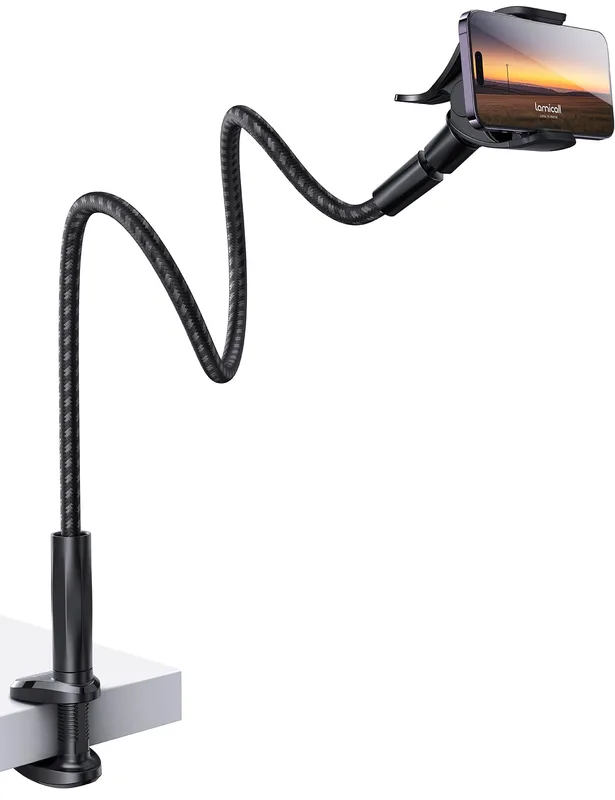
Lamicall Gooseneck Flexible Phone Holder
Pros
- ✓ 38-inch flexible arm provides genuinely flexible positioning — overhead for recipe viewing, sideways for reference, angled for video calls
- ✓ Nylon braided exterior is far more durable than plain plastic goosenecks and holds its bend without slowly drooping over days
- ✓ 360° swivel at the phone end allows portrait and landscape without re-bending the arm
- ✓ Clamp installs and removes in under a minute, making it practical for renters or desk-sharing setups
Cons
- ✗ Clamp base requires a free desk edge — does not work if your desk is flush against a wall on all sides
- ✗ 38-inch arm is noticeably longer than most office setups actually need — overkill for a straightforward upright desk stand
- ✗ Phone clamp fits up to 7 inches, which excludes some larger-format Android phones
The Lamicall Gooseneck is the stand for setups where a traditional upright stand does not work. The 38-inch nylon-braided flexible arm clamps to the desk edge and bends to any position — overhead for recipe following, off to the side for reference while typing, or angled forward for video calls.
The nylon braiding over an aluminum-magnesium core is meaningfully better than plain plastic goosenecks. It holds its position without the slow droop that budget gooseneck stands develop over weeks of use.
At $25, it is the most expensive stand in this roundup. But it is also the only one that solves the specific problem of positioning a phone somewhere other than directly in front of you.
Best for: Anyone who needs flexible, multi-position phone placement — video recipe followers, live-reference users, and people doing phone-based motion capture or photography.
Comparison Table
| Stand | Price | Height | MagSafe | Best For |
|---|---|---|---|---|
| Lamicall Foldable | $8.99 as of Oct 18, 2026 | Up to 3.2” | No | Best overall |
| UGREEN MagSafe | $13.29 as of Oct 18, 2026 | Up to 5.9” | Yes | iPhone users |
| Nulaxy A4 | $9.99 as of Oct 18, 2026 | Dual-hinge | No | Best budget |
| iWALK Magnetic | $15.99 as of Oct 18, 2026 | 4.7–6.1” | Yes (+ Android) | Android users |
| MOFT O Snap | Unavailable | Preset angles | Yes | Travel/portability |
| Lamicall Gooseneck | $19.98 as of Oct 18, 2026 | Flexible arm | No | Multi-position |
What to Look for in a Desk Phone Stand
Stability first
A phone stand that shifts or tips when you tap the screen is more frustrating than no stand at all. Look for metal bases over plastic, and check that the weight-to-footprint ratio makes sense. Weighted bases (like the Lamicall Foldable) are generally more stable than tall, narrow designs.
Height and angle adjustment
The goal of a phone stand is to keep the screen closer to eye level, which reduces the neck flexion that causes tech neck. Most freestanding stands max out at 4–6 inches of height lift. If you need more range, a gooseneck clamp style gives you much more flexibility.
MagSafe vs. universal cradle
MagSafe-compatible stands (UGREEN, iWALK, MOFT) are faster to use for iPhone 12 and newer — one snap and done. But they require a compatible case or the included metal ring for non-MagSafe devices. Universal cradle stands work with everything, every time, with no setup.
Portability
If you work from different locations — home, office, coffee shop, hotel — a foldable stand is worth paying attention to. The Lamicall Foldable, Nulaxy A4, and iWALK all collapse to very compact sizes. The MOFT O Snap is the lightest option if you need something truly travel-friendly.
Use case: second screen vs. reference vs. video calls
A phone sitting upright for Slack notifications or a reference document just needs basic stability. Video calls benefit from height adjustment so the camera is nearer to eye level. Overhead recipe following needs a gooseneck. Buy for your specific use case — not the most feature-laden option.
How a Phone Stand Improves Your Ergonomic Setup
Most people place their phone flat on the desk, which forces a consistent 45–60° neck tilt every time they glance at it. Over an 8-hour workday, that adds up to meaningful cumulative neck flexion.
Propping the phone at eye level — or even at a 45° angle on a stand — cuts that neck bend significantly. A phone stand is one of the lowest-cost ergonomic improvements you can make to a home office setup. For a more complete look at desk ergonomics across all price tiers, see our home office ergonomics budget guide.
A phone stand also pairs well with a monitor arm for a clean setup where both screens are at comfortable heights. And if you are building out a full accessory layer for your desk, the ultimate desk accessories guide is a good starting point.
FAQ
What is the best phone stand for video calls?
For video calls, height and stability matter most. The UGREEN Magnetic Stand reaches 5.9 inches, which gets the phone camera meaningfully closer to eye level. The Lamicall Foldable Stand is a strong choice for non-iPhone users at a slightly lower price.
Do phone stands work with thick cases?
Most stands in this roundup support cases up to 0.7–0.8 inches thick. Cradle-style stands (Lamicall, Nulaxy) generally handle thick cases better than magnetic stands, which may lose some grip force on very large or heavy OtterBox-style cases. The Lamicall Foldable Stand lists explicit 0.71-inch case compatibility.
Is a MagSafe phone stand worth it?
For iPhone 12 and newer users, yes. The snap-on convenience is genuinely better than setting a phone into a cradle multiple times per day. The UGREEN at $14 brings that feature at a price that is hard to argue with. For Android users, a standard cradle stand is more practical.
Can I use a phone stand on a standing desk?
Absolutely. All six stands in this roundup work on standing desks. For height-variable setups, a gooseneck clamp stand offers the advantage of repositioning the arm to match your new desk height without readjusting a separate stand each time you sit or stand.
What is the cheapest good phone stand?
The Nulaxy A4 at $12 is the best value in this category. The dual-hinge adjustability and aluminum build would have cost $20+ just a couple of years ago. It is a genuinely good stand, not a compromise buy.
What is a gooseneck phone stand good for?
Gooseneck stands shine when you need a phone somewhere other than directly in front of you. Common uses: overhead shot for content creation, off to the side for reference while typing on a keyboard, or arm-length positioning for live recipes during standing desk cooking reference. The Lamicall Gooseneck is the best option in this roundup for that use case.
Conclusion
For most home office workers, the Lamicall Foldable Stand is the right call. It is proven by over 32,000 reviews, works with any phone and any case, and the $17 price is easy to justify. If you have an iPhone 12 or newer, spend the extra few dollars on the UGREEN Magnetic Stand instead — the snap-on convenience is worth it.
On a tight budget, the Nulaxy A4 at $12 delivers genuine quality. Need flexible positioning? The Lamicall Gooseneck is the only stand in this group that can reach overhead or off to the side. And if you travel constantly, the MOFT O Snap will outlast its own product category.
A phone stand is a $12–25 fix that you will use every single workday. It is one of the easiest wins in a home office ergonomics kit.