Hybrid work in 2026 means millions of people are genuinely splitting time between a home office desk, the kitchen table, and — let’s be honest — the couch or bed at least a few hours a week. The problem is that working directly with a laptop on your lap is a posture disaster: screen too low, wrists bent at bad angles, and a machine that runs hot enough to be uncomfortable. A good ergonomic lap desk solves all three of those problems.
Not all lap desks are worth buying. Some are just flat boards with thin foam that wobbles and slides. The ones that actually help keep your wrists neutral, your screen at a reasonable angle, and your laptop cool enough to work without throttling. After comparing specs, materials, and owner feedback across dozens of options, these five are the ones that deliver.
In a hurry? The LapGear Home Office Pro is the best all-around lap desk for remote workers — mouse pad, wrist rest, and stable cushion all in one package under $40.
1. LapGear Home Office Pro — Best Overall
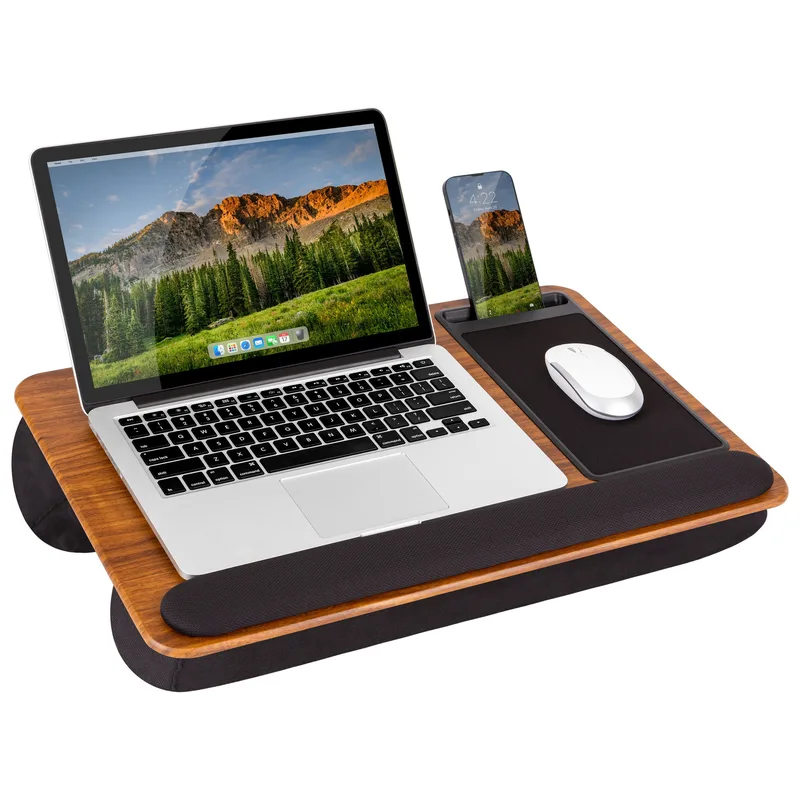
LapGear Home Office Pro Lap Desk
Pros
- ✓ Purpose-built for work with integrated wrist rest and precision mouse pad
- ✓ Stable dual bolster cushion holds firm on your lap without rocking
- ✓ Phone holder keeps notifications visible without a separate stand
- ✓ Surface stays grippy — laptop doesn't creep toward your knees
Cons
- ✗ Only fits laptops up to 15.6 inches — larger models won't fit well
- ✗ No tilt adjustment — flat surface only
- ✗ Cushion can trap heat after extended sessions
The LapGear Home Office Pro is what a lap desk looks like when it’s designed specifically for laptop work rather than general laptop-on-couch use. The surface is 21.1 by 14.1 inches, enough for most 15.6-inch laptops with a usable wrist rest strip along the front edge. The cushion underneath uses dual bolsters that grip your legs rather than sliding around every time you shift position.
What sets it apart from basic foam boards is the built-in precision mouse pad on the right side. If you’re doing any real work — spreadsheets, design, research — you need a proper mouse, and having a dedicated pad surface means you’re not trying to use a wireless mouse on a textured wood surface. The phone holder slot on the side is a small touch that adds real utility: keep your phone upright for notifications or video calls without propping it against a coffee mug.
The 15.6-inch laptop limit is a genuine constraint. If you’re using a 16 or 17-inch machine, look at the Sofia + Sam below. But for the majority of remote workers with standard laptop sizes, this is the most thoughtfully designed lap desk available at this price.
Best For: Remote workers who need an actual workstation on the couch, not just a flat surface.
2. Sofia + Sam Multi-Tasking Lap Desk — Best Value
Sofia + Sam Multi-Tasking Lap Desk
Pros
- ✓ Memory foam cushion is noticeably more comfortable than standard foam
- ✓ Large surface fits 17-inch laptops with room for a notebook beside it
- ✓ Integrated wrist rest reduces forearm strain during long typing sessions
- ✓ Low price for the size and quality you get
Cons
- ✗ No tilt or height adjustment — flat surface only
- ✗ Larger footprint makes it bulky to store between uses
- ✗ No integrated mouse pad — you'll need a separate pad or use the wood surface
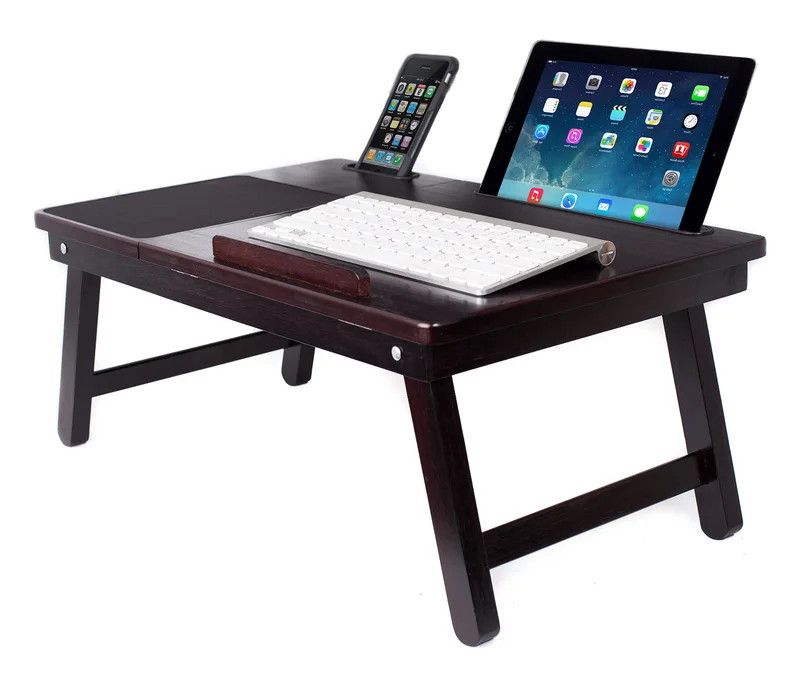
The Sofia + Sam Multi-Tasking Lap Desk does one thing really well: it gives you a large, comfortable surface at a price that’s hard to argue with. The memory foam cushion base is softer and more conforming than the standard polyester foam used in cheaper lap desks, and you notice the difference after an hour of use.
The surface measures 19.3 by 16.2 inches, which means this is one of the few lap desks that genuinely accommodates 17-inch laptops with room left over. The engineered wood top provides a firm, stable work area, and the built-in wrist rest along the front edge reduces forearm fatigue during longer typing sessions.
The tradeoffs are real. There’s no tilt adjustment — you get a flat surface at whatever angle your legs create. There’s no integrated mouse pad, so you’ll either use the wood surface directly or throw a small mouse pad on top. And it’s a big piece of kit to store: when you’re not using it, it takes up noticeable shelf or closet space. For a larger laptop and a tight budget, though, this is the obvious pick.
Best For: Users with 15 to 17-inch laptops who want maximum surface area without spending much.
3. HUANUO Adjustable Lap Desk HNLD2G — Best for Adjustability
HUANUO Adjustable Lap Desk HNLD2G
Pros
- ✓ Eight tilt positions let you fine-tune the viewing angle for your posture
- ✓ Lightweight under 2 lbs — genuinely portable from room to room
- ✓ Dual cushions distribute weight evenly across your lap
- ✓ Built-in carry handle makes it easy to grab and go
Cons
- ✗ Smaller platform leaves no room beside your laptop for a mouse
- ✗ Plastic construction feels less premium than aluminum alternatives
- ✗ Not ideal for users who need a side work surface for writing
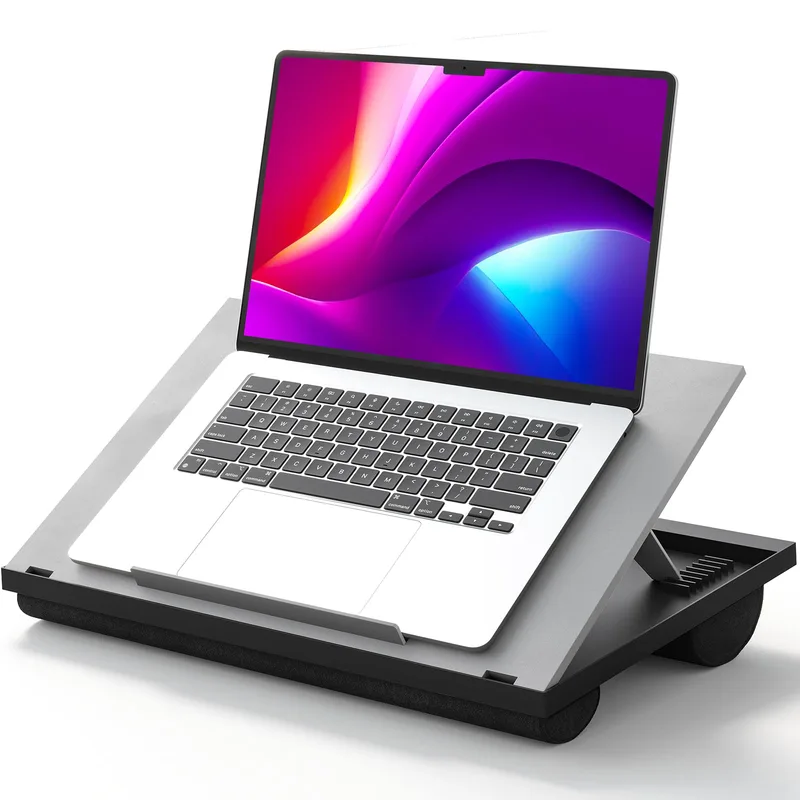
Most lap desks lock you into one flat angle. The HUANUO HNLD2G gives you eight. That matters more than it sounds: the right tilt angle for working upright on a firm couch is different from the angle you want when reclined in a recliner, and this desk lets you change it without getting up.
The dual cushion base spreads weight across your lap rather than concentrating it in one spot, which reduces the leg pressure that makes long sessions on cheaper lap desks uncomfortable. At 1.9 lbs with a built-in carry handle, it’s the most portable option on this list — pick it up with one hand, move it to another room.
The platform itself is 14.8 by 11 inches, which is smaller than the fixed-top options. There’s no side mouse space. If you need room for a notebook and a mouse alongside your laptop, this isn’t the desk for you. But for a lightweight adjustable option that handles different positions and postures, nothing at this price competes.
Best For: People who work from multiple positions throughout the day — upright, reclined, in bed.
4. WorkEZ Professional Lap Desk — Best Premium Build
WorkEZ Professional Lap Desk
Pros
- ✓ Aluminum naturally dissipates laptop heat — no fans or extra cords needed
- ✓ Works as a lap desk, monitor riser, or floor stand — genuinely multi-purpose
- ✓ Accordion-style legs adjust height and angle independently of each other
- ✓ Slim profile slides easily into a laptop bag
Cons
- ✗ No cushioned base — needs a pillow or folded blanket underneath on your lap
- ✗ Smaller surface area than foam-top lap desks
- ✗ Hard aluminum edges can press uncomfortably into wrists without padding
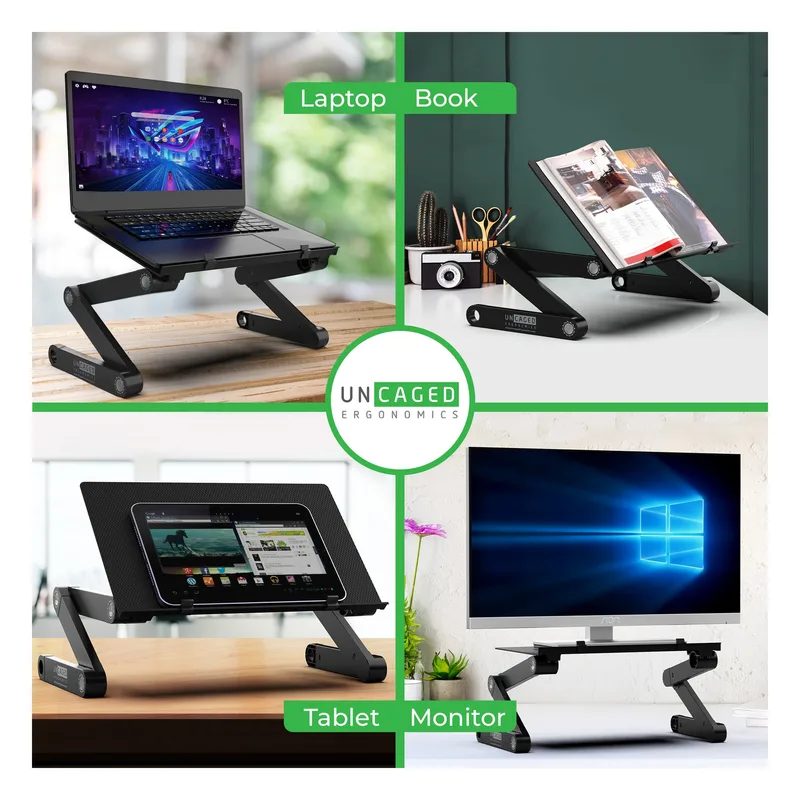
The WorkEZ Professional from Uncaged Ergonomics takes a completely different approach: instead of foam and engineered wood, it’s anodized aluminum. The practical benefit is heat dissipation — aluminum conducts heat away from your laptop without needing fans or USB power. If your laptop runs warm under load, this is the most passive cooling solution available.
The accordion-style legs adjust height and tilt independently, which gives you more precise positioning than most lap desks. At 16 by 11 inches, the panel is smaller than foam alternatives, but it’s designed for focused laptop-only use, not as a multi-surface workstation. It also works off your lap: fold the legs out further and it becomes a desk riser, or use it on the floor as a portable stand.
The main limitation is comfort: there’s no built-in cushion. You need to add a pillow or folded blanket under the stand when using it on your lap, otherwise the metal frame will press into your legs. That’s a real inconvenience compared to foam lap desks that handle lap comfort natively.
Best For: Power users whose laptops run hot and want passive cooling without fans.
5. HUANUO Adjustable Lap Desk with Cooling Fans — Best for Cooling
HUANUO Adjustable Lap Desk with Cooling Fans
Pros
- ✓ Two built-in fans actively cool your laptop — critical for high-performance machines
- ✓ Detachable mouse pad gives you a proper side workspace for either hand
- ✓ Adjustable height doubles as a small standing keyboard tray
- ✓ USB-powered fans run off your laptop — no extra power source needed
Cons
- ✗ Fan noise is noticeable — not ideal for quiet work environments or calls
- ✗ Heavier and bulkier than non-fan lap desks
- ✗ USB cable routing can become an annoyance depending on your setup
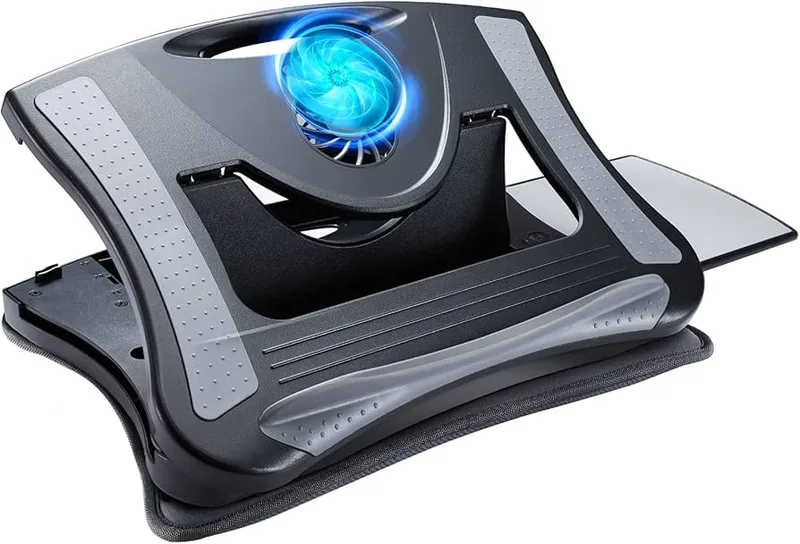
Gaming laptops and video editing machines generate serious heat. If yours gets uncomfortably hot during extended work sessions, a passive aluminum surface won’t cut it. The HUANUO fan model adds two USB-powered CPU cooling fans to an adjustable lap desk platform, actively pulling heat away from your machine.
The detachable mouse pad is a practical addition — it clips onto the side of the platform and gives you a dedicated mousing surface without adding a separate item to juggle. The whole unit adjusts height for different use cases: lap desk, TV tray, or small keyboard riser at a standing desk.
The fan noise is real. At higher speeds, you’ll hear it in a quiet room, and during video calls the microphone may pick it up depending on placement. It’s also the heaviest and bulkiest option here. But if thermal throttling is cutting into your work performance, the fans make a measurable difference.
Best For: Gamers and content creators who work from the couch with high-performance laptops.
Comparison Table
| Lap Desk | Price | Surface Size | Fits | Cushion | Tilt Adjust | Best For |
|---|---|---|---|---|---|---|
| LapGear Home Office Pro | $35.59-$41.99 as of Oct 18, 2026 | 21.1” x 14.1” | Up to 15.6” | Dual bolster | No | All-around WFH use |
| Sofia + Sam Multi-Tasking | Unavailable | 19.3” x 16.2” | Up to 17” | Memory foam | No | Large laptops, best value |
| HUANUO HNLD2G | $19.99-$22.49 as of Oct 18, 2026 | 14.8” x 11” | Up to 15.6” | Dual cushion | 8 angles | Adjustability, portability |
| WorkEZ Professional | Unavailable | 16” x 11” | Most sizes | None (aluminum) | Yes, independent | Passive cooling, travel |
| HUANUO with Fans | Unavailable | ~16” x 12” | Up to 15.6” | Cushion pad | Yes | Active cooling, gaming laptops |
What to Look for in an Ergonomic Laptop Lap Desk
Cushion quality matters more than you think
The cushion is what you’re actually sitting with. Thin polyester foam compresses within minutes and gives you nothing. Better options use dual bolster designs that distribute your laptop’s weight across two points on your legs, or memory foam that maintains its shape across long sessions. If a lap desk is under $20, the cushion is probably the corner they cut.
Tilt angle and your posture
A flat lap desk puts your screen at whatever angle your legs create, which is usually too low unless you’re sitting fully upright. Adjustable tilt is a genuine ergonomic benefit: even a 10-15 degree lift brings the screen closer to eye level and reduces the neck-down position that causes upper-back strain. If you work from a recliner or frequently change positions, adjustable tilt is worth the slight extra cost.
Surface size and your laptop size
A 15.6-inch laptop on a 14-inch surface will hang over the edges. Check the manufacturer’s stated laptop compatibility, not just the overall desk dimensions. Most standard lap desks fit up to 15.6-inch models; if you have a 16 or 17-inch machine, verify the surface size explicitly.
Cooling: passive vs. active
Aluminum frames passively conduct heat away from your laptop. If your machine gets hot but doesn’t throttle under normal work, aluminum is enough. If you’re rendering video, gaming, or running VMs, active cooling fans will make a noticeable difference in both comfort and performance.
Mouse space
If you use a mouse — and most people doing real work do — you need a dedicated surface for it. Look for lap desks with integrated mouse pads, pull-out trays, or enough extra surface to add a small pad. Working without proper mouse support is the ergonomic mistake that causes the most wrist strain over time.
Budget expectations
The $25-45 range covers the entire lap desk category from decent to excellent. You don’t need to spend more than $50 for a lap desk that does everything well. The differences between a $30 and a $40 option are usually about cushion quality and extra features like mouse pads or phone holders — not structural quality.
FAQ
Are lap desks actually good for posture?
A lap desk is better than a laptop directly on your lap but not a replacement for a proper desk setup. The main benefit is keeping your wrists at a more neutral angle and preventing your laptop from pressing into your thighs for extended periods. For full ergonomic benefits — screen at eye level, proper lumbar support — you still need a real desk and monitor. But for occasional couch or bed work, a lap desk meaningfully reduces strain compared to no support at all.
What size lap desk do I need for a 15-inch laptop?
A surface of at least 16 inches wide is recommended for a 15.6-inch laptop so the laptop has some clearance from the edges. If you want side mouse space, look for surfaces 19 inches or wider, like the Sofia + Sam or LapGear Home Office Pro. The LapGear’s 21.1-inch width leaves a comfortable strip for a wrist rest even with a 15.6-inch laptop sitting on it.
Can I use a lap desk in bed without damaging my laptop?
Yes, with a caveat. The key issue is airflow. Using your laptop on soft surfaces like a mattress or pillow can block the bottom vents and cause overheating. A lap desk — particularly an aluminum one or a model with cooling fans — keeps the laptop lifted off the soft surface and allows air to circulate under the machine. Avoid lap desks with solid bases that fully seal against the laptop bottom.
Do lap desks work for gaming?
Basic lap desks work for casual gaming but struggle with sustained gaming workloads that push laptop temperatures high. The HUANUO fan model is specifically worth considering if you game on a laptop from the couch: the active cooling keeps temperatures lower and reduces throttling. For extended gaming sessions, also look for a surface large enough to use a mouse with proper motion room.
How do I keep a lap desk from sliding?
Most quality lap desks use non-slip fabric on the cushion underside to grip clothing. The bigger issue is the laptop sliding on the desk surface — look for models with a raised device ledge, device stop, or grippy surface material. The LapGear Home Office Pro has a rubberized surface that holds laptops well. If your current lap desk slides, a thin rubberized drawer liner under the cushion or a rubber strip along the bottom edge is an inexpensive fix.
Is it worth spending $40-50 on a lap desk?
For a primary use case — a remote worker who regularly works from the couch or spends time working from bed — yes. The difference between a $15 flat board and a $40 lap desk with a proper cushion, mouse pad, and wrist rest is significant after an hour of use. For occasional use, any decent foam-top desk around $25-30 will do the job.
Conclusion
For most remote workers, the LapGear Home Office Pro is the obvious starting point — it’s built specifically for work, handles the most common laptop sizes, and includes a mouse pad and wrist rest in a package under $40. If your laptop is larger than 15.6 inches, the Sofia + Sam Multi-Tasking gives you more surface at a lower price with comfort-first memory foam.
For frequent position changes, the HUANUO HNLD2G is the adjustable pick at $30. For premium passive cooling without fans, the WorkEZ Professional is worth the bump in quality. And if your laptop runs genuinely hot during work sessions, the HUANUO fan model solves a real problem that the other options ignore.
A good lap desk costs less than most people spend on a single lunch out. Given how much time hybrid workers actually spend on the couch, it’s worth getting one that doesn’t hurt you.