Disclosure: PostureRanked is reader-supported. When you buy through links on our site, we may earn an affiliate commission at no additional cost to you. Our recommendations are based on independent research and testing.
| Product | Price | Rating |
|---|---|---|
| Kinesis Advantage360 Professional | — | 9.2 |
| Dygma Defy | — | 9.4 |
| Keychron Q10 Pro | — | 9.0 |
| Kinesis Freestyle Pro | — | 8.6 |
| Feker Alice98 | — | 8.8 |
| Keebio Iris CE | — | 8.6 |
PostureRanked is reader-supported. When you buy through links on our site, we may earn an affiliate commission at no additional cost to you.
I’ve been typing on split keyboards for three years now. Before that, I spent a decade ignoring the tingling in my wrists until one morning I couldn’t grip a coffee mug without pain. That was my wake-up call. If you’re a programmer logging 8+ hours at the keyboard daily, picking the right ergonomic keyboard isn’t a nice-to-have. It’s career insurance.
Here’s the thing — not every “ergonomic” keyboard actually helps. Some just angle a standard layout and slap a premium price on it. The keyboards below genuinely change how your hands, wrists, and shoulders interact with your work. I’ve dug through the current options, cross-referenced reviews from RTINGS, Tom’s Hardware, and the mechanical keyboard community, and narrowed it down to six picks worth your money in 2026.
Short on time? Grab the Keychron Q10 Pro if you want the best balance of ergonomics and easy adaptation. If you’re already dealing with pain, go straight to the Kinesis Advantage360 Pro — it’s expensive and the learning curve is real, but nothing else shapes your hands this well.
Quick Comparison
| Keyboard | Best For | Layout | Switches | Price |
|---|---|---|---|---|
| Kinesis Advantage360 Pro | Best Overall | Split Contoured | Gateron Brown/Pink | $449–$599 |
| Dygma Defy | Best Split | Full Split Columnar | Hot-swappable | $329–$619 |
| Keychron Q10 Pro | Best Value | Alice Layout | Hot-swappable | $159–$258 |
| Kinesis Freestyle Pro | Best for Offices | Split Flat | Cherry MX Silent Red | $179–$209 |
| Feker Alice98 | Best with Numpad | Alice + Numpad | Hot-swappable | $99–$161 |
| Keebio Iris CE | Budget Split | Split Columnar | Hot-swappable Choc | $125–$240 |
1. Kinesis Advantage360 Professional — Best Overall
Kinesis Advantage360 Professional
Pros
- ✓ Concave key wells follow natural finger curves — unmatched comfort
- ✓ Thumb clusters put Enter, Backspace, Ctrl under your strongest digit
- ✓ ZMK firmware is fully open-source with browser-based configuration
- ✓ Adjustable tenting stands included
Cons
- ✗ 3-6 week learning curve to reach normal typing speed
- ✗ $449-599 price point is steep
- ✗ Skills don't transfer back to flat keyboards easily
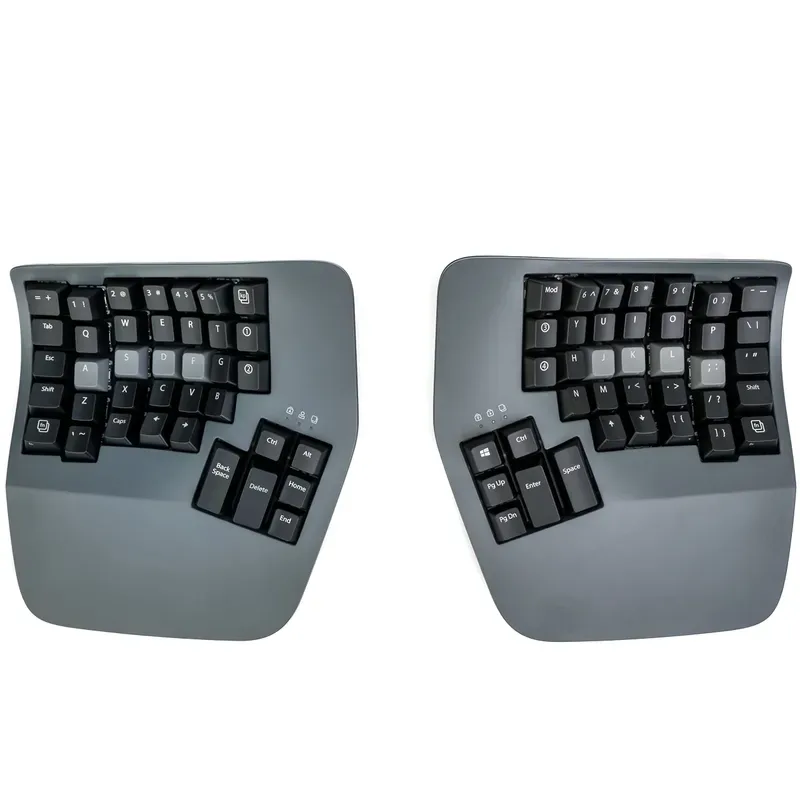
The Advantage360 Pro is the keyboard equivalent of a standing desk — everyone who tries one says they can’t go back. The concave key wells position your fingers along their natural curves rather than forcing them flat. Your thumbs get dedicated clusters for Enter, Backspace, Ctrl, and Alt, which means your pinkies stop doing all the heavy lifting.
Kinesis ships it with Gateron Brown (tactile) or Pink (silent linear) switches, both rated for 50 million keystrokes. The ZMK firmware is open-source and configurable through a browser GUI — no command line required, though you can also fork the config on GitHub if you prefer.
Who should buy this: Programmers with existing wrist or shoulder pain, or anyone who types 6+ hours daily and wants to prevent it. The contoured wells and thumb clusters are unmatched for reducing strain.
Who should skip this: Anyone who regularly switches between personal and shared workstations. The unique layout trains muscle memory that doesn’t transfer back to flat keyboards. You’ll be slower on a laptop for a while.
The tenting stands are included, not sold separately like some competitors. Bluetooth connects to multiple devices, and the USB-C link cable between halves stores neatly underneath.
Price: $449–$599
Check Kinesis Advantage360 Pro on Amazon
Check Kinesis Advantage360 Pro (Quiet Switches) on Amazon
2. Dygma Defy — Best Full Split
Dygma Defy
Pros
- ✓ 8-key thumb clusters eliminate pinky strain for modifiers
- ✓ Hot-swappable switches — experiment freely
- ✓ Tenting adjustable from 7 to 60 degrees
- ✓ Bazecor software is genuinely easy to use
Cons
- ✗ Wireless version pushes price toward $600
- ✗ Large desk footprint with both halves separated
- ✗ Steeper learning curve than Alice-style boards
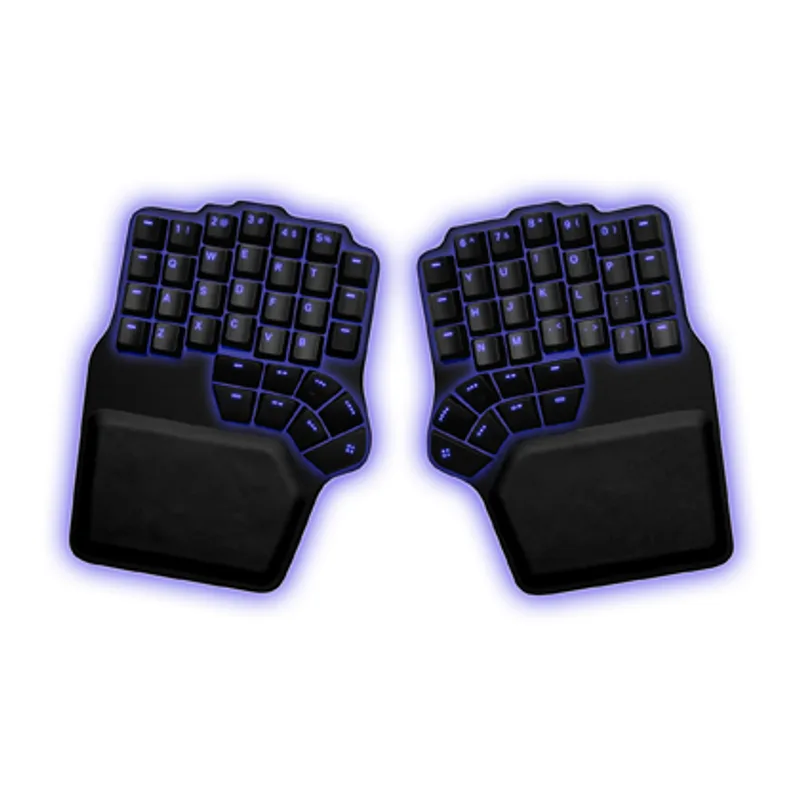
The Defy takes split further than most — two completely separate halves, each with an 8-key thumb cluster. That’s 16 extra keys under your thumbs that would otherwise be crammed onto your pinkies. Columnar layout aligns keys vertically so your fingers travel straight up and down instead of diagonally.
Hot-swappable switches mean you can experiment. Start with tactile Browns, swap to silent linears for office days, try Boba U4Ts when curiosity strikes — no soldering required. The detachable wrist rests are a thoughtful addition that most competitors skip or charge extra for.
Who should buy this: Programmers who want maximum adjustability. The tenting goes from 7 to 60 degrees, the halves can sit wherever your shoulders are comfortable, and the Bazecor configurator software is genuinely one of the easiest to use.
Who should skip this: Anyone on a budget. The wireless version with all accessories pushes toward $600. Also not ideal if desk space is tight — two separate halves plus wrist rests take up real estate.
Bazecor lets you build layers, set up macros, and configure per-key RGB without touching firmware files. For programmers who want deep customization without a steep setup process, it hits the sweet spot.
Price: $329–$619
Check Dygma Defy on Official Site
3. Keychron Q10 Pro — Best Value
Keychron Q10 Pro
Pros
- ✓ Adapt in days, not weeks — familiar enough to jump right in
- ✓ Full aluminum CNC body feels premium
- ✓ QMK/VIA programmability for custom macros
- ✓ Double gasket mount gives satisfying, dampened sound
Cons
- ✗ Not truly split — can't adjust separation distance
- ✗ Heavy at 5.4 lbs — not portable
- ✗ No dedicated numpad
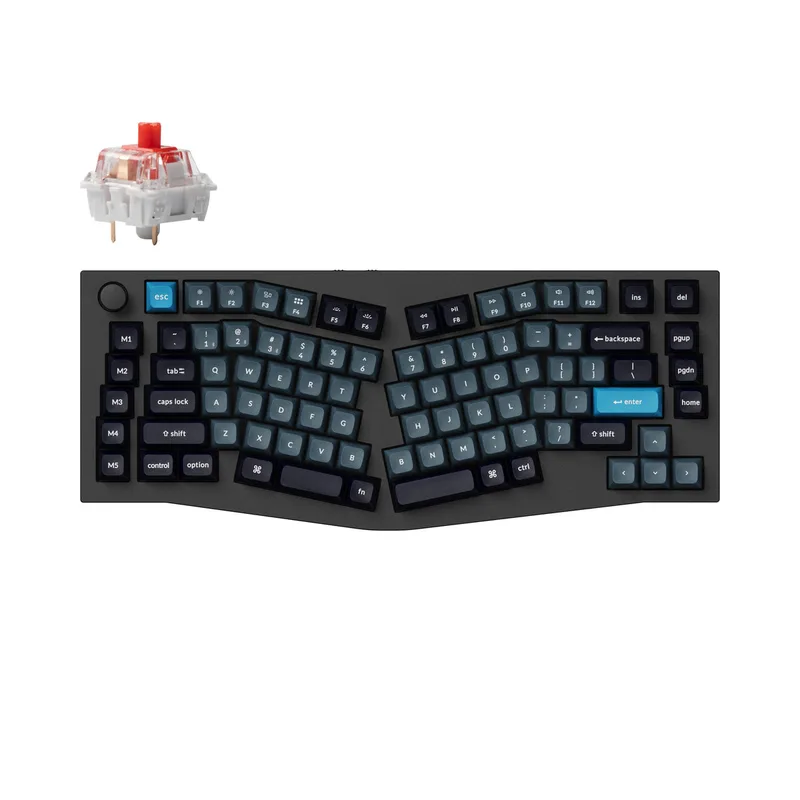
If you want ergonomic benefits without dedicating a month to relearning how to type, the Q10 Pro is the answer. The Alice layout angles the two halves in a gentle split — enough to reduce wrist pronation, but familiar enough that most people adapt in three to five days. I’ve recommended this to four colleagues. All four stuck with it.
The full aluminum CNC body adds weight (5.4 lbs) but gives it a premium, no-rattle feel. Double gasket mounting dampens keystrokes for a satisfying “thock” that mechanical keyboard enthusiasts chase. QMK/VIA support means full programmability — remap any key, create IDE macro layers, set up one-key git commands.
Who should buy this: Most programmers. Seriously. It gives you 80% of the ergonomic benefit of a full split at a fraction of the learning curve and cost. Starting around $159 for barebones or $258 assembled, it’s the easiest recommendation on this list.
Who should skip this: Anyone who needs true split positioning for shoulder issues, or programmers who need a numpad. The one-piece design limits how far apart the halves sit.
Keychron also makes the Q10 Max with 2.4 GHz wireless in addition to Bluetooth — worth considering if low-latency wireless matters to you.
Price: $159–$258
Check Keychron Q10 Pro (Brown Switches) on Amazon
Check Keychron Q10 Pro (Red Switches) on Amazon
4. Kinesis Freestyle Pro — Best for Offices
Kinesis Freestyle Pro
Pros
- ✓ Cherry MX Silent Red option is genuinely quiet for shared workspaces
- ✓ Adjustable separation up to 20 inches
- ✓ Flat profile works with any standard desk setup
- ✓ SmartSet macro recording is simple — no software install needed
Cons
- ✗ No wireless option
- ✗ Limited programmability compared to QMK boards
- ✗ Stock may be limited — Kinesis focusing on Advantage360 line
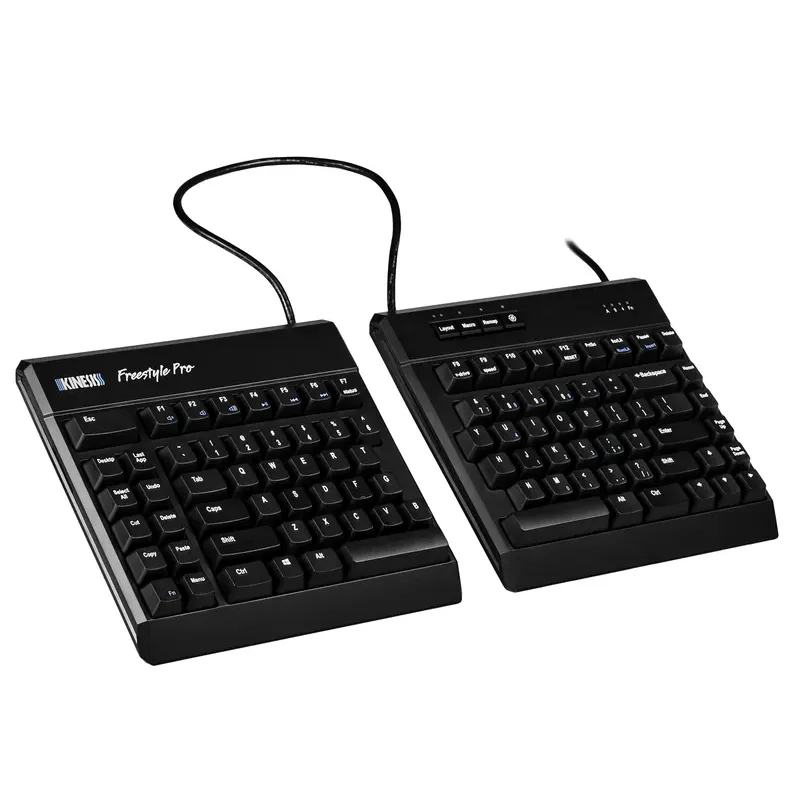
The Freestyle Pro solves a specific problem: you need split ergonomics but work somewhere where clicky mechanical keys would get you dirty looks. Cherry MX Silent Red switches are genuinely quiet — comparable to a membrane keyboard’s noise level, with none of the mushy feel.
The halves separate up to 20 inches via a built-in cable. SmartSet programming lets you record macros on-the-fly without installing software — press the Program key, type the sequence, done. The embedded numpad (via function layer) keeps it compact without sacrificing number entry.
Who should buy this: Office programmers in shared or open workspaces. Also a good choice if you want split ergonomics without the extreme layout changes of columnar or contoured designs — the key layout is standard, just separated.
Who should skip this: Remote workers who’d benefit more from the Keychron Q10 Pro at a similar price. The Freestyle Pro is wired-only and its programmability is basic compared to QMK boards. Also worth noting — Kinesis is focusing their product development on the Advantage360 line, so the Freestyle Pro’s long-term availability is uncertain.
The optional VIP3 accessory kit adds tenting and tilting. It’s sold separately (~$40) and worth adding if you go this route.
Price: $179–$209
Check Kinesis Freestyle Pro (Brown Switches) on Amazon
Check Kinesis Freestyle Pro (Silent Red) on Amazon
5. Feker Alice98 — Best with Numpad
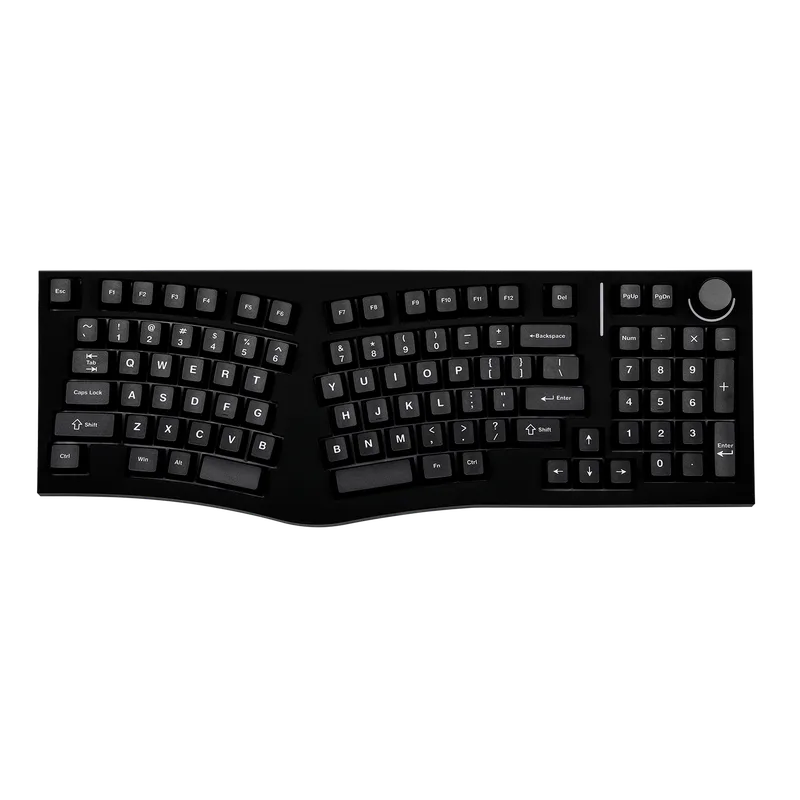
Feker Alice98
Pros
- ✓ Only ergonomic keyboard with integrated numpad at this price
- ✓ Split spacebar can be programmed for different functions
- ✓ Gasket mount with 5 layers of dampening — sounds great
- ✓ Under $160 with premium features
Cons
- ✗ Not truly split — can't adjust halves independently
- ✗ Larger footprint due to numpad
- ✗ Stock Feker switches are decent, not exceptional
Most ergonomic keyboards ditch the numpad to save space. If you work with databases, do data entry, or just prefer dedicated number keys, the Alice98 gives you an Alice-layout split angle and a full numpad. It’s one of the only keyboards that does both, and it starts under $100 for the wired version.
The gasket mount with five layers of dampening material gives it a sound profile you’d expect at twice the price. The split spacebar can be programmed as two separate keys — I’d map the right half to Backspace. The rotary knob handles volume by default but can be remapped to scrolling, zooming, or anything else.
Who should buy this: Programmers who work with numerical data regularly and don’t want to give up the numpad for ergonomics. Also a great entry point if you’ve never tried an ergonomic layout — the Alice angle is gentle enough that you’ll adjust in a few days.
Who should skip this: Anyone who needs true split separation. The Alice98 is one piece, so you can’t position the halves independently. If wrist pronation is your main concern, a true split like the Defy or Iris will help more.
QMK/VIA support is available on both the wired and wireless versions. The wireless model adds Bluetooth and 2.4 GHz with an 8,000 mAh battery that lasts weeks with backlighting off.
Price: $99–$161
6. Keebio Iris CE — Best Budget Split
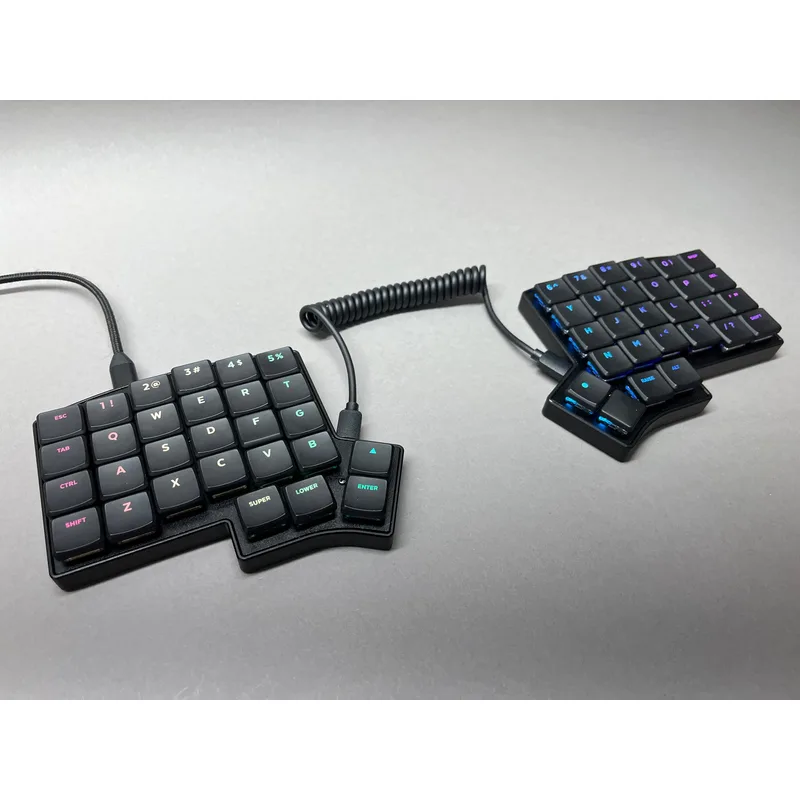
Keebio Iris CE
Pros
- ✓ True split ergonomics starting at $125
- ✓ Incredibly compact — fits any desk
- ✓ QMK/VIA fully programmable
- ✓ Active community shares layouts and keymaps
Cons
- ✗ No wireless option
- ✗ 56 keys means heavy layer usage — steeper learning curve
- ✗ No wrist rests included
True split keyboards usually start at $300+. The Iris CE brings genuine split columnar ergonomics starting at $125. It’s become a favorite among programmers who’ve developed hand or wrist pain and need relief without emptying their savings.
The trade-off? Fewer keys. At 56 keys total (28 per half), you’ll rely on layers for numbers, symbols, and function keys. That sounds intimidating, but the QMK/VIA community has shared hundreds of programmer-optimized keymaps. The active community is genuinely helpful — you won’t be figuring this out alone.
Who should buy this: Budget-conscious programmers who want real split ergonomics. Also great for minimalists who prefer compact setups. At 12 ounces (polycarbonate), it’s the lightest option here by far.
Who should skip this: Anyone who doesn’t want to learn layers. With 56 keys, you’re committing to a workflow change. Also wired-only with no wireless option, so it’s a desk-bound keyboard.
Low-profile Choc switches give the Iris a slim profile that pairs well with flat desks. Keebio also offers the Iris SE (standard MX switches) and Iris LM (low-profile MX) if you prefer different switch types.
Price: $125–$240
Check Keebio Iris CE on Official Site
Buying Guide: What to Look For
Split vs. Alice Layout
True split keyboards (Advantage360, Defy, Iris, Freestyle Pro) let you position each half independently. Alice-layout boards (Q10 Pro, Alice98) angle the keys but keep them in one piece. True split gives more ergonomic benefit but takes longer to learn. If you’re not sure, start with Alice — you can always go split later.
Switches Matter More Than You’d Think
Tactile switches (Cherry MX Brown, Gateron Brown, Boba U4T) give a physical bump on each keypress. Most programmers prefer these because the feedback reduces typos and the bump confirms actuation without bottoming out.
Linear switches (Cherry MX Silent Red, Gateron Silent Black) glide smoothly with no bump. Pick these for shared workspaces or if you find tactile bumps distracting during long coding sessions.
Heavy tactile switches (Cherry MX Clear, Zealio V2 67g) suit heavy typists who bottom out on lighter springs. The stronger resistance reduces finger fatigue for aggressive typists.
Hot-Swappable vs. Soldered
Hot-swappable sockets let you pull switches out and replace them without soldering. This is valuable because switch preference is personal — what feels great for an hour might fatigue your fingers after eight. The Defy, Q10 Pro, Alice98, and Iris CE all support hot-swap.
Programmability: QMK vs. Proprietary
QMK/VIA firmware (Q10 Pro, Alice98, Iris CE) offers the deepest customization — layers, tap-hold keys, macros, leader keys. Bazecor (Defy) and ZMK (Advantage360) are similarly powerful with friendlier interfaces. SmartSet (Freestyle Pro) is more basic but adequate for simple remapping.
The Adjustment Period
| Keyboard Type | Time to Adapt | Full Speed Recovery |
|---|---|---|
| Alice Layout | 3–7 days | 1–2 weeks |
| Split Flat | 1–2 weeks | 2–3 weeks |
| Split Columnar | 2–4 weeks | 3–4 weeks |
| Contoured (Advantage360) | 3–6 weeks | 4–6 weeks |
Every programmer I’ve talked to says the productivity dip was worth it. Once adjusted, flat keyboards feel cramped and awkward.
Frequently Asked Questions
Are split keyboards worth it for programmers?
Yes — if you type more than 4 hours daily. Most programmers who switch report significantly less wrist and shoulder tension within the first month. The learning curve is real but temporary. The comfort improvement is permanent.
Do I need mechanical switches?
Not strictly. But mechanical switches last 50+ million keystrokes, offer better tactile feedback, and enable full programmability. Membrane ergonomic keyboards exist (Microsoft Sculpt, Logitech Ergo K860) but they lack the programmability and switch customization that programmers benefit from.
What’s the difference between Alice and true split?
Alice layouts curve the keyboard but keep both halves in one connected unit. True split keyboards separate into two independent pieces positioned anywhere on your desk. True split offers more shoulder relief and adjustability. Alice offers faster adaptation and simpler desk setup.
Can I use an ergonomic keyboard with a standing desk?
Absolutely. It’s often the best pairing. Ergonomic keyboards maintain proper wrist alignment at any desk height, and a standing desk with a split keyboard lets you adjust both arm position and desk height independently. Check out our standing desk setup guide for the full pairing strategy.
Should I pair this with a vertical mouse?
Strongly recommended. A split keyboard fixes wrist pronation for typing, but a standard flat mouse puts your mousing hand right back into a pronated position. A vertical mouse completes the ergonomic setup. Many programmers report the keyboard-plus-mouse combination eliminated symptoms that the keyboard alone only reduced.
How many layers do I actually need?
Two to three. Layer 0 is your default typing layer. Layer 1 typically handles navigation (arrow keys, Home, End, Page Up/Down) and media controls. Layer 2 is for IDE-specific macros or numpad emulation. Some people add a gaming layer, but for programming work, three layers cover everything.
The Bottom Line
For most programmers, the Keychron Q10 Pro is the right pick. Premium aluminum build, QMK programmability, and an Alice layout gentle enough that you’ll be back to full speed in under a week. At $159–$258, it’s the best value on this list by a wide margin.
If you’re already dealing with wrist pain, RSI symptoms, or shoulder tension, invest in the Kinesis Advantage360 Pro or Dygma Defy. The contoured wells and true split positioning provide relief that Alice-style boards can’t match. Yes, the learning curve and price are steep. Your career is steeper.
Need a numpad? The Feker Alice98 is the only ergonomic option that includes one, starting at just $99.
On a tight budget? The Keebio Iris CE proves you don’t need $400+ for genuine split ergonomics. Starting at $125, it’s the most affordable path to a true split setup.
Whatever you choose, make the switch sooner rather than later. Programmer ergonomics isn’t about comfort — it’s about keeping your hands functional for the next twenty years of your career. A split keyboard pairs well with a vertical mouse or ergonomic trackball and a wrist rest — together these three accessories eliminate most keyboard-related RSI risk. For a full-picture view of building a healthy desk setup, see our best desk accessories for remote work guide.