The outlet behind most desks was never built for how many things plug in now — a monitor, a dock, a lamp, a laptop charger, a phone cable, and whatever gadget showed up this year. A single wall outlet or a bare extension cord turns into a tangle fast. In 2026, the fix has shifted: desk power strips increasingly clamp to the edge of the desk instead of sitting on the floor, and USB-C has taken over from USB-A as the port that actually matters for charging a modern laptop.
This roundup covers six power strips built specifically for desk use, with a mix of clamp-mount, smart, and USB-C-focused options. If you just want the recommendation: the Anker Nano Power Strip at $69.99 clamps to the desk edge and delivers a genuinely useful 70W of combined USB-C charging. If you want more outlets for less money, the NTONPOWER Standing Desk Power Strip at $32.99 is the value pick.
Anker Nano Power Strip (Desk Clamp, A9196) — Editor’s Pick
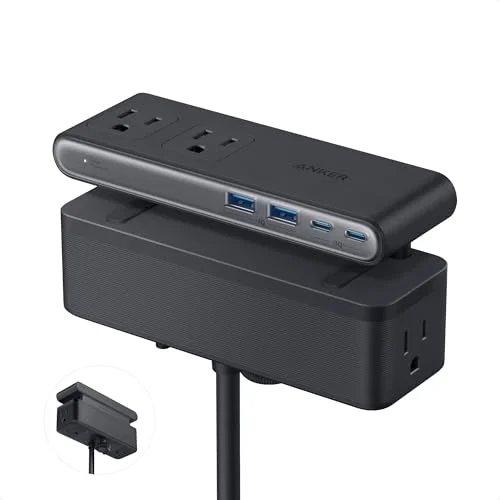
Anker Nano Power Strip (Desk Clamp, A9196)
Pros
- ✓ 70W combined USB-C output is enough to fast-charge a laptop and a phone at the same time
- ✓ Clamp mount keeps every outlet off the desk surface and off the floor
- ✓ Outlets spread across three sides so bulky adapters don't block each other
- ✓ Newest release in this roundup, launched in April 2026 with current-generation charging chips
Cons
- ✗ Most expensive strip here, especially before Anker's frequent sales
- ✗ Clamp needs a desk edge under 1.8 inches thick — doesn't work on very thick slab desks
- ✗ 6 AC outlets is fewer than the Belkin if you're running a lot of full-size adapters
Anker Nano Power Strip (Desk Clamp, A9196)
Pros
- ✓ 70W combined USB-C output is enough to fast-charge a laptop and a phone at the same time
- ✓ Clamp mount keeps every outlet off the desk surface and off the floor
- ✓ Outlets spread across three sides so bulky adapters don't block each other
- ✓ Newest release in this roundup, launched in April 2026 with current-generation charging chips
Cons
- ✗ Most expensive strip here, especially before Anker's frequent sales
- ✗ Clamp needs a desk edge under 1.8 inches thick — doesn't work on very thick slab desks
- ✗ 6 AC outlets is fewer than the Belkin if you're running a lot of full-size adapters
Anker released the Nano clamp strip in April 2026, and it’s the newest design in this roundup — which shows in the USB-C spec. 70W combined across two USB-C ports is enough to fast-charge a laptop on one port while a phone or tablet tops up on the other, something most desk power strips still can’t do. The clamp fits desk edges up to 1.8 inches thick at angles up to 45 degrees, and with six outlets spread across the top, bottom, and side of the unit, bulky wall adapters don’t crowd each other out the way they do on strips with outlets in a single row.
It’s the priciest strip here, and Anker runs frequent sales that can knock $10 to $12 off, so it’s worth checking current pricing before buying at full price. If your desk edge is thicker than 1.8 inches — common on solid-slab or L-shaped desks — the clamp won’t fit and you’ll need a freestanding option instead.
Best for: Anyone charging a laptop and a phone from the same strip who wants the cords and outlets off the desk entirely.
Belkin 12-Outlet Surge Protector with USB-C — Best for Max Outlets
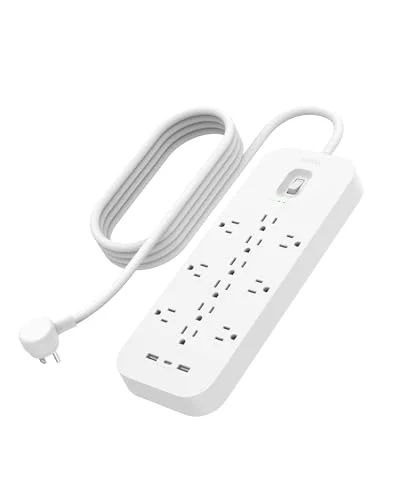
Belkin 12-Outlet Surge Protector with USB-C (SRA007p12tt6)
Pros
- ✓ 12 outlets is more than double most desk power strips in this price range
- ✓ 3,480 Joules of surge protection is the highest rating in this roundup
- ✓ Owner reviews consistently mention years of reliable use with no failures
- ✓ On/off switch lets you kill power to the whole strip without unplugging
Cons
- ✗ USB-C output tops out at 22.5W combined — too slow for fast-charging a modern laptop
- ✗ Freestanding design takes up desk or floor space instead of clamping out of the way
- ✗ Belkin sells several similarly-named strips with different joule ratings — double check this exact model before buying
Belkin 12-Outlet Surge Protector with USB-C (SRA007p12tt6)
Pros
- ✓ 12 outlets is more than double most desk power strips in this price range
- ✓ 3,480 Joules of surge protection is the highest rating in this roundup
- ✓ Owner reviews consistently mention years of reliable use with no failures
- ✓ On/off switch lets you kill power to the whole strip without unplugging
Cons
- ✗ USB-C output tops out at 22.5W combined — too slow for fast-charging a modern laptop
- ✗ Freestanding design takes up desk or floor space instead of clamping out of the way
- ✗ Belkin sells several similarly-named strips with different joule ratings — double check this exact model before buying
When six or nine outlets isn’t enough, the Belkin solves that problem outright with 12. It’s built for a desk running a full setup — monitor, dock, speakers, lamp, and multiple chargers — without needing a second strip. The 3,480-Joule surge rating is also the highest in this roundup, and owner reviews on Belkin’s own listing consistently mention years of daily use without a failure.
The trade-off is the USB-C port, which caps at 22.5W combined with the two USB-A ports. That’s fine for a phone or tablet but noticeably slow for charging a modern laptop, where 45W-plus is the real benchmark. It’s also freestanding rather than clamp-mounted, so it sits on the desk or floor rather than tucking out of sight. Belkin sells several visually similar surge protectors with different joule ratings under different model numbers, so confirm you’re ordering the SRA007p12tt6 specifically.
Best for: A single desk running a lot of separate devices, where outlet count matters more than fast USB-C charging.
Eaton Tripp Lite TLP606DMUSB Desk Clamp Surge Protector
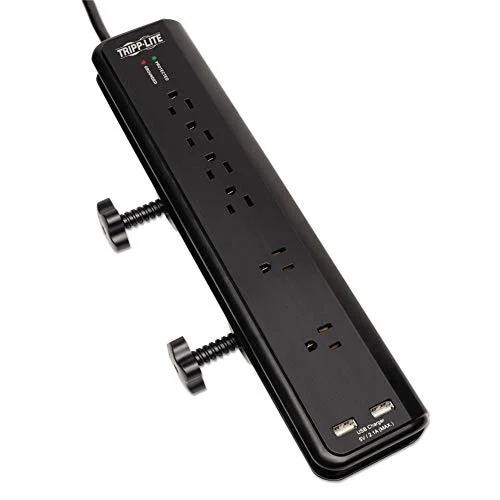
Eaton Tripp Lite TLP606DMUSB Desk Clamp Surge Protector
Pros
- ✓ Lifetime warranty backed by a $40,000 insurance policy is the strongest guarantee here
- ✓ Block-spaced outlets fit oversized power bricks without blocking the next socket
- ✓ Diagnostic LED tells you if the surge protection has been triggered and needs replacing
- ✓ Established design with a long track record rather than a first-year product
Cons
- ✗ USB-A only — no USB-C, which is a real limitation for charging newer laptops and phones
- ✗ Clamp fits thinner desk edges than the Anker or NTONPOWER, measure before ordering
- ✗ Design hasn't been updated in years while competitors added USB-C
Eaton Tripp Lite TLP606DMUSB Desk Clamp Surge Protector
Pros
- ✓ Lifetime warranty backed by a $40,000 insurance policy is the strongest guarantee here
- ✓ Block-spaced outlets fit oversized power bricks without blocking the next socket
- ✓ Diagnostic LED tells you if the surge protection has been triggered and needs replacing
- ✓ Established design with a long track record rather than a first-year product
Cons
- ✗ USB-A only — no USB-C, which is a real limitation for charging newer laptops and phones
- ✗ Clamp fits thinner desk edges than the Anker or NTONPOWER, measure before ordering
- ✗ Design hasn't been updated in years while competitors added USB-C
Tripp Lite’s clamp strip has been around for years, and its lifetime warranty backed by a $40,000 connected-equipment insurance policy is the strongest guarantee of anything in this roundup — most competitors offer one to two years. The six outlets are spaced to fit oversized power bricks without blocking the socket next to them, and a diagnostic LED lets you know if the surge protection has actually been triggered and needs replacing.
What it doesn’t have is USB-C. Both USB ports are USB-A, sharing 2.1A combined, which was standard when this design launched but is behind the rest of this roundup now. If you’re not charging a USB-C laptop from your desk strip, that’s a non-issue. If you are, one of the other five picks here fits better.
Best for: Buyers who want the longest warranty in this roundup and don’t need USB-C charging.
NTONPOWER Standing Desk Power Strip with Coiled Cord — Best Value
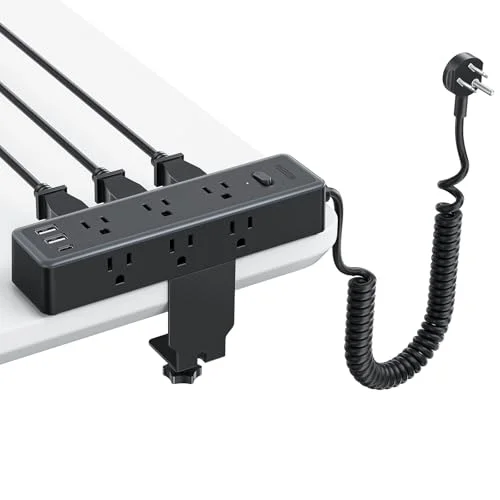
NTONPOWER Standing Desk Power Strip with Coiled Cord
Pros
- ✓ 9 outlets spaced 1.57 inches apart, wide enough for large adapters without crowding
- ✓ Coiled cord stretches to reach a standing desk's full height range without a tangled loop
- ✓ Clamp detaches for wall-mounting if you'd rather not clip it to the desk edge
- ✓ Cheapest strip here that still includes a USB-C port
Cons
- ✗ USB-C wattage isn't published — don't count on full-speed laptop charging
- ✗ 1,200 Joules is the lowest surge rating in this roundup
- ✗ NTONPOWER sells several near-identical cord-length variants, confirm you're ordering this one
NTONPOWER Standing Desk Power Strip with Coiled Cord
Pros
- ✓ 9 outlets spaced 1.57 inches apart, wide enough for large adapters without crowding
- ✓ Coiled cord stretches to reach a standing desk's full height range without a tangled loop
- ✓ Clamp detaches for wall-mounting if you'd rather not clip it to the desk edge
- ✓ Cheapest strip here that still includes a USB-C port
Cons
- ✗ USB-C wattage isn't published — don't count on full-speed laptop charging
- ✗ 1,200 Joules is the lowest surge rating in this roundup
- ✗ NTONPOWER sells several near-identical cord-length variants, confirm you're ordering this one
Nine outlets, a USB-C port, and a clamp mount for $32.99 makes the NTONPOWER the best spec-for-dollar strip here. The coiled cord is a genuinely useful detail for standing desks specifically — it stretches from about 1.6 to 6 feet, so it extends when the desk goes up and coils back in when it comes down, instead of hanging in a loose loop that catches on things.
The catch is that NTONPOWER doesn’t publish a wattage spec for the USB-C port, so don’t assume it fast-charges a laptop the way the Anker Nano does — treat it as reliable phone and tablet charging rather than a laptop-charging port. Surge protection is also the lowest rated in this roundup at 1,200 Joules, still enough for normal power fluctuations but less headroom than the Belkin or Tripp Lite.
Best for: Standing desk owners who want a clamp-mount strip with USB-C without paying Anker Nano prices.
TP-Link Kasa Smart Wi-Fi Power Strip (KP303) — Best Smart Strip
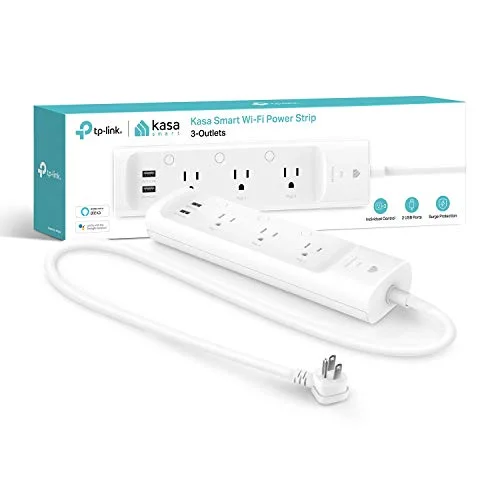
TP-Link Kasa Smart Wi-Fi Power Strip (KP303)
Pros
- ✓ Each of the 3 outlets can be scheduled or voice-controlled independently
- ✓ No smart home hub required — connects directly over Wi-Fi
- ✓ Cheapest strip in this roundup
- ✓ Setup through the Kasa app takes a few minutes
Cons
- ✗ No USB-C at all, a real gap next to the rest of this roundup
- ✗ TP-Link's own community forums show scattered reports of outlets or the whole unit failing after 8 months to 2 years
- ✗ Only 3 AC outlets limits it to a secondary strip rather than your main desk power
TP-Link Kasa Smart Wi-Fi Power Strip (KP303)
Pros
- ✓ Each of the 3 outlets can be scheduled or voice-controlled independently
- ✓ No smart home hub required — connects directly over Wi-Fi
- ✓ Cheapest strip in this roundup
- ✓ Setup through the Kasa app takes a few minutes
Cons
- ✗ No USB-C at all, a real gap next to the rest of this roundup
- ✗ TP-Link's own community forums show scattered reports of outlets or the whole unit failing after 8 months to 2 years
- ✗ Only 3 AC outlets limits it to a secondary strip rather than your main desk power
If app control or voice control matters more than raw outlet count, the Kasa KP303 is the only smart strip in this roundup. Each of its three outlets can be scheduled or controlled independently through the Kasa app or Alexa/Google Home, and it connects directly over Wi-Fi without needing a separate smart home hub.
It’s also the strip to be most careful about. TP-Link’s own community forums include scattered but real reports of outlets — or the entire unit — failing anywhere from eight months to two years in, including at least one report of visible circuit board damage. Plenty of other owners report years of trouble-free use, so it’s not a universal issue, but it’s worth knowing going in. There’s no USB-C at all, and three outlets is thin if this is meant to be your main desk strip rather than a secondary one for lamps and peripherals.
Best for: A secondary strip for smart-scheduled devices like a desk lamp or space heater, not your primary charging hub.
Anker 623 Capsule Power Strip — Best USB-C PD
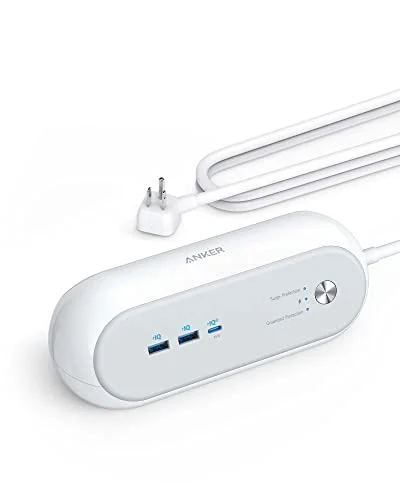
Anker 623 Capsule Power Strip (45W USB-C PD)
Pros
- ✓ 45W USB-C Power Delivery is enough to charge most ultrabooks and MacBooks at real speed
- ✓ Compact capsule footprint fits in a laptop bag for travel or a second desk
- ✓ Well-established model with years of owner reviews rather than a first-year release
- ✓ Rounded, cable-friendly design keeps cords from kinking at the plug
Cons
- ✗ Only 3 AC outlets — not enough if you're running a full monitor, dock, and lamp setup
- ✗ Not a clamp-mount design, so it still takes up desk real estate
- ✗ USB-A ports are capped at a combined 15W, noticeably slower than the USB-C port
Anker 623 Capsule Power Strip (45W USB-C PD)
Pros
- ✓ 45W USB-C Power Delivery is enough to charge most ultrabooks and MacBooks at real speed
- ✓ Compact capsule footprint fits in a laptop bag for travel or a second desk
- ✓ Well-established model with years of owner reviews rather than a first-year release
- ✓ Rounded, cable-friendly design keeps cords from kinking at the plug
Cons
- ✗ Only 3 AC outlets — not enough if you're running a full monitor, dock, and lamp setup
- ✗ Not a clamp-mount design, so it still takes up desk real estate
- ✗ USB-A ports are capped at a combined 15W, noticeably slower than the USB-C port
The 623 Capsule has been around since 2022 and is still current for a simple reason: 45W of USB-C Power Delivery is genuinely enough to charge most ultrabooks and MacBooks at their real charging speed, not a trickle. It’s the strip to reach for if a fast-charging laptop port matters more than outlet count or clamp mounting. The compact capsule shape also makes it the one strip here worth throwing in a bag for a second desk or a trip.
Three AC outlets is the limiting factor — fine for a laptop charger, a lamp, and one more device, tight if you’re running a full monitor-and-dock setup. It’s freestanding, not clamp-mounted, so it still takes up desk space rather than tucking under the edge.
Best for: Laptop-first desks where fast USB-C charging matters more than total outlet count.
Comparison Table
| Product | Price | AC Outlets | USB-C Output | Mount Type |
|---|---|---|---|---|
| Anker Nano (A9196) | $69.99 as of Sep 20, 2026 | 6 | 70W combined | Desk clamp |
| Belkin SRA007p12tt6 | $41.95 as of Sep 20, 2026 | 12 | 22.5W combined | Freestanding |
| Tripp Lite TLP606DMUSB | $54.99 as of Sep 20, 2026 | 6 | None (USB-A only) | Desk clamp |
| NTONPOWER Coiled | Unavailable | 9 | Unpublished wattage | Desk clamp |
| TP-Link Kasa KP303 | $25.17-$37.19 as of Sep 20, 2026 | 3 | None (USB-A only) | Freestanding |
| Anker 623 Capsule | $39.99 as of Sep 20, 2026 | 3 | 45W | Freestanding |
Buying Guide: What Actually Matters for a Desk Power Strip
USB-C wattage, not just USB-C presence. A lot of strips advertise “USB-C” without publishing the wattage, and that number matters more than the port type. Under 20W combined is fine for a phone. 45W and up is what actually fast-charges a modern laptop. Check the spec sheet, not just the port list, before assuming a strip will charge your laptop at full speed.
Clamp mount vs. freestanding. A clamp-mount strip attaches to the desk edge and keeps every outlet and cord off the desk surface and floor — genuinely useful if you’re short on desk space or running a standing desk with cable management. Measure your desk edge thickness first; most clamps top out around 1.5 to 2 inches, and a thick slab desk won’t fit some models.
Joule rating for surge protection. Higher is better, but the difference between 1,200 and 3,480 Joules matters most if you’re in an area with frequent power fluctuations or you’re protecting genuinely expensive equipment. For a typical home office, anything above 1,000 Joules is reasonable.
Outlet count vs. USB port count. Decide what you’re actually plugging in before choosing. A monitor, dock, and lamp need AC outlets; phones, earbuds, and most peripherals charge over USB. A strip with 12 AC outlets and weak USB, like the Belkin, suits a device-heavy desk. A strip with fewer outlets but strong USB-C, like the Anker Nano or 623 Capsule, suits a charging-heavy desk.
Pair it with real cable management. A power strip solves charging, not clutter. Our cable management solutions roundup and under-desk cable trays roundup cover routing the cords once they leave the strip, and our desktop organizers roundup covers keeping the rest of the desk surface clear.
FAQ
What’s the best desk power strip for charging a laptop?
The Anker Nano Power Strip, with 70W of combined USB-C output, or the Anker 623 Capsule at 45W if you don’t need the clamp mount. Both deliver real fast-charging speeds; strips with unpublished or sub-20W USB-C specs, like the NTONPOWER, are better suited to phones and tablets than laptops.
Do I need a clamp-mount power strip, or is freestanding fine?
Freestanding is fine if you have desk space to spare. A clamp mount is worth it if you’re short on surface area, running a standing desk where cords need to move with the desk height, or just want a cleaner-looking setup with outlets off the desk entirely.
How many Joules of surge protection do I actually need?
For a typical home office, 1,000 to 2,000 Joules is reasonable. Go higher — 3,000-plus, like the Belkin in this roundup — if you’re protecting particularly expensive equipment or live somewhere with frequent power fluctuations.
Are smart power strips reliable?
Mixed. The Kasa KP303 in this roundup gets real usefulness from app and voice control, but TP-Link’s own community forums show scattered reports of outlets or the whole unit failing between eight months and two years of use. It’s not a dealbreaker, but it’s a step down in long-term reliability compared to a simple non-smart clamp strip like the Tripp Lite.
Can I mount a desk power strip on a standing desk?
Yes — clamp-mount strips like the Anker Nano, Tripp Lite, and NTONPOWER all work on standing desks. The NTONPOWER’s coiled cord is specifically useful here since it stretches and retracts as the desk moves up and down, rather than hanging in a loose loop.
Conclusion
For most home offices: the Anker Nano Power Strip at $69.99. The 70W USB-C output and clamp mount solve both charging speed and desk clutter, and it’s the newest design in this roundup.
If you want more outlets for less money: the NTONPOWER Standing Desk Power Strip at $32.99 delivers nine outlets, USB-C, and a clamp mount at less than half the Anker’s price.
If outlet count matters more than USB-C speed: the Belkin 12-Outlet Surge Protector at $41.99 fits a device-heavy desk running a full monitor-and-dock setup.
If a fast-charging laptop port is the priority and you don’t need a clamp: the Anker 623 Capsule at $54.99.
If smart scheduling matters for a secondary strip: the TP-Link Kasa KP303 at $29.99, with the reliability caveat above in mind.
Whichever strip you choose, pair it with real cable routing — our under-desk cable trays roundup covers keeping the cords themselves out of sight once they leave the strip.