Disclosure: PostureRanked is reader-supported. When you buy through links on our site, we may earn an affiliate commission at no additional cost to you. Our recommendations are based on independent research and testing.
| Product | Price | Rating |
|---|---|---|
| Herman Miller Aeron | $1,395 | 9.0 |
| UPLIFT V3 | $699 | 9.0 |
| Ergotron LX | $179 | 9.6 |
PostureRanked is reader-supported. When you buy through links on our site, we may earn an affiliate commission at no additional cost to you. Learn more
Why the Complete Setup Matters More Than Any Single Product
Most ergonomic advice focuses on one thing — “buy a better chair” or “get a standing desk.” That advice misses the point. Ergonomic discomfort is almost always a system problem, not a single-product problem.
A $1,400 chair won’t fix neck pain if your monitor sits 6 inches too low. A $900 standing desk won’t eliminate back fatigue if you’re sitting in a chair with broken lumbar support. And a perfect chair-and-desk combination still fails if your monitor forces you to crane your neck for eight hours a day.
The three pillars of a functional ergonomic workspace — seating, surface height, and monitor position — need to work together. When they do, the results are significant: research from Cornell University’s Human Factors and Ergonomics Research Group has linked properly configured workstations to measurable reductions in musculoskeletal complaints and meaningful gains in sustained productivity.
This guide identifies the highest-performing product in each category, explains what makes it the right choice, and provides budget alternatives for every tier. It is designed as a complete system, not a collection of unrelated product reviews.
The Ergonomic Chair: Herman Miller Aeron
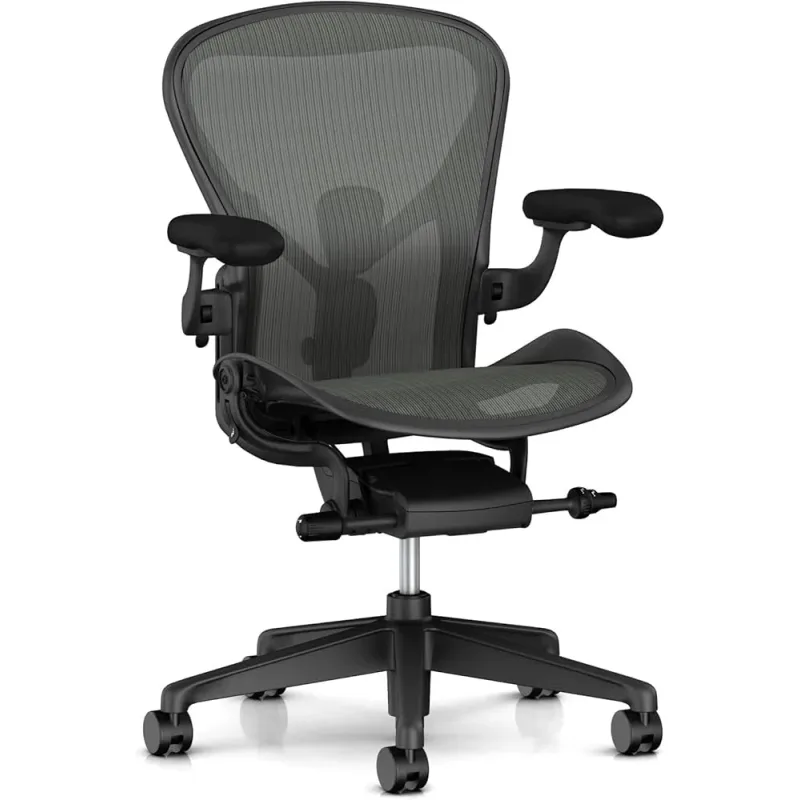
Herman Miller Aeron
Pros
- ✓ PostureFit SL addresses lumbar and sacral support simultaneously
- ✓ Pellicle mesh breathes — no sweaty back during long sessions
- ✓ Three size options ensure a proper anatomical fit
- ✓ 12-year warranty covers every component, including mesh
Cons
- ✗ $1,395 is a significant upfront cost
- ✗ Firm mesh feel requires a break-in period of several days
- ✗ No seat depth adjustment — sizing handles fit instead
If you sit for six or more hours per day, the chair is where to invest first. It is the component you interact with continuously — not occasionally like a desk, not indirectly like a monitor arm.
The Herman Miller Aeron has held the top position in commercial ergonomic seating for over 25 years because it solves the two problems that cheaper chairs ignore: fit and sustained support.
Fit first. The Aeron comes in three sizes — A for smaller frames (under 5’4”, ~130 lbs), B for the majority of adults (5’2”–6’, up to 230 lbs), and C for larger frames (5’10”–6’7”). Choosing the correct size is more important than any other ergonomic adjustment. A Size B on a person who fits Size A is less comfortable than a $300 chair that fits properly.
PostureFit SL is the differentiator. Most chairs offer a single lumbar pad. The Aeron’s PostureFit SL system uses two independently adjustable pads — one targeting the lumbar spine, one the sacrum. Together, they support the natural S-curve of the spine rather than just one segment of it. This distinction is why the Aeron remains relevant at its price point when dozens of competitors have attempted to replicate it at lower cost.
The mesh takes adjustment. Pellicle mesh feels firmer than foam for the first week. It distributes pressure more evenly across the seat and back, reduces contact points that cause pressure buildup, and breathes throughout the day. After the adjustment period, most users report the mesh feel as an advantage, not a drawback. Foam alternatives compress over time; Pellicle maintains its tension for the life of the chair.
Longevity changes the math. At $1,395 with a 12-year warranty and a realistic lifespan of 15–20 years, the Aeron costs roughly $0.09 per hour of use based on a standard 40-hour work week. For comparison, a $400 chair that needs replacement every three to four years costs more per hour over the same period.
For a deeper look at the Aeron — including the sizing process, PostureFit adjustment walkthrough, and honest take on who should skip it — see our full Herman Miller Aeron review.
Budget Chair Alternative: The Branch Ergonomic Chair at $329 delivers adjustable lumbar, 4D armrests, and a well-constructed mesh back at under a third of the Aeron’s price. It lacks the PostureFit SL system and the long-term durability data, but it is a legitimate ergonomic chair — not a gaming chair masquerading as one. If you’re weighing whether active posture retraining might help alongside a new chair, see our Posture Corrector vs Ergonomic Chair comparison.
The Standing Desk: UPLIFT V3
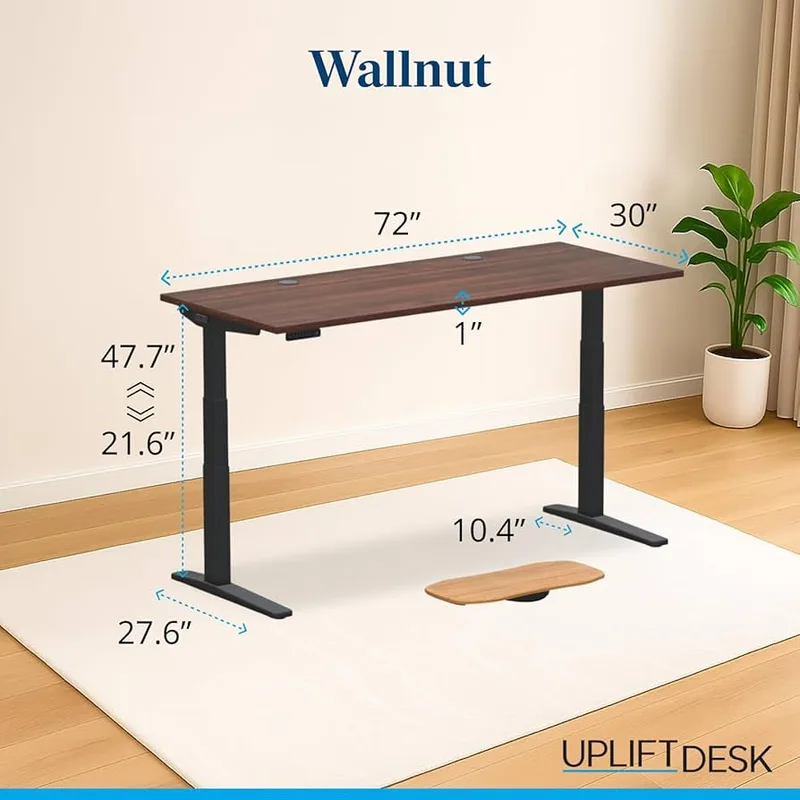
UPLIFT V3
Pros
- ✓ C-frame design dramatically reduces wobble at full height
- ✓ 22+ desktop finishes and sizes for custom configurations
- ✓ Programmable keypad with 4 height presets (included)
- ✓ 48 integrated mounting points for the UPLIFT accessory ecosystem
Cons
- ✗ Starts ~$100 more than comparable FlexiSpot configurations
- ✗ 355 lb capacity is lower than FlexiSpot's 440 lbs
- ✗ Motor slightly louder (~55 dB) than quieter competitors
The standing desk market has consolidated significantly. Several brands that dominated five years ago have exited or degraded in quality. The desks worth buying in 2026 share a few common traits: dual motors for stability and load capacity, three-stage legs for maximum height range, and genuine warranty support.
The UPLIFT V3 earns its position at the top through a combination of engineering decisions that become obvious during daily use.
The C-frame eliminates the primary complaint about standing desks. Wobble at standing height is the most common frustration with electric sit-stand desks. The V3’s C-frame crossbar — which runs underneath the desktop connecting both legs — dramatically increases lateral stability compared to standard T-frame designs. At full extension with a dual-monitor setup, the difference is noticeable.
Height range covers nearly everyone. The V3 reaches from 21.6” (appropriate for seated use at around 5’0”) to 47.7” standing height (comfortable standing position for users up to approximately 6’2”). Taller users should look at the UPLIFT Commercial variant, which extends to 52.1”.
The accessory ecosystem adds long-term value. UPLIFT’s 48 integrated mounting points make it straightforward to add cable management channels, monitor mounts, CPU holders, and keyboard trays without drilling or clamping. For a workspace that evolves over time, this matters.
What the V3 doesn’t do better. The FlexiSpot E7 Pro offers 440 lbs of weight capacity versus the V3’s 355 lbs, has a quieter motor, and starts approximately $100 cheaper for equivalent configurations. If weight capacity or noise level are primary concerns — particularly for dual-monitor setups with heavy displays plus desktop equipment — the FlexiSpot vs UPLIFT comparison covers that decision in detail. For most users, the UPLIFT’s stability and customization options tip the balance.
Budget Desk Alternative: The Flexispot E5 starts around $280 and delivers reliable dual-motor performance with a 3-year warranty. It competes directly with standing desks at twice the price on core functionality, with fewer customization options. Our best standing desks under $500 roundup covers the full mid-range field.
The Monitor Arm: Ergotron LX
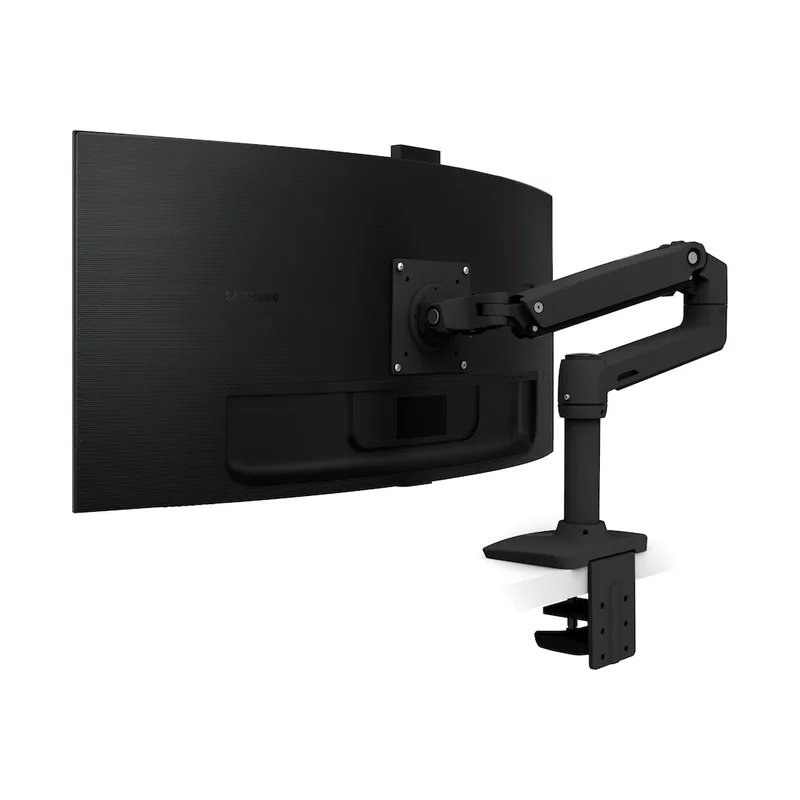
Ergotron LX
Pros
- ✓ Aircraft-grade aluminum construction — no flex under heavy monitors
- ✓ Gas spring holds position perfectly without drift
- ✓ 360-degree rotation supports portrait mode workflows
- ✓ 10-year warranty matches premium desk and chair tiers
Cons
- ✗ $179 is premium pricing for a single-monitor arm
- ✗ Tension adjustment hex key is easy to misplace
- ✗ Polished aluminum finish shows fingerprints readily
Monitor positioning is ergonomics’ most underrated variable. The standard recommendation — top of the screen at or slightly below eye level, monitor 20–28 inches from your face — is impossible to achieve consistently without a monitor arm if your desk height changes throughout the day. A standing desk without a monitor arm forces a choice: optimize for sitting, or optimize for standing.
The Ergotron LX is the reference-class monitor arm because it handles this problem with a mechanical precision that cheaper arms do not approach.
The gas spring holds position without drift. Every monitor arm uses either a gas spring or a friction joint to maintain position. Gas springs counterbalance the weight of the monitor and hold the arm exactly where you place it. Friction joints depend on tightened bolts that loosen over time. The Ergotron LX’s gas spring, combined with a 7–25 lb weight range, handles everything from lightweight 24-inch monitors to heavy 34-inch ultrawide panels. There is no gradual sagging over time.
The build quality is categorical. Aircraft-grade aluminum construction means zero flex in the arm at any position. The cable routing channels inside the arm keep the desk surface clean. The polished aluminum aesthetic works with virtually any desk surface or office aesthetic.
360-degree rotation is more useful than it sounds. Being able to flip a monitor to portrait orientation for reading documents, viewing code, or working with long-form content is a meaningful productivity feature. Most arms that offer rotation do so with stiff joints. The Ergotron LX rotates smoothly.
10-year warranty. At $179, this is the most consumer-friendly warranty in the monitor arm category at any price.
For the full monitor arm comparison — including the Amazon Basics alternative that uses Ergotron’s own internals at a 35% discount — see our complete monitor arm buying guide.
Budget Arm Alternative: The VIVO STAND-V001 handles single monitors up to 22 lbs for under $35. It uses manual height adjustment rather than a gas spring, so repositioning requires more effort, but for a stationary desk setup it performs reliably.
Supporting Accessories
The chair, desk, and monitor arm form the ergonomic foundation. These additions address the remaining contact points.
Keyboard Tray. For users with standing desks, a keyboard tray positions the keyboard below the desk surface, allowing a more neutral wrist angle and more precise elbow positioning. This matters most for users whose desk surface sits slightly too high for proper seated typing position. See our keyboard tray roundup for options at every price point.
Footrest. If your chair’s seat height is set correctly for your desk (thighs roughly parallel to the floor), your feet may not reach the floor flat — particularly for shorter users. A footrest keeps the lower legs at a proper angle rather than hanging. Our footrest guide covers both seated and anti-fatigue standing options.
Desk Lighting. Overhead lighting that creates glare on monitors is a consistent source of eye strain and secondary headaches. A monitor-mounted light bar — such as the BenQ ScreenBar — illuminates the desk surface without hitting the screen. See the BenQ ScreenBar review for specifics. Alternatively, our best desk lamps for eye strain guide covers a broader range of options.
Budget Breakdown by Tier
| Category | Entry (~$200–400) | Mid (~$400–800) | Premium ($800+) |
|---|---|---|---|
| Chair | Branch Ergonomic (~$329) | Steelcase Leap V2 refurb (~$600) | Herman Miller Aeron (~$1,395) |
| Desk | FlexiSpot E5 (~$280) | FlexiSpot E7 Pro (~$550) | UPLIFT V3 (~$699+) |
| Monitor Arm | VIVO V001 (~$35) | Amazon Basics Arm (~$110) | Ergotron LX (~$179) |
| Keyboard Tray | Mount-It! Under-Desk (~$45) | Ergotron Neo-Flex (~$100) | Humanscale Float (~$290) |
| Footrest | Everlasting Comfort (~$30) | Humanscale FM300 (~$75) | Humanscale FR300 (~$120) |
| Tier Total (approx.) | ~$720 | ~$1,435 | ~$2,183+ |
Notes: Desk prices reflect base configurations without desktop upsells. Chair prices reflect new retail; refurbished premium chairs can significantly reduce tier two cost.
FAQ
How much should I budget for a complete ergonomic workspace?
A functional ergonomic workspace can be built for $700–800 at the entry tier. This covers a genuine ergonomic chair (not a gaming chair), a basic sit-stand desk, and a budget monitor arm. The mid tier at $1,200–1,500 is where performance-to-cost optimization peaks — you get professional-grade components without premium branding markup. The premium tier at $2,000+ makes sense for users who spend 8+ hours per day at a desk and can amortize the cost over a 10–15 year product lifespan.
Should I buy a chair or desk first?
Chair first, without hesitation. You sit in your chair for every minute at your desk. The desk affects posture only when transitioning between sitting and standing. If your budget forces a choice, spend the most on the chair — a good chair on a standard desk beats a bad chair on an excellent standing desk.
What’s the correct monitor height for an ergonomic setup?
The top of the screen should be at or slightly below eye level when seated upright. Most people using their laptop or a monitor on a flat desk surface look slightly downward, which strains the neck over time. A monitor arm (or even a simple riser) corrects this. The 20–28 inch viewing distance recommendation varies by monitor size — larger screens can be viewed from farther away without detail loss.
Can I build an ergonomic workspace without a standing desk?
Yes. The standing desk is a valuable addition for anyone who wants to alternate positions throughout the day, but it is not a prerequisite for an ergonomic workspace. A fixed-height desk set to proper seated height, combined with a good chair and correctly positioned monitor, is ergonomically sound. The research on standing desk benefits is real but modest — what matters most is not standing, but moving regularly and avoiding static postures.
How long does it take to adjust to a new ergonomic setup?
Most people notice a reduction in discomfort within one to two weeks, with full adaptation — including calibrating all adjustments — taking three to four weeks. The most common mistake is adjusting one thing (usually chair height) without recalibrating the rest of the system. If you change chair height, monitor arm position changes. If monitor height changes, monitor distance may need adjustment. Treat the workspace as a system and adjust all variables together when making changes.
Verdict: Recommended Complete Setups
Entry Tier (~$720): Branch Ergonomic Chair + FlexiSpot E5 desk + VIVO V001 monitor arm. This combination delivers real ergonomic function at a price accessible to most home office setups. The Branch chair is the genuine ergonomic option in this price range; the FlexiSpot E5 is a reliable sit-stand desk without unnecessary features; the VIVO arm requires manual adjustment but holds position adequately for a non-adjustable daily setup.
Mid Tier (~$1,435): Refurbished Steelcase Leap V2 + FlexiSpot E7 Pro + Amazon Basics Monitor Arm (Ergotron internals at 35% less). This is the performance-per-dollar sweet spot. The Leap V2 — available for $500–700 refurbished from certified dealers — is a match for the Aeron in adjustability and support. The FlexiSpot E7 Pro adds the Ergotron LX’s stability equivalent without the UPLIFT price premium.
Premium Tier (~$2,183+): Herman Miller Aeron (Size B or C) + UPLIFT V3 + Ergotron LX. This is the combination covered in detail throughout this guide. Each product leads its category in long-term durability and adjustment range. For users who sit 7+ hours per day, the total cost becomes negligible against the productivity and health benefits accrued over a 10-year ownership period. Add the keyboard tray, footrest, and monitor lighting from the accessories section for a fully configured workspace.
One rule applies at every tier: buy the chair first, size it correctly, and calibrate the desk and monitor to the chair — not the other way around. The ergonomic system works from the ground up.