Disclosure: PostureRanked is reader-supported. When you buy through links on our site, we may earn an affiliate commission at no additional cost to you. Our recommendations are based on independent research and testing.
| Product | Price | Rating |
|---|---|---|
| Kinesis Advantage360 Pro | $499 | 9.2 |
| ZSA Moonlander | $365 | 9.0 |
| ErgoDox EZ | $270 | 8.7 |
| Ultimate Hacking Keyboard v2 | $352 | 8.8 |
| Kinesis Freestyle Pro | $179 | 8.5 |
| Matias Ergo Pro Programmable | $259 | 8.3 |
Disclosure: PostureRanked is reader-supported. When you buy through links on our site, we may earn an affiliate commission at no extra cost to you. Learn more
Most people come to luxury ergonomic keyboards the same way: wrist pain that won’t quit, a physio referral, or a colleague whose RSI disappeared after switching. In early 2026, Engadget refreshed their ergonomic keyboard guide after testing 15 boards and named keyboards like the Kinesis mWave and Keychron Q11 as top picks for mainstream buyers. But mainstream picks and luxury picks are solving different problems. The $119 mWave is a solid gateway. The keyboards on this list are the destination.
These are split mechanical keyboards built to last a decade, with firmware you can reprogram without limits, switches you can swap, and ergonomic corrections deep enough to actually change how your hands sit at a desk. They’re not cheap. They’re not supposed to be.
If you want the short answer: the Kinesis Advantage360 Pro is the most ergonomically effective keyboard on the market. The ZSA Moonlander is the best choice if you want hot-swap switches and exceptional software. The Kinesis Freestyle Pro at $179 is the right pick if you want a split keyboard without rebuilding your muscle memory.
Kinesis Advantage360 Pro
Kinesis Advantage360 Pro
Pros
- ✓ Deepest ergonomic correction available — contoured key wells eliminate lateral finger reach entirely
- ✓ Full Bluetooth between halves, no cable connecting left and right
- ✓ 360-degree tenting with palm pads included in the box
- ✓ Open-source ZMK firmware supports complete layout customization
Cons
- ✗ Steepest learning curve of any keyboard here — expect 3-6 weeks to reach previous typing speed
- ✗ Large footprint, not portable
- ✗ $499 is a hard sell unless you have documented RSI or spend 8+ hours typing daily
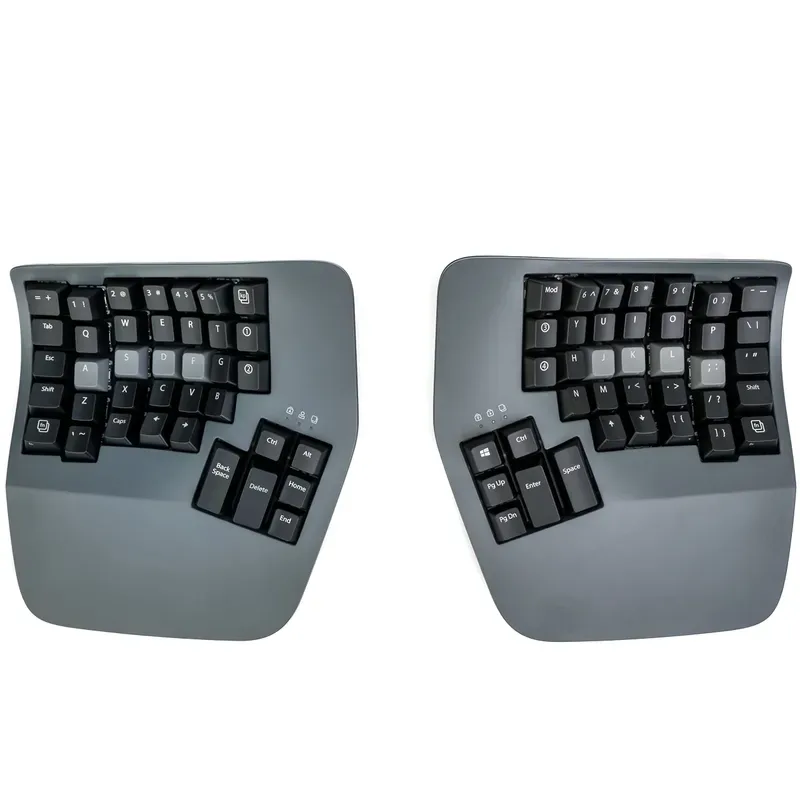
The Advantage360 Pro is what happens when you ignore every compromise. The key wells are deeply contoured — your fingers drop into them rather than reaching across a flat surface. The layout is ortholinear, so columns are straight and each finger travels the same distance up and down. Add full Bluetooth between the two halves (no cable connecting them), 360-degree tenting, and open-source ZMK firmware, and you have the most ergonomically complete keyboard available at any price.
The catch is the learning curve. It’s the real thing. Most people who bought an Advantage360 report 3-6 weeks of feeling incompetent before their speed returns. The ortholinear layout, contoured wells, and thumb clusters all rewire the hand positions you’ve spent years building. That’s also precisely what makes it effective — it forces you to adopt the correct posture rather than letting you half-do it.
At $499, it’s a serious commitment. But if you’ve already spent that on ergonomic chairs, standing desks, and physical therapy, the Advantage360 is the intervention that works.
Best for: Anyone with diagnosed RSI or wrist/shoulder problems from long daily typing sessions.
ZSA Moonlander
ZSA Moonlander
Pros
- ✓ Hot-swappable switches — change feel or try new switches without soldering
- ✓ Oryx browser configurator makes remapping approachable for non-programmers
- ✓ Thumb cluster wings fold down to serve as tenting legs
- ✓ Robust QMK support with a huge enthusiast community behind it
Cons
- ✗ Only available direct from ZSA — no Amazon option, shipping can take 2-3 weeks
- ✗ Thumb cluster requires adjustment if coming from standard stagger layout
- ✗ No wireless option
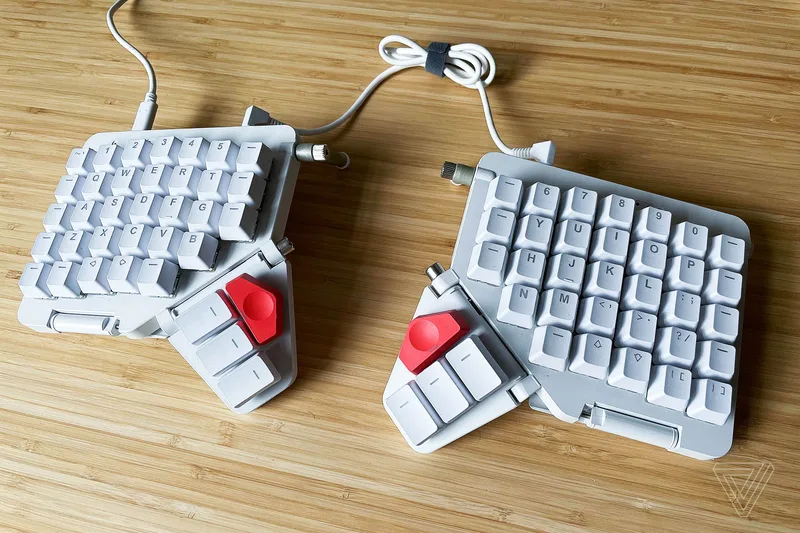
The Moonlander sits at the practical center of this list. Hot-swappable switches, an excellent browser-based configurator (Oryx), and a design that works both as a daily workhorse and as a tinkerer’s playground. The thumb cluster wings double as tenting legs when folded down — not a gimmick, genuinely functional.
The QMK firmware community behind the Moonlander is enormous. You’re not writing layer config from scratch; thousands of people have shared starting points on GitHub, Reddit, and the ZSA forums. If you’re a programmer who wants to learn keyboard firmware at your own pace, there’s no better entry point at this price. The $365 price includes your choice of switches at checkout — linear, tactile, or clicky — which is a meaningful advantage over keyboards that lock you in.
The main limitation: no wireless. The Moonlander is USB-C only, and ZSA ships direct from Canada, so factor in 2-3 weeks of lead time.
Best for: Programmers, writers, and power users who want maximum customizability and an active community.
ErgoDox EZ
ErgoDox EZ
Pros
- ✓ Widest switch selection at checkout of any keyboard on this list
- ✓ Large thumb cluster — 6 thumb-accessible keys per hand
- ✓ Enormous QMK community with thousands of shared layouts to start from
- ✓ Oryx configurator works identically to the ZSA Moonlander
Cons
- ✗ No built-in tenting — the Wing tilt kit is a separate $50 purchase
- ✗ Base $270 price climbs fast with options and add-ons
- ✗ Fully non-standard layout — no shortcuts for people new to ortholinear
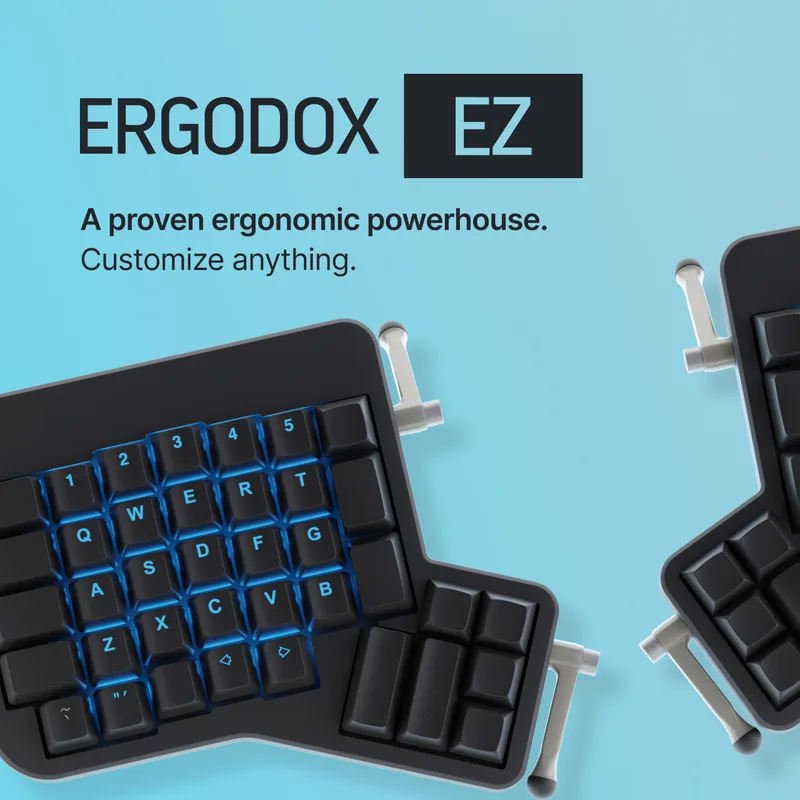
The ErgoDox EZ came before the Moonlander, and ZSA — the same company — built the Oryx software for both boards. Functionally, the two are siblings. The ErgoDox is ortholinear where the Moonlander is columnar-staggered, which is a meaningful difference in feel. The ErgoDox also has a larger thumb cluster (6 keys per hand instead of 5), which gives you more remapping flexibility for modifiers, layers, and macros.
At $270 base, it’s the most affordable fully ortholinear hot-swap split on this list. That price climbs quickly with options — add the Wing tenting kit ($50), choose premium switches, swap the keycaps — but the base board is excellent and the QMK community is even larger than the Moonlander’s specifically because the ErgoDox has been around longer.
No built-in tenting is the main structural drawback. If proper tenting matters to you, budget for the Wing kit upfront.
Best for: QMK enthusiasts, Vim users, and people who want the largest possible thumb cluster for layer switching.
Ultimate Hacking Keyboard v2
Ultimate Hacking Keyboard v2
Pros
- ✓ Familiar ANSI stagger means the lowest relearning curve of any true split on this list
- ✓ Modular system adds trackball, trackpoint, key cluster, or touchpad modules
- ✓ Agent configuration software is the most polished open-source keyboard tool available
- ✓ Built in Hungary — exceptional build tolerances and double-shot PBT keycaps
Cons
- ✗ 60% layout has no dedicated function row — requires layer adjustment
- ✗ USB-A only — no USB-C cable, no wireless
- ✗ Modular add-ons cost extra — a fully kitted UHK can run past $400
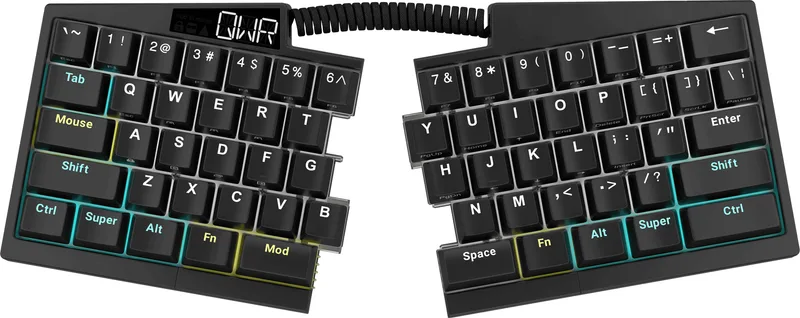
The UHK takes a different philosophy from the rest of the list: keep the standard ANSI stagger, make it split, and extend it with a modular accessory system. The result is a keyboard that gives you the shoulder-width separation of a split board without any of the layout relearning. Someone can pick up a UHK and type at full speed within minutes.
What sets it apart is the modular add-on system. You can attach a trackball, trackpoint, trackpad, or key cluster to the right half in seconds. For developers who want to minimize mouse movement — keeping hands on the keyboard while navigating code — the key cluster module that packs 7 extra keys in the thumb zone is legitimately useful. The Agent configuration software is the most polished open-source keyboard tool available: clean UI, layer visualization, solid macro editor.
The downsides are real: no USB-C, no wireless, and the 60% layout requires a layer for function keys. But if you’ve been put off by ortholinear keyboards and want ergonomic gains without the learning cliff, the UHK is the one.
Best for: Developers who want split ergonomics on a familiar ANSI layout, especially those who use Vim or terminal-heavy workflows.
Kinesis Freestyle Pro
Kinesis Freestyle Pro
Pros
- ✓ Standard stagger layout — no relearning at all, type at full speed on day one
- ✓ Up to 20-inch separation between halves — more than any competitor at this price
- ✓ SmartSet engine stores 9 custom layouts directly on-board, no software needed
- ✓ Most affordable mechanical split keyboard on this list
Cons
- ✗ Tenting requires the VIP3 lifter kit as a separate purchase
- ✗ No hot-swappable switches — committed to your switch choice at order
- ✗ Firmware customization is more limited than QMK alternatives
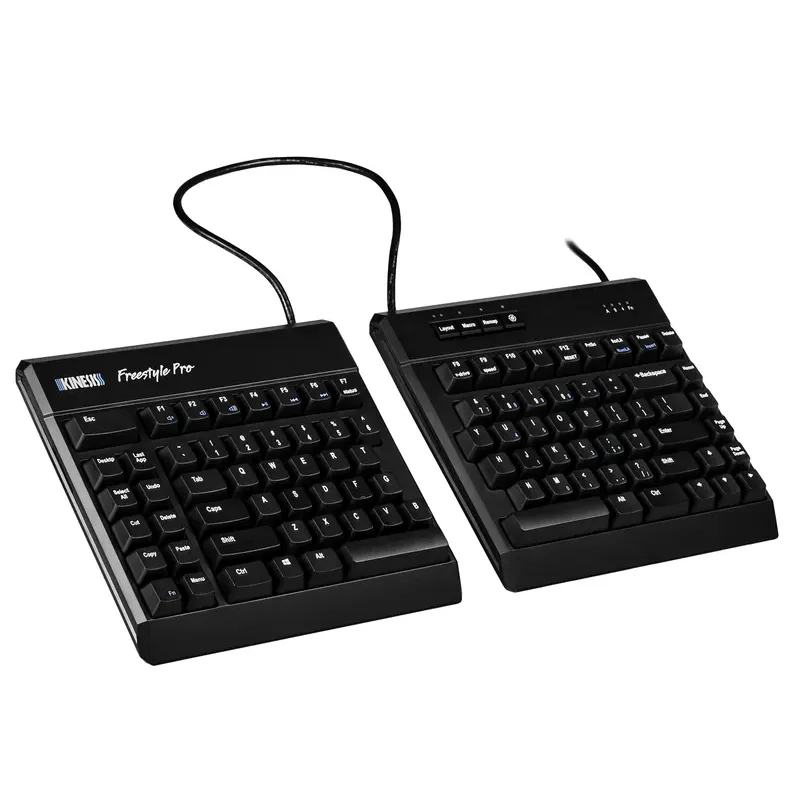
The Freestyle Pro is the most accessible keyboard on this list. Standard ANSI stagger, Cherry MX switches, up to 20 inches of separation between halves. Pick one up and you’ll type at your normal speed within hours.
The trade-off for approachability is limited ceiling. You can’t hot-swap switches. The SmartSet firmware is functional but far simpler than QMK. Tenting requires the VIP3 lifter kit as a separate add-on. And the design is showing its age — USB-A, no backlight on some variants, no Bluetooth.
But for someone whose primary goal is reducing wrist deviation and shoulder inward rotation — the two most common RSI contributors for desk workers — the Freestyle Pro at $179 does the job. The 20-inch separation is genuinely more than competitors like the Microsoft Sculpt offer, and it’s a real mechanical keyboard with real Cherry MX switches, not a rubber dome.
If you’re not ready to spend $365+ and don’t want to spend weeks relearning to type, start here.
Best for: First-time split keyboard users, people who want ergonomic improvements without a relearning period.
Matias Ergo Pro Programmable
Matias Ergo Pro Programmable
Pros
- ✓ Matias Quiet-Click switches offer a tactile character unlike any Cherry MX equivalent
- ✓ Built-in tenting legs — no separate accessories needed
- ✓ Integrated USB 2.0 hub adds two ports directly on the keyboard
- ✓ Gel palm rests included in the box at this price
Cons
- ✗ Matias Alps-style switches are divisive — very different feel from Cherry MX Brown
- ✗ Availability is inconsistent — can go out of stock for weeks at a time
- ✗ Less firmware flexibility compared to QMK boards
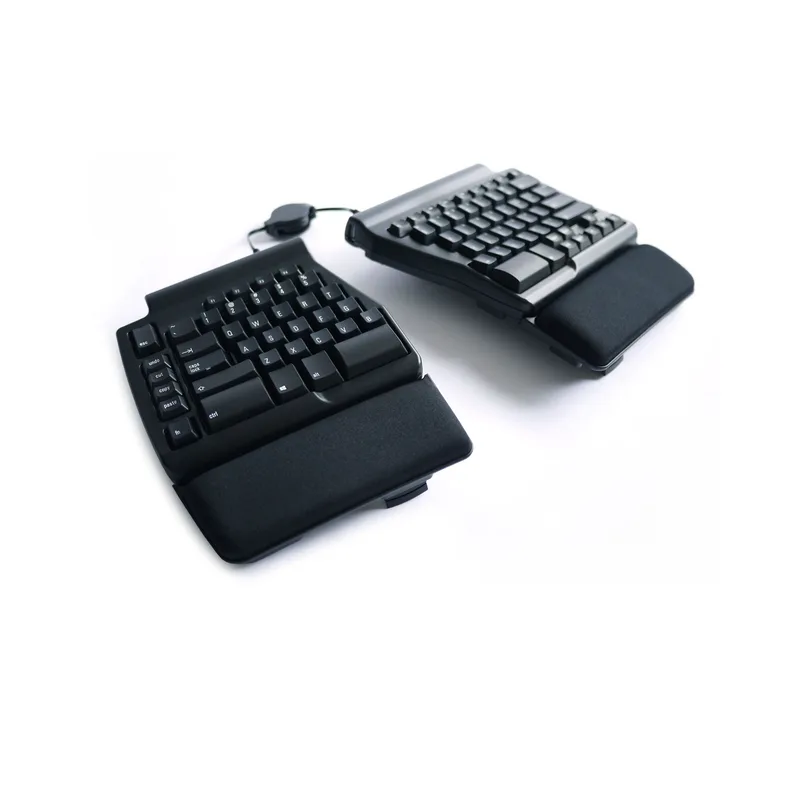
The Matias Ergo Pro runs Alps-style switches rather than Cherry MX. Specifically, Matias Quiet-Click switches — a tactile bump at the top of the keystroke with a quiet landing. The feel is distinct enough that Cherry-loyal typists will either love it or find it jarring. For Mac typists and people who’ve used older Apple Extended Keyboards, it’ll feel like coming home.
The practical advantages are solid: built-in tenting legs (no add-on), gel palm rests in the box, an integrated USB 2.0 hub, and a standard stagger layout. The programmable version (B09C7KYRRM) lets you assign text strings up to 60 characters to a single key — useful for email signatures, code snippets, or long commands.
The main risk with the Matias is availability. It can go out of stock for weeks at a time on Amazon. If you find it in stock at $259 and your instinct is Alps-style switches, buy it — these boards don’t go on deep discount. If you’re building a luxury home office setup and want reliable delivery, the ZSA Moonlander or UHK are safer bets.
Best for: Mac users, typists who prefer Alps-style switches, and anyone who wants everything included in the box.
Comparison Table
| Keyboard | Price | Layout | Switches | Hot-Swap | Wireless | Rating |
|---|---|---|---|---|---|---|
| Kinesis Advantage360 Pro | $499 | Split ortholinear contoured | Cherry MX / Gateron | No | Yes (BT 5.0) | 9.2 |
| ZSA Moonlander | $365 | Split columnar stagger | Your choice | Yes | No | 9.0 |
| Ultimate Hacking Keyboard v2 | $352 | Split ANSI 60% | Cherry MX / Kailh | No | No | 8.8 |
| ErgoDox EZ | $270 | Split ortholinear | Your choice | Yes | No | 8.7 |
| Kinesis Freestyle Pro | $179 | Split standard stagger | Cherry MX Brown / Red | No | No | 8.5 |
| Matias Ergo Pro Programmable | $259 | Split standard stagger | Matias Quiet-Click | No | No | 8.3 |
Buying Guide: What to Look for in a Luxury Ergonomic Keyboard
Split vs. Tented vs. Contoured
These three design approaches target different problems. A split keyboard separates into two halves you position at shoulder width — this alone fixes most ulnar deviation and shoulder rounding. Tenting raises the inner edge of each half so your palms rotate inward less; combined with split, it eliminates pronation. Contoured well designs like the Advantage360 add a third dimension: keys are arranged in curved columns so your fingers travel vertically rather than diagonally. Each step adds ergonomic benefit and learning curve.
Layout: Staggered vs. Ortholinear
Standard keyboards use a “staggered” layout where rows are offset — a legacy of mechanical typewriter clearances. Ortholinear keyboards align columns vertically. The ergonomic case for ortholinear is that stagger forces lateral finger reach; ortholinear eliminates it. The practical case against it: you’ll type slowly for weeks. If you can afford the relearning time, ortholinear is worth it. If you can’t, the Freestyle Pro and Matias maintain standard stagger.
Firmware: QMK vs. Proprietary
QMK is open-source keyboard firmware with a massive community and near-unlimited configurability: layers, tap-hold behaviors, combos, auto-shift, macros, custom RGB, and more. All three of the top picks here (Advantage360 ZMK, Moonlander QMK, ErgoDox QMK) use it or a compatible variant. Proprietary firmware on the Freestyle Pro and Matias is simpler to use but hits walls quickly if you want complex remapping. The UHK Agent sits between them — open-source but purpose-built.
Hot-Swap vs. Soldered
Hot-swap switches let you remove and replace switches without soldering. If you’re not sure which switch you’ll prefer long-term (tactile vs. linear vs. clicky), hot-swap is worth the premium. The ZSA Moonlander and ErgoDox EZ both support it. The others don’t.
Budget Expectations
For context: a budget split keyboard runs $80-130. A mainstream ergonomic split (like the Microsoft Sculpt or Logitech Ergo K860) runs $100-150. Everything on this list is luxury tier — $179 at the floor, $499 at the ceiling. These are keyboards built to last 10-15 years. The math on a $365 keyboard used daily for five years is $73/year, or about $0.20 per day of typing.
FAQ
Is the learning curve for ortholinear keyboards really that bad?
For most people: yes, and it’s worth it. Expect 2-3 weeks of noticeably slower typing and around 4-6 weeks to return to previous speed, depending on how much you type daily. Heavy typers (8+ hours/day) adapt faster. The good news is that once you’ve adapted, going back to standard keyboards isn’t as disorienting as the learning curve in reverse.
Can I use these keyboards with both Mac and Windows?
Yes, all of them support both operating systems. QMK boards (Moonlander, ErgoDox EZ, UHK) can store separate Mac and Windows layers on the keyboard itself, switching between them with a key combo. The Kinesis Advantage360 has dedicated Mac and PC modes. The Freestyle Pro ships with pre-configured Mac hotkeys. The Matias Ergo Pro has separate Mac and PC models — make sure you order the right one.
Do I need to program these keyboards to use them out of the box?
No. Every keyboard here works immediately with a standard default layout. Programming is optional, but the people who buy these boards eventually use it — custom layers, remapped modifiers, macros for common shortcuts. The Oryx configurator for the Moonlander and ErgoDox makes this approachable without touching raw firmware.
Are wrist rests necessary with split ergonomic keyboards?
It depends on the keyboard. The Matias Ergo Pro includes gel palm rests. The Kinesis Advantage360 includes palm pads. The ZSA Moonlander and ErgoDox EZ don’t — they’re designed to use without wrist rests during active typing, with rests only during pauses. Check our best wrist rests for mechanical keyboards guide if you need to add them.
What about wireless — do any of these keyboards support Bluetooth?
Only the Kinesis Advantage360 Pro has Bluetooth (5.0), and uniquely, the connection between the two halves is also wireless. The other keyboards on this list are USB-only. If wireless is non-negotiable, the Advantage360 Pro is your pick; otherwise the ZSA Moonlander’s USB-C reliability is arguably preferable for zero-latency work.
Are these keyboards compatible with ergonomic desk setups?
Yes, and they’re a natural upgrade alongside a standing desk or keyboard tray. The ability to position each half independently is especially useful on L-shaped and sit-stand desks where you might angle the halves differently depending on your sitting vs. standing position.
Conclusion
The Kinesis Advantage360 Pro ($499) is the most ergonomically complete keyboard available. If wrist or shoulder pain is the reason you’re here, this is the one. It will cost you three weeks of slower typing. It will be worth it.
If you want maximum flexibility without the deep learning curve of the contoured layout, the ZSA Moonlander ($365) is the better call — hot-swap switches, excellent software, and a proven track record with programmers and writers.
For developers who want split ergonomics without relearning their layout: the Ultimate Hacking Keyboard v2 ($352) is the answer. ANSI stagger, modular add-ons, best-in-class configuration software.
If $179 is your ceiling and you’re not willing to spend six weeks adapting to an ortholinear layout, the Kinesis Freestyle Pro delivers meaningful ergonomic improvement with zero relearning. It’s where most people should start.
For more on building out the rest of your workspace, see our luxury home office setup guide and best desk accessories roundup.