Disclosure: PostureRanked is reader-supported. When you buy through links on our site, we may earn an affiliate commission at no additional cost to you. Our recommendations are based on independent research and testing.
| Product | Price | Rating |
|---|---|---|
| Twelve South Curve Flex | $80 | 9.1 |
| Roost V3 Laptop Stand | $72 | 9.0 |
| Rain Design mStand | $45 | 8.6 |
| BoYata Laptop Stand | $30 | 8.7 |
| Nexstand K2 Laptop Stand | $30 | 8.3 |
| Nulaxy C1 Laptop Stand | $20 | 7.9 |
Disclosure: PostureRanked is reader-supported. When you buy through links on our site, we may earn an affiliate commission at no extra cost to you. Learn more
If you use a laptop at a standing desk, you already know the problem: the screen sits way too low. You end up hunching over, craning your neck downward, and undoing every ergonomic benefit the standing desk was supposed to give you. A laptop stand fixes that by bringing your screen up to eye level where it belongs.
But not all stands work the same way. Some are built for portability, folding down to nothing so you can toss them in a bag. Others sit permanently on your desk and look like they belong there. Some adjust to a dozen heights. Others give you exactly one — and hope it’s the right one.
We’ve evaluated stands across every category to find the best options for standing desk users in 2026. Whether you want a travel-ready riser or a permanent desktop solution, here’s what’s actually worth buying.
Short on time? The Twelve South Curve Flex is our top pick — adjustable height up to 22 inches, folds flat for travel, and built from premium aluminum. On a budget? The BoYata Laptop Stand delivers 90% of the experience for $30.
1. Twelve South Curve Flex — Editor’s Pick
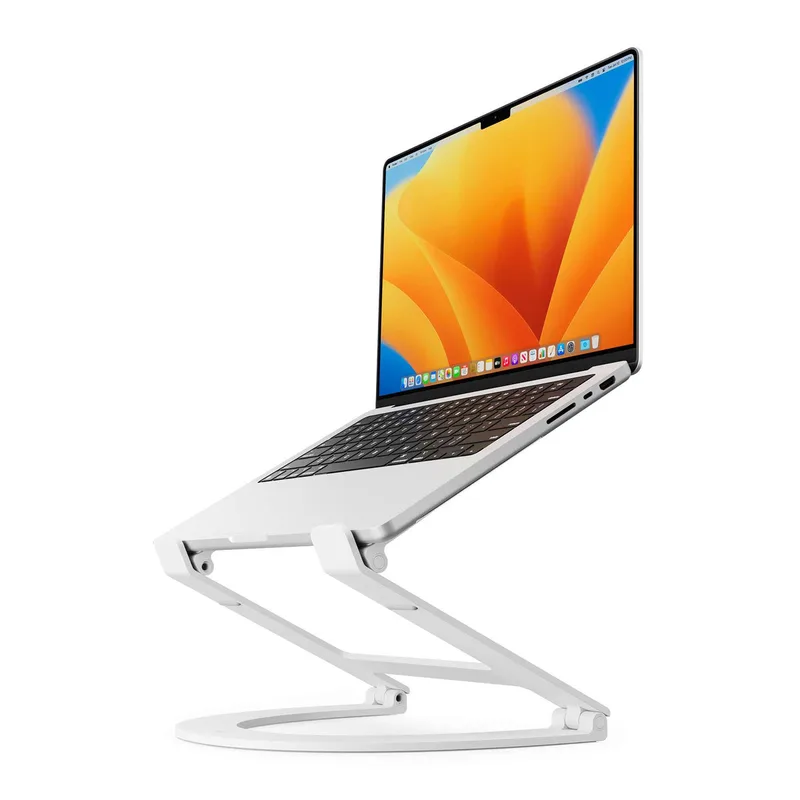
Twelve South Curve Flex
Pros
- ✓ Widest height and angle range of any stand we tested
- ✓ Folds flat with included neoprene travel pouch
- ✓ Premium aluminum build matches MacBook aesthetic
- ✓ Silicone arm covers prevent scratches
Cons
- ✗ 7 lb weight limit rules out heavier gaming laptops
- ✗ At $80, it's the priciest option here
$80 | Buy on Amazon
The Curve Flex is the most versatile laptop stand I’ve used. It adjusts from 2 to 22 inches of height — that upper range matters for standing desks, where you often need more elevation than a typical riser provides. The angle is adjustable too, from flat to 45 degrees, so you can set up a comfortable typing position or go full vertical for an external-monitor-only workflow.
Build quality is excellent. The aluminum arms are coated in textured silicone that grips your laptop securely without scratching it. The bent-arm design keeps the laptop stable even during aggressive typing. When you’re done for the day, it folds completely flat and slides into the included neoprene travel pouch — which makes it a rare stand that works both at your desk and at a coffee shop.
The 7 lb weight limit is the only real limitation. Most ultrabooks and MacBooks fall well under that, but if you’re running a beefy 17-inch gaming laptop, check the weight first. For everyone else, the Curve Flex earns its premium price.
Best for: Standing desk users who want maximum adjustability and premium build quality.
2. Roost V3 — Best for Portability
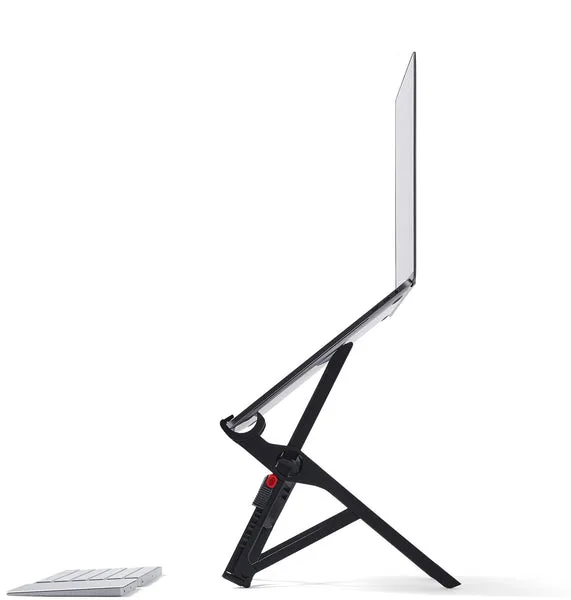
Roost V3 Laptop Stand
Pros
- ✓ At 6 oz, the lightest serious laptop stand on the market
- ✓ Patented rigid structure eliminates wobble
- ✓ Self-adjusting grips fit any laptop automatically
- ✓ Made in the USA
Cons
- ✗ No angle adjustment — vertical lift only
- ✗ Requires external keyboard and mouse
- ✗ Premium price for a plastic stand
$72 | Buy on Amazon
The Roost V3 weighs 6 ounces. That’s less than a phone. For remote workers and digital nomads who carry a laptop between desks, offices, and coffee shops, nothing else comes close.
Don’t let the weight fool you — this stand is rigid. The patented interlocking truss structure eliminates the flex and wobble you get with cheap folding stands. Self-adjusting grips lock onto any laptop from 12 to 18 inches without fiddling with clips or brackets. You set it down, your laptop clicks in, and it’s done.
Height adjusts from 6.5 to 12.5 inches of screen lift, which is solid for most standing desk setups. The trade-off is that you get vertical lift only — no angle adjustment. That’s fine if you’re pairing it with an external keyboard and mouse (which you should be anyway for proper ergonomics at a standing desk). But it means the Roost is specifically an elevation tool, not an all-in-one workspace stand.
At $72, it’s not cheap for what’s essentially a piece of reinforced plastic. But it’s been the go-to for the laptop ergonomics crowd for years, and the build quality justifies the price if portability is your priority.
Best for: Remote workers, digital nomads, and anyone who needs a stand that disappears into a bag.
3. Rain Design mStand — Best Desktop Stand
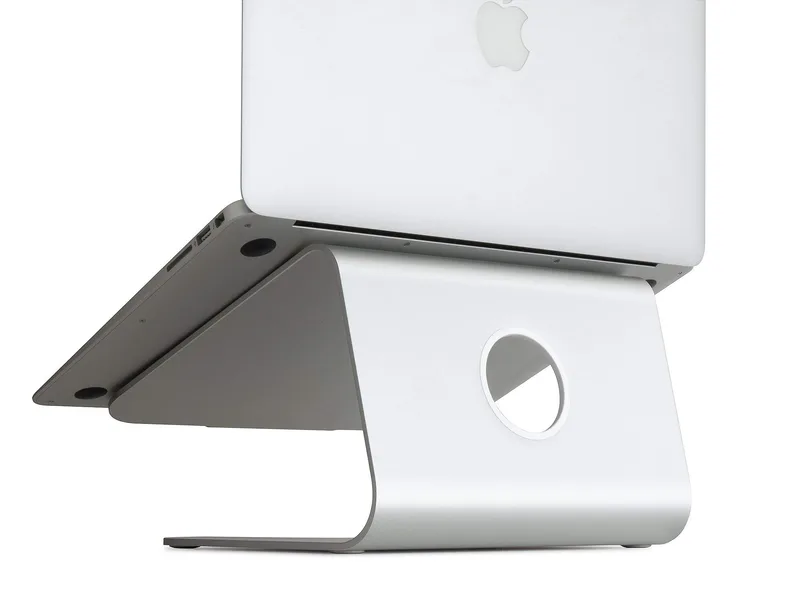
Rain Design mStand
Pros
- ✓ Iconic single-piece aluminum design looks stunning
- ✓ Rock-solid stability — no wobble, no flex
- ✓ Doubles as a heat sink to cool your laptop
- ✓ Built-in cable management
Cons
- ✗ Fixed height — no adjustment
- ✗ Too heavy for travel at nearly 3 lbs
- ✗ 5.9 inches may not be enough elevation for standing desks
$45 | Buy on Amazon
If your laptop lives on one desk and rarely moves, the mStand is the stand to beat. It’s machined from a single piece of aluminum that matches the MacBook aesthetic perfectly — silver, space gray, gold, midnight, and even starlight finishes are available. The thing looks like Apple designed it.
The single-piece construction means zero wobble. Nothing flexes, nothing rattles, nothing shifts. Your laptop sits in a gently curved cradle that also acts as a passive heat sink, drawing heat away from the chassis. A 2-inch cable hole in the back keeps your charging cable tidy.
The limitation is straightforward: 5.9 inches of fixed elevation, no adjustment. For seated desk use, that’s usually perfect. For a standing desk, it depends on your height and monitor setup. Taller users may want more lift. But as a permanent fixture on a standing desk, the mStand adds clean, stable elevation with zero maintenance and zero fuss.
At 2.89 lbs, this isn’t a travel stand. It’s a desktop fixture — and it excels at that job.
Best for: Permanent desk setups where aesthetics and build quality matter.
4. BoYata Laptop Stand — Best Value
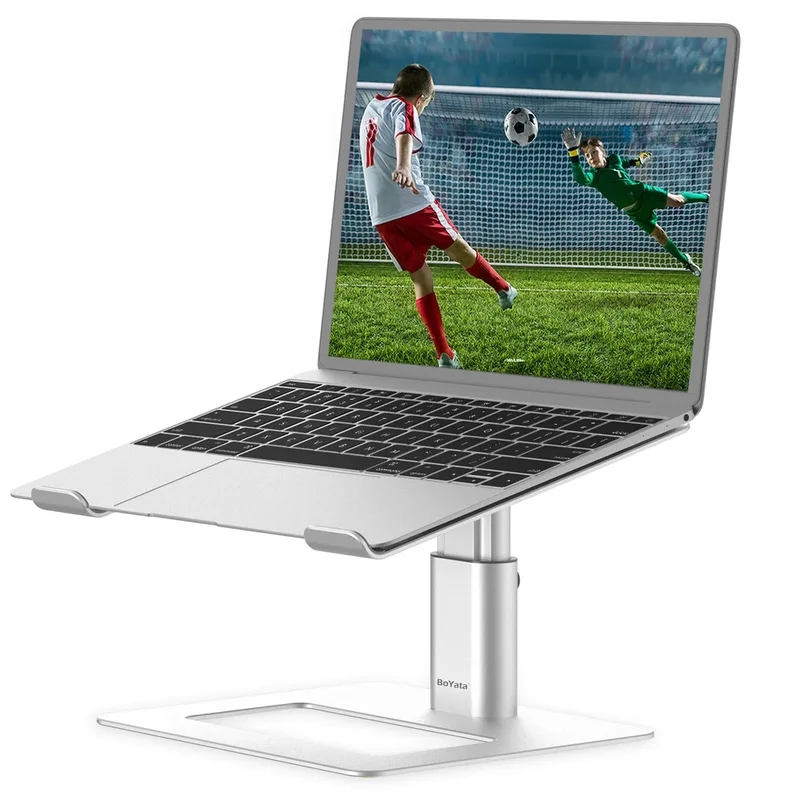
BoYata Laptop Stand
Pros
- ✓ Best build quality under $35
- ✓ Holds laptops up to 17 inches and 11 lbs
- ✓ Adjustable height and angle with firm Z-axis hinge
- ✓ Heat-vent design keeps laptop cool
Cons
- ✗ Hinge is stiff — takes two hands to adjust
- ✗ Not easily portable
- ✗ Generic design won't win any style points
$30 | Buy on Amazon
The BoYata is the stand I recommend when someone asks “what’s the best laptop stand under $35?” It’s aluminum, it’s adjustable, it holds laptops up to 17 inches, and it has over 11,000 reviews on Amazon with a 4.8-star average. That’s not an accident.
The Z-axis hinge lets you adjust both height and viewing angle. It takes some force to move — the hinge is intentionally stiff so it stays put once you set it. That stiffness is actually a feature, not a bug. Cheap stands with loose hinges drift downward under the weight of a laptop. The BoYata stays exactly where you put it.
Heat-vent cutouts in the platform promote airflow, and anti-slip silicone pads on the feet and laptop cradle keep everything in place. The build feels like a $50-60 stand. At $30, it’s a steal.
The downsides are minor. It takes two hands to adjust the angle. It’s not really portable — at 1.6 lbs with no folding mechanism, it’s a desk accessory. And it looks like every other aluminum laptop stand on Amazon. But for the money, nothing else matches the build quality and adjustability.
Best for: Budget-conscious buyers who want adjustable height and solid construction.
5. Nexstand K2 — Best Budget Portable
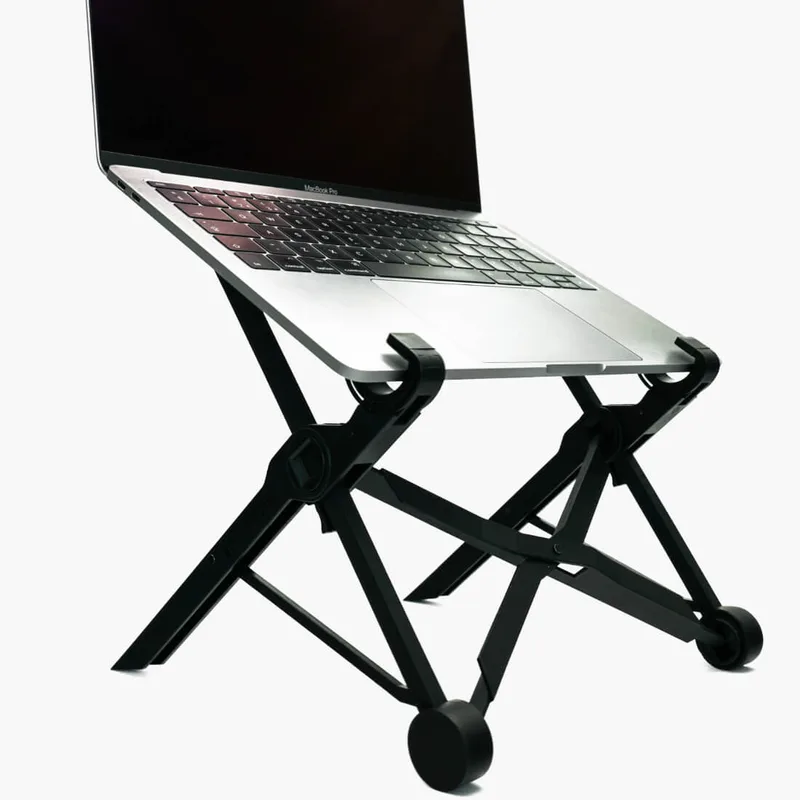
Nexstand K2 Laptop Stand
Pros
- ✓ Half the price of the Roost with similar portability
- ✓ Holds up to 20 lbs — handles any laptop
- ✓ 8 height positions for fine-tuning
- ✓ Folds to the size of a rolled-up magazine
Cons
- ✗ Slightly less rigid than the Roost V3
- ✗ Nylon construction feels less premium
- ✗ Front edge can dig into some laptop chassis
$30 | Buy on Amazon
The Nexstand K2 is the Roost V3’s biggest competitor — and it costs less than half the price. At 8.2 ounces and folding down to the size of a rolled-up magazine (1.5 x 1.5 x 14 inches), it’s almost as portable as the Roost while holding up to 20 lbs. That weight capacity is impressive — the K2 handles gaming laptops that would crush flimsier stands.
Eight height settings give you decent range for dialing in your screen position. The fiberglass-reinforced nylon construction is lightweight and surprisingly strong, though it doesn’t feel as rigid as the Roost’s interlocking truss design. There’s a small amount of flex during heavy typing, though it’s not enough to be a real problem.
The one complaint I hear from K2 users is the front edge — on some laptops, the lip where the stand grips the chassis can feel a bit aggressive. Check your laptop’s front edge thickness before buying. But for $30, the K2 is the best value in the portable stand category by a wide margin.
Best for: Travelers and commuters who want Roost-level portability at half the price.
6. Nulaxy C1 — Budget Pick
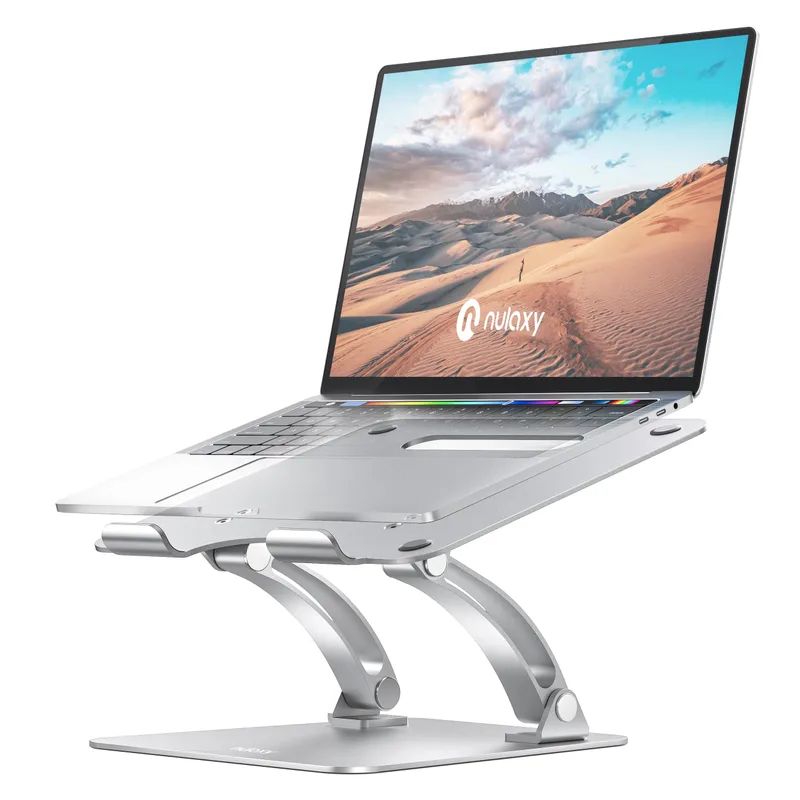
Nulaxy C1 Laptop Stand
Pros
- ✓ Hard to beat at $20
- ✓ Aluminum build at a plastic price
- ✓ Foldable for basic portability
- ✓ Heat-vent cutout helps with cooling
Cons
- ✗ Limited height adjustment range
- ✗ Plastic hinge joints feel cheap over time
- ✗ Wobbles slightly under heavy typing
$20 | Buy on Amazon
At $20, the Nulaxy C1 is the entry point. It’s an aluminum dual-fold stand with a heat-vent cutout, and it works well enough for the price. The dual-fold design means you can adjust the height and angle within a limited range — enough to improve your screen position, though not as dramatically as the taller stands on this list.
The aluminum platform handles laptops up to 17 inches and 22 lbs, which is more capacity than you’ll ever need. It’s reasonably portable at 1 lb and folds down for basic transport, though it’s not in the same league as the Roost or Nexstand for travel.
Where the C1 shows its price is in the hinge joints. They’re plastic, and after months of use, they can develop play. If you’re adjusting the angle frequently, the hinges will loosen faster. For a stand that you set once and leave, that’s not an issue. For one that gets constant adjustment, spend the extra $10 on the BoYata.
Best for: First-time buyers, occasional laptop users, or anyone on a tight budget.
Laptop Stand Comparison Table
| Stand | Price | Weight | Height Range | Portable? | Best For |
|---|---|---|---|---|---|
| Twelve South Curve Flex | $80 | 1.75 lbs | 2–22” | Yes (folds flat) | Maximum adjustability |
| Roost V3 | $72 | 6 oz | 6.5–12.5” lift | Yes (ultra-light) | Travel and portability |
| Rain Design mStand | $45 | 2.89 lbs | 5.9” fixed | No | Permanent desktop setup |
| BoYata | $30 | 1.6 lbs | Adjustable angle | No | Budget adjustable |
| Nexstand K2 | $30 | 8.2 oz | 8 positions | Yes (folds compact) | Budget portable |
| Nulaxy C1 | $20 | 1 lb | Limited range | Semi-portable | Budget entry point |
Buying Guide: What to Look for in a Laptop Stand for Standing Desks
Height Range Matters Most
At a standing desk, your screen needs to be at eye level — roughly 15-20 inches above the desk surface for most people. Some stands only lift 4-6 inches, which is fine for seated use but not enough when you’re standing. Look for stands with at least 8-10 inches of lift, or pair a shorter stand with a monitor arm.
Portable vs. Fixed
Portable stands (Roost, Nexstand) fold small and weigh under half a pound, but they require an external keyboard and mouse. Fixed stands (mStand, BoYata) are sturdier and allow typing directly on the laptop, but they stay on your desk. Pick based on how you actually work.
Weight Capacity
Most laptop stands hold 10-20 lbs, which covers any standard laptop. But if you’re running a 17-inch gaming laptop with a discrete GPU, check the spec sheet. Ultrabooks at 3-4 lbs work on anything. A 7 lb workstation needs a stand rated for it.
Material and Cooling
Aluminum stands double as heat sinks, pulling warmth away from your laptop chassis. Open-platform designs with ventilation cutouts help too. If your laptop runs hot under load — and most do when docked at a standing desk — aluminum with vents is the way to go.
Budget Expectations
- Under $25: Basic elevation, limited adjustability, plastic hinges
- $25–50: Solid aluminum, adjustable height/angle, good for permanent setups
- $50–80: Premium materials, wide adjustment range, portable options
- $80+: Ultra-portable specialty stands, maximum height range
Frequently Asked Questions
Do I need a laptop stand for a standing desk?
Yes — unless your standing desk has a built-in laptop riser or you use an external monitor at eye level. Without elevation, you’ll hunch over your laptop screen, which defeats the purpose of standing. A stand brings the screen up to eye level where your neck stays neutral.
Can I type on my laptop while it’s on a stand?
On low-angle stands like the BoYata and Nulaxy, yes. On tall vertical stands like the Roost and Nexstand, no — you’ll need an external keyboard and mouse. For standing desk ergonomics, the external keyboard setup is actually better because it lets you position your screen and keyboard independently.
How high should my laptop screen be at a standing desk?
The top of your screen should be roughly at eye level, or slightly below. For most people, that means the screen center sits 15-20 inches above the desk surface. Measure from your desk to your eye line while standing naturally, then pick a stand that gets you close.
Are portable laptop stands stable enough for daily use?
The good ones are. The Roost V3 uses an interlocking truss frame that’s remarkably rigid for its weight. The Nexstand K2 has minor flex but nothing that affects normal use. Both hold laptops securely with anti-slip grips. Just don’t lean on them — they’re designed to hold the laptop’s weight, not yours.
Aluminum or plastic — does it matter?
For desktop stands, aluminum wins. It’s sturdier, looks better, and acts as a passive heat sink. For portable stands, reinforced plastic or nylon is preferred because it’s lighter. The Roost V3 is fiberglass-reinforced plastic specifically because aluminum would add weight without adding value for a travel stand.
Should I get a laptop stand or a monitor arm with a laptop tray?
If you use your laptop as your primary display, a stand is simpler and cheaper. If you have an external monitor and want to use the laptop as a secondary screen, a monitor arm with a laptop tray (like the Vivo or Ergotron options) gives you more flexibility to position both screens independently. For standing desk users who dock their laptop, the arm-and-tray combo is often the better long-term investment.
The Bottom Line
For most standing desk users, the Twelve South Curve Flex is the best all-around pick. It has the widest height range, folds for portability, and the build quality is genuinely excellent. If you travel with your laptop, the Roost V3 is the portability king at 6 ounces.
Don’t want to spend $70+? The BoYata at $30 is the best value on this list — sturdy, adjustable, and well-built for a fraction of the price. And the Nexstand K2 matches it at $30 if you need something portable.
Whatever you pick, the most important thing is getting your screen to eye level. Your neck will thank you. A laptop stand pairs naturally with an ergonomic keyboard and a monitor arm — together they let you position your screen and input devices completely independently. If you’re setting up a full standing desk workspace, our best desk accessories for remote work guide covers every category, and our ergonomic workstation setup guide explains the fundamentals that make gear choices matter.