You’ve probably spent real money on your monitor, chair, and standing desk. Then you prop important documents against a coffee mug. The result: your neck rotates 50 to 100 times an hour, switching between screen and paper. By 3pm you feel it in your neck and upper back.
Document holders fix this without drama. Your reference material sits at screen height, in your natural line of sight. You stop tilting your head down. The strain goes away. It’s one of the cheapest ergonomic fixes you can make — and the range runs from $15 to $78 depending on how much paper you deal with.
Quick picks: For daily document work, the Fellowes Pro Series In-Line ($60) is the best overall. For a space-saving monitor clip, grab the 3M DH445 ($33).
1. Fellowes Pro Series In-Line Document Holder
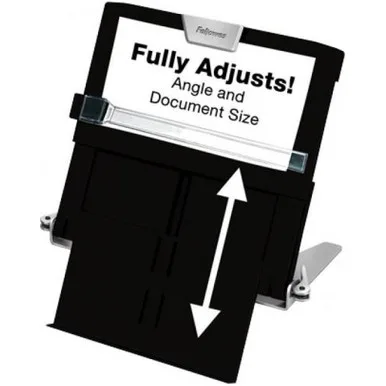
Fellowes Pro Series In-Line Document Holder
Pros
- ✓ Handles 250 sheets — the highest capacity in this roundup
- ✓ Magnetic line guide keeps your place without fidgeting
- ✓ Six angle positions cover everything from flat reading to near-vertical
- ✓ Weighted base stays put even with heavy books or catalogs loaded
Cons
- ✗ Most expensive pick at $60
- ✗ Takes up desk real estate — not ideal for minimal or crowded workspaces
- ✗ Inline design means it sits between keyboard and monitor, not beside it
The Fellowes 8039401 is what a document holder looks like when cost-cutting wasn’t the priority. The base is wrought iron — actually heavy, not just heavy-looking — so it doesn’t slide or vibrate when you flip pages. Six angle positions (25° to 75° incline) let you dial in exactly the right tilt for your eye level and viewing distance. The magnetic line guide holds your place and moves smoothly as you work down the page, eliminating the small but constant frustration of losing your spot.
The inline design places your reference material directly in front of you, between keyboard and monitor, at screen height. That’s the ergonomically correct position — it eliminates the side-to-side neck rotation that side-mounted holders require for sustained use. The 250-sheet capacity handles full technical manuals, thick reports, and legal binders without complaint.
At $60, it’s the most expensive desktop option in this roundup. You feel where that money went as soon as you pick it up.
Best for: Accountants, paralegals, writers, data entry workers — anyone who spends hours each day working from paper documents.
Skip it if: Your desk is already crowded, or you only occasionally reference a page or two. The Fellowes 21103 ($19) handles light use fine.
2. Kensington InSight InLine Copyholder with SmartFit
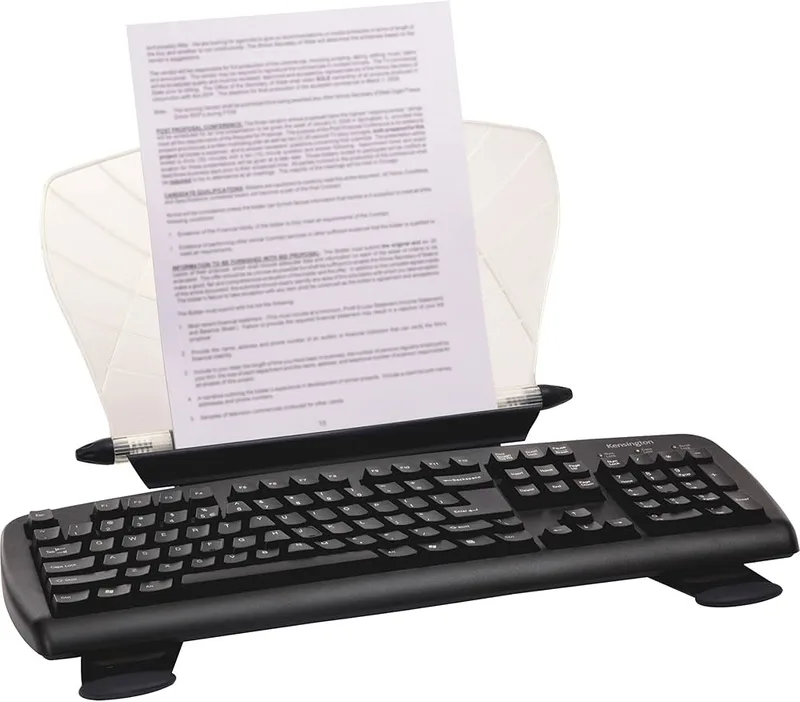
Kensington InSight InLine Copyholder with SmartFit
Pros
- ✓ Holds two full pages simultaneously — ideal for comparing documents while typing
- ✓ Four configurations fit different desk setups without buying extra hardware
- ✓ SmartFit color-coded system guides you to the ergonomically correct height
- ✓ Dual-hinge adjustment is precise and stays locked at your chosen angle
Cons
- ✗ Most expensive option at $78
- ✗ Metal and white finish shows smudges and wear over time
- ✗ Some users find it smaller than expected based on product photos
The Kensington K62097US does one thing no other holder here can: it holds two full 8.5x11 sheets side by side. If your work involves comparing two documents simultaneously — a source and a draft, a form and supporting data, two versions of a report — this is the tool that makes that genuinely comfortable rather than awkward.
Four different configurations cover most desk setups: on the desktop, on a keyboard platform, over the keyboard (between keyboard and monitor), or at an angled desktop position. The SmartFit color-coded system helps guide you to the ergonomically correct height for your monitor and eye position, which is useful if you’ve never calibrated your setup. The dual-hinge adjustment is more precise than the Fellowes above — fine-tunable to within a few degrees and it holds position without drifting.
The tradeoffs are price ($78, the priciest option here) and physical footprint. The metal and white finish also picks up smudges easily, and some buyers find it physically smaller than product photos suggest.
Best for: Data entry, auditing, legal work — any workflow that requires keeping two documents visible at once.
Skip it if: You only ever reference one document at a time. The Fellowes Pro Series handles that better for $20 less.
3. 3M DH445 Monitor Mount Document Holder
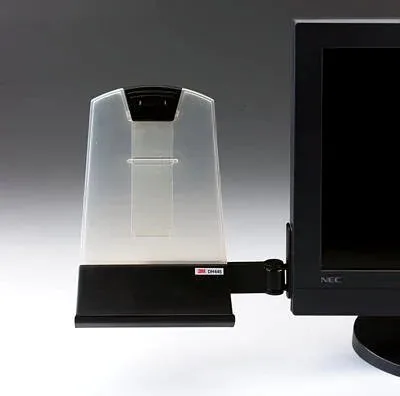
3M DH445 Monitor Mount Document Holder
Pros
- ✓ Clips directly to your monitor — zero desk space used
- ✓ Works in both portrait and horizontal orientation
- ✓ Easy clip installation — no tools, no adhesive, no permanent changes
- ✓ Swings out of the way when you do not need it
Cons
- ✗ 35-sheet capacity is limiting for longer documents or reports
- ✗ Only works with flat panel monitors — not for laptop screens without modification
- ✗ No magnetic line guide — you have to track your place manually
The 3M DH445 clips to the edge of your flat panel monitor. Unlike inline designs, it uses zero desk space — the document hangs off your screen. For a small desk or anyone who has every inch counted, that matters considerably.
Installation takes about 30 seconds. No tools, no adhesive, no permanent changes to your monitor. The holder tilts and swings to position documents at a comfortable viewing angle beside your screen, and you can flip between portrait and horizontal orientation. The clear tray holds 35 sheets securely. When you don’t need it, it swings out to the side.
At $33 it hits a compelling spot: more capable and more adjustable than the sub-$20 adhesive clips, but significantly cheaper than the premium inline options. If you primarily reference short-to-medium documents — notes, reference sheets, short reports — rather than thick binders, the 35-sheet limit won’t come up.
Best for: Workers with limited desk space who reference documents regularly but don’t need to hold a whole manual at once.
Skip it if: You routinely work from thick reports or binders, or you need a magnetic line guide.
4. Fellowes 21103 Non-Magnetic Desktop Copyholder
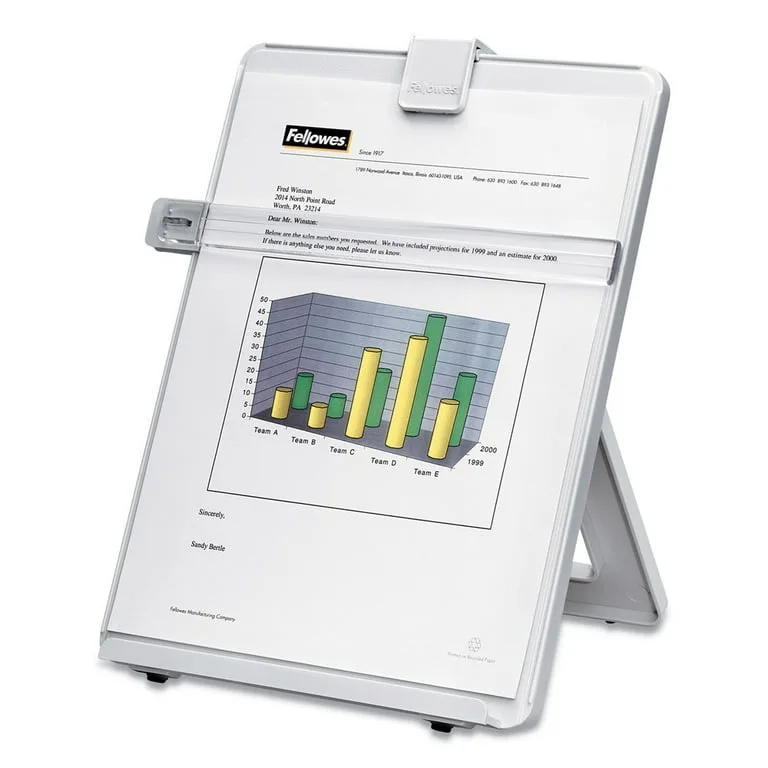
Fellowes 21103 Non-Magnetic Desktop Copyholder
Pros
- ✓ 125-sheet capacity handles long manuals and multi-page reports
- ✓ Adjustable easel angle positions document at a comfortable reading angle
- ✓ Removable line guide included — tracks your position as you type
- ✓ Folds flat for storage
Cons
- ✗ Plastic build feels lightweight compared to metal options
- ✗ Non-magnetic line guide is flimsier than magnetic alternatives
- ✗ Sits on the desk beside your monitor — no monitor-mount option
The Fellowes 21103 is the straightforward option: a plastic easel that holds documents at a reading angle beside your monitor, at a price where you just buy it. At $19 with a three-year warranty, it’s a proper buy-and-forget purchase.
The 125-sheet capacity is large enough for any single document you’re likely to reference. The removable line guide tracks your position down the page. The easel adjusts to a few angle positions, though the range is narrower than the Pro Series. The platinum plastic build is functional rather than premium — fine for what it is.
This is the pick for the home office worker who occasionally needs to reference a printed document but isn’t doing it all day. Three-year warranty on a $19 accessory is worth noting — most budget accessories ship with nothing.
Best for: Occasional paper reference work, home offices on a tight accessories budget, people who want something functional without overthinking it.
Skip it if: You reference documents for extended stretches throughout the day. The magnetic line guide and central inline position of the Fellowes Pro Series are worth the extra $41 for sustained use.
5. Mount-It MI-9005 Monitor Document Clip
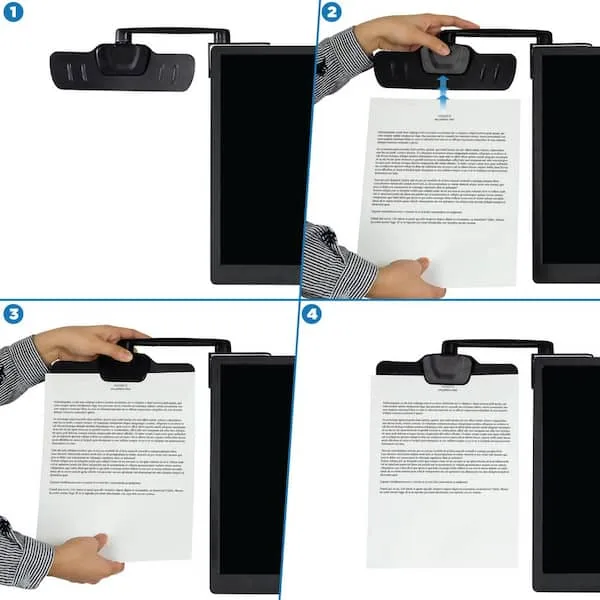
Mount-It MI-9005 Monitor Document Clip
Pros
- ✓ Adhesive attachment keeps the desk and monitor clip-free
- ✓ 360° swivel on both arm and clip puts documents at any angle
- ✓ Swings fully out of the way when not holding documents
- ✓ Compact footprint — nothing is added to desk surface
Cons
- ✗ Adhesive mount is permanent-ish — removing it risks monitor surface damage
- ✗ No line guide — just a clip
- ✗ Clip width is 8 inches so it does not accommodate oversized pages
The Mount-It MI-9005 uses a 3M adhesive strip to bond a small base to the top of your monitor, then extends a 6.5-inch swing arm with a clip at the end. Both the arm and the clip swivel 360°, giving you more positioning flexibility than you’d expect from something this compact. When not in use, the arm folds back flat against the monitor bezel.
It adds nothing to desk surface. That’s the whole value proposition — maximum minimalism. The adhesive is strong enough that you won’t worry about it falling off; that same strength becomes the concern when you want to remove it, since some monitor finishes don’t survive adhesive removal without cosmetic damage.
At $20, it’s the pick for anyone who wants paper right at their monitor without clipping to the bezel. Best suited for one to five sheets at a time — meeting notes, a checklist, a quick reference card. Not built for a 200-page technical manual.
Best for: Minimalist desks, tight workspaces, people who want reference material right at their monitor without any bezel clip.
Skip it if: You’re not comfortable with adhesive attachments on your monitor, or you need to hold more than a handful of sheets regularly.
6. 3M DH240MB Monitor Mount Document Clip
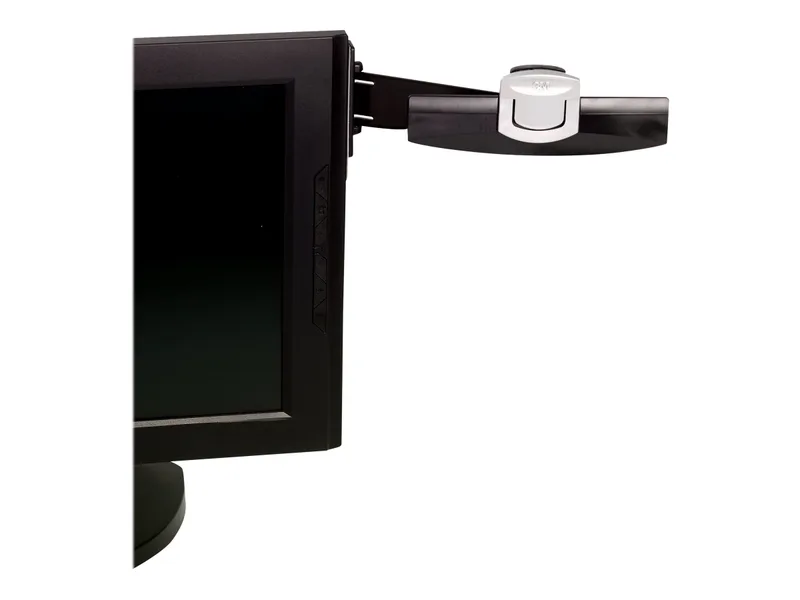
3M DH240MB Monitor Mount Document Clip
Pros
- ✓ Command Adhesive mounts and removes cleanly — no residue
- ✓ Dual clip modes: slide-in for quick reference, clip for longer documents
- ✓ Swings out of the way when not in use
- ✓ Cheapest option in this roundup at $15
Cons
- ✗ 30-sheet capacity is the lowest in this roundup
- ✗ Command strips have limited reuse — budget for replacements
- ✗ No angle adjustment after mounting
The 3M DH240MB uses Command Adhesive — the same removable strips found in Command hooks — to attach a document clip to the side of your monitor. The advantage over permanent adhesive: Command strips are engineered to come off cleanly when you want to reposition or move to a different workstation.
The dual-mode clip slides in up to five sheets one-handed for quick reference, or clamps shut to hold up to 30 sheets for longer documents. The arm swings away when not in use. At $15, it’s the cheapest option in this roundup that actually solves the problem.
The honest limitations: no angle adjustment after mounting, no line guide, and Command strips aren’t infinitely reusable — budget for occasional replacements. For occasional light use, a few pages of reference material, or anyone trying their first document holder without committing, this is a low-risk entry point.
Best for: Occasional use, travel setups, anyone who wants to try a monitor document holder without spending much.
Skip it if: You need to hold documents all day. The 3M DH445 ($33) gives significantly more capability for regular use.
Comparison Table
| Product | Price | Mount Type | Capacity | Line Guide | Rating |
|---|---|---|---|---|---|
| Fellowes Pro Series In-Line | $45.97 as of Oct 18, 2026 | Inline desktop | 250 sheets | Magnetic | 9.0 |
| Kensington InSight InLine | Unavailable | Inline desktop | 2 pages side-by-side | No | 8.7 |
| 3M DH445 | Unavailable | Monitor clip | 35 sheets | No | 8.5 |
| Fellowes 21103 Desktop | $24.89 as of Oct 18, 2026 | Desktop easel | 125 sheets | Non-magnetic | 8.2 |
| Mount-It MI-9005 | $17.99 as of Oct 18, 2026 | Adhesive monitor arm | ~30 sheets | No | 8.0 |
| 3M DH240MB | Unavailable | Command adhesive clip | 30 sheets | No | 7.5 |
Buying Guide: What to Look for in a Document Holder
Mount Type
Inline (between keyboard and monitor): Positions documents in your central field of view, directly in front of you at screen height. Most ergonomically sound for sustained use — no side-to-side neck rotation. Requires desk depth between keyboard and monitor.
Monitor side-clip: Clips to the edge of your flat panel monitor. Uses zero desk space. Documents sit slightly to one side, which is fine for occasional reference but causes more neck rotation during all-day document work compared to inline placement.
Adhesive monitor mount: Attaches to the top or side of your monitor with adhesive. Most portable and minimalist option. Reversibility depends on the adhesive type — Command Adhesive (3M DH240MB) removes cleanly; standard adhesive (Mount-It MI-9005) carries more risk.
Desktop easel: Freestanding beside your monitor. No modifications to the monitor. Requires desk surface but offers the highest sheet capacity for the price.
Sheet Capacity
For occasional reference — a checklist, a page of notes, short instructions: 20-35 sheets is enough.
For sustained document work — typing from a manuscript, data entry from printed forms, reading through lengthy reports: look for 100+ sheets with a line guide so you can track your position without losing your place every time you look up.
Line Guides
A line guide is a horizontal bar or magnetic strip you move down the page as you work. For anyone who frequently switches between screen and document, it eliminates the seconds lost re-finding your place each time. For sustained typing-from-paper work, this matters more than most people expect. The Fellowes Pro Series magnetic line guide is the best implementation here — smooth to move, holds position, doesn’t require fiddling.
Build Quality
For daily heavy use: wrought iron or metal base (Fellowes Pro Series, Kensington InSight). These won’t drift or rattle.
For occasional use: impact-resistant plastic (Fellowes 21103, Mount-It MI-9005, 3M options) does the job at a fraction of the cost.
Budget Expectations
- Under $20: Basic desktop easel or adhesive monitor clip. Fine for occasional use.
- $20-$40: Monitor-clip design with better stability, more adjustment, and wider orientation options.
- $60-$80: Premium inline holders with magnetic line guides, high capacity, and multiple angle positions. Worth it for anyone who works from paper documents for more than an hour a day.
FAQ
Do document holders actually reduce neck strain?
Yes — when positioned correctly. The goal is reference material at roughly the same height and distance as your monitor, so your head stays in one position rather than tilting down to a flat desk. Occupational health guidelines consistently recommend in-line document positioning for workers who type from paper. User reviews of quality document holders report meaningful reduction in neck and upper back discomfort for people who use them consistently.
What’s the difference between inline and side-mount document holders?
An inline holder sits between your keyboard and monitor, placing the document in your central field of view. A side-mount clips to the monitor edge, placing the document to one side of your screen. Inline is more ergonomically sound for sustained use because it eliminates side-to-side neck rotation. Side-mount is the better tradeoff when desk space is limited.
Will a monitor clip document holder damage my monitor?
Clip-style holders like the 3M DH445 that grip the monitor bezel leave no residue and remove cleanly. Adhesive-style holders carry more risk depending on your monitor’s bezel material. The 3M DH240MB Command Adhesive is the safest adhesive approach — it’s engineered for clean removal. Standard adhesive (Mount-It MI-9005) is less forgiving and can damage softer bezel finishes.
Can I use a document holder with a laptop?
Clip-on monitor holders require a flat panel bezel and don’t work well on laptop screens. Adhesive-style clips can attach to a laptop lid, though the same removal risk applies. Desktop easel holders work with any setup — laptop screen, external monitor, or both.
How high should a document holder be positioned?
At approximately the same height as your monitor, and at a similar distance from your eyes. The top of the document should sit near eye level — the same principle as monitor positioning. If the document is significantly lower or to the side of your screen, you’re still making the repeated head movements you’re trying to eliminate.
Is a document holder worth it for occasional paper use?
For light occasional use — one document once a day — the $19 Fellowes 21103 is worth it. Even one hour of improved posture per day adds up over weeks. For daily sustained document work, the ergonomic value of the Fellowes Pro Series at $60 pays for itself quickly in reduced discomfort and fewer interruptions to re-find your place.
Conclusion
For daily document work, the Fellowes Pro Series In-Line Document Holder ($60) is the one to buy. The magnetic line guide, 250-sheet capacity, and weighted base put it in a different category from everything else here. If you work from paper regularly, this is the pick.
For desk space constraints and a monitor-clip preference, the 3M DH445 ($33) delivers the best value: stable, adjustable, and nothing added to your desk surface.
For comparing two documents side by side, the Kensington InSight InLine ($78) is the only option that handles that properly.
Under $20, grab the Fellowes 21103. It’s functional, it works, and the three-year warranty is better than you’d expect at the price.
Any of these beats the coffee mug.
Related: The Ultimate Guide to Desk Accessories for Remote Work | Best Ergonomic Laptop Accessories