Disclosure: PostureRanked is reader-supported. When you buy through links on our site, we may earn an affiliate commission at no additional cost to you. Our recommendations are based on independent research and testing.
| Product | Price | Rating |
|---|---|---|
| Hexcal Studio | — | 9.0 |
| iMovR Tucker Cable Management Kit | — | 8.8 |
| Humanscale NeatTech System | — | 9.2 |
| J Channel Cable Raceway | — | 8.4 |
| NODOCA Under-Desk Cable Tray | — | 8.6 |
| Monoprice Under-Desk Cable Tray | — | 8.2 |
| Velcro ONE-WRAP Cable Ties | — | 9.4 |
PostureRanked is reader-supported. When you buy through links on our site, we may earn an affiliate commission at no additional cost to you.
You just dropped $600+ on a standing desk. Then you plugged in your monitor, laptop dock, phone charger, desk lamp, speakers, and a USB hub — and now the underside of your beautiful new desk looks like a server room that lost a fight with a tornado.
Sound familiar? Standing desks make cable management harder than regular desks because everything moves. Every time you adjust height, cables stretch, tangle, and occasionally yank something off the desk entirely. The fix isn’t complicated, but you need the right tools.
Short on time? Grab a NODOCA Under-Desk Cable Tray ($40-45) and a 100-pack of Velcro ONE-WRAP ties ($8-12). That combo handles 90% of standing desk cable problems for under $55 total.
Quick Comparison: Best Cable Management Solutions
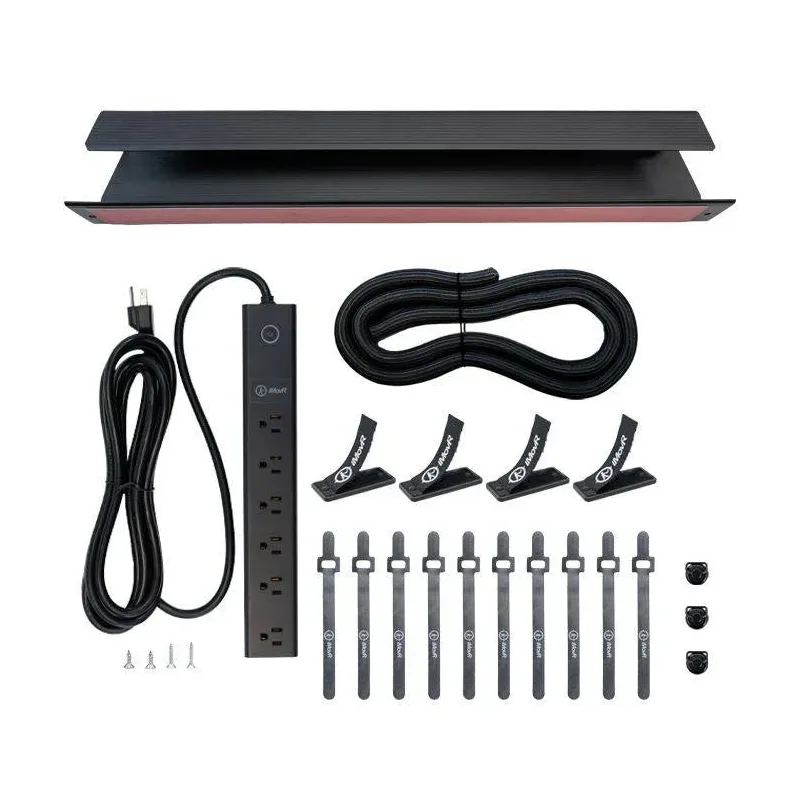
iMovR Tucker Cable Management Kit
Pros
- ✓ Heavy-duty steel won't sag under power bricks
- ✓ 5-year warranty from iMovR
- ✓ Pro kit includes cable chain for desk-to-floor routing
- ✓ Multiple kit levels to match your needs
Cons
- ✗ Pro and Advanced kits get pricey
- ✗ Requires some assembly
- ✗ Basic kit lacks surge protector
| Product | Best For | Type | Capacity | Price |
|---|---|---|---|---|
| Hexcal Studio | Premium all-in-one | Desktop organizer | 14 devices, 101 lbs | ~$899 |
| iMovR Tucker Kit | Heavy-duty setups | Under-desk tray + chain | 20+ cables | $49-$149 |
| Humanscale NeatTech | Professional offices | Cable basket | 10 lbs | $150-$250 |
| J Channel Raceway | Wall-mounted runs | Wall raceway | 5-10 cables | $10-$15 |
| NODOCA Tray | Best value overall | Under-desk tray | 11 lbs | $40-$45 |
| Monoprice Tray | Tightest budget | Under-desk tray | 10-15 cables | $15 |
| Velcro ONE-WRAP | Every desk, period | Reusable ties | Unlimited | $8-$12 |
Types of Cable Management Solutions
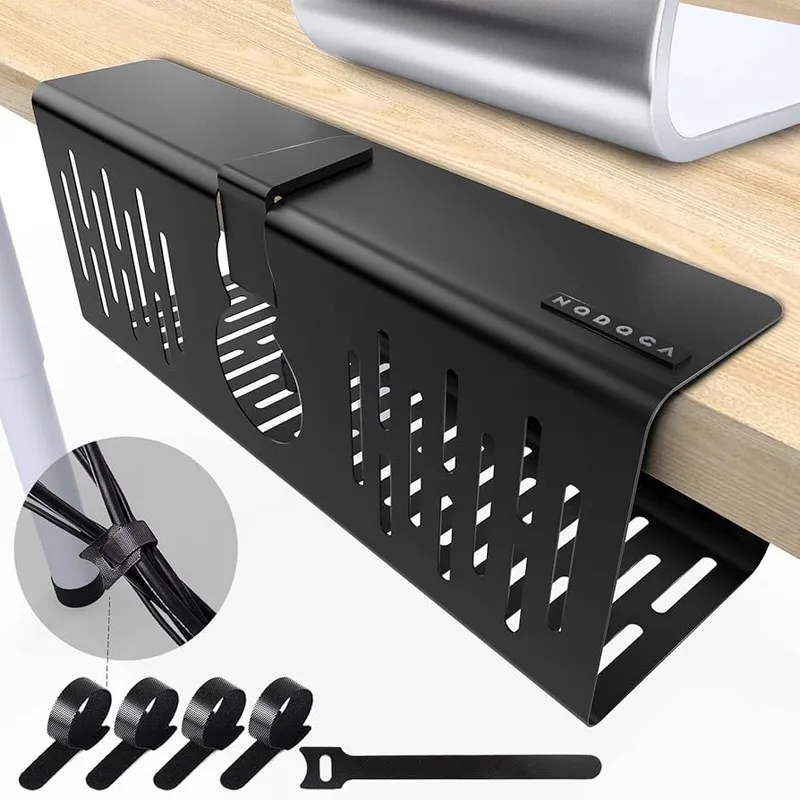
Before diving into specific products, here’s a quick breakdown of what’s out there:
Under-desk cable trays mount beneath your desktop and hold power strips, adapters, and excess cable. They’re the most popular solution for standing desks because everything moves with the desk.
Cable spines and chains are flexible vertical channels that route cables from desk to floor. They accordion as your desk moves up and down, so cables never strain.
Cable raceways are rigid channels that mount on walls or desk legs. They hide cables completely but work best for fixed runs — not the moving parts of your setup.
Cable ties and sleeves are the simplest option. Bundle cables together with reusable ties to reduce tangles and visual clutter. Not a standalone solution, but essential for any setup.
Hexcal Studio — Best Premium All-In-One
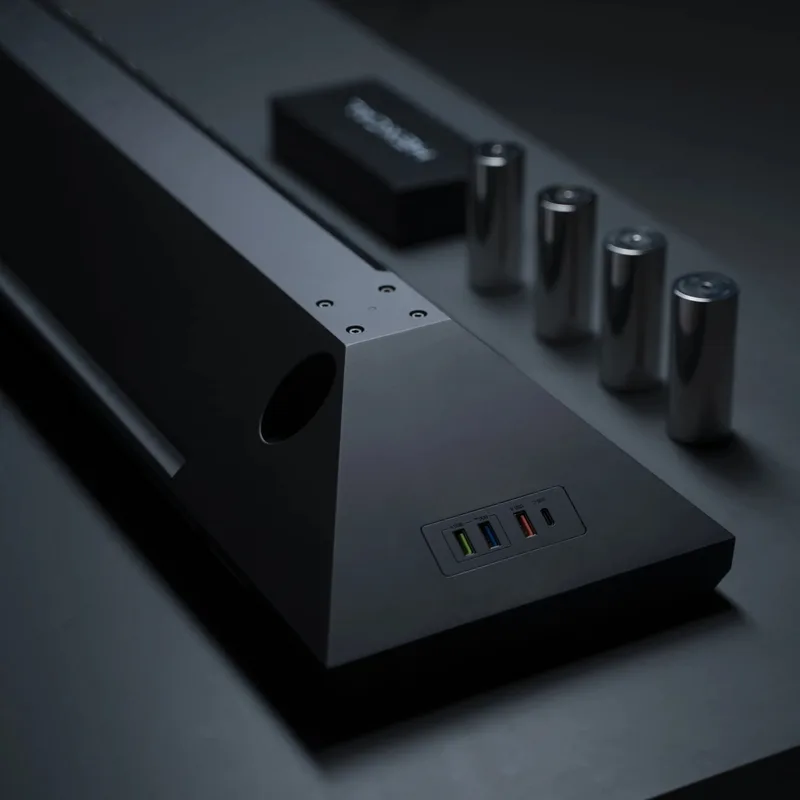
Hexcal Studio
Pros
- ✓ Integrated power and cable management in one unit
- ✓ Premium aluminum build quality
- ✓ Built-in wireless charging and USB ports
- ✓ Hides all cables and adapters from view
Cons
- ✗ Very expensive at around $899
- ✗ Overkill for simple setups
- ✗ Heavy at 21.7 lbs
The Hexcal Studio isn’t just cable management — it’s a full desktop command center. This aluminum platform sits on your desk (not under it) and integrates power delivery, cable routing, and device organization into one unit. Eight AC outlets, four USB ports, and two Qi wireless chargers built right in.
I’ll be honest: at ~$899, this is absurd overkill for most people. But if you have a multi-monitor battlestation with a laptop, tablet, phone, external drives, and a half dozen peripherals, the Hexcal eliminates the need for separate power strips, USB hubs, and charging pads. Everything routes through one clean platform.
The aero-grade aluminum build is genuinely premium. Weighs 21.7 lbs, holds up to 101 lbs on top, and has an internal cable chamber that hides all the wiring. It looks like a piece of furniture, not a cable management accessory.
Who should buy this: Power users with 8+ devices who want a single integrated solution and don’t mind the price tag.
Who should skip this: Anyone who just needs to tidy up a few cables under their desk. You’d be spending 20x what you need.
iMovR Tucker Cable Management Kit — Best Heavy-Duty
iMovR makes standing desks, so they understand the cable problem firsthand. The Tucker kit comes in three tiers: Basic ($49), Advanced ($99), and Pro ($149). The Basic kit gives you a 23-inch steel tray. The Advanced adds a 6-outlet surge protector with a 12-foot cord. The Pro includes everything plus a cable chain for clean desk-to-floor routing.
The steel construction is the real differentiator here. Cheap trays sag under the weight of a full-size power strip and a couple of laptop charger bricks. The Tucker doesn’t. It mounts with double-sided tape (plus optional screws for extra security) and the 5-year warranty gives real peace of mind.
If you run a multi-monitor setup with a docking station and multiple large power adapters, the Tucker Pro is the move. The included cable chain solves the desk-to-floor routing that cheaper trays ignore entirely.
Who should buy this: Multi-monitor setups, home offices with heavy equipment, or anyone who’s broken a cheaper tray before.
Who should skip this: Light setups with just a laptop and one monitor. The NODOCA or Monoprice tray is plenty.
Check iMovR Tucker Kit on Amazon
Humanscale NeatTech System — Best for Professional Offices
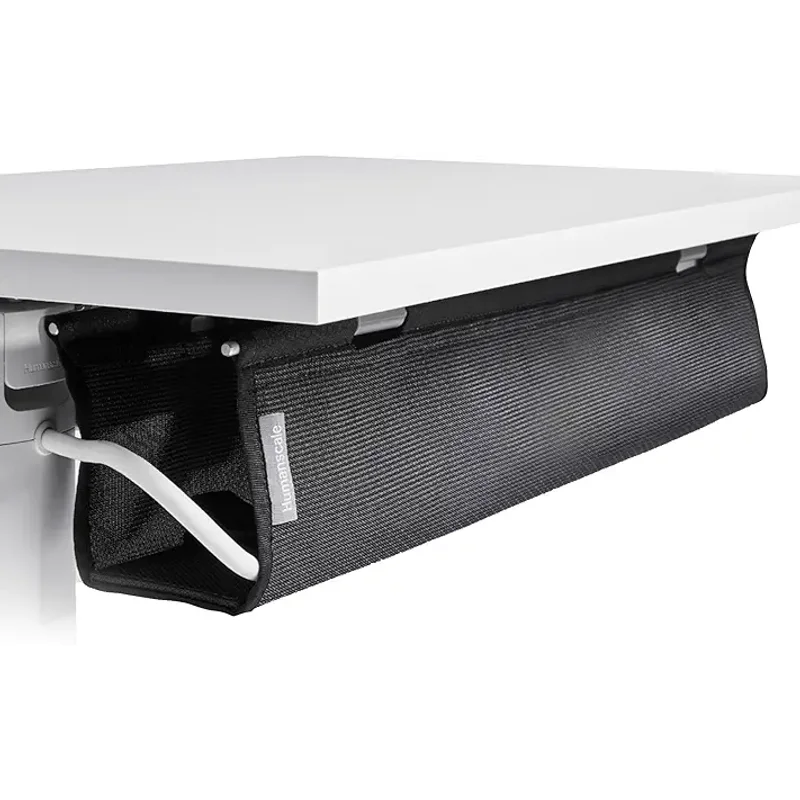
Humanscale NeatTech System
Pros
- ✓ 15-year warranty is best in class
- ✓ Three size options fit any desk
- ✓ Professional look with multiple material choices
- ✓ Includes Velcro ties for bundling
Cons
- ✗ Premium pricing starts around $150
- ✗ 10 lb capacity limits heavy adapter loads
- ✗ Fabric options collect dust over time
Humanscale makes some of the best ergonomic furniture on the market, and the NeatTech brings that same design sensibility to cable management. It’s a fabric basket that mounts under your desk, available in three sizes (24”, 38”, or 48”) and three materials (mesh, Eco Knit, or leather).
The 15-year warranty is remarkable for a cable management product. Most competitors offer one year or none at all. The included Velcro ties and installation template make setup straightforward, and the professional aesthetic works in client-facing offices where a bare metal tray would look out of place.
The tradeoff is capacity. At 10 lbs max, the NeatTech handles cables and small adapters well but won’t support a heavy surge protector the way a steel tray can. For a lean setup — monitor cable, laptop charger, phone charger, and a few peripherals — it’s perfect.
Who should buy this: Professional offices, minimalist setups, anyone who values aesthetics and long-term warranty over raw capacity.
Who should skip this: Heavy-duty setups with large power bricks. Go with the iMovR Tucker instead.
Check Humanscale NeatTech on Amazon
J Channel Cable Raceway — Best for Wall Runs
J Channel Cable Raceway
Pros
- ✓ Extremely affordable
- ✓ Paintable to match any wall color
- ✓ Cuts easily with scissors for custom lengths
- ✓ Peel-and-stick installation takes minutes
Cons
- ✗ Not suitable for moving desk cables
- ✗ Adhesive may fail on textured walls
- ✗ Fixed installation with no adjustability
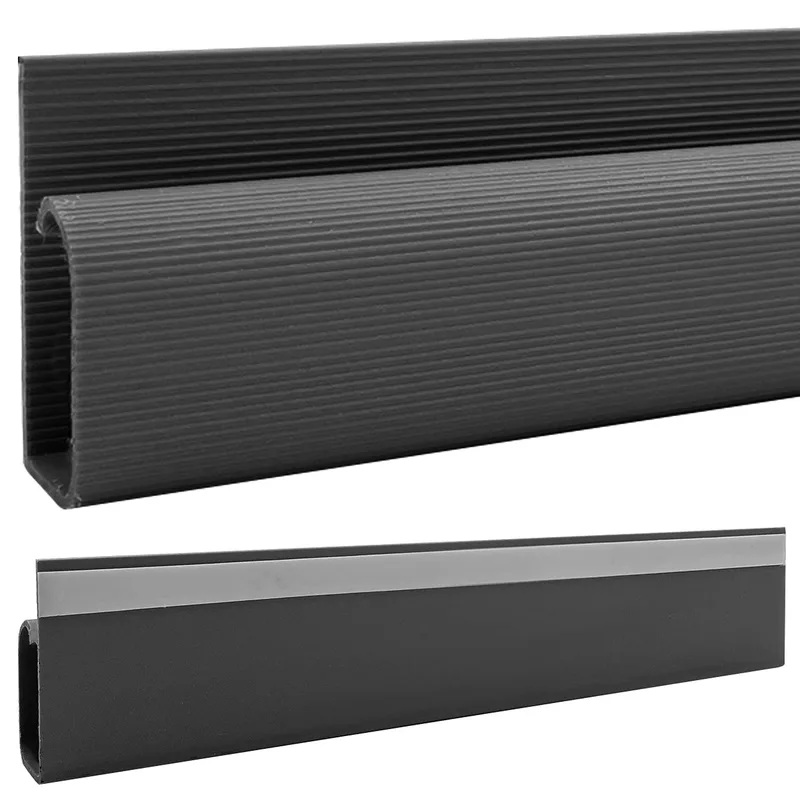
Not every cable problem lives under the desk. If you have cables running along walls — from a wall-mounted monitor, from the floor outlet up to desk level, or between rooms — J Channel raceways hide them cleanly for about $10-15 per 46-inch strip.
Installation is dead simple: peel the adhesive backing, stick it to the wall, press cables into the open channel. The rigid plastic is paintable, so you can match your wall color and make the raceway nearly invisible. Cuts easily with scissors if you need a custom length.
One important caveat: these are for fixed cable runs only. Don’t use them for any cable that needs to move with your standing desk. They’re rigid and will either pull off the wall or strain your cables. Use them for the stationary portions of your setup — wall to floor outlet, wall-mounted accessories, or cable runs behind furniture.
Who should buy this: Anyone with visible wall cable runs, wall-mounted monitors, or cables that need to cross open wall space.
Who should skip this: These don’t solve the standing desk motion problem. Pair them with an under-desk tray for a complete solution.
Check J Channel Cable Raceway on Amazon
NODOCA Under-Desk Cable Tray — Best Value
NODOCA Under-Desk Cable Tray
Pros
- ✓ No drilling required — clamps on in seconds
- ✓ Steel mesh allows airflow for adapters
- ✓ Affordable price for solid build quality
- ✓ Easy to reposition if you change desks
Cons
- ✗ Smaller than premium trays at 13.8 in
- ✗ Clamps visible from the side
- ✗ Won't fit desks thicker than 1.3 inches
Here’s the sweet spot for most people. The NODOCA tray clamps onto your desk in about 3 seconds — no drilling, no screws, no tools. The steel mesh construction provides airflow so your power adapters don’t overheat, and 11 lbs of capacity handles a power strip plus a few adapters without issue.
At $40-45, you’re getting a steel tray with no-drill mounting — the same combo that costs $100+ from premium brands. The clamp system means you can reposition it easily or take it with you if you switch desks.
The main limitation is size. At 13.8 inches long, it’s noticeably shorter than the 23-inch trays from iMovR and Monoprice. If you have a massive power strip or tons of adapters, it might feel cramped. For a standard setup — one surge protector and two or three chargers — it’s more than adequate.
Also note: the clamps only fit desks up to 1.3 inches thick. Most standard desktops fall within that range, but if you have a thick butcher-block or hardwood top, measure first.
Who should buy this: Home office setups with a standard desk, anyone who doesn’t want to drill holes, renters who need a portable solution.
Who should skip this: Thick desktop owners or heavy-equipment setups that need a longer tray.
Check NODOCA Cable Tray on Amazon
Monoprice Under-Desk Cable Tray — Budget Pick
Monoprice Under-Desk Cable Tray
Pros
- ✓ Lowest price for a full-size steel tray
- ✓ 23-inch length fits most desks well
- ✓ Available in black and white
- ✓ Simple and reliable design
Cons
- ✗ Requires drilling into your desk
- ✗ Basic aesthetics with no cover
- ✗ Shallower than some competitors
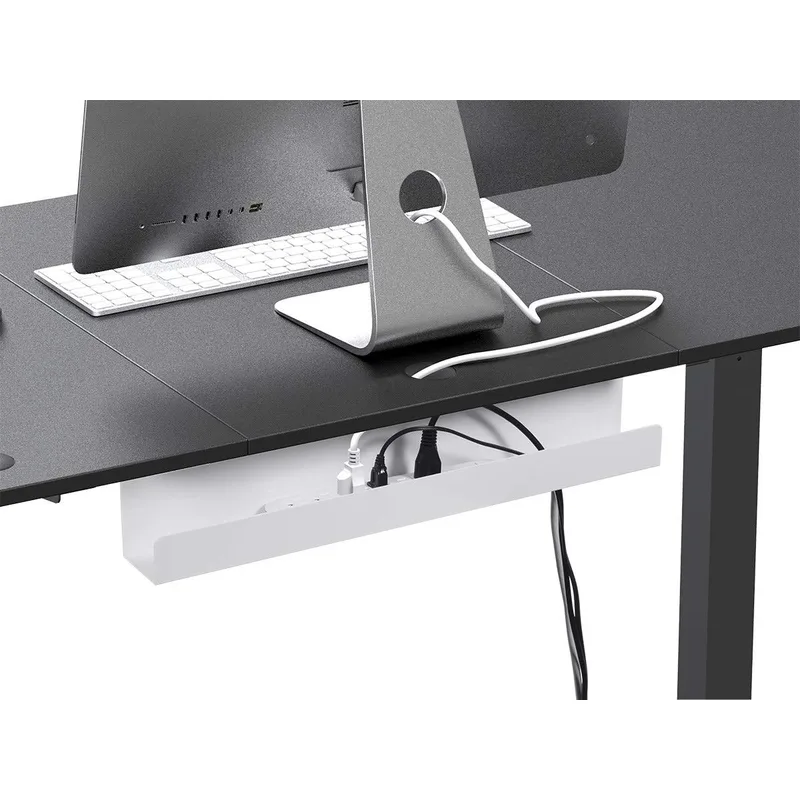
When $40 is still more than you want to spend, Monoprice has you covered. Their 23-inch steel cable tray runs about $15 — that’s less than a meal out. You get a full-size tray that holds a power strip and a mess of cables, available in black or white.
The catch: you need to drill. No clamp option here. If you own your desk and don’t plan to move the tray, that’s fine. The screw-mount is actually more secure than clamps for heavier loads.
At 23 inches, it’s significantly longer than the NODOCA, which means more room for your power strip and adapters. The shallower depth (2.9 inches vs. the NODOCA’s 4.7 inches) means it holds less vertically, but for flat-lying cables and a low-profile power strip, it works well.
Who should buy this: Budget-conscious buyers who own their desk and don’t mind drilling two holes.
Who should skip this: Renters or anyone who wants a no-drill solution. Get the NODOCA instead.
Check Monoprice Cable Tray on Amazon
Velcro ONE-WRAP Cable Ties — The Must-Have Accessory
Velcro ONE-WRAP Cable Ties
Pros
- ✓ Infinitely reusable unlike zip ties
- ✓ Never damages cable insulation
- ✓ 100-pack lasts years
- ✓ Works with any cable management system
Cons
- ✗ Ties alone don't hide cables
- ✗ Eventually wear out with heavy use
- ✗ Can collect dust and lint
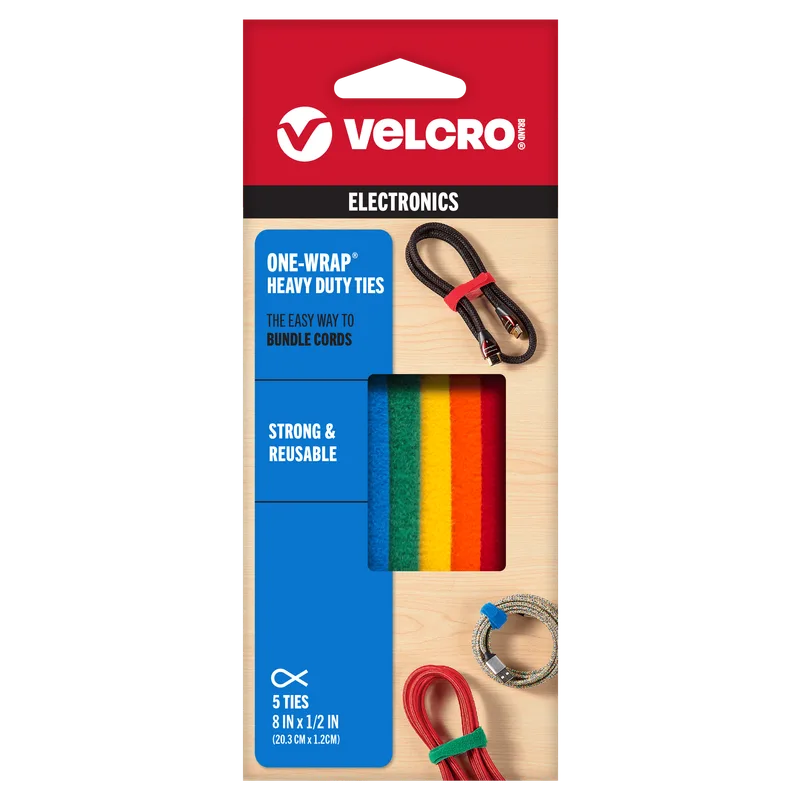
Buy these regardless of what else you pick. A 100-pack of Velcro ONE-WRAP ties costs $8-12 and will fundamentally change how your cables behave. Bundle your monitor cables together. Loop excess cable length. Secure runs to your desk frame. Attach cables to a spine or tray.
Unlike zip ties (which are permanent, cut into insulation, and need to be replaced every time you add a cable), Velcro wraps are infinitely reusable. The 8-inch length handles everything from thin USB cables to thick power cords. The slotted head design lets you create a loop around a cable bundle, pull tight, and wrap the excess back on itself.
I’ve had the same pack for three years across two desk setups. Still using the original ties. At this price, there’s no reason not to have them.
Who should buy this: Everyone. Seriously. Every standing desk owner needs these.
Who should skip this: Nobody. Even if you don’t buy a tray, buy the ties.
Check Velcro ONE-WRAP Cable Ties on Amazon
How to Buy Cable Management for a Standing Desk
Not sure where to start? Here’s what actually matters when choosing cable management solutions.
1. Figure Out Your Cable Count
Count everything: monitor power, monitor data (HDMI/DisplayPort/USB-C), laptop charger, phone charger, desk lamp, speakers, USB hub, ethernet, keyboard/mouse receivers. Most standing desk setups have 8-15 cables. That number determines whether you need a small tray or a large one.
2. Decide Where Your Power Strip Goes
This is the most important decision. Mount it under the desk (recommended) and cables only need to stretch from the tray to the wall — one short run that moves with the desk. Leave it on the floor and every device cable needs enough slack for the full height range.
3. Match the Solution to the Problem
- Under-desk tray handles the main cable mass — power strip, adapters, excess cable length
- Cable ties bundle individual runs and secure cables to the desk frame
- Cable spine/chain routes cables cleanly from desk to floor (only needed if you have multiple floor connections)
- Wall raceway hides fixed cable runs along walls
Most people need a tray + ties. That’s it. Don’t over-buy.
4. Check Desk Thickness
Clamp-mount trays (like the NODOCA) have thickness limits. Screw-mount trays (like Monoprice) work with any thickness but require drilling. Measure your desktop before ordering.
5. Plan for Growth
If you might add a second monitor, a USB hub, or a docking station later, size your tray for future needs. Going slightly larger now saves you from replacing everything later.
Frequently Asked Questions
Do I need a cable spine for a standing desk?
Usually not. If your power strip mounts under the desk, cables only need to reach from the tray to the wall — a single flexible run handling about 20 inches of movement. A cable spine helps if you have multiple floor connections or want the absolute cleanest look, but most home offices don’t need one.
Can I use zip ties instead of Velcro?
You can, but don’t. Zip ties are one-time-use — you cut them every time you add or rearrange a cable. Over time, they also dig into cable insulation. Velcro ties cost $8 for 100 and last years. There’s no good reason to use zip ties for desk cable management.
How much cable slack do I need for a standing desk?
Measure your desk at sitting height to your floor outlet. Add 12-18 inches beyond that for standing height plus routing slack. More is better — a cable that’s too long just needs bundling, but a cable that’s too short will strain connectors and disconnect when you stand up.
Will cable management restrict my desk’s movement?
Only if you route cables through pinch points or leave them too tight. The fix: after installing everything, raise your desk to full standing height and check that all cables have slack. Lower it back down and confirm nothing tangles. Do this a few times before finalizing any tie-down points.
What about wireless to reduce cables?
Wireless keyboard, mouse, and headphones help — that’s three fewer cables. But you’ll still have monitor power, display cables, laptop charging, and probably ethernet for anyone who needs reliable connectivity. Wireless reduces the problem but doesn’t eliminate it. Budget for a tray and ties regardless.
How do I manage cables for a dual-monitor setup?
Bundle each monitor’s cables (power + data) into their own run with Velcro ties. Route both bundles along the desk frame to the under-desk tray. Use a single cable spine (if needed) for the combined run from tray to floor. The key is keeping monitor runs separate until they reach the tray — this makes it easier to swap or adjust individual monitors later.
The Bottom Line
For most standing desk owners, the winner is clear: grab the NODOCA Under-Desk Cable Tray and a 100-pack of Velcro ONE-WRAP ties. Under $55 total, no drilling required, and it handles a standard home office setup with zero fuss. That’s what I recommend to anyone who asks.
Running a heavy multi-monitor setup? The iMovR Tucker Pro Kit ($149) handles the weight and includes a cable chain for clean desk-to-floor routing. It’s built for punishment.
Professional office where aesthetics matter? The Humanscale NeatTech looks polished enough for client-facing spaces and carries a 15-year warranty.
On the tightest budget? The Monoprice tray at $15 plus Velcro ties gets you functional cable management for under $25. You’ll need to drill two holes, but the results are solid.
Skip the Hexcal Studio unless you genuinely have 10+ devices and want integrated power, USB, and wireless charging in one platform. For everyone else, a tray and ties solve the problem for a fraction of the cost.
Cable management isn’t glamorous. But the first time you raise your standing desk and nothing yanks loose, nothing tangles, and nothing falls — you’ll wonder why you waited so long. Cable management is just one piece of a complete home office setup — see our full best desk accessories for remote work guide for the rest of the picture, and our ergonomic workstation setup guide for the positioning fundamentals that matter most.