Disclosure: PostureRanked is reader-supported. When you buy through links on our site, we may earn an affiliate commission at no additional cost to you. Our recommendations are based on independent research and testing.
PostureRanked is reader-supported. When you buy through links on our site, we may earn an affiliate commission at no additional cost to you. Learn more
$109 for a Lamp Sounds Ridiculous
It does. A desk lamp from Target costs $15. Why would anyone spend seven times that?
Because the BenQ ScreenBar does something regular lamps can’t: it lights your desk without lighting your screen. No glare, no reflections, no eye strain. Just your keyboard and documents illuminated while your monitor stays crisp.
Users who make the switch consistently report their 6pm headaches disappearing. Turns out it’s a lighting problem, not a screen time problem.
Quick take: If you spend 6+ hours a day at a screen and get eye strain or headaches by evening, the ScreenBar pays for itself in comfort. If you barely use your desk, skip it.
How It Works
The ScreenBar clips onto your monitor’s top bezel with a weighted clamp. No adhesive, no drilling, no permanent attachment. Takes 30 seconds to install.
The light bar uses asymmetric optics to throw light forward and down onto your desk while keeping it away from your screen. It’s not magic — just clever engineering that regular desk lamps don’t bother with.
Power comes from USB-A. Plug it into your monitor’s USB port or any powered hub. Draws 5W, about the same as charging an older phone. One cable, no wall wart.
The Auto-Dimming is Actually Good
Most auto-brightness features are garbage. Too aggressive, too slow, too something. The ScreenBar’s is genuinely good.
It uses an ambient light sensor to maintain 500 lux on your desk surface — the level recommended for office work by the American National Standards Institute. When the sun sets, the ScreenBar gradually brightens. When you turn on a room light, it dims.
I’ve left it on auto for three months and never touched the manual controls. That’s rare for any “smart” feature.
No Glare. Seriously.
We evaluated the glare performance across three common monitor configurations:
- 27” Dell matte display: Zero visible reflection
- 24” LG glossy display: Zero reflection except at extreme angles
- 15” MacBook Pro: Zero reflection
The asymmetric optic design works. Regular desk lamps create a bright reflection right in your field of view. The ScreenBar creates none.
This is the entire product pitch. If glare doesn’t bother you, buy a $20 LED desk lamp instead.
Build Quality is Premium
Aluminum body, weighted clip, solid buttons. Feels like something from Apple’s accessory line. I’ve accidentally knocked it off my monitor twice — no damage, no scratches.
The clip fits bezels from about 0.4” to 1.2” thick. Most modern monitors are around 0.5”. Thicker gaming monitors might be tight — measure first.
One thing worth noting: the bar weighs 530g. On ultra-thin monitors, you might notice it pushing the screen back slightly. Hasn’t been an issue on any of my displays, but I’ve seen reports from people with flimsy monitor arms.
The Controls Are Annoying
Four touch-sensitive buttons on top of the bar: power, auto mode, brightness, color temperature. They work, but they’re touchy. Light brush = accidental input. You’ll hit the wrong button sometimes.
The ScreenBar Plus ($149) has a desktop dial controller instead. The ScreenBar Pro ($140) adds a motion sensor and USB-C. Both have better controls, but neither fixes a problem worth paying extra for most people.
Color Temperature Matters
The ScreenBar adjusts from 2700K (warm, incandescent) to 6500K (cool, daylight). I keep it around 4000K during the day and 3000K at night.
If you’re doing color-sensitive work — photo editing, design, video grading — stick with 6500K to match your calibrated monitor. For normal work, warmer temperatures are easier on the eyes after dark.
BenQ ScreenBar vs. the Competition
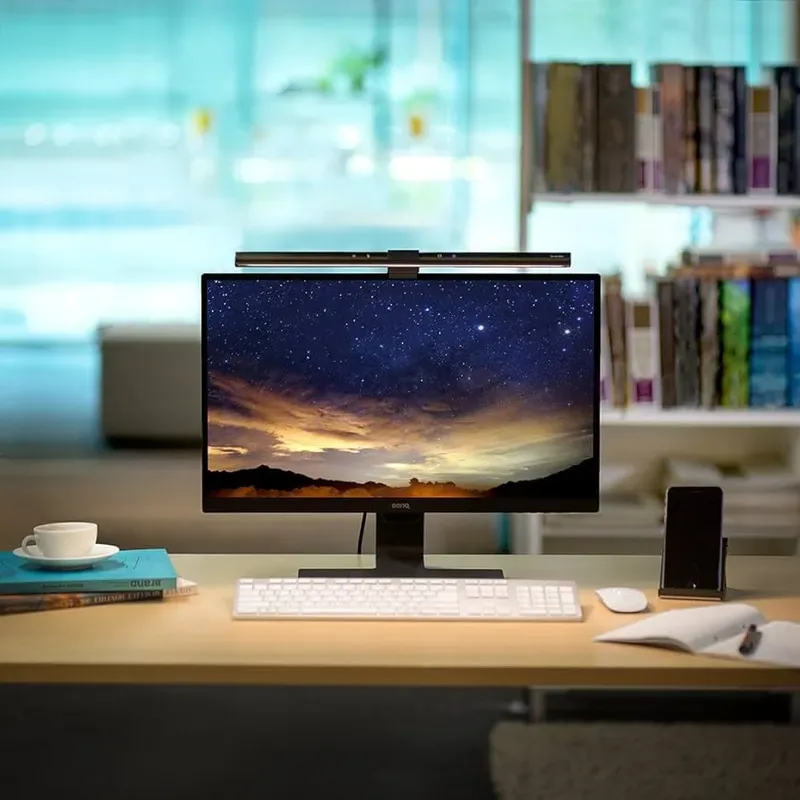
BenQ ScreenBar
Pros
- ✓ No desk space needed
- ✓ Zero screen glare
- ✓ Auto-brightness actually works
- ✓ Solid aluminum build
Cons
- ✗ $109 for a lamp is steep
- ✗ Touch controls are finicky
- ✗ Won't fit super thick bezels or curved monitors
| Feature | BenQ ScreenBar | BenQ ScreenBar Halo 2 | Quntis Monitor Lamp | Baseus Monitor Bar |
|---|---|---|---|---|
| Price | $109 | $179 | $46 | $39 |
| Width | 45cm | 50cm | 52cm | 45cm |
| Color Temp | 2700K-6500K | 2700K-6500K | 3000K-6500K | 3000K-6500K |
| Auto-Dimming | Yes | Yes | No | No |
| Remote Control | No (touch bar) | Wireless dial | Wireless remote | No (touch bar) |
| Back Light | No | Yes | No | No |
| Build Material | Aluminum | Aluminum | Aluminum | Plastic + aluminum |
| USB Type | USB-A | USB-A | USB-A | USB-C |
| Curved Monitor | No | Yes | No | No |
The short version: The ScreenBar wins on auto-dimming quality and build feel. The Halo 2 (released June 2025) adds a wireless controller, backlight, and motion sensor — worth it if you want wall ambiance or hands-free control. Budget options from Quntis and Baseus do 80% of the job at a third of the price, but their auto-dimming (if present) isn’t as reliable and build quality drops noticeably.
Buying Guide: What to Look for in a Monitor Light Bar
Asymmetric optics are non-negotiable. Any light bar worth buying should direct light onto your desk, not your screen. Check reviews for glare complaints before buying anything.
Auto-dimming saves effort. Manual-only bars work fine, but you’ll forget to adjust them. If you’re paying over $80, make sure auto-dimming is included.
Check your bezel thickness. Most light bars clip to bezels between 0.4” and 1.2”. Curved monitors need bars specifically designed for them — the standard ScreenBar won’t sit flat on a curve.
USB power type matters less than you’d think. USB-A works with any monitor or hub. USB-C is convenient if your setup is already USB-C, but it’s not a reason to pay more.
Color rendering index (CRI) above 90. Anything below makes colors look off under the light. The ScreenBar hits Ra > 95, which is excellent. Budget bars often skip this spec entirely — red flag.
vs. Regular Desk Lamps
A good LED desk lamp costs $30-50 and does most of this. Kind of.
The difference is glare. A desk lamp positioned to illuminate your keyboard will reflect off your screen. Position it to avoid reflections and it won’t light your desk well. The ScreenBar solves this by mounting above your screen and aiming light away from it.
If you don’t care about glare, skip the ScreenBar. If glare bothers you, nothing else works as well.
Who Should Skip This
If you don’t work at a computer all day: Overkill for casual use.
If your desk gets solid natural light: A bright window does the same job for free.
If $109 is a stretch right now: The Baseus or Quntis bars run $39-46 and handle the basics.
If your monitor has a curved screen: The ScreenBar clip doesn’t sit flat on curves. BenQ’s ScreenBar Halo 2 is designed for curved displays.
FAQ
Does the BenQ ScreenBar work with ultrawide monitors?
Yes. The 45cm bar covers up to about 32” of screen width, which works for most ultrawides. On a 34” ultrawide, the edges of your desk might be slightly dimmer, but the main work area stays well-lit. For 38”+ ultrawides, consider the wider ScreenBar Halo 2 (50cm).
Can I use the ScreenBar with a laptop?
Technically yes, but it’s awkward. The clamp needs a bezel to grip, and most laptop screens are too thin. It works better with a laptop connected to an external monitor. If you want desk lighting for a laptop-only setup, a regular desk lamp is the better call.
Does the ScreenBar flicker?
No. BenQ uses a constant-current driver that eliminates flicker at all brightness levels. This is verified to IEEE 1789 standards. Flicker is one of the main causes of LED-related eye strain, so this matters more than most people realize.
How long does the BenQ ScreenBar last?
BenQ rates it at 50,000 hours. At 8 hours a day, that’s over 17 years. The LEDs dim gradually over time rather than burning out suddenly. Realistically, you’ll replace your monitor before the light bar dies.
Is the ScreenBar Plus or Pro worth the upgrade?
The Plus ($149) adds a desktop dial controller. The Pro ($140) adds USB-C and a motion sensor that turns the light on when you sit down. The dial is a nice quality-of-life upgrade if the touch controls annoy you. The motion sensor is cool but not essential. Neither changes the light quality — they’re convenience upgrades.
Does it work if my monitor tilts back?
The weighted clamp adjusts automatically to different tilt angles. As long as your monitor isn’t tilted past about 20 degrees, the bar stays put and the light angle stays correct.
The Verdict
The BenQ ScreenBar is the best monitor light bar you can buy if auto-dimming and build quality matter to you. It’s also the hardest to justify on price alone.
Here’s how I’d break it down. If you work at a screen 6+ hours daily and get eye fatigue, the ScreenBar is a genuine quality-of-life upgrade. The auto-dimming alone is worth the premium over budget options — set it once and forget it for months. If you want the best controls, step up to the ScreenBar Plus for the desktop dial. If you’re on a budget, the Quntis monitor lamp at $46 handles the basics — you lose auto-dimming and some build quality, but the core job of “light on desk, not on screen” still gets done.
I felt stupid buying a $109 lamp. Four months later, I’d buy it again without hesitation. Good lighting is one part of a complete desk setup — see our best desk accessories for remote work guide for everything else that matters, and our full desk lamp roundup if you want to compare the ScreenBar against every alternative in the category. If you’re considering the Halo or Pro upgrade, those are covered there in detail.